Inside the lab follow MDrepairs on YouTube, TikTok & Instagram - visit our YouTube channel ↗

Data recovery services for Charlotte, by mail

See how we work at the bench

We make and post these videos for 2M+ followers across YouTube, TikTok and Instagram combined.

If the files you need are stuck on a phone, hard drive, SSD, memory card or laptop, we can help you get them back. Use our free UPS label to mail your device from Charlotte. It goes straight to our only lab in Lincroft, New Jersey. When the connectors broke right off a Toshiba external drive, we moved its original memory chip to a replacement board and mailed back every file on a new drive, more than a terabyte in all.

Your files can still be there even if your device won't start. For a free quote, tell us what happened and which files you need back.

4.6 from 345 Google reviews

Our lab is in Lincroft, New Jersey. Here's how to mail your device from Charlotte.

  • Since 2014One lab, in Lincroft, New Jersey
  • 20,000+ ticketsacross all services since 2014
  • 4.6 from 345Google reviews
  • $100 diagnosticcredited toward a successful recovery

The people we help

Our customers include people from

What people say about MDrepairs

4.6 from 345 Google reviews. If you've been told your device can't be fixed, we can still look for the files you need.

Read our Google reviews

I had an iPhone that I sent out to multiple businesses because I could not get into it. Got back responses like “device corrupted” and “unrepairable”. Gave it one last try with MDrepairs.., and success!

Demetrios Anastasiou, Google Review 2023

Great service!!! After 3 other companies failed to fix it MDrepairs fixed my water damaged phone with years of photos on it. Worth every penny! Recommend to everyone!

G P, Google Review 2025

Had to bring an old android of mine back to life and I know it was no easy task. MDrepairs was the 3rd company I called and the only ones that were able to get the job done. He had to go above and beyond by sourcing parts from a donor phone.

Donato Guerrera, Google Review 2025
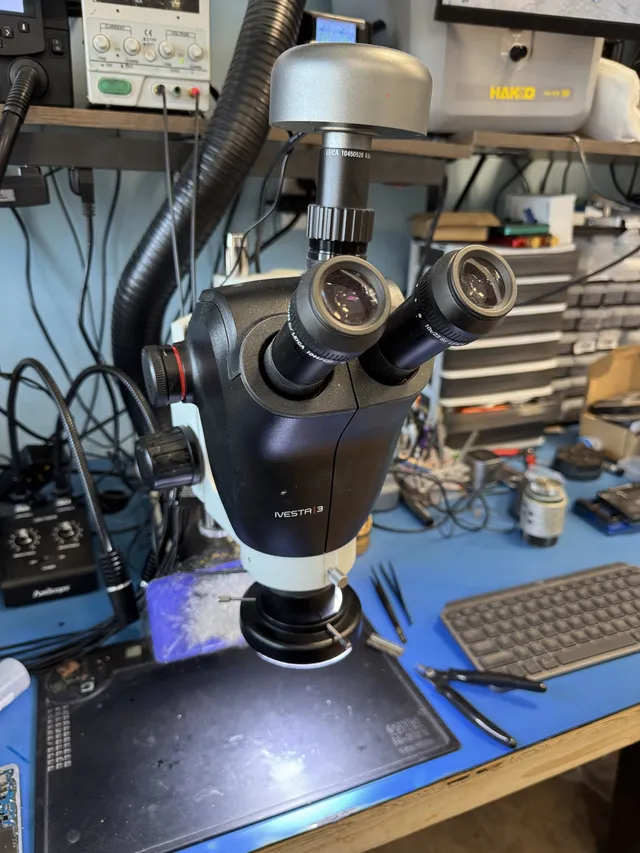
Stereo microscope at the bench with a keyboard to the right
Finding faults and soldering tiny connections on a circuit board can get a dead device running long enough to copy its files.

Who opens your box?

Joseph Montanti, our founder and lead technician, opens your box at the Lincroft lab. He's worked at this bench since he started MDrepairs in 2014.

The bench videos above let you see how he handles a drive before you mail yours.

Reviewed by Joseph Montanti, founder and lead technician, November 2026.

Choose your device

Find your device below to see what to do before you send it. If yours isn't listed, browse all our data recovery services. If you're sending a device for work, see our program for businesses and IT staff.

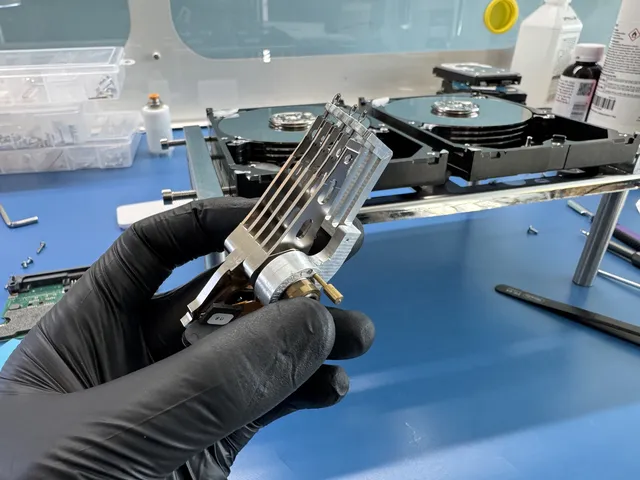
Black-gloved hand holding a hard drive head stack

Hard drive

If your drive clicks, leave it unplugged. Do the same if it stopped showing up. A Samsung external drive came in with a failed head, one of the parts that read the disks. We copied what we could, then used matching heads from another drive to read the rest. We mailed all the files back on a new drive.

How we recover hard drive files

Send your external drive in its original case if you have it. We can look at the case's USB connection and test the drive on its own. That helps us tell where the trouble is.

A repeated click is the sound of little arms struggling to read the disks. We replace failed arms with matching ones from the same model. We copy the areas that still read cleanly before returning to the trouble spots.

We copy what we can from the areas on both sides of a scratch. We stop the arm that reads the disk before it touches the scratch. If one side of a disk is too scratched to read, we can remove the arm for that side and set the drive to read only the sides without scratches.

Scratches can leave only part of a drive readable. A dropped drive with one scratched side still had files we could read. The damage kept us from seeing which folders they belonged in. We could still send the owner files grouped by type. When we can tell where the files belong, we keep your folders.

Recovery prices by device and job
Hard Drive - Firmware / Logical$1,000 - $1,500
Hard Drive - Head Swap$1,500 - $3,000+
Scratched / Contaminated Platters$3,000 - $3,500+
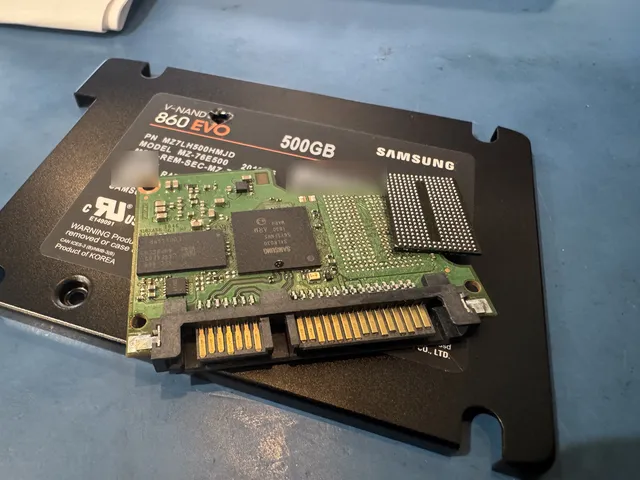
Samsung solid state drive board out of its housing, with a lifted memory chip

SSD

Stop using your SSD if it disappears from your computer. New data can overwrite files we could still recover.

How we recover SSD files

An SSD is a solid-state drive. Yours might be marked NVMe. It keeps files on chips, and the first sign of trouble can be your computer showing the wrong size for it. We diagnose the SSD to find out what we can still read. We mail back the files we recover on a new drive.

If you deleted something, turn the SSD off. It can clear deleted files on its own soon afterward. Anything new you save could also cover up a file you want back, so leave updates and resets alone.

Recovery prices by device and job
SSD / NVMe Recovery$1,000 - $2,000+
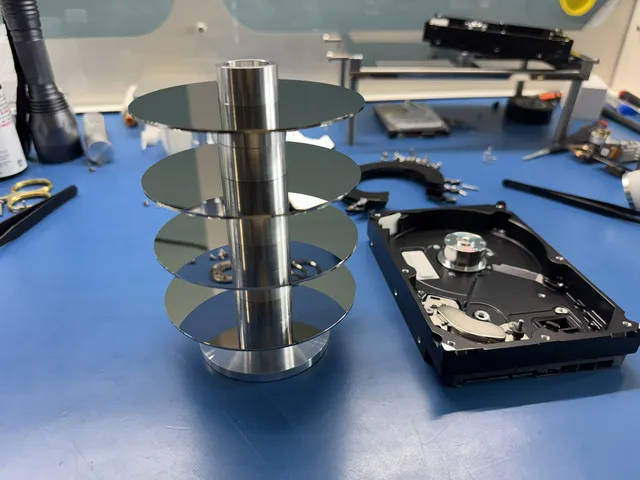
Four platters stacked on a metal alignment tool

RAID or NAS

If a drive in your RAID or NAS fails, shut the box down without rebuilding it. Send every drive in the set, even the ones that still work. We work from copies of the drives to put your files back together.

How we recover RAID and NAS files

If you're taking drives out, mark each one with the number of its slot first. We make a separate copy of every drive, work out which order the set used, and put the files together from the copies. That keeps us from writing anything onto the originals.

You get a list of the files we found to look through. Ask us for a quote for your set, since there's no fixed price for recovering a group of drives.

Recovery prices by device and job
RAID / Multi-Drive ArraysContact for Quote
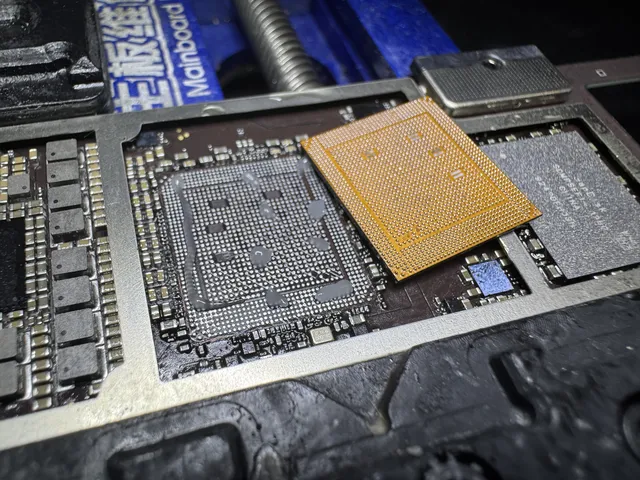
Orange interposer lying over a board's grid of pads

iPhone

If your phone got wet, stop charging it. Leave it off if it went dark after a fall or won't start. We recovered data from an iPhone 13 that came in with water damage.

How we recover iPhone files

We need the old iPhone running to reach your files. We can replace a failed part on the phone's circuit board or move its main chips to a working board if the damage is severe.

Once the old phone runs, your passcode unlocks it. With Stolen Device Protection on, you'd have to approve a copy to a computer or USB stick with Face ID or Touch ID on that phone. For mail-in recovery with that setting on, we back up the old phone to your own iCloud account.

Your photos and videos can come back on another iPhone when you sign in to the same iCloud account. Once the backup is in iCloud, you can decide whether you want a full restore. That option means erasing the replacement iPhone first and setting it up again from the backup.

You can leave Stolen Device Protection as it is before mailing. It's on by default from iOS 26.4. You may have enabled it on an older phone. With protection on, we back up to your iCloud account. With protection off, we make a full backup for another iPhone and sort photos, messages and contacts into folders. Keep a wet iPhone powered off.

Recovery prices by device and job
iPhone (3GS - 11)$1,000 - $1,500
iPhone (12 - 17 Series)$2,000
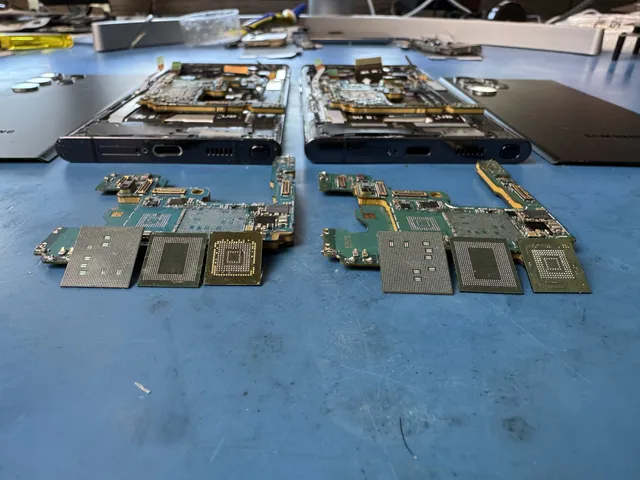
Two phone boards side by side with chips lifted off each

Android phone

If your Android shut off and won't start again, leave it off. Skip the factory reset even if you've moved to a replacement.

How we recover Android files

A broken part on your phone's main board can keep it from starting even when the pictures are still there. We work on that part to get your phone running long enough to copy your files.

If you've already taken pictures with your replacement Android, you can keep those too. The backup we make from your old phone adds to what's on the new one. We also give you your photos and videos as files you can open on their own.

Recovery prices by device and job
Samsung Galaxy / Android$1,500 - $2,000
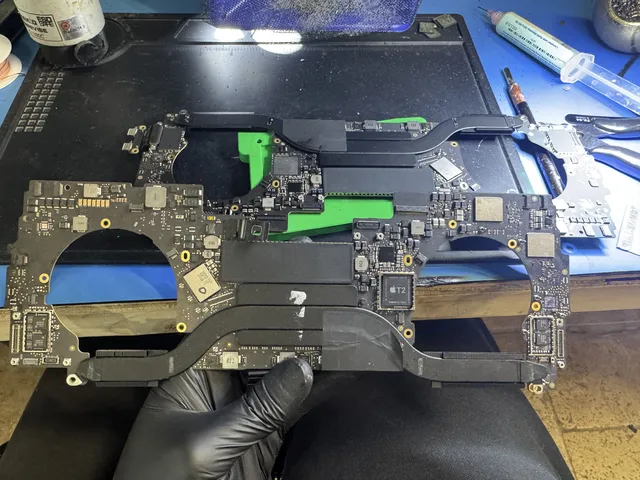
Gloved hand holding a whole MacBook logic board above the bench

Laptop or MacBook

If your laptop won't start, leave it off. Tell us if it took a fall or if you saw a message about a missing startup disk. We recovered files from a laptop that came in damaged after a drop.

How we recover laptop files

We can take a removable drive out and read it even if the laptop won't start. If your laptop asks for a recovery key to unlock your files, look in the account you use to sign in. You might have a printed copy, or your IT team may have the key for a work laptop.

Send the whole MacBook. You don't need to know which processor it uses. If the files are on the circuit board, we work on the board itself. On Macs with Apple's own processor, that chip and the storage chips have to work before we can copy your files. If something spilled on the MacBook, disconnect the charger and leave it off.

Recovery prices by device and job
MacBook / Laptop$1,500 - $3,500+
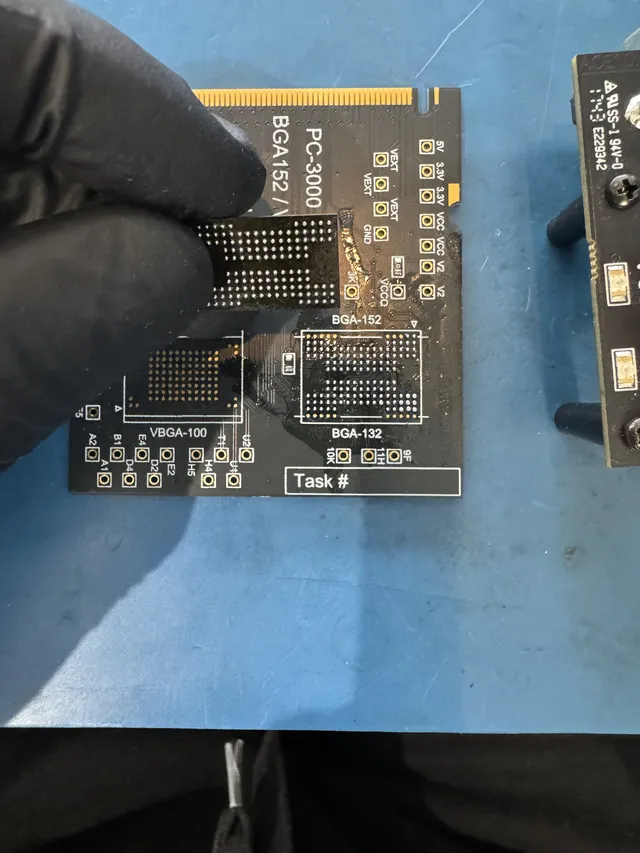
Gloved fingers holding a memory chip on a chip reader board

SD card or USB flash drive

If your computer asks to format your card or USB stick, cancel. If pictures went missing from a card, take it out of the camera so the next shot doesn't write over them. We recovered files from a 128 GB USB stick that came in by mail.

How we recover card and flash drive files

Inside a card or USB stick, the chip that finds your files is separate from the chip that holds them. If the first one dies, we can read the second directly. When we diagnose a stick with a snapped plug, we look at the plug itself and the chips inside.

If a card broke in half, what matters is where it broke. Keep the original card so we can look at the break. We'll mail it back with any pictures we recover.

Recovery prices by device and job
Flash Drive / SD Card$299 - $1,750+
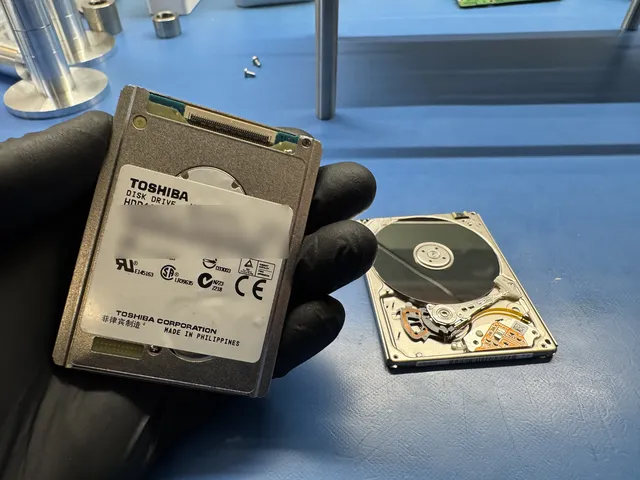
Gloved hand holding a small Toshiba hard drive

iPad or iPod

If your iPad won't start, skip Restore on your computer. It erases the files you're trying to save. If your iPod stops working or its plug breaks, hold on to it so we can work on it.

How we recover iPad and iPod files

For an iPad with a broken screen, we work to get it running long enough to copy the pictures you've been unable to back up.

For the iPod, we save the playlists along with the songs, so you can keep the order you chose for your music. We also copy any photos and videos on it.

Mail your device from anywhere in Charlotte

How to pack and ship your device

For mail-in data recovery, send your device to our lab in Lincroft, NJ. We cover the UPS label and the trip home in the lower 48, except islands.

  1. Open a ticket

    Fill out the mail-in form for your device. We'll send your ticket number by text or email.

  2. Get your shipping label

    The form lets you get your prepaid label and print the packing slip right away. The slip goes inside the box with your device.

  3. Cushion the device

    Pack about 2 inches of bubble wrap on every side so the device sits snugly in the box. Tape every seam closed.

  4. Hand it to UPS

    Take the box to any UPS location. We'll let you know by text or email when it reaches our lab.

Shipping time and time at our lab

We use UPS 2nd Day Air both ways. On each trip, you can expect delivery by the end of the second business day after UPS gets your box. Weekends and holidays don't count.

Shipping time and time at our lab
At our labHow long it takes
Standard wait before we start the diagnostic4 to 6 weeks
Recovery work after the diagnosticDepends on what's wrong with your device

Shipping times in the UPS Rate & Service Guide

Address
644 Newman Springs Road, Suite A, Lincroft, NJ 07738
Hours
Mon-Fri 10am to 6pm Eastern

What happens once we have your device

  1. We diagnose your device

    We diagnose your device for $100 to find out what it would take to reach your files. That diagnostic fee goes toward the price of a successful recovery.

  2. You decide

    We give you an estimate based on what we found. You get to think it over, and we start the recovery only if you approve it.

  3. We work on the recovery

    With your go-ahead, we work at the bench to read the files on your original device. Here's how we handle your device and data while they're with us.

  4. Get your recovered files

    We mail your recovered files on a new drive back to you. We keep a copy offline for two weeks, then delete it.

Your files and your device after recovery

Our copy of your files

We keep an offline copy for two weeks in case your drive gets lost or damaged in the mail. We delete it then, or sooner if you ask.

Make your own backup

Make another copy the day your files arrive. After two weeks, our copy is gone.

Your original device

If you mailed us a hard drive, SSD or SD card, your original comes back along with the drive holding your recovered files.

How much does data recovery cost in Charlotte?

$100 diagnostic, credited toward a successful recovery.

The $100 diagnostic is non-refundable once diagnostics start, and donor drives or replacement parts you approve are non-refundable once ordered, even if recovery fails.

The price depends on what failed, so we diagnose your device for $100 and give you an estimate before you decide on recovery. We publish the whole price list because you ought to be able to talk it over at home before you put your drive in a box.

If we can't get any files back, there's no recovery fee. Before you pay that fee, you see a report showing which files we recovered.

Where the $100 goes

That $100 pays for figuring out what failed and how we could reach your files. If the recovery succeeds, the money you've already paid goes toward your total data recovery cost.

Why identical drives get different estimates

One drive may need a fix to the software that runs it. Another just like it may need new arms to read the disks, which puts it in a different row on the price list.

How soon we can start

With Priority (+$250), we start diagnosing your device within 5 to 7 days. If you need us sooner, we start within 1 to 2 days with Urgent (+$500).

Recovery prices by device and job
Recovery jobPrice
Flash Drive / SD Card$299 - $1,750+
Hard Drive - Firmware / Logical$1,000 - $1,500
Hard Drive - Head Swap$1,500 - $3,000+
Scratched / Contaminated Platters$3,000 - $3,500+
SSD / NVMe Recovery$1,000 - $2,000+
iPhone (3GS - 11)$1,000 - $1,500
iPhone (12 - 17 Series)$2,000
Samsung Galaxy / Android$1,500 - $2,000
MacBook / Laptop$1,500 - $3,500+
CPU Swap (Severe Cases)$3,500
RAID / Multi-Drive ArraysContact for Quote
When we start diagnosing your device with standard or rush service
OptionTimingAdded cost
Standard diagnosticStarts in about 4–6 weeks, then recovery time varies by caseNo surcharge
PriorityAssessment starts within 5–7 days+$250
UrgentAssessment starts within 1–2 days+$500
EmergencyAssessment starts same-day+$1,000

Rush moves up the day we start diagnosing your device. How long the recovery itself takes still depends on what we find. You can read how we price data recovery and how financing through Affirm works if you qualify.

Devices mailed from North Carolina

People across North Carolina mailed us these devices, including a laptop damaged in a fall and a hard drive that wouldn't turn on. We've left out the owners' names. Choose your kind of device to see what we got back, or browse our full case index.

Recent recoveries from North Carolina

  • USB flash drive, 128 GB Data recovered 2026
  • Hitachi hard drive, 2 TB Clicking or other noise · Data recovered 2026
  • Cell phone CPU Swap (Severe Cases) · Data recovered 2026
  • Laptop Dropped or physically damaged · Data recovered 2026
  • WD external hard drive WD60EFRX Failed or corrupted · Data recovered 2025
  • Toshiba external hard drive Dropped or physically damaged · Data recovered 2025
  • Samsung external hard drive Will not turn on or charge · Data recovered 2025
  • iPhone 13 Water or liquid damage · Data recovered 2025
  • Hard drive Will not turn on or charge · Data recovered 2023
  • External hard drive Dropped or physically damaged · Data recovered 2023

These cases come from our ticket system, BenchKey, the shop software we built and run our lab on, with names, contact details and addresses left out. How we publish cases

After a flood or power outage

Leave your device off if it got wet or stopped working in a storm. Even if it won't start, the photos and files you need can still be inside.

Flooding around Charlotte during Hurricane Helene

Leave a flooded hard drive off, keep it away from heat and call us first. If your phone got wet, stop charging it.

When the power goes out and comes back

Hurricane Helene's winds knocked out power. Before the next storm arrives, unplug computers and drives at the wall. If the storm has already started, leave the plugs alone. Once it passes and it's safe, unplug any dry electronics still connected, since power can surge when it comes back.

Drive trouble after a power cut or surge

A sudden power cut can damage the heads that read the disks in a running hard drive, even if the drive stayed dry. That same cut can make a solid-state drive look empty. If your drive clicks or smells burnt afterward, switch it off and leave it off. Its board can burn while the files survive.

More recoveries from our bench

If your hard drive is clicking, start with the WD My Passport film. If your phone won't start, watch how we got childhood photos off the Galaxy S6.

Watch more recoveries on YouTube

Mailing from outside Charlotte?

Find your town below for its own mailing guide. The same free UPS label works from each town listed here.

Around Charlotte
Central North Carolina
Western NC and the foothills
Eastern NC and the coast

For the rest of the state, see our North Carolina data recovery page. If you're just over the state line, use our mailing guide for South Carolina.

Questions before you mail your device

I'm in Charlotte. Do you have a place here?

No, our only lab is in Lincroft, New Jersey. You can get a free UPS label and take your box to any UPS location.

How do I mail my device?

Fill out the mail-in form to get your free UPS label. Put the label on your packed box and take it to any UPS location. The UPS directory lists Charlotte locations.

What time can I call?

We're open Monday to Friday, 10am to 6pm Eastern. That's your time in Charlotte, too. Call (732) 933-7717.

How long will it take, including shipping?

The standard wait is 4 to 6 weeks before we reach your device in line and start the diagnostic. Rush starts the diagnostic sooner. How long the recovery itself takes depends on what we find. We use UPS 2nd Day Air both ways. On each trip, you can expect delivery by the end of the second business day after UPS gets your box.

I need my files back fast. Can you start right away?

Yes, rush service shortens the wait to start the diagnostic at the lab. The rush table above shows the added costs. Shipping with our UPS label still takes about two business days each way.

My backup drive died. Can you still get my files?

Yes, we recover files from failed backup drives by mail. Unplug yours and skip recovery software. Don't plug it back in to see if it shows up. We'll send the files we recover on a new drive. Make a second copy the day your files come back.

A drive in our RAID or NAS failed. What should we do?

Power down your RAID or NAS without rebuilding it. Send every drive in the set so we can make copies and piece your files back together from them. If you're handling this for work, see our program for businesses and IT staff.

My external hard drive is clicking or stopped showing up. What should I do?

If your drive clicks, leave it unplugged. If it stopped showing up, unplug it. Skip recovery software and send it in its original case. We found a fault in a clicking Hitachi's built-in software, copied the disk and returned everything, including a few hundred photos.

What do I get back, and how?

Your recovered files come home on a new external drive or USB flash drive, and we cover return shipping in the lower 48 whatever the outcome. If you sent a hard drive, SSD or SD card, we put the original in the box too. When we mail your files back on a new drive, we keep an offline copy for two weeks.

Guides for your files and devices

If your laptop won't start, the computer guides can help you decide what to send. Look under Preventing data loss for help making a backup when your files come home.

Tell us what you need back

Use the quote form to tell us what device you have, what happened and which files you need back. If you decide to send it from Charlotte, you can use our free UPS label.

Contact us

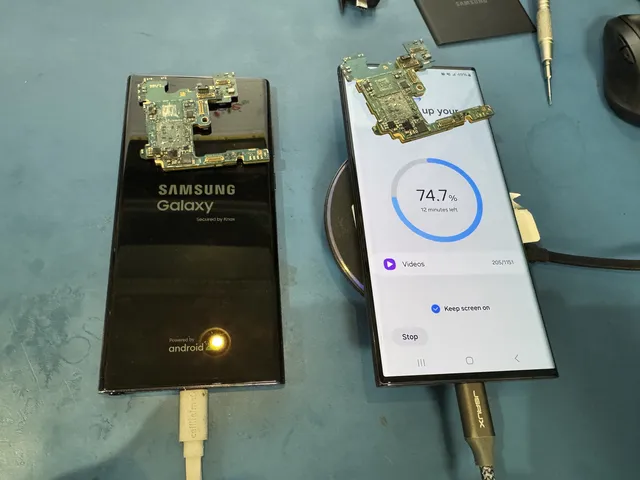
Two Samsung Galaxy phones with removed boards resting on top
Files are being copied from this Samsung Galaxy so the owner can keep them even without the phone.