
Laptop data recovery when yours won't turn on
Laptop data recovery starts with the part that holds your photos, which can stay intact even when a board or power fault keeps your laptop from turning on. Leave your laptop off so another start doesn't make a failing drive worse.
You can mail us any brand of Windows notebook or Chromebook, or bring yours to the MDrepairs counter in Lincroft, New Jersey. The free label covers shipping within the contiguous US.
- Since 2014One lab, in Lincroft, New Jersey
- 20,000+ ticketsacross all services since 2014
- 4.6 from 345Google reviews
- $100 diagnosticcredited toward a successful recovery
The people we help
Our customers include people from
-

-

-
 AT&T
-
 Marriott
-

-

-
 Tennessee Titans
-

-

-

-

-

-

-

What to do in the first hour
If you heard a click or spilled your coffee, you already know enough to act. You can protect the files without spending anything or figuring out which part broke.
What helps
- Shut it down completely
Leave it off, especially if you heard beeping or grinding. Each minute a damaged hard drive spins can scratch the disks that hold your files.
- Cut the power after a spill
Hold the power button for about 10 seconds and unplug the charger. Even as the spill dries, it can keep eating into the metal on the board.
- Get your unlock key ready
If Windows locked your drive, find your BitLocker recovery key before you send the laptop, even if you've never had to enter it.
What to avoid
- Don't keep testing a clicking drive
If the drive clicks or disappears, skip the restarts and recovery programs. Trying another cable or another computer still puts the failing drive back to work.
- Skip the hair dryer, oven and rice
Leave a wet laptop unplugged and don't turn it on to test it. Send it in soon so we can clean the board.
- Don't reset or reinstall Windows
After deleting something you need, stop using the laptop. Even saving another document can write over the one you meant to keep.
What happened to your laptop?
A click after a fall and a warning from Windows can both keep you out of your folders. Choose what happened to yours to see what it means for your files.
My dead laptop won't turn on
Your files can still be on the drive when a board or power problem leaves your laptop dead. An HP gaming laptop that shut off came back on after we found and removed the part on its board that was sending power the wrong way. A power surge or bad charger can burn those parts.
We lift out a removable drive to read it, or work on the board itself if the storage is fixed there. Send yours as it is. If you'd also like the laptop running again, we quote that repair separately.
My drive clicks or beeps
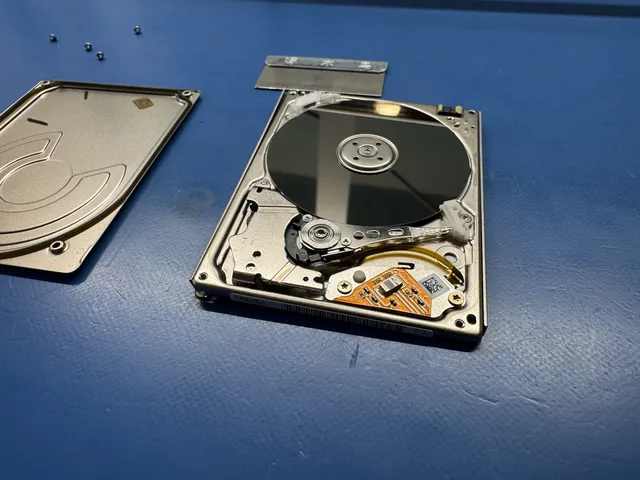
A fall while the laptop is running can knock the heads, the tiny tips that read the disks, against the spinning surface. The drive may click or stop showing up. A beep points us to a motor that won't spin or an arm stuck against a disk.
We replace broken heads with ones from a matching drive. We copy the easier spots first and come back to the harder ones. With scratched disks, recovery is partial, but the unmarked areas can still hold photos you'd be glad to have.
Getting files off a water-damaged laptop
We open the laptop, take out the drive if it's removable, and clean the board to stop the liquid from eating into the metal. Then we test the parts. We can copy a drive the spill missed, repair the software inside a damaged drive or read its memory chips.
Sugary drinks and salt water do more harm than plain water. Send the laptop in as soon as you can, because even a spill that looks dry can keep doing damage inside.
My drive disappeared from Windows
A solid-state drive (SSD) can disappear from Windows and the laptop's startup settings if a fall cracks its board, the chip that runs it fails or the drive's own software stops working.
If the control chip fails, we can try to read the memory chips directly and piece your files back together, unless the drive also lost its key. Some SSDs with an NVMe connection use that chip to unlock their files. Send yours in and we'll check what we can read.
I deleted files or reset my laptop
On a spinning hard drive, a deleted file stays on the disk until something new takes its place. That can leave files to recover even after a factory reset. On an SSD, a feature called TRIM tells the drive to clear that space soon after a deletion or reset.
Stop using the laptop now and send it to us. That goes for a drive you formatted to start fresh, too, or one with a whole section that's gone missing.
My laptop screen broke
The screen shows your photos, but the drive holds them. If only the screen broke, your files are right where you saved them.
What kind of storage is inside my laptop?
What holds your files tells us how to read them. It also tells you whether you can take the drive out yourself and which row of the price list fits your laptop.
| Storage | Which laptops? | Comes out? | Recovery price |
|---|---|---|---|
| Removable 2.5-inch hard drive Hard Drive Data RecoveryHow to Safely Remove a Hard Drive From a Laptop | Older laptops and budget models | Yes. Connect a healthy, unencrypted drive by USB adapter. Copy important files first. Stop at the first click. | $1,000 - $3,000+ |
| Removable solid-state drive (SSD) without encryption SSD Data RecoveryNVMe SSD Recovery | Recent laptops with a 2.5-inch SATA drive or a small M.2 stick using an NVMe or SATA connection | Yes. A dead control chip hides the drive from adapters. | $1,000 - $3,000+ |
| Soldered storage MacBook Data Recovery | Some thin Windows laptops, MacBooks, and budget laptops or Chromebooks with built-in memory called eMMC | No. The chips are fixed to the main board, so send the whole laptop. | $1,500 - $3,500+ |
| BitLocker or Device Encryption BitLocker Data Recovery: How to Recover an Encrypted Drive | Windows laptops with a locked drive, including removable SSDs, even if you never chose that setting | Yes, if it's removable. You'll still need the recovery key to open your files. | $1,500 - $3,500+ |
The storage matters more than the name on the lid. We work on Dell, HP, Lenovo, ASUS, Acer, MSI, Samsung, Microsoft Surface, Razer and Framework laptops, plus Chromebooks and Apple MacBooks. If Windows asks for a code, here's where to find your BitLocker key.
Gaming and workstation laptops with two drives
One drive can hold Windows and the other your work. If they're paired as RAID 0, files are split across both drives, so we need both. RAID 1 keeps a full copy on each. Send the laptop whole or include both drives, and mention it if your gaming laptop ran hot.
Files saved on a Chromebook
Check Google Drive first for files your Chromebook copied there. If you saved a photo or a project only on the Chromebook, we look for it on the device itself. That can mean working on the board if its SSD or eMMC chip is fixed there.
Where can I find my BitLocker recovery key?
Before mailing, look for your 48-digit recovery key at account.microsoft.com/devices/recoverykey, on a printout or USB stick, or with IT at work. Windows 10 or 11 can turn on Device Encryption when you sign in with a Microsoft account. Your laptop's security chip (TPM) unlocks the drive automatically, so moving it to another computer prompts for the key.
We can make a copy while the failing drive is still locked. Your key comes in after that, when we unlock the copy and take out the files we were able to read.
If the drive was moved or the laptop's security chip failed, the files stay locked without your BitLocker key. For a company laptop, ask IT before going online. There may be an order waiting to erase the laptop.
How we get your files back
We copy what we can read from your laptop, unlock the copy with your key if needed, and send your files back.
Should I send the whole laptop or the drive?
A drive you've already taken out can go in the box by itself. If you'd rather leave the screws alone, send the whole laptop. We also need it whole when the storage is fixed to the main board.
From sending to getting files back
-
Send your laptop or drive
You can ask for a quote at no cost. In the contiguous US, the mail-in form gives you a free UPS 2nd Day Air label right away, and we cover the trip back whatever the outcome. Print the packing slip and put it in with the laptop. You can also bring it to our counter.
-
Decide on our estimate
We use the $100 diagnostic to identify the storage in your laptop and find the fault. Once you have the price, it's your call whether we start recovery.
-
We copy the drive
We save what the drive lets us read, then work from that copy, using your key if it's locked.
-
We return your files
Before paying for recovery, you can click through the folders in your recovery report to see which files came back and which may be partly or fully damaged. You receive your recovered files on a new external drive or USB flash drive, and we keep a copy offline for two weeks after mailing it back.
What to have ready
If you're unsure what to send or how to describe the trouble, you can contact the lab before packing your laptop.
- Your key or drive password
Have the BitLocker key handy, or the password for a drive you locked yourself. We can talk you through looking for the key in your Microsoft account.
- What happened and what you tried
Tell us about a drop, spill or reset and what happened afterward. Mention it if you already tried the drive in another computer.
- A word with your IT team
For a company laptop, check with the people who manage it before you send it to us.
What does it cost to get my files back?
$100 diagnostic, credited toward a successful recovery.
The $100 diagnostic is non-refundable once diagnostics start, and donor drives or replacement parts you approve are non-refundable once ordered, even if recovery fails.
Your price starts with how your laptop stores files. There's a row for removable drives without encryption, one for storage soldered to the board or locked by its own hardware, and one for drives Windows locks with BitLocker. Once the $100 diagnostic shows what failed, we confirm your exact price.
- Why estimates differ
Matching laptops can get different estimates if one needs work on its drive and the other on its board. If you also want the computer working again, we price that repair separately.
- How you can pay
Use Apple Pay, PayPal or credit cards. There's Afterpay or, if you qualify, Affirm.
| Laptop storage | Recovery price |
|---|---|
| Removable Drive Laptops | $1,000 - $3,000+ |
| Soldered / Hardware-Encrypted Storage | $1,500 - $3,500+ |
| BitLocker / FileVault Volumes | $1,500 - $3,500+ |
| Option | Assessment starts | Extra cost |
|---|---|---|
| Standard diagnostic | Starts in about 4–6 weeks, then recovery time varies by case | No surcharge |
| Priority | Assessment starts within 5–7 days | +$250 |
| Urgent | Assessment starts within 1–2 days | +$500 |
| Emergency | Assessment starts same-day | +$1,000 |
Our data recovery pricing guide gives the full price list and explains what goes into your estimate.
PC laptops we've recovered files from
We got files back from a laptop after a spill, a laptop that fell and one whose owner had deleted files. Some owners mailed their laptops and others brought them to our Lincroft counter.
- Laptop Data recovered At our lab's counter in Lincroft 2026
- Laptop Dropped or physically damaged · Data recovered Mailed from North Carolina 2026
- Laptop Deleted or formatted · Data recovered Mailed from Arizona 2025
- Dell laptop Data recovered At our lab's counter in Lincroft 2024
- Laptop Data recovered At our lab's counter in Lincroft 2023
- HP laptop Water or liquid damage · Data recovered At our lab's counter in Lincroft 2022
These cases come from our ticket system, BenchKey, the shop software we built and run our lab on, with names, contact details and addresses left out. How we publish cases
Which service fits what you need?
Choose this service for files saved on your Windows laptop or Chromebook. You can also get help fixing the computer or recovering photos you saved on a different device.
I want to use my laptop again
Getting the laptop running so you can work on it again is a repair. That's a separate job from getting your work off its drive.
My files are on a MacBook
If your MacBook's storage is soldered to the main board and Apple's security chip locks your files, we work on that board to reach them.
I saved the files on another device
A flash drive, an SD card from your camera and an iPad each have a recovery page. If you saved the files somewhere else, our list of recovery services covers every device we handle.
Laptop recovery by state
Use your region to find the laptop recovery page for your state.
Our only lab is in Lincroft, and you can use our free label to mail your laptop for recovery from the contiguous US.
You're welcome to send yours from Alaska, Hawaii, Puerto Rico or another island, too. From there, you arrange the shipping and pay for it.
- Address
- 644 Newman Springs Road, Suite A, Lincroft, NJ 07738
- Hours
- Mon-Fri 10am to 6pm Eastern
- Phone
- (732) 933-7717
Northeast
Southeast
Midwest
Questions about recovering laptop files
Do you recover files the same way from laptops and desktops?
Yes. We use the same methods to read the same kind of storage in either computer. A laptop can take a fall on the way home, though, so tell us if yours was dropped.
Is it worth getting files off my old laptop?
That depends on what the files are worth to you. You might never need that laptop again and still want the family photos you saved on it. The $100 diagnostic tells you what we can recover and what it would cost before you decide.
How should I pack my laptop for the mail?
Shut the laptop down fully, even if it's already asleep. Leave the charger and accessories at home. Wrap the laptop or bare drive and put padding on every side, ideally in a box inside another box. The mail-in form provides the packing slip and, if you're in the contiguous US, the label.
What you can check at home
Our guides cover getting to files behind a broken screen, taking out a healthy drive and finding the key if Windows has locked it.
Dead or broken laptops
Drives and encryption
Macs and recovery prices
Tell us about your laptop
When you call or ask for a quote, start with the files you miss and what happened the last time you used the laptop.
