Dropped WD My Passport's photos recovered through head and firmware work
- Device
- Western Digital 5 TB My Passport
- What happened
- Dropped, then began clicking with files inaccessible
- What was wrong
- Reading heads needed replacement; a ROM firmware restriction then blocked access
- Result
- Recovered. The customer's pictures and videos were saved, more than 3 TB in total.
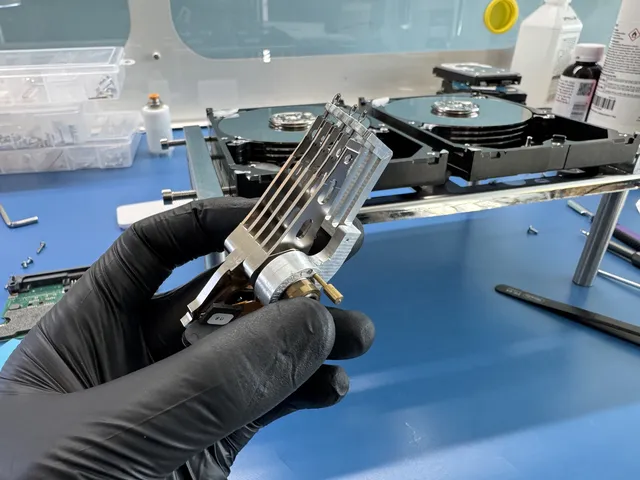
A customer mailed in a hard drive that had started clicking after a drop. It held more than 3 TB of pictures and videos. Joe opened it to examine and replace the reading heads. He used a head comb, a small tool that held the heads in position during transfer, and inspected the original heads under a microscope.
The heads looked clean, with no visible dust or damage that would require a different approach. Joe moved a good head assembly from a donor drive into the customer's drive. He then changed the circuit board's connection from USB to SATA so he could work with it through the recovery equipment. That involved soldering four data lines along with power and ground.
On the next test, a firmware restriction still blocked access. Joe located that restriction in the ROM firmware, the code stored on the circuit board. He read and saved the firmware to the computer, changed it using PC-3000 and wrote the updated version back to the board. After another start, the drive no longer reported the restriction.
Joe backed up the start-up files and checked for firmware damage before opening Data Extractor. The customer's files were now visible in that recovery software. He imaged the drive, saving more than 3 TB of pictures and videos.
If yours is similar
New heads were not the final step for this clicking My Passport; a firmware restriction still blocked Joe's equipment. Stop reconnecting yours after a drop and let the diagnostic assess the heads along with any restrictions on access.
WD My Passport Data RecoveryThe people we help
Our customers include people from
-

-

-
 AT&T
-
 Marriott
-

-

-
 Tennessee Titans
-

-

-

-

-

-

-