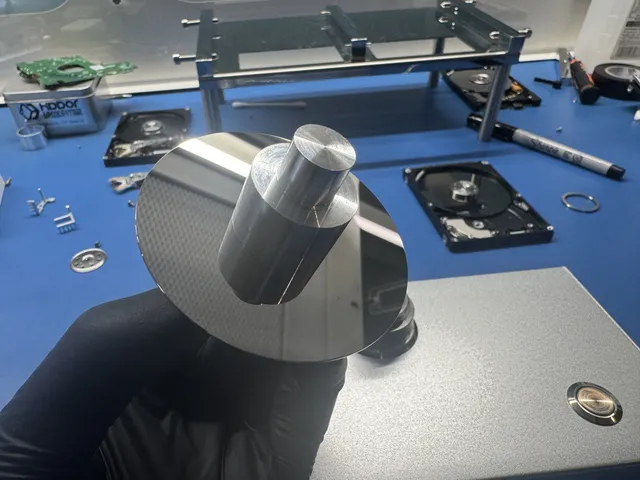
Hitachi data recovery for hard drives
When one part fails, Hitachi data recovery can mean fixing or replacing that part so we can copy the photos still on your disks. Switch it off now. A damaged head, one of the tiny tips that read the disks, can scrape the surface on the next spin. Our first aid guide for a failing hard drive explains what's safe to do before you send it.
If your Travelstar is in a portable case, leave it inside and include its cable. Drop off your drive at our counter in Lincroft, NJ, or print a free shipping label to mail it from the contiguous US.
- Since 2014One lab, in Lincroft, New Jersey
- 20,000+ ticketsacross all services since 2014
- 4.6 from 345Google reviews
- $100 diagnosticcredited toward a successful recovery
The people we help
Our customers include people from
-

-

-
 AT&T
-
 Marriott
-

-

-
 Tennessee Titans
-

-

-

-

-

-

-

Is my drive a Hitachi or HGST?
If the label says Hitachi or Hitachi Global Storage Technologies, it's a Hitachi. IBM's drive business took that full name in 2003. When Western Digital bought the drive business in 2012, Hitachi stopped making drives. There's no maker recovery service, so you can come straight to an independent lab like ours.
The first letters of the model number tell you which family your drive belongs to. You can look them up in the table of Hitachi drive families.
If the label says HGST, use our HGST recovery page. For Western Digital or WD, use our Western Digital recovery page.
Hitachi Deskstar and Travelstar, plus CinemaStar and Ultrastar
We ask where the drive came from and how its model number starts. Those two details can tell us which family you have even if you don't remember its name.
| Drive family | Where it lived | Model number | When it fails |
|---|---|---|---|
| Deskstar | Desktop computers and larger external cases | HDS, HDT or HDP, including HDS721010CLA332 (1 TB) | If the motor jams, stacked disks must stay lined up. Replacement heads must match the original count. |
| Travelstar | Laptops and small portable drives | HTS, including HTS545050B9SA02 (500 GB external) and HTS545032B9A202 (320 GB) | If it falls while spinning, the heads can hit the disks. Keep a portable in its case. |
| CinemaStar | Recorders and TV set-top boxes | HCS or HCC | If the recorder is running, switch it off so new footage can't replace the recording you want. |
| Ultrastar RAID Data Recovery | Servers and storage arrays (drives working together), with SATA or SAS connectors | HUA or HUS | If the drives worked together, we copy each one separately and rebuild the set from the copies. |
The Hitachi drives we've recovered include a Travelstar from Washington and a Florida customer's external with a model number starting with HDN. Your model number may start with other letters, too.
What happened to your Hitachi drive?
Pick what you heard or saw when your drive stopped reading to find out what it means and what to do now.
Why is my Hitachi hard drive clicking?
Switch off a clicking Hitachi. That click is the heads trying again because they can't read the marks that guide them across the disk. There's no home fix for a failed head.
We couldn't see a customer's Hitachi on our system when we first connected it. Trying to read the instructions it uses to start brought on the clicking. Through the microscope we could see the heads were mangled.
We fitted heads from a matching drive and could finally read the disks. It took a few days to copy all 200 GB and get the family's photos back from that clicking Hitachi.
Why is my Hitachi hard drive beeping?
If your drive beeps or buzzes without spinning, switch it off. The motor can jam after years in a drawer, or the heads that read the disks can stick to them and keep them from turning.
Don't shake the drive, tap it or put it in the freezer. Here's how we free disks that won't turn.
Why can't my computer find it?
A quiet Hitachi can disappear because its start-up files are damaged or its heads can't read them. If yours sounds normal and hasn't fallen, our guide to an external drive not showing up explains what you can safely check.
If it went completely dead after a power surge, keep the original circuit board. We need the settings on its chip, which is why a spare board alone won't start your Hitachi.
I dropped my laptop or portable Travelstar
Leave it unplugged, even if it looks fine. A fall can knock the heads against a spinning disk, so we inspect the surfaces before fitting heads from a matching drive and reading around any damage.
Scratches rule out a full recovery, but the pictures on the undamaged part of a disk can still be worth getting back.
Footage is missing from my CinemaStar recorder
Turn the recorder off and leave it off. Footage can still be there even if the recorder no longer lists it, but each new recording can write over an old one. Once that happens, the old footage is gone.
A recorder saves footage in a way your computer can't read on its own. We copy the whole CinemaStar, then look for your missing recordings on that copy.
I deleted files or formatted my Hitachi
Your files can survive a deletion or a quick format, so stop using the drive before anything writes over them, including a full format that replaces them with zeros.
How we get files off a Hitachi
We repair a failing Hitachi to get your files off a drive you can no longer trust. Once it reads, we make a copy of the disks first so we can work from that copy.
Fixing the drive's start-up instructions
A Hitachi keeps its start-up instructions, called firmware, in two places. Some sit in the ROM, a memory chip on the circuit board. Others live in a reserved space on the disks called the System Area. If the map that tells the drive where to read gets damaged, your computer can show the wrong size.
Our PC-3000 recovery system reads those instructions through a connection meant for repairs. We back them up before repairing a damaged map or the drive's list of worn spots. When the Hitachi with the family photos started clicking during that first check, the trouble turned out to be the reading heads.
Why we keep even a burned circuit board
Keep the original board even if it's burned. The chip on it holds settings for your particular Hitachi. A spare board alone won't start yours and can send the heads into the disks, so we move the original ROM chip or copy its contents to a compatible board.
A customer in Florida described a fire or power surge when they sent us a 6 TB Hitachi external drive. The model was HDN726060ALE614, and we got their files back.
How we match replacement heads
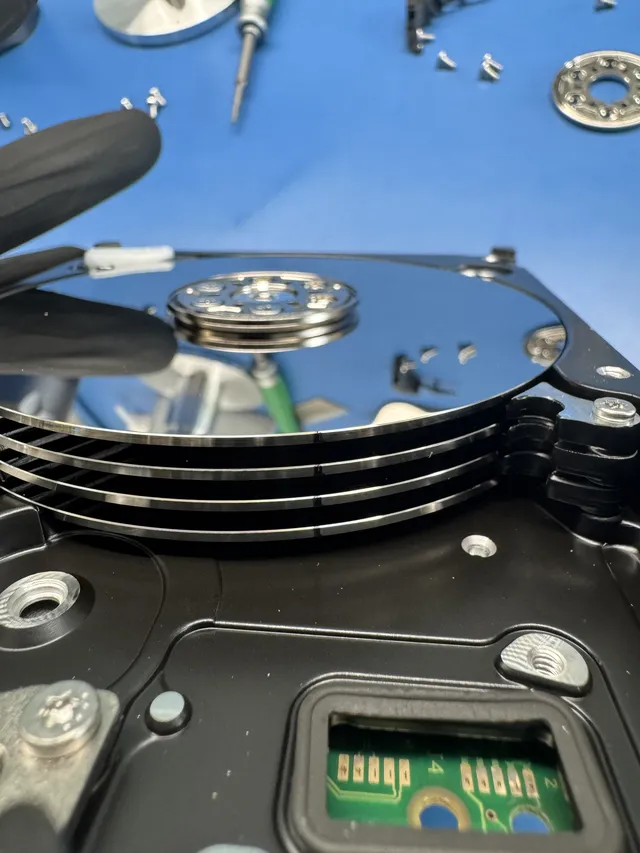
We inspect the disks at a bench where filtered air keeps dust off them. The arm carries the heads and a small part that boosts their signal, so the spare arm needs the same number of heads. We also match the drive model and firmware version.
After fitting matched heads to a clicking 320 GB Travelstar from Maryland, we ran an extra scan for files in case the folders were damaged. We returned the recovered files on a new drive, with a small group set aside because unreadable spots meant those files might not open.
Finding parts for an old Hitachi
A spare marked Deskstar can still have the wrong parts for your Deskstar. We may have to find a donor, another drive with the part that fits yours. That search can add time, and you decide whether we order it.
When a Connecticut customer's external wouldn't spin, we found a damaged board and scratches on the top disk. We ordered parts to test, then kept looking until we found drives with parts that worked. It took longer, but the owner got part of their collection of photos and recordings back.
Freeing disks that won't turn
Before we move any disks, we find out what's holding them still. In a drive left on a shelf for years, the bearing that lets the motor turn can seize. If the heads are stuck to the disks instead, we lift them off under magnification and fit replacements.
If the motor itself is stuck, we move the disks into the body of a drive with a working motor. Each disk has to stay lined up exactly as it was. That's more to keep in place on a Deskstar with stacked disks than on a Travelstar with a single disk.
What will it cost to recover my files?
$100 diagnostic, credited toward a successful recovery.
The $100 diagnostic is non-refundable once diagnostics start, and donor drives or replacement parts you approve are non-refundable once ordered, even if recovery fails.
Your price depends on what stopped the drive and how badly it's damaged. After the $100 diagnostic, we'll explain what happened, what we can try for your files and what it will cost. You decide if it's worth doing before we start the recovery.
- Which price fits my drive?
We set the price after the diagnostic. We might repair start-up files, find deleted files, replace heads or read around scratches. We quote Ultrastar arrays separately. You approve donor parts before we order them.
- Ways to pay
We take cards, PayPal and Apple Pay. If you qualify for financing with Affirm, you can spread out the payments.
| Work needed | Price |
|---|---|
| Hard Drive - Firmware / Logical | $1,000 - $1,500 |
| Hard Drive - Head Swap | $1,500 - $3,000+ |
| Scratched / Contaminated Platters | $3,000 - $3,500+ |
| RAID / Multi-Drive Arrays | Contact for Quote |
| Service option | When assessment starts | Added cost |
|---|---|---|
| Standard diagnostic | Starts in about 4–6 weeks, then recovery time varies by case | No surcharge |
| Priority | Assessment starts within 5–7 days | +$250 |
| Urgent | Assessment starts within 1–2 days | +$500 |
| Emergency | Assessment starts same-day | +$1,000 |
You can compare prices for different kinds of data recovery and read why one recovery can cost more than another.
Hitachi drives we've recovered
People across the US mailed us these Hitachi drives, and we got files back from them.
- Hitachi external hard drive, 500 GB HTS545050B9SA02 Clicking or other noise · Data recovered Mailed from Washington 2026
- Hitachi hard drive, 2 TB Clicking or other noise · Data recovered Mailed from North Carolina 2026
- Hitachi hard drive, 1 TB HDS721010CLA332 Data recovered Mailed from New Jersey 2026
- Hitachi external hard drive Stopped working or not detected · Partly recovered Mailed from Connecticut 2025
- Hitachi hard drive, 320 GB HTS545032B9A202 Clicking or other noise · Data recovered Mailed from Maryland 2025
- Hitachi hard drive Stopped working or not detected · Data recovered Mailed from Georgia 2025
- Hitachi external hard drive, 6 TB HDN726060ALE614 Fire or power surge · Data recovered Mailed from Florida 2025
These cases come from our ticket system, BenchKey, the shop software we built and run our lab on, with names, contact details and addresses left out. How we publish cases
Which page fits my drive?
You can find the recovery page you need by the maker's name on the label or by the kind of device that held your files.
My drive has another maker's name
If you see Seagate, Toshiba, Maxtor or LaCie on your drive, our page for that brand explains how we can help get your files back.
What about my Hitachi external hard drive?
A Hitachi in a USB case belongs here. It can have a Deskstar or Travelstar inside, so send it whole with its cable. For another brand of external, use our external drive page, or choose a different kind of device from our recovery services.
Questions about your old Hitachi
Can I run recovery software on my Hitachi?
Only for deleted files or a format, and only if your computer finds the drive, it sounds normal and it hasn't been slowing down or freezing. Leave it off if it clicks, beeps or buzzes, or if it fell, got wet or was opened. Our free hard drive check asks questions you can answer without plugging it in.
What is your success rate on Hitachi drives?
We don't publish a data recovery success rate because we take on scratched disks and drives someone has already tried to recover. For your photos, what matters is whether we can read the spots where they're saved. We examine your Hitachi in the diagnostic so we can tell you what's possible.
Help with a failing hard drive
Start with what you noticed, from a drive that slowed down to one that stopped reading altogether. The guides explain what you can check and what a repair involves.
What you can check
When a drive fails
Cases from our bench
Even a drive that reads fine today can fail the next time you take it out of the drawer. Keep the pictures and work you care about in three different places.
Tell us about your Hitachi
For a quote, send the model number, what happened the last time the drive ran and anything you've tried since. We'll put the files we recover on a new drive for you.