Samsung data recovery for Galaxy phones
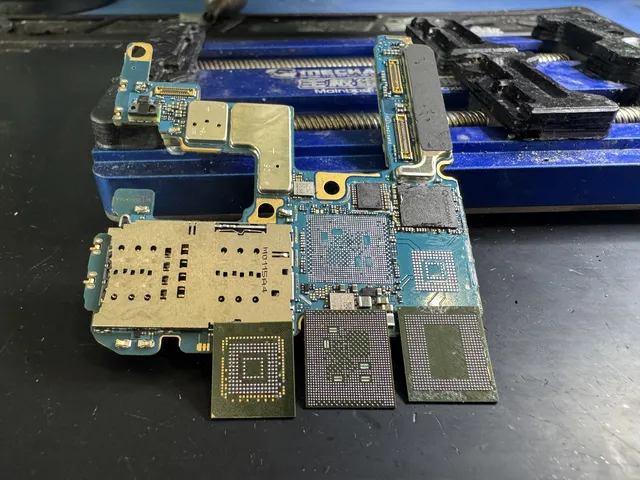
Even if your Galaxy won't turn on, your photos can still be there, and our Samsung data recovery lab repairs power or charging faults on the phone's own circuit board to reach them. If we can't repair your board, we can move its original chips to a working board from the same model. For our Samsung phone data recovery service, mail your Galaxy from the contiguous US or bring it to our lab counter in Lincroft, New Jersey.
- Since 2014One lab, in Lincroft, New Jersey
- 20,000+ ticketsacross all services since 2014
- 4.6 from 345Google reviews
- $100 diagnosticcredited toward a successful recovery
The people we help
Our customers include people from
-

-

-
 AT&T
-
 Marriott
-

-

-
 Tennessee Titans
-

-

-

-

-

-

-

Phone data recovery reviews
MDrepairs is rated 4.6 from 345 Google reviews. Here's what customers wrote after we worked on their phones.
Had to bring an old android of mine back to life and I know it was no easy task. MDrepairs was the 3rd company I called and the only ones that were able to get the job done. He had to go above and beyond by sourcing parts from a donor phone.
After four years, my Android phone completely died. A local repair shop told me the motherboard was shot and my data was lost for good. … In the end, they successfully recovered all of my data!
MDRepairs was great! They recovered the Data on my phone after sending it to two other Recovery centers that said it would not be possible! They were straight forward on pricing and we're very honest. Would recommend!
My iPhone completely died out of nowhere - it wouldn’t turn on at all - neither Geek Squad or Apple could do anything. … I brought it here as a last resort, and they worked actual magic. They got into the motherboard, got the phone to turn on, and recovered everything in less than a week.
What to do when your Galaxy stops working
Keep your Galaxy as it is while you look for another copy. If your last pictures never made it to Google Photos, the ones on that phone may be all you have.
What to do first
- Check backups from another device
Look in your Samsung account, Google Photos, OneDrive, Google Contacts and any backup your app keeps. A backup dated before the picture you want won't have it.
- Keep a wet Galaxy off
Set it in a dry spot away from the charger. Water can still be inside, so resist the urge to turn it on to see if it's dried out.
- Keep the phone and its loose parts
The board inside carries the chips we need. If someone took the Galaxy apart, save that board and every piece that came out.
- Write down what you remember
Include when it stopped, what you saw and anything you tried afterward. Note whether you know the code that opens the screen.
What to avoid
- Hold off on charging or restarting
Both send power through the board. If it's wet or a damaged part lets electricity go where it shouldn't, another try can do more damage.
- Turn down a factory reset
Skip installing fresh system software, too. On a current Galaxy, a reset erases the key that opens your files.
- Don't trade yours for a replacement
When you swap the board or the whole phone, pictures you never backed up stay behind on the old board.
- Stop guessing the PIN or pattern
Ask us about your model before you try another code. The chip that runs your Galaxy and its Android version determine whether it can open without the code.
- Skip recovery programs on a dead Galaxy
Before a program can copy anything, the phone has to start and let you unlock it.
Samsung phone data recovery by symptom
A black screen is enough to go on. Choose what you saw or what you need back, and we'll explain what it means for your files.
Recover data from a Samsung phone that won't turn on
We can test a Galaxy that won't start. The trouble usually lies in the parts that charge or power it, so the chip holding your photos can still be fine. Set the charger aside and keep all the pieces.
This A03S wouldn't turn on, and its owner needed old text messages. Corrosion under a chip had joined circuits that should have stayed apart. After we cleaned the original chip and put it back, the phone turned on and we saved those texts.
It shut off and never came back on
A failed part can send electricity down a shortcut and cut power to the rest of your Galaxy. That's a short. We look for the part causing it so we can replace it.
When this S9 shut off without warning, we traced the short to a capacitor, a tiny part that smooths out the power. It was sending electricity straight to ground, the circuit's return path. Joe confirmed we'd saved the owner's pictures.
Samsung data recovery after water damage
A soaking can leave the storage chip intact even as water eats away at the board around it. Salt water and a long wait make the damage harder to repair. Keep the Galaxy off and get it to us without charging it, even if the outside looks dry.
An S22 went dead after a fall into a pool. Corrosion covered the board, but the storage chip tested healthy. We fitted the original chips that run the phone, store its files and unlock them onto a working board from another S22. All the owner's pictures came back, more than 200 GB.
After liquid damage, we'd retire the phone once the files are off it. Corrosion can cause other parts to fail later.
I spilled coffee and the screen went blank
A single broken connection inside your Galaxy can leave it looking fine until you press the power button and nothing happens.
On the A03s that went dark after a coffee spill, we found a break in the line from the power button to a resistor, a tiny part that limits the flow of electricity. We rebuilt the line, the phone started, and its owner got the pictures back.
Samsung data recovery with a broken screen
If your phone still runs behind a broken or black screen, check your backups first. Another display can sometimes let you reach the files. If the whole Galaxy is dead, the board is where we look for your pictures.
On the S24 Ultra, an HDMI cable let us see the home screen and pictures on another display while the phone's own screen stayed black.
My Galaxy cracked or bent in a fall
A fall can break a connection or crack a chip. We check the board to see which happened. If the board is beyond repair, intact chips can move to a matching one. Recovery stops if the chip that runs the phone or the one holding your files is cracked.
Samsung boot loop or stuck on the logo
A Galaxy that keeps coming back to the Samsung logo can have a broken part or a problem with its software. If it holds your only copy, don't reset it, install fresh system software or unlock the bootloader, the part that starts Android.
A shop already tried fixing my Galaxy
We can still check your Galaxy after an earlier repair. Send the original board with every part that came out. Knowing what was heated or replaced, and if anyone reset the phone or installed fresh system software, helps us decide what to test.
I need my Samsung Notes or texts
Tell us which note or conversation you want us to look for. Everything else we can read comes with it for the same price.
A customer mailed us an S10E for the notes they'd saved in Samsung Notes. We found parts connected to a faulty power chip were sending electricity straight to ground. The owner got back the notes they asked for.
Deleted photos, a reset, or a reset prompt
On a current encrypted Galaxy, a completed factory reset erases the key to your files. We work with what the phone still holds and can't recover permanently deleted files from its storage. Check the trash in your Samsung or Google account for deleted photos, and look for an earlier backup online or on your computer.
If the phone is only asking for a reset, your files are still there. Leave that message alone and send the Galaxy to us so we can try to open the files with your code.
I've forgotten my Galaxy PIN or pattern
We need your PIN, pattern or password to reach your files. If you've forgotten it, ask us before you mail the phone. We can usually open older Android phones and those with a MediaTek processor, the chip that runs the phone, without the code.
Leave the keypad and any reset offer alone. We'll check your processor and Android version during the diagnostic to see what's possible. The service is for getting your data back. You'll still need the code to use the phone afterward.
How our Samsung data recovery service works
We try to repair your Galaxy's own board so we can turn the phone on, unlock it with your code and copy everything it can read. If the board is beyond repair, we can move its original chips to a working one.
Why can't you read the storage chip alone?
On a modern Galaxy, the storage chip holds your pictures in a locked form called encryption. The key that opens them is tied to the phone's own processor, the chip that runs it, and a small security chip. Reading the storage alone leaves the pictures locked. With those chips working together, your code lets us in.
An older Galaxy may have no encryption, so whether that lock was on matters more than the phone's age. An S6 that shut off and sat in a drawer for ten years had unencrypted storage. We never fixed what kept it from starting, but we got the childhood photos straight off its chip.
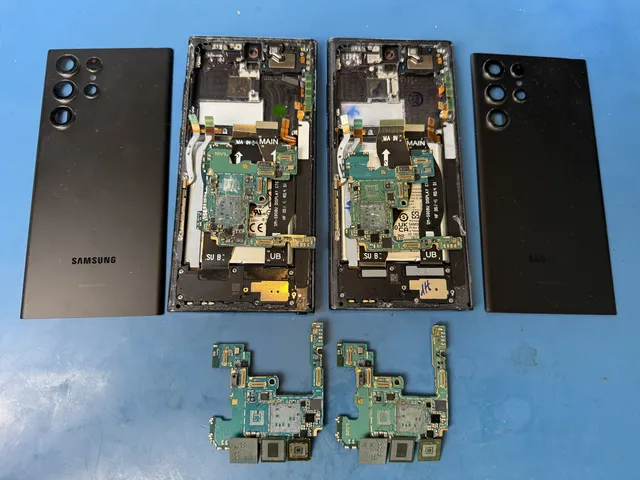
The recovery in six steps
-
Get your Galaxy to us
Ask for a quote, then bring the phone to our Lincroft counter or mail your Galaxy to us using the mail-in form's free label for the contiguous US.
-
We find the fault
During the $100 diagnostic we open the phone, connect the bare board to a power supply on our bench and measure how much electricity it draws. A camera that shows heat helps us spot the part that gets hot when there's a short.
-
You review the estimate
You'll know which part failed, what we'd need to do to reach your files and the price of that work. It's your call. We start the recovery when you say yes.
-
We repair the board
Under a microscope we can reconnect a broken line or replace a part that's sending power the wrong way, moving your original chips to a working board only if yours is beyond repair.
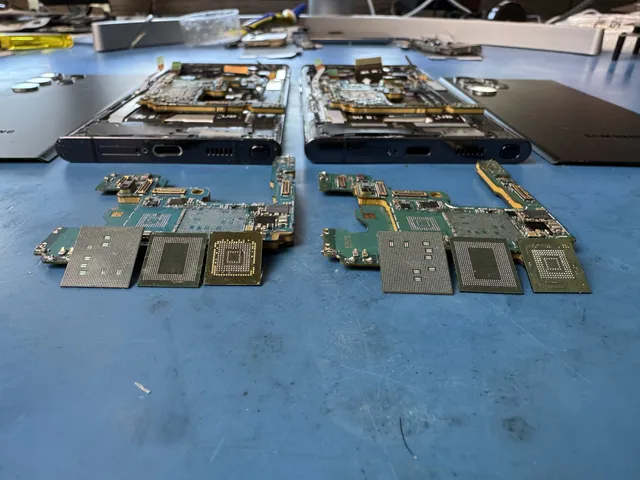
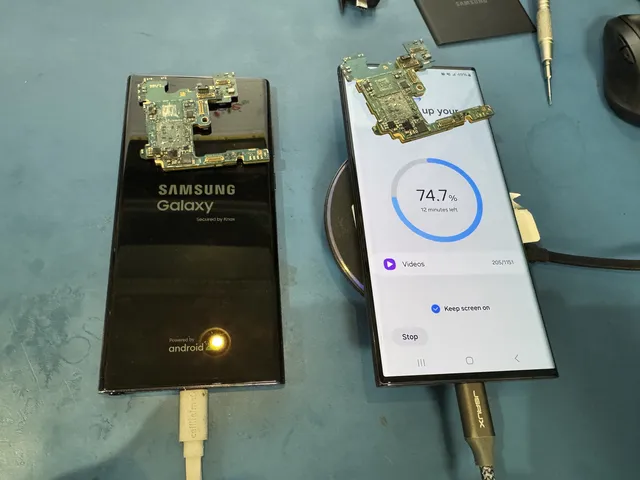
Both phone boards have chips lifted off, with the opened phones behind them on our Lincroft bench. -
We copy your Galaxy
Your code lets us unlock the running phone to make a full Android backup and copy the individual files into folders.
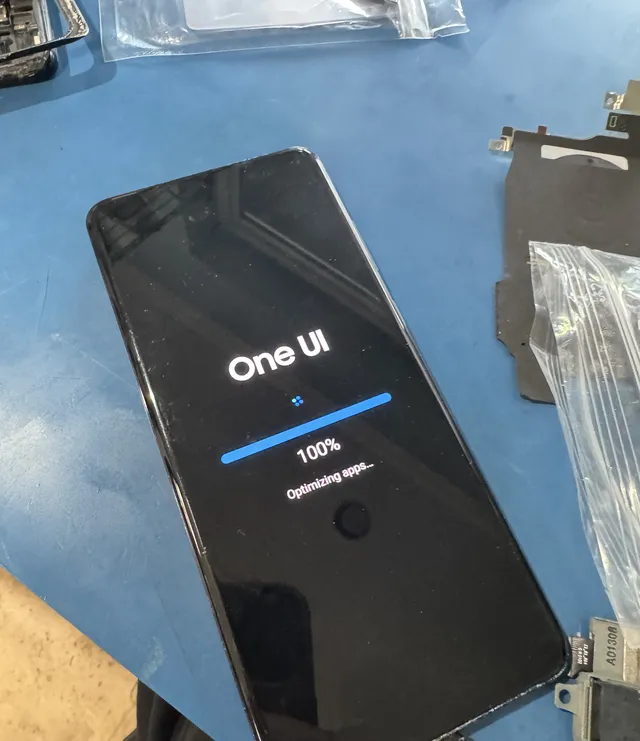
On the bench at our Lincroft lab, the phone's startup screen reads "Optimizing apps". -
You get your files back
First you get a photo showing what we saved, then a drive with your recovered files.
What to tell us about your Galaxy
The last thing you saw helps us choose what to test first. It matters, for instance, if the Galaxy keeps showing the Samsung logo or went dark the moment it got wet.
- Your PIN, pattern or password
When you ask for a quote, say whether you know the code we need. The code itself belongs only in the mail-in form's passcode field. Keep it out of email.
- The moment it stopped
Tell us how long ago it fell or got wet and what happened right afterward. If it shut off for no reason you could see, that's worth knowing too.
- Earlier work and loose parts
Send the pieces along even if you don't know what they're called. A description of the earlier repair helps us see what's changed since the Galaxy failed.
- The model and the files you miss
If you remember a name like S10 Plus or S20 Ultra, include it. Tell us which files you want checked first, without sharing their private contents.
What decides whether I get my Galaxy files back?
What we can save depends on the storage chip and the parts your Galaxy needs to open its files. We don't publish a success rate because it can't tell you which of those parts still work. That's what we check during the diagnostic.
What we can copy
- Photos and videos
A picture you took and never backed up can come back along with the videos still saved on your Galaxy.
- Messages, contacts and calls
We can copy texts and WhatsApp conversations along with saved numbers and the list of calls you made or received.
- Samsung Notes and documents
A note you wrote on the screen with the S Pen can come back with your other Samsung Notes and the documents you saved.
- Files on a Galaxy that looks ruined
Corrosion can cover the board while the chip holding your files stays healthy. That's why even a Galaxy that looks finished is worth checking.
Where recovery can stop
- Damage to the chips themselves
Cracks in the processor that runs your Galaxy or the NAND chip storing your files end recovery. So does damage to the EEPROM, the little chip holding phone settings. Let us check yours.
- A forgotten code on a newer Galaxy
A newer Galaxy can keep your files locked even when it starts. Before mailing yours, check what to do about a forgotten Galaxy code.
- Deleted files or a completed reset
A copy may still be in your account or on a computer. Here's where to look after deletion or a reset.
- A second lock inside an app
An app or Samsung's Secure Folder can ask for its own password even after your Galaxy opens. If the files you need are inside, look for the password you set there.
How will you return the files from my Galaxy?
One new drive holds both the full Android backup of your Galaxy and your files sorted into folders.
- For your next phone or your computer
Restore the backup to a new phone when you're ready. To see a picture now, open its folder on your computer. We leave the files on your original Galaxy intact.
- An external drive or USB flash drive
Collect your drive at the counter or have it mailed. We delete our offline copy after two weeks, earlier if you call, text or email. Bring that drive back after two weeks and recovery costs full price.
- Back up the drive right away
Any drive can fail, including a new one. On the day you get it, copy your files elsewhere until you have them in three different places.
- Check for the files you named
We check what came back against the files you named. If you asked for a conversation saved inside an app, we may need to copy it out in a different format so you can read it.
What does Samsung Galaxy data recovery cost?
$100 diagnostic, credited toward a successful recovery.
The $100 diagnostic is non-refundable once diagnostics start, and donor drives or replacement parts you approve are non-refundable once ordered, even if recovery fails.
If the diagnostic shows we can repair your Galaxy's board, that's the “Samsung Galaxy / Android” price. If the board is too damaged to fix, “CPU Swap (Severe Cases)” covers moving your original chips to a working board.
Once we've checked the board, you get the exact price for your Galaxy. We wait for your approval before doing the recovery work.
- One price per Galaxy
Your photos, texts, WhatsApp chats and Samsung Notes are all part of the same job. The phone's price covers everything we can read from it.
- See the files before paying
Before the recovery payment is due, you'll have an email from us with a photo of the files we saved.
- Ways to pay
Along with cards, we accept PayPal and Apple Pay. For customers who qualify, Affirm financing splits the cost into payments over time.
| Recovery work | Price |
|---|---|
| Samsung Galaxy / Android | $1,500 - $2,000 |
| CPU Swap (Severe Cases) | $3,500 |
| Service option | Timing | Extra cost |
|---|---|---|
| Standard diagnostic | Starts in about 4–6 weeks, then recovery time varies by case | No surcharge |
| Priority | Assessment starts within 5–7 days | +$250 |
| Urgent | Assessment starts within 1–2 days | +$500 |
| Emergency | Assessment starts same-day | +$1,000 |
With standard service, the wait for your Galaxy's first check is usually 4 to 6 weeks. A rush option changes only when we start checking your phone. Recovery takes more time after that, depending on what we find. Our guide to data recovery costs covers the fees.
Samsung Galaxy data recovery by series
For Samsung cell phone data recovery, the model helps us work out how to reach the files. Find your Galaxy line for examples from our bench and what we'd look for on yours.
| Galaxy line | Models and coverage | Reaching your files | Recovery price |
|---|---|---|---|
| Newer Galaxy S phones Samsung Galaxy S25 / S25 Ultra Data Recovery: The Newest Models | S9, S10, S10e, S20 FE, S21, S21 Ultra, S22, S22 Ultra, S23 Ultra, S24, S24 Ultra, S25 Ultra | Moving the original processor and security chip with the storage if the board can't be repaired | $1,500 - $2,000 |
| Older Galaxy phones | S6, S7, S8 | Reading the storage chip directly if the phone saved the files without encryption | $1,500 - $2,000 |
| Galaxy Note | Note series covered | Copying readable Samsung Notes, including S Pen handwriting, with your other files | $1,500 - $2,000 |
| Galaxy Z Flip and Z Fold Samsung Galaxy Z Fold/Flip Hinge Damaged? Save Your Data Inside | Z Flip 5, Z Fold 4, Z Fold 7 | Checking if a screen or hinge cable repair is enough, or if the board's power circuit failed | $1,500 - $2,000 |
| Galaxy A | A03s, A51 | Checking access without a code on older phones or those with MediaTek chips (ask before mailing) | $1,500 - $2,000 |
| Galaxy Tab | Galaxy Tab tablets assessed | Getting a quote for your particular tablet |
If you're unsure of the model, we can identify it during the diagnostic. The model and the part that failed tell us how to reach your files. We quote tablets separately because the listed prices cover phones.
Galaxy phones we've recovered
These are Galaxy phones people mailed in or brought to our counter, with the model, the owner's description, the state and the year from each recent job ticket.
- Samsung Galaxy Z Fold 7 Dropped or physically damaged · Data recovered Mailed from Maryland 2026
- Samsung Galaxy S23 Ultra Will not turn on or charge · Data recovered Mailed from Arizona 2026
- Samsung Galaxy S10e Data recovered Mailed from Texas 2026
- Samsung Galaxy S20 FE Water or liquid damage · Data recovered Mailed from Maryland 2026
- Samsung Galaxy S21 Will not turn on or charge · Data recovered Mailed from Washington 2026
- Samsung Galaxy phone Will not turn on or charge · Data recovered Mailed from Florida 2026
- Samsung Galaxy Z Fold 4 Water or liquid damage · Data recovered Mailed from New Jersey 2026
- Samsung Galaxy S23 Ultra Will not turn on or charge · Data recovered Mailed from Massachusetts 2026
- Samsung Galaxy S22 Failed or corrupted · Data recovered Mailed from Illinois 2026
- Samsung Galaxy S21 Water or liquid damage · Data recovered Mailed from Washington 2026
- Samsung Galaxy S23 Ultra Data recovered At our lab's counter in Lincroft 2026
- Samsung Galaxy phone Water or liquid damage · Data recovered Mailed from Michigan 2026
- Samsung Galaxy S22 Data recovered Mailed from California 2026
- Samsung Galaxy S22 Water or liquid damage · Data recovered Mailed from California 2026
- Samsung Galaxy S24 Dropped or physically damaged · Data recovered Mailed from Washington 2026
- Samsung Galaxy S21 Ultra Water or liquid damage · Data recovered Mailed from Indiana 2026
- Samsung Galaxy S25 Ultra Deleted or formatted · Data recovered Mailed from Utah 2026
- Samsung Galaxy S10e Stopped working or not detected · Data recovered Mailed from Tennessee 2026
- Samsung Galaxy Z Fold 7 Water or liquid damage · Data recovered Mailed from New York 2026
- Samsung Galaxy S22 Ultra Data recovered Mailed from Florida 2026
- Samsung Galaxy phone Data recovered At our lab's counter in Lincroft 2026
- Samsung Galaxy S9 Water or liquid damage · Data recovered Mailed from Georgia 2026
- Samsung Galaxy phone Water or liquid damage · Data recovered Mailed from Texas 2026
- Samsung Galaxy S10e Stopped working or not detected · Data recovered Mailed from Colorado 2026
- Samsung Galaxy phone Data recovered Mailed from Virginia 2026
- Samsung Galaxy phone Water or liquid damage · Data recovered 2026
- Samsung Galaxy phone Data recovered 2026
- Samsung Galaxy S22 Ultra Data recovered At our lab's counter in Lincroft 2026
These cases come from our ticket system, BenchKey, the shop software we built and run our lab on, with names, contact details and addresses left out. How we publish cases
Is recovery what my Galaxy needs?
Start with what you want to have in your hand afterward. For you it might be a working Galaxy, or it might be a copy of a picture you can't replace.
Can I keep using my Galaxy?
Replacing a broken screen or charging port can get your Galaxy back into daily use. With recovery, the goal is to copy your files to another device even if you have to retire the phone.
Does Samsung offer data recovery?
A replacement Galaxy or main board comes without the files you saved on yours. Keep that original board. When the repair calls for a replacement part, we fit it to your board.
This Samsung shut off and barely drew any electricity when Joe tested it. That pointed him to the chip that controls power. He fitted a working power chip from another board, and the owner got the pictures back.
Can I use Samsung data recovery software instead?
Smart Switch, Samsung's transfer app, and other programs need you to unlock a running Galaxy and approve the copy. A USB cable can't do that for you, and a program can't repair a broken power circuit.
Can you help with an iPhone?
We recover iPhones too, and our iPhone recovery page has films of that work.
What about another Android phone?
For a Google Pixel or a phone from LG, Motorola or another Android maker, start with our cell phone recovery page.
What about a Samsung SSD or memory card?
Samsung solid-state drives (SSDs) and memory cards each have their own recovery page for files saved on that kind of storage.
Can I send a company phone?
Yes, tell us which files the business needs and who can approve access. If your company manages the phone, its administrator can help. For ongoing phone recoveries, use our partnership program.
Who offers Samsung data recovery near me?
Our one lab for Samsung mobile phone data recovery is in Lincroft, New Jersey. You can mail us a Galaxy from any state. Choose yours for the details on sending it here.
The mail-in form prints a packing slip for the box and a free UPS label to send your Galaxy in from the contiguous US. Return shipping is free. You can also bring your phone to our counter.
- Address
- 644 Newman Springs Road, Suite A, Lincroft, NJ 07738
- Hours
- Mon-Fri 10am to 6pm Eastern
- Phone
- (732) 933-7717
Northeast
Southeast
Midwest
Southwest
Samsung Galaxy data recovery questions
Can Samsung chip-off data recovery work with Knox encryption?
No. On a current Galaxy, lifting the storage chip into a reader or reading it through board connections (JTAG or ISP) gives only locked data. Samsung's security system ties the key to the original processor and security chip, so we repair the board or move those chips with the storage to a working one. An older Galaxy with unencrypted storage can be read directly.
Can you recover data from Samsung Galaxy tablets?
Yes, we can assess your Galaxy Tab. Ask us for a tablet quote when you tell us what happened to it, since the listed prices cover phones.
Who works on my Galaxy?
Joseph Montanti works on your Galaxy at the Lincroft bench where he films his recoveries. Joe founded MDrepairs and is our lead technician.
Will I be able to use my Galaxy again after recovery?
Getting the files back can still leave you with a phone that won't start, as the S6 owner found. For daily use, ask about a repair. After a soaking, we'd use the backup to move to another phone because corrosion can cause trouble later.
How do you keep my Galaxy files private?
We keep our backup offline and delete it after two weeks. To have us delete it sooner, call, email or text. Put your code only in the passcode field on the mail-in form. For details about access, see our phone and file handling guide.
Galaxy recovery guides and films
Our bench guides take a closer look at specific problems, from a Galaxy that won't start to a damaged hinge on a Z Fold.
Galaxy and Android guides
Case films and lab blog
Tell us what happened to your Galaxy
For a free quote, tell us what you remember about the problem and which Galaxy you have, if you know. The $100 diagnostic shows what's possible for your files so you can decide whether to go ahead.