
SanDisk data recovery
A dead card, USB stick or portable solid-state drive (SSD) can still hold your files on its memory chips, so our job in SanDisk data recovery is finding a way around the failed part. If you're asked to format your SanDisk, cancel. Formatting prepares it to hold new files. Set it aside and follow the advice for memory cards, USB sticks or portable SSDs.
Bring yours to our Lincroft, New Jersey counter or mail it from the contiguous US with our free label, and we'll price the work according to the kind of SanDisk you have.
- Since 2014One lab, in Lincroft, New Jersey
- 20,000+ ticketsacross all services since 2014
- 4.6 from 345Google reviews
- $100 diagnosticcredited toward a successful recovery
The people we help
Our customers include people from
-

-

-
 AT&T
-
 Marriott
-

-

-
 Tennessee Titans
-

-

-

-

-

-

-

Which SanDisk do you have?
Read the whole label. Cruzer means a USB stick, but Extreme appears on cards and portable SSDs.
| SanDisk line | Device type | Inside each model | What we do | Price row |
|---|---|---|---|---|
| SanDisk Extreme PRO, Extreme and Ultra SD Card & Flash Drive Data Recovery | SD and microSD memory cards for phones, handheld cameras and aerial cameras | Memory for your photos and a control chip that keeps track of them | Read a one-piece card through tiny metal contacts, priced in the Monolithic Recovery row | $299 - $1,750+ |
| High Endurance and MAX Endurance Dashcam Footage Recovery: Getting Back Overwritten Video | microSD cards for dashboard and security cameras that keep recording | Loop recording wears the memory and replaces old clips, so remove the card immediately after an incident | Adjust our reader for worn memory to save whatever part of the clip still reads | $299 - $1,750+ |
| SanDisk Cruzer Glide USB stick recovery | USB stick with a plug that slides out | Forcing the slider can break it or crack the joints holding the plug to the board | Mend the plug's connections or go around them to read the memory directly | $299 - $1,750+ |
| Cruzer Blade Snapped or bent USB plugs | Short USB stick you might leave in a laptop or TV | A knock can snap it off in the port and tear the copper paths on its board | Join those paths with fine wire under a microscope, or read the memory chip itself | $299 - $1,750+ |
| Ultra Fit, Dual, Flair, Extreme Go | USB sticks with different cases and plugs | Tiny Ultra Fit, two-plug Ultra Dual, metal-bodied Ultra Flair and larger Extreme Go | Cut open metal cases, mend tiny connections or read the chip directly if the board is too damaged | $299 - $1,750+ |
| SanDisk iXpand | USB stick that plugs into an iPhone or iPad and into a computer | If you cleared the photos off your phone, the copies on the stick may be the only ones | Read the chip, then rebuild the app's folders so the photos we recover stay organized | $299 - $1,750+ |
| Extreme Portable SSD SSD Data RecoverySanDisk Extreme Portable SSD Corruption: The 2023 Bug and RecoverySanDisk SSD Errors: What They Mean | A solid-state drive in a rugged case with a small board that connects it to USB | Its IP65 rating covers dust and light water spray. A dunk can let water in. | We've recovered files from drives computers couldn't see. Our SanDisk portable SSD recovery guides explain the 2023 failures. | $1,000 - $2,000+ |
| Extreme PRO Portable and PRO-G40 NVMe SSD Data Recovery | Portable SSDs with a built-in password lock | Turning on the password makes the drive itself scramble the files you save | Try to get a failed control chip working again so your password can unlock the files | $1,000 - $2,000+ |
You can look for yours among the SanDisk sticks we have recovered.
SanDisk became a Western Digital (WD) brand in 2016. We also recover WD's own drives.
What is your SanDisk doing?
A snapped plug points us toward the connection, while a stick that opens empty points us toward its list of files. Either can leave your photos in place. Choose the sign you saw.
Cracked, bent, snapped or dropped
A thin card can crack beside the memory and leave your pictures readable. With a broken card, stick or portable SSD, keep it unplugged and send every piece, even a plug that snapped off. A customer mailed us a 256 GB SanDisk stick after a fall and got their files back.
Not recognized, or shows a tiny size
A nick in the plastic alone won't hide your files, but a bad metal contact or a fault in the chip that runs the device can. If your card or stick suddenly claims it has only a few megabytes of space, the trouble is in that chip's built-in software.
Skip trying it again, even in a different camera or computer. We first try to copy the files through its own connection. If the control chip has died, we can try reading the memory directly. Some newer cards use a kind of error correction that rules out recovery.
RAW, "needs to be formatted" or "blank"
When your screen says RAW or calls the card blank, the card's list of files may be damaged. Your photos can still be on the chip even though the camera can't find them. If the card appears and then vanishes, we suspect a failing control chip.
Decline the format and leave the card out of other computers. We copy the card and rebuild the list from that copy so your pictures can keep their folders. If the control chip has died, we have to read the memory directly, which costs more.
Deleted or formatted by mistake
If you deleted a folder or formatted a card or stick by mistake, the files can stay there until a new save writes over them. Set it aside now. Software can help on a card or stick that still reads normally.
If it's a portable SSD, switch it off right away. An instruction called TRIM tells the drive which space it can erase after a deletion, even before you save anything new.
Slow, freezing or throwing errors
If a photo stalls halfway through copying, the chip running your card or stick may be failing, or the memory holding the picture may be worn. Stop the copy there. Some files can come back damaged, but we can adjust our reader to correct errors the card or stick couldn't.
Wet
Leave a wet SanDisk unplugged. Water eats away at metal faster when the power is on, and even an Extreme Portable SSD can take in water through its port. Pat yours dry and put it in a dry container. Send it soon so we can clean off the corrosion before trying to read the memory.
How we get files off a SanDisk
We read the chip markings first because SanDisk's layout depends on the controller, the chip that runs your device. It scatters and scrambles pieces of each photo across the flash memory, called NAND. That's why a straight copy of the memory won't give you a picture you can open.
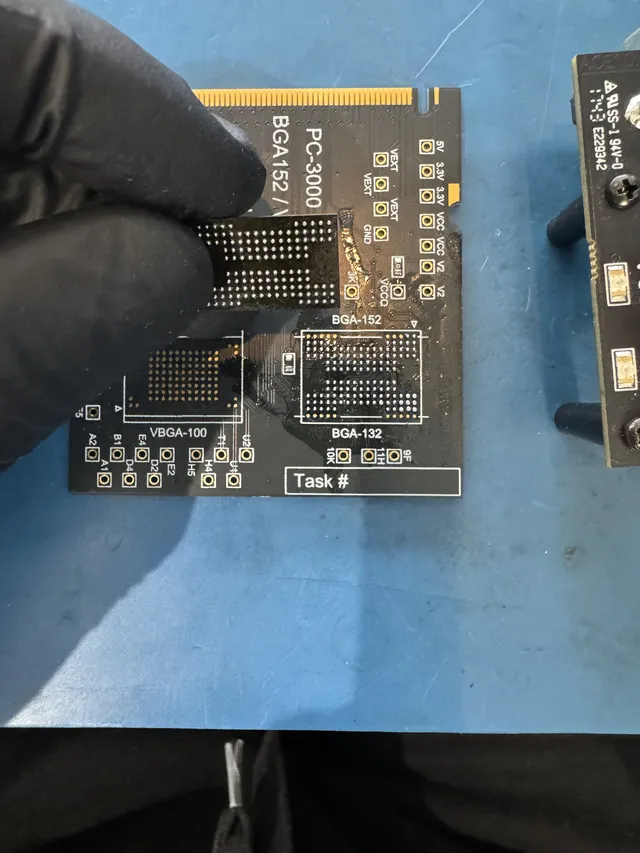
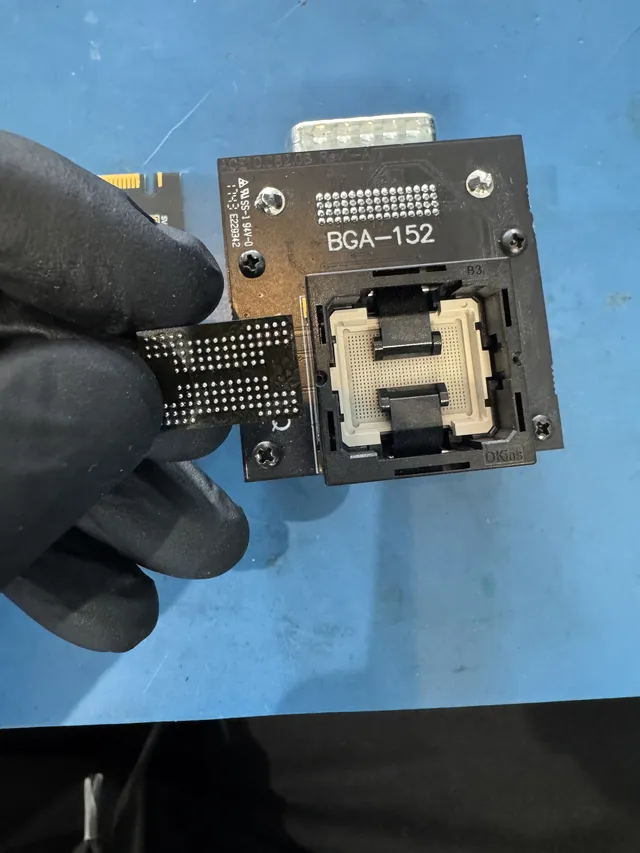
At his Lincroft bench, Joe lifts a separate memory chip onto his PC-3000 Flash reader. He reads a one-piece card through tiny metal contacts, the work priced in the Monolithic Recovery row. Then he removes the extra bits used to check for errors, unscrambles the rest and follows the controller's map to rebuild files and folders.
Follow the steps for memory cards, USB sticks or portable SSDs from the first check to copying what we can read.
Can I get photos off a fake SanDisk SD card?
We can look for the photos the card actually saved. A fake tells your camera there's still room after its real memory fills up. The next picture can land on top of an older one or never get saved at all.
We read what's in the real memory. During our hands-on check, called the diagnostic, we can usually tell whether a card is genuine from its controller, the markings on its memory chip and how much it really holds.
Use H2testw or F3 only on a new, empty card. These programs test how much it holds by filling it, so either can write over pictures you want to keep. When you replace the card, buy from a seller SanDisk has approved.
Which files can we get back from your SanDisk?
The diagnostic lets us check the memory where your photos were saved. What we can read there tells us what's possible for your SanDisk, which is why we don't print a success rate.
When files can come back
- A dead controller with readable memory
Even the last photo you saved can still be on the card or stick. We can look for it by reading the memory on its own.
- A broken USB plug
Your Cruzer can leave its plug in the computer and still hold your work in the part you have in your hand. Even torn copper connections can be mended.
- Deleted photos or a formatted card
If nothing else has taken their place, we can look for the patterns a photo or video leaves in the memory, even when its name has disappeared.
What can stop recovery
- A crack through the memory
We can't recover a card split through the chip that stores your files. Send yours even if it looks that way, so we can check the break during the diagnostic.
- One kind of error correction
Some newer controllers correct reading errors with a method called LDPC. We can't recover a card that uses it. We identify your controller during the diagnostic so you know if that limit applies to yours.
- A locked SSD whose controller stays dead
If the original controller in your password-locked Extreme PRO Portable or PRO-G40 can't work again, your files may stay locked. Have the password ready when we check your drive.
SanDisk USB sticks we've recovered files from
A customer brought the 128 GB Ultra to our Lincroft counter. The other sticks came by mail.
- SanDisk USB flash drive, 256 GB Dropped or physically damaged · Data recovered Mailed from Michigan 2026
- SanDisk Ultra, 128 GB Data recovered At our lab's counter in Lincroft 2026
- SanDisk USB flash drive, 32 GB Failed or corrupted · Data recovered Mailed from California 2025
These cases come from our ticket system, BenchKey, the shop software we built and run our lab on, with names, contact details and addresses left out. How we publish cases
What does SanDisk data recovery cost?
$100 diagnostic, credited toward a successful recovery.
The $100 diagnostic is non-refundable once diagnostics start, and donor drives or replacement parts you approve are non-refundable once ordered, even if recovery fails.
Cards and USB sticks start lower on our price list than portable SSDs. On a portable SSD, we have an extra board to check at the USB port, and pieces of the same photo can sit on different memory chips.
If only your Cruzer's file index is damaged, we use the File and Folder Problems price. For a sealed, one-piece card that needs a direct chip read, the Monolithic Recovery row applies. After the diagnostic, we'll confirm the cost and let you decide whether we begin recovery.
- Photo proof
We email you a photo so you can see what we got back from your card, USB stick or SSD before you pay the recovery fee.
- Paying over time
You can divide the bill into payments through Affirm financing if you qualify.
| Recovery work | Price |
|---|---|
| Flash Drive / SD Card | $299 - $1,750+ |
| File and Folder Problems | $299 - $1,500 |
| Chip Access & Reconstruction | $1,750+ |
| Monolithic Recovery | $1,750+ |
| SSD / NVMe Recovery | $1,000 - $2,000+ |
| Service option | When checks start | Extra cost |
|---|---|---|
| Standard diagnostic | Starts in about 4–6 weeks, then recovery time varies by case | No surcharge |
| Priority | Assessment starts within 5–7 days | +$250 |
| Urgent | Assessment starts within 1–2 days | +$500 |
| Emergency | Assessment starts same-day | +$1,000 |
Our full recovery price list gives the figures, and our guide to what data recovery costs explains how the work affects the price.
Is there another name on your drive?
If your label says something other than SanDisk, you can find the device that held your files in our list of data recovery services.
Kingston cards and USB sticks
Our Kingston recovery page covers both the card you take out of a camera and the stick you plug into a computer.
Samsung and Crucial SSDs
Each maker has its own recovery page. Choose the name printed on your SSD to see how we work on those drives.
Hard drive or flash memory?
Flash memory holds your files on chips. A hard drive keeps them on spinning disks, so our job there is to get the disks reading again.
Questions about your SanDisk
Can SanDisk recovery software get my files back?
It can help with deleted files on a card or stick that reads steadily and shows its normal size. A scan strains a failing device, so stop if it freezes, disconnects, shows a tiny size or asks to be formatted. If it never shows up at all, leave it unplugged for us.
Can you recover camera, flight or dashboard footage, or files on a Nintendo Switch card?
We can rebuild a playable clip from an interrupted recording, so take a dashcam card out right after an incident to preserve the footage, and use our camera, drone and Switch card guides for other devices.
When can I drop off my SanDisk, and how do I pack it for mailing?
Drop off your SanDisk at our Lincroft counter Monday to Friday, 10am to 6pm Eastern. If you're mailing it, put the packing slip from our mail-in form in a small padded box with the device. In the contiguous US, you can print a free UPS 2nd Day Air label as soon as you finish the form.
Can you read a SanDisk card or stick that's spent years in a drawer?
Those pictures can still be there. The chips hold files without power, and what they hold fades only over a very long time. The diagnostic lets us check what's left on the card or stick you found.
Guides for drives and memory cards
SSD recovery guides
Camera and game console cards
- A Professional Guide to Photo Recovery from SD Card
- Camera Says 'Cannot Access Memory Card'? Do This
- Canon R5 / R6 SD Card Corrupted Mid-Shoot? Pro Photographer Recovery
- GoPro SD Card Error: Recovering Your Footage
- Drone SD Card Corrupted: How to Recover DJI Footage
- Nintendo Switch SD Card Won't Read? Save Game Recovery Guide
Before handing over your only copy, you can read how we handle your device and the files on it.
Get a quote for your SanDisk
Tell us which pictures or work files you miss, and if we can recover them, you'll receive your files on a new drive while we hold an offline backup for two weeks.
