Android Won't Turn On? How to Get Your Data Back
Our founder and lead technician, Joseph Montanti, handles cases personally.
To recover data from a Samsung or other Android phone that won't turn on, the usual route is to repair the original hardware enough to start Android, unlock it, and copy the files. A failed charging circuit, battery, display, or power-button connection can leave the phone unusable while its storage still holds your photos. Modern Android encryption also needs the phone's original security hardware, so removing the memory chip is not a shortcut around a dead phone or a forgotten lock.
Check for damage before connecting power. If the phone got wet, suffered a hard impact, has a swollen battery, or becomes unusually hot, leave it off and disconnect its charger. Keep the original board intact and avoid resets or firmware flashing while it holds files you still need.
On this page
Checks for an undamaged Samsung or Pixel that will not power on
A drained or frozen phone can look completely dead. The following checks are for a dry, physically undamaged phone without the conditions above. Samsung and Pixel use different restart procedures, so do not apply one button combination to every Android.
- Check the charging equipment. Test the cable and power adapter with another device, and use a compatible replacement if either fails. Inspect the phone's charging port without inserting metal tools.
- For a Samsung Galaxy, hold Power or the Side key together with Volume Down until it restarts. Samsung says this can take up to 60 seconds. If Maintenance Boot Mode appears, select Normal Boot. For a Pixel, Google's blank-screen check uses the Power button for about 35 seconds.
- If the battery is drained, follow the charging time for the model. Samsung specifies at least an hour and says a charging indicator can take up to 10 minutes to appear. Google says a deeply discharged Pixel left unused can show no response for up to 25 minutes after connection.
- Call the phone from another phone. Ringing or vibration with a black screen points toward a display-access problem. Check for a faint image as well; the screen may be too dim to see easily.
- Connect to a computer with a data-capable USB cable if the phone remains cool and undamaged. Detection shows that some USB communication is working. File access still requires the phone to boot far enough to unlock and approve the connection.
If the phone opens normally, use that access to save the missing files now. Unlock it, connect it to a computer, tap the USB notification, and select File Transfer as described in Google's transfer instructions. Copy the needed photos and documents, then open the copies on the computer; stop the transfer if the phone begins rebooting or heating up.
USB transfer exposes shared folders such as camera photos and downloads. Text messages, WhatsApp history, and authenticator accounts have separate backup or export options. Getting the phone to the home screen is the start of saving those items, rather than proof that every app has been copied.
What leaves an Android phone looking dead
A power circuit supplies several parts of the board. A shorted component can pull that circuit down and prevent startup. A broken charging path can leave the battery empty even with a cable plugged in. These are different faults from damaged storage, and repairing the affected circuit can restore normal access to the files.
A failed display or power-button connection can be just as misleading. In the lab's Samsung A03s coffee-damage recovery, the board could charge but would not turn on. Joe traced a broken power-button connection, repaired it with a wire, and saved the pictures after the phone started.
A boot loop is different from no power: the phone starts but cannot reach stable operation. Software, storage, and board faults can cause that behavior. A factory reset may make some software faults disappear by erasing user data, which is the wrong trade when those files are the reason for the repair. Google confirms that a factory reset erases data from the phone.
| What still works | Possible repair route | What file access needs |
|---|---|---|
| Phone rings; display stays black | Restore display and touch access | Your screen lock and approval of file transfer |
| Phone works with a repaired battery or charging connection | Keep the original board and storage | A stable boot followed by a copy or backup |
| No startup because of a board short | Locate and repair the failed circuit | Usable original storage and security components |
| Severely corroded or damaged board | Original-board repair or a supported transfer of required original components | The hardware and credentials needed for decryption |
A replacement motherboard leaves your files on the removed board. Repairing the original preserves the storage and security hardware needed for Android to unlock the files. If the files are the priority, arrange Samsung Galaxy data recovery before authorizing that replacement.
Board repair and chip transfers are different jobs
In the Galaxy S24 Ultra electrical-damage case, Joe found and replaced a shorted chip on the charging path. The phone then ran, but its built-in display remained blank, so he used an HDMI adapter to reach the home screen and pictures. That display route worked on this model; it is not an option on every Android phone.
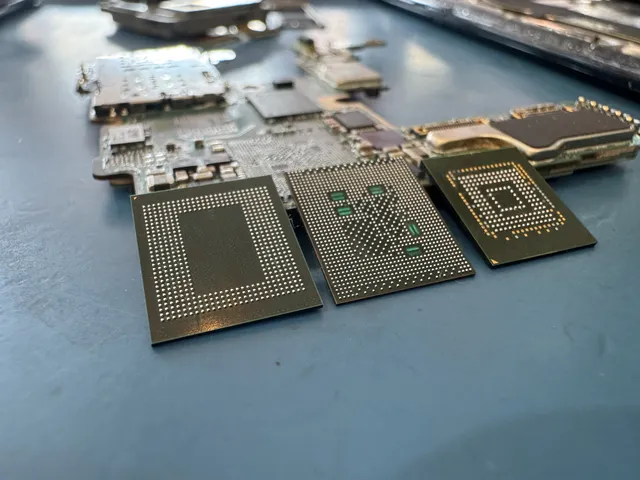
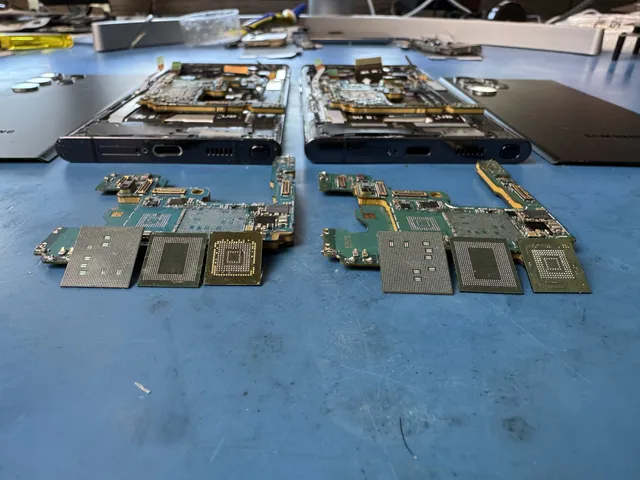
Extensive board damage can require moving the surviving original components to a compatible donor board. The original storage must travel with whatever processor and security components that model needs. This differs from installing a replacement board with its own chips.
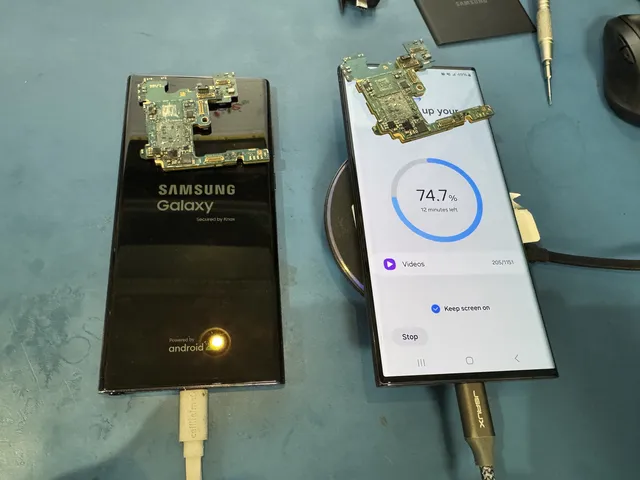
The saltwater-damaged Galaxy Z Flip 5 required a transfer of the original storage, CPU, RAM, and another chip. Joe installed those original chips on a donor board, and the phone powered on with its data saved.
On some older devices, supported unencrypted storage can be read independently. The terms eMMC and UFS describe storage technology; they do not establish whether a chip read will yield decrypted files. The exact phone, software, security configuration, and chip condition determine whether that approach is available.
When the phone needs recovery work
If the undamaged-phone checks end with no usable screen or startup, the next step is diagnosis of the original hardware. Software running on your computer cannot copy files from a phone that cannot communicate or unlock. The broken-phone recovery guide separates display problems, partial startup, and board damage.
The recovery cost follows the failed parts and the work needed to reach your files. The $100 diagnostic is credited toward a successful recovery, and the recovery estimate is approved before work begins; see data recovery pricing.
You can check Google Photos, any cloud storage you used, and earlier computer copies while the damaged phone stays off. Open the files from another device to see what is already saved. A device backup and a photo library can contain different things, so check both before deciding which missing files still require the original phone.
Get help with data recovery
Bring your device to our Lincroft lab during opening hours, or mail it in.
How to mail your deviceThe $100 diagnostic is non-refundable once diagnostics start, and donor drives or replacement parts you approve are non-refundable once ordered, even if recovery fails.
More lab videos
Published by MDrepairs
MDrepairs is a data recovery and electronics repair lab in Lincroft, New Jersey. Our founder and lead technician Joseph Montanti films real cases for our YouTube channel, showing tools, repair steps and recovery outcomes.
Keep reading
- Android “No Command” Screen: What It Means Before You Factory Reset
- Deleted Videos on Android: Where to Find and Restore Them
- Forgot Your Android Pattern Lock? Check Your Options Before a Reset