Hard drive not detected data recovery
Your photos can still be on the disks when your drive disappears, and our first step in hard drive not detected data recovery is finding where the drive gets stuck during startup. Leave it unplugged. If it's quiet, undamaged and hasn't fallen, clicked or dropped out, try another cable once. Another spin could scratch the disks. Watch us get family photos back from a Hitachi that stopped working. Our guide to failing hard drives covers other symptoms.
From anywhere in the contiguous US you can mail us your drive with a free shipping label, or you can hand it to us at the MDrepairs counter in Lincroft, New Jersey.
- Since 2014One lab, in Lincroft, New Jersey
- 20,000+ ticketsacross all services since 2014
- 4.6 from 345Google reviews
- $100 diagnosticcredited toward a successful recovery
The people we help
Our customers include people from
-

-

-
 AT&T
-
 Marriott
-

-

-
 Tennessee Titans
-

-

-

-

-

-

-

What to do first when your drive disappears
If another cable didn't help, let us handle the next start. A failing head, the tiny part that reads a disk, can scrape the surface that holds your files. At the bench we can control that first spin.
What you can do
- Disconnect the drive
Once the disks stop turning, a weak head can't keep scraping them. If the drive fell, keep it off even if it was quiet afterward.
- One check for quiet external drives
Skip this if it fell, clicked or disconnected even once. If it's quiet and undamaged, try another cable in a computer's own USB port once, using another computer if possible.
- Keep the whole external drive together
Its circuit board connects the electronic parts and can hold the key to your files. Send that board with its case and cable, even if it's broken.
What to skip
- Plugging it in over and over
Even if the last try sounded fine, another spin with a weak head can damage the instructions the drive itself needs to start.
- Running a recovery program
If your computer can't list the drive, a program has nowhere to look for your files.
- Swapping boards with another drive
A small chip on your board, the ROM, holds settings for your drive alone. Even a board swap with the same model can make the heads hit a disk.
- Opening the drive or its outer case
Lifting the metal cover exposes the disks to dust. Even taking apart an external drive's outer case can cost you the board that unlocks your files.
What your drive tells us as it starts
Once the drive has power, it spins the disks and reads the instructions stored there, called start-up files. Next it tells your computer its name and size, then signals it's ready. Where it stops tells us what to check.
There's no spin and no sound
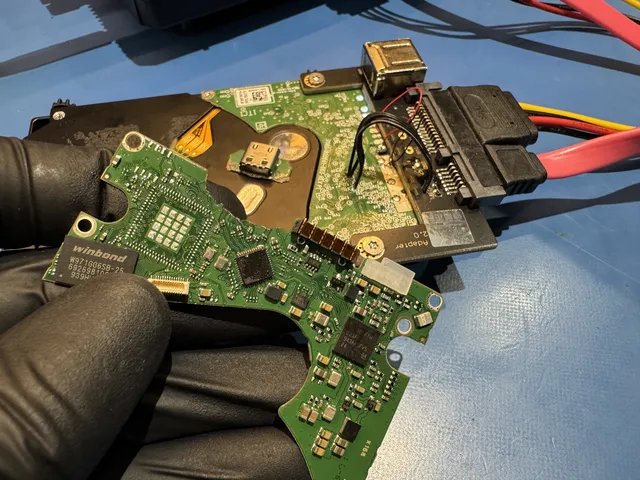
If your drive stopped spinning after a power surge, the trouble may be on the drive's own board. The TVS diode, a small part that protects the board, can short out in a surge and cut off power to the whole drive.
A desktop external drive's wall adapter can power the board yet give the motor too little to turn. A portable drive can also get too little power from a keyboard's USB port. Tell us if you tried another wall adapter, since the wrong voltage can damage the board.
The owner of the WD40NDZM in this film said the board snapped as the drive came out of its case. We moved its original processor, the chip that unlocked the files, and its ROM onto a replacement board and saved everything, including the owner's music.
It hums or buzzes without spinning
A stuck motor can still draw power. That's how you can hear a hum or buzz even though the disks never turn. Switch it off when you hear that.
It spins, then goes quiet
Your drive can spin and still get stuck trying to read its start-up files. If they're damaged, the drive can stay in a busy state, spinning without telling the computer it's ready. The head that reads those files can also fail without a click, so leave it unplugged even if it sounds fine.
It appears for seconds, then disappears
If the drive appears for a moment and then disappears, one of the heads that read the disks may be failing. Scanning the drive in those few seconds can do more damage. Leave it unplugged, because a weak head can scrape the disks the next time they spin.
The name or size looks wrong
If your hard drive shows 0 bytes or the wrong size, it got far enough to answer your computer. The trouble can be in the record of its name and size, or in its translator, the map it uses to find each piece of a file. The disks can still hold your photos.
If Windows says “Unknown” or “Not initialized” but shows the right size, the drive is answering. Windows may have trouble with the file system, the way your files and folders are organized. Tell us what size you saw.
The light blinks but nothing opens
Your drive can light up or set off the USB chime even when Windows doesn't list it. If the connect and disconnect sounds keep repeating, the little USB board linking the drive to your computer may be failing. The drive inside the case can still be fine.
If you saw “Unknown USB Device (Device Descriptor Request Failed),” Windows asked what was plugged in and couldn't get an answer it could use. Include that message when you tell us what happened.
Why a drive disappears and what we can do
A drive can disappear because it lost power or got stuck reading its own instructions. Our diagnostic tells us why yours stopped showing up. We explain what's possible and give you a price to approve for any work we can do.
| What failed | What we do | What we need | Price listing |
|---|---|---|---|
| Damaged circuit board (PCB) or diode | Remove or replace the diode, or fit a matching board with your ROM chip | The original board and ROM, even if a surge or the wrong adapter damaged them | Contact for Quote |
| Damaged start-up files | Use the drive's built-in service connection to repair or reload the files without opening the drive | Heads that can still read the start-up files | $1,000 - $1,500 |
| Damaged file map or identity record | Rebuild the translator and start copying as soon as the drive can find its data | A healthy drive for the copy before we work on any files | $1,000 - $1,500 |
| Failed head for the start-up files What to Do When You Hear a Clicking Hard Drive | Install replacement heads at our bench under filtered air to protect the exposed disks from dust | Matching heads from another drive of the same model | $1,500 - $3,000+ |
| Failed USB board External Hard Drive Data Recovery | Test a separate board and connect directly, or solder on SATA (the drive's internal connection) for built-in USB | The original USB cable, circuit board and outer case | Contact for Quote |
| Stuck motor Beeping Hard Drive Data Recovery | Transfer your disks to another drive whose motor turns | A donor drive that matches yours | Contact for Quote |
A circuit board, USB board or motor doesn't have a price row of its own. For those repairs we need to check your drive to tell you which price applies.
When the USB board fails but the drive works
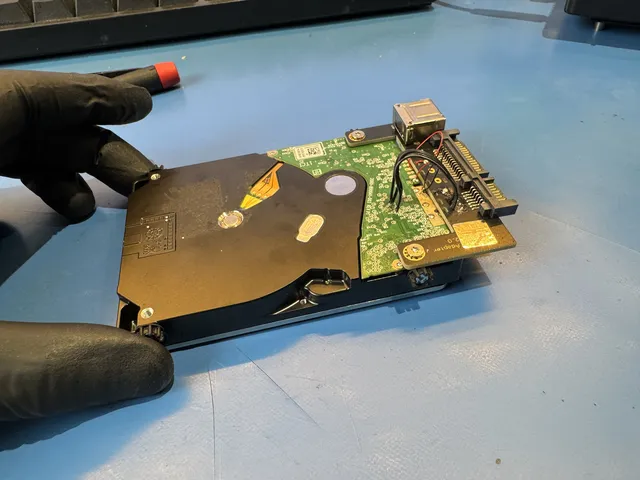
On some newer portable drives the USB plug sits right on the drive's own board. There's no second socket waiting inside the case. We solder wires for power and data onto the board to give it a SATA connection.
On Western Digital drives like the My Passport, the board can also encrypt the files. That means it scrambles what goes onto the disks and holds the key to reading it again. We can repair that board or move the chips that hold the key to a matching board.
Please leave the drive in its case. A case that snaps together can crack as you pry it apart, and on some drives the board you're trying to get past is fixed to the drive itself.
What can we get back from your drive?
A broken board can leave the disks holding your photos untouched, while a scratch can make part of a disk unreadable. That difference is why we don't publish a success rate. After the diagnostic, we can tell you what's possible for your drive.
When files can still be read
- Only the drive's board failed
Your photos are on the disks, so losing the board can leave them untouched. If we remove a blown surge protector to get the drive reading, we copy the files while it lacks surge protection.
- The drive lost its instructions
Your photos can survive a power cut that damaged the drive's instructions while it was updating them. Restoring those instructions or the map of your files can make your folders readable again.
- Only the external USB board failed
Losing the USB connection can hide a drive full of pictures. If the drive inside the case still reads, those pictures are there for us to copy.
What can put files beyond reach
- A head has scratched the disks
We can recover only the parts that still read around a scratch. Unplug yours now so the damaged head can't scrape a new spot.
- The board with the key is missing
If the board scrambled your files, a spare board alone can't unlock them. Hang on to the case and the original board, even if all you have are broken pieces.
- A scratch crosses the start-up files
Another company had tried first. With new heads, the dropped drive showed zero megabytes. A scratch damaged both copies of its start-up files, so we couldn't save the photos. If yours fell, leave it unplugged.
Hard drives that disappeared from their owners' computers
When these drives disappeared, their owners lost access to family pictures, videos and a game project. Here's what it took to read each drive and what its owner got back.
WD20SDRW that still spun quietly
The owner's game project was on a drive that still sounded healthy. Replacement heads got it started, and before we copied a file we saved the map it uses to locate each piece of data.
When that map went bad, all we could read were zeros. Loading our saved copy into the drive's memory made the files readable again, and after four head replacements in all we brought back everything except 28 MB.
Helium drive that disconnected during a photo transfer
The computer froze partway through moving the owner's photos. When we checked the helium-filled drive, its motor spun but its heads hadn't started reading. We replaced the heads and supplied helium while it ran. That let us save the drive's start-up files, then the owner's pictures and videos.
Hitachi that wouldn't appear
The family pictures this owner wanted for Christmas were on a Hitachi that didn't even appear on our bench computer. It clicked when we tried to read its start-up files. Under the microscope we could tell how badly the heads were bent. With replacements from a matching drive, we got all 200 GB back.
5 TB My Passport clicking after a fall
New heads alone didn't get this dropped drive reading. Even after we soldered on a SATA connection, a setting in the drive's ROM chip kept us out. We changed that setting and wrote it back to the chip. That opened up more than 3 TB of the owner's pictures and videos.
What does it cost to recover a hard drive that's not detected?
$100 diagnostic, credited toward a successful recovery.
The $100 diagnostic is non-refundable once diagnostics start, and donor drives or replacement parts you approve are non-refundable once ordered, even if recovery fails.
The price depends on what failed and whether a head touched the disks. “Hard Drive - Firmware / Logical” covers damaged start-up instructions or a broken map of the files. If the heads need replacing, that's “Hard Drive - Head Swap.”
If a head scratched one of the disks, called platters, that's the “Scratched / Contaminated Platters” row. For unlisted circuit board, USB board or motor work, your diagnostic settles which price applies.
- You decide after the diagnostic
Once you have the price, you can tell us to go ahead or stop there.
- Ways to pay
Along with cards, we accept Apple Pay and PayPal, with financing through Affirm if you qualify.
| Recovery work | Price |
|---|---|
| Hard Drive - Firmware / Logical | $1,000 - $1,500 |
| Hard Drive - Head Swap | $1,500 - $3,000+ |
| Scratched / Contaminated Platters | $3,000 - $3,500+ |
| Option | When assessment starts | Extra charge |
|---|---|---|
| Standard diagnostic | Starts in about 4–6 weeks, then recovery time varies by case | No surcharge |
| Priority | Assessment starts within 5–7 days | +$250 |
| Urgent | Assessment starts within 1–2 days | +$500 |
| Emergency | Assessment starts same-day | +$1,000 |
With standard service, allow 4 to 6 weeks before we can check why your drive disappeared. The work takes additional time depending on what failed. Our recovery cost guide explains the rush options for an earlier start.
Does another sign fit your drive better?
If your drive clicked, beeped or fell before it disappeared, use the guide for that particular sign. For files on a different device, choose its data recovery service.
It makes a repeating click
If clicking was the last thing you heard, our clicking drive guide explains what happens when a head struggles to read.
It beeps at startup
Use the beeping drive guide if you heard a beep or a steady hum as the motor tried to turn.
It fell before it disappeared
If the drive vanished right after a fall, leave the power off and start with recovery for dropped drives.
It grinds or scrapes
If you heard grinding, leave the drive off and read about scratched disks, since a head may have rubbed the surface that holds your files.
A whole set of drives disappeared
If your drives work together in a set called a RAID array, one failure can hide the whole set, so we repair and copy the drives individually before rebuilding it from those copies.
Find your drive by brand
Choose the name on your drive's label to read about recovery for that maker's hard drives.
Questions about a drive your computer can't see
Can data be recovered from a hard drive that is not detected?
Yes, your files can still be on the disks. A drive can get stuck before it even tells your computer its name. Our diagnostic tells us what stopped yours and whether there's a way to read your files.
What if my drive is missing from the startup screen?
If your drive is missing from the computer's start-up settings (BIOS), it may have lost power or stalled before giving its name. If BIOS lists it but Windows doesn't, the drive is answering and Windows may have trouble finding your folders or talking to the drive.
Can data recovery software help if my hard drive is not detected?
No program can read a drive the computer can't find. Software can help if the drive stays visible at its true size but looks empty or says RAW, meaning Windows can't tell how the files are organized. If the size is wrong, the drive keeps disconnecting or each piece takes seconds to read, leave it off.
Can you still help if another shop worked on my drive?
Yes, we can examine it. Tell us who worked on the drive, whether it was opened, where any replacement heads or board came from, and whether anyone managed to copy part of it. That lets us account for what's changed when we start our own diagnostic.
What if my solid-state drive (SSD) isn't detected?
A drive marked SSD calls for solid-state drive recovery. If yours is the type labeled NVMe, go straight to NVMe SSD recovery.
Guides for figuring out what happened
If you're deciding what to try, start with what you noticed. These guides explain drive health, missing files and what goes into a recovery price.
Missing drives and drive health
A hard drive can quit between one day and the next. Keep the photos and work you'd miss in three different places so losing a drive doesn't take your only copy.
Tell us when your drive disappeared
Ask us for a quote, and any files we recover will come back to you on a new external drive or a USB flash drive.