
External hard drive data recovery
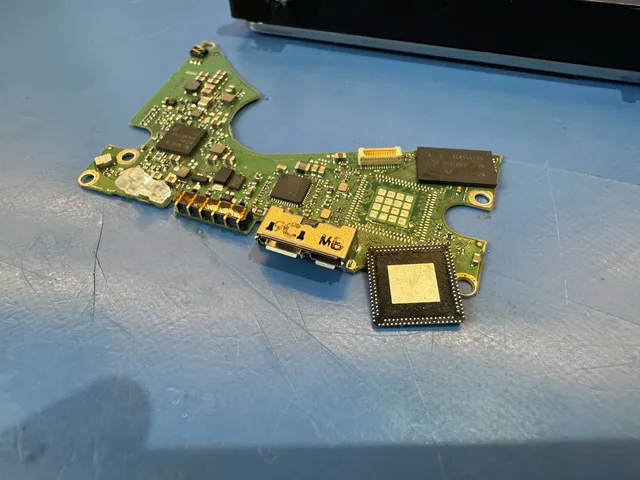
For external hard drive data recovery, we test the drive and the little USB board where your cable meets the case, looking for a way past the failed part to the photos on your disks. Unplug your drive and leave it off in its case. The board inside can hold the key to your files, so send the whole drive.
Bring the drive, its cable and any power adapter to our shop in Lincroft, New Jersey. If you're mailing them from the contiguous US, print a free UPS label for the box.
- Since 2014One lab, in Lincroft, New Jersey
- 20,000+ ticketsacross all services since 2014
- 4.6 from 345Google reviews
- $100 diagnosticcredited toward a successful recovery
The people we help
Our customers include people from
-

-

-
 AT&T
-
 Marriott
-

-

-
 Tennessee Titans
-

-

-

-

-

-

-

What hard drive owners say
If you're deciding who to trust with your drive, hear from the people who put theirs in our hands.
I brought a broken external hard drive in for repair, and had an excellent experience working with Joe. … Turned out, the drive was completely shot and required some surgery to recover the data. His work is masterful!
I had an external hard drive crash. I took it to a local shop in Edmond, OK but they were unable to get hard drive up and running … Joe contacted me stating they recovered a little over 81,000 RAW Nikon NEF photo's
I used MDrepairs to retrieve files that were lost after a hard drive failure. All communication from MDrepairs was prompt and professional. … The cost was very fair.
What should I do if my external drive stops working?
Leave a damaged external hard drive off. It's tempting to try opening that last folder again, but each attempt on a failing drive can cost you files we could still save.
What to do now
- Disconnect the power
Clicks, beeps or a grinding sound mean it's time to unplug the drive. Leave it off after a fall or a spill, too, or if it smells burnt.
- Keep the pieces together
Leave the drive in its case and gather what goes with it. That includes its cable, its power adapter if it has one, and anything that's come loose.
- Write down what happened
Include which computer you used, if the drive fell or the cable came out, and anything you or someone else tried, even taking the case off.
- Quiet and never dropped? Check the connections
Check the cable, port and any power adapter. Search Windows for Disk Management or your Mac for Disk Utility. Look for your drive, even unnamed. Stop if it's missing.
What to avoid
- Don't lift it out of its case
Opening the case can snap the board we may need to unlock your files.
- Don't go from computer to computer
Tell us what happened on the first computer, even if nothing showed up. If the drive is failing, trying another computer can leave us with fewer files to save.
- Turn down the offer to format
Formatting sets the drive up for new files. Skip repair tools and recovery software, too, so nothing you run writes over a photo you want to keep.
- Keep heat off a wet drive
A spill is reason enough to unplug the drive. Skip the hair dryer and leave the drive off, even if you only want to check one file.
What's inside the case of an external drive?
A small USB board inside the case connects the drive to your computer. Either part can fail, so when the board comes off, we test the drive on its own. If it reads normally, we can copy your files directly unless we need the original board to unscramble them.
If the drive itself fails that test, we follow our hard drive recovery steps. Many WD portable models have the USB socket on the drive's own board, with no other place to plug in. We attach wires with melted metal, called solder, to add a SATA connection, the kind a drive uses inside a computer.
Please keep the case and its board with the drive. If the original board holds the key that unscrambles your files, we'll need that piece even if it's broken.
Which kind of external drive do you have?
Check whether your drive gets its power from the USB cable or a wall adapter. Where the USB socket sits and whether two drives share the box also change what we check first and what you should send.
| Drive type | How to tell | What changes inside | What to send |
|---|---|---|---|
| Portable external drive | Gets its power from the USB cable | The USB board between the cable and the drive can fail while the files are still readable | Pack the drive in its case with its USB cable |
| WD portables with built-in USB WD My PassportWestern Digital Data Recovery | A My Passport or WD20SDRW with the USB socket built into the drive's own board | There's no SATA socket, and the board's chip can hold the key to unscrambling files | Keep it closed and include its cable and any loose pieces |
| Desktop external drive WD My Book recovery | A WD My Book or Seagate Expansion Desktop with its own wall adapter | A power surge or the wrong adapter can damage the drive | Pack its own power adapter and USB cable with the drive |
| Two-drive external RAID Data Recovery | Two drives working as one set (RAID) in a LaCie 2big, G-RAID or My Book Duo | We rebuild the set from separate copies of both drives (by quote) | Send the box with both drives in it |
| Portable solid-state drive (SSD) SSD recovery limitationsSamsung T7 or T9 SSD not showing up? When you can recover your files | A portable SSD such as a Samsung T7 or SanDisk Extreme | It has no disks or moving parts, so the SSD page covers the work and its price | Use the SSD page for what to send |
Look for the model number on your drive's label among the external drives we've recovered.
What is your external drive doing?
If you can't get to your files, we start with a diagnostic. It tells us whether the trouble is in the socket, the board, the drive itself or the way your folders are organized.
External hard drive not showing up?
If a quiet, undamaged drive still doesn't show up after the safe connection checks, stop there. A broken socket or board can cut the connection. Even when the motor sounds fine, the drive inside can have trouble reading.
The WD20SDRW in this film held a customer's game project. When it stopped working, its motor still spun quietly. We rewired the board from USB to SATA, but the heads, the tiny parts that read the disks, had failed. We needed four head replacements to save everything except 28 megabytes.
It clicks or beeps
Unplug the drive when you hear it. Those clicks or beeps can come from the heads struggling to read or stuck against a disk. Our guides to clicking and beeping drives explain what each sound can tell you.
It fell while it was plugged in
Keep it off after a fall. When we get a dropped portable hard drive for recovery, we check for a bent head or a scratch where a head hit the spinning disk.
A customer moved his laptop, and the drive on the other end of its cable fell. We cut the top head off a replacement set to leave the scratched top surface untouched. Of the roughly 1.2 terabytes on the drive, we saved about 1.1, including his family pictures.
After a cat knocked a WD10JMVW off a table, even replacement heads couldn't move into place. We suspected a bent pin, so we moved the disks into another drive's body. The owner had saved pictures and videos of her kids growing up. We got almost everything back, with about 15 gigabytes unreadable.
The cable came out mid-copy
If it beeps without spinning, leave it unplugged. That's what happened when a customer disconnected hers while it was reading. The heads caught on the edges of the disks and scattered dust inside the drive.
We cleaned the disks and fitted new heads, which let us save about 680 gigabytes of her pictures, documents and other files. With a working drive, choose Eject on your computer before you disconnect the cable.
Is my external hard drive's USB port broken?
Leave the cable out if the socket has come loose. A tug or a bend can break the spots where the socket joins the board, making the drive come and go on your screen. That break leaves the disks untouched. We can repair the socket or go around USB.
You can see us go around USB on a dropped 5-terabyte My Passport. This one clicked, so we replaced its heads first. Then we soldered a SATA connection onto the board and removed a restriction in the code that runs the drive. We saved more than 3 terabytes of pictures and videos.
Why is my WD external hard drive encrypted?
You can have an encrypted drive without ever choosing a password. Many WD external models use a chip on the board to scramble what's written to the disks. Without that chip to unscramble it, even a photo you know is there reads as nonsense.
The owner said another company snapped the board while taking his WD40NDZM out of its case. We moved the original processor that unlocks the files and the ROM chip that holds the drive's instructions onto a replacement board. Then we rewired its USB-C cable connection to SATA and saved everything, including his music.
If you turned on encryption yourself, send your password or recovery key with the drive so we can open the copy we make.
My desktop drive has no light or sound
Leave the other power adapters in the drawer. A desktop drive gets power from the wall, so a surge or the wrong adapter can leave it dark and silent. Send us the adapter that belongs to it along with the drive.
My computer wants to format the drive
Cancel the format prompt. If you see RAW, your computer recognizes the drive but can't tell how its files are organized. This can happen after you switch between Windows and Mac or unplug without ejecting. Even if your folders disappear, the files stay on the disks until something writes over them.
Skip the built-in repair tools, CHKDSK on Windows and First Aid on a Mac. Don't install recovery software on the drive either. We read drives used with Windows, Mac, PlayStation or Xbox the same way until it's time to put the folders back together.
It freezes in the middle of a copy
Stop the copy if it keeps stalling. A customer had used the WD external in this film for fifteen years. When we tried to copy it, it kept getting stuck, even though our first test said all four heads worked.
We mapped which parts of the disks each head could read. The third one could barely read anything, so we saved what the other three could reach before we fitted new heads. We got back over 800 gigabytes of the owner's pictures and videos.
What will it cost to recover my external drive?
$100 diagnostic, credited toward a successful recovery.
The $100 diagnostic is non-refundable once diagnostics start, and donor drives or replacement parts you approve are non-refundable once ordered, even if recovery fails.
If the drive itself failed, what broke inside tells us which price on the list applies. For work on the USB board or the chip that unlocks your files, we'll give you a quote after the diagnostic.
It costs nothing to ask us for a quote, and you approve the estimate before we start work on your files. You'll get an email from us with a photo of what we saved, so you can see the result before you pay for the recovery.
- Portable SSDs and two-drive boxes
Portable SSDs have their own price row on our SSD recovery page. For a two-drive box, we quote the whole set through our RAID recovery page.
- How you can pay
We take cards, and our payment and financing guide explains how you can pay over time with Affirm if you qualify.
| Work needed | Price |
|---|---|
| Hard Drive - Firmware / Logical | $1,000 - $1,500 |
| Hard Drive - Head Swap | $1,500 - $3,000+ |
| Scratched / Contaminated Platters | $3,000 - $3,500+ |
| Service option | When checks start | Added cost |
|---|---|---|
| Standard diagnostic | Starts in about 4–6 weeks, then recovery time varies by case | No surcharge |
| Priority | Assessment starts within 5–7 days | +$250 |
| Urgent | Assessment starts within 1–2 days | +$500 |
| Emergency | Assessment starts same-day | +$1,000 |
The data recovery price list gives you the figures, and our guide to external hard drive recovery cost explains how the work shapes a quote.
External drives we've recovered files from
- Toshiba external hard drive, 3 TB DT01ACA300 Clicking or other noise · Data recovered Mailed from Tennessee 2026
- Seagate external hard drive, 500 GB ST3500418AS Fire or power surge · Data recovered Mailed from Ohio 2026
- Seagate external hard drive, 500 GB ST3500320AS Deleted or formatted · Data recovered Mailed from Missouri 2026
- Seagate external hard drive, 3 TB ST3000DM001 Hard Drive - Head Swap · Data recovered Mailed from Texas 2026
- Seagate external hard drive, 5 TB ST5000LM000 Data recovered Mailed from Kentucky 2026
- Seagate external hard drive, 2 TB ST2000LM007 Clicking or other noise · Data recovered Mailed from Alaska 2026
- Hitachi external hard drive, 500 GB HTS545050B9SA02 Clicking or other noise · Data recovered Mailed from Washington 2026
- Toshiba external hard drive Hard Drive - Firmware / Logical · Data recovered Mailed from Maine 2026
- Toshiba external hard drive MQ01UBD100 Stopped working or not detected · Data recovered Mailed from Iowa 2026
- Toshiba external hard drive, 2 TB MQ04UBD200 Hard Drive - Firmware / Logical · Data recovered Mailed from Tennessee 2026
- Seagate external hard drive, 2 TB Data recovered Mailed from Washington 2026
- Seagate external hard drive, 1 TB ST31000528AS Clicking or other noise · Data recovered 2026
- Seagate external hard drive, 2 TB ST2000DL003 Fire or power surge · Data recovered Mailed from Tennessee 2026
- Seagate external hard drive, 1 TB ST1000LM038 Stopped working or not detected · Data recovered At our lab's counter in Lincroft 2026
- Seagate external hard drive ST3500410AS Failed or corrupted · Data recovered Mailed from Michigan 2026
- Seagate external hard drive, 2 TB ST2000DM001 Deleted or formatted · Data recovered Mailed from Indiana 2026
- Seagate external hard drive, 1 TB ST1000DM003 Hard Drive - Firmware / Logical · Data recovered Mailed from Ohio 2026
- Seagate external hard drive ST1000LM024 Clicking or other noise · Data recovered Mailed from California 2026
- External hard drive Deleted or formatted · Data recovered Mailed from New York 2026
- Toshiba external hard drive, 1 TB MQ01ABD100M Stopped working or not detected · Data recovered Mailed from Alaska 2026
- Seagate external hard drive ST2000DM001 Data recovered Mailed from Alabama 2026
- Seagate external hard drive, 500 GB ST500LM021 Clicking or other noise · Data recovered Mailed from Texas 2026
- Seagate external hard drive ST1000LM024 Stopped working or not detected · Data recovered Mailed from California 2026
- Seagate external hard drive ST2000DL001 Stopped working or not detected · Data recovered Mailed from Colorado 2026
- Seagate external hard drive ST2000DL001 Data recovered Mailed from Virginia 2026
- External hard drive Data recovered 2026
- Seagate external hard drive ST3300622A Clicking or other noise · Data recovered Mailed from Washington 2026
- Seagate external hard drive ST3500418AS Will not turn on or charge · Data recovered Mailed from South Carolina 2026
- Seagate external hard drive ST3160815AS Stopped working or not detected · Data recovered Mailed from Michigan 2026
- G-Technology G-DRIVE, 6 TB Data recovered Mailed from Connecticut 2026
- Seagate external hard drive ST2000LM003 Dropped or physically damaged · Data recovered Mailed from Texas 2026
- External hard drive Data recovered Mailed from California 2026
- Seagate external hard drive ST9320320AS Stopped working or not detected · Data recovered Mailed from Texas 2026
- External hard drive, 500 GB Will not turn on or charge · Data recovered Mailed from California 2026
- Seagate external hard drive ST31000528AS Stopped working or not detected · Data recovered Mailed from New York 2026
- External hard drive, 500 GB Data recovered Mailed from Michigan 2026
- Seagate external hard drive, 4 TB ST4000DM004 Clicking or other noise · Data recovered Mailed from Virginia 2026
- Seagate external hard drive ST4000LM024 Stopped working or not detected · Data recovered Mailed from Virginia 2026
- Seagate Backup Plus, 1 TB Data recovered At our lab's counter in Lincroft 2025
- Samsung external hard drive Stopped working or not detected · Data recovered Mailed from California 2025
- Seagate external hard drive, 2 TB ST3200542AS Stopped working or not detected · Data recovered Mailed from Virginia 2025
- Seagate external hard drive ST2000LM007 Data recovered Mailed from Tennessee 2025
- Samsung external hard drive Dropped or physically damaged · Data recovered Mailed from Alabama 2025
- Seagate external hard drive, 4 TB ST4000LM024 Clicking or other noise · Data recovered Mailed from Pennsylvania 2025
- Toshiba external hard drive Dropped or physically damaged · Data recovered Mailed from North Carolina 2025
- Samsung external hard drive Will not turn on or charge · Data recovered Mailed from North Carolina 2025
- External hard drive Dropped or physically damaged · Data recovered Mailed from Pennsylvania 2025
- External hard drive Failed or corrupted · Data recovered Mailed from Washington 2025
- External hard drive, 500 GB Stopped working or not detected · Data recovered Mailed from California 2025
- External hard drive Failed or corrupted · Data recovered Mailed from California 2025
- External hard drive, 1 TB Data recovered At our lab's counter in Lincroft 2025
- External hard drive Data recovered At our lab's counter in Lincroft 2025
- Seagate external hard drive ST1000LM024 Data recovered At our lab's counter in Lincroft 2025
- Seagate external hard drive ST3750630AS Will not turn on or charge · Data recovered Mailed from Colorado 2025
- External hard drive Hard Drive - Head Swap · Data recovered Mailed from Ohio 2025
- Toshiba external hard drive DT01ACA100 Stopped working or not detected · Data recovered Mailed from Florida 2025
- External hard drive Stopped working or not detected · Data recovered Mailed from California 2025
- External hard drive Will not turn on or charge · Data recovered Mailed from Oklahoma 2025
- External hard drive Fire or power surge · Data recovered 2025
- Hitachi external hard drive Stopped working or not detected · Partly recovered Mailed from Connecticut 2025
- External hard drive Stopped working or not detected · Data recovered Mailed from Tennessee 2025
- Seagate external hard drive ST1000DM003 Stopped working or not detected · Data recovered Mailed from Pennsylvania 2025
- External hard drive Stopped working or not detected · Data recovered Mailed from Florida 2025
- External hard drive, 6 TB Clicking or other noise · Data recovered Mailed from Florida 2025
- Seagate external hard drive ST2000LM007 Clicking or other noise · Data recovered Mailed from Indiana 2025
- External hard drive, 4 TB Data recovered 2025
- Seagate external hard drive ST2000DM001 Stopped working or not detected · Data recovered Mailed from Florida 2025
- Seagate external hard drive ST9500420AS Stopped working or not detected · Data recovered Mailed from Virginia 2025
- Seagate external hard drive Failed or corrupted · Data recovered Mailed from Utah 2025
- External hard drive Data recovered Mailed from Tennessee 2025
- External hard drive Stopped working or not detected · Data recovered Mailed from New York 2025
- Toshiba external hard drive MQ01UBB150 Dropped or physically damaged · Data recovered Mailed from Wisconsin 2025
- External hard drive Stopped working or not detected · Data recovered Mailed from Ohio 2025
- External hard drive, 3 TB Will not turn on or charge · Data recovered Mailed from California 2025
- External hard drive Clicking or other noise · Data recovered Mailed from Texas 2025
- External hard drive, 8 TB Clicking or other noise · Data recovered Mailed from Florida 2025
- Seagate external hard drive ST2000MD001 Will not turn on or charge · Data recovered Mailed from Missouri 2025
- Hitachi external hard drive, 6 TB HDN726060ALE614 Fire or power surge · Data recovered Mailed from Florida 2025
- Maxtor external hard drive Failed or corrupted · Data recovered Mailed from Massachusetts 2025
- External hard drive Clicking or other noise · Data recovered Mailed from New York 2025
- Samsung external hard drive Clicking or other noise · Data recovered Mailed from New Jersey 2025
- Toshiba external hard drive Stopped working or not detected · Data recovered Mailed from Oklahoma 2025
- Toshiba external hard drive, 5 TB Data recovered Mailed from California 2025
- Seagate external hard drive ST2000LM007 Data recovered At our lab's counter in Lincroft 2025
- External hard drive Data recovered Mailed from New York 2025
- External hard drive Data recovered Mailed from Colorado 2024
- External hard drive Stopped working or not detected · Data recovered Mailed from Virginia 2024
- External hard drive Dropped or physically damaged · Data recovered Mailed from Utah 2024
- External hard drive Data recovered Mailed from Texas 2024
- External hard drive, 4 TB Stopped working or not detected · Data recovered Mailed from Georgia 2024
- LaCie external hard drive Data recovered At our lab's counter in Lincroft 2024
- Seagate external hard drive, 8 TB ST8000NM0045 Stopped working or not detected · Data recovered Mailed from Tennessee 2024
- Seagate external hard drive Data recovered At our lab's counter in Lincroft 2024
- External hard drive Will not turn on or charge · Data recovered Mailed from Florida 2024
- Samsung external hard drive Data recovered Mailed from Texas 2024
- External hard drive Data recovered Mailed from New York 2024
- External hard drive Stopped working or not detected · Data recovered Mailed from Michigan 2024
- External hard drive Deleted or formatted · Data recovered Mailed from California 2024
- Seagate external hard drive ST2000DM001 Fire or power surge · Data recovered 2024
- External hard drive Data recovered At our lab's counter in Lincroft 2023
- External hard drive Fire or power surge · Data recovered Mailed from Pennsylvania 2023
- External hard drive Dropped or physically damaged · Data recovered Mailed from North Carolina 2023
- External hard drive Partly recovered At our lab's counter in Lincroft 2023
- Toshiba external hard drive Stopped working or not detected · Data recovered 2022
These cases come from our ticket system, BenchKey, the shop software we built and run our lab on, with names, contact details and addresses left out. How we publish cases
Is this the right page for my drive?
Start with the device that held the files. An internal drive, an SSD and a memory card have their own guides, and the name on your case can point you to a maker's page.
The drive came out of my computer
Use our hard drive recovery guide for a drive you took out of a laptop or desktop computer. It also explains how we work on the hard drive inside an external case.
I know the name on the case
Look for the name on your case among our guides for LaCie, WD, Toshiba, Seagate, Hitachi and Maxtor. Each goes into the work we do on that maker's drives.
This is our page for G-Technology data recovery. We've recovered a 6-terabyte G-DRIVE. If your Mac sees your G-DRIVE mobile but won't open it, our guide covers that problem.
Mine is a portable SSD
If the label says SSD, there are no spinning disks to repair. Our SSD recovery page covers that service, and our guide explains how we get files off a solid-state drive.
It's a USB stick or memory card
A stick that plugs straight into your computer and a memory card from your camera need different work from a hard drive. Follow the flash drive recovery page for a USB stick or the SD card case for a camera card.
Questions about external drive recovery
Can you recover data from a dead external hard drive?
Yes, if we can still read the disks. A dead USB board or a broken socket can leave a drive full of photos invisible to your computer. The diagnostic tells us if the trouble stops at the connection or goes deeper into the drive.
What are my chances of saving the files on my external drive?
It depends on the condition of your disks. A scratch limits us to a partial recovery, but even part of a family album can be worth saving. One number can't tell you how much of yours we can read. That's why we don't publish a success rate and why we examine your drive to give you an answer.
Can you still help if someone already opened my drive?
Yes, you can send it as it is. Include every part, even a broken piece of board, and tell us what was tried. Earlier work can make recovery harder.
Is it worth paying to recover my external hard drive?
We'd save the money if you already have the files elsewhere or can get another copy online. If that drive holds your only pictures of someone you love, or work you'd have to do all over again, recovery can be worth paying for. Leave it off while you decide.
What should I do if my external drive was my backup?
Start with the originals if you still have them, and make copies so your files are in three different places. You get the files we recover on a new external drive or USB stick, and we keep a copy offline for two weeks.
Guides for external drive owners
Learn why a drive stops reading and which checks are safe at home. If you're thinking of sending yours, our cases, prices and terms can help you decide.
Get a quote for your external drive
Tell us what happened and which files you'd like back when you ask for a quote. Leave the drive unplugged in its case.
