
SD card data recovery for photos and videos
Your photos can still be on a card that snapped, got wet or stopped showing up on your computer. We can look for those pictures by reading the chip that stores them, even when the camera can't read the card. Stop shooting. Cancel any request to format the card for new files, then take it out. Only try SD card data recovery software if the card is undamaged and your computer can still read it.
You can bring your SD or microSD card to the MDrepairs counter in Lincroft, New Jersey, or mail it to us from anywhere in the contiguous US.
- Since 2014One lab, in Lincroft, New Jersey
- 20,000+ ticketsacross all services since 2014
- 4.6 from 345Google reviews
- $100 diagnosticcredited toward a successful recovery
The people we help
Our customers include people from
-

-

-
 AT&T
-
 Marriott
-

-

-
 Tennessee Titans
-

-

-

-

-

-

-

What customers say about getting their files back
A thumb drive owner tells how we got their files back by reading the chip inside. Rob Knight thanks Joe for recovering photos and videos from his family's early days.
Great service! MDrepairs successfully retrieved my data from a 15 year old thumb drive that failed. I had previously sent the drive to another company which wasn't successful, but MDrepairs got my data back by going to the "chip-level recovery from the NAND". Time of repair was less than two weeks. Highly recommended
We had this device for almost 10 years. It contained some of the earliest memories of our kids. … I saw an MD Repairs video and thought I'd give it a shot. Joe was great to work with, very responsive, and was able to restore pictures and videos from our family's early days.
I went to several other locations to try and recover my data. These guys did it, and they were patient with my payment as well.
Software or a professional SD card recovery lab?
If you deleted your photos and your computer still reads the undamaged card, try PhotoRec before you pay anyone, us included. It's free. For formatted SD card recovery, we'd start there too if you used a quick format.
Choose a different drive for the pictures the program finds. If the scan misses photos or gives you files that look wrong or won't open, stop there. Another scan can make a failing card worse.
If no device sees the card, or your computer reports its entire size as 0 bytes, a program can't reach your pictures. That's a job for the lab. A broken card or one that's been wet needs to stay out of the reader, too.
What should I do with my card right now?
You don't have to buy anything right now. Leaving the card out gives you time to decide what to do without saving over a picture or powering up a damaged card.
What helps
- Stop shooting and remove the card
Even a test shot can land right where a missing picture was saved.
- Save recovered files somewhere else
If you're trying software on a readable card, use a card reader. Pick a different drive for the pictures it finds so they can't replace others on the card.
- Copy a read-only card now
If the card won't let you save a new picture but still lets you open the old ones, copy them to another drive while you can.
What can hurt
- Saying yes to format
Choose Cancel to keep the camera from changing the list it uses to find the pictures you've already taken.
- Installing software on the card
Install the program on your computer. The program itself takes up space and could write over a file you're trying to find.
- Plugging it in again
Leave it unplugged if it's broken, won't show up or shows 0 bytes for its total size. Another attempt can put more strain on a failing card.
- Testing a wet card
Keep it out of every device. Power speeds up corrosion, the damage that eats away at the card's metal connections.
What happened to your SD card?
Start with what you saw, even if all you remember is the message on your camera. That can tell you when to copy your pictures and when to leave the card alone.
Broken SD card data recovery
Keep the pieces. A snap can split the plastic and the little board inside while leaving the chip that holds your pictures whole. Leave the card out of the reader so we can check whether the crack went through that chip.
My camera wants to format the card
Cancel the request to format the card. “Card Error” on a camera or “SD card is blank” on a phone can mean the device can't find its way to pictures that are still there. Take the card out and keep it as it is.
SD card not detected
If your card disappears or shows the wrong size, the chip that runs it may have lost its map of your files. We can go around that chip and read the memory directly to rebuild the map. Leave the card out of the reader.
Corrupted SD card recovery
A photo with gray patches can still be worth saving. When some of the memory holding it is damaged or written over, part of the picture may come back. If your computer shows RAW instead of folders or won't open your files, the trouble may be with the card's list of files.
RAW on a photo file has a different meaning. It's a picture in the camera's own format, like a Canon CR3 or a Nikon NEF. Those pictures can come back too. Save anything that still opens to a different drive.
Water damaged SD card recovery
Keep a wet card out of the reader. A diver sent us one they'd found in a river, hoping the pictures would help find its owner. It wouldn't read, so Joe wired its tiny metal contacts to a reader by hand. He got back more than 140 pictures.
If yours got wet, shake out any water, skip the rice and send it as it is.
Write protected SD card
You can still see your pictures, but the card won't let you save another one. On a full-size card the little lock switch can break. A card can also lock itself as the memory wears out. Copy the pictures you can open now, or send us the card.
My card holds less than it says
Pictures that start disappearing or coming out broken as the card fills can point to a fake. It claims more space than it has, so once the real memory is full, the next photo can quietly replace an earlier one. Stop shooting. We can check what's actually there.
My last video won't play
If a camera battery died or a DJI drone went down mid-recording, the footage can be on the card even though the camera didn't finish the file. Keep that card. We can build a playable clip around what was saved and join the pieces a GoPro recorded as separate chapters.
I need a clip from my dashcam
Protect the clip you need before the drive home. A dashcam makes room for new footage by recording over its oldest clips, so take the card out as soon as you're safely stopped after an accident.
What fails inside an SD card?
Two cards can look identical in your hand. Fixing the gold strips that touch the reader takes different work from reaching a chip sealed inside. That's what decides which price applies to yours.
| What failed | What you notice | What we do | What might survive | Price |
|---|---|---|---|---|
| Index of names and folders | Missing files after deletion or formatting, a format prompt, or garbled pictures | Make a complete copy, then rebuild its index or recognize files by how each type starts | Files new data hasn't replaced, possibly with new names and no folders | $299 - $1,750+ |
| Gold contacts on the card | Damaged gold strips and a card the reader can't see | Repair the contacts or read the memory without using them | Files the damaged connection kept the reader from reaching | $299 - $1,750+ |
| Control chip beside the memory chip | No card detected, a size of 0 bytes, another wrong size or a read-only warning | Lift out the separate memory chip, read it and rebuild the map of the files | Files still held in the separate chip | $1,750+ |
| One-piece card (monolithic microSD) | A dead or snapped microSD card | Uncover tiny contacts and wire them to a reader | Files still in the memory if the chip itself is whole | $1,750+ |
A healthy card can look dead if your camera can't read that type. An SDHC card holds 4 to 32 gigabytes (GB) and won't show up in a camera made only for original SD cards. An SDXC card, 64 GB or more, needs a camera or reader that accepts SDXC.
FAT32, the way an SDHC card organizes files, allows up to 4 GB per file. The camera splits a longer recording as it goes, so a single take can come back as a set of clips.
How our SD card data recovery service works
We check what failed to see whether we can copy your card as it is, after fixing its gold contacts, or by reading the memory chip directly. We use what we can copy to piece your photos and videos back together.
What makes microSD card data recovery different?
Your camera can save one picture across different spots on a memory chip called NAND. The controller, the chip that talks to the camera, chooses those spots and remembers where each piece went.
On a one-piece microSD card, the memory and controller are sealed together. There's no separate chip to lift out, so the tiny contacts under the coating give us another way to reach the pictures.
From card to files
-
Bring or mail your card
You can ask us for a free quote before mailing your card or bringing it to the counter.
-
We check your card
During the $100 diagnostic we check which part failed and whether the chip holding your pictures is still whole. We explain what we found and what it means for your photos.
-
You approve the estimate
You get a price for the work your card needs. We wait for you to approve it before we start recovering the files.
-
We read the memory
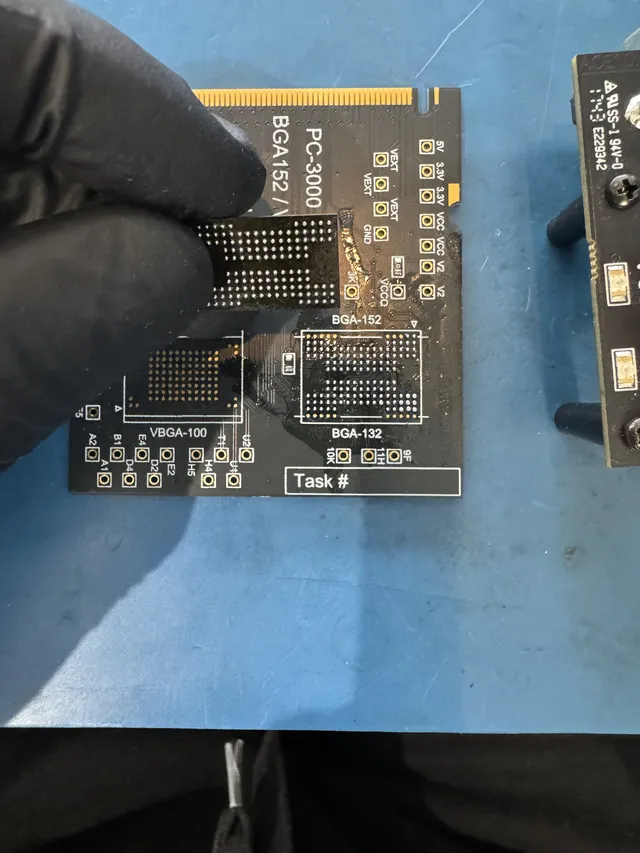
If the card has a separate memory chip, Joe uses controlled hot air to lift it off the board and puts it in a chip reader. A customer's one-piece card held pictures of their dog and wouldn't show up on the computer. That one needed wires.
Joe used CAD drawing software to mark the square where his laser would clear the coating off the contacts. Following a diagram, he soldered fine wires from the contacts to an adapter, joining them with melted metal. His PC-3000 Flash tool could then copy the memory through those wires without using the controller.
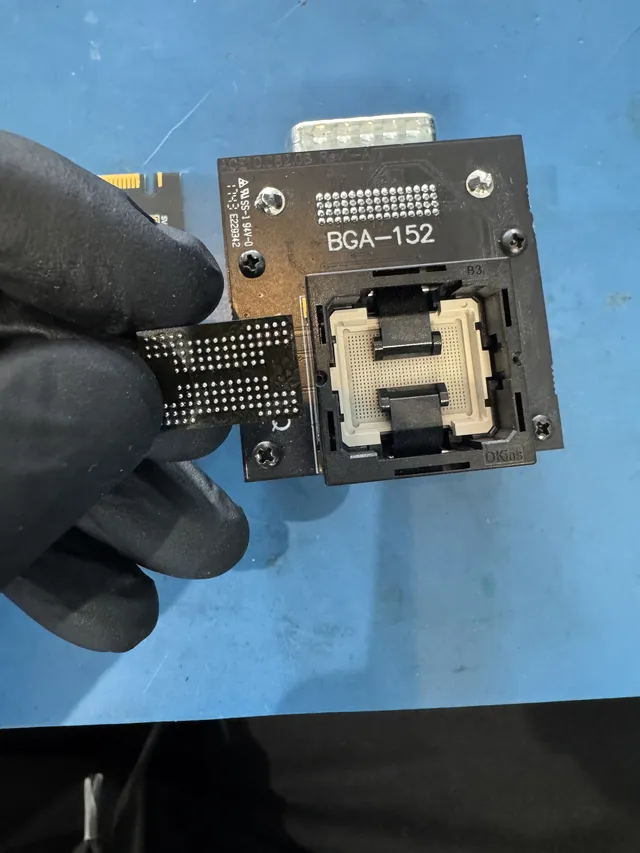
The socket on our Lincroft bench holds memory chips for reading separately from their circuit boards. -
We rebuild the files
The memory gives us pieces of files the way the controller stored them. We correct reading errors, undo the scrambling and put the pieces back in order. Then we rebuild the list of names and folders or recognize each file by the pattern it starts with.
On the card with the dog photos, the first pictures Joe put together still looked garbled. He made one more adjustment to how the pieces fit and got back more than 200 pictures.
-
We return your files
We email you a picture of what we got off the card so you can see the result before paying for recovery, and you get the files on a new drive.
What should I send with the card?
Tuck a note in with the card, even if all you remember is the message on your camera.
- The card, protected from bending
Slip it into a case or a small padded envelope before you put it in the box. That helps keep it from bending in the mail.
- What happened to it
Include the last thing the camera or computer showed you and anything you tried afterward. Knowing that a scan already ran helps us make sense of what we see.
- Which files you'd want back first
If the ceremony is the clip you need, say so. A damaged card can give us only part of a picture, so we check what came back against the files you named.
Which photos can we get back?
The condition of the memory in your own card decides what we can bring back. That's why we don't publish a success rate. The diagnostic lets us tell you what's possible for the pictures you came for.
When photos can survive
- A card no device sees
Your computer can lose contact with the chip that runs the card while the memory still holds your files.
- A quick format
A quick format replaces the card's list of files with an empty one. The photos can remain right where the camera put them until something else is saved there.
Where recovery stops
- A break through the memory chip
If the chip itself has snapped in half, we can't recover the pictures on it. If you're unsure, leave the pieces as they are and send them for a diagnostic without bending them further.
- How a newer card corrects errors
We can't recover files if your card uses LDPC, a kind of error correction built into some newer cards' controllers. The diagnostic tells us if yours fixes reading errors that way.
- Files that were written over
A full format writes over the space that held your pictures. Anything a format or a new recording replaced is gone, so stop using the card now to protect what's left.
What does SD card data recovery cost?
$100 diagnostic, credited toward a successful recovery.
The $100 diagnostic is non-refundable once diagnostics start, and donor drives or replacement parts you approve are non-refundable once ordered, even if recovery fails.
Wiring a one-piece card by hand under a microscope costs more than rebuilding folders on a card that still reads. Once we've examined your card, we can confirm the price for the work it needs.
SD card recovery starts at a lower price than hard drive or solid-state drive recovery. Our guide to data recovery costs explains what goes into the estimate.
- Starting sooner
With standard service, we check your card after a wait of 4 to 6 weeks. Rush gets that check started sooner. Recovery takes extra time depending on what your card needs.
- Ways to pay
You can pay over time with Affirm if you qualify, or pay by card, PayPal or Apple Pay.
| Work needed | Price |
|---|---|
| Flash Drive / SD Card | $299 - $1,750+ |
| File and Folder Problems | $299 - $1,500 |
| Chip Access & Reconstruction | $1,750+ |
| Monolithic Recovery | $1,750+ |
| Service option | Timing | Added cost |
|---|---|---|
| Standard diagnostic | Starts in about 4–6 weeks, then recovery time varies by case | No surcharge |
| Priority | Assessment starts within 5–7 days | +$250 |
| Urgent | Assessment starts within 1–2 days | +$500 |
| Emergency | Assessment starts same-day | +$1,000 |
Our full data recovery price list includes the terms for the diagnostic fee.
How do I get my pictures back?
You can open your recovered pictures straight from the new drive we put them on.
- The drive with your files
You'll receive an external drive or a USB flash drive. Pick it up at the counter if you're local, or have us mail it to you.
- Our backup copy
We keep our backup off the internet and delete it after two weeks, or sooner if you ask. After those two weeks, another recovery costs full price if you bring back the drive we gave you.
- Your original card
The card you brought in or mailed comes home with you too.
- Back up your photos
The day you get the drive, copy the files to two other places. Then you have your photos in three different places if something happens to one copy.
SD and microSD cards we work on
Full-size SD, miniSD and microSD describe a card's physical size, while SD, SDHC and SDXC group cards by how much they can hold.
We have recovery pages for SanDisk and Kingston, and we also work on cards from Samsung, Lexar, Sony, Transcend and PNY.
Where can I find SD card recovery near me?
Our only lab is in Lincroft, New Jersey, where you can hand us your card at the counter. If you'd rather skip the trip, you can mail it to us from anywhere in the contiguous US.
For free shipping both ways in the contiguous US, use our mail-in form to print a UPS 2nd Day Air label and packing slip right away, then put the card in a protective case and tuck the slip into the box.
- Address
- 644 Newman Springs Road, Suite A, Lincroft, NJ 07738
- Hours
- Mon-Fri 10am to 6pm Eastern
- Phone
- (732) 933-7717
Where were the pictures saved?
If you copied the pictures to a drive or saved them on the camera itself, that gives you another place to look. Start with the device that held the copy you want.
A USB stick or an SSD
USB sticks and solid-state drives (SSDs) use the same kind of memory as cards, and each has its own recovery guide.
Photos on a hard drive
A hard drive keeps photos on spinning disks, so our hard drive recovery page and cases show how we work with the tiny parts called heads that read those disks.
What does SD card repair mean?
We can repair a contact or go around the controller when that's what it takes to get your files off the card and onto a new drive.
Files on another device
If you saved the pictures on the phone, camera or computer itself, choose that device in our data recovery services.
Questions about your memory card
Are my Nintendo Switch game saves on the card?
Your game progress stays on the console. The card can hold games you installed, screenshots and video clips. We keep the folders the way the Switch expects them so you can put what we recover onto a replacement card.
Could a card keep my photos for years in a drawer?
Yes, a card can keep pictures for years without power. Age affects how well the memory holds on to them, so it's worth checking the card you found.
Can you take a CompactFlash card from my camera?
Yes, we work on CompactFlash camera cards too.
Can I send a card someone already tried to recover?
Yes, you can send it after a repair attempt or a software scan. Tell us how far it got, even if the only pictures you saw were too garbled to use. Leave the next attempt to us.
SD card recovery guides
Choose the problem you ran into, from photos that disappeared after a shoot to a camera that can't read its card.
Missing photos and videos
Cameras, consoles and card types
Costs and more card guides
Tell us about your card
When you ask for a quote, tell us what happened to your card and which files you miss, even if it's one picture from the whole trip.