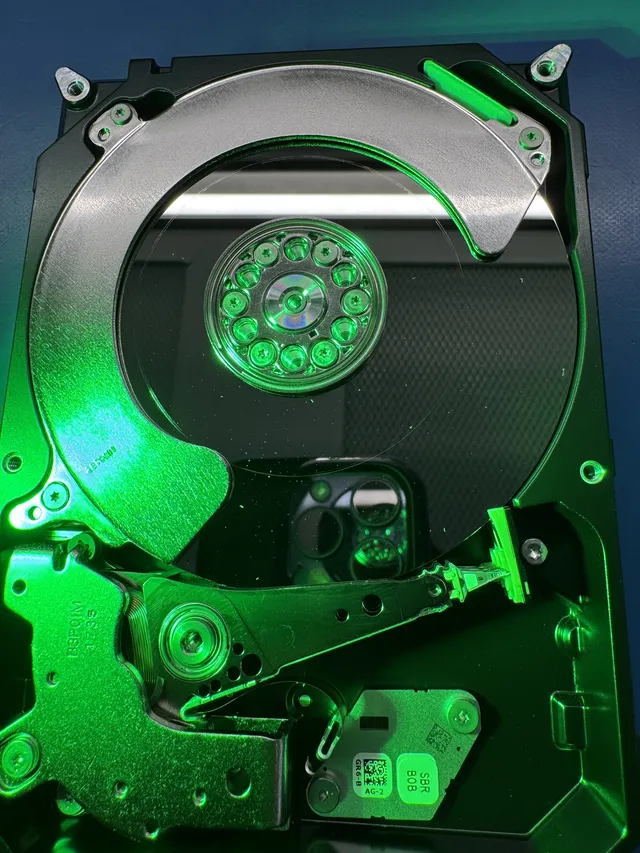
Dropped hard drive data recovery
We can help you get your files back from a dropped hard drive, even if it clicks or no longer shows up on your computer. Unplug it and leave it off for now. The heads inside read your files as the disks spin, and a damaged head can scratch the surface. We recovered more than 3 terabytes of photos and videos from a WD My Passport that clicked after a fall. If your drive stopped working without a fall, our hard drive guide explains what to do first.
Our mail-in form gives you a free shipping label in the contiguous US. Leave an external drive in its case and pad it on every side so it can't shift in the box. You're also welcome to bring it to our counter in Lincroft, New Jersey.
- Since 2014One lab, in Lincroft, New Jersey
- 20,000+ ticketsacross all services since 2014
- 4.6 from 345Google reviews
- $100 diagnosticcredited toward a successful recovery
The people we help
Our customers include people from
-

-

-
 AT&T
-
 Marriott
-

-

-
 Tennessee Titans
-

-

-

-

-

-

-

What to do if you drop your hard drive
Unplug the drive and set it down flat. Once it's off, the most helpful things you can tell us are what happened and which files you need. Our guide to handling a dropped hard drive covers these first steps.
Right after the fall
- Disconnect the cable
Even if you were in the middle of copying files, go ahead and unplug the drive without waiting for the computer to eject it.
- Lay the drive flat
Leave it there with the power off. While the disks are spinning, a damaged head can scrape away the coating that holds your files.
- Make a note of what happened
Write down whether the drive was running when it fell, what you heard afterward and whether anyone has opened it or tried to copy files since.
- Tell us which files matter most
If the only copies of your children's photos are on this drive, tell us. We'll look for those first.
What to avoid
- Don't plug it back in for a quick check
If a head has already left a scratch, debris from that spot can spread the next time the disk spins and scratch an area that's still readable.
- Keep the drive closed
There's so little space between a head and a disk that even a speck of dust or a fingerprint on the surface can lead to a scratch.
- Don't freeze, shake or tap the drive
Putting a drive in the freezer can leave moisture on the disks. If you think something is stuck inside, leave the drive still.
- Skip scans and repair software
A scan keeps damaged heads moving across the disks. If you dropped a laptop, reinstalling its operating system can also write over the files you're trying to save.
Did the fall cause a head crash?
It may have, especially if your hard drive was running. The heads normally float just above the spinning disks. When a head hits the surface, that's a head crash. What you heard after the fall helps us narrow things down before we look inside.
My external hard drive fell while it was running
Even tipping over can be enough for a head to hit a spinning disk. Leave the drive off so a damaged head doesn't scrape more of the surface.
My hard drive was off when it fell
The disks weren't spinning, and the heads were parked to one side. The impact can still bend parts inside, so leave the drive unplugged until we can check it.
Why is my dropped hard drive clicking?
That click can come from the heads trying over and over to find their place on the disks. If you hear it and the drive is still plugged in, disconnect it.
My hard drive buzzes, hums or makes no sound
A head may be stuck against a disk, or the motor may be unable to turn. Leave the drive still and tell us what you remember hearing, even if it was completely quiet.
My dropped hard drive no longer shows up on my computer
The fall may have broken the USB socket where the cable plugs in or the little board behind it. Either can keep the drive from showing up even when the disks are intact.
A WD hard drive that clicked even with replacement heads
A mother's WD10JMVW held photos and videos of her children going back to 2005. Her cat knocked it off a table, and she was told the files were lost. Joe saw no major damage on the disks, but even the heads he fitted from a matching drive clicked without moving off the ramp where they rest.
Joe suspected the pin holding the heads might have bent. He moved her disks and a fresh set of heads into the body of a matching drive. The clicking stopped, and he found about 900 gigabytes. She got almost all her files back, with about 15 gigabytes unreadable.
When a head scratches the disk
We can work around a scratch to copy files from the undamaged areas. Where the head scraped away the coating, though, the data stored in that spot is gone.
One man asked us to recover a lifetime of photos. A scratch had damaged both copies of the files his drive needed to start. Joe tried a replacement disk and new heads, but he couldn't repair either copy or get the photos back.
What can break when a hard drive falls?
A fall can break the USB connection, bend the body of the drive or send a head into a spinning disk. During the diagnostic, we check which parts took the hit and whether the disks are scratched. That tells us what your drive needs and what the work will cost.
| What was damaged | What you may notice | What we do | What we may recover | Price range |
|---|---|---|---|---|
| Damaged heads, intact disks | Clicking after the fall | Fit working heads from a matching drive | All your files if the replacement heads can read the entire disk | $1,500 - $3,000+ |
| Stuck heads or motor | A buzz, a hum or no sound | Free the heads by hand or move the disks to a matching drive with a working motor | Files on the readable surfaces once the disks can spin again | $1,500 - $3,000+ |
| Bent drive body | Clicking even after the heads are replaced | Move your disks and replacement heads into the body of a matching drive | Files the heads can read once the disks are in place | $1,500 - $3,000+ |
| Broken USB socket or board | The drive no longer appears on your computer | Bypass the broken connection or move the chip that holds the drive's settings to a matching board | Files still intact on the disks | Contact for Quote |
| Scratched disks | Clicking and files that won't open | Copy the parts of the disks the scratches missed | Whole files from undamaged areas and partial files where a scratch erased data | $3,000 - $3,500+ |
| Damaged startup files | The drive won't finish starting up | Check both copies of the files the drive needs to start and repair one if possible | Readable files if we can repair a copy. | $1,000 - $1,500 |
How we recover files from a dropped hard drive
If we need to open your drive, we do it in an enclosure that keeps dust out. We examine the heads and disks under a microscope and clean away any fine debris a damaged head left on the surface.
We replace damaged heads with a set from a matching drive. If those heads wear out as we work, we may need a second drive for parts. When the body is bent or the motor won't turn, we can move your disks into the body of a matching drive.
For a broken USB connection, we can wire the drive directly to our equipment. Some WD drives need a lock removed from their internal software after a head change. Once we can read the disks, we copy the drive, skipping unreadable spots, and recover your files from that copy. Our hard drive recovery guide explains each step.
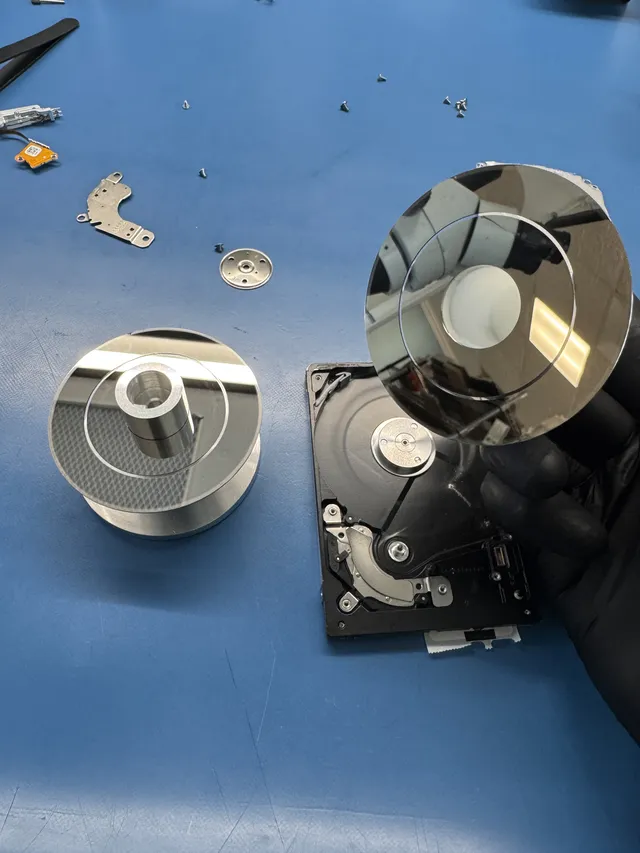
What we recovered from dropped external hard drives
These drives came to us by mail from across the country and in person at our Lincroft counter. Some owners got every file back. Others got files with gaps where part of a disk was unreadable.
A dropped WD20NPVZ from Texas
The owner mailed us this WD in 2023 after a fall left them unable to open a single file. Once we replaced the heads, we could read every file. We copied about 500 gigabytes onto a new drive and mailed it back.
A running hard drive that tipped over in Texas
In 2025 the owner heard clicking after this drive tipped over while it was running. A head had struck one of the disks. With working heads in place, we copied about 450 gigabytes, though unreadable spots left gaps in the files we sent back.
A scratched hard drive from California
This drive arrived by mail in 2026 with dust inside, but only the top surface was scratched. The first set of replacement heads wore out, so we used a second drive for parts. We returned about 100 gigabytes of intact files, including photos and videos.
A WD6400AAVS from Louisiana
The owner mailed us this WD in 2026 when none of the files would open. With replacement heads we recovered about 90 gigabytes intact. We got back about 190 gigabytes more, mostly videos, though parts of those files may be damaged.
A hard drive brought to our Lincroft counter
In 2024 we recovered files for a customer who brought a damaged hard drive to our counter.
Damaged hard drives sent by mail
We've recovered files for people who mailed us physically damaged drives from as far away as Washington.
Which files could I get back from a dropped hard drive?
We may be able to recover every file if the disks are intact. If a disk is scratched, where the scratch landed matters. Once we've examined your drive, we can explain what the damage means for your files. That's why we don't publish a recovery success rate.
Files we may be able to save
- Every file on an intact disk
Sometimes the fall damages only the heads. If working heads can read the disks from beginning to end, we can copy everything on them.
- Files stored away from a scratch
One customer's laptop pulled his hard drive down by its cable. The drive held roughly 1.2 terabytes. We left the scratched surface alone and recovered about 1.1 terabytes from the others.
- Photos, even when the folders are lost
A scratch on one drive destroyed the record of which files belonged in which folders. We still recovered 228 gigabytes and sorted the files by type.
What a repair can't restore
- The part of a file a scratch erased
Once the coating is gone, so is the data written in that spot. A photo that was stored across a scratch may come back with a piece missing.
- Files on a surface the heads can't read
If replacement heads keep wearing out on one surface, we may still be able to read the others. Tell us which files would make a partial recovery worthwhile so we can look for those first.
- The original drive for everyday use
Retire the drive that fell. If we recover your files, you'll get them back on a new drive.
How much does dropped hard drive recovery cost?
$100 diagnostic, credited toward a successful recovery.
The $100 diagnostic is non-refundable once diagnostics start, and donor drives or replacement parts you approve are non-refundable once ordered, even if recovery fails.
If your drive needs replacement heads, the price is $1,500 to $3,000 or more. We confirm your price after the $100 diagnostic, once we've checked the disks for scratches and worked out whether we'll need more than one matching drive for parts. You decide whether to go ahead.
On the price list, firmware is the software inside the drive, and a head swap means replacing the parts that read your files. Platters are the disks themselves. The scratched or contaminated platter rate applies when those surfaces are scratched or dusty.
- Keeping the cost down
Even if you've already tried the drive once, it helps to leave it off now. A damaged head can scratch an intact disk the next time it spins, and recovering files from a scratched disk costs more.
- What you see before you pay
Before you pay for the recovery, we email you photos showing the files we got back. If you qualify, you can pay over time with Affirm.
| Recovery work | Price range |
|---|---|
| Hard Drive - Firmware / Logical | $1,000 - $1,500 |
| Hard Drive - Head Swap | $1,500 - $3,000+ |
| Scratched / Contaminated Platters | $3,000 - $3,500+ |
| Service option | When diagnostics start | Added cost |
|---|---|---|
| Standard diagnostic | Starts in about 4–6 weeks, then recovery time varies by case | No surcharge |
| Priority | Assessment starts within 5–7 days | +$250 |
| Urgent | Assessment starts within 1–2 days | +$500 |
| Emergency | Assessment starts same-day | +$1,000 |
With standard service, the wait before we diagnose your drive is 4 to 6 weeks. Recovery takes extra time depending on the damage. Our full data recovery price list includes rush options for an earlier diagnostic.
Is this the right recovery service for my drive?
If your drive uses spinning disks and it fell or tipped over, we can check it here. For a different device or a failure that didn't involve a fall, browse our data recovery services.
A dropped external hard drive or WD My Passport
Our external hard drive guide covers damage to the case and the USB connection. If yours says My Passport on the label, the WD My Passport guide also covers the electronics inside your drive.
A dropped laptop or MacBook hard drive
If your laptop or MacBook has a spinning hard drive and it was running when the laptop fell, the heads may have hit the disks. A cracked screen alone tells us very little about the drive inside.
A dropped external SSD
If the label says SSD, you have a solid state drive. It stores files on chips and has no heads or spinning disks. Our guide to dropped external SSDs explains what to do next.
The drive was unplugged while copying files
Tell us if the cable came out during a transfer. In one case, a helium drive was disconnected when the computer froze while copying photos. The motor still spun, but the heads wouldn't read. We replaced them, copied the drive and recovered the owner's photos and videos.
A dropped drive from a RAID set
A RAID set is a group of drives that work together as one. Let us know if the drive that fell belonged to a set. We use all the drives in it to put your files back together.
Find your hard drive by brand
Look for the maker's name on your drive's label, then choose that brand below.
Questions about dropped hard drive recovery
Can you recover data from a dropped hard drive that won't show up?
Yes, if we can get the disks reading again. A broken USB connection or a damaged head can keep the drive from showing up even when the files are intact. Once we've checked yours, we can tell you what it needs and what we think we can recover.
What if I already plugged my hard drive in after the fall?
If it's still plugged in, unplug it now. Tell us what you remember about how long it ran and what you saw or heard. You don't need to start it again to give us a better description.
Can you take another look if I've been told my dropped hard drive is unrecoverable?
Yes. If you know what the first shop tried or what they found inside, tell us. That gives us a place to start when we examine the drive and work out which files may still be readable.
Can a dropped external hard drive be repaired for everyday use?
No. We work on a dropped drive to get it reading long enough to copy your files. Anything we recover goes on a new drive so you can retire the one that fell.
Can I move the disks from a dropped hard drive into a new case myself?
No, leave the drive closed. A fingerprint or a speck of dust on a disk can lead to a scratch where your files are stored. If the body is bent, we can move the disks into a matching drive in an enclosure that keeps dust out.
Help with hard drive noises and missing files
Choose a guide that fits the sound you heard or the message you saw on your screen. If the drive fell, leave it unplugged as you read.
Hard drive noises and failures
Once your photos are back on a drive, make two more copies and keep all three in separate places.
Tell us about your dropped hard drive
When you ask for a quote or fill out the mail-in form, tell us how the drive fell and which files you'd most like back. We'll look for those first and return the files we recover on a new drive.