
Samsung Galaxy repair in Middletown, NJ
We repair Samsung Galaxy S, Note and A phones here in Lincroft. Bring yours in if the screen or back glass is cracked, the battery won't hold a charge, the charging port has worn out or the phone got wet. We also repair the Z Fold and Z Flip. You're welcome to walk in without an appointment. If you'd like us to check for a part before you make the trip, give us your full model name by phone or through the quote form.
Your free estimate tells you what the repair will cost and how long we expect it to take, so you can decide whether to go ahead. If you have a Google Pixel, Motorola, LG or another brand, see our cell phone repair page.
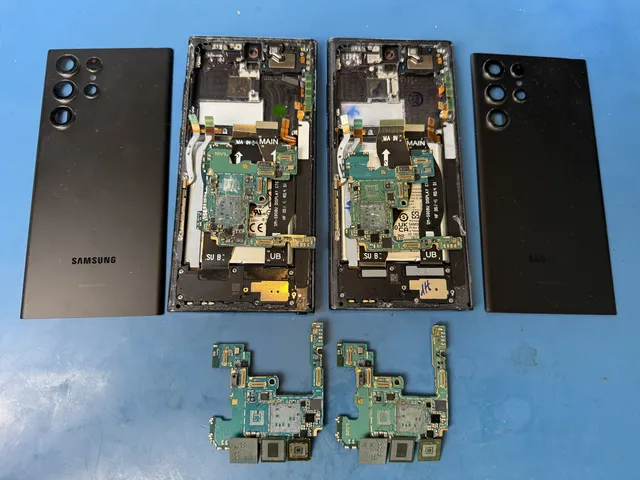
- Walk-ins welcomeOne lab, in Lincroft, New Jersey
- 20,000+ ticketsacross all services since 2014
- 4.6 from 345Google reviews
- Free estimate90 days on every repair
The people we help
Our customers include people from
-

-

-
 AT&T
-
 Marriott
-

-

-
 Tennessee Titans
-

-

-

-

-

-

-

What customers say about our phone repairs
Here's what customers wrote on Google after we worked on their phones and other devices.
Outstanding service. Quick and efficient. I took it to another company first and they said there was nothing they can do. MD Repairs did it with no problem. Will be my go-to company for device repairs.
Had to bring an old android of mine back to life and I know it was no easy task. MDrepairs was the 3rd company I called and the only ones that were able to get the job done. He had to go above and beyond by sourcing parts from a donor phone.
Great service!!! After 3 other companies failed to fix it MDrepairs fixed my water damaged phone with years of photos on it. Worth every penny! Recommend to everyone!
So appreciative of MDRepairs! They not only fixed my phone, but they went above and beyond by backing up all my data and sending it too. Felt confident from the moment I started working with them! HIGHLY recommend!
Common Samsung Galaxy problems
You don't need to know which part broke to ask for a free estimate. Just tell us what your Galaxy is doing and when you first noticed it.
Cracked Galaxy screen, colored lines or no picture
A drop can damage the screen even when the glass looks fine. Green or pink lines may appear later, or a black patch may start to spread. You might find a dead spot where taps no longer work. If the screen responds to taps you didn't make, that's called ghost touch.
If you still hear the phone ring or feel it vibrate while the screen is black, the display may be the only part that's failed. Bring it in soon if the glass is cracked. The edges can cut your fingers, and a crack can spread or let in dust and moisture.
Galaxy battery drains quickly or starts to swell
If your screen or back glass is lifting, stop using the phone. A swollen battery can push the glass up and make your Galaxy rock when you set it on a flat table. Bring it in as it is, without pressing the glass back down or puncturing the battery.
If your Galaxy runs out of power by afternoon or shuts off while it still shows a charge, the battery may be worn. Let us know if the phone has also slowed down or started restarting on its own.
What to do if your Galaxy gets wet
Turn your Galaxy off right away and bring it in as soon as you can. Keep it off the charger and leave the power button alone once it's off.
The IP rating on the box describes how well your Galaxy resists water when it's new. Age, drops and past repairs can weaken that protection.
What water leaves behind can eat into metal on the board that connects the parts inside. That's corrosion. Your Galaxy can feel dry and work for a day or two, then stop charging or die as the damage spreads. Skip the rice. It can't reach the corrosion, and waiting lets it spread.
Galaxy won't turn on or gets stuck on the Samsung logo
A Galaxy that keeps restarting at the Samsung logo is in a boot loop. The cause could be the battery, the parts that charge it, the main circuit board or the phone's software. Any of those problems can also keep a Galaxy from turning on at all. We'll explain what we find in your estimate so you can decide about the repair.
What we can fix on your Samsung Galaxy
We check what's causing the problem before we quote the work. If you have to hold the cable at an angle to get a charge, for instance, we'll check for lint in the port before we suggest replacing it.
| Repair | What you notice | What we do |
|---|---|---|
| Galaxy screen repair | Cracked glass, lines across the screen, taps that don't register, taps you didn't make or no picture | Fit the right screen for your model and test the touch response all the way to the edges, including on curved S and Note screens |
| Samsung battery replacement | An empty battery by afternoon, a phone that shuts off with charge left, or glass lifting at the front or back | Replace the worn or swollen battery with a new one |
| Samsung back glass repair | Cracked glass on the back of the phone or sharp edges where the glass broke | Replace the back glass, then check the cameras and the coil underneath that your Galaxy uses for wireless charging |
| Samsung charging port repair | Slow charging, no charge at all or a cable you have to hold at an angle | Clear out packed lint and replace the port if it's worn and cleaning doesn't solve the problem |
| Samsung water damage repair | A phone that stops charging or goes dark in the days after a spill | Open the phone, inspect the board under a microscope and remove liquid and corrosion. Then repair or replace damaged parts and test the phone. |
| Z Fold repair & Z Flip repair | A broken screen, trouble opening or closing the phone, or a Fold or Flip that won't turn on | Examine your Fold or Flip and explain what it needs and what the repair would cost |
| Cameras, speakers, microphones and buttons | Cloudy or black photos, trouble hearing each other on calls, or buttons that don't respond | Repair or replace the damaged part, including the glass over a camera if it's cracked |
| Moving to a new Galaxy | Your new Galaxy is ready to set up, but your photos, contacts and apps are still on the old phone | Help move your photos, contacts and apps to the new phone with Samsung's Smart Switch |
If you're coming in for a cracked screen and the battery is wearing out too, we can quote both repairs together.
We also work on the main circuit board here in Lincroft. At our bench, we use a microscope to repair the tiny parts that carry power through your Galaxy.
Which Samsung Galaxy models do you repair?
We repair Galaxy S, Note and A phones, the Z Fold and Z Flip, and Galaxy Tab tablets. If you don't see yours below, tell us the full model name and we'll check whether we can repair it.
Galaxy S series
We've repaired the S25 and S25 Ultra, as well as the standard, Ultra, Plus and FE versions of both the S24 and the S23. Our S22 repairs include the standard model, the Plus and the Ultra.
We've also worked on the S21 and S21 Ultra, along with the standard, FE, Plus and Ultra versions of the S20. Older models we've repaired include the S10, S9, S8, S7, S6 and S5.
Galaxy Note series
We've repaired the Note 20, Note 20 Ultra, Note 10 and Note 10+, as well as older models like the Note 9, Note 5 and Note 4.
Galaxy A series
If you have a Galaxy A, give us the full model name when you get in touch so we can check which part fits.
Galaxy Z Fold and Z Flip
We've repaired the Z Fold 6, Z Flip 6 and Z Flip 7. If you're bringing in a Fold with a screen problem, let us know whether it's the outer screen or the larger one you see when you open the phone.
We'll look at your Fold or Flip before we quote the repair. If a damaged hinge is keeping you from your photos, our guide explains what you can do to get them back.
Galaxy Tab tablets
You can bring a Galaxy Tab tablet to the same Lincroft counter for repair.
How much does Samsung Galaxy screen repair cost?
The price depends on your Galaxy model and what was damaged. When we can see what's wrong, we'll give you a free estimate before you decide whether to fix it.
If we need to open and test your phone to find the problem, a full diagnostic costs $100. You approve and pay for that testing when you drop the phone off. If you go ahead with the repair, the full $100 goes toward the price.
- The screen your Galaxy uses
Your full model name tells us which screen fits. Flat screens, curved S and Note screens, and folding Z Fold screens need different parts. Before you approve, ask which of the three grades your estimate covers. The least expensive makes sense for a carrier trade-in. If you’re keeping your phone, the middle grade saves a little. We recommend OEM, made to the phone maker’s standard.
- What needs testing
If your Galaxy only charges on a wireless pad, the port is a good place to start. A phone that shows no sign of life may need more testing before we know which repair to quote.
- More than one broken part
Mention anything else that stopped working when the screen cracked. If the volume button broke in the same fall, we can put both repairs on one estimate.
For a repair estimate, send us your Galaxy model and a description of the problem through our online quote form.
How Samsung cell phone repair works at our counter
When you bring your Galaxy in, we'll explain what needs fixing and what it will cost. You choose the work you'd like us to do, and we test the phone before you take it home.
Do I need Galaxy repair or data recovery?
If you want to use your Galaxy for calls and apps again, ask for a repair. If it died or got wet and what matters most is getting your photos back, ask for data recovery. Let us know if those are your only copies before you decide whether to repair the phone.
Your repair in five steps
-
You bring in your Galaxy
Tell us the full model name, what happened and what the phone does now. If a green line appeared after you dropped it, knowing about the fall helps us understand what you're seeing.
-
We give you an estimate
When the problem is clear, we can give you a free estimate for the repair. If we need to open the phone for testing, we'll explain the cost of a full diagnostic and ask for your approval first.
-
You decide on the repair
You'll see the work we recommend and the price in writing. You choose which repairs, if any, you'd like us to make.
-
We make the repair
We do the work you approved at our Lincroft bench. If we find anything that would change the estimate, we'll talk it over with you before we go any further.
-
We test your Galaxy before pickup
We check the cameras, plug in a charger and test taps all the way to the edges of the screen, including any curved glass. On a Z Fold or Z Flip, we also check how the phone opens and closes. Our warranty covers every repair for 90 days.
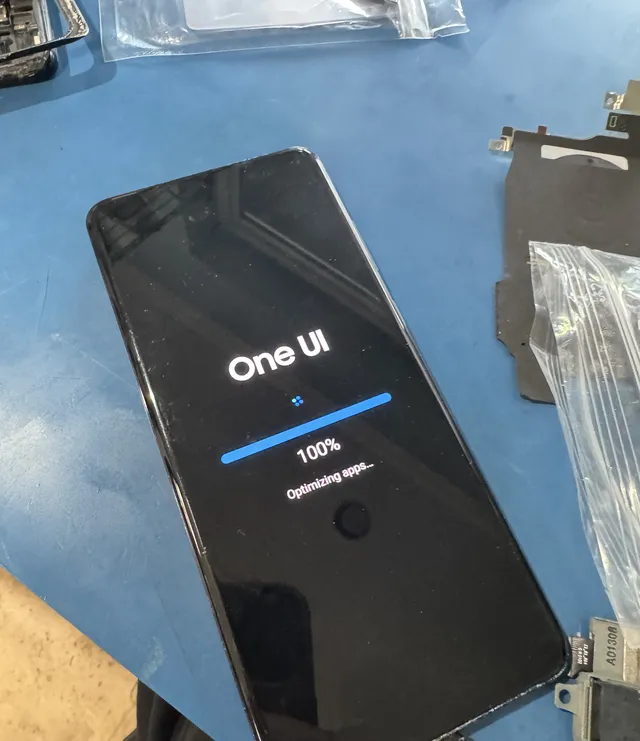
On the bench at our Lincroft lab, the phone's startup screen reads "Optimizing apps".
Before you bring your Galaxy in
If your Galaxy got wet, leave it off. You can tell us what happened without turning it on to show us.
- Back up a working Galaxy
If the phone still turns on and it's safe to use, back up what you can before your visit using Samsung Cloud, Smart Switch or your Google account.
- Be ready to unlock the phone yourself
We may ask you to unlock your Galaxy at the counter so we can test it. Make sure you know your PIN or pattern and your Samsung or Google account password. Leave those details out of your quote message.
- Bring your cable and charger
If you're having trouble charging, bring the cable and charger you use at home. A frayed cord or a weak charger can make it seem like the port is broken.
- Tell us how the trouble started
A drop, a spill or swelling is worth mentioning even if the phone kept working for a while. If someone has already opened it, tell us what they tried.
Is it worth repairing my Samsung Galaxy?
It can be worth fixing a Galaxy you like, especially if just one part needs work. We'd weigh the estimate against the price of a replacement, consider the age of the phone and ask whether your photos are backed up. If we'd put the money toward another phone, we'll tell you.
When a repair makes sense
- Your Galaxy still works well for you
If the phone still gets updates and does what you need, it can be worth repairing a cracked curved screen, replacing a tired battery or fixing the charging port.
- The battery is the only problem
If the rest of the phone works well, a new battery lets you keep using your Galaxy with your number, apps and photos right where you want them.
When we'd consider other options
- An older Galaxy needs major work
Check whether Samsung still sends security updates for your model. If those have ended and the phone needs a major repair, we'd put that money toward replacing it.
- Several repairs add up
If the repairs come close to what your Galaxy is worth, we'd consider replacing it. That may be an easier decision if you were already thinking about an upgrade.
- Your photos matter most
Data recovery is our main work. If your Galaxy won't turn on and it holds photos you never backed up, ask us about Samsung Galaxy data recovery. We can help you get those pictures back.
Where can I bring my Galaxy for repair?
Our only shop is in Lincroft, part of Middletown Township here in Monmouth County.
We take Galaxy repairs in person only, and you're welcome to walk in whenever we're open.
- Address
- 644 Newman Springs Road, Suite A, Lincroft, NJ 07738
- Hours
- Mon-Fri 10am to 6pm Eastern
- Phone
- (732) 933-7717
Other repairs at our Lincroft shop
iPhone repair and phone data recovery
We also repair iPhones here. If what you need is photos or files from a phone that won't turn on, we can help with data recovery.
iPhone repair
Find your iPhone model and see which problems we can fix for you.
Getting photos and files off a Galaxy
For photos still on a Galaxy, start with the Samsung Galaxy data recovery page. If the files are on an iPhone or another phone, choose the recovery page for that device.
Questions about Samsung Galaxy repair
Will I lose my photos if you repair my Galaxy?
Your photos and other files stay on your Galaxy during a standard screen or battery repair. Back it up first if you can use it safely, and tell us before we start if the phone holds the only copies of any pictures.
How long does a Galaxy repair take?
We'll tell you how long we expect the repair to take when we give you the estimate. The timing depends on your Galaxy model, what's wrong and which part it needs.
Do I need an appointment for Galaxy repair?
No, you can walk in any time we're open. If you give us your full Galaxy model ahead of time by phone or through the quote form, we can get the right part ready for your visit.
Samsung Galaxy data recovery guides from our lab
If a cracked screen, water damage or a broken hinge is keeping you from your photos, our guides explain what you can do next.
Broken, wet or newer Galaxies
Folding Galaxies and dead phones
You'll find more guides to getting photos and files off broken devices on the MDrepairs data recovery blog.
Tell us what's happening with your Galaxy
Call, send the quote form or come see us in Lincroft. Your model and what you've noticed are enough for us to start a free repair estimate.