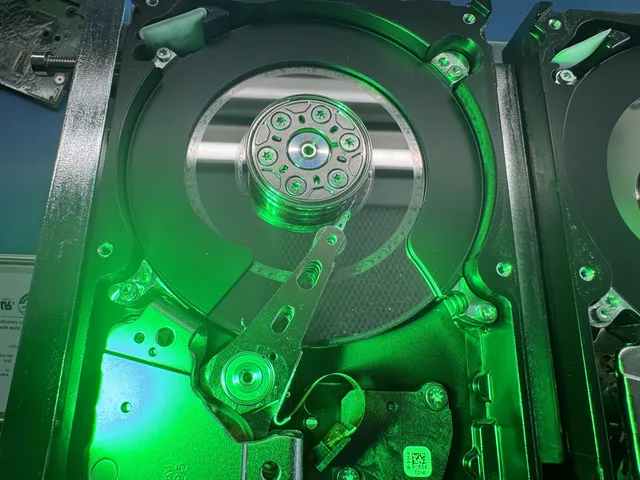
Scratched platter data recovery
With scratched platter data recovery, we can save photos and documents by reading the undamaged areas of the platters (the disks inside your drive), though we can't bring everything back. Switch the drive off now if it grinds, scrapes or clicks. If you're unsure what caused the noise, our guide to failing hard drives covers the other reasons a drive can stop reading.
The MDrepairs mail-in form gives you a free shipping label if you're sending your drive from the contiguous US, or you can bring it to our counter in Lincroft, New Jersey.
- Since 2014One lab, in Lincroft, New Jersey
- 20,000+ ticketsacross all services since 2014
- 4.6 from 345Google reviews
- $100 diagnosticcredited toward a successful recovery
The people we help
Our customers include people from
-

-

-
 AT&T
-
 Marriott
-

-

-
 Tennessee Titans
-

-

-

-

-

-

-

What to do when your drive grinds
A scratched disk sheds dust as its coating comes off. Stop the drive from spinning so its heads, the tiny tips that read your files, can't drag that dust across a clean spot and scratch it too.
Do this now
- Switch it off and unplug it
Leave it disconnected so the damaged parts stay still while you decide what to do about your files.
- Cushion the drive in a box
Use enough padding to keep the drive from sliding around or bumping the sides on its way to us.
- List the files you want back
Include what happened and anything you've tried. Name the photos or documents you'd miss, and we'll look for those first.
What to avoid
- Don't reconnect it for another listen
Tell us what you remember hearing. Trying to get the same sound again sends the heads right back through the dust.
- Leave the cover on
Opening the drive lets dust in. Trying to wipe a disk can leave fingerprints, and either can lead to more scratches.
- Skip recovery scans and repair commands
A recovery program sends the heads across the damage again. So do repair commands such as CHKDSK on Windows and First Aid on a Mac.
- Skip the freezer and board swaps
Freezing can leave water inside. Tapping, shaking or swapping the board that holds the electronics can't put the missing coating back.
How we read around the scratch
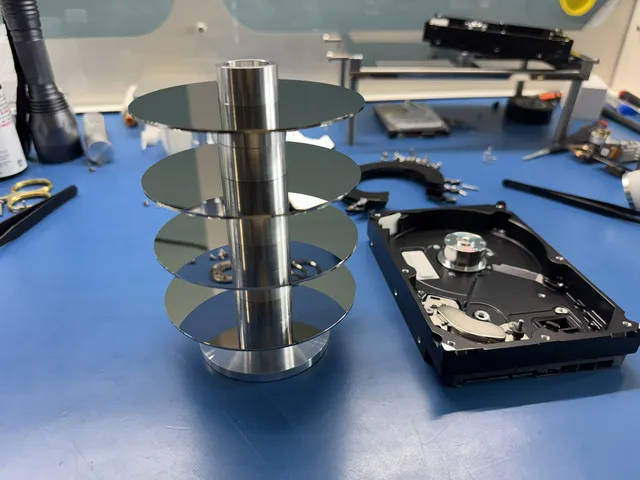
We open your drive in a dust-free enclosure at our bench and check the heads and disks under a microscope. On a Seagate from Alaska, dust covered every disk, so we lifted them out, cleaned each surface and fitted matching heads. We need working heads to read your files, and a damaged surface can wear them out.
If part of a surface is still readable, we read forward and stop at the edge of the scratch. From the far side of that same surface, we read backward until we reach the other edge. We stop there, too. One touch and that new head stops working for good.
If a whole surface is too scratched to read, we cut off the head that would touch it. We change the drive's start-up software, called firmware, so it runs without that head. Then we can copy as much as possible from every clean surface. Our hard drive recovery steps cover the rest of the job.
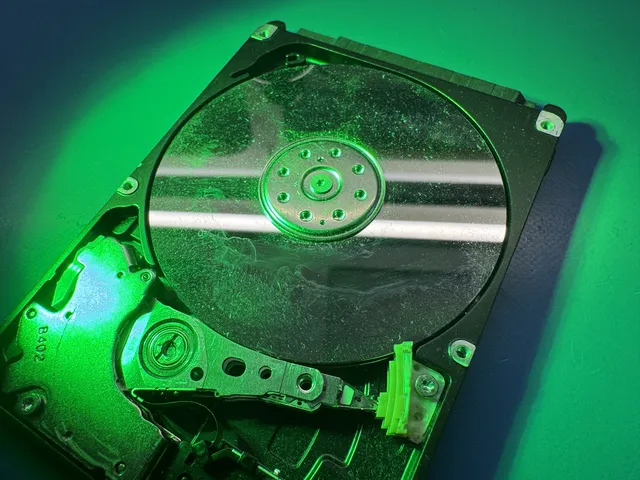
What a scratched disk looks like
Where a scratch landed can matter more than how big it is. Only when we open the drive can we see what kind of mark it left and what that means for getting your files back.
| What we find | What it means | What we do | Possible recovery | Price |
|---|---|---|---|---|
| Dust without deep scratches | Loose dust can scratch areas that still hold files | Clean each surface and fit replacement heads | Files on surfaces we can read once the dust is gone | $3,000 - $3,500+ |
| Fine scratches on one surface | Small marks can wear out a head before it finishes reading | Replace worn heads and read only the areas the scratches missed | Files on surfaces the replacement heads can still read | $3,000 - $3,500+ |
| Scratch across part of a surface | A head can't cross the mark to reach files on the far side | Approach the mark from both directions | Files from either side of the scratch and from the other readable surfaces | $3,000 - $3,500+ |
| One surface scratched beyond reading | The drive can no longer reach files on that side | Remove that surface's head and set the drive to skip it | Files from the other readable surfaces only | $3,000 - $3,500+ |
| Scratch over the drive's start-up files | The drive needs those files to read even the clean disks | Try to repair the files the drive needs to start | Nothing if those start-up files can't be repaired | $3,000 - $3,500+ |
| Clean disks with failed heads Clicking Hard Drive Data Recovery | The drive can click even when the disks holding your files are intact | Swap the failed heads for matching ones | Files on disks the new heads can read | $1,500 - $3,000+ |
On an external drive that fell, skipping the scratched top surface let us save about 1.1 terabytes from the rest.
What a partial recovery can give you
What we can save depends on where the scratch landed and how badly your disks are damaged, so we don't publish a success rate. After the $100 diagnostic, we'll explain what looks readable before you decide whether to go ahead.
What we can bring back
- Files on untouched surfaces
If your pictures are on a side we can still read, we can copy them even when the other side of that disk is badly scratched.
- Part of an album or project
Part of an album can be worth getting back if it holds the pictures you have of your dad. The same goes for the documents you saved for a project.
- Photos together, without their old folders
If the scratch takes the map of your file names and folders, we group what we save by type, like photos with photos. That's how 228 gigabytes came back from a dropped drive.
- Files with a piece missing
If we can recover a file that ran across a scratch, we'll send it to you even if part of it is damaged.
Where the reading stops
- The data in the scratch itself
Where a head scrapes off the magnetic coating that holds your files, it takes that piece of the recording with it. We can check the areas around the mark for you.
- A disk surface worn bare
A drive left grinding can wear away an entire surface. Switch yours off now so a damaged head can't keep cutting into the coating.
- A surface no replacement head can read
Even heads that match your drive can keep failing on the same spot. If any parts have already been tried, tell us which ones when you ask us to check yours.
- A glass disk broken into pieces
After a hard fall, let us check the disks before you write off your photos. If the glass has shattered, we can't get files off those pieces.
How disks get scratched and what you might hear
A knock while the disks spin can leave a scratch. So can a head that keeps rubbing as it fails, or dust and fingerprints that get inside an opened drive.
My drive grinds or scrapes
Switch it off at the first scrape. It can be the sound of a head rubbing a disk, as our guide to grinding noises explains.
It fell while it was running
If a head hits the spinning disk during a fall, that's a head crash. Switch the drive off right away and let us check whether it left a mark.
On a drive that clicked after a fall, the scratch was right where the drive kept its start-up files. Both copies were beyond repair, so even the clean surfaces were out of reach and we couldn't recover the owner's photos.
Someone opened my drive
If you've already lifted the cover, you can still send us the drive. Include every part that came out and tell us which surfaces were touched or wiped so we know where to look for dust or fingerprints.
Can I tell from the outside?
You can't tell from the sound or the case. A drive that spins without showing up, clicks and shuts off, or takes ages to open a file can have a different fault. We open yours at the bench and use a microscope and a green light to see whether there's a scratch.
Scratched drives we've worked on
We've been able to recover data from a scratched hard drive even with dust on every disk. Here's what we found on the bench, what we tried and what each owner got back.
External drive plugged into a laptop
This drive held roughly 1.2 terabytes when it fell as its owner moved the laptop. We cleaned off the dust and removed the replacement head for the scratched top surface, saving about 1.1 terabytes from the others.
Western Digital WD20SDRW with a game project
We found fine scratches on the top disk. After we replaced the failed heads and restored a saved map of where the drive had stored its data, only 28 megabytes were unreadable.
Western Digital WD10TMVV from New Jersey
The top disk was deeply scratched, with finer marks on the other disks. We switched off the replacement head for that top surface and read the others, getting about 10 gigabytes back, including files with damaged sections.
Buzzing external drive from Brooklyn
A scratch crossed the middle of the top disk, so we copied the other surfaces first. On the top disk the heads gave out at the scratch from either direction, leaving the owner with about 580 gigabytes from the undamaged surfaces.
Seagate ST2000LM007 from Alaska
Inside this beeping drive, the heads were stuck and dust from scratches at the edges had spread to every disk. After we took the disks out, cleaned each one and replaced the heads several times, the owner got about 230 gigabytes back, including some files with errors.
WD WDBYVG0020BBK from Florida
This drive fell while it was running, and parts of the disks were too damaged to read. We started with the files the owner had marked as important and got some of the data back by replacing the heads as they wore out.
WD My Passport WD50NDZW
A customer in Texas saw a message saying the drive couldn't be read after it fell. We copied about 3 terabytes with the working heads, but one badly damaged surface stayed unreadable even with replacements.
External drive brought to our Lincroft counter
In 2023 the owner handed us a drive with marks where failing heads had rubbed the disks. We set those spots aside as possibly unreadable and copied the rest onto a new external drive that the owner picked up at the counter.
What does it cost to recover a scratched drive?
$100 diagnostic, credited toward a successful recovery.
The $100 diagnostic is non-refundable once diagnostics start, and donor drives or replacement parts you approve are non-refundable once ordered, even if recovery fails.
We can confirm the price once we've examined your drive. It comes down to the number of scratched surfaces, the work it takes to read around them, and the replacement heads and matching drives we need for parts.
- If the disks turn out clean
If only the heads have failed, we quote the head swap price for fitting replacements.
- If little or nothing comes back
Before paying for recovery, browse your report's folders to see which files came back and which may be partly or fully damaged. If nothing comes back, there's no recovery charge. You cover approved parts. Financing.
| Work needed | Price |
|---|---|
| Scratched / Contaminated Platters | $3,000 - $3,500+ |
| Hard Drive - Head Swap | $1,500 - $3,000+ |
| Rush option | Assessment starts | Added cost |
|---|---|---|
| Standard diagnostic | Starts in about 4–6 weeks, then recovery time varies by case | No surcharge |
| Priority | Assessment starts within 5–7 days | +$250 |
| Urgent | Assessment starts within 1–2 days | +$500 |
| Emergency | Assessment starts same-day | +$1,000 |
Our full data recovery price list also explains how the diagnostic fee works. The standard wait for that check is 4 to 6 weeks. Recovery takes extra time, and mechanical repairs that need matching parts take the longest.
Could something else have failed?
Scratches are one reason a hard drive can stop reading. Choose the problem you've noticed, or find recovery services for another kind of device.
My drive keeps clicking
Clicking points to a failing head, even when the disk is clean. Our clicking drive guide explains the sound, and the case of the stalled external drive shows how replacing its heads brought back over 800 gigabytes.
My drive beeps without spinning
A drive that beeps without spinning can have heads stuck against a disk. They can leave scratches there. Our beeping drive guide explains what to do about that sound.
My drive took a fall
If a fall damages the body that holds the disks, we can move them into a matching drive, the repair we used after a cat knocked a drive off a table.
My computer can't find the drive
A drive that disappears can have clean disks. See why a drive isn't detected, or choose the guide for an external drive that plugs in or a RAID set, where drives work together to store your files.
Look up your drive by brand
If the label says Toshiba or LaCie, you can start there even if you're unsure what failed. Each maker's guide covers the parts and repairs for its drives.
Questions about your scratched drive
Can you recover data from a scratched platter?
Yes, but only in part. Where the scratch landed makes a difference. If a picture is on a clean part the drive can still reach, that's a picture we can copy.
Another company said my drive can't be recovered. Is it worth sending?
It can be worth another look. After earlier attempts, we saved 228 gigabytes from a drive that had been called unrecoverable and about 1.1 terabytes from an external drive that fell. We couldn't recover a different owner's photos because the start-up files were beyond repair. The diagnostic tells us what we can try for yours.
How long does recovery take for a drive with scratched platters?
With standard service, it's 4 to 6 weeks before we start checking your drive. The recovery takes extra time, especially if the disk wears out the heads we're reading with and we have to find matching replacements. With a rush option we can begin examining your drive sooner.
Can I use my scratched hard drive again after recovery?
No. The repair is only to get your files off the scratched disks and onto a new drive. Make that new drive one of three places you keep them.
More help with a failing hard drive
For a noise after a fall, start with the guide to scratched disks. For a missing file or a message you don't recognize, choose the guide for that problem.
Scratched and failing drives
Hard drives can quit without warning. Keeping your pictures and documents in three different places means a failed drive won't take your only copy with it.
Tell us what you want to save
When you call or ask for a quote, tell us what happened to your drive and which files you need. Any files we save come back to you on a new USB stick or external drive.