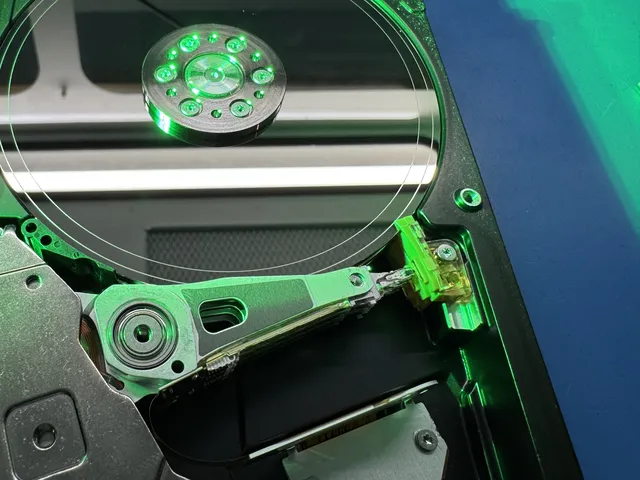
Seagate data recovery
Seagate data recovery is possible even if your drive clicks or shows 0 GB, because a failed part can keep it from reading photos that are still there. Turn it off and leave it unplugged while you read what to do with a failing hard drive, including which tests to skip.
You can mail us your Seagate whether it's a portable drive or one from inside a computer. The shipping label is free in the contiguous US. You can also drop yours off in Lincroft, New Jersey.
- Since 2014One lab, in Lincroft, New Jersey
- 20,000+ ticketsacross all services since 2014
- 4.6 from 345Google reviews
- $100 diagnosticcredited toward a successful recovery
The people we help
Our customers include people from
-

-

-
 AT&T
-
 Marriott
-

-

-
 Tennessee Titans
-

-

-

-

-

-

-

Which Seagate drive do you have?
Check the label for the name or a model number starting with ST. That tells us what's inside and what belongs together, like a portable in its case, a drive with its original board or the whole set from a storage box.
| Seagate line | What you have | What matters inside | What to send |
|---|---|---|---|
| Seagate Backup Plus, Expansion, One Touch External Hard Drive Data Recovery | A 2.5-inch drive such as ST2000LM007 in a small USB case like the Backup Plus Slim | Knocks can hurt slim models called Rosewood. The board behind the case's USB port can fail separately. | Your portable still in its case, along with its cable |
| Seagate BarraCuda desktop drives | A 3.5-inch drive in a desktop computer or external case, like ST2000DM001 or ST4000DM004 | Newer disks have tracks that overlap like shingles, so the drive's software needs a more detailed map. | The drive from the computer, or the complete external drive with its power adapter |
| Barracuda 7200.11 and 7200.12 | An older 3.5-inch desktop drive with a model number ending in AS, like ST3500320AS or ST31000528AS | Faulty start-up software (firmware) can keep the 7200.11 busy while your files stay on its disks. | The drive as it is, without another test spin |
| Seagate IronWolf and IronWolf Pro RAID Data Recovery | A drive from a network storage box (NAS) where your files span a set of drives | We rebuild the set from a separate copy of each drive. This work is by quote. | Every drive, marked with its position in the box if you know it |
| Seagate Exos and enterprise drives Helium drive whose heads wouldn't start | A drive built for businesses and data centers, like the 8 TB enterprise model ST8000NM0045 | More disks and reading arms (heads) than a desktop drive. Some models have helium sealed inside. | The drive itself |
| Seagate SkyHawk | A drive inside a DVR or NVR, the box that records footage from your security cameras | We rebuild the recorder's video format from a copy. Only footage it hasn't recorded over remains. | The drive or drives from the recorder |
| Seagate FireCuda and Seagate SSDs Recovery for solid-state drivesNVMe SSD recovery | A hybrid with disks and a chip for temporary storage, or a solid-state drive (SSD) | On SSDs, including NVMe models, a control chip reads your files from memory chips. There's no spinning disk. | The drive, switched off |
Look for the ST number from your drive's label among the Seagate drives we've recovered.
What's your Seagate doing?
If your drive disappears from your computer, the trouble could be in its reading arms, circuit board, start-up software or USB case. We start with a $100 diagnostic to find out what failed.
Why is my Seagate hard drive clicking?
Turn it off when the clicking starts and leave it off. Each click is another failed try by the reading heads to get started. A recovery scan would put those same parts back to work.
Why is my Seagate beeping?
A beep without any spin means the motor is trying to turn the disks. A head can be stuck to a disk, or the motor itself can be jammed. Turn it off. Don't shake it, tap it or put it in the freezer. We have a guide for a Seagate Expansion that beeps.
We got about 680 GB of pictures, documents and other files off an external drive that started beeping after its owner unplugged it while it was reading.
I dropped my Seagate
Keep it still and unplugged. A short fall can leave a head torn off and stuck to a disk, as we found in the ST5000LM000 inside a Backup Plus after a cat knocked it off a table.
My computer can't find my external Seagate
The little board inside the case can fail even with the light on. We take the drive out to check it directly for trouble with its own board, motor or heads. Leave it unplugged for now. Recovery software needs the computer to see the drive first.
Our guides walk through a Backup Plus Slim that goes undetected, a Seagate that won't show up on a Mac, and a drive whose light comes on but whose files never appear.
Is your Seagate busy or showing 0 GB?
Busy means the disks spin but your computer never gets an answer. A drive that reports the wrong total size can have the same start-up fault, with your files still in place. Leave it off. A computer program can't fix this, so we work directly on the drive's firmware.
It won't spin or it smells burnt
If the drive stopped spinning after a power surge, the wrong adapter or a spark of static, its circuit board is where we'd look. A burnt smell or a scorch mark is a clue. Keep the original board, burnt spots and all, and leave any spare board off the drive.
I deleted files or formatted the drive
Stop using the drive, even if the next thing you meant to install was a recovery program. A quick format clears the file list, and deleting a photo frees up its spot. Until something new is written there, we can look for the photo itself on a copy.
How we repair Seagate firmware
To start up, your Seagate reads a chip on its circuit board, then a reserved part of the disks called the system area. Together they hold its firmware, including the map that locates your files (the translator), a list of bad spots to skip and factory settings for its heads and disks that no other drive can supply.
A built-in connection called the diagnostic port lets our PC-3000 recovery system reach the system area. We back up its files before changing anything and can rebuild the map from copies the drive keeps there. A damaged activity log can leave an older 7200.11 stuck busy until we clear it through that port.
After a cat toppled a Backup Plus during a photo transfer, another company tried to help. Inside the ST5000LM000, Joe found a head stuck to a disk, fitted replacements and backed up its start-up files. When both copies of the temporary cache file failed, he loaded his backups of the cache and file map into the drive's working memory.
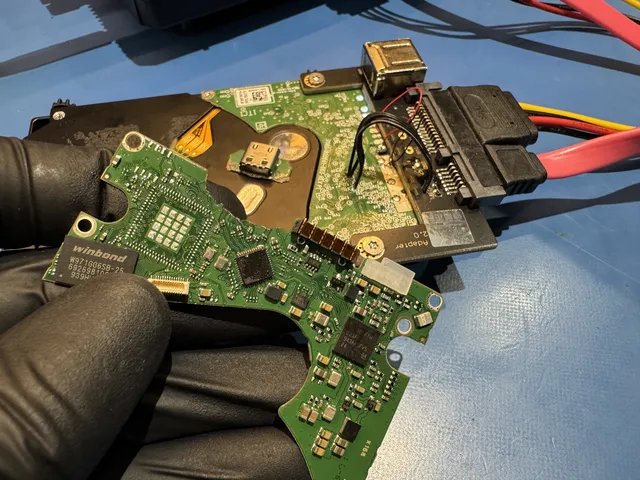
Seagate hard drive recovery when a part breaks
We try to keep your Seagate reading long enough to copy your files onto a new drive, as our hard drive recovery steps explain.
Finding heads that match your Seagate
Among the drives we keep for parts, a matching model number is only a start. The generation, the version of the start-up software and the position of each head have to match, too. We fit the replacements at a bench with filtered air to keep dust off the disks.
When one head struggles, we can switch it off in the drive's software and let the working heads go first. We copy those surfaces before returning to the weak one, then look for your files on the copy.
Why keep a burnt Seagate board?
On a modern Seagate, a spare board comes set up for the heads and disks it left the factory with. That's why the burnt original is worth keeping. We can take the settings from the chip on your board and put them on a matching replacement.
Stuck heads or a motor that seized
We magnify the spot where the head touches the disk so we can lift it free. If the motor has seized, we keep the disks lined up in their original order and move the stack into a spare drive whose motor can turn it.
Reading around scratches on Seagate disks
A scratch limits us to a partial recovery, but we can read toward it from opposite directions. If a surface is too scratched to read, we cut off its head and change the drive's software so the replacement heads read only the undamaged surfaces.
What does Seagate data recovery cost?
$100 diagnostic, credited toward a successful recovery.
The $100 diagnostic is non-refundable once diagnostics start, and donor drives or replacement parts you approve are non-refundable once ordered, even if recovery fails.
What broke and how badly it was damaged set the price. A single folder of pictures can take the same head repair to reach as a whole drive of work files. After the $100 diagnostic, we confirm the price with you. Recovery starts when you approve it.
- Which price fits my drive?
Look at “Hard Drive - Firmware / Logical” for a drive that stays busy or was formatted. A click after a fall points us toward “Hard Drive - Head Swap” when we check yours.
- Ways to pay
We take cards, Apple Pay and PayPal, and you can pay over time with Affirm if you qualify.
| Work needed | Recovery price |
|---|---|
| Hard Drive - Firmware / Logical | $1,000 - $1,500 |
| Hard Drive - Head Swap | $1,500 - $3,000+ |
| Scratched / Contaminated Platters | $3,000 - $3,500+ |
| SSD / NVMe Recovery | $1,000 - $2,000+ |
| RAID / Multi-Drive Arrays | Contact for Quote |
| Service option | When checks start | Added cost |
|---|---|---|
| Standard diagnostic | Starts in about 4–6 weeks, then recovery time varies by case | No surcharge |
| Priority | Assessment starts within 5–7 days | +$250 |
| Urgent | Assessment starts within 1–2 days | +$500 |
| Emergency | Assessment starts same-day | +$1,000 |
You can see prices for all our recovery services and read how we work out the cost of a recovery.
Seagate drives we've recovered
We've recovered files from Seagates that clicked or wouldn't turn on.
- Seagate external hard drive, 500 GB ST3500418AS Fire or power surge · Data recovered Mailed from Ohio 2026
- Seagate external hard drive, 500 GB ST3500320AS Deleted or formatted · Data recovered Mailed from Missouri 2026
- Seagate external hard drive, 3 TB ST3000DM001 Hard Drive - Head Swap · Data recovered Mailed from Texas 2026
- Seagate external hard drive, 5 TB ST5000LM000 Data recovered Mailed from Kentucky 2026
- Seagate external hard drive, 2 TB ST2000LM007 Clicking or other noise · Data recovered Mailed from Alaska 2026
- Seagate hard drive, 1 TB ST1000LM035 Stopped working or not detected · Data recovered Mailed from Colorado 2026
- Seagate external hard drive, 2 TB Data recovered Mailed from Washington 2026
- Seagate external hard drive, 1 TB ST31000528AS Clicking or other noise · Data recovered 2026
- Seagate external hard drive, 2 TB ST2000DL003 Fire or power surge · Data recovered Mailed from Tennessee 2026
- Seagate external hard drive, 1 TB ST1000LM038 Stopped working or not detected · Data recovered At our lab's counter in Lincroft 2026
- Seagate external hard drive ST3500410AS Failed or corrupted · Data recovered Mailed from Michigan 2026
- Seagate external hard drive, 2 TB ST2000DM001 Deleted or formatted · Data recovered Mailed from Indiana 2026
- Seagate external hard drive, 1 TB ST1000DM003 Hard Drive - Firmware / Logical · Data recovered Mailed from Ohio 2026
- Seagate external hard drive ST1000LM024 Clicking or other noise · Data recovered Mailed from California 2026
- Seagate BarraCuda, 3 TB ST3000DM001 Clicking or other noise · Data recovered Mailed from Utah 2026
- Seagate external hard drive ST2000DM001 Data recovered Mailed from Alabama 2026
- Seagate external hard drive, 500 GB ST500LM021 Clicking or other noise · Data recovered Mailed from Texas 2026
- Seagate external hard drive ST1000LM024 Stopped working or not detected · Data recovered Mailed from California 2026
- Seagate external hard drive ST2000DL001 Stopped working or not detected · Data recovered Mailed from Colorado 2026
- Seagate external hard drive ST2000DL001 Data recovered Mailed from Virginia 2026
- Seagate external hard drive ST3300622A Clicking or other noise · Data recovered Mailed from Washington 2026
- Seagate external hard drive ST3500418AS Will not turn on or charge · Data recovered Mailed from South Carolina 2026
- Seagate external hard drive ST3160815AS Stopped working or not detected · Data recovered Mailed from Michigan 2026
- Seagate external hard drive ST2000LM003 Dropped or physically damaged · Data recovered Mailed from Texas 2026
- Seagate external hard drive ST9320320AS Stopped working or not detected · Data recovered Mailed from Texas 2026
- Seagate external hard drive ST31000528AS Stopped working or not detected · Data recovered Mailed from New York 2026
- Seagate hard drive, 1 TB Data recovered At our lab's counter in Lincroft 2026
- Seagate external hard drive, 4 TB ST4000DM004 Clicking or other noise · Data recovered Mailed from Virginia 2026
- Seagate external hard drive ST4000LM024 Stopped working or not detected · Data recovered Mailed from Virginia 2026
- Seagate Backup Plus, 1 TB Data recovered At our lab's counter in Lincroft 2025
- Seagate external hard drive, 2 TB ST3200542AS Stopped working or not detected · Data recovered Mailed from Virginia 2025
- Seagate external hard drive ST2000LM007 Data recovered Mailed from Tennessee 2025
- Seagate external hard drive, 4 TB ST4000LM024 Clicking or other noise · Data recovered Mailed from Pennsylvania 2025
- Seagate external hard drive ST1000LM024 Data recovered At our lab's counter in Lincroft 2025
- Seagate external hard drive ST3750630AS Will not turn on or charge · Data recovered Mailed from Colorado 2025
- Seagate hard drive Failed or corrupted · Data recovered Mailed from Massachusetts 2025
- Seagate hard drive ST3320833AS Fire or power surge · Data recovered Mailed from Ohio 2025
- Seagate external hard drive ST1000DM003 Stopped working or not detected · Data recovered Mailed from Pennsylvania 2025
- Seagate external hard drive ST2000LM007 Clicking or other noise · Data recovered Mailed from Indiana 2025
- Seagate external hard drive ST2000DM001 Stopped working or not detected · Data recovered Mailed from Florida 2025
- Seagate external hard drive ST9500420AS Stopped working or not detected · Data recovered Mailed from Virginia 2025
- Seagate external hard drive Failed or corrupted · Data recovered Mailed from Utah 2025
- Seagate hard drive, 3 TB ST3000DM001 Stopped working or not detected · Data recovered Mailed from Kentucky 2025
- Seagate external hard drive ST2000MD001 Will not turn on or charge · Data recovered Mailed from Missouri 2025
- Seagate external hard drive ST2000LM007 Data recovered At our lab's counter in Lincroft 2025
- Seagate hard drive ST3500820AS Stopped working or not detected · Partly recovered Mailed from Tennessee 2025
- Seagate external hard drive, 8 TB ST8000NM0045 Stopped working or not detected · Data recovered Mailed from Tennessee 2024
- Seagate external hard drive Data recovered At our lab's counter in Lincroft 2024
- Seagate hard drive Data recovered At our lab's counter in Lincroft 2024
- Seagate hard drive ST2000LM007 Dropped or physically damaged · Data recovered Mailed from New York 2024
- Seagate external hard drive ST2000DM001 Fire or power surge · Data recovered 2024
These cases come from our ticket system, BenchKey, the shop software we built and run our lab on, with names, contact details and addresses left out. How we publish cases
Does your drive have a different name?
For a different brand, match the name on the label to its own guide. You can also look up a phone or another device in the full list of recovery services.
My drive says LaCie or Maxtor
We have a guide for each of these Seagate brands. A modern LaCie has a Seagate inside the case. If you have an old Maxtor DiamondMax, we'd look for a matching Maxtor to supply the parts.
My drive has another maker's name
If the label says My Passport or My Book, that's a Western Digital. We have pages for those models and for drives marked Toshiba, Hitachi or HGST.
My files are on a Samsung Galaxy
For pictures saved on the phone itself, choose the Galaxy phone recovery service. Reading a phone takes different work from reading a Seagate disk.
Questions about your Seagate drive
Do you publish a success rate for Seagate drives?
We don't publish one. A single number would have to cover everything from readable disks to a disk scratched right where you saved your pictures. That's why we judge recovery case by case. After the diagnostic, we can tell you what's possible for the files on your drive.
Can software fix a Seagate that stays busy or isn't detected?
No, the drive has to answer your computer before a recovery program can read a file. The software that starts the drive runs inside it, beyond that program's reach. Only try recovery software on a healthy drive that shows up and runs quietly. Scanning a failing one can add to the damage.
Guides for Seagate owners
Use the health checks while your Seagate is working normally. If it has already failed, the guides explain what an odd sound or a missing drive can mean.
Check a working drive
Keep the files you care about in three different places. That way, losing a drive doesn't cost you the only copy.
Tell us what happened to your Seagate
When you ask for a free quote, tell us what your Seagate did before it stopped working. We return the files we recover on a new external drive or USB flash drive.