Clicking hard drive data recovery
We may be able to get your photos and other files back from a clicking hard drive. If the heads that read the disks have failed, we can fit a matching set and copy what's still readable. If it's still running, turn it off and leave it unplugged. Another start could let a damaged head scratch the disks. Our hard drive recovery guide covers other symptoms.
You can bring your drive to our counter in Lincroft, New Jersey, or mail it to us. If you're shipping from the contiguous US, use our mail-in form to get a free shipping label.
- Since 2014One lab, in Lincroft, New Jersey
- 20,000+ ticketsacross all services since 2014
- 4.6 from 345Google reviews
- $100 diagnosticcredited toward a successful recovery
The people we help
Our customers include people from
-

-

-
 AT&T
-
 Marriott
-

-

-
 Tennessee Titans
-

-

-

-

-

-

-

My hard drive is clicking. What should I do?
Turn it off, even if you can still open your folders. While the disks are spinning, a damaged head can scratch the area where your files are stored.
What to do now
- Disconnect the power
Unplug the drive if it's external. If it's inside your computer, shut the computer down and leave it off.
- Note when the clicking started
Let us know if the drive fell, took a bump or started clicking for no obvious reason. Include how many times you've turned it back on since then.
- Send the whole drive
For an external drive, include the case and cable. Send a note with it telling us which files matter most to you, even if all you need is one folder of family photos.
What to avoid
- Don't plug it back in to listen
Just describe the sound you remember. Trying it on another computer would still put the drive through another start.
- Skip recovery software and repair tools
Tools like CHKDSK in Windows and First Aid on a Mac ask the drive to do more reading. Software can't fix a damaged head.
- Don't tap, hit or shake the drive
Even a tap can knock a head against a disk. Keep the drive out of the freezer and leave the cover and circuit board in place.
- Hold off on copying files
It's tempting to copy your photos the moment a folder opens. That extra reading puts more strain on the heads, and the drive may stop in the middle of a file.
What causes the click of death in a hard drive?
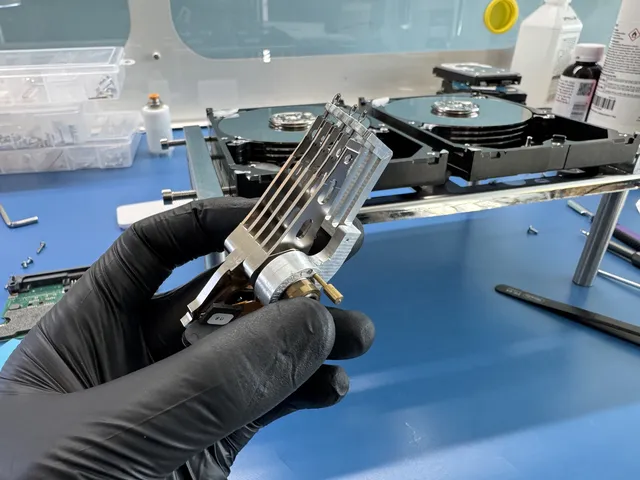
That repeated click can be the drive trying to read the instructions it needs to start. An arm carries the heads from their resting place on a ramp out over the spinning disks, called platters. If the heads can't read those instructions, the arm returns to the ramp and tries again. You hear a click each time.
The rhythm alone doesn't tell us which part failed. Broken heads can even be quiet, so we open the drive and test it to find the cause. Our guide to hard drive clicking noises covers sounds from a steady tick to a few clicks followed by silence.
What can make a hard drive click?
A damaged head, a scratched disk or trouble reading the files the drive needs to start can all cause clicking. We test the drive to find out what work it needs, what that will cost and which files we may be able to copy.
| Cause | What we find | What we do | What we can recover | Price |
|---|---|---|---|---|
| Damaged heads Hitachi family photo recovery | Head tips that look bent or broken under the microscope | Fit heads from a matching drive | Files on the areas the replacement heads can read | $1,500 - $2,250 |
| One weak head | The heads can read all but one disk surface | Copy files with the working heads first, then replace the heads | Files from the readable surfaces, plus anything the new heads can read on the remaining surface | $1,500 - $2,250 |
| Damaged startup files WD head and start-up repairs | The heads work, but the drive can't finish starting up | Save a copy of the startup files, then repair the damaged ones | Files we can read once the drive starts up | $1,000 - $1,500 |
| A fall that may have bent the arm's support WD10JMVW knocked down by a cat | Even with replacement heads, the drive clicks and the heads stay on the ramp | Move the disks and replacement heads into the body of a matching drive | Files the heads can reach if the drive reads again after the move | Contact for Quote |
| A disk scratched while it was spinning Scratched platter data recovery | A scratch on the disk and dust spread through the drive | Try to read around the scratch | Files we can read outside the damaged area | $500 + $2,000 - $3,500+ |
| Failed circuit board | The circuit board on the outside of the drive can't get it ready to read | Move the chip that stores your drive's settings to a matching board | Files the drive can read with its original settings | Contact for Quote |
The repair can involve more than replacing the heads. To get the photos off a My Passport that clicked after a fall, we also had to unlock a chip on its circuit board. A matching set of heads was enough for another clicking WD drive.
How we recover data from a clicking hard drive
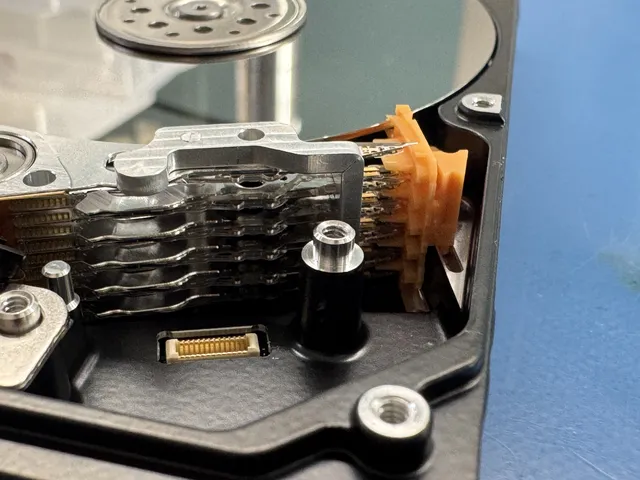
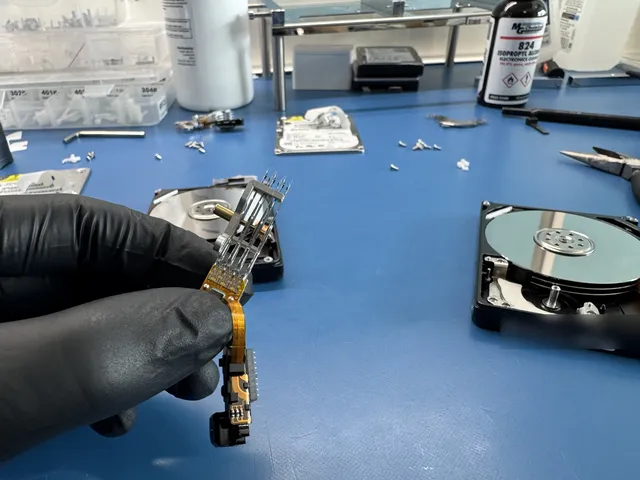
At the bench, we briefly power up the drive to see how the heads move. We open it in a dust-free enclosure and look at the tips under a microscope to see if any are bent or broken. When the heads need replacing, we use a set from a drive that matches your model exactly.
As soon as the drive can read, we save its startup files in case they fail while we're working. If one head is weak, we use the working heads to copy everything they can reach. Once those files are on another drive, we fit replacement heads and try to read the surface the weak head missed.
If a bent support keeps the new heads clicking, we move the disks into the body of a matching drive. We copy whatever we can read to a healthy drive without writing back to the original. On a weak drive, copying alone can take days. Our guide explains how hard drive recovery works.
When did your hard drive start clicking?
Tell us what was happening when you first heard it. Knowing whether the drive fell off a table or started clicking during ordinary use helps us more than knowing how loud it was.
My hard drive started clicking after a fall
Turn the drive off. A fall can damage the heads, bend the support that holds the arm or knock a head against one of the disks.
One drive started clicking when its owner plugged it back in after a fall. We found a scratch where the drive kept its startup files and pieced together a working file from two damaged copies. The drive failed when we tried to write that file back to the disk, so we couldn't recover the owner's photos.
It clicks, then my folders come back
Turn it off even if a folder opens. The drive is still failing and may stop in the middle of a copy. At the bench, we can start with the files the working heads can reach.
My hard drive clicks but doesn't show up
Your computer may stop recognizing the drive if the heads can't read its startup files. Your photos and other files can still be on the disks.
My external hard drive is clicking
Send the drive in its case, along with the cable. There's a spinning hard drive inside, and we may need the circuit board in the case to read your files.
Files we've recovered from clicking hard drives
These drives came to our Lincroft lab after their owners heard clicking or another noise. Here's what we were able to save.
Clicking WD external hard drive (WD10TMVW)
When this WD started clicking, its owner in Arizona lost access to files they couldn't replace. We put in matching heads, copied every file to a new drive and mailed it back.
WD My Passport with one failed head
After some time in storage, this My Passport would spin up and click. Our first set of replacement heads still struggled to read it. With a second set, we copied every file, and the owner checked that the photos were there.
Hitachi HTS545032B9A202
Replacing this Hitachi's failed heads with a matching set got it reading again. A few files came from damaged spots on the disks, so we kept those separate on the new drive. That way the owner knew which files might not open.
Seagate ST3300622A external hard drive
This Seagate kept clicking when we connected it at the bench, and our computer couldn't open it. We took it out of its case and replaced the failed heads with ones from matching drives. That let us copy every file the owner wanted back.
Other hard drives that made noise
We've also recovered files from portable and internal drives made by Toshiba, Hitachi, Seagate and WD after their owners heard clicking or other noises.
What files can you recover from a clicking hard drive?
Photos, videos and other files may still be intact if the disks that hold them escaped damage. We examine the disks during the diagnostic so we can tell you what's possible for your drive.
When files are still readable
- The heads broke but the disks are intact
With matching heads, we copied 200 gigabytes from a clicking Hitachi, including the owner's family photos. We also recovered over 3 terabytes of photos and videos from a WD My Passport.
- Some of the heads still work
Each head reads its own disk surface. We copy what the working heads can reach to another drive before we try for the files on the surface the weak head missed.
- Someone has already worked on the drive
The WD10JMVW that a cat knocked down had already been worked on by the time it reached us. Moving its disks and replacement heads into the body of a matching drive stopped the clicking. The owner got nearly everything back, with about 15 gigabytes still out of reach.
What can limit a recovery
- A scratch where a file is stored
If a scratch wears away part of a photo, that part is lost. Turning the drive off at the first click can keep a damaged head from scratching more of the disk.
- Previous work inside the drive
Earlier repairs can make recovery harder. Let us know what was tried, including any parts someone removed or replaced.
What does head replacement cost for a clicking hard drive?
$100 diagnostic, credited toward a successful recovery.
The $100 diagnostic is non-refundable once diagnostics start, and donor drives or replacement parts you approve are non-refundable once ordered, even if recovery fails.
Head replacement starts at $1,500 and can cost $2,250. We check the heads, the disks and the drive's startup files before we give you an estimate. You decide whether you'd like us to go ahead. Before you pay, we give you a recovery report so you can click through your folders and see which files we recovered and which may be partly or fully damaged.
- What affects the estimate
If only the heads are damaged, we quote you for replacing them. If a head has scratched a disk, the work also includes reading around that scratch. That's another reason to leave a clicking drive off.
- Ways to pay for recovery
You can pay by card or, if you qualify, spread the cost over time with Affirm. Our payment and financing guide explains both options.
| Recovery work | Price |
|---|---|
| Hard Drive - Head Swap | $1,500 - $2,250 |
| Hard Drive - Firmware / Logical | $1,000 - $1,500 |
| Scratched / Contaminated Platters | $500 + $2,000 - $3,500+ |
| Service option | When diagnostics start | Extra charge |
|---|---|---|
| Standard diagnostic | Starts in about 4–6 weeks, then recovery time varies by case | No surcharge |
| Priority | Assessment starts within 5–7 days | +$250 |
| Urgent | Assessment starts within 1–2 days | +$500 |
| Emergency | Assessment starts same-day | +$1,000 |
For prices on other devices, see our full data recovery price list.
What if my hard drive makes a different sound?
If you hear grinding or scraping, turn the drive off right away. We also work on drives that beep without spinning up and on sets of drives where only one clicks. Our full list of data recovery services covers these problems.
My hard drive grinds or scrapes
Grinding means a head is touching a disk, so turn the drive off as soon as you hear it. We can try to read the undamaged surfaces, as we did for an external drive that fell when someone moved the laptop it was plugged into.
My hard drive beeps or buzzes without spinning
A head may be stuck against a disk, or the motor may be unable to turn. Either can keep the drive from spinning up.
One drive in my RAID or NAS clicks
Don't start a rebuild. The drives in a RAID work together, sometimes inside a network storage box called a NAS. A rebuild puts extra strain on every drive and could cause another to fail. We copy each drive separately and use those copies to put the set back together.
Help for your brand of hard drive
Choose the name on your drive to see how we recover files from that brand.
Questions about clicking hard drives
Can you recover data from a clicking hard drive?
Yes, if we can read the areas where your files are stored. Even when the heads have failed, the photos on the disks may still be intact. We check the disks during the diagnostic to see what we may be able to recover.
Is a clicking hard drive dead?
Not necessarily. A broken head can keep the drive from working while your files are still on the disks. We only need to get it reading long enough to copy them to a new drive. Once you have your files back, retire the old drive.
How long does it take to recover a clicking hard drive?
With standard service, the wait is about 4 to 6 weeks before we examine your drive. Rush service shortens that wait. From there, the time we need to recover your files depends on the repairs your drive needs and how well it reads.
More about clicking and failing hard drives
If you're looking up a sound you remember or a message you saw on your screen, these guides cover clicking, drives that disappear from the computer and other signs of failure.
Clicking and other signs of failure
Other hard drive problems and recovery costs
When you have your photos back, keep copies in three different places as part of a 3-2-1 backup.
Talk to us about your clicking hard drive
When you ask for a quote, tell us when the clicking started and which files you want back. You can then mail the drive to us or bring it to our counter in Lincroft. We'll return the files we recover on a USB stick or a new external drive.