Hard Drive Failure: Symptoms, Causes, and What to Do
Our founder and lead technician, Joseph Montanti, handles cases personally.
Hard drive failure can show up as repeated clicking, files that will not read, frequent freezing, slow file access or a disk that disappears from the computer. If the drive still reads steadily and makes its normal sounds, copy the files you need to another device. If it clicks, beeps, grinds or stalls during copies, power it down for recovery. A failed hard drive can have usable recordings left on its platters even though a broken component blocks access.
On this page
Recognize the change in drive behavior
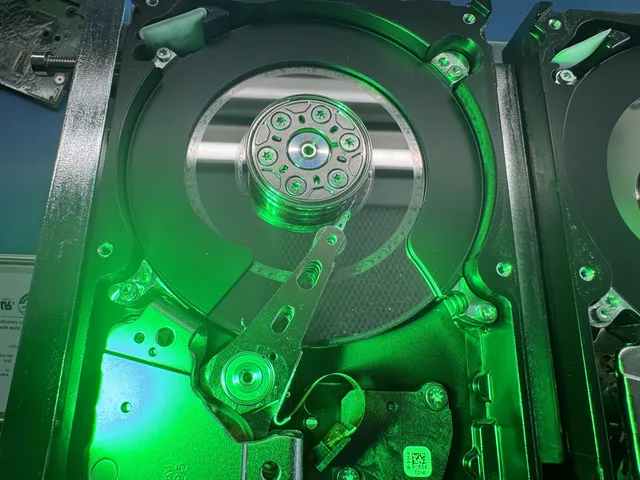
A hard disk drive, or HDD, stores files on rotating magnetic platters. Heads move across those surfaces to read and write. Power circuitry and firmware make that mechanism available to the computer. A problem in any of those parts can interrupt file access, and more than one can fail together.
Frequent freezing and slow file access are common symptoms of a failing hard disk. The computer sends a request and waits while the drive struggles to complete it. You may notice pauses while opening folders, starting Windows or copying a file that used to read normally. Other computer faults can cause slowness too, so pay attention to whether the pauses coincide with access to this disk.
| Symptom | What it suggests | What to do |
|---|---|---|
| New, repetitive hard clicking | The heads are repeatedly trying to read or position without completing normal access. | Leave the drive off. |
| Grinding or scraping | Contact with the recording surfaces may be occurring. | Disconnect power immediately. |
| Beeping during startup | Rotation is stalled or the drive is underpowered. | Keep the drive and its original connection hardware together for recovery. |
| Slow files, freezes or corrupted contents | Read failures, filesystem trouble or connection problems. | Copy while stable; end attempts if reads hang or the disk disconnects. |
| Missing from BIOS or showing the wrong capacity | Connection or internal startup failure. | Use limited connection checks only on an undamaged, stable drive. |
| SMART warning | The device or monitoring software has flagged health information. | Protect readable files before further diagnostics. |
| Excessive heat | Cooling, environment or a device fault needs attention. | Turn it off if unusually hot or unstable; use the model's temperature specification. Check ventilation and the environment after protecting the data. |
File corruption can appear as a photograph with missing blocks, a document that will not open or a video that stops partway through. Damage to the filesystem can hide whole directories even when some file contents remain readable. A missing folder therefore calls for preserving the remaining data before trying to repair the folder structure.
Stop when reading becomes unstable. A clicking, beeping, grinding, dropped or wet drive stays off; repeated hangs or disconnects during copying are also a stop point. Keep the mechanism closed and avoid repeated restarts, freezer tricks, tapping, initialization, formatting or repair utilities on the only copy.
What clicking, beeping and silence mean
The heads normally move rapidly while the platters spin beneath them. A little chatter during access and a parking click at shutdown can be normal. With repeated hard clicking and failed access, the drive is trying to get a usable read and returning the head assembly for another attempt. The click is movement of that assembly; it is not necessarily the head bouncing against the platter on every sound.
A head crash is physical contact between a head and a recording surface. It is one kind of hard drive failure. Scraping can remove the magnetic coating that holds files and leave debris inside the mechanism. Replacement heads can provide a reader, but they cannot restore a recording layer that has been worn away.
Seagate's sound guide separates ordinary access sounds from persistent hard clicking and grinding. Its explanation is useful when an otherwise working drive makes a familiar noise; a new noise accompanied by failed reading is the more serious combination.
Beeping commonly accompanies a spindle that cannot reach speed. The spindle turns the platter stack. A seized rotating assembly can prevent that, and heads stuck to a platter can hold the disks still. That stuck-head condition is called stiction. A USB power problem can also leave too little power for startup, even though an activity light comes on.
Silence sends the investigation toward power delivery and the drive's board as well as the motor. A failed board, wrong adapter or loose connection can prevent startup before any mechanical sound occurs. Keep the original board: some drives need original ROM information or other original components for a replacement board to access the recorded data.
Copy a readable drive before diagnostics
A drive that is slow but still reading steadily gives you a chance to save files. Spend that access on the material you need. Sorting folders, uninstalling software or running a long surface test uses the same drive before the copy is safe.
- Connect a separate destination with enough free space. Begin with documents, photos or other files that have no second copy.
- Copy the files without moving or deleting the originals. If one file returns a read error and the drive remains responsive, skip it and save the accessible material.
- If copies repeatedly hang, the drive vanishes or abnormal sounds begin, end the attempt.
- Open the files on the destination to check them. Keep that copy before attempting filesystem repair or more detailed health tests.
For a stable disk with missing files, a full image or clone preserves the readable contents beyond the folders you can currently open. Recovery software can search that copy. It should save recovered files away from the source, so restoring one file does not overwrite another.
Microsoft's CHKDSK documentation explains which options change the filesystem. Repairs may help make a volume usable after its contents are protected. They are not a first step for recovering the only copy from a failing disk.
Read SMART warnings in context
SMART stands for Self-Monitoring, Analysis and Reporting Technology. It exposes information the drive keeps about its operation. Some fields track errors or replacement sectors; others describe use or temperature. Their meanings and raw-value encoding depend on the manufacturer and model.
For a readable drive whose files are now protected, tools such as CrystalDiskInfo on Windows, DriveDx on Mac or smartctl can display supported health information. Some USB connections do not pass it through, so an unavailable SMART report can be a connection limitation.
- Open the health tool and select the correct disk by model and capacity.
- Read the overall status and the attribute descriptions. Use the maker's interpretation for the particular drive.
- Compare concerning values with any existing earlier report, without starting repeated tests to generate one. New read errors or growing defect counts matter alongside the symptoms you already have.
| Common attribute | Meaning | Useful qualification |
|---|---|---|
| 5: Reallocated Sector Count | Locations replaced with spare storage. | A changing count is more informative than a universal cutoff. |
| 197: Current Pending Sector Count | Unstable sectors awaiting resolution. | Preserve readable files; do not force writes to clear the number. |
| 198: Offline Uncorrectable | Uncorrectable areas found in offline/background work on supporting drives. | Some drives report this differently or share its count with attribute 197. |
| 10: Spin Retry Count | Retries while bringing the spindle up to speed. | Interpret using the specific drive's definition. |
| 7: Seek Error Rate | Information about head-positioning operations. | A large raw number can encode several fields; it is not a universal count of failed seeks. |
Seagate's health documentation explains these model-dependent interpretations. An overall Good or Passed result means the applicable reporting thresholds have not produced that tool's failure status. It does not override a drive that is clicking, dropping out or failing to return files.
Blue screens and missing boot drives
Windows can stop when it loses access to needed disk data, but memory and driver faults can also produce blue screens. The exact error describes what Windows failed to do. It gives a starting point without turning every crash into a failed-disk diagnosis.
| Windows stop code | What Windows reports |
|---|---|
KERNEL_DATA_INPAGE_ERROR (0x7A) | A requested page of kernel data could not be read from the paging file into memory. |
NTFS_FILE_SYSTEM (0x24) | A problem occurred in the driver used to read and write NTFS volumes. |
INACCESSIBLE_BOOT_DEVICE (0x7B) | Windows lost access to its system partition during startup. |
CRITICAL_PROCESS_DIED (0xEF) | An essential system process terminated. |
PAGE_FAULT_IN_NONPAGED_AREA (0x50) | Invalid system memory was referenced. |
“No boot device found” and “Disk boot failure” mean the computer has not found a usable startup path. The disk may still appear in BIOS/UEFI. A missing boot entry and a disk absent from the storage list call for different investigations, so reinstalling Windows is premature when you still need the files.
For an undamaged disk with no abnormal sounds or unstable reads, check accessible SATA data and power connections with the computer shut down and disconnected from power. A known-good data cable or compatible port can separate a connection fault from the drive. Follow Seagate's internal-drive guidance and your computer's handling instructions. A drive that keeps disappearing during use belongs with the stop conditions above.
Repair work and recovery costs
Hard drive repair for recovery aims to make the original recordings readable long enough to copy them. A board repair restores an electronic path. Donor heads replace a failed reading assembly. Firmware work restores access through the drive's own operating information. Some jobs need several of these together.
A logical failure is different: the hardware supplies storage, but deletion, formatting or damaged file structures make the files inaccessible. Recovery software can examine the preserved data for those files. That is the situation in which a computer shop with suitable software may help without opening the mechanism.
| Failure type | Price range | Work involved |
|---|---|---|
| Logical: deleted files or corruption | $1,000 - $1,500 | Reading available data and reconstructing files. |
| Electrical: PCB or board failure | $1,000 - $1,500 | Restoring the original drive's power and communication path. |
| Firmware corruption | $1,000 - $1,500 | Restoring access through internal operating information. |
| Mechanical: heads or motor | $1,500 - $3,000+ | Mechanical work and controlled imaging. |
| Severe platter damage | $2,250 - $3,500+ | Reading surviving areas while dealing with damaged surfaces. |
At MDrepairs the $100 diagnostic is credited toward successful recovery, and recovery work waits for your approval of the estimate. The hard drive recovery cost explanation covers those work categories in more detail.
A drive revived for extraction has already suffered the failure that interrupted access. Once the files are safe, move regular use to reliable replacement storage. A temporary return of access is useful for the recovery; it is not a reason to put the only copy back onto the damaged disk.
A failure with both head and firmware damage
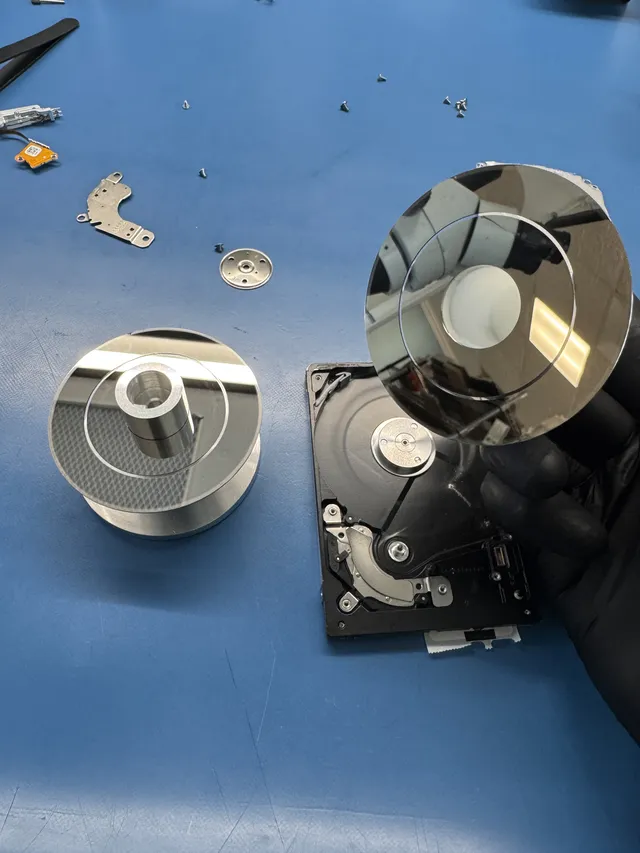
In this Seagate ST5000LM000 recovery, a drop left mangled heads and a detached head on a platter. Joe removed that piece, cleaned the surfaces and installed donor heads, then worked around media-cache corruption using saved service-area files loaded into memory. Data Extractor was used to image the recovered data.
The media cache and translator are part of how this drive organizes and locates recorded data. The technician saved the service-area files before continuing because they belonged to this individual drive.
Head and platter work at MDrepairs takes place in a laminar-flow work area. The repair happens on the original source before it can be read; an image then gives file recovery a separate copy to use. That sequence explains why a mechanically dead drive cannot simply be cloned first through ordinary computer software.
Hard drive recovery at the Lincroft, New Jersey lab is available through the mail-in process. Preserve the original board and enclosure with the disk so recovery starts with the components that held its operating information.
How this differs from SSD failure
An SSD has no rotating platters or head assembly. Its controller manages flash memory, a translation layer and, on encrypted designs, the path needed to decrypt the contents. The Samsung SSD technology paper explains those controller and flash-management functions.
Deletion also works differently on storage that supports TRIM. This command tells the device that certain addresses are no longer needed; later controller cleanup can remove their old contents. That makes an existing backup especially valuable after deletion on an SSD. With either device, use a separate, readable copy first once the original becomes unreliable.
Get help with data recovery
Bring your device to our Lincroft lab during opening hours, or mail it in.
How to mail your deviceThe $100 diagnostic is non-refundable once diagnostics start, and donor drives or replacement parts you approve are non-refundable once ordered, even if recovery fails.
Published by MDrepairs
MDrepairs is a data recovery and electronics repair lab in Lincroft, New Jersey. Our founder and lead technician Joseph Montanti films real cases for our YouTube channel, showing tools, repair steps and recovery outcomes.
Keep reading
- External Drive Says “The Parameter Is Incorrect”: Data-Safe Checks
- External Hard Drive Freezes File Explorer or the Computer: Safe Next Steps

- “The Semaphore Timeout Period Has Expired” During a Drive Copy