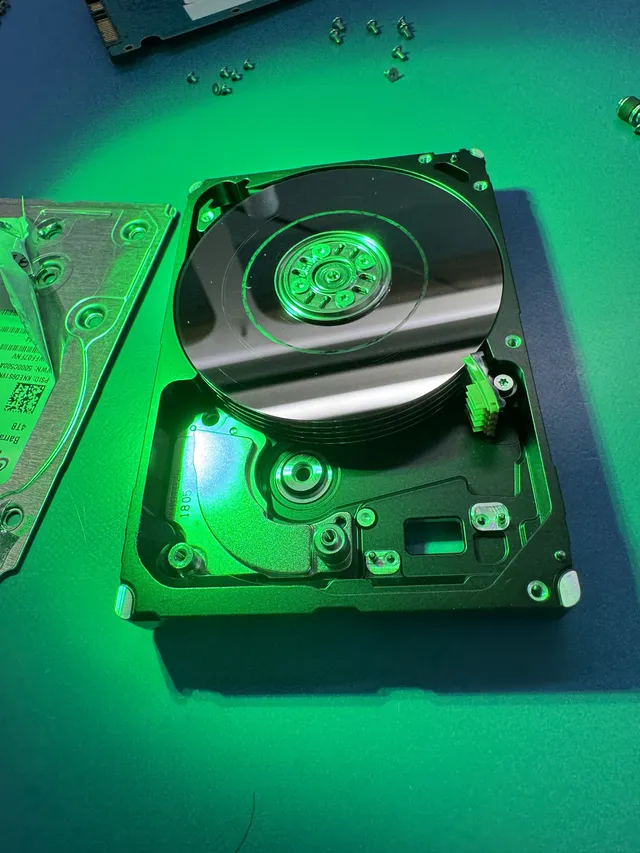
Beeping hard drive data recovery
Beeping hard drive data recovery can save photos from undamaged parts of the disks, even when the motor can't turn them. Unplug the drive now and keep it off. Each start can drag a stuck head, one of the tiny arms that read the disks, across the surface that holds your files. Our guide to failing hard drives covers other signs of trouble too.
If you're sending the drive from the contiguous US, use our mail-in form for a free shipping label. You're also welcome to hand it to us at the MDrepairs counter in Lincroft, New Jersey.
- Since 2014One lab, in Lincroft, New Jersey
- 20,000+ ticketsacross all services since 2014
- 4.6 from 345Google reviews
- $100 diagnosticcredited toward a successful recovery
The people we help
Our customers include people from
-

-

-
 AT&T
-
 Marriott
-

-

-
 Tennessee Titans
-

-

-

-

-

-

-

What to do when your hard drive starts beeping
In a beeping external hard drive, the motor tries to spin the disks, stalls and tries again. A stuck head can scrape a disk each time. Our guide to hard drive beeps explains the sound.
First steps
- Pull the plug and leave it out
If the motor itself has jammed, it heats up every time the drive tries to start.
- Write down what happened
When you ask us for a quote, tell us what the drive was doing before the beep, what you heard and anything you've tried since.
- Look for the originals
If this was your backup drive, open the folders you copied from on your computer. The pictures you want may still be right there.
What to avoid
- Don't plug it back in to check
Trying a different cable or computer still asks the same motor to start, even if all you wanted was a look at one folder.
- Resist the urge to tap it
A knock or a shake meant to loosen a head can damage the arm or mark the disk underneath it.
- Keep it out of the freezer
Water can form inside as the cold drive warms up again.
- Leave the cover on
Opening the drive lets dust reach the disks. Turning one by hand can leave a fingerprint or push a head out of place.
- Skip the recovery software
A program can't read a disk that isn't turning. Starting a scan would ask the motor to spin it again.
When did your drive start beeping?
What happened right before the first beep gives us our best clue. If the power went out halfway through copying your photos, that's worth telling us.
It beeped after I unplugged it mid-copy
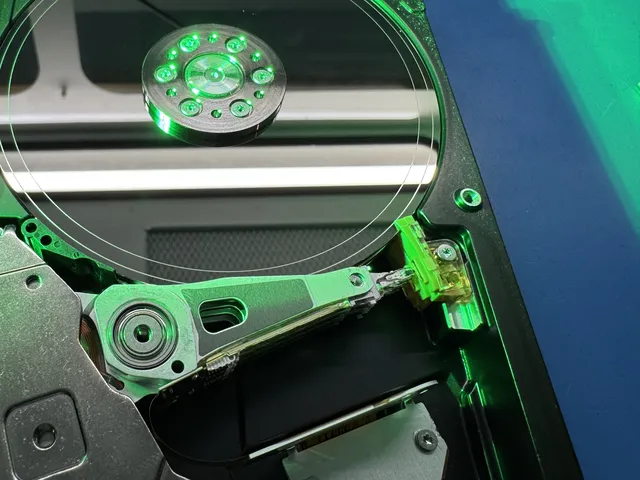
The owner unplugged the external drive in this film while it was reading. After that it beeped but wouldn't spin. When Joe opened it, he found the heads stuck at the edges of the disks and dust from the scrape inside.
If power cuts out before the heads reach the little ramp where they rest off the disks, they can stick to the disk underneath them. With your next drive, let the copy finish and choose Eject on your computer before you pull the cable.
I dropped it and now it beeps
A fall can trap a head against the disk or leave the motor unable to turn. Keep it unplugged and tell us about the fall when you send it.
It beeps and my computer can't find it
If the disks don't turn, your computer can't read your files. It may see only that a drive is connected or miss the drive altogether, even with your photos still there. If your drive spun but never appeared, use the guide for drives your computer can't detect.
Mine makes a buzz or a hum
With no spin, a buzz or hum can mean the motor is stuck or a head is holding a disk still. Describe the sound you remember without trying to hear it again.
What can make a hard drive beep?
A stuck arm and a jammed motor can sound exactly alike. For the $100 diagnostic, we open the drive to find the cause and check its platters, the disks that hold your files. That tells us which repair to quote.
| Cause | What you notice | What we do | What's still readable | Price range |
|---|---|---|---|---|
| Heads stuck to the disks (stiction) | Beeps without spinning after it was unplugged or lost power during a copy | Free the heads, clean the disks and fit matching heads and a new ramp where they rest | Your files, though a stuck head can damage a spot and leave part of a photo unreadable | $1,500 - $3,000+ |
| Stuck heads that scratched the disks Scratched Platter Data Recovery | Keeps beeping through repeated starts or beeps after a fall | Clean each disk, replace the heads and read around the damaged spots | Files around the scratches, with errors possible in files that crossed a mark | $3,000 - $3,500+ |
| Seized hard drive motor (won't turn) | Beeps or hums without spinning, on an older drive or after a knock | Move the disks, still lined up, to a matching drive whose motor works (a platter transplant) | The whole drive if only the motor failed and the heads left the disks unharmed | $1,500 - $3,000+ |
| Damaged circuit board | Won't spin after a power surge or a mix-up with the power adapter | Move the chip with your drive's own settings from the damaged board to a matching one | Files on undamaged disks once the board repair gets the drive running | Contact for Quote |
A drive can have more than one of these problems at once. See how Joe freed the heads and copied a customer's files or what we recovered from other drives people mailed us.
Freeing hard drive heads stuck to the disks
On the external drive a customer unplugged mid-copy, Joe removed the ramp and lifted the stuck heads off the edges of the disks. Dust from the scrape could ruin new heads, so he took each disk out, cleaned both sides and fitted replacements and a new ramp.
Once the disks turned again, Joe unlocked the drive with PC-3000, our drive recovery system. He read and adjusted its start-up files, the instructions on its disks, then copied the drive piece by piece onto a healthy one. The owner got back about 680 GB from that copy, including her pictures and documents.
When the motor has jammed, Joe moves your disks into a matching drive at his bench in Lincroft. He keeps them lined up exactly as they were when your files were written. We cover the rest in the six steps of hard drive recovery.
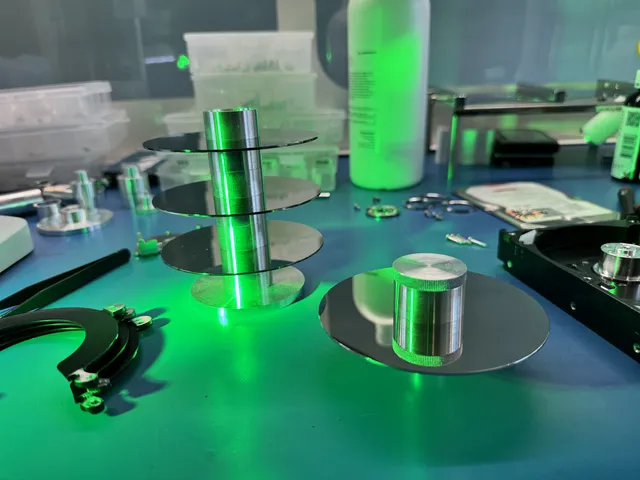
Beeping drives and stuck heads at our lab
These owners mailed us their drives, and you can read each full story on their state's page. A stuck head can scrape a spot too badly to read and still leave other files we can send home.
Seagate external hard drive beeping (ST2000LM007)
In 2026 an Alaska customer's 2 TB drive beeped when plugged in, and the computer only partly recognized it. Cleaning the disks and replacing the stuck heads let us send about 230 GB home, though some files had errors.
Seagate ST1000LM024 external hard drive
In 2026 a California customer's computer couldn't even see the drive that held their photos and videos. We freed and replaced its stuck heads, and although some large videos came back damaged, the owner got about 150 GB of files back in good shape.
Hitachi external hard drive that wouldn't spin
The Hitachi a Connecticut customer mailed us in 2025 had a damaged circuit board and scratches on the top disk. It took time to find matching parts that worked, but we recovered photos and videos for the owner.
Which files can you get back from a beeping drive?
Whether we can recover data from your beeping hard drive depends on the condition of its disks. A number can't tell you where a scratch landed, so we don't publish a success rate. After the diagnostic, we'll explain what looks possible for your photos.
What we can save
- Photos the heads never touched
On the drive Joe freed, the scrape was at the very edge, where no files were stored. Her pictures were farther in, on a surface he could still read.
- A whole drive's worth of files
With only the hard drive motor stuck, the disks can still hold every picture you saved. A working motor lets us read them from start to finish.
- Files on a drive that disappeared
If the disks are unharmed, your files are still where you saved them, even if your computer only partly recognizes the drive or no longer shows it at all.
Where damage can cost files
- A spot rubbed bare
A stuck head can wear through the coating that holds part of a photo. Unplug the drive to stop that head from scraping a fresh spot.
- A file with a missing piece
If a scratch crossed part of a video, it might open with errors or fail to play. Tell us which files you care about so we can look for those first.
How much does recovering a beeping hard drive cost?
$100 diagnostic, credited toward a successful recovery.
The $100 diagnostic is non-refundable once diagnostics start, and donor drives or replacement parts you approve are non-refundable once ordered, even if recovery fails.
Moving disks off a jammed motor and replacing stuck heads share a price range. Reading around scratches has its own range. We check for that damage during the diagnostic so you know which price applies to your drive.
- Why another try can cost more
If another start pulls a stuck head across the disk, we can go from lifting the head to working around scratches. That moves the job into the higher price range.
- Ways to pay
You can use a card, Apple Pay or PayPal for a single payment, or split the cost through Affirm if you qualify.
| Repair | Price range |
|---|---|
| Hard Drive - Head Swap | $1,500 - $3,000+ |
| Scratched / Contaminated Platters | $3,000 - $3,500+ |
| Service option | When checks start | Added cost |
|---|---|---|
| Standard diagnostic | Starts in about 4–6 weeks, then recovery time varies by case | No surcharge |
| Priority | Assessment starts within 5–7 days | +$250 |
| Urgent | Assessment starts within 1–2 days | +$500 |
| Emergency | Assessment starts same-day | +$1,000 |
With standard service, we start checking your drive in 4 to 6 weeks. Recovery takes additional time, especially if we need matching parts for the heads or motor. You can compare prices for all our data recovery services.
Is it a beep or something else?
Start with the sound you heard before you unplugged the drive. Each fault has its own guide, and you can browse all our data recovery services if none fits.
Hard drive beeping and clicking
With a beep, you never hear the disks spin up. A whir followed by click-click means the disks did turn but the heads struggled to read. A drive can make both sounds in turn.
When a head scratches the disk
Our scratched-disk guide shows how we read around marks from stuck heads. From a dropped drive with one scratched surface, we recovered 228 GB sorted by file type. On a WD drive with failed heads and small scratches, all but 28 MB came back.
Portable hard drive beeping
Your computer's USB port powers a portable drive's small motor. A desktop model uses a wall adapter. If you hear your WD My Passport beeping, keep the case closed because its board can hold the USB socket and the key that unlocks your files.
Find your drive by brand
Each maker has its own recovery guide. If you don't know the model, the brand name on your drive is enough to find the right one.
Questions about a beeping hard drive
Can a beeping hard drive be fixed?
It can be, long enough to get your files off. Once a moving part has failed, we'd retire that drive even if it starts up again. Anything we recover goes onto a new one.
How should I describe the beep?
Describe it from memory when you ask us for a recovery quote.
Is a beeping hard drive worth recovering?
It can be worth it for the family album alone if that's the only copy you have. If everything on the drive is easy to replace, we'd skip it. The diagnostic tells you what we can try, and you get an estimate before you decide.
Guides to beeping and failing hard drives
You can read up on the noise from a drive that won't start, or learn how to check the health of a drive you're still using.
When drives won't spin
Keep the files you'd miss in three different places so you've still got a copy when a drive quits.
Ask about beeping hard drive recovery
You can ask for a quote with the drive still unplugged, and anything we recover comes home on a new drive.