Inside the lab follow MDrepairs on YouTube, TikTok & Instagram - visit our YouTube channel ↗

Data recovery services for Tennessee, by mail

Recoveries filmed at our Lincroft bench

We make and post these videos for 2M+ followers across YouTube, TikTok and Instagram combined.

You can mail your device from home to our only lab in Lincroft, New Jersey. We take phones and laptops, hard drives, SSDs and memory cards from Nashville, Lebanon and across the state. We recovered the notes from a Galaxy that went dark and wouldn’t charge, and sent them back as documents you can open on a computer.

4.6 from 345 Google reviews

Your prepaid UPS label has our lab’s address in Lincroft, New Jersey. The packing slip goes inside the box you mail from Tennessee.

  • Since 2014One lab, in Lincroft, New Jersey
  • 20,000+ ticketsacross all services since 2014
  • 4.6 from 345Google reviews
  • $100 diagnosticcredited toward a successful recovery

The people we help

Our customers include people from

MDrepairs reviews on Google

4.6 from 345 Google reviews. One owner describes the email showing their shattered phone lit up again.

Read our Google reviews

His shattered phone sat outside for three days, one in which it rained … The kid literally said it would take “magic” to fix my husband’s phone … Then, later that evening, I got an email with a photo of the phone turned on!

Stephanie Howard, Google Review 2023

Great service!!! After 3 other companies failed to fix it MDrepairs fixed my water damaged phone with years of photos on it. Worth every penny! Recommend to everyone!

G P, Google Review 2025

I went to several other locations to try and recover my data. These guys did it, and they were patient with my payment as well.

Chris Cerpa, Google Review 2026
Stereo microscope at the bench with a keyboard to the right
Behind the microscope in our Lincroft lab are a power supply, soldering station and parts drawers.

Who gets my package in Lincroft?

If you're mailing a device from Memphis, it comes to our lab. Joseph Montanti, MDrepairs' founder and lead technician, does his recovery work here in Lincroft.

Reviewed by Joseph Montanti, founder and lead technician, November 2026.

Which devices can I send for data recovery in Tennessee?

If you saved your files on an external drive, you can mail just the drive from Chattanooga and keep your laptop at home. For another device, find it in our recovery service guide. If you run a repair shop, you can send a customer’s device through our partner program.

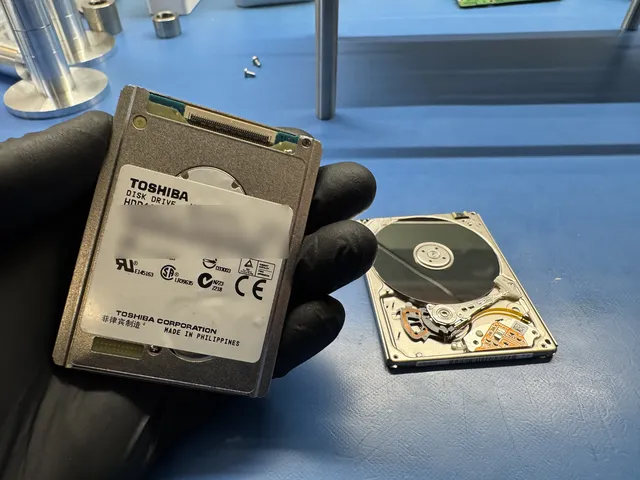
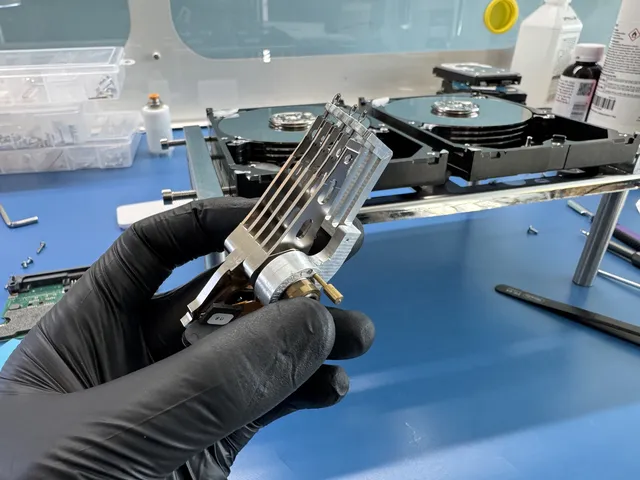
Black-gloved hand holding a hard drive head stack

Hard drives and external drives

Even if you can no longer open your drive, your files can still be there. We recovered files from an 8 TB Seagate in that condition. If yours fell or started clicking, leave it unplugged and keep its USB case with it when you send it.

Hard drive results

If we can rebuild your original folders, that’s how we arrange your files on the new drive. You can see how we saved photos from a stalling external drive.

Recovery prices by device and job
Hard Drive - Firmware / Logical$1,000 - $1,500
Hard Drive - Head Swap$1,500 - $3,000+
Scratched / Contaminated Platters$3,000 - $3,500+
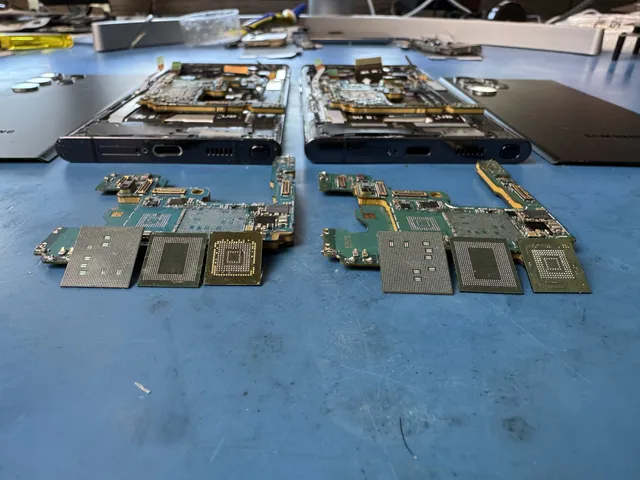
Two phone boards side by side with chips lifted off each

Samsung Galaxy and other Android phones

Keep your original Galaxy. Your files can still be there when the phone goes dark. We recovered notes from an S10e whose main chip had come loose. For a quote, just tell us whether you know your unlock code. When you mail the phone, enter the code in the passcode field on the mail-in form.

Restoring an Android backup

A recovered Samsung backup can go onto the Galaxy you're using now, alongside the pictures you've taken since.

Recovery prices by device and job
Samsung Galaxy / Android$1,500 - $2,000
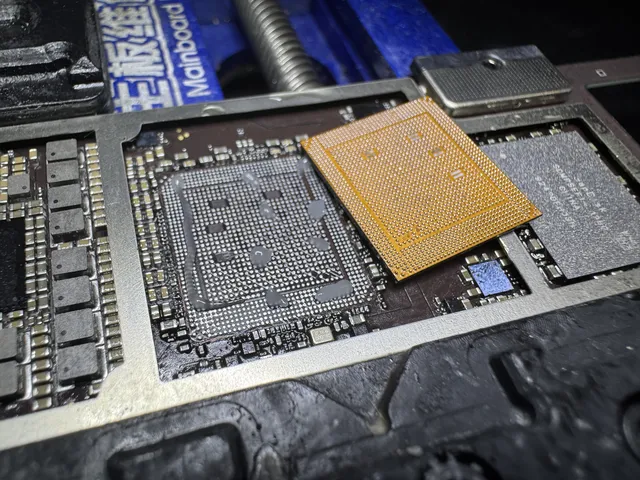
Orange interposer lying over a board's grid of pads

iPhones

If your iPhone got wet and you need a backup before a repair, leave it off and unplugged. Ask us about saving your files before anyone erases the phone or replaces its main board. In 2026 we recovered files from a water-damaged iPhone 14 Pro.

iPhone backup options

Once your iPhone is running again, we can back it up to a computer if Stolen Device Protection is off. If it's on and asks for your Face ID, we use your own iCloud.

Recovery prices by device and job
iPhone (3GS - 11)$1,000 - $1,500
iPhone (12 - 17 Series)$2,000
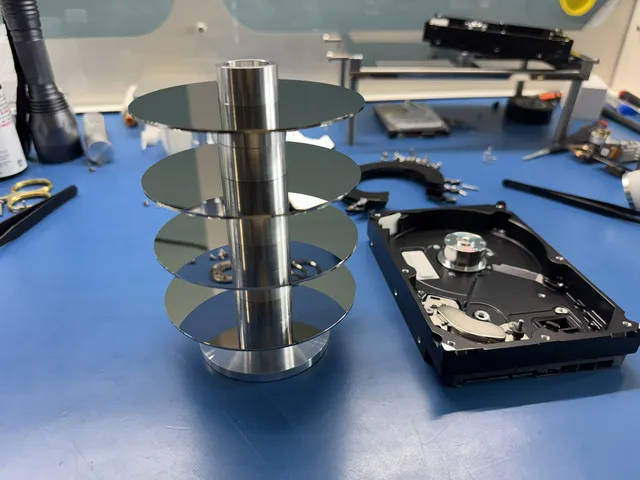
Four platters stacked on a metal alignment tool

RAID and network storage

Power the unit down. If you remove the disks, mark each one with its slot number first.

Mail your device from anywhere in Tennessee

How to pack and ship your device

For mail-in data recovery, send your device to our lab in Lincroft, NJ. We cover the UPS label and the trip home in the lower 48, except islands.

  1. Open a ticket

    Fill out the mail-in form for your device. We'll send your ticket number by text or email.

  2. Get your shipping label

    The form lets you get your prepaid label and print the packing slip right away. The slip goes inside the box with your device.

  3. Cushion the device

    Pack about 2 inches of bubble wrap on every side so the device sits snugly in the box. Tape every seam closed.

  4. Hand it to UPS

    Take the box to any UPS location. We'll let you know by text or email when it reaches our lab.

Shipping time and time at our lab

We use UPS 2nd Day Air both ways. On each trip, you can expect delivery by the end of the second business day after UPS gets your box. Weekends and holidays don't count.

Shipping time and time at our lab
At our labHow long it takes
Standard wait before we start the diagnostic4 to 6 weeks
Recovery work after the diagnosticDepends on what's wrong with your device

Shipping times in the UPS Rate & Service Guide

Address
644 Newman Springs Road, Suite A, Lincroft, NJ 07738
Hours
Mon-Fri 10am to 6pm Eastern

What happens once we have your device

  1. We diagnose your device

    We diagnose your device for $100 to find out what it would take to reach your files. That diagnostic fee goes toward the price of a successful recovery.

  2. You decide

    We give you an estimate based on what we found. You get to think it over, and we start the recovery only if you approve it.

  3. We work on the recovery

    With your go-ahead, we work at the bench to read the files on your original device. Here's how we handle your device and data while they're with us.

  4. Get your recovered files

    We mail your recovered files on a new drive back to you. We keep a copy offline for two weeks, then delete it.

Your files and your device after recovery

Our copy of your files

We keep an offline copy for two weeks in case your drive gets lost or damaged in the mail. We delete it then, or sooner if you ask.

Make your own backup

Make another copy the day your files arrive. After two weeks, our copy is gone.

Your original device

If you mailed us a hard drive, SSD or SD card, your original comes back along with the drive holding your recovered files.

UPS locations for shipping from Tennessee to Lincroft

Take your box to UPS in your part of Tennessee for the trip to our lab in Lincroft, New Jersey. Choose The UPS Store if you need packing supplies. If your box is packed and labeled, even the CVS on South Willow Avenue in Cookeville can take it.

Mailing from Nashville

Downtown, the last Air drop-off is 5:30 PM at The UPS Store at 250 Rep John Lewis Way S. If that’s too early for you, it’s 6:30 PM at the store at 7051 Highway 70 S.

Memphis and Jackson

You can mail from The UPS Store at 6025 Stage Road in Memphis. The UPS Store’s last Air drop-off is 6:45 PM. If you’re in Jackson, you can use The UPS Store on Vann Drive.

Knoxville and Chattanooga

In Knoxville you can use The UPS Store at 10629 Hardin Valley Road. In Chattanooga there’s one at 2288 Gunbarrel Road. If you’d like to call us before you go, you’re on Eastern time in either city, just as we are in Lincroft.

Clarksville and Franklin

If you’re mailing from Clarksville, you can use The UPS Store at 2250 Wilma Rudolph Boulevard, Suite F. In Franklin, you can give your box to The UPS Store on Murfreesboro Road or the one on Mallory Lane.

If you’re calling from Nashville, Memphis, Murfreesboro, Cookeville or Dunlap, your clock is on Central time. You can reach us at (732) 933-7717 from 10am to 6pm Eastern, Monday to Friday.

How much does data recovery cost in Tennessee?

$100 diagnostic, credited toward a successful recovery.

The $100 diagnostic is non-refundable once diagnostics start, and donor drives or replacement parts you approve are non-refundable once ordered, even if recovery fails.

The price depends on what failed, so we diagnose your device for $100 and give you an estimate before you decide on recovery. We publish the whole price list because you ought to be able to talk it over at home before you put your drive in a box.

If we can't get any files back, there's no recovery fee. Before you pay that fee, you see a report showing which files we recovered.

Where the $100 goes

That $100 pays for figuring out what failed and how we could reach your files. If the recovery succeeds, the money you've already paid goes toward your total data recovery cost.

Why identical drives get different estimates

One drive may need a fix to the software that runs it. Another just like it may need new arms to read the disks, which puts it in a different row on the price list.

How soon we can start

With Priority (+$250), we start diagnosing your device within 5 to 7 days. If you need us sooner, we start within 1 to 2 days with Urgent (+$500).

Recovery prices by device and job
Recovery jobPrice
Flash Drive / SD Card$299 - $1,750+
Hard Drive - Firmware / Logical$1,000 - $1,500
Hard Drive - Head Swap$1,500 - $3,000+
Scratched / Contaminated Platters$3,000 - $3,500+
SSD / NVMe Recovery$1,000 - $2,000+
iPhone (3GS - 11)$1,000 - $1,500
iPhone (12 - 17 Series)$2,000
Samsung Galaxy / Android$1,500 - $2,000
MacBook / Laptop$1,500 - $3,500+
CPU Swap (Severe Cases)$3,500
RAID / Multi-Drive ArraysContact for Quote
When we start diagnosing your device with standard or rush service
OptionTimingAdded cost
Standard diagnosticStarts in about 4–6 weeks, then recovery time varies by caseNo surcharge
PriorityAssessment starts within 5–7 days+$250
UrgentAssessment starts within 1–2 days+$500
EmergencyAssessment starts same-day+$1,000

Rush moves up the day we start diagnosing your device. How long the recovery itself takes still depends on what we find. You can read how we price data recovery and how financing through Affirm works if you qualify.

Files we recovered for people in Tennessee

These devices came by mail from Tennessee. We got files back from a 500 GB Western Digital marked WD5000AZLX after its owner lost access. On a Seagate ST3500820AS, we copied files using the parts that could still read the disks before trying replacements. One disk surface stayed unreadable, but we mailed its owner what we’d saved. Our nationwide case library includes other recoveries.

Samsung Galaxy S10e overheated: photos and notes recovered

2026 · Mailed from Tennessee

This Samsung Galaxy S10e overheated, shut down and wouldn't turn on or take a charge.

We found that the processor had come slightly loose from the board. We made a backup the owner could restore to a new Samsung phone. Their photos were in that backup, and we turned their notes into documents.

We mailed the documents and the backup together on a new drive. The owner could open those notes on any computer.

External hard drive with stuck heads: about 270 GB of intact files

2025 · Mailed from Tennessee

An external hard drive came to us from Tennessee in 2025 after it stopped working during use. It would not spin up, and the laptop no longer detected it. We found the read/write heads stuck on the platters, with parts of the disk surface too badly damaged to read.

We replaced the heads more than once to read the areas we could still reach. We mailed the owner a new drive with about 270 GB of intact files and about 75 GB of files with damaged sections.

External hard drive with a damaged folder map: files recovered by type

2025 · Mailed from Tennessee

From the sound of it, the external hard drive was still running. The computer powered on, but it couldn't start up or see the drive.

The read heads had failed, and the map that kept track of the folders had so many bad spots we couldn't use it. We replaced the heads and put the files back together by type. The original file names and folders didn't come back. We mailed the owner a new drive with the rebuilt files on it.

Recent recoveries from Tennessee

  • Toshiba external hard drive, 3 TB DT01ACA300 Clicking or other noise · Data recovered 2026
  • Toshiba external hard drive, 2 TB MQ04UBD200 Hard Drive - Firmware / Logical · Data recovered 2026
  • iPhone 14 Pro Water or liquid damage · Data recovered 2026
  • Seagate external hard drive, 2 TB ST2000DL003 Fire or power surge · Data recovered 2026
  • WD external hard drive, 500 GB WD5000AZLX Stopped working or not detected · Data recovered 2026
  • Samsung Galaxy phone Data recovered 2025
  • External hard drive Data recovered 2025
  • Seagate hard drive ST3500820AS Stopped working or not detected · Partly recovered 2025
  • Seagate external hard drive, 8 TB ST8000NM0045 Stopped working or not detected · Data recovered 2024

These cases come from our ticket system, BenchKey, the shop software we built and run our lab on, with names, contact details and addresses left out. How we publish cases

Protecting your files in Tennessee floods, ice storms and power outages

Leave your device off if it got wet or went dark in a Tennessee storm. A hard drive can go underwater and still hold your files. Skip the hair dryer and tell us what happened without trying to start the drive.

A hard drive that went underwater in a flash flood needs to stay damp. If your drive stayed dry and ice cut your power, unplug it before the lights come back.

Hard drives in floodwater

If a river floods, don’t wade in for your hard drive. Even river water can carry sewage or chemicals. Once it’s safe, photograph the drive for insurance before you move it. If it went underwater, leave it off and seal it in a bag with a damp cloth.

Ice storms and power outages

Charge your phone before the ice arrives so it’s ready for an emergency call. If the lights go out, unplug your computer and drives in case the power comes back with a surge. Tell us if your hard drive was running when you lost power.

SSDs after rolling blackouts

Stop using your SSD if it looks empty after rolling blackouts. A single power cut can scramble the map your drive uses to find your files. Leave it disconnected and skip updates to the drive’s own software.

We recovered files from a wet iPhone 14 Pro mailed from Tennessee in 2026. When you ask for a quote, tell us how your phone got wet and which files you’d like back.

Data recovery for school and work in Tennessee

If your school or work files disappear, start with the device you saved them on. That might be your laptop, the drive with your recording session, a card full of photos or the drives your office shares.

Student laptops and USB sticks

If your laptop can’t find a startup disk, stop restarting it. Your paper can still be on that drive. If a computer asks to format the USB stick holding your coursework, choose Cancel and set the stick aside.

Camera cards

Choose Cancel if your camera asks to format a card. If you’ve just taken graduation portraits, those pictures may still be on it. Take the card out of the camera and set it aside.

More recoveries filmed in Lincroft

Choose a drive or phone like yours to see a recovery up close at our Lincroft bench.

Watch more recoveries on YouTube

Mailing a device from your Tennessee town

You can mail from Arlington or anywhere in Tennessee. The city guides follow the state’s three Grand Divisions, so Dunlap in Sequatchie County is under Middle Tennessee. If you’re sending from Knoxville, you can go straight to the guide for your MacBook or your iPhone.

West Tennessee
Middle Tennessee
East Tennessee

For a device across the Tennessee border, use the mailing instructions for Alabama, Georgia, Kentucky, North Carolina or Virginia. If you're helping someone farther away, the California and New York City guides explain how they can send the device from home.

Questions about getting your files back

Where do I send an SD card from Tennessee, and who supplies the label?

Send your card to Lincroft, New Jersey. When you fill out the mail-in form for it, we give you a prepaid shipping label.

Does a partial recovery cost less? Can I check which files you got back?

A partial recovery costs the same as a full one because it takes extra work. Before you decide whether to pay for the recovery, open the folders in your report. Look for the files you wanted and any notes about possible damage.

How long will a drive I mail from Memphis be away?

From Memphis, we suggest allowing 2 to 3 business days for UPS 2nd Day Air to reach Lincroft. Our standard wait to start the diagnostic is about 4 to 6 weeks. Recovery work takes extra time depending on the fault.

Can you look for photos and voicemails on a wet iPhone without a recent backup?

Yes. Leave the iPhone off. We can look for both if we can get it running well enough to unlock it with your passcode.

Can you check a hard drive if its reading heads have already been removed?

Yes. Leave it off and tell us which parts were removed. We check the disks themselves. Even with a scratch, we can look for portions of a photo archive or documents on surfaces we can still read.

Should I power up a noisy drive after years in storage?

Leave it unplugged, keep its case and tell us what you heard before storing it. We'd need to examine the drive to know what's readable.

Should I tap my Seagate to free the heads if it stops spinning?

Keep your drive still and unplugged, with the cover in place to keep dust off the disks. The read heads in a Seagate mailed from Tennessee were stuck against its disks. We replaced the heads more than once and mailed back a new drive with both intact and partly damaged files. A stalled motor can also stop a drive from spinning.

I’m in Bluff City. Where can I hand my packed device to UPS?

You can take the box to UPS in Bristol, Tennessee, which is in Sullivan County with Bluff City. UPS’s Tennessee directory also lists Kingsport if that trip works better for you. For a box you’ve already sealed and labeled, look for a UPS Access Point and check the location’s details before you go.

My drive stopped working during a storm. What should I tell you?

Tell us whether the drive got wet and when it stopped working. If the drive stayed dry, mention whether it stopped when the lights came back on. Power can return with a surge. You can describe what happened without plugging it in again.

Can I bring you my device for data recovery in Nashville?

In Nashville, you hand your box to UPS for the trip to Lincroft, New Jersey, where we have our only lab. You can get your free label through the mail-in steps and take your package to the downtown UPS Store on Rep John Lewis Way S.

How do I send a drive for data recovery from Clarksville?

You can mail your drive from a UPS store in Clarksville. All our recovery work takes place in Lincroft, New Jersey. The last Air drop-off is 6:00 PM at The UPS Store on Hankook Road and 5:30 PM at The UPS Store on Tiny Town Road.

How can I get files back from my SSD in Franklin, Tennessee?

You can send us your SSD from Franklin by UPS. If the drive disappears from your computer, stop using it even if it shows up again. When you’re ready to mail it to Lincroft, The UPS Store has locations on Carothers Parkway and Fieldstone Parkway.

How can I get data recovery help from Memphis?

From Memphis, you can send your device by UPS to Lincroft, New Jersey, where we do all our recovery work. The UPS Store on Stage Road takes Air packages until 6:45 PM Central. If you want to call us first, our phone hours follow Eastern time.

Can I send my laptop for data recovery from Jackson, Tennessee?

Take your boxed laptop to The UPS Store at 319 Vann Drive, Suite E, in Jackson. Look for the tracking number in your email. You can use it to follow your box from Jackson to our lab in Lincroft.

My basement flooded in Middle Tennessee. Can I get my computer out?

Leave the computer off and stay out of the water. Wait until it’s safe, then photograph your equipment for insurance before moving it. If a separate hard drive went under, keep it damp in a sealed bag. Even if the outside looks dry, don’t try to start it.

My drive won’t start after a Tennessee ice storm. What now?

Keep it unplugged. When power returns, a surge can burn a hard drive’s circuit board without erasing the files on its disks. Tell us if yours was spinning when the lights went out and whether you heard clicking or noticed a burnt smell afterward.

Why does my SSD look empty after the power flickered?

Your SSD can lose track of where your files are when the power cuts out. That can leave you looking at a blank window while the files themselves are still on the drive. If the lights keep going out, leave the drive disconnected and skip any update to its built-in software.

How do I protect my phone and computer before a Tennessee storm?

Charge your phone for emergency calls. If ice is forecast or you’re under a tornado watch, unplug your computer and drives at the wall before the storm reaches you. Switching off the power strip isn’t enough. Once a thunderstorm starts, leave the plugs alone.

Can you help with a failed backup drive or NAS in Tennessee?

Yes. We can look for your files on a failed backup drive or NAS at our lab in Lincroft, New Jersey. If you’re mailing yours from Jackson, the last Air drop-off at The UPS Store on Vann Drive is 6:30 PM.

Guides for the problem you're seeing

Leave a phone or computer where it is if you’d have to stand in floodwater to reach it. Even if your lights are out after a storm like Helene, a downed power line can send electricity through the water. Once you’re safe, keep a soaked phone off and unplugged.

Tell us what you'd like back

If it's one note on a phone or one folder on a drive that you miss, say so. Tell us what device it's on and what happened to it. You can ask for a free quote before you pack anything.

Contact us

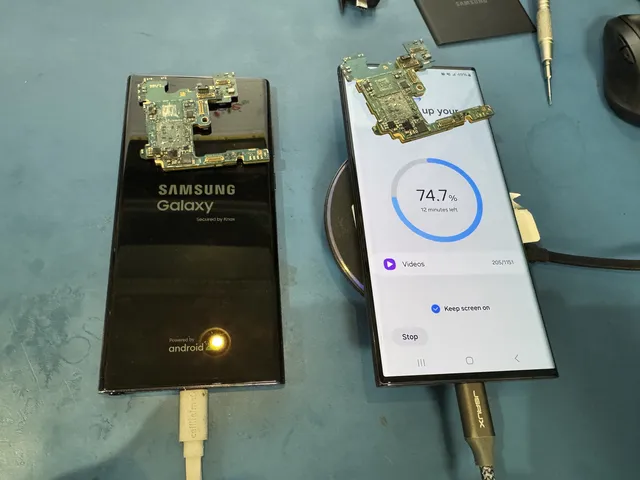
Two Samsung Galaxy phones with removed boards resting on top
On our Lincroft bench, the left screen shows the Samsung Galaxy logo; the right displays copying progress.