New heads and platter cleaning restored a beeping external drive's files
- Device
- External hard drive
- What happened
- Unplugged while reading, then beeped without spinning
- What was wrong
- Heads stuck at platter edges had scattered platter dust inside
- Result
- Recovered. About 680 GB of the customer's pictures, documents and other files were recovered.
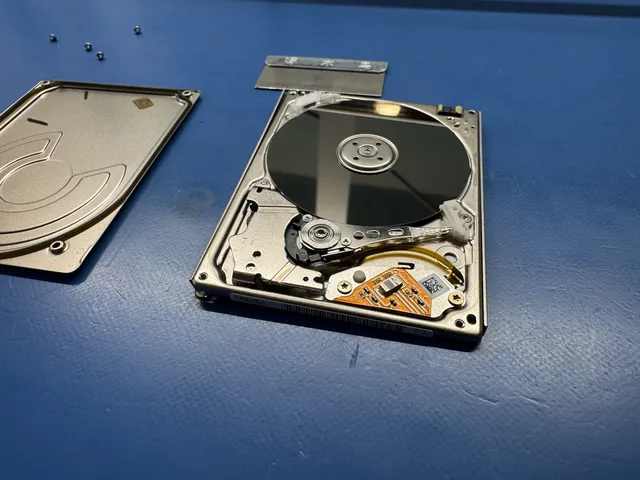
A customer mailed in an external hard drive after unplugging it while it was reading. She had lost access to her pictures and documents. Joe confirmed that the drive beeped and did not spin up. When he opened it, he found the reading heads stuck on the edges of the platters instead of resting on their parking ramp.
At first, the location of the contact looked encouraging because it was at the platter edges, outside the area holding files. Joe removed the ramp and freed the heads. He then saw the complication: scraping at those edges had scattered platter dust throughout the drive. The platters needed to come out for cleaning before replacement heads could be used.
He removed the platters individually and placed them on a stand. The edges showed the damage, and dust had accumulated inside the casing. Joe cleaned the surfaces, then installed replacement reading heads and a new ramp before closing the drive.
Joe connected the drive to PC-3000 Express, a recovery system, with a terminal adapter for communicating with the drive. He removed its access restriction and read its start-up files. He adjusted those files to stabilize the drive until its data sectors became accessible.
In Data Extractor, Joe opened the partition and could see the customer's data. It amounted to about 680 GB. He imaged the drive, saving a copy of her files.
If yours is similar
Beeping came from heads stuck at the platter edges, with dust scattered inside this drive. Leave a beeping drive unplugged until a diagnostic checks what is stopping it from spinning and whether its platters are damaged.
External Hard Drive Data RecoveryThe people we help
Our customers include people from
-

-

-
 AT&T
-
 Marriott
-

-

-
 Tennessee Titans
-

-

-

-

-

-

-