Hard Drive Won't Spin Up? Stuck Spindle Recovery Guide
In this article
If your hard drive won't spin up and makes no sound at all when powered on, your data is almost always still on the platters. Silent failure usually means one of two things: the heads parked roughly and stuck to the platter surface (called stiction), or the spindle motor itself is seized. Both are recoverable in a lab. Neither is recoverable by tapping the drive on a table, freezing it, or applying more voltage. Those tricks work for the YouTube comments section. They almost never work in real life, and when they fail they often turn a $1,500 recovery into a $3,500 platter swap.
The first thing to do is the simplest. Stop trying to power it on. Every time you cycle power on a stuck drive, the motor pulls hundreds of milliamps trying to break loose, then gives up. That current heats the motor coils and can burn out the motor driver IC on the PCB. One or two attempts to spin up is normal data when a drive lands at the lab. Twenty attempts is a problem we have to work around.
What "Won't Spin Up" Actually Means
A healthy hard drive does something specific when power hits it. The 12V rail wakes the spindle motor driver, which spins the platters from zero to 7,200 RPM (or 5,400, or 10,000, depending on the drive) over about two to three seconds. You can hear it. Put your ear against the metal case and you'll hear a soft whoosh that builds and stabilizes. Then the heads unpark, swing out over the platters, and start reading the firmware area. The drive reports ready to the SATA bus.
A drive that won't spin up is dead at the first step. The motor never starts. The platters never reach speed. The heads stay parked. The PCB powers on, the controller wakes up, but no data ever crosses the SATA bus because there's nothing to read from.
What you experience: connect power, hear nothing, computer doesn't see the drive. Sometimes you feel a tiny twitch through the case as the controller tries to start the motor and fails. Sometimes you smell faintly hot electronics as the motor coils heat up from repeated start attempts. Sometimes there's just silence.
This is different from a clicking drive (heads are alive but can't seek) or a beeping drive (motor is trying to spin but can't get the platters moving against resistance). A truly silent drive means the motor never even tried, or the controller refused to attempt the spin-up at all.
Confirm It's the Drive, Not Your Cable or PSU
Before assuming the worst, rule out the simple stuff. A silent drive often turns out to be a perfectly healthy drive plugged into a dead SATA power cable, a broken USB-to-SATA adapter, or a power-starved laptop USB port. These tests take five minutes and they can save you a recovery fee.
For an internal drive, plug it into a different SATA power cable from the same PSU. For an external drive, try a different USB cable from the same computer. For a USB drive that needs external power (a 3.5-inch external), try a known-good 12V adapter that matches the drive's voltage and current spec.
USB ports go bad. SATA controllers go bad. Plug the drive into a different machine if you can. If it works, the drive isn't the problem. If it still does nothing, move on.
Power the drive on and put your ear against the side of the metal case. Listen for two seconds. You're listening for a faint whirring or whooshing sound, even a very quiet one. If you hear absolutely nothing, the motor isn't moving at all. If you hear a faint click or chatter but no spin-up, that's a different failure mode.
If the drive's been on for thirty seconds, the motor area near the center bottom should be slightly warm if the motor was trying. Stone-cold means the motor never received current. Warm means it tried and couldn't move.
If after these four tests the drive is still silent, it's almost certainly a stiction or seized-motor case. Time to stop testing.
Heads Stuck to Platters: The Stiction Problem
Stiction is a portmanteau of "static friction." It's what happens when two ultra-smooth surfaces sit against each other for a long time and basically weld via van der Waals forces. On a hard drive, those two surfaces are the platter (mirror-finish magnetic surface) and the heads (tiny floating sliders that fly nanometers above the platter when the drive is running).
Normally, when you shut down the drive, the controller parks the heads in a designated ramp or landing zone at the inner edge of the platter. Modern drives use a ramp outside the platter entirely, so the heads never touch the magnetic surface. But two things still cause stiction:
- Older drives without ramp loading. Drives from before roughly 2005 parked the heads on the platters themselves in a special non-data area. After years of sitting unused, the heads bond to the platter and refuse to release when the motor tries to spin.
- Sudden power loss with heads partially deployed. If the power dropped while the drive was actively reading, the heads might have landed in an unexpected place. Even on ramp-load drives, a rough landing can put a head right on a magnetic surface where it now sticks.
- Drops, falls, or impacts during operation. If a drive falls while running, the heads can slam into the platter. They sometimes bond instantly to the platter through that sudden contact.
When the spindle motor tries to start a drive with stuck heads, it can't. The motor has plenty of torque to spin a free platter stack, but when 5 to 10 heads are bonded to the platters, the platters won't move. The motor pulls high current, the controller detects an over-current condition, and the drive stops trying. Silence.
Seized Spindle Motor: When Bearings Lock Up
The other "silent failure" cause is a seized spindle motor. The spindle motor sits in the center of the drive. It has bearings (usually fluid-dynamic bearings on modern drives, ball bearings on older ones). The bearings let the platters spin freely for tens of thousands of hours of operation.
Bearings fail for a few reasons:
- Lubricant breakdown. Fluid-dynamic bearings have a thin layer of oil that supports the spindle. After ten or fifteen years of use, that oil can break down or migrate. The bearing becomes rough, then locks.
- Contamination. Microscopic particles can enter the bearing through a degraded seal. They lodge in the bearing surfaces and create friction.
- Heavy impact or fall. A drive dropped on its side can deform the bearing race. Even if the platters look unharmed, the bearing now binds.
- Sitting unused for years in a humid environment. Moisture and corrosion can eat into bearing surfaces.
A seized motor is more serious than stiction. The motor itself cannot be repaired. The fix is to transfer the platters from the broken drive into a donor drive that has a working motor. This is called a platter swap, and it's the most invasive recovery technique in the hard drive playbook.
Why the Ear Test Is Misleading
People often tell us "I held it to my ear and heard a little whirring, so the motor must be working." Or "I held it to my ear and heard nothing, so the motor must be dead." Both conclusions are usually wrong.
Here's what you might actually be hearing. The PCB powers up the spindle motor driver IC. That IC sends a brief test pulse to the motor windings, just enough to check that the motor can move. Even a stuck drive will produce a faint electrical hum or a tiny mechanical twitch when this test pulse fires. Untrained ears hear that twitch and assume the motor is "trying to start" or "almost working." It isn't. The motor is just being electrically tickled.
On the other hand, a healthy drive's spin-up is genuinely quiet. Modern drives are engineered to be near-silent at startup. If you've never listened to a healthy drive intentionally, you may not realize how soft the sound is. You might assume yours is dead because you don't hear anything obvious, when in fact the motor is just fine and the issue is downstream (a dead PCB, for example).
The right way to diagnose is current-draw measurement. A working motor pulls a specific current profile during spin-up. A stuck motor pulls high current that stays flat. A seized motor pulls heavy steady current. A dead motor driver pulls no current at all. We can read these profiles in seconds with the right tools. Without them, you're guessing.
The "Tap the Drive" Myth Sometimes Works, Mostly Destroys
You'll find dozens of YouTube videos showing someone tap a stuck hard drive gently on the corner of a table, plug it in, and have it spin up. This is real. It works sometimes. The mechanism is exactly what you'd guess: the tap delivers a small impulse that breaks the head-to-platter bond. The drive spins. The data comes off.
Here's why we strongly discourage this. The tap that releases stiction is almost the same tap that destroys the drive. The threshold is narrow. Too gentle and nothing happens. Slightly too hard and you slam the heads into the platter or knock the heads out of alignment. We've seen drives walk in where the customer tapped them on a desk twenty times, getting progressively frustrated, before finally landing them at the lab. Those drives have head damage, platter damage, or both. The recovery just got much harder and much more expensive.
If your data is worth more than the cost of a lab recovery (and let's be honest, if you're reading this article it probably is), skip the tap. Tapping can cause additional damage. A lab should assess the fault and explain the proposed method and its risks.
- Head crash: heads slam into platters and gouge the magnetic surface
- Bent head slider: heads bend out of alignment and can no longer fly correctly
- Platter shift: if you hit hard enough, the platters move on the spindle and lose their precise alignment
- Bearing damage: a hard tap can damage the spindle bearing, turning stiction into a full motor swap case
The Freezer Trick and Why It Fails
The other famous DIY move is putting the drive in a sealed bag and freezing it overnight, then trying to power it on. The theory is that cold contraction shrinks bonded surfaces and releases stiction. Or that it temporarily restores bearing lubrication. Or some other variation.
The freezer trick almost never works in 2026. It worked occasionally on drives from the 1990s for very specific bearing-related failures. Modern drives use fluid-dynamic bearings, much tighter mechanical tolerances, and sealed designs that don't respond to cold the way old ball-bearing drives did. Worse, when you bring a frozen drive back to room temperature, condensation forms on the platters as the air inside the HDA warms up. Water on the platters causes head crashes when the drive does spin up.
If your drive was recovered after the freezer trick, that's good for you. If your drive wasn't recovered after the freezer trick, you've now added condensation damage to whatever was wrong before. We can still usually recover, but the cost goes up.
What Not to Do With a Silent Drive
- Keep cycling power. Each retry stresses the motor coils and the driver IC. Five attempts is the limit before damage compounds.
- Tap, shake, or drop the drive on purpose. The window between "released the stiction" and "destroyed the drive" is too narrow for hobbyist hands.
- Put it in the freezer. Condensation damage adds insult to injury.
- Open the HDA. The platter chamber needs a clean, filtered work area. Dust particles act like boulders under flying heads.
- Apply external voltage to the motor. Some forum posts suggest bypassing the controller and energizing the motor directly. Don't. You'll fry the motor or the heads.
- Try to spin the platters by hand by inserting a tool through the breathing hole. Yes, people do this. No, it doesn't help. It bends the platters off-axis instead.
- Send the drive to a "data recovery service" that quotes flat $200 fees online. Stuck-spindle work that exposes the heads or platters needs a clean, filtered work area. Flat $200 services either don't have the tools or they're a recovery scam.
Inside the Lab: How MDrepairs Handles a Stuck Spindle
The lab approach depends entirely on whether the drive has stiction (heads bonded) or a seized motor (bearing failure). Diagnosis comes before repair work. The repair process branches from there.
Initial Diagnosis
We connect the drive to a current-monitored power supply and read the current draw during a brief spin-up attempt. A stuck-heads drive shows high initial current that flatlines and then drops as the controller gives up. A seized-motor drive shows high current that stays flat (no rotation at all). A dead-PCB drive shows essentially zero current. The differences are obvious to a trained eye.
Stiction release
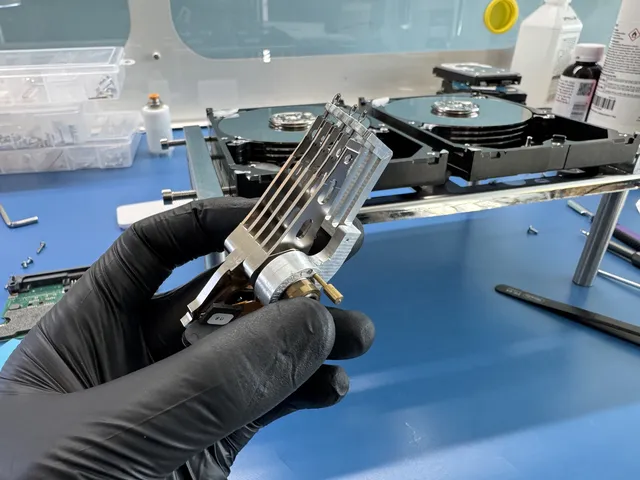
We perform head and platter work in a filtered, laminar-flow work area. Once inside, the tech can see the heads parked on the platters. Using specialized tools (a head-lifter tool, or in some cases a manual head displacement procedure), the heads are gently freed from the platter surface. The HDA is closed back up and the drive is tested.
Imaging With Stable Operating Conditions
A drive that just survived stiction gets imaged immediately. We use PC-3000 for drive imaging. The drive is not used as the source for direct customer reads. The image lives on a separate target. We never write to the source drive. The storage industry standards we follow keep the source intact throughout the imaging process.
Platter Swap for Seized Motors
For seized motors, the recovery is much more invasive. We source a donor drive of identical model, firmware, and PCB. The platters from the broken drive are physically extracted and installed on the donor drive's spindle. This requires special tooling to preserve platter alignment (off by a few microns and the heads won't read), to keep platters in correct orientation (flipping a platter loses all data on that surface), and to maintain rotational position between platters in a multi-platter stack. Once the swap is complete, the donor drive is reassembled and imaged.
Verification and Delivery
From the sector image, we mount the file system in read-only mode and pull out the user's data. We verify sample files: photos open, documents open, videos play. The customer receives a recovered file list. The $100 diagnostic is credited toward a successful recovery and cannot be refunded once diagnostics have started. Approved donor drives or replacement parts cannot be refunded once ordered, even if recovery fails. Recovery work begins after you approve the estimate.
How Much Does Stuck Spindle Recovery Cost?
| Failure Type | Typical Range | Why |
|---|---|---|
| Stiction, heads stuck to platters | $1,500 to $3,000+ | Laminar-flow work area, head-lifter tooling, donor not always needed |
| Seized motor, platter swap to donor | $2,250 to $3,500+ | Donor drive cost, platter extraction tooling, laminar-flow work area |
| Stiction plus head damage from DIY attempts | $2,250 to $3,500+ | Head stack swap in addition to releasing stiction |
| Multi-platter drive (4+ platters) | $2,250 to $3,500+ | More platters means more alignment work during swap |
| Helium-sealed enterprise drives | $1,400 to $5,000+ | Helium escape on opening requires special handling and recharge |
Most consumer cases at MDrepairs land in the $1,500 to $3,500+ range. The biggest factor is whether the heads are intact. If they are, recovery is straightforward. If they're damaged from tapping or impact, we add a head swap, which adds cost. More on recovery pricing and our full price list.
How to Stop This From Happening Again
Don't Leave Drives Unused for Years
The single biggest cause of stiction on older drives is sitting unused. Once a year, plug your archived drives in, let them spin up, copy a few files off, and shut them down properly. This redistributes bearing lubricant and prevents the head-platter bond from forming.
Always Shut Down Cleanly
Yanking power from a running drive can leave heads in non-parked positions. On laptops, that means waiting for the shutdown sequence to complete before closing the lid or pulling the battery. On desktops, use the OS shutdown command, not the power switch.
Handle Drives Carefully
Don't drop running drives. Don't move a laptop with the disk active. Don't stack drives on top of each other while they're running. Don't put a running drive on a soft surface like a bed or carpet where it can vibrate against fabric. Use a hard, flat surface.
Use SMART Monitoring
SMART data can predict bearing failure before it locks up. Tools like CrystalDiskInfo on Windows or DriveDx on Mac read the SMART attributes and warn you when temperatures rise, when seek error rates climb, or when read errors increase. A drive showing degrading SMART data should be backed up immediately. Seagate's SeaTools and similar manufacturer tools can run deeper diagnostics than the OS provides.
Replace Aging Drives Before They Fail
A drive running 24/7 for ten years is on borrowed time. Even if SMART looks clean, mechanical wear is accumulating. If you're using a drive that's been spinning for a decade, copy the data to a new drive now. Spending $80 on a replacement is much cheaper than a $1,500 recovery.
Have a Backup Strategy
Every important file should exist in at least two places. Cloud backup (Backblaze, iDrive, OneDrive) plus a local copy is a solid baseline. The 3-2-1 rule: three copies of important data, on two different media types, with one copy offsite. Most home users don't follow this. The ones who do never need data recovery.
FAQ
Can I tell at home whether my silent drive has stiction or a seized motor?
Not reliably. Both produce identical "drive is totally silent" symptoms. The diagnosis requires current-draw measurement during a controlled spin-up attempt. Without the right equipment, it's a guess.
I tapped the drive and now it spins. Can I just copy my files?
You can try, but the drive is unstable. The mechanism that caused stiction is still present and the drive can lock up again at any time. Copy your most important files first as quickly as possible. Don't run disk repair or chkdsk. Don't reorganize files. Just copy them off. Then send the drive in for a proper recovery if there's data still on it.
Why doesn't the data recovery cost include just replacing the bearing?
Hard drive spindle motors are not designed to be repaired. The motor is a sealed unit integrated with the bottom of the drive chassis. The bearing is not field-replaceable. The only way to recover a seized motor is to move the platters to a donor drive that has a working motor.
How long does stuck spindle recovery take?
Our standard recovery estimate is 4–6 weeks; timing may vary by case. Queue, parts, drive condition, imaging and delivery affect the schedule. More on recovery timelines.
Do I need to send a matching donor drive with mine?
Not required, but if you have one it can speed things up. We keep a large parts inventory of common drive models. For rarer drives (some old enterprise SCSI drives, specific Hitachi Ultrastar variants), donor availability can affect the schedule.
What if the heads got damaged from tapping before I sent it in?
We'll detect it during diagnosis. If the heads are bent or have torn off the slider arms, we add a head stack swap to the recovery plan. This adds cost but the data is usually still recoverable. More on what we cover for HDDs.
Is my data still secure during recovery?
Yes. Our lab follows strict chain-of-custody procedures. The drive is logged on receipt, photographed, secured in a locked rack, and never leaves the facility. Recovered data is encrypted before delivery. We do not look at customer data beyond what's needed to verify recovery success.
Can I just buy the exact same drive model and put my old platters in it myself?
Technically you could try. Practically, no chance. Platter alignment requires positioning accurate to a fraction of a micron. Off by 10 microns and the heads can't find the tracks. Off by 50 microns and you scratch the platter. This work requires a clean, filtered work area and appropriate tools.
Does it matter what brand my drive is for stuck spindle recovery?
Yes. Western Digital, Seagate, Toshiba, and Hitachi all have different internal mechanical designs. Seagate enterprise drives use different platter materials than WD consumer drives. Donor sourcing is more complex for some brands. But all major brands are recoverable when the failure is mechanical.
Do you ship to people outside New Jersey?
Yes. Most of our hard drive cases are mail-in from across the US. You generate a free prepaid UPS label on the mail-in form (contiguous US), packing instructions, and signed delivery confirmation. How to ship safely.
MDrepairs is an independent data recovery lab serving customers nationwide via mail-in service. We carry out head and platter work in a laminar-flow work area.
How MDrepairs can help
Real cases like this come through our New Jersey lab every week. If you are dealing with one now, start here.
- Beeping Hard Drive Recovery Stuck-spindle and seized-motor recovery for beeping drives. Learn more
- Clicking Hard Drive Recovery Head-stack failure recovery for clicking and ticking drives. Learn more
- Data Recovery Services Every device and failure type, recovered in our New Jersey lab. Learn more
- RAID Data Recovery Array reconstruction for RAID 0/1/5/6/10, NAS and servers. Learn more