Drive Spins but Isn't Detected: PCB, Heads or Firmware?
Our founder and lead technician, Joseph Montanti, handles cases personally.
A hard drive that spins but is not detected is getting enough power to turn its motor, but something is interrupting communication or startup. Check the cable and connection first on an undamaged drive. If those are sound, the fault can be in the circuit board, the reading heads, or the drive’s firmware, including information it must read from its own platters.
On this page
Check where the spinning drive disappears
“Not detected” can mean two different things. A drive absent from File Explorer may still appear in Disk Management, where Windows lists the physical disks and their volumes. A disk that is missing there too has not reached the same stage of communication. That difference determines whether file-recovery software has anything to read.
Skip power-on checks after physical damage. A drive that has been dropped or wet, or that clicks, beeps, or grinds, should stay disconnected for recovery. The checks below are for a drive spinning normally without those symptoms.
- For a USB hard drive, use a known-working compatible data cable and connect directly to a computer port. Remove a hub from the connection.
- For an internal SATA drive, shut down and disconnect the computer’s power before checking the data and power connectors. If you are comfortable servicing the computer, try a known-working SATA data cable.
- Look in Windows Disk Management, or use View > Show All Devices in macOS Disk Utility. Dismiss any request to initialize or format the disk. Check the physical disk’s capacity as well as whether its volume appears.
- For an external drive, try one other computer. For an internal drive, check whether the BIOS or UEFI storage screen lists it and whether the relevant storage port is enabled.
Seagate’s BIOS detection guidance covers disabled ports and faulty data cables. Its USB troubleshooting guide separates connection problems from RAW or unallocated storage. Apple shows the device-and-volume view in Disk Utility.
If the folders become readable, transfer the files you need to another drive while access is available. End that copy if reads stall, the disk vanishes again, or hard clicking begins. An intermittent connection can come from the cable or connector; intermittent reading can also come from the drive itself, so repeated restarts are a poor substitute for getting the files out.
| What the computer sees | What it means | Useful next step |
|---|---|---|
| Correct disk capacity, readable folders | The drive is currently providing access to its data. | Copy the needed files before troubleshooting further. |
| Correct capacity, RAW or unallocated volume | Windows cannot use the existing file-system or partition information. | Recover the files before initialization or formatting. |
| Physical disk reports the wrong size, 0 bytes, or the wrong identity | Startup or device identification is incomplete or incorrect. | Leave partition tools alone and have the drive and interface checked. |
| No disk after connection checks | The computer has no usable storage device to read. | End power-on attempts and skip recovery scans until a technician can get the disk detected. |
Why the motor can run while the data stays unavailable
The board and the data connection
The printed circuit board, or PCB, carries the electronics that control the drive and communicate with the computer. Spinning shows that the motor is being driven; other parts of the board or the external enclosure’s USB interface can still have a fault. A broken data cable can also leave power connected, which is why the external checks come first.
Preserve the original board if hardware repair is needed. In a recorded WD40NDZM board repair, the original CPU and ROM had to move to a replacement board so the existing encrypted data could be read. The components needed depend on the drive’s design; a matching model number is not enough to choose and install a substitute board.
Heads that fail quietly
The heads read the magnetic information from the platters. They can fail to deliver readable data while the motor keeps running, even without the repetitive clicking people associate with a broken hard disk. If a head cannot read information the drive needs during startup, the drive may never become ready for the computer.
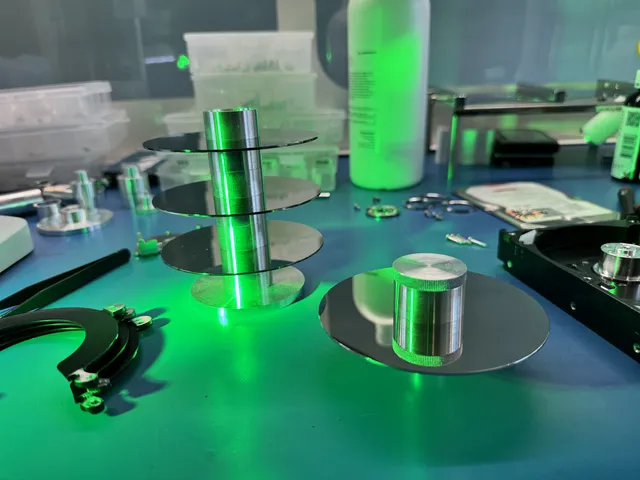
Head replacement addresses that reading problem. It involves opening the sealed drive and fitting compatible parts in a laminar-flow work area. If the platter surface is also damaged, new heads still have to work around areas that are difficult or impossible to read.
Firmware and the translator
Firmware runs the drive’s internal operations. Its service area holds information needed to access the storage, including the translator that connects requested addresses to data locations. A fault in that information can prevent normal access even when the motor and some reading functions still work.
A firmware download intended to update a healthy drive is different from repairing damaged internal information while preserving its data.
A quiet WD drive with failed heads
In Joe’s WD20SDRW recovery, the external hard drive spun without strange noises but would not initialize. Head replacement restored some access, and he saved the translator before later loading that backup into memory to recover access after translator corruption. The recorded result was all data except 28 MB recovered, with four head replacements during the work.
That drive also had small scratches on its top platter. Quiet operation had hidden a mechanical problem, and the recovery involved both heads and firmware. PC-3000 and Data Extractor appear in the recording because getting a drive ready and copying its sectors are separate parts of the job.
For a drive that remains undetected, repair aims to restore enough access to image its readable data onto other storage. The recovery software then works with that copy. Firmware work, board repair, and head replacement involve different labor and parts; the required combination determines the estimate.
If the hard drive is not spinning at all
An HDD that never starts has a power or mechanical-startup problem to investigate before data communication. Insufficient power, a faulty power path, or an internal mechanical obstruction can prevent rotation. Seagate’s internal-drive troubleshooting page identifies missing or incorrect power as a cause of no spin.
For an undamaged external drive that uses a power adapter, check that the correct adapter is connected; a portable USB drive instead receives power through its USB connection. If the appropriate external connection does not restore startup, fixing it requires identifying the electrical or mechanical fault. Tapping the enclosure or trying to move the heads at home can damage the parts that still hold the files.
Get help with data recovery
Bring your device to our Lincroft lab during opening hours, or mail it in.
How to mail your deviceThe $100 diagnostic is non-refundable once diagnostics start, and donor drives or replacement parts you approve are non-refundable once ordered, even if recovery fails.
Published by MDrepairs
MDrepairs is a data recovery and electronics repair lab in Lincroft, New Jersey. Our founder and lead technician Joseph Montanti films real cases for our YouTube channel, showing tools, repair steps and recovery outcomes.
Keep reading
- BitLocker Recovery Key Not Working? Check the Key ID Before Resetting
- exFAT Drive Corrupted? Cross-Platform Rescue Guide
- External Drive Painfully Slow? It May Be Dying