Seagate Drive Light On but Not Working? Read First
Our founder and lead technician, Joseph Montanti, handles cases personally.
A Seagate hard drive with its light on but no files showing has power to its indicator, but the connection, disk startup or volume mounting has failed somewhere along the way. A bad cable, damaged electronics, unreadable firmware or failed heads can all leave the light on. If the light is off too, the power connection may have failed. Some models also turn their light off through a setting or power-saving mode.
In Windows, click Cancel if asked to initialize or format the disk. A locked One Touch with Hub of 12 TB or more can appear uninitialized. On a Mac, choose Ignore. If the One Touch is already connected, has never been dropped or wet and is running without unusual sounds or dropouts, open Seagate Toolkit and enter the Seagate Secure password before imaging or repair. Never initialize or repair a locked disk to get around the lock.
On this page
What the light and sound tell you
The motor must turn the platters, the heads must read the drive's internal operating information, and the computer must recognize the disk before it can open a volume. A drive can spin normally and still fail while reading its firmware or your files.
Use what you already heard when the problem appeared. Seagate's sound guide distinguishes normal soft seeks from repeated hard clicking and grinding.
| What you heard | What it usually means |
|---|---|
| Soft whirring and occasional gentle clicks | The motor is turning and the heads are moving. Connection, firmware and file-system problems can still prevent access. |
| Repeated hard clicks or knocks | The drive is struggling to read or position its heads; a physical fault is likely. |
| Beeping without normal spin-up | The drive is having trouble starting. Insufficient power or an internal mechanical obstruction can cause this. |
| No sound while the light remains on | The disk may be spinning quietly or asleep. If startup failed, the power supply or motor may be involved. |
Leave a damaged drive disconnected. If it was dropped, got wet, or began clicking repeatedly, beeping or grinding, skip powered checks and arrange recovery of the files you need.
When the Seagate HDD has no light
For a portable external hard drive that is not lighting up, the cable and USB port supply its power. A desktop model may use a separate power adapter as well as USB. For now, inspect both ends of the cable, the adapter label and the wall outlet without reconnecting or powering the drive. These are among Seagate's first checks for a drive that is not working.
An unlit indicator can also be normal. On the USB-C One Touch Portable described in this manual, the light goes off after extended power saving or safe removal. A slow white blink means access or power saving. LED meanings vary between models, so a blinking light is not a universal firmware error code.
If your Backup Plus still opens in Explorer or Finder with its light off, check whether you disabled the LED in Seagate Dashboard's drive controls. That feature depends on the model. On the newer USB-powered One Touch desktop model, a fast red blink specifically means the USB-C port supplies less than the required 15 W.
Check the connection, then look for the disk
Try the connection once only on an undamaged drive without abnormal sounds. If the disk stays missing after that check, stop without reconnecting it. Do not scan a drive showing physical symptoms. Keep the drive resting on a stable surface. Leave the enclosure and sealed disk closed, keep the original circuit board in place and never freeze the drive.
- For a single connection check, use a known-working compatible USB cable directly at a computer port, or try the drive on another computer. Bypass any hub or dock. If the desktop drive uses a separate power adapter, use the one specified for that drive during this same check.
- On Windows, right-click Start and open Disk Management. Look for the Seagate disk even if Explorer has no drive letter for it. If it is absent, check Device Manager's Disk drives and USB sections for an entry or error.
- On a Mac, open Disk Utility and choose View > Show All Devices. Look for the physical disk and any volume beneath it. If the disk is absent, look under USB in System Information.
Those checks follow Seagate's Windows and Mac detection instructions. A correct capacity is useful, but it does not establish that every sector is readable. A 1 TB disk showing about 931 GB in Windows is normal; 0 bytes or a tiny capacity for a previously working disk needs further investigation.
Detected, but still missing from Explorer or Finder
A recognized Windows volume with its expected file system may just lack a drive letter. In Disk Management, right-click that volume, choose Change Drive Letter and Paths, then Add. On a Mac, select an existing volume under the disk and try Mount.
For an unlocked, stable disk with a RAW volume, preserve a full image and run CHKDSK or First Aid only on a working copy.
If the folders open again, copy your needed documents and photos onto separate storage before putting the Seagate back to work. End the transfer at a stall, read error, dropout or hard click. A drive that still reports 0 bytes or remains absent after the single connection check belongs with Seagate data recovery; a file scan needs access to readable sectors.
The diagnostic costs $100, credited toward a successful recovery, and you approve the recovery estimate before work begins.
Firmware, heads and the USB connection
The translator is the drive's map between the sector addresses requested by the computer and their locations on disk. Damaged translator or media-cache information can keep a spinning Seagate busy instead of letting it return data. Failed heads can also prevent it from reading that internal information. The exact fault needs examination of the drive.
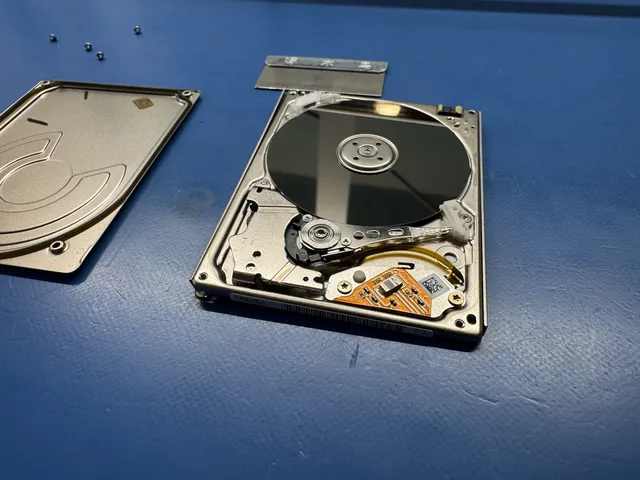
In this recorded Seagate ST5000LM000 recovery, Joe found mangled heads and a detached head stuck to a platter after a fall. After fitting donor heads, he dealt with damaged media-cache information by loading saved translator and cache files into RAM, then extracted 3.5 TB.
A failed USB interface can interrupt communication while leaving the indicator lit. Whether that interface can be bypassed depends on the hardware inside the particular enclosure. Keep the original enclosure and circuit board together: the recorded Seagate job also needed access to the drive's original ROM and service-area files.
Opening the metal drive lid exposes its heads and platters to contamination. Seagate's data-loss guidance explains why physical failures need controlled handling and why a recovery scan can worsen a damaged drive. At this lab, head and platter work takes place in a laminar-flow work area.
If only Seagate Dashboard is not working
When the disk and files are visible but Dashboard fails to recognize them, troubleshoot the backup application separately. The drive uses the operating system's storage support and does not need Dashboard to appear. Seagate also says Dashboard will not be updated for Windows 11, which matters if the trouble started after changing computers or Windows versions.
Get help with data recovery
Bring your device to our Lincroft lab during opening hours, or mail it in.
How to mail your deviceThe $100 diagnostic is non-refundable once diagnostics start, and donor drives or replacement parts you approve are non-refundable once ordered, even if recovery fails.
Published by MDrepairs
MDrepairs is a data recovery and electronics repair lab in Lincroft, New Jersey. Our founder and lead technician Joseph Montanti films real cases for our YouTube channel, showing tools, repair steps and recovery outcomes.
Keep reading
- BitLocker Recovery Key Not Working? Check the Key ID Before Resetting
- exFAT Drive Corrupted? Cross-Platform Rescue Guide
- External Drive Painfully Slow? It May Be Dying