Hard drive data recovery
We recover photos, documents and other files from hard drives that computers can no longer read. If yours fell, started clicking or suddenly disappeared from your computer, unplug it and leave it off. The disks inside may still hold the files you want back. Our hard drive data recovery service starts with a look at what went wrong. We'll see whether we can get the drive reading long enough to copy your files onto a new one. You can bring it to our counter in Lincroft, New Jersey or use our free shipping label to mail it from anywhere in the contiguous US.
- Since 2014One lab, in Lincroft, New Jersey
- 20,000+ ticketsacross all services since 2014
- 4.6 from 345Google reviews
- $100 diagnosticcredited toward a successful recovery
The people we help
Our customers include people from
-

-

-
 AT&T
-
 Marriott
-

-

-
 Tennessee Titans
-

-

-

-

-

-

-

Hard drive data recovery reviews
Our rating is 4.6 from 345 Google reviews. These hard drive owners tell you what happened in their own words, exactly as they posted them.
My grandma passed away on August 17th, 2025. … I thought I lost all her photos because my hard drive stopped working one day. But MDRepairs brought all my memories with her back.
I brought a broken external hard drive in for repair, and had an excellent experience working with Joe. … Turned out, the drive was completely shot and required some surgery to recover the data. His work is masterful!
I used MDrepairs to retrieve files that were lost after a hard drive failure. All communication from MDrepairs was prompt and professional. … The cost was very fair.
I send it out to a couple shops out here in vegas, and they weren't able to fix. So later I gave up on it … So I saw the video on Facebook from MB repairs, and I decided to send it out to them. And they were able to recover every single music file.
I had an external hard drive crash. I took it to a local shop in Edmond, OK but they were unable to get hard drive up and running … Joe contacted me stating they recovered a little over 81,000 RAW Nikon NEF photo's
What to do with a failing hard drive
You can tell us a lot about a failing drive without turning it on again. Leave it off, keep its parts together and make a note of what you remember.
First steps
- Unplug the drive
The small parts that read the disks are called heads. If one is damaged, starting the drive can drag it across the surface where your files are recorded.
- Keep the original case and cable
Leave an external drive in its case and keep the cable with it. On some models, a chip on the circuit board inside the case holds the key we need to read your files.
- Write down what happened
Tell us when the drive stopped working, what you heard and anything you tried afterward. Those details help us decide what to check first.
- Have the drive checked soon
This matters especially if the drive got wet. While it sits, corrosion can spread from the circuit board to the heads that read the disks.
What to avoid
- Another test run
If you heard a noise, describing it is enough. There's no need to plug the drive in again so we can hear it, and a damaged drive can still spin quietly.
- Opening the drive
Once the cover comes off, dust can settle on the disks. A fingertip can leave a mark on the surface or knock a head out of place.
- Putting the drive in the freezer
Moisture can collect inside a cold drive and corrode the parts that read your files.
- Running recovery software or repair commands
A scan puts extra strain on a drive that clicks, beeps or keeps disconnecting. CHKDSK in Windows and First Aid on a Mac can also change the records your computer uses to find your files.
- Swapping the circuit board (PCB)
Your original board carries a chip with settings specific to your drive. Fitting another board with the wrong settings can make the heads strike the disks.
- Choosing Format or Initialize
Cancel that prompt if it appears. Your computer is asking to prepare the drive for new files, which can change the information it needs to find the folders already there.
What's happening with your hard drive?
Start with the sound you remember or the message you saw on your screen. The videos show what we found when customers brought us drives with those symptoms.
Why is my hard drive clicking, ticking or grinding?
A click or tick can come from the arm that holds the heads as it tries again and again to get into position. Grinding or scraping means a head is touching a disk. Leave the drive off if you hear either sound.
The owner of a clicking Hitachi wanted the family photos back for Christmas. When we looked under the microscope, we could see how badly the heads were damaged. A matching set of heads let us recover all 200 GB.
Why is my hard drive beeping instead of spinning?
A beep or buzz can mean the heads are stuck to the disks or the motor has jammed. Leave the drive still until we can check the heads and motor, even if it's tempting to tap or shake it loose.
One customer's drive began beeping after she unplugged it while it was reading. We freed the heads from the edges of the disks and recovered about 680 GB, including her pictures and documents.
Can you get files off a dropped hard drive?
Yes, if the areas holding those files are still readable. A fall can push a head against a disk hard enough to scratch it. Even then, we can read around the scratch to reach files on the undamaged areas.
A customer's drive fell when he moved his laptop with the drive still plugged in. The top disk surface was scratched, but we recovered about 1.1 TB of the roughly 1.2 TB on the drive by reading the other surfaces. His family photos were among the files he got back.
Why isn't my hard drive showing up?
A bad cable or a faulty circuit board in an external case can keep your computer from seeing a working drive. We also check the heads and the files the drive needs to start. If yours is undamaged, runs quietly without cutting out and still appears in your computer's list of disks, try these cable and port checks.
The owner of the Western Digital drive in this video could hear it spinning quietly but couldn't open his game project. We found failed heads and small scratches on the disks and recovered all but 28 MB of his data.
Can you recover files from a dead hard drive?
A drive that won't light up or spin can still have readable disks. We check the circuit board first, since a power surge or the wrong adapter can damage it. If the board has failed, we move the chip that holds your drive's settings to a matching board.
Can you recover deleted files or a formatted hard drive?
Deleting a file or running a quick format can leave the file itself on the disk. Stop using the drive so nothing new gets written over the files you want back.
If your computer shows the drive as RAW or asks you to format it, it can see the drive but can't find its way to your folders. Cancel the prompt. We make a copy and try to rebuild the folder information there.
Are slow reads and errors signs my hard drive is failing?
They can be. A drive may take ages to open a folder, freeze or disconnect as it struggles to read one spot on a disk. A SMART warning is a health alert from the drive itself. If the drive is undamaged and still reads quietly and steadily, back up your files to a different drive now.
Can you recover a hard drive damaged by water or fire?
We can recover files if the disks inside are still readable. Send a wet drive in soon, without using heat to dry it or trying to clean the disks. After a fire, the water used to put it out can do more harm than the heat. We clean the drive and repair any board damage before we try to copy it.
Can you work on a hard drive that's already been opened?
Yes. Opening a drive can make recovery harder, so it helps to know what was tried and whether anyone took parts out.
The dropped drive in this video came to us after another shop had worked on it. A scratch ran through the area that held the drive's startup files, and we weren't able to recover the owner's photos.
Hard drive repair or data recovery?
We do both. Our hard drive repair service is for getting your files back, and that can mean replacing the circuit board, repairing the drive's own start-up files or fitting new heads to read the disks.
People ask us, can a hard drive be repaired well enough to use again? Long enough to copy what we can read, yes. Once the moving parts have failed, the drive will fail again, so we put the files we recover on a new drive.
How our hard drive data recovery service works
Once your drive is reading, we copy as much of each disk as we can onto a healthy drive. That lets us set your original aside while we put your files and folders back together from the copy.
Where a hard drive keeps your files
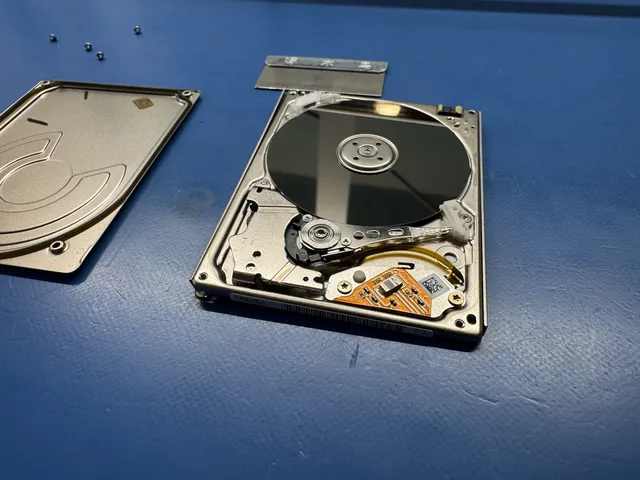
Inside your drive, a motor spins disks called platters. Your photos, documents and other files are recorded as magnetic patterns on their surfaces. Tiny heads at the ends of moving arms float just over the platters to read those patterns.
A circuit board on the outside controls the drive. The instructions it needs to start, called firmware, are stored partly in a chip on that board and partly on the disks. A fault in any of these parts can leave a photo right where you saved it even though your computer can no longer open it.
Hard drive recovery in six steps
-
Bring or mail in your drive
Start with a free quote, then bring your drive to Lincroft or mail it to our lab. If you're in the contiguous US, you can print your free prepaid UPS 2nd Day Air label and packing slip as soon as you finish the form.
-
We find out what failed
We start the $100 diagnostic by inspecting the outside of the drive and testing its circuit board. When we power it up at the bench, we can measure how much power the motor draws, watch how the heads move and check the drive's startup files and health record.
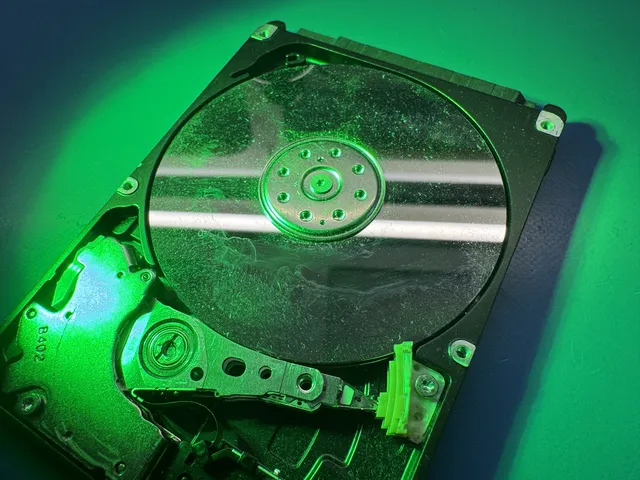
We clean dust like this off the platter so the heads have a clear surface to read when we copy the files. -
You decide whether to go ahead
We explain what we found, what we can try and what it will cost. You decide if it's worth doing. We order the parts and start recovery work only with your approval.
-
We repair the drive
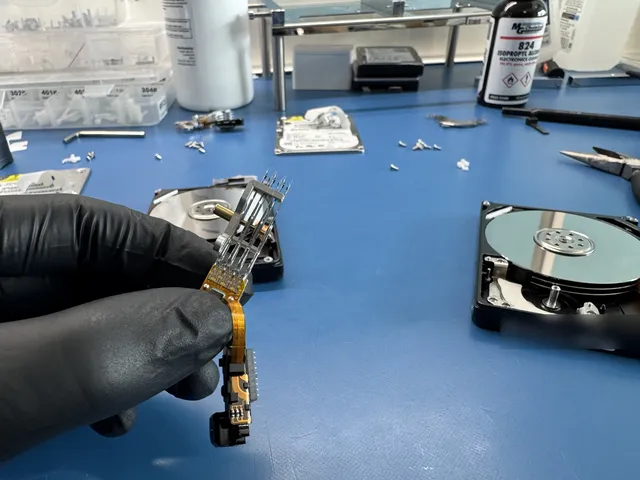
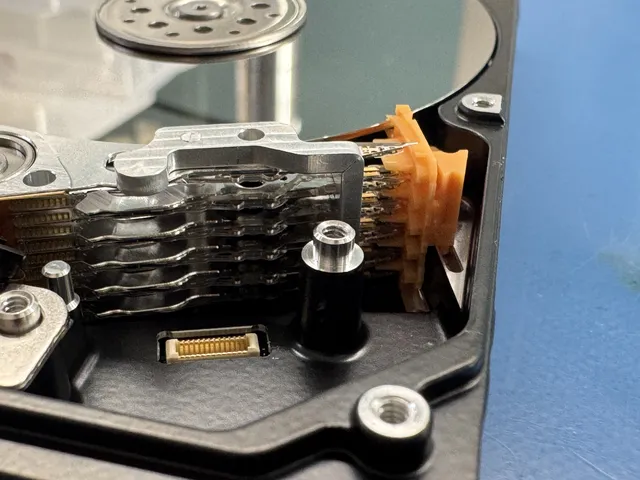
When a drive needs new heads, we find matching ones from another drive of the same model. We free stuck heads by hand and fit replacements at a bench where filtered air keeps dust off the disks. If the motor is jammed, we move the disks into a matching drive with a working motor.
For a circuit board (PCB) replacement, the cover can stay on. We transfer the chip with your drive's settings to the replacement board. We can also repair the drive's startup files through a connection built into the drive.
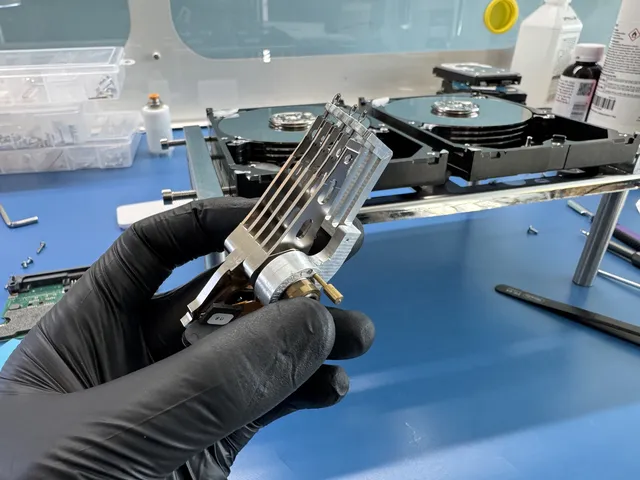
If a hard drive's heads fail, we replace them with a set from a matching donor drive. Then we copy whatever the replacement heads can read. -
We copy the disks
With PC-3000 and DeepSpar equipment, we copy the disks piece by piece onto a healthy drive without writing anything to yours. We take the good areas first, then go back to the weak ones, limiting the time and number of tries. We piece your files together from that copy.
-
We return your files
We email you photos so you can see what we recovered before you pay the recovery fee. The files themselves come back to you on a new drive.
What to send with your hard drive
These four things help us decide where to start and which files to look for first.
- The drive, its case and its cable
The label on an external case helps us identify the drive inside. If you've already taken it apart, leave it as it is and send the cable and every piece you removed.
- What happened to the drive
Describe the last sound you heard and anything you tried after the drive stopped working. Let us know if someone opened it or ran recovery software on it.
- Your password or recovery key
If you used BitLocker on Windows or FileVault on a Mac to lock the drive, we'll need your password or recovery key to open the files.
- The files you want most
If there's one folder you'd open first, give us its name. Even if only part of the drive reads, we can check what we recovered against what you came in for.
What can fail inside a hard drive?
The trouble can be in a moving part, the disk surface or the records the drive uses to start and find your files. Two drives of the same model can sound alike and need different repairs. A beep, for instance, can come from stuck heads or a jammed motor.
| What failed | What you might notice | How we handle it | What we may recover | Price |
|---|---|---|---|---|
| The heads that read the disks | Clicking or ticking, or a drive that spins but never shows up | Fit matching heads from the same model at a bench with filtered air | All your files with their names and folders if every disk surface reads | $1,500 - $3,000+ |
| Stuck heads or a jammed motor | Beeps or buzzes without spinning | Free and replace stuck heads by hand, or move disks into a drive with a working motor | All files if every surface reads. A scratch can limit recovery to part of the drive. | $1,500 - $3,000+ |
| Scratched platters (the disks inside) Recovery from scratched disks | Grinding or scraping, clicking after a fall, or a drive that still won't read after a recovery attempt | Read toward the scratch from both directions, or cut off that surface's head and read the others | Files from the areas of the disks we can still read | $3,000 - $3,500+ |
| Damaged startup files (firmware) | The drive spins quietly but stays busy, shows 0 GB or another incorrect size, or never appears | Repair the startup files through the drive's built-in connection while the cover stays on | All files with their original names and folders if the whole drive reads | $1,000 - $1,500 |
| The file system that keeps track of your folders | Files are missing even though the drive runs, or your computer asks you to format it | Copy the drive and rebuild the folder information on the copy | Files that weren't written over, grouped by type without names or folders if the map is gone | $1,000 - $1,500 |
If your drive won't light up or spin, we check its circuit board. More than one part can fail, so we base your estimate on what we find when we examine your drive.
Scratched platter recovery, encrypted hard drives and helium drives
A scratch can damage one surface while the other sides of the disks still hold readable files. With an encrypted drive, saving a chip from the original circuit board can be just as important as saving the disks.
What can you recover from scratched hard drive platters?
We can get files off a badly scratched disk by reading the areas the scratch didn't reach. We read forward toward the mark, then in reverse from the other side. We stop short both times because one pass over the scratch would destroy the new head.
If a surface is too scratched to read at all, we cut off its head and change the drive's start-up files so it runs without that head. The other heads can then read the undamaged surfaces. What's on the scratch itself is gone, so anything we get back is only part of the drive.
We used that second method on the dropped drive in this film after another company had tried. The scratch took out the map of its folders, so we got 228 GB back grouped by file type. Part of a family photo collection can still be worth bringing home.
Can you recover files from an encrypted WD My Passport?
Yes, if we have the key that unlocks the files. On some My Passport drives, a chip on the original circuit board scrambles the files as they're saved, and we need that chip to read them again. If you locked the drive on your computer, we can copy it while it's locked and use your password or recovery key to open the copy.
The Western Digital in the video had a snapped circuit board. We moved its original chips to a matching board and recovered everything on the drive, including the owner's music.
Can you work on a sealed helium hard drive?
Yes. Some drives that hold a lot of data have helium sealed inside them in place of air. We've opened helium drives to replace failed heads and supplied helium again so we could read the disks.
Which files can you get back?
We look for the files you want on the parts of the disks we can still read. With the $100 diagnostic, we can examine your particular drive, including any scratches or earlier repairs, and explain what's possible.
What we can recover
- Files on a drive that stopped working
A failed head, motor or circuit board can keep you from opening files that are still there. If we can get the drive reading again, we can copy those files.
- Files missing after deletion or a quick format
A folder can look empty while the pictures it held are still on the disk. We look for files that new data hasn't replaced.
- Original file names and folders
If the whole drive reads and its folder records are intact, your files can come back in the folders you remember. Even if those records are gone, we can look for pictures and documents by file type.
- Files from a wet or burned hard drive
The plastic case can melt while the disks inside the metal body are still readable. Water can also damage a circuit board while leaving the files on the disks intact.
What can prevent recovery
- New data written over a file
When new data is written in the same spot, it replaces what was there. Leaving the drive off helps preserve the files that are left.
- A scratch through the file itself
A scratch destroys the recording along its path. We read around the scratch to find files on the undamaged areas.
- A missing encryption key
If the chip that unlocks the files on your drive is destroyed, its key can be lost with it. If you locked the drive on your computer, look for your password or recovery key.
How much does hard drive data recovery cost?
$100 diagnostic, credited toward a successful recovery.
The $100 diagnostic is non-refundable once diagnostics start, and donor drives or replacement parts you approve are non-refundable once ordered, even if recovery fails.
Your hard drive recovery cost depends on what failed, the condition of the disks and the matching parts the job needs. In the hard drive rows of our full price list, “logical” means the drive runs but its files or folders need to be put back together.
After the diagnostic, we give you an estimate to approve before recovery begins. If we don't recover your files, you pay the $100 diagnostic and the cost of any parts we ordered with your approval. You'll find the details in our service terms.
- See which files came back
Before you pay the recovery fee, you'll get an email with photos showing the files we recovered.
- Payment options
We accept cards, PayPal and Apple Pay. You can also pay over time with Affirm if you qualify.
- If you need us to start sooner
A rush diagnostic moves up the day we start examining your drive. How long recovery takes from there depends on what we find.
- How long hard drive recovery takes
The kind of repair sets the timing. Rebuilding folders or repairing startup files takes the least time, followed by circuit board repairs. Moving parts take longer because we have to find a match and copy the disks slowly.
| Work needed | Price |
|---|---|
| Hard Drive - Firmware / Logical | $1,000 - $1,500 |
| Hard Drive - Head Swap | $1,500 - $3,000+ |
| Scratched / Contaminated Platters | $3,000 - $3,500+ |
| RAID / Multi-Drive Arrays | Contact for Quote |
| Service option | When we start | Added cost |
|---|---|---|
| Standard diagnostic | Starts in about 4–6 weeks, then recovery time varies by case | No surcharge |
| Priority | Assessment starts within 5–7 days | +$250 |
| Urgent | Assessment starts within 1–2 days | +$500 |
| Emergency | Assessment starts same-day | +$1,000 |
With standard service, we start examining your drive about 4 to 6 weeks after it arrives. Allow time after that for the recovery itself. If your files are spread across drives in a RAID set, we give you a separate quote for the whole set.
What comes back to me after hard drive recovery?
You get your recovered files on a new drive, along with the original drive you sent us. We keep a backup offline for two weeks so you have time to make your own.
- Your files on a new drive
We put your files on a new external drive or USB flash drive. We can mail it to you, or you can pick it up at our counter in Lincroft.
- The backup at our lab
If your new drive gets lost or damaged in the mail, we still have a copy here. We delete it after two weeks. If you'd like us to delete it sooner, just email, call or text.
- Make a backup the day your drive arrives
Follow the 3-2-1 backup rule and keep your files in three places. If the drive we returned to you needs recovery after the two weeks are up, the full recovery price applies again.
- Your original hard drive
We return the old drive to you as well. Use the new one for your files so you don't have to rely on the drive that failed.
- If only part of the drive reads
Some areas of a damaged disk may never read. With a partial recovery, we check what came back against the files you told us about, even if that's just one folder.
Hard drive data recovery by brand
Look for the name on your drive's label. It helps us identify which parts will fit and how to reach the files the drive needs to start.
Seagate data recovery
If a Seagate stays busy or reports the wrong size, we can use its built-in repair connection to reach its startup files before we try to copy it. We work on Barracuda, IronWolf, Backup Plus, Expansion, One Touch, FireCuda, Exos and SkyHawk drives.
Western Digital data recovery
We work on My Passport, My Book, Elements, easystore, WD Blue, Black, Red, Purple, Gold and Ultrastar drives. On a portable WD, keep the original circuit board with its built-in USB port. It holds the drive's settings and, on some models, the chip we need to read encrypted files.
Toshiba data recovery
If your Canvio Advance, Slim or Ready can't read its own startup files, we use a repair method specific to Toshiba drives to reach them. We also work on the P300, X300, N300 and MG series.
Hitachi and HGST data recovery
HGST became part of Western Digital. If you have a Deskstar, Travelstar, Touro or Ultrastar with Hitachi or HGST on the label, we use the repair methods and matching parts for that family.
Samsung hard drive data recovery
We still recover files from Samsung Spinpoint drives, even though Samsung stopped making hard drives in 2011. When a Spinpoint needs parts, we get them from a matching Samsung drive.
LaCie and Maxtor data recovery
Current LaCie Rugged, d2 and 2big models have Seagate drives inside, so we use Seagate repair methods. Maxtor also belongs to Seagate. If yours is an older Maxtor DiamondMax or OneTouch, we look for parts from a matching Maxtor.
Hard drives we've recovered
These drives have all been on our bench. You can look for a drive like yours by name, by the problem its owner noticed or by model number when we have one.
- WD external hard drive, 2 TB WDBYVG0020BBK Dropped or physically damaged · Data recovered 2026
- Toshiba external hard drive, 3 TB DT01ACA300 Clicking or other noise · Data recovered Mailed from Tennessee 2026
- Seagate external hard drive, 500 GB ST3500418AS Fire or power surge · Data recovered Mailed from Ohio 2026
- WD My Passport, 500 GB Clicking or other noise · Data recovered Mailed from Virginia 2026
- Maxtor hard drive Dropped or physically damaged · Data recovered Mailed from Virginia 2026
- Toshiba hard drive, 500 GB MQ01ABF050 Data recovered Mailed from Louisiana 2026
- Seagate external hard drive, 500 GB ST3500320AS Deleted or formatted · Data recovered Mailed from Missouri 2026
- Seagate external hard drive, 3 TB ST3000DM001 Hard Drive - Head Swap · Data recovered Mailed from Texas 2026
- WD external hard drive WD15NMVW Dropped or physically damaged · Data recovered Mailed from Washington 2026
- Seagate external hard drive, 5 TB ST5000LM000 Data recovered Mailed from Kentucky 2026
- Seagate external hard drive, 2 TB ST2000LM007 Clicking or other noise · Data recovered Mailed from Alaska 2026
- Hitachi external hard drive, 500 GB HTS545050B9SA02 Clicking or other noise · Data recovered Mailed from Washington 2026
- Toshiba external hard drive Hard Drive - Firmware / Logical · Data recovered Mailed from Maine 2026
- Toshiba external hard drive MQ01UBD100 Stopped working or not detected · Data recovered Mailed from Iowa 2026
- WD external hard drive, 2 TB WD20EZRX Stopped working or not detected · Data recovered Mailed from Arizona 2026
- Toshiba external hard drive, 2 TB MQ04UBD200 Hard Drive - Firmware / Logical · Data recovered Mailed from Tennessee 2026
- WD hard drive, 500 GB WD5000AAKS Clicking or other noise · Data recovered Mailed from Wisconsin 2026
- Seagate hard drive, 1 TB ST1000LM035 Stopped working or not detected · Data recovered Mailed from Colorado 2026
- Maxtor hard drive, 160 GB Clicking or other noise · Data recovered Mailed from California 2026
- WD hard drive, 500 GB Clicking or other noise · Data recovered Mailed from Wisconsin 2026
- WD external hard drive, 500 GB WD5000AAKS Failed or corrupted · Data recovered Mailed from Georgia 2026
- Seagate external hard drive, 2 TB Data recovered Mailed from Washington 2026
- Seagate external hard drive, 1 TB ST31000528AS Clicking or other noise · Data recovered 2026
- WD external hard drive, 2 TB WD20EZRZ Failed or corrupted · Data recovered Mailed from Ohio 2026
- WD external hard drive, 8 TB WDBWLG0080HBK Stopped working or not detected · Data recovered Mailed from New York 2026
- Maxtor hard drive Data recovered Mailed from California 2026
- Seagate external hard drive, 2 TB ST2000DL003 Fire or power surge · Data recovered Mailed from Tennessee 2026
- WD external hard drive WD5000AAKS Dropped or physically damaged · Data recovered Mailed from Virginia 2026
- WD external hard drive, 4 TB WD40EZRZ Deleted or formatted · Data recovered Mailed from California 2026
- Seagate external hard drive, 1 TB ST1000LM038 Stopped working or not detected · Data recovered At our lab's counter in Lincroft 2026
These cases come from our ticket system, BenchKey, the shop software we built and run our lab on, with names, contact details and addresses left out. How we publish cases
What kind of data recovery does my drive need?
The next step depends on where your files live and what went wrong, from a folder deleted on a healthy drive to a box of drives that work together.
Should I try hard drive data recovery software?
Software can help you recover deleted files from a healthy drive. Save anything it finds to a different drive so you don't write over the files you're trying to recover. If your drive clicks, beeps or keeps disconnecting, a scan puts more strain on it and won't fix a broken head.
If an undamaged drive is already running quietly and steadily, look for it in Disk Management on Windows or Disk Utility on a Mac. If it's listed there, you can try another cable and port. In Windows, assigning a missing drive letter may be enough. Our free hard drive checking tool can help you decide when to stop.
What if my drive is an SSD?
An SSD needs a different kind of recovery. A solid-state drive stores your files in memory chips, and a controller chip manages how it reads them. Those chips are what we work with when you send us an SSD.
How do you recover hard drives in a RAID set?
We copy each drive separately, then use the copies to put the set and its folders back together. In a RAID set, the drives work together to hold your files. You might have a set like this in a network storage box called a NAS.
If the set is already missing one drive and another is showing warnings, hold off on starting a rebuild. It puts every remaining drive to work and can cause another one to fail.
Can I send my whole computer for hard drive recovery?
Yes, you can send the whole computer or just the drive. We read the disks the same way whether the drive came from a laptop, desktop, Mac, video recorder or game console. When we put the folders back together, we follow the way that device organized them.
Can my business send you a hard drive?
Yes. Our business partnership program is for people who look after their company's computers or send drives to us on behalf of clients.
Where can I find hard drive data recovery near me?
Our lab is in Lincroft, New Jersey. You can bring your drive straight to our counter or mail it to us at the same address.
Shipping is free both ways in the contiguous US. As soon as you finish the mail-in form, you can print your prepaid UPS 2nd Day Air label and packing slip. Cushion the drive on every side so it stays still in the box. Choose your location for mailing details.
- Address
- 644 Newman Springs Road, Suite A, Lincroft, NJ 07738
- Hours
- Mon-Fri 10am to 6pm Eastern
- Phone
- (732) 933-7717
Northeast
Southeast
Midwest
Contact, prices and recovery services
- How to mail your device
- Ask for a quote
- Contact our Lincroft lab
- The full recovery price list
- Affirm financing if you qualify
- All our data recovery services
- Cases we've filmed at the bench
- Find a device by model
- iPhone data recovery
- Cell phone data recovery
- Samsung Galaxy phone recovery
- USB flash drive recovery
- SD card recovery
- iPad data recovery
- iPod data recovery
- Moving files to your new phone
Questions about hard drive data recovery
How much of my hard drive can you recover?
It depends on which areas of the disks we can read and whether those areas hold the files you want. Once we've examined your drive, we can explain where the damage is and what we can try.
Is there a hard drive data recovery lab near me?
Our only lab is in Lincroft, New Jersey, where you can bring your drive to our counter. If you're farther away, you can mail it to us from anywhere in the contiguous US.
Who will work on my hard drive?
Our team of engineers does the recovery work at our lab in Lincroft. You can see Joseph Montanti working at that bench in the hard drive recovery videos on this page.
Will taking the hard drive out of my computer erase my files?
No. Your files stay on the disks when you disconnect the drive. To erase them, something has to change the magnetic recording, such as writing over it or exposing the drive to a strong enough magnet.
Can you recover files from an old hard drive that hasn't run in years?
Yes, the files can still be there after years in a drawer. The bearing that lets the motor turn can dry out and stick while the drive sits, so leave it off and let us handle that first spin at the bench.
Should I recover my files before a hard drive warranty exchange?
Yes. The files on your old drive go back with it when you exchange it. If you want to keep them, have them recovered before you return the drive or agree to have it erased.
How should I pack my hard drive to mail it?
Leave an external drive in its case, or put a bare drive in a bag that protects against static. Cushion every side so it stays still in the box. In the contiguous US, print the label and packing slip from our mail-in form. Put the slip inside and the label outside, then drop the box at any UPS location.
What happens to my private files?
The backup we keep for you stays offline. We delete it after two weeks, or sooner if you ask. We email you photos showing what we recovered before you pay. You can also read how we handle and track your drive while it's at our lab.
How do I choose a hard drive data recovery lab?
Ask who does the work, what you'll owe if recovery fails and how they'll check for the files you care about. We show repairs on film, give you an estimate to approve and email photos of what we recover before you pay. If recovery fails, you owe the $100 diagnostic and the cost of parts we ordered with your approval.
Hard drive recovery guides from our lab
If you're trying to place a noise you heard, start with the guides on clicking, beeping and other sounds. You'll also find help with missing files, repair costs and what's safe to check at home.
Noises, drops, scratches and water
- Hard Drive Clicking? What It Means and What to Do
- Hard Drive Making Noise? What Each Sound Means for Your Data
- Hard Drive Beeping? What It Means and How to Save Your Data
- Dropped Hard Drive: Can Your Data Still Be Recovered?
- Can You Recover Data from a Scratched Hard Drive Platter?
- Water Damaged Hard Drive: Can Your Data Be Recovered?
Dead drives, errors and missing files
- External Hard Drive Not Showing Up? Here's How to Fix It
- A Professional Guide to Recovering Data from a Dead Hard Drive
- How to Fix a Corrupt HDD: A Professional Data Recovery Guide
- Hard Drive Failure: Symptoms, Causes, and What to Do
- Data Recovery After a Power Surge: What to Do
- Can You Recover Deleted Files from a Hard Drive?
Repair, cost, health, RAID and SSDs
- Is Hard Drive "Repair" Actually a Thing? (No, Here's What to Do Instead)
- Hard Drive Recovery Cost: What You'll Actually Pay at a Real Lab
- How to Check Hard Drive Health: The Complete 2026 Guide From a Data Recovery Lab
- Will a Magnet Erase a Hard Drive? Tested Honestly
- How to Recover Data from RAID Drives: A Professional Guide
- How to Recover Data from an SSD: A Professional Lab Guide
Tell us which files you want back
You don't need to know what broke to ask for a free quote. Tell us what happened the last time you used the drive and which files you'd look for first. If you send it in, we'll explain what the $100 diagnostic shows, what we can try and what it will cost. You decide whether to go ahead.