Dropped Hard Drive: Can Your Data Still Be Recovered?
Our founder and lead technician, Joseph Montanti, handles cases personally.
Yes, data can be recovered from a dropped hard drive when the recording surfaces still hold readable data. The fall can damage the heads that read those surfaces, the motor, or the drive's chassis without erasing all the files. A drive dropped while running is especially exposed to a head crash because its heads are over the spinning platters.
On this page
The first steps after dropping a hard drive
Keep the dropped drive off. Unplug an external drive, or shut down the computer containing it, and leave it disconnected. Another start with damaged heads can scrape the surfaces that hold your files.
- Leave the drive in its current enclosure. Opening the metal drive cover exposes the heads and platters to contamination; tapping or shaking adds another impact.
- Check any existing backup from a different device. Open the folders you need and see whether the latest files are there. This can settle whether you need recovery without using the damaged drive.
- If you need files that are missing from the backup, arrange a mechanical inspection. Put the drive in an antistatic bag, cushion it with foam or bubble wrap, and use a rigid box that prevents it from moving.
Our hard-drive packing guide covers the packing details. You can bring the drive to our Lincroft, New Jersey lab or use the mail-in service.
Recovery software searches sectors through the drive's existing heads. That is useful for some file-system problems, but it leaves bent or broken heads in place and makes them keep reading. CHKDSK and formatting also change the disk's contents without repairing the impact damage. Seagate's data-loss guidance separates physical failure from problems suitable for software recovery.
Was the drive running when it fell?
When a hard drive is running, its read/write heads travel just above the platter surfaces. A sharp impact can push a head into a surface. This is a head crash: contact can damage the head, scrape the magnetic coating that stores data, and leave fragments inside the drive. Dell describes physical shock, including a drop, as a cause of head crashes and mechanical failure.
A powered-off drive has its heads parked. That moves them out of their reading position and gives the drive more protection against shock. It still has delicate mechanical parts. An impact can damage the parked head assembly or distort the chassis, leaving a drive that will no longer start or position its heads correctly.
Manufacturers specify separate operating and non-operating shock limits for this reason. The limits belong to a particular model and test pulse. They do not translate into a universal safe height above a carpet or concrete floor. Western Digital's WD Purple technical manual, for example, gives different limits for a running drive and one that is off.
A running drive that falls onto carpet can suffer internal damage even when the plastic enclosure looks fine. A drive dropped onto concrete while off can retain readable platters even when it no longer works. Power state, the direction of the impact, and the damage inside all matter; inspection establishes which parts need work.
For an undamaged external hard drive in normal use, keep it stationary while it runs. Let transfers finish, safely eject it, then disconnect it and let it stop spinning before moving it.
What the impact does to heads and platters
The data lives in the magnetic recording surfaces of the platters. The heads read those surfaces, and the spindle motor turns them. A failed head or motor can block access to data that is still present. Replacing a damaged component can restore access long enough to extract it.
The distinction matters when you are deciding whether a dropped external hard drive can be fixed. Getting your files back is a different job from making the drive suitable for everyday storage again. A mechanically repaired drive may only remain readable long enough for imaging, which copies accessible sectors onto healthy storage. Your recovered files then come from that copy.
Head damage and scratches
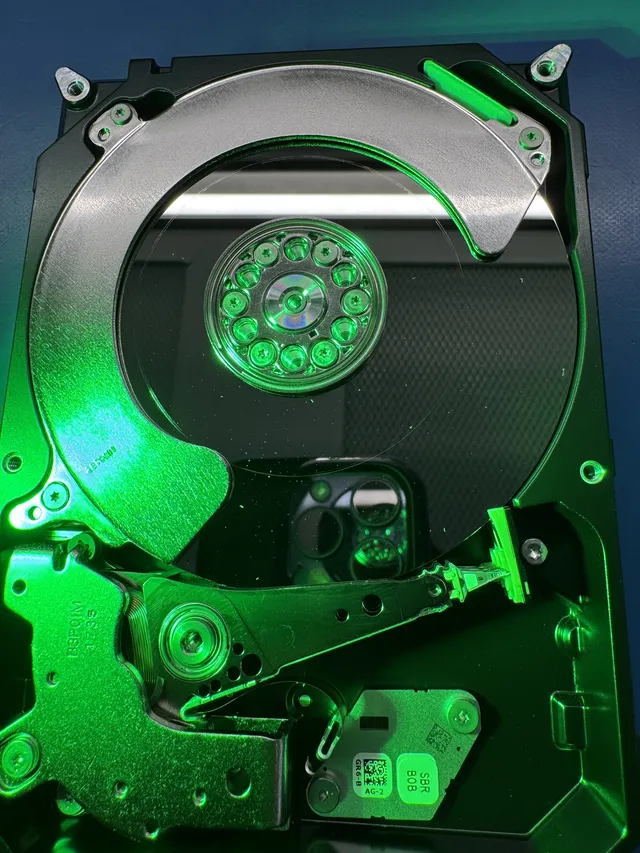
A head crash can bend the head assembly or detach one of its small reading elements. Debris left behind can damage replacement heads as they pass over it. That is why checking and cleaning the platter surfaces comes before trying another head assembly.
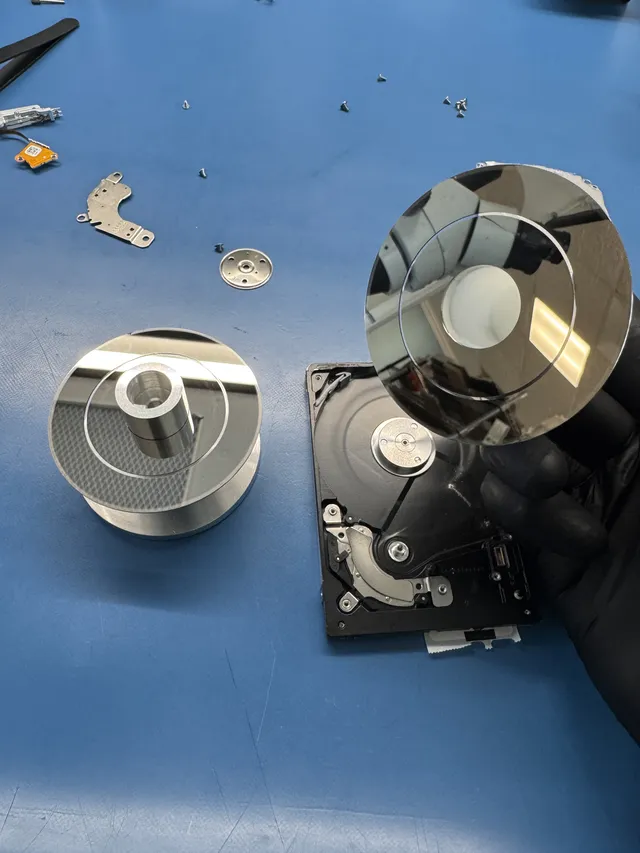
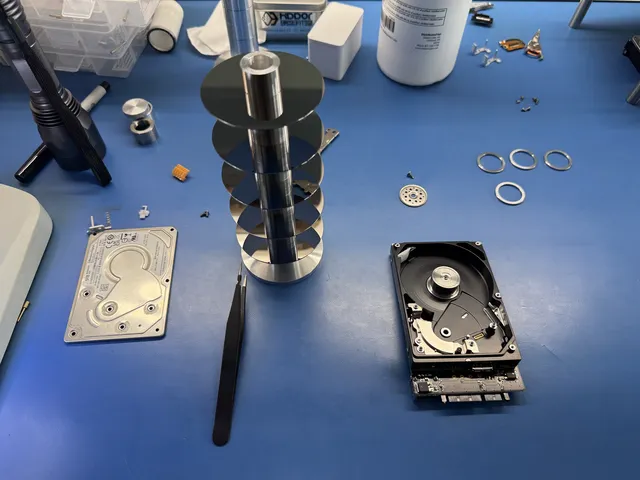
Joe's dropped Seagate ST5000LM000 recovery shows mangled heads and a detached head stuck to a platter. He removed the five platters, checked and cleaned their surfaces, and fitted donor heads. He then worked through a firmware problem before imaging the drive and recovering the data.
Scratches that remove the recording material also remove the data stored in that area. Replacing the heads does not put that material back. Other areas may remain readable, but a file can span both good and damaged sectors. That is why a drive can produce some complete files, some damaged files, and gaps even after its mechanical fault has been repaired.
The position of damage matters as well as its size. Drives keep internal operating information in a service area on the platters. Trouble reading that information can prevent normal access to a much larger amount of user data. A drive that spins but never becomes ready can therefore need both mechanical work and firmware work.
Damage to the chassis or motor
The motor and the mount supporting the head assembly must keep the moving parts in the right positions. Distortion can prevent the platters from turning freely or stop the heads from moving into position. Installing working heads in a distorted chassis can leave the same fault.
In this WD10JMVW dropped-drive case, replacement heads clicked rapidly and would not leave their parking ramp. Joe suspected a bent mounting pin, moved the platters into a donor chassis, and fitted another head assembly. The drive became readable, and he recovered almost all the files, with some data remaining unreadable.
A platter transfer is delicate because the recording surfaces have to survive removal and reinstallation. It is a repair for a specific mechanical problem, rather than the first step for every drive that has fallen. The WD case needed it after a head replacement failed to restore movement.
What the symptoms after a drop mean
If your hard drive fell and stopped working, use the behavior you already observed. These are reasons to seek mechanical recovery; they are not tests to perform by reconnecting it.
| What happened after the fall | What it usually means | What to do with the drive |
|---|---|---|
| Repeated clicking or ticking | The heads keep attempting to position or read and fail. Impact damage to the heads or their mounting can cause this. | Leave it disconnected for inspection of the heads, surfaces, and chassis. |
| Beeping or buzzing without normal spinning | The motor is struggling to turn the platters. Heads stuck against a surface or another mechanical obstruction can prevent startup. | Have the internal obstruction checked before another start. |
| No spin and no vibration | The motor may be unable to turn, or the power path may have been damaged. | Keep the original drive and enclosure together for electrical and mechanical checks. |
| Spinning, but absent from the computer | The drive has power but is failing to become ready or communicate. Damaged heads can prevent it from reading its service area. | Choose recovery that can investigate the drive itself, beyond replacing a USB cable. |
| Folders appear, but reads hang or produce I/O errors | Some sectors are readable and others are failing. The directory can be accessible while the file contents are not. | Arrange controlled imaging after the mechanical condition has been checked. |
A sharp click and a soft tick do not reliably separate scratched platters from a repairable head fault. In the WD case above, the replacement heads clicked because their movement was obstructed. The broader clicking-hard-drive explanation covers repeated read attempts and other causes when there has been no drop.
If you already opened a folder after the fall, that shows the drive read that folder at that moment. It may still have damaged parts. The stopped, dropped drive belongs on the inspection path above; reconnecting it for a full backup would require sustained reading before its mechanical condition is known.
Why tapping, freezing, and opening the drive cause trouble
Tapping a drive applies force without controlling where the heads move. A head caught against a platter can drag across the coating as it comes free. Even if the motor begins turning afterward, the damaged reading element and any fragments remain inside. A successful spin-up after a tap is therefore a poor reason to put the drive back into use.
Freezing changes the temperature of every part together. It leaves broken heads and distorted mounts in place, while introducing a condensation risk as the cold drive returns to a warmer room. The manufacturer's environmental limits specify non-condensing conditions. A freezer adds a moisture problem to a mechanical problem.
Removing the drive cover at home also exposes the recording surfaces. A particle trapped between a moving head and a platter can interfere with the small clearance they need. Inspection under controlled conditions lets the technician examine the damage and remove debris before installing replacement parts. Looking at a platter through an open cover at a desk offers no equivalent way to handle what is found.
Portable drives, desktop externals, and laptops
A portable USB hard drive has a complete mechanical drive inside its outer enclosure. A damaged USB socket or enclosure can interrupt access, but the same impact also reaches the drive inside. A cracked case is therefore worth preserving with the drive: it is part of the hardware that needs checking.
Some external drives depend on their original electronics for access to encrypted data. Moving the bare drive into an unrelated enclosure can introduce another problem. In the lab's WD40NDZM broken-board recovery, Joe moved the original CPU and ROM onto a replacement board to regain access. An enclosure swap is not a general repair for a dropped external hard drive.
A larger desktop external drive adds a separate power supply and usually has a heavier enclosure. It can suffer the same head and platter damage as a portable drive. Being plugged into wall power does not tell you whether its heads were parked at the moment it fell.
For a dropped laptop, the storage type matters. A hard disk drive (HDD) has the head-crash risk described here. An SSD stores data in chips, so there is no rotating platter or head assembly to crash; impact can instead damage the board, connectors, or surrounding computer. Keep the laptop intact if opening it would mean disturbing a damaged board or battery.
Dropped-drive recovery work and cost
Head and platter work at MDrepairs takes place in a filtered, laminar-flow work area. We inspect the surfaces and head assembly, look for fragments, and determine whether the chassis can support a repair. The two filmed recoveries above show why the next step depends on what is damaged: one needed donor heads and firmware work, while the other needed a donor chassis as well.
Dropped-drive repairs fall into the following price ranges. Donor parts, damage to the surfaces, and the work needed to get stable reads affect the estimate.
| Damage or work involved | Estimated cost |
|---|---|
| Stuck heads or a minor firmware problem, with no platter damage | $300 - $500 |
| Head replacement with clean platters | $500 - $800 |
| Head crash with platter damage | $800 - $1,200 |
| Motor seizure requiring a platter transfer, or extensive scratching | $1,000 - $1,500+ |
The diagnostic is $100, credited toward a successful recovery, and you approve the estimate before recovery work begins. Our standard recovery estimate is 4–6 weeks, with the schedule depending on the case and any required donor parts.
Get help with data recovery
Bring your device to our Lincroft lab during opening hours, or mail it in.
How to mail your deviceThe $100 diagnostic is non-refundable once diagnostics start, and donor drives or replacement parts you approve are non-refundable once ordered, even if recovery fails.
More lab videos
Published by MDrepairs
MDrepairs is a data recovery and electronics repair lab in Lincroft, New Jersey. Our founder and lead technician Joseph Montanti films real cases for our YouTube channel, showing tools, repair steps and recovery outcomes.
Keep reading
- External Drive Says “The Parameter Is Incorrect”: Data-Safe Checks
- External Hard Drive Freezes File Explorer or the Computer: Safe Next Steps

- “The Semaphore Timeout Period Has Expired” During a Drive Copy