Is Hard Drive "Repair" Actually a Thing? (No, Here's What to Do Instead)
Our founder and lead technician, Joseph Montanti, handles cases personally.
Hard drive repair, as a real consumer service, doesn't exist. If your hard drive is failing, no shop or lab is going to repair it and hand it back to you working like new. The drive itself is a sealed, factory-calibrated assembly that costs less to replace than to fix. What actually happens when someone says "I need my hard drive repaired" is one of three things: they need a healthy old drive cloned onto a new one before it dies, they need data recovery from a drive that's already failed, or they need to replace the drive entirely. None of those is "repair" in any meaningful sense. The word survives because that's what people type into Google. The service is something different.
If you're here because your drive started making noises, won't show up, or stopped working, you're almost certainly looking for data recovery. We pull the data off the failed drive in a lab, hand it back to you on a new drive, and you replace the old one with a fresh one. The cost of "repairing" the dead drive itself isn't part of the equation because we never put it back into service. This article walks through why hard drives stopped being repairable, what to do instead, and how to tell the difference between a drive that needs cloning, recovery, or replacement.
On this page
Why nobody repairs hard drives anymore
To understand why hard drive repair isn't a thing, you have to understand what a hard drive actually is. A modern HDD is a precision assembly that lives inside a sealed metal enclosure. The internal parts are paired to each other at the factory: specific heads matched to specific platters, with a unique firmware calibration table written to the platter's reserved area that tells the drive electronics how to interpret signals from those particular heads. Open the case in your living room, swap any internal component, and the drive will never read your data again. It's not designed to be serviced. It's designed to be replaced.
The economics killed it first
In the early 1990s, hard drives cost hundreds of dollars per drive. A 200 MB drive was a $400 purchase. At that price, paying $150 to have one repaired made sense. Today a 2 TB drive costs $50 retail. Spending $300 to "repair" a $50 drive doesn't make sense to anyone. Manufacturers stopped engineering for repairability decades ago because the customer demand for it disappeared.
What customers do still pay for is the data on the drive. That's why data recovery exists as a healthy industry and hard drive repair doesn't. The drive is replaceable. The data isn't.
The clean room requirement killed it next
The internal flying height of a hard drive's read/write heads is roughly three nanometers above the platter. A human hair is 70,000 nanometers thick. A dust particle is 1,000 nanometers. A skin cell is 30,000 nanometers. Open a hard drive in a normal room and you contaminate the platters with thousands of particles that are mountains compared to the flying height. The drive can never run safely again. Real internal work happens in a Class 100 clean room with fewer than 100 particles per cubic foot of air. The capital investment to operate one is significant, and there's no economic case for using one to "repair" a $50 drive. There is a case for using one to recover priceless data from that drive, which is the business model that survived.
Firmware coupling killed any DIY repair
Drives manufactured after about 2008 store a unique calibration table on the platter's service area. This table contains adaptive parameters, head maps, defect lists, and SMART logs. The drive's controller reads this table at boot. If the heads, platters, motor, or PCB don't match the calibration table, the drive won't initialize. You can't just buy a "donor" drive on eBay and swap parts. The donor's heads won't read your platters. Your PCB won't talk to your motor without the right firmware. In the lab, we use PC-3000 to work with drive firmware. Outside a lab, you can't.
And SSDs made the question moot anyway
The whole industry started shifting to SSDs around 2012, and by 2020 most new laptops and many desktops shipped with no spinning hard drive at all. Hard drive sales are concentrated now in two markets: external backup drives and high-capacity enterprise/NAS storage. Neither of those benefits from a "repair" service. The external drives are cheap to replace. The enterprise drives are in RAID arrays designed to tolerate single-drive failure. More on the HDD-to-SSD transition.
What people actually mean by "hard drive repair"
People searching for "hard drive repair" do not all mean the same thing. They're describing one of several different problems using a single phrase that no longer maps to a real service. Here are the most common things they actually need.
"My drive is failing and I want to save it"
Translation: a clone is for a drive that's still healthy. While it reads normally without errors or freezes, copy its entire contents to a fresh new drive. The new drive becomes your working drive. The old one gets retired. This isn't repair, it's replacement with data preservation. A computer shop can do it. So can you with a $30 USB-to-SATA adapter and free software like Macrium Reflect or Carbon Copy Cloner. The catch: this only works if the drive is still healthy enough to read. If it's already clicking, grinding, or failing to mount, you're past the cloning window and into recovery territory.
"My drive is dead and I want my files back"
Translation: you need data recovery. The drive is past the point of cloning. Either it won't power on, won't show up to the operating system, or it's making noises that mean it's mechanically failing. The only way to get the files back is to send it to a lab that can either repair it just long enough to read the data (board-level repair, firmware unlock) or open it in a clean room and pull data directly off the platters (head replacement, platter imaging). The drive is not coming back as a working drive. It will live just long enough to give up its files.
"My drive is corrupted and Windows can't read it"
Translation: depends on the cause. If the drive is mechanically fine but the file system is corrupted (sudden power loss during a write, virus damage, bad shutdown), this is logical recovery. First make a full drive image, as described in the logical recovery section below. Tools like TestDisk, R-Studio, or chkdsk can then be used on a working copy. If the drive is failing mechanically and the OS sees errors as a result, software will make it worse. The fact that the drive shows up at all is a good sign that it's still in cloning-or-recovery territory rather than fully dead.
"I want to fix my drive so I can keep using it"
Translation: you can't, and you wouldn't want to. Even if a lab could rebuild a failed drive, you would not put your data back on a drive that has already failed once. Drive failure is rarely a single-event problem. It's a degradation curve. A drive that failed once is much more likely to fail again. The right move is always to replace the failed drive with a new one and recover the data onto something fresh.
Symptom to solution decision tree
Here's a quick way to map what your drive is doing to what service you actually need. Use this before you call anyone.
| Symptom | Diagnosis | What you actually need |
|---|---|---|
| Drive works fine but you want to upgrade or migrate | Healthy drive, planned change | Clone to new drive. DIY or computer shop. |
| Drive is slow, slow boots, occasional freezes | Early degradation, SMART warnings likely | Power off and use a recovery lab. More signs here. |
| SMART warning popup from OS | Drive reporting imminent failure | Have a recovery lab image it. You have hours to days, not weeks. |
| Drive shows up but some files are missing or corrupt | Logical damage or possible hardware failure | Recovery software (TestDisk, R-Studio) only if the hardware is healthy; otherwise, a recovery lab. Software recovery guide here. |
| Drive doesn't show up in OS | Could be cable, port, PCB, or firmware failure | Try different cable/port first. If still missing, recovery lab. Troubleshooting steps here. |
| Drive makes clicking sound | Heads can't read, click of death | Recovery lab. Power off now. Clicking guide here. |
| Drive makes grinding or scraping sound | Head crash, platters scratched | Recovery lab. Power off immediately. Grinding guide here. |
| Drive beeps when plugged in | Spindle motor seized | Recovery lab. Beeping guide here. |
| Drive won't power on at all | PCB failure, charging circuit damage, or motor | Recovery lab. Not a computer shop fix. |
| Drive dropped while running | Possible head crash, internal damage | Recovery lab. Dropped drive guide here. |
| Drive water damaged or fire damaged | Severe physical damage | Recovery lab specializing in physical damage |
Notice that "repair the drive and keep using it" doesn't appear anywhere in this table. That's not because we're trying to upsell you to recovery. That's because nobody offers it. The drive in your hand has a finite life and is now closer to the end of it. The question is whether you can still copy data off it cheaply (cloning) or whether you need professional help to get the data back (recovery).
What local computer shops can (and can't) do
Computer repair shops are great for a lot of things. Hard drive recovery isn't one of them, in most cases. Here's an honest breakdown of where they help and where they hurt.
What computer shops CAN do well
- Clone a healthy drive to a new one. If your drive is still working and you want to migrate to an SSD or a bigger drive, any computer shop can do this in an hour. Typical cost $50 to $150.
- Replace a failed drive with a new one. Open the laptop or desktop, swap drives, reinstall the OS. If you don't need data recovery, this is the cheap and fast option.
- Run consumer recovery software on logically damaged drives. If your drive shows up but files are corrupted or accidentally deleted, a shop can run R-Studio, Recuva, or similar tools and recover most files. Reasonable cost. Works only on mechanically healthy drives.
- Diagnose whether it's a drive problem or something else. They can swap cables, test ports, and tell you if your drive is the actual problem or if it's the motherboard, power supply, or RAM. Useful triage.
What computer shops CANNOT do
- Open a sealed hard drive. They don't have clean rooms. Opening a drive in a normal shop guarantees contamination and ends any chance of recovery.
- Replace internal components like heads, platters, or motors. Requires clean room, donor parts inventory, and specialized alignment tools.
- Read from a drive that won't show up. If the drive isn't visible to the OS, software recovery tools can't help. The drive needs hardware intervention.
- Recover from mechanical failures (clicking, grinding, beeping). These all require physical work in a lab environment.
- Bypass encrypted drive locks if the encryption keys are damaged. Recovery still needs the encryption keys.
What a data recovery lab actually does
People imagine data recovery as either glamorous tech wizardry or a black-box service. The reality is closer to bench work in a hospital. The drive comes in, gets diagnosed, gets opened or jumpered, gets imaged, gets file-reconstructed, and gets shipped back. Here's the work in plain terms.
Logical recovery (drive mechanically fine)
For drives that work but have file system corruption, deleted files, or formatted partitions, we connect the drive to a write-blocker and image it sector-by-sector to a healthy disk. Then we run file system reconstruction software on the image. The original drive is never modified. Recovery happens entirely from the copy. This is the cheapest and fastest kind of recovery, often $1,000 to $1,500.
Firmware recovery (drive has lost its calibration)
Some drive failures aren't mechanical or logical. The firmware that lives on the drive's platters has gotten corrupted, or the drive can't initialize because of a bad sector in the service area. We connect to the drive using PC-3000, manually rewrite or work around the bad firmware sectors, and bring the drive online long enough to image it. The drive still doesn't go back into service. The data comes off, and that's the goal. Cost is usually $1,000 to $1,500.
PCB-level repair (electrical damage)
If the drive's controller board got fried by a power surge, water, or static, we replace specific components on the board (often the TVS diodes, the motor driver chip, or sometimes the entire PCB) while preserving the original ROM data that's paired to the platters inside. Modern drives store unique calibration ROM data on a separate chip that has to be transferred to any replacement board. We do this work under stereo microscopes with micro-soldering tools. Cost $1,000 to $1,500.
Head replacement (mechanical failure inside)
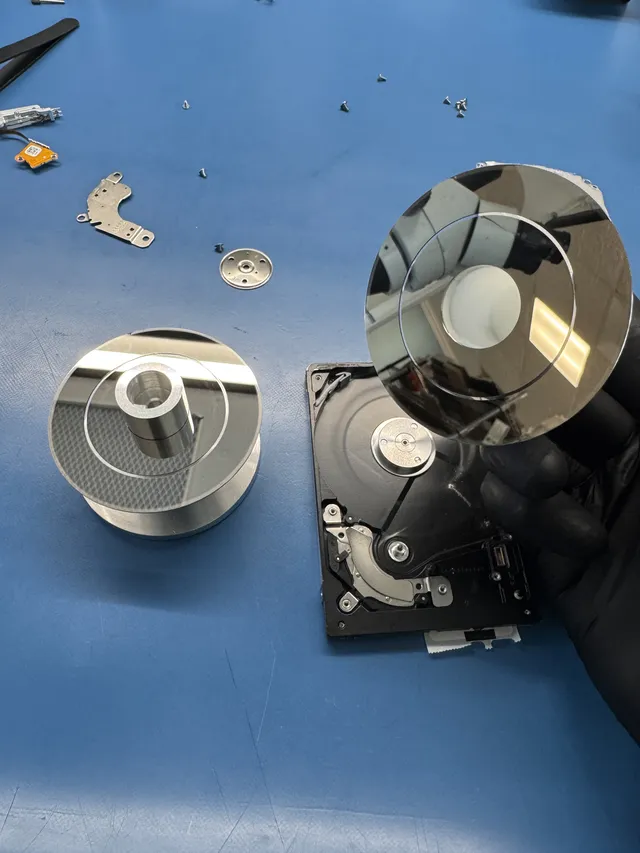
The most dramatic kind of recovery. We open the drive in a Class 100 clean room, remove the damaged head stack using a precision tool called a head comb, install matched donor heads from an identical drive model, and read the platters. Donor matching is critical. The donor drive has to be the same model, same firmware revision, often the same manufacturing date range. Sourcing donors for older or obscure drives can take days. Cost $1,500 to $3,000+.
Chip-off or platter swap (worst case)
When heads are destroyed and donor heads can't be made to work, sometimes we have to remove the platters themselves and install them in a donor drive's chassis. This is the highest-risk operation in data recovery. Platters have to be moved as a stack, perfectly aligned, in a clean room, without ever touching the surfaces. Cost $2,250 to $3,500+.
Cloning vs recovery: timing matters more than you think
The single most expensive mistake people make with hard drives is waiting too long. A drive that could have been cloned for $80 last week needs $1,500 of recovery work today. The difference is one piece of information: did you act when the drive was still alive, or after it died?
Cloning window: drive is healthy
If your drive boots, shows up in the OS, and reads normally without errors or freezes, cloning may be an option. Buy a new drive that's the same size or bigger. Use cloning software (Macrium Reflect on Windows, Carbon Copy Cloner on Mac, or `dd` on Linux) to make a sector-by-sector copy. The new drive becomes a perfect replica of the old one. Boot from it, retire the old drive, done. Total cost: the new drive plus an hour of your time.
SMART warnings mean it's time to retire the drive. When the OS tells you your drive has "failed self-test" or "is reporting failure," you have hours to days, not weeks. Stop using the drive for new work. Have a recovery lab image it. Treat every SMART warning like a fire alarm.
Recovery window: drive is failing or dead
Once the drive is making noises, won't show up, or is throwing read errors on every other file, you're out of the cloning window. Cloning software running on a failing drive will accelerate the failure. Each forced read attempt on a failing sector creates more damage. The drive will degrade faster under cloning attempts than it would sitting on a shelf.
If you're past the cloning window, stop trying to read the drive yourself. Power it off. Ship it to a recovery lab. The lab uses specialized imaging hardware that's gentle on dying drives in a way consumer software isn't.
The 5-year cliff
Consumer hard drives have a useful life of three to seven years under normal home or office use. Around the five-year mark, the failure rate climbs sharply. If you have important data on a five-year-old drive, treat it like it's already past its life expectancy. Clone it preemptively to a new drive before something fails. Here's how to check your drive's age and health.
SSDs aren't repairable either (different reasons)
Hard drives aren't the only storage devices people search "repair" for. SSDs get the same searches. They also aren't repairable, but for a different set of reasons.
SSDs have no moving parts
The mechanical failure modes that kill HDDs (head crashes, motor failures, platter wear) don't exist for SSDs. There's no spinning, no flying heads, no clean room concerns. But that doesn't make SSDs repairable. It just shifts the failure modes to other components.
What kills SSDs
SSDs die from three main causes: controller chip failure (the small chip that manages reads, writes, wear leveling, and encryption), NAND wear (the storage cells have a limited write count), and firmware corruption. None of these are user-fixable. The controller manages the NAND layout and error correction; hardware encryption depends on the model. Raw chip reads need that layout rebuilt, and encrypted data also needs its keys.
Lab SSD recovery
Modern SSD recovery depends on a viable controller and encryption path. The lab assesses original-board repair, controlled reading, and firmware or virtual-translator access supported for the exact device. Independent raw-NAND chip-off cannot bypass encryption, and a lost controller path can make recovery impossible.
The "SSD repair" search means recovery too
When someone searches "SSD repair," they almost always mean data recovery. The drive itself is more expensive to replace than a hard drive (a 1 TB NVMe drive is $80 to $150), but it's still cheaper to replace than to "fix." The whole industry is built on the same model: extract data, replace drive, retire old drive.
Honest pricing for what you actually need
Since "hard drive repair" isn't a real service, the prices below cover what people actually pay for the real services they need. No fake "starting at $99" numbers.
| Service | Typical price | Where to get it |
|---|---|---|
| Clone healthy drive to new drive (DIY) | $30-$80 for hardware + cloning software (often free) | Yourself, with a USB-to-SATA adapter |
| Clone at computer shop | $80-$200 | Local computer repair |
| Replace failed drive in laptop or desktop | $120-$300 + cost of new drive | Local computer repair |
| Logical recovery (deleted files, formatted partition, drive shows up) | $1,000-$1,500 | Data recovery lab or sometimes a knowledgeable computer shop |
| PCB / firmware recovery (drive won't show up but mechanically fine) | $1,000-$1,500 | Data recovery lab |
| Head replacement (clicking, dropped, mechanical failure) | $1,500 - $3,000+ | Data recovery lab with clean room |
| Original-hardware recovery assessment | By quote | Requires a viable original reading/encryption path; chip-off is not a general fallback |
| "Hard drive repair" (the mythical service) | Does not exist | Nobody offers it |
The pricing tells the story. The cheapest options are everything that doesn't involve actually fixing the drive: cloning, replacing, or running software recovery. The expensive options all involve a recovery lab pulling data off a drive that's about to be retired. Nobody charges you to fix a hard drive and keep it because nobody does that work. Our full pricing page covers every drive type and recovery scenario.
Real lab footage
What real hard drive lab work actually looks like. This is platter removal, the kind of work that happens when there's no other way to get to the data. Not "repair" in any consumer sense.
The mail-in recovery process, start to finish
Since you're not getting your drive "repaired," you're getting your data recovered. Here's the actual process so you know what to expect when you ship a drive in.
Step 1: Free phone or web consult
Call us at (732) 933-7717 or fill out a quote form. We ask what the drive is doing, how it failed, what's on it, and what you've already tried. We give you a price range before you ship anything.
Step 2: Ship the drive in
Anti-static bag, bubble wrap, a sturdy box. Detailed shipping guide here. We accept FedEx, UPS, and USPS. Pre-paid labels available on request.
Step 3: Diagnosis
When the drive arrives, we run a full diagnosis. For mechanically failing drives, this means opening in the clean room and inspecting. For logical issues, this means imaging on a write-blocker. You get a call with what we found and a firm quote.
Step 4: Recovery work
Chip-off is a possible method for certain supported, unencrypted flash devices, not a universal last resort. Raw NAND needs compatible error correction, descrambling, and controller-layout reconstruction. Modern encrypted SSDs and phones require their original or specifically supported reading/security path; memory removal does not bypass encryption.
Step 5: Data delivery on a new drive
You get your data back on a new external drive, organized by folder structure. The original failed drive comes back too if you want it, otherwise we recycle it responsibly. Payment happens after you've confirmed your data is intact.
Step 6: Set up the new drive for daily use
Your new drive plugs into any computer. You can use it as-is, or copy the data back to your laptop/desktop and use the new drive for ongoing backups. We can also recommend a setup that prevents this happening again. Read our backup guide here.
FAQ
Can you repair a hard drive?
No, and neither can anyone else. Hard drive repair as a consumer service doesn't exist. Drives are sealed factory-calibrated assemblies that cost less to replace than to fix. What people usually need when they search "hard drive repair" is either drive cloning (for a healthy drive that's about to die), data recovery (for a drive that's already failed), or simply replacing the drive with a new one. None of those is repair in the traditional sense.
Why don't computer repair shops fix hard drives?
Computer shops don't have clean rooms, donor parts inventory, or the firmware tools needed to do real internal work on hard drives. The flying height of a drive's heads is so small that opening it in a normal room contaminates the platters permanently. Computer shops can clone healthy drives, replace failed drives with new ones, and run software recovery on logically damaged drives, but they can't physically work on drive internals. That requires a specialty data recovery lab.
What's the difference between hard drive repair and data recovery?
Hard drive repair would mean fixing a broken drive so it works again. Nobody does this. Data recovery means extracting your data from a broken drive, putting that data onto a new healthy drive, and retiring the broken one. The broken drive does not come back to working condition. The data does. Data recovery is what the entire industry actually offers when people search for hard drive repair.
Can I repair my own hard drive at home?
No. Opening a hard drive in a normal home or office environment exposes the platters to dust, skin cells, hair, and pollen, which are all thousands of times bigger than the flying height of the read/write heads. The drive will never run safely again. Internal repairs require a Class 100 clean room, specialized donor part inventory, and firmware tools that cost tens of thousands of dollars. The advice on YouTube videos showing home repairs is almost always wrong or applies to drives from before 2010.
If my drive is failing, should I clone it or send it for recovery?
Clone only while the drive reads normally, without errors or freezes. Slow reads, unusual noises, missing detection, or read errors call for recovery instead. Past that point, software cloning will accelerate the failure. Send it to a recovery lab instead. The earlier you catch it, the cheaper the outcome.
Can SSDs be repaired?
Modern SSD recovery depends on a viable controller and encryption path. The lab assesses original-board repair, controlled reading, and firmware or virtual-translator access supported for the exact device. Independent raw-NAND chip-off cannot bypass encryption, and a lost controller path can make recovery impossible.
Why is data recovery so expensive if hard drives are cheap?
The drive itself is cheap. The recovery work isn't. Real data recovery requires clean room facilities, donor part inventories that take years to build, hardware imaging tools that cost tens of thousands of dollars (PC-3000, DeepSpar, Atola), and skilled technicians. The pricing reflects the time and equipment, not the value of the drive. The drive is replaceable. The data isn't.
Should I trust a shop that advertises "hard drive repair $99"?
Probably not. A $99 hard drive repair is almost always one of three things: a bait-and-switch where the price balloons once they have your drive, a cloning or replacement service mislabeled as "repair," or a shop that's about to run scans on your drive that will make the damage worse. Real labs quote a range up front and don't hold drives hostage. If you're being quoted a flat $99 to "repair" a drive, ask what specifically they'll do and what happens if they can't.
Can I just replace the circuit board to fix my drive?
Not on drives made after about 2010. Modern drives store unique calibration ROM data on the PCB (a small chip with adaptive parameters specific to your platters and heads). Swapping the whole board with one from a donor drive doesn't work because the new board will try to read your platters with the wrong calibration. Labs can do PCB-level repair by moving the original ROM chip to a donor board using micro-soldering, but that's not a DIY operation. It requires stereo microscopes and BGA rework tools.
Where are you located, and do you do walk-ins?
Our lab is at 644 Newman Springs Road, Suite A, Lincroft, NJ 07738. Walk-ins are welcome during business hours. We accept both mail-in devices and local drop-offs. Call ahead at (732) 933-7717 if you're driving in.
If my drive is dead, will you tell me honestly if recovery isn't possible?
Yes. If we open the drive and find that the platters are destroyed beyond reading, or that the NAND chips on an SSD are physically damaged past the point of recovery, we tell you directly and return the drive. The diagnostic costs $100, is credited toward a successful recovery and is non-refundable once diagnostics start. Donor drives or replacement parts you approve are non-refundable once ordered, even if recovery fails. You approve the estimate before recovery work starts. We don't take cases we know are hopeless. Our reputation depends on being straight with customers about what's possible, which is also why we wrote this guide explaining that "hard drive repair" isn't a real service to begin with.
Get help with data recovery
Bring your device to our Lincroft lab during opening hours, or mail it in.
How to mail your deviceThe $100 diagnostic is non-refundable once diagnostics start, and donor drives or replacement parts you approve are non-refundable once ordered, even if recovery fails.
More lab videos
Published by MDrepairs
MDrepairs is a data recovery and electronics repair lab in Lincroft, New Jersey. Our founder and lead technician Joseph Montanti films real cases for our YouTube channel, showing tools, repair steps and recovery outcomes.
Keep reading
- BitLocker Recovery Key Not Working? Check the Key ID Before Resetting
- exFAT Drive Corrupted? Cross-Platform Rescue Guide
- External Drive Painfully Slow? It May Be Dying