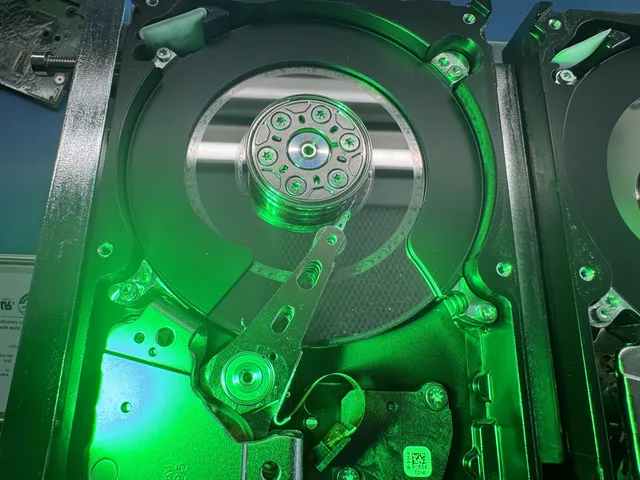
Can You Recover Data from a Scratched Hard Drive Platter?
Our founder and lead technician, Joseph Montanti, handles cases personally.
Data can be recovered from the readable parts of a hard drive with scratched platters. Where a scratch has removed the magnetic recording layer, the information stored in that material is lost; recovery works with what survives. Scratching a platter is also insufficient to establish that a drive has been securely erased, because other areas and surfaces may still contain files.
Leave a scratched drive powered off. If the drive starts clicking, scraping, grinding or making another unfamiliar mechanical noise, smells burnt or has been dropped, power it off and leave it off; further operation with damaged heads can extend the damage. Do not run recovery scans, restart it to hear the noise again, open the cover or try to clean the platters.
On this page
How hard drive platter damage happens
A platter is a rigid disk coated with magnetic recording material. The read/write heads detect and change magnetic patterns on its surface. During normal operation, the heads fly just above the rotating surface on a thin cushion of air, as described in Seagate's explanation of hard-drive construction.
A head crash happens when a head contacts the platter. Leave a running external drive in place, and shut down a laptop with a spinning hard disk before carrying it. A dropped drive can suffer this kind of contact, damaging the head and scratching the recording surface. Seagate's drive-handling guidance describes physical shock as a cause of head contact and scratches. A damaged head can then make further contact as the platter turns.
The resulting scrape can remove recording material and create loose debris. That makes the job more difficult than replacing one broken electrical component: the surface over which a replacement head must travel has also changed. A new head cannot put the missing magnetic pattern back into a gouge.
Clicking often comes from the drive repeatedly trying to position its heads and complete a read. Grinding or scratching is a stronger reason to suspect damaging contact. Seagate warns that continued use with grinding or scratching can damage the platters. A technician needs to inspect the heads and surfaces to determine the extent of the fault.
A drive can also have damaged heads or small scratches without making an obvious scraping noise. In that situation, it may spin normally but fail to initialize or stop responding when particular areas are read. If the drive has already reported a growing number of bad sectors, retire it once the files are safe, even if it stays quiet. The sound is useful context, but the recovery depends on the readable sectors and the condition of the mechanism.
What different scratches mean
Some damage looks like a small dull patch; other damage forms visible rings around the platter. A broad scored area presents a different reading problem from a mark confined to one spot. The condition of the corresponding head and the presence of debris matter as well as the visible mark.
| Damage seen during inspection | Appearance | What affects access to files |
|---|---|---|
| Light surface scuffing | A limited dull or marked area | Whether the recording layer and the sectors needed by the files remain readable |
| Localized scratches | Marks confined to part of one surface | Which file contents or organizing records occupy that area |
| Circular scoring | Rings following the rotation path | Loss of recorded sectors along the damaged tracks and further contact with the head |
| Widespread scoring | Extensive marks and damaged areas across a surface | What can still be read elsewhere, including other surfaces |
Visible scratches do not translate into a fixed percentage of recoverable files. Files vary in size and placement, and the information needed to locate them can occupy a much smaller area than their contents. This is why the location of the damage can matter more than how dramatic it looks in a photograph.
There is no polishing process that restores the original data to removed recording material. Cleaning contamination and making surviving areas accessible are different from repairing the contents of a destroyed sector. A drive that has been made readable long enough to recover files is also a different proposition from a dependable drive for future storage.
Why a small scratch can affect many files
A file can occupy multiple regions of a disk. If one required piece is lost, the filename may still be visible even though the file will not open correctly. A video may play until it reaches missing data; an archive may fail to extract; a photo may open with a damaged region. The effect depends on which part of the file is missing.
File-system metadata holds names, folder relationships and the locations of file contents. Losing those records can hide otherwise readable data. Recovery software may reconstruct enough of the layout to restore named files, or it may need to search the captured sectors for recognizable file formats. That second method can recover contents with generic names and without the original folder arrangement. PhotoRec explains that contiguous and fragmented files recover differently: recognizing a file's beginning cannot supply a missing middle.
The drive also has its own operating information, separate from Windows or macOS file-system records. One example is its translator, which connects the sector addresses requested by the computer to where data is stored. Damage to that information can prevent access even when user-data areas remain readable. The WD case below shows why preserving it matters.
Multiple platter surfaces add another distinction. A head serves a particular surface, so a failure affecting one surface may leave other surfaces available. But a file can require sectors from more than one surface. Losing one of four surfaces therefore does not neatly mean losing one quarter of the files.
Recorded scratched-drive recoveries
In this dropped-drive case, one of four surfaces was unreadable and held information organizing the files. Joe removed the damaged head and changed firmware values so the drive could operate with that head missing. He recovered 228 GB from the readable portions, organized by file extension.
In a WD20SDRW belonging to a game developer, failed heads and small top-platter scratches were accompanied by slow access to the drive's service area. Joe backed up its translator, then restored that backup into memory after firmware work corrupted the working translator. After four head replacements during the job, the recovery returned all but 28 MB of data.
The cost of working with damaged surfaces
Scratched-platter recovery can require donor parts and repeated work to obtain readable sectors. Donor compatibility and how well the drive reads with replacement heads affect how that work proceeds. The amount of recoverable data is established through that work, rather than promised from the visible damage category.
| Damage category | Recovery price |
|---|---|
| Light scratches | $2,250 - $3,500+ |
| Moderate scratches or partial surface damage | $2,250 - $3,500+ |
| Severe scoring across multiple surfaces | $2,250 - $3,500+ |
| Extensive damage with uncertain recoverable content | $2,250 - $3,500+ |
Whether that work is worthwhile depends on the files and the copies you already have. A partial recovery of a needed project may have value; a large collection of replaceable downloads may not. The recovery pricing page gives the wider service categories.
The $100 diagnostic is credited toward a successful recovery, and you approve the recovery estimate before work starts. Once diagnostics start, that fee is non-refundable; approved donor drives or replacement parts are non-refundable once ordered, even if recovery fails.
The standard recovery estimate is 4–6 weeks, with the condition of the drive, donor availability and imaging affecting the schedule. A completion date needs to account for what the drive can sustain while being read.
How a lab reads the surviving areas
MDrepairs carries out work on heads and platters in a laminar-flow work area. The original heads and platter surfaces need inspection before deciding what physical work is appropriate. In the dropped-drive video, Joe used a microscope on the heads and inspection lighting on the surfaces. The WD video shows replacement-head work in a laminar-flow work area. Inspection also has to account for recording surfaces hidden below the top platter.
Head selection can then help obtain data from accessible surfaces. ACE Lab's Data Extractor documentation describes reading by head map, controlling retries and making full or partial images. Those controls let a technician choose what to read instead of asking an ordinary file-copy operation to keep retrying the same failed area.
Choosing a head in software controls which head is used for reading. A damaged physical head assembly may still need work before the platters can turn safely.
An image stores the sectors that were captured so file recovery can continue on another device.
Why a software scan is not the first step
A normal recovery application asks the drive to read sectors. It can help with deleted files or damaged directory records when the storage is readable, but it has no way to lift a damaged head away from a platter or restore a scraped-off recording layer. A long scan puts the mechanism to work before those physical problems have been addressed.
Recovered files need to be opened and checked. For a video, that means looking beyond the first frame; for a project, it includes its linked assets; for an archive, it includes the ability to extract its contents. A restored filename or folder tree is a starting point for checking what survived.
If the drive has already been opened
Keep the original cover, circuit board and any removed parts with the drive, and contact the lab for packing instructions for its current condition. Leave the platter surfaces untouched, including with a cloth, tissue or compressed air. The drive-shipping guide covers ordinary closed-drive packing; an exposed mechanism needs specific handling.
Opening introduces contamination risk, but it does not automatically remove the recorded data. Explain that the cover has been removed when arranging the recovery so the lab can plan around the exposure. There is no need to run the drive to demonstrate its current condition.
Is opening an HDD and scratching the platter enough for disposal?
No. Damage to part of a platter can leave information elsewhere, including on surfaces you have not reached. A nonworking drive and a sanitized drive are different things. If the goal is secure disposal rather than recovery, deliberately making a few scratches provides no verified erasure of the whole device.
Use a sanitization method supported for the device, or a suitable destruction service when the drive cannot be sanitized electronically. Seagate describes clearing, purging and physical destruction as different approaches. Choose disposal only after deciding that no files remain to be recovered; a home scratching attempt makes later recovery harder without establishing that all data is gone.
Get help with data recovery
Bring your device to our Lincroft lab during opening hours, or mail it in.
How to mail your deviceThe $100 diagnostic is non-refundable once diagnostics start, and donor drives or replacement parts you approve are non-refundable once ordered, even if recovery fails.
More lab videos
Published by MDrepairs
MDrepairs is a data recovery and electronics repair lab in Lincroft, New Jersey. Our founder and lead technician Joseph Montanti films real cases for our YouTube channel, showing tools, repair steps and recovery outcomes.
Keep reading
- BitLocker Recovery Key Not Working? Check the Key ID Before Resetting
- exFAT Drive Corrupted? Cross-Platform Rescue Guide
- External Drive Painfully Slow? It May Be Dying