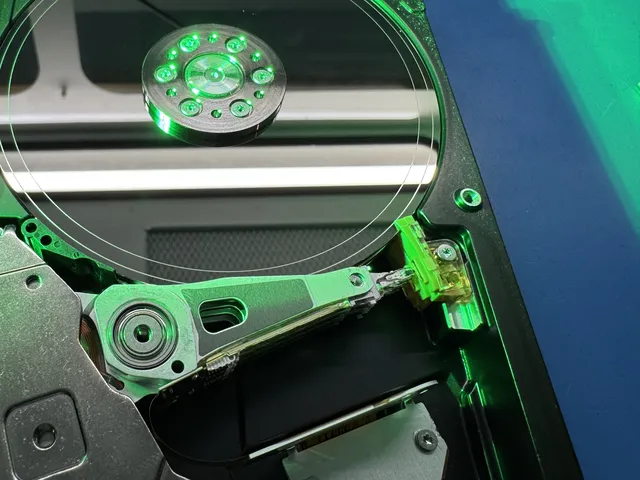
Recovery in progress on the bench
the queue moves every day
from 345 Google reviews · 2M+ followers of our recovery videos · Mail-in recovery nationwide
If you need hard drive data recovery in Puerto Rico, mail your drive to our lab in Lincroft, New Jersey, so we can diagnose the fault and work to copy your files.
Real devices, real outcomes. Details generalized for customer privacy.
Recovery in progress on the bench
the queue moves every day
Dropped My Hard Drive
dropped, not spinning up
data recovered
Dropped Hard drive
dropped, not spinning up
data recovered
Hard Drive Fell and making clicking sounds.
clicking on power-up
data recovered
External Hard Drive Dropped and Now Making Noise
dropped, not spinning up
data recovered
2007 imac hard drive clicking
clicking on power-up
data recovered
Hard Drive recovery - HDD
failed device
data recovered
hdd - Toshiba - DTB 310 - 1TB
recovery requested
added to the engineer's queue
Recover data from clicking HDD
clicking on power-up
data recovered
Next spot in the queue
yours could be next
Joseph Montanti, our founder and lead technician, films hard drive data recovery at MDRepairs from the first diagnostic to the day we return the files. On YouTube and our other social channels, you can watch our engineers open a failed drive, replace the heads that read the disks and rebuild the firmware that runs the drive.
More Recovery CasesThe people we help


 AT&T
 Marriott


 Tennessee Titans







Pick the closest match to see what might be wrong, what to avoid and how soon to act.
Keep it powered off
A click can mean the heads that read your files are struggling to move into place over the disks. If you turn the drive on again, a damaged head can scrape the surface that holds your files. Leave it off and closed. We can open it at the lab and copy the areas we can still read.
Stop using it for now
If you heard it spinning, the problem could be in the electronics, the heads that read the disks or the drive's own software, called firmware. If it stayed quiet, the circuit board may have failed or the motor may be stuck. Leave it disconnected. Tools that look for the drive can keep turning it off and on.
Keep it powered off
If the drive is still running, turn it off. A fall can leave the heads that read your files out of line or resting on a disk. If that disk spins again, a head can scratch the surface where your files are stored. Leave the drive off until we can examine it and tell you what we find.
Act soon
After you delete files or format a drive, the files can stay on the disks until something writes over them. A download, an update or even browsing the web can do that, so stop using the drive. Recovery software can help with deleted files on a healthy drive. If yours is failing, don't run recovery or repair software on it.
Keep it powered off
The disks that hold your files can survive a flood or fire, even when the electronics are damaged. Wet parts corrode quickly. Leave the drive off, and if it's wet, don't try to dry it with rice or heat. Seal it in a bag and send it to us.
Stop using it for now
Slow loading, freezes and warnings about reallocated sectors can mean parts of the disk are getting hard to read. Back up what you can in one pass, without running a full scan or defragmenting the drive. If the backup stalls, stop and send us the drive.
Hard drive recovery starts at $1,000. Your quote depends on what failed, the condition of the disks inside your drive and which donor parts we need.
Our $100 standard diagnostic covers hands-on testing of your drive at the bench. Based on what we find, you get a firm quote to approve before we start recovery. We credit the $100 toward a successful recovery. If we can't get back any of the files we agreed to look for, there's no recovery fee.
Use the quote form to tell us what happened to your drive and which files you need back.
We confirm your price after the diagnostic.

The standard wait is 4 to 6 weeks before we reach your device in line and start the diagnostic. Recovery takes additional time depending on what we find. If you need us to start sooner, ask which rush options are available. Each rush window applies only to the start of the diagnostic.
4 to 6 weeks
No surcharge
With standard service, we start the diagnostic after a wait of 4 to 6 weeks. There's no rush fee, and the time we need for recovery depends on what we find.
5 to 7 days
+$250
With Priority, we start the diagnostic within 5 to 7 days. Ask us about availability.
1 to 2 days
+$500
With Urgent, we start the diagnostic within 1 to 2 days. Ask us about availability.
Same day
+$1,000
With Emergency service, we start the diagnostic the same day. Ask us about availability.
Allow 4 to 6 weeks for us to start the diagnostic on the standard schedule. Ask about rush availability if you need an earlier start to the diagnostic. Recovery time depends on what we find, and shipping takes additional time in each direction.
Once your drive is on the bench, the time we need depends on what failed.
Recovery can be quicker after accidental deletion, formatting or damage to a partition because the drive needs no mechanical work. That can also be true of a Seagate F3 drive with a fault in its service area, the part of the disks that holds its firmware.
A power surge can burn out or short the circuit board. We repair the board and transfer the ROM chip that holds your drive's own settings. That takes longer than a simple logical recovery and less time than a head swap.
If your drive is clicking, has crashed heads, a seized motor or scratched platters, we may need parts that match your exact model. We allow time to find those parts, work on the drive in a controlled space and carefully copy what we can read.
Allow time for shipping each way in addition to the diagnostic and recovery. Read the shipping and return terms we send you before you mail your drive.
Send your drive to our lab in Lincroft, New Jersey. Before you pack it, read the instructions we send and confirm the transit time, return shipping and delivery details with us.
Before you mail your drive, tell us about any physical damage and anything that's already been tried to fix it.
Tell us what drive you have, what happened and which files you need back. Before sending it, read how we take it in, what the diagnostic involves and how shipping works.
Follow the packing instructions we send. If you have an external drive, keep it in its original enclosure and include the parts it came with.
After the $100 diagnostic, we explain what we found, what recovery work we can try and any limits that matter for your files. You get a quote and decide whether we go ahead.
Check the recovered files against the ones you asked for, then confirm how you'd like to receive them.
Your drive stays in our lab, where our founder works alongside our recovery engineers. We record who handles it from the day it arrives until we return your files.
Tell us which files matter most to you. A folder name or the year you took the photos gives us a place to start.
Once your drive is here, we give you a quote. If you tell us to go ahead, we look for the files you named and check what we find against your list.
Your recovery report shows which files came back intact, which have some damage and which we couldn't read at all. You can click through your folders before you decide whether to pay.
We can mail you the drive with your recovered files, or you can pick it up at our lab.
Your recovered files come back on a new external drive or a USB flash drive. Copy them to two other places right away so you have three copies.
We send your original drive back too. It's already failed once, so don't trust it with the only copy of anything important.
If a file won't open, check your recovery report to see whether it was damaged. If you can't find a file on the new drive, our guide shows you where to look for your recovered files.
If you're unsure what to try at home, our guided tool walks you through the safe steps for your drive. Every lab recovery starts with a $100 diagnostic suited to your drive, and we credit the fee toward a successful recovery.
Start with the free quote form for instructions on sending your drive. After the $100 diagnostic, you get a recovery quote that explains any special work or delivery terms. You decide whether we go ahead. We credit the diagnostic fee toward a successful recovery. If we can't get any files back, there's no recovery fee.
Before we try to copy your data, we examine the moving parts by hand. We look for a seized motor, crashed heads or heads stuck to the disks so we can stabilize the drive before imaging it.
We use ACE Laboratory hardware to read the drive's firmware modules and SMART data, its own health record. We also examine the service area on the disks to find out what failed.
When we need to expose the disks, we open your drive on a laminar flow bench, where filtered air helps keep dust away. To make a copy, we block writes to your drive and read it sector by sector onto a healthy donor disk.
Your report explains what failed, which recovery options you have, how much the work would cost and what its limits are.
For hard drive recovery at home, start by choosing your symptoms in our DIY Recovery Tool. Whether your drive is clicking, beeping or not detected, the tool explains when to call the lab and walks you through any steps that are safe for your drive. You can use it without a download or sign-up.
Each short film shows what went wrong with one drive and what we did to read its files.
$100 diagnostic, credited toward a successful recovery. If we can't get any files back, there's no recovery fee.
Affirm financing, if eligibleHard drive data recovery is how we get missing, damaged or unreadable files off a failed drive, even one that won't power on or show up on your computer. The failure may be mechanical or electrical, or it may be logical, meaning the drive has lost track of how your files are stored.
Your files are stored magnetically on spinning disks called platters. Read/write heads float just above them. A head crash, seized motor, burned circuit board or firmware fault can leave your files on the platters but out of reach. During hard disk drive recovery, we work around or replace failed parts so we can read the disks again.
We copy the readable sectors of your drive before working on your files. ACE Laboratory's PC-3000 lets us diagnose firmware problems, change which heads the drive uses and repair the service area. We use DeepSpar imaging hardware to copy data from physically damaged drives. We also have a laminar flow bench and keep donor drives from all major manufacturers.
The part that failed determines how we reach your files and how much that work costs.
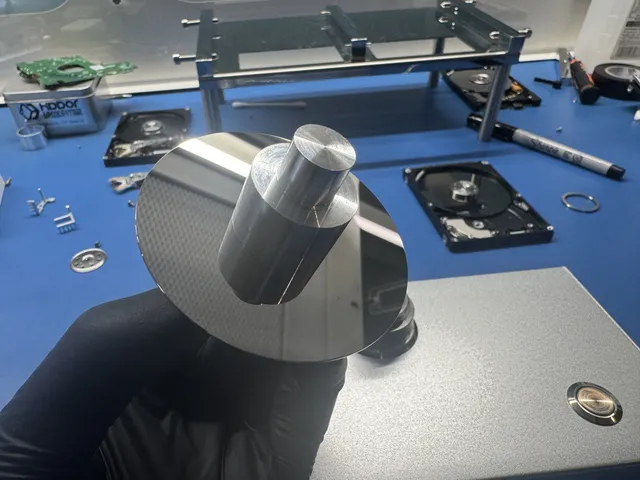
These disks hold your files in a magnetic coating. Physical damage to the coating makes data recovery difficult. During scratched platter recovery, we work around each scratch because data is gone wherever that coating has been stripped away.
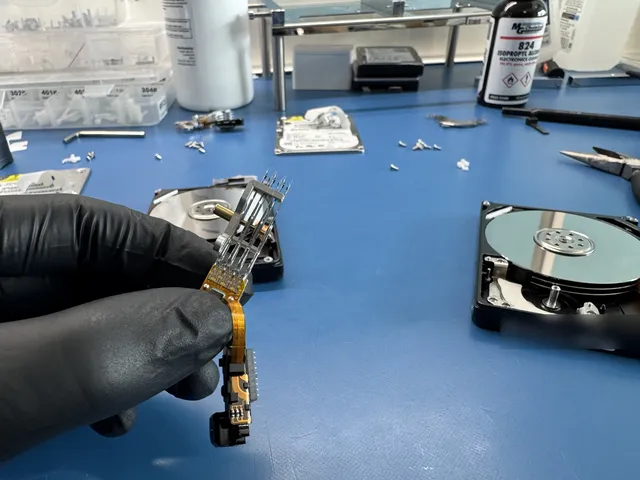
The heads read and write your data while floating just nanometers above the spinning platters. If a head fails, you may hear clicking. A head that hits the surface can destroy data where it lands.
This motor spins the platters. If it seizes, you may hear beeping or buzzing. We move the platters to a working motor assembly from a donor drive.
The board on the outside of your drive controls its operation. The board's ROM chip holds settings unique to your drive, so a replacement board needs those settings before it can work.
Firmware is the drive's own software. It maps the physical location of your data and is stored in the service area on the platters. If the firmware is damaged, your drive may stall at startup or stop appearing on your computer.
The preamp strengthens the signals that travel from the heads to the circuit board. When it fails, you can hear the same clicking or see the same read errors as with failed heads. We replace the full set of heads to address it.
What you hear and what your computer detects help us decide how to approach data recovery. Find the symptom that fits your drive to see what to do now.
Repeated clicking can come from failing read/write heads trying to move into position over the disks, then falling back. Each attempt can scratch the surface that holds your files. Read about our clicking hard drive recovery service.
Turn it off now and leave it off.
Beeping can mean the motor can't spin the disks. The motor may have seized, or the heads may be stuck to a platter. Either problem calls for physical work inside the drive. See what that involves in beeping hard drive recovery.
Turn it off now and keep it still.
When a drive spins but your computer doesn't see it, the firmware, circuit board or service area on the disks may be damaged. If it doesn't spin, the motor or board may have failed. We work on drives not detected by the computer, including external hard drives that no longer mount.
Leave it disconnected. Each new attempt can worsen firmware damage.
Liquid can quickly corrode the circuit board, heads and other parts inside your drive. Heat from a fire can warp those parts, and smoke can contaminate them. Either kind of damage needs prompt attention at the lab.
Leave the drive off, keep it away from heat and send it to us promptly.
After you delete files, empty the Recycle Bin or format a drive, the computer can lose track of data that still sits on the disks. New writes can overwrite those files. Our guide explains how to recover deleted files from a hard drive.
Stop using this drive. Install any recovery software on a different drive.
If your drive won't spin or light up, the circuit board may have failed. A surge, a bad power supply or a damaged SATA or USB port can cause that, even when the platters and their data are still intact.
Ask us before trying a circuit board from another drive.
If you're unsure what the symptoms mean, use our HDD Diagnostic Tool or call 732-933-7717 to talk with a technician.
Run the Diagnostic ToolWhat failed determines how we recover your files, how long the work takes and what it costs. The problem may be physical damage inside your drive or a fault in the way it stores or finds your data.
If the read/write heads fail, we replace them with matching heads from a donor drive of the same model. Filtered air at the bench protects the exposed platters while we work.
If the motor has seized, we move the platters into a donor chassis with a working motor. If the heads are stuck to a platter, a problem called stiction, we work under magnification and free them by hand with tools made for the job.
A head that touches a spinning platter can leave a circular scratch and destroy data along its path. During scratched platter recovery, we work around those scratches to copy the parts of the disk we can still read.
A failed motor, circuit board or preamp can keep your drive from spinning. Once we diagnose which part failed, we can replace it or move the platters into a working assembly.
Keep a dropped hard drive powered off. A physical impact can shift the heads, damage the preamp or cause a head to strike a platter. How much damage it does depends in part on whether the disks were spinning when the drive fell.
Deleted data stays on the platters until something overwrites it. We copy the drive sector by sector, then work from that copy. We look for patterns that identify individual files and rebuild the file system to recover folders and the way they fit together.
A sudden shutdown, power loss or unreadable sectors can damage NTFS, HFS+, ext4 and other file systems. We rebuild the records that tell your computer how to find and open the files.
A bad sector, a power problem or a manufacturing defect can damage the firmware stored in the service area on your drive's platters. Your computer may report that the drive is not detected, or the drive may freeze at startup. We use PC-3000 to read and patch the damaged parts of the firmware.
When the magnetic surface deteriorates, more sectors can become unreadable and your drive can report a SMART warning. To make a forensic image of the drive, we copy the readable areas first, then return to the difficult ones in later passes.
A power surge, a bad adapter or a failed component can damage your drive's circuit board. To use a compatible donor board on a modern drive, we transfer the original ROM chip with the firmware settings your drive needs to start.
The model on your drive helps us choose the tools and procedures to use. Our technicians work with all major drive families, each with its own hardware, firmware and failure patterns.
Some Barracuda and Backup Plus models use Seagate Rosewood drives. The drive can report an LED error or lock up and stop responding. We use the PC-3000 terminal to unlock the service area and rebuild the damaged firmware modules before copying the drive.
On Western Digital SMR drives, shingled magnetic recording fits more data on the disk by overlapping its tracks. A map called the translator matches logical addresses to physical sectors. If that map is damaged, your drive can look empty or unreadable while the data is still on the disks.
Helium reduces turbulence, so sealed drives of 8 TB and up from Seagate, WD and HGST can fit more platters inside. We cut open the sealed case to replace the failed heads, then feed in lab-grade helium as we copy the platters. We have to read them before the gas escapes.
Older Seagate F3 drives store parts of their firmware on surfaces read by different heads. If a head starts to fail, your drive may stay busy or stall at startup. With PC-3000, we can disable damaged heads, patch the firmware and rebuild the drive's system files to regain access.
On Western Digital drives with Marvell controllers, the circuit board's ROM chip holds settings unique to that drive. If the board fails, we desolder the chip, read it and transfer it to a compatible donor board so the drive can start with its own settings.
High-capacity drives fit more data into the same platter area. On 2 TB, 4 TB, 8 TB and larger drives, that leaves little room for a head to be out of alignment. A head swap takes a precise donor match, and copying the drive takes longer.
The name and model on your drive help us match the heads, firmware and donor parts it needs. We keep donor drives and the tools specific to each major manufacturer because their designs and failure patterns differ.
We work on Seagate Barracuda, IronWolf, Backup Plus, Expansion, One Touch, FireCuda, Exos and SkyHawk drives. With F3 firmware, failing heads can leave a drive busy, stuck at startup or reporting the wrong capacity. On a Rosewood drive that locks up with an LED error, we use the PC-3000 serial terminal to unlock it.
Seagate Recovery DetailsWe work on Western Digital My Passport, My Book, Elements, easystore, WD Blue, Black, Red, Purple, Gold and Ultrastar drives. On modern WD models with Marvell controllers, we transfer the original ROM chip so a replacement board has your drive's own settings. On a WD SMR drive, power loss can damage the map that tells the drive where to find your data.
WD Recovery DetailsWe work on Toshiba Canvio Advance, Canvio Slim, Canvio Ready, P300, X300, N300 and MG enterprise drives. The heads can wear on Canvio models in the 1 TB to 2 TB range. A firmware fault can also leave a drive spinning without finishing startup. We use Toshiba-specific PC-3000 modules to access the service area.
Toshiba Recovery DetailsDeskstar, Travelstar, Touro and Ultrastar drives can develop worn heads, failed preamps or worn motor bearings. Western Digital acquired HGST, but HGST firmware still needs its own diagnostic procedures, and its donor heads have different matching requirements from WD drives.
Hitachi Recovery DetailsSamsung no longer makes hard drives, but its Spinpoint F3 desktop drives and Spinpoint M8 and M9T portable drives are still in use. Their heads can wear, motors can seize and circuit boards can fail. Recovery calls for Samsung-specific PC-3000 firmware modules and Samsung donor heads. Seagate parts don't fit these drives.
Seagate owns both brands. Modern LaCie Rugged, d2 and 2big drives use Seagate mechanisms, so we use F3 firmware tools for recovery. The Rugged drives used by photographers and videographers share those Seagate failure patterns. Older Maxtor DiamondMax and OneTouch drives need parts from a matching Maxtor donor.
You can try recovering deleted files at home if your drive still works normally. If moving parts are failing, a recovery attempt can do more damage. How your drive sounds and responds helps you decide where to start.
Our HDD Diagnostic Tool walks you through your symptoms to help you decide whether to try recovery at home.
Turning a failing drive back on can cause permanent damage. Leave it off and call 732-933-7717 or get a free quote.
If your drive sounds normal and shows no signs of physical damage, start with the cable and what your computer detects. These checks can help you decide whether you need to pay for recovery.
Trying to make a failing drive start or read again can damage its parts or further corrupt the data on the drive.
Dust and fibers in room air can land on the platters as soon as you open the drive. They can cause a head crash, and handling the exposed parts can scratch the disks or knock the heads out of alignment. That damage can put files permanently out of reach.
Freezing a clicking drive won't fix the mechanical fault. Condensation inside a modern drive can corrode the heads and platter surfaces, and the sudden temperature change can crack glass platters.
If your drive starts clicking repeatedly, grinds or keeps appearing and disappearing, leave it off and ask us to diagnose it. Restarting it can worsen mechanical damage.
A modern circuit board has a ROM chip with settings unique to your drive. Without those settings, a replacement board may leave the drive undetected or position the heads incorrectly so they hit the platters.
Recuva and Disk Drill are meant for logical problems on drives whose hardware still works. On a mechanically failing drive, their repeated attempts to read the disks can wear the heads further. If your drive has started making unusual sounds, leave it off.
If your drive is failing, send it in promptly. Worn heads can fail completely, water can keep corroding parts inside a wet drive, and growing bad sectors can leave more files unreadable.
Some warning signs give you time to back up while your drive can still read your files. If you hear a new mechanical noise or the drive struggles to read, switch it off and tell us what changed.
Files that take longer to open, a slow startup and unexpected freezes can mean the heads are struggling to read the platters. Parts of the disks may be developing bad sectors.
If your drive's SMART health report flags reallocated sectors, pending errors or trouble positioning the heads, back up your files right away.
If your drive keeps dropping out and coming back, the connection may be unstable, or the circuit board or heads may be failing. You may eventually lose access to the drive altogether.
A healthy hard drive is quiet. New clicking, grinding, beeping or buzzing can mean moving parts are failing. Turn your drive off if you hear those sounds.
Garbled documents, pictures with pieces missing or blue screens while your computer reads the disk can mean your drive is struggling to read its platters. More files can become unreadable as the damage spreads.
If you recognize these signs, read our guide to hard drive failure, use the HDD Diagnostic Tool or call 732-933-7717 to talk with a technician.
If you need your files back, ask for recovery. Trying to make a failing drive work again can damage the data still on it.
Hard drive repair aims to make the device usable for storage again so it spins, reads and writes normally.
If your drive is clicking or beeping from a mechanical failure, or if the heads have hit the platters, retire it from regular use. A temporary fix can get it spinning again, but the next failure can destroy files that are still readable now.
If you need the files on a failing drive, leave it as it is. Hard drive repair attempts such as running CHKDSK, changing firmware or opening the drive at home can permanently damage data.
Hard drive data recovery means getting your files off a drive that has failed.
Hard drive repair can be part of getting your files back. We may replace a circuit board and transfer its firmware chip, repair firmware in the service area or swap the head stack on a filtered bench. Each repair helps us read your drive long enough to copy the data.
Once we've stabilized your drive, we copy what we can still read from the disks inside it, sector by sector. We recover your files from that copy. You can get them on a new external drive or by secure download.
You can ask us to return your original drive.
Clicking, beeping or not detected? Turn your drive off to protect the disks that hold your files, then get a free quote.
Affirm financing, if eligibleYou can see how we handle a drive before you send yours. We film recoveries at the bench, show the results and explain our prices before you decide.
We diagnose your drive, explain your options and give you a quote. You decide whether we start recovery.
We replace failed head stacks, repair motors and free heads stuck to the platters. When we work on exposed disks, including scratched platters, we do it in a controlled space at the bench.
If we can't get any files back, there's no recovery fee. After the $100 diagnostic, you get a written quote. It explains any special work and delivery terms so you can decide whether to approve recovery.
We use ACE Laboratory's PC-3000 and keep donor heads, circuit boards and firmware modules on hand. We match them to your exact drive so we can copy it sector by sector.
Our team works on your drive in Lincroft, New Jersey. Before we start, we go over who may access your files, how we'll verify and deliver them, and how long we keep a copy.
You can send your drive from anywhere in the country through our secure mail-in program. Our lab is at 644 Newman Springs Road in Lincroft, New Jersey. For shipping details for your case, get a quote or call 732-933-7717.
We work on hard drives from any operating system or storage setup, whether the disk was inside a computer or in its own enclosure.
The file system tells your computer where to find your files, so its layout guides our recovery work. We know the structures used by NTFS and HFS+, and our tools also support more complex formats such as APFS and ReFS.
A USB external hard drive contains the same kind of drive you'd find in a desktop or laptop. We test the enclosure during the diagnostic because its electronics can fail while the drive inside still works. That tells us whether you need a full recovery.
This external hard drive spun quietly, but it wouldn't finish starting up. We replaced the read heads and preserved the firmware information the drive needed to find the files. We got files back, though some data remained unreadable.
If your drive also spins quietly, the sound alone can't tell you what's wrong or which files you can get back.
Hard drive data recovery from a RAID starts with the individual drives and how they're arranged. RAID (Redundant Array of Independent Disks) combines drives for speed, protection against a drive failure or both. A NAS (network-attached storage) device, such as a Synology, QNAP or WD My Cloud, can use RAID for the storage you access over your network.
When an array fails, recovering data from RAID drives means finding out which drives failed and how the array originally organized the data across them.
RAID 0 splits data across two or more drives. If one fails, there's no spare copy and you lose access to the whole array. We image each failed drive individually, then use the original block size and stripe order to piece the volume back together.
A mirrored pair holds the same data on both drives. If one fails, we image the surviving drive, which should still have a complete copy. If both fail, we work from the one in better condition.
RAID 5 spreads data and parity, the information used to rebuild missing data, across three or more drives. It can handle one failed drive. If two or more fail together, or another fails during a rebuild, we image every available drive and use the parity information to reconstruct the missing data.
We handle all RAID levels, including RAID 6 and RAID 10. Each protects data differently, so the steps we take depend on which drives failed and how they were arranged.
Ask us for a RAID recovery quote. We base it on how many drives you have, how they're arranged and what failed. A single failed drive carries standard hard drive recovery pricing. Multiple failed drives or work to rebuild the array add to the cost. For businesses that rely on a NAS or server, our partnership program offers priority scheduling and dedicated RAID support.
Every recovery starts with a $100 diagnostic. We inspect the outside of your drive, test the circuit board and measure the current the motor draws. During a controlled spin-up, we monitor how the heads respond. What we find lets us give you an estimate for both cost and timing.
The $100 diagnostic is credited on success; diagnostic and approved parts charges apply on failure or you decline. For drives with severe platter damage, we charge $500 for platter inspection and cleaning, then $2,000 - $3,500+ for the recovery. Tell us before intake if the platters are damaged or anyone has opened the drive, and confirm the cost before you approve the work.
If you're unsure where to start, choose your symptoms in our HDD Diagnostic Tool.
With the ACE Laboratory PC-3000, we can diagnose firmware faults, test which heads can read and turn off damaged heads. As we image the drive, we can choose when to retry a difficult area.
We do each head swap under filtered air. The same bench lets us move platters to a donor drive or inspect the inside of your drive while keeping airborne particles away from the disks.
We keep donor drives from all major manufacturers, including Seagate, WD, Toshiba and Hitachi. Having different firmware revisions on hand helps us find a match for your drive.
We use your packing slip to match your drive to your ticket when it arrives.
These sources explain how drives fail, how our equipment works and the standards we refer to. You can read the originals for details on a model or procedure.
Backblaze publishes annualized hard drive failure rates for the drives it monitors. You can look up a model to see how it performed in that fleet.
ACE Laboratory's specifications describe the hardware and software in this data recovery system and the work it supports at our bench.
We use this imager alongside PC-3000 to copy failing drives sector by sector. Its settings let us control how long we wait for a read and when to try it again.
In this edition, the US National Institute of Standards and Technology explains how a single overwrite can clear recorded data on a modern magnetic drive. It's the source for our answer about overwritten data recovery.
We cite this federal law because it generally bars a manufacturer from voiding your consumer warranty solely for choosing an independent technician for repair or data recovery.
Backblaze publishes quarterly failure rates by manufacturer and model. We refer to its reports for information on Seagate, WD, Toshiba and HGST drives.
Keep three copies of your files on two kinds of storage, with one copy offsite or in the cloud. That extra copy helps protect your files if a drive fails or if theft, fire or ransomware affects your working copy.
Use CrystalDiskInfo on Windows or DriveDx on Mac to read your drive's SMART health report regularly. If it flags reallocated sectors or pending errors, back up right away. Our guide shows how to check hard drive health on Windows, Mac and Linux.
If your drive is aging or reports a SMART warning, plan to replace it while you can still read your files. Clone the old drive to the new one while it's stable.
If your drive already has symptoms, use our HDD Diagnostic Tool or call 732-933-7717 and tell us what you're seeing.
These hard drive data recovery guides can help you decide what to do with your drive now and how to protect your files afterward.
If your drive spins normally, sounds quiet and shows up, connect it as a secondary drive. Boot from another disk and install R-Studio, Recuva or PhotoRec there to avoid overwriting deleted files. Scan the source read-only and save recovered files elsewhere. If it's not detected, makes unusual sounds or reports SMART errors, contact our lab. Our HDD Diagnostic Tool can guide you.
A drive that won't power on or isn't detected may still hold your files. We examine the platters and look for a seized motor, board damage such as a burned TVS diode or failed motor controller, or damaged service area firmware. We work around or replace failed parts. Our dead hard drive recovery guide explains what to try and when to call us.
Deleted files can stay on the platters until new data overwrites them. What you can get back depends on how the drive handles deletion, how you deleted the files or formatted the drive, and what has been written since. Stop using the drive and follow our guide on how to recover deleted files from a hard drive.
If your drive is quiet, spins normally and shows up on your computer, Recuva, R-Studio and PhotoRec can help with deleted files, formatted partitions or a damaged file system. If you need the lab's help with that kind of file loss, logical recovery starts at $1,000.
Stop scanning if your drive clicks, beeps, won't spin or doesn't show up. Repeated scans put more strain on failing heads and on the platters, the disks that hold your files. If those disks need advanced recovery work, the cost is $500 + $2,000 - $3,500+. Our HDD Diagnostic Tool can help you decide whether to try software or send your drive in.
Before you trust a data recovery service with files you can't replace, ask where your drive will go, who will handle it and how you'll know which files came back.
You can get hard drive data recovery by mail even if your drive has physical damage that needs work at the bench. Before you send it, ask how long recovery might take, how shipping works and how to reach the technician handling your drive.
With our nationwide service, you can mail your drive to our Lincroft lab from New York City, Texas, Florida, California, Maryland, Pennsylvania, Illinois, Georgia or anywhere else in the country.
At the lab, we use PC-3000 to diagnose your drive and keep donor drives on hand. If we need to open your drive, we work on a laminar flow bench.
For a rush diagnostic, we can start within 5 to 7 days with Priority (+$250), within 1 to 2 days with Urgent (+$500) or the same day with Emergency (+$1,000). Contact us to confirm availability. The standard wait is 4 to 6 weeks before we reach your device in line and start the diagnostic. Recovery takes additional time depending on what we find.
We handle dropped, clicking or undetected external drives of every brand, including Seagate Backup Plus, WD My Passport, Toshiba Canvio and LaCie Rugged. We test the enclosure separately. If only the USB board failed, recovery can be simpler and cost less. For damage inside, we use the same process as for internal drives. We support all connections, including USB 3.0, USB-C, Thunderbolt, FireWire and eSATA.
Tell us which business files you need and who can authorize access. If you have documentation, compliance or evidence preservation requirements, discuss them with us before we start so we can agree on how to handle your drive. See our partnership program.
If you manage IT or run a technology services business, our partnership program offers priority scheduling, volume pricing and a dedicated account manager for hard drive data recovery. You can send us hard drive recovery cases that need board-level microsoldering, head swaps on a controlled bench, firmware repair or forensic imaging. We can provide reports under your name and deliver files directly to your client.
You can send your drive to our lab in Lincroft, New Jersey through our nationwide mail-in service. We use ACE Laboratory PC-3000 for diagnostics and DeepSpar imagers to copy drives. We keep donor drives from every major manufacturer and use a HEPA-filtered laminar flow bench when we need to open your drive.
After we test your drive, we explain the work we recommend and what might keep us from reading some of your files. Before you pay for recovery, you can look through your report to see which files we got back.
If we can't get any files back, there's no recovery fee. The $100 diagnostic is non-refundable once diagnostics start, and donor drives or replacement parts you approve are non-refundable once ordered, even if recovery fails.
Our data recovery services cover hard drive data recovery, SATA SSD data recovery and NVMe SSD recovery. Choose iPhone data recovery, Samsung Galaxy data recovery or cell phone data recovery for any brand. We offer flash drive and USB recovery, SD card recovery, laptop data recovery, MacBook data recovery, iPad data recovery and iPod data recovery. Afterward, move files to your new phone.
Ready to get your hard drive files back?
You can mail any of these devices to us from Puerto Rico. Choose your device to see how we work on it.
$100 diagnostic, credited toward a successful recovery. If we can't get any files back, there's no recovery fee.
We use cookies for analytics to see how visitors use the site, and to measure our ads. Privacy Policy