Camera Says 'Cannot Access Memory Card'? Do This
Our founder and lead technician, Joseph Montanti, handles cases personally.
Canon says "Card cannot be accessed. Reinsert/change the card or format card with camera." Sony says "Unable to use memory card." Nikon shows "This memory card cannot be used." Different words, same moment: your screen is telling you the card is in trouble while a shoot is happening around you. Here's what actually triggers these errors, the two-minute triage that protects your shots, and how recovery works when the card is genuinely failing.
On this page
What actually triggers the error
Cameras throw the cannot-access family of errors for a handful of distinct reasons, and the right response depends on which one you've got:
- File system corruption. The card's index got damaged: a battery died mid-write, the card came out too early, or the same card bounced between camera and computer one time too many. The photos are almost always still there; the map to them is broken.
- Failing memory. Flash cells wear out, and cheap or old cards wear out sooner. Early on, the card works but stumbles: slow saves, occasional errors, a corrupted frame here and there. The error message is the card asking for retirement.
- Controller lockup. The small chip managing the card crashes or bricks. The card may show as unreadable everywhere, or appear as a generic device with no capacity.
- Contact and mechanical problems. Worn contacts, a damaged card slot, a microscopic crack in the card from being flexed in a wallet or pocket. Sometimes visible, often not.
- Fake or counterfeit cards. A "1TB" card from a marketplace deal that's really 32GB of reprogrammed flash will work fine right up until it wraps around and eats your files.
The safe swap-and-image routine (do this mid-shoot)
When the error hits during a shoot, this two-minute routine protects everything already captured:
That fourth step is the one that separates saved shoots from lost ones. Windows and macOS both love to "helpfully" offer repairs when they see a damaged card, and camera menus offer formatting. All of those write to the card. Writing to a failing card is how recoverable becomes unrecoverable.
When software works and when it won't
Whether you can handle this yourself comes down to how the card behaves when a computer sees it:
Software territory: the card mounts, shows up with its real capacity, and reads at normal speed, but the camera complained or some files look corrupted. Here, imaging the card and running recovery software on the image usually brings the shoot back. If the card asks to be formatted when connected, our guide to cards that say they need formatting covers that specific fork in the road.
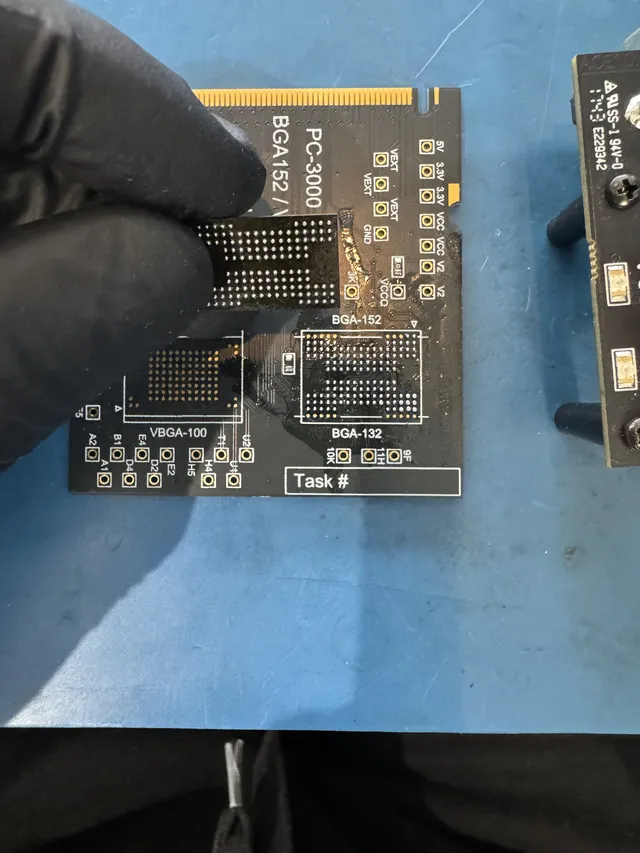
Lab territory: the card isn't detected at all, shows 0 bytes or a wrong size, disappears mid-read, heats up, or reads at a crawl with errors. All of those point at failing memory or a dead controller, and consumer software can't reach around dead hardware. Lab recovery reads the flash directly: for card-shaped cards that's often monolith work, exposing microscopic internal contacts and reading the raw memory, then rebuilding the controller's data layout in software. It's the same discipline as our SD card data recovery service, including the delicate stuff like cards that got formatted before anyone realized what that meant.
One more habit that pays off during triage: test the suspect card in nothing else. The instinct is to try it in a second camera body, then a phone adapter, then three card readers, collecting error messages like second opinions. Each device that touches the card gets a chance to write to it: cameras drop database files onto cards, phones index them, and some readers mount cards read-write with the OS immediately writing thumbnails and metadata. If the first computer you connect it to can't see the card cleanly, that's your answer, and the card's next stop should be an imaging rig, not a tour of every slot in the house.
For working photographers: the stakes math
If the card in question holds paid work, treat DIY differently. A wedding, a client session, or a once-ever event changes the math: one failed recovery attempt with the wrong tool can cost the whole gallery, and the "savings" of a free scan evaporate against reshooting something that can't be reshot. We wrote a dedicated emergency playbook for this in the wedding photographer SD card guide, and the short version applies to every pro shoot: isolate the card, image it once, and if the card shows hardware symptoms, go straight to a lab and say the word "deadline." Ask about rush diagnostic availability when you call. It advances the assessment start, not the recovery completion date.
And going forward, two habits neutralize this whole category of disaster: shoot dual-slot with real-time backup when your body supports it, and retire cards on a schedule instead of on failure. Cards are cheap. Reshoots are not.
What recovery costs for card-access errors
Logical cases (corrupted file system, card still readable) sit at the low end of recovery pricing. Hardware cases (dead controller, failing or physically damaged memory, monolith work) cost more because chip-level reads and layout reconstruction take specialized equipment and time. At MDrepairs the $100 diagnostic is credited toward a successful recovery and is non-refundable once diagnostics start. Donor drives or replacement parts you approve are non-refundable once ordered, even if recovery fails. You approve the estimate before recovery work starts. You'll see the recovered shoot before you pay for it.
Frequently Asked Questions
What does "cannot access memory card" mean on my camera?
The camera can detect the card but can't reliably read its file system or memory. Causes range from simple index corruption (photos intact, map broken) to failing flash memory or a crashed card controller. The message itself doesn't tell you which, so the safe assumption mid-shoot is always the same: stop using the card and protect what's on it.
Will formatting fix a memory card error?
It often makes the card usable again, and that's exactly the problem: it does so by discarding the existing photos. If the card holds images you need, don't format. Recover first, then format the card later (or better, retire it) once your files are safe. A card that errored once has told you its opinion of your data.
Can photos be recovered from a card my camera can't read?
A card or USB drive must be identified before choosing chip-off. Separate NAND packages can sometimes be read externally; monolithic devices may require access to technological pads or traces. Neither method guarantees files: the dump still needs supported error correction, descrambling, and translation, and encryption remains a separate limit.
Why does my camera say the card is locked or write-protected?
SD cards have a physical lock slider on the left edge; it slides toward "LOCK" more easily than anyone would like, including inside a tight card slot. Check the slider first. If the card is unlocked and the camera still claims write protection, the card's controller may be failing into read-only mode to protect itself, which is your cue to copy everything off it now.
Are cheap or bundled SD cards more likely to throw this error?
Yes, meaningfully. Counterfeit and bargain cards use lower-grade flash and optimistic capacity labeling, and they fail earlier and stranger than name-brand cards from reputable sellers. For anything that matters, buy known brands from real retailers, and remember that even a genuine card is a consumable with a service life, not an archive.
Get help with data recovery
Bring your device to our Lincroft lab during opening hours, or mail it in.
How to mail your deviceThe $100 diagnostic is non-refundable once diagnostics start, and donor drives or replacement parts you approve are non-refundable once ordered, even if recovery fails.
Published by MDrepairs
MDrepairs is a data recovery and electronics repair lab in Lincroft, New Jersey. Our founder and lead technician Joseph Montanti films real cases for our YouTube channel, showing tools, repair steps and recovery outcomes.
Keep reading
- USB “Device Descriptor Request Failed”: What It Means for a Flash Drive
- USB Says “Please Insert a Disk” or “No Media”: Can You Recover the Files?
- SD Card Write Protected? Fixes Beyond the Switch