Dashcam Footage Recovery: Getting Back Lost Video
Our founder and lead technician, Joseph Montanti, handles cases personally.
Dash cams overwrite the oldest unprotected recordings on a microSD card when loop recording needs space. Missing footage may still be in an event folder, a phone download, or an uploaded copy; a deleted file may also remain on the card until its space is reused. Video data that has been overwritten is gone from that location, so the first job is to find out which kind of loss you have.
Keep the card out of the recording loop. Shut down the camera before removing its card, and leave it out while you look for the footage. If the card is cracked, gets unusually hot, or repeatedly disconnects, stop trying to read it; do not format or repair the only copy.
On this page
Retrieve the footage that is still there
If a computer reads the card normally, copy the clips you need to another drive now, starting with the incident and the recordings immediately before and after it. Open the copies to check them. A camera's playback screen can show only one recording category at a time, so an empty list does not necessarily mean an empty card.
Use a card reader and look through the card's folders on the computer. Keep front and rear camera files together when copying. Their viewpoints can answer different questions, and the relevant moment may fall at the end of one segment and the beginning of the next. If the expected time is missing, browse the neighboring files as well as searching by filename.
| Camera | Where to look | What the folder contains |
|---|---|---|
| Garmin Dash Cam 47, 57 and 67W | DCIM, then 100EVENT, 101PHOTO, 102SAVED or 105UNSVD | Incident videos, photos, manually saved videos and unsaved recordings, respectively. |
| Viofo models with documented buffered parking recording | RO folder | Protected parking event clips. Check the regular recording folders too. |
| Thinkware U1000 and Q800PRO | Recorded Videos in the Thinkware Cloud app, with each category selected | Continuous, continuous incident, manual, motion detection and parking incident recordings. |
These locations come from Garmin's computer playback instructions, Viofo's parking mode instructions, and Thinkware's recorded video guide. Folder names and app screens vary by model; use the instructions for the camera that made the recording.
Also check the phone or computer used to view earlier clips. A downloaded file is a separate copy even after the camera deletes its version. For a cloud-connected camera, check the account used with that camera. BlackVue documents automatic Live Event Upload on supported models when the feature and connection are configured. Enabling it after an incident cannot upload a clip that has already disappeared.
Overwritten, deleted and formatted footage
Loop recording gives a camera room to keep recording without someone clearing the card each day. Once the available recording space fills, the camera removes older unsaved videos and writes new ones. Garmin describes this behavior in its recording guide. A larger card can hold more footage, but the time retained also depends on the recording settings and number of cameras.
Deleting a clip removes the file system's reference to it and makes its space available. Recovery software can sometimes find the remaining video data before that space is reused. Overwriting is the next step: new recording data takes the place of the old data. A scan cannot reconstruct old frames from the new frames occupying that space.
| What happened | What may remain | Next action |
|---|---|---|
| The playback list is empty | Files in another recording category, directory or downloaded copy. | Check the folders and saved copies before scanning. |
| A clip was deleted | Video data in space that has not been reused. | Image a stable card, then scan the image. |
| The card was quick-formatted | Some file contents may remain after the directory was replaced. | Scan a preserved image; avoid new recordings. |
| New footage replaced the old clip | A separate saved or uploaded copy, or portions elsewhere that escaped reuse. | Search those other copies and assess any remaining fragments. |
| The camera lost power during a clip | Video data with incomplete file metadata. | Preserve the file and card image for examination. |
Formatting is not one uniform operation. The SD Association distinguishes Quick format from Overwrite format: its Quick option replaces file system entries, while Overwrite writes across the user data area. A camera's own format command can behave differently. The name of the command is therefore less useful than whether the card still contains the old video data.
Protected recordings also need copying elsewhere. On the BlackVue DR770X-2CH IR, the protected event allocation has a limit, with settings controlling how new events are handled when it fills. A protected folder is a place to find an incident, not permanent storage for it.
Scan a copy of a readable card
A card image is a file containing the card's readable sectors, including space that no longer belongs to a visible file. Copying the visible folders does not preserve that deleted-file space. An image lets you try recovery software without repeatedly scanning the original card, and keeps a starting point if a recovered clip needs further work.
This route suits a card that stays connected and reads at its correct capacity. A card reported as no media or zero capacity needs a different approach: the computer has no normal readable storage for a file scan to search. A format prompt can also appear when the file system is damaged, so dismiss it and check whether an imaging tool can read the card's sectors.
- Connect the stable card through a suitable reader. Choose a different drive with enough free space for the whole card image and the recovered files. The image needs room for the card's full capacity, even if only a few clips are visible.
- On Windows, use the source and destination selection in HDD Raw Copy Tool to read the card into a raw image file. Select the card as the source and an image file on the other drive as the destination. For PhotoRec, choose a raw image rather than the tool's compressed image format.
- For a Mac, open Disk Drill's Byte-to-byte Backup, select the card and click Create backup. Save the .dmg image on the separate drive.
- Open the completed image with recovery software that supports raw images. PhotoRec supports disk images and searches for file signatures when the original directory is missing.
- Save recovered files to the other drive. Review the recovered clips there, keeping the original image unchanged.
For Linux users comfortable identifying disks, the equivalent raw-copy command is sudo dd if=/dev/sdX of=/path/on/other-drive/dashcam-backup.img bs=4M status=progress. Replace the input with the card's whole-device path and the output with a file on another drive. The if argument is the source; of is the destination. Reversing them writes to the wrong device. This syntax uses GNU dd; it is not a command to paste unchanged into a Mac terminal.
In PhotoRec, an image can be opened with photorec dashcam-backup.img. For the Mac backup, substitute the saved .dmg file's path for dashcam-backup.img. Select the relevant partition, choose Search, and use Other for FAT or exFAT when asked for the file system family. A whole-partition search is appropriate after formatting or file system damage. The developer's walkthrough explains these choices and destination selection.
PhotoRec identifies files from their contents, so the results may have generated names rather than the camera's original date-based names. Look at the footage itself. A recovered MP4 with a plausible size still needs checking through the relevant part of the recording; a thumbnail or playable opening frame is only the beginning of that check.
The lock tab on a full-size SD adapter is an extra precaution only when the reader honors it. The SD specification assigns that switch to the host's responsibility. A microSD card has no mechanical lock switch of its own, and the adapter tab is not a substitute for saving recovery output elsewhere.
The video file is there but will not play
Video contains both the recorded picture and sound and information telling a player how to read them. In the QuickTime file structure used by MOV and related containers, the movie metadata describes tracks and where their samples are stored. Apple's format documentation separates this movie information from the media data.
If recording loses power before the file is finished, the media data can be present while the information needed to play it is incomplete. That is different from an empty file, which contains no video payload to reconstruct. It is also different from a clip that plays correctly but shows the wrong time: that clip may simply be another recording.
Fragmentation creates another problem. A video can occupy several separate areas of a card. Software that recognizes the start of an MP4 may recover the first part but miss the connection to later pieces after the directory information is lost. PhotoRec's documentation describes its limits with fragmented files. Repeated scans with different names do not replace missing segments.
Keep an intact neighboring clip from the same camera along with the damaged file. Its format can help establish how that camera arranged its tracks and timing information. Any attempted file repair belongs on a copy, because rewriting a header or index changes the file being examined. The remaining payload determines how much useful footage can be rebuilt.
If the camera was smashed in an accident
A broken camera body and a broken memory card are different jobs. If the card is intact and reads normally through a computer's reader, the camera does not need to work for you to copy its completed recordings. The last clip may be unfinished if power failed during the incident. Earlier completed clips should be included when you preserve the card.
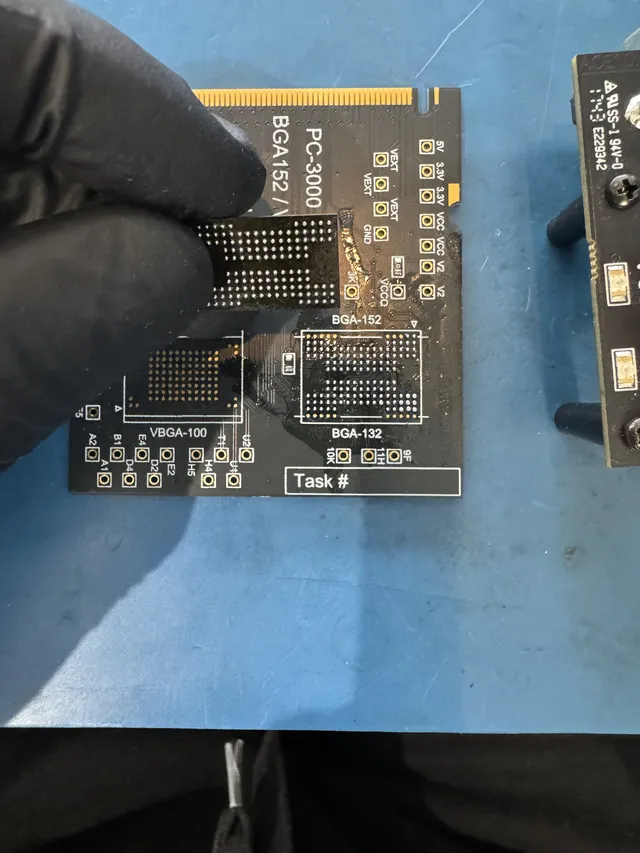
A damaged card may need work below the file system. In Joe's recorded recovery of an unreadable SD card, he exposed the card's data connections, attached an adapter, and read the flash with PC-3000 Flash. Error correction and reconstruction of the stored page layout made the recovered photos readable. That kind of work is part of the lab's SD card data recovery service.
Dashcam footage recovery costs $100 to $500. The work differs between retrieving files from a readable image and gaining access to a failed card, so the estimate follows examination of the card. You approve that estimate before recovery work begins.
Keep the original recording with the usable copy
If the footage is needed for an accident claim, preserve the full original clip and work from a duplicate when making a shorter version to share. A crop or conversion can remove surrounding events and change file metadata. Keeping the original card and image also leaves the unedited material available if someone needs to examine it later.
Location data depends on the camera. Garmin's Dash Cam 67W has GPS; the Mini 2 has no internal GPS receiver. Garmin lists the differences. A video recovery therefore cannot promise GPS coordinates from every model, and an incorrect camera clock can produce an incorrect timestamp even in a fully playable recording.
Once the needed clips are copied and checked, follow the camera maker's card instructions before returning the card to service. Garmin, for example, requires FAT32 for the Mini 2 and explains that formatting deletes its recordings. A replacement card lets the camera resume recording while you retain the incident card unchanged.
Get help with data recovery
Bring your device to our Lincroft lab during opening hours, or mail it in.
How to mail your deviceThe $100 diagnostic is non-refundable once diagnostics start, and donor drives or replacement parts you approve are non-refundable once ordered, even if recovery fails.
Published by MDrepairs
MDrepairs is a data recovery and electronics repair lab in Lincroft, New Jersey. Our founder and lead technician Joseph Montanti films real cases for our YouTube channel, showing tools, repair steps and recovery outcomes.
Keep reading
- USB “Device Descriptor Request Failed”: What It Means for a Flash Drive
- USB Says “Please Insert a Disk” or “No Media”: Can You Recover the Files?
- SD Card Write Protected? Fixes Beyond the Switch