Photos Disappeared From Your SD Card? Don't Shoot More
Our founder and lead technician, Joseph Montanti, handles cases personally.
Photos can disappear from an SD card because they were deleted, the card's file directory was damaged, or the camera cannot display the folder or image format they are in. Pictures that have lost their directory entries may still be recoverable before new data replaces them.
Put this card aside for recovery. Do not take more pictures, format it, or accept a repair prompt before preserving its contents. Have the card examined if it drops out of the reader, stops returning file contents, reports read errors or gets unusually hot; end the transfer at any of those signs.
On this page
When the camera says “no images”
The camera's playback screen shows the pictures it recognizes. A computer gives you a broader view of the card. Canon's on-screen message guide explains that images from another camera, edited files and renamed files may not display. That makes a card-reader check worthwhile before assuming the photos were deleted.
- Let the camera finish accessing the card, switch it off, and remove the card. Use a compatible reader to connect it to your computer.
- Open the card in File Explorer or Finder. Look inside DCIM and each of its subfolders, then check the other folders on the card. A different camera may have created a different folder.
- On Windows 11, choose View, Show, then Hidden items in File Explorer. Microsoft gives the steps in its File Explorer guide. Save the visible and hidden pictures you want on separate storage, beginning with the photos you most need to keep.
- Open the copied images. Check full-size photos, including RAW files, before treating a set of thumbnails as a complete recovery.
If pictures appear on the computer but not in the camera or phone gallery, you have a display or compatibility problem to investigate after saving them. If no files appear anywhere, the next question is whether the card still reads reliably enough to make an image. A card that is not detected follows the SD card not showing up route.
The small lock slider on an SD card or microSD adapter can help prevent writes when the reader respects it. It is not a hardware write blocker: the SD specification makes write protection the host's responsibility. Keep recovered files off the source card even when its tab is set to Lock.
Why did the pictures disappear?
Deleting a photo makes its space available for another file. A quick format can also replace the directory without overwriting every image. The SD Association's formatter documentation distinguishes that operation from an Overwrite format, which writes across the user data area. Camera format commands vary, so a formatted card needs examining before anyone can say what remains.
File system damage can separate a photo's contents from the information used to locate it. Pulling a card or losing power during a write can damage saved data as well as the directory. Sony's memory-card precautions explain why the access lamp matters: the camera may still be writing after you have taken the picture. Waiting for it to finish avoids interrupting that operation.
A card showing gigabytes of used space has space marked as occupied. That number does not establish that every missing photo is intact. Hidden files, other recording folders and damaged allocation information can all make the visible file list disagree with the capacity display. The files themselves, or the data found in an image, need to be read.
| What you see | Likely explanation | What to do |
|---|---|---|
| Pictures appear on a computer but not in the camera | Playback compatibility, folder selection or file naming. | Copy and open them on the computer. |
| Files vanished after Delete or Format | Directory entries were removed; some contents may remain. | Image a stable card and scan that copy. |
| A format prompt or unreadable folder names | The device cannot read the file system properly. | Preserve readable sectors before any repair. |
| Files fail after the card reaches a certain capacity | Possible false capacity or failing flash memory. | Preserve existing data before testing the card. |
Counterfeit cards can report more capacity than they contain. The SD Association describes cards with falsified capacity information. Photos written beyond the real storage may never have been saved correctly. A capacity test writes data to the card, so it belongs after recovery, on a card whose contents you no longer need.
Recover missing photos from a readable card
For a stable card, a full image preserves the sectors containing both visible files and deleted-file space. HDD Raw Copy Tool can create a raw image on Windows; select the card as the source and a file on a separate drive as the destination. The destination needs enough room for the card's capacity. On a Mac, follow CleverFiles' Byte-to-byte Backup instructions to save a full card image on that other drive before scanning.
Software such as PhotoRec can scan that image for recognizable photo contents without relying on the original directory. This is useful when filenames and folders are gone. Files found by their contents often receive new names, so sorting by the old camera filename may no longer work.
Save the results to separate storage and inspect the pictures you need. A JPEG may have a readable preview while part of the full image is damaged. For RAW files such as CR3, NEF and ARW, use software that supports that camera's format to check the recovered file. The deleted SD card files guide covers the recovery steps in more detail.
If you took more photos after the loss, the result can be a mixture: some old files survived, some were partly overwritten, and some were replaced completely. A scan can find surviving data; the next photograph may have occupied space that belonged to a missing one. This is why the amount of further recording matters more than how long the card has been sitting unused.
When the card no longer reads
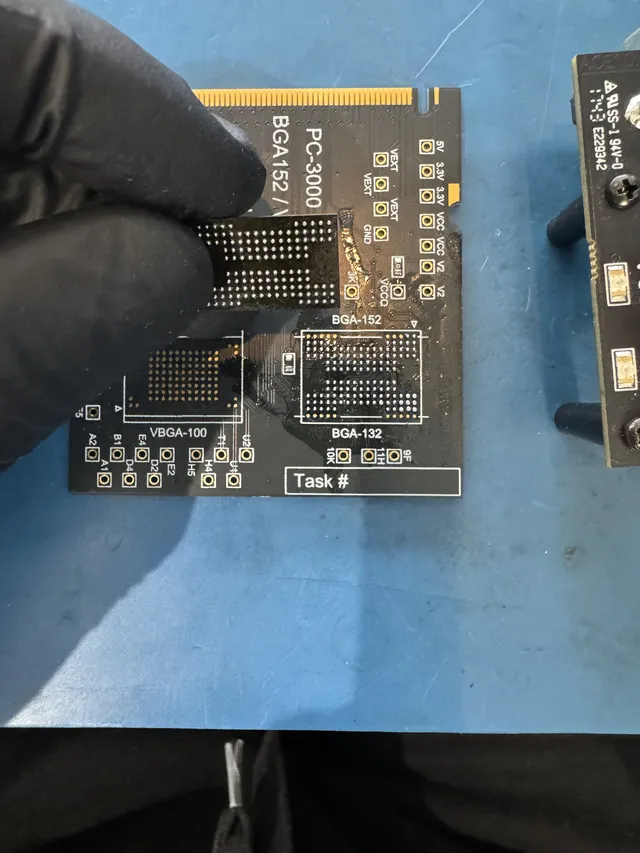
A controller failure or damaged connection can keep otherwise surviving flash data out of reach of ordinary software. Some SD cards expose separate components; others pack their memory and controller into a sealed assembly. Recovery work depends on that construction and the failed part.
In Joe's recovery of a water-damaged SD card, the card would not read through an adapter. He opened its casing under a microscope, connected its data lines to an adapter, and used PC-3000 Flash to read the memory and rebuild the photo files. Accessing the memory was only part of the work; the raw data also needed reconstruction.
That is the kind of fault handled by SD card data recovery. A card with electrical damage needs that assessment before a file-recovery scan can be useful.
Get help with data recovery
Bring your device to our Lincroft lab during opening hours, or mail it in.
How to mail your deviceThe $100 diagnostic is non-refundable once diagnostics start, and donor drives or replacement parts you approve are non-refundable once ordered, even if recovery fails.
Published by MDrepairs
MDrepairs is a data recovery and electronics repair lab in Lincroft, New Jersey. Our founder and lead technician Joseph Montanti films real cases for our YouTube channel, showing tools, repair steps and recovery outcomes.
Keep reading
- USB “Device Descriptor Request Failed”: What It Means for a Flash Drive
- USB Says “Please Insert a Disk” or “No Media”: Can You Recover the Files?
- SD Card Write Protected? Fixes Beyond the Switch