External Drive Clicking? Unplug It Now, Here's Why
Our founder and lead technician, Joseph Montanti, handles cases personally.
We've built half our reputation on clicking drives; a short video of one clicking on our bench has been watched by more than ten million people. So believe us when we say the difference between a full recovery and a scratched-platter heartbreak is usually just how many times the drive was powered on after the first click. Here's what the sound means in an external drive specifically, the one safe check you're allowed, and what recovery actually looks like.
On this page
What that clicking sound actually is
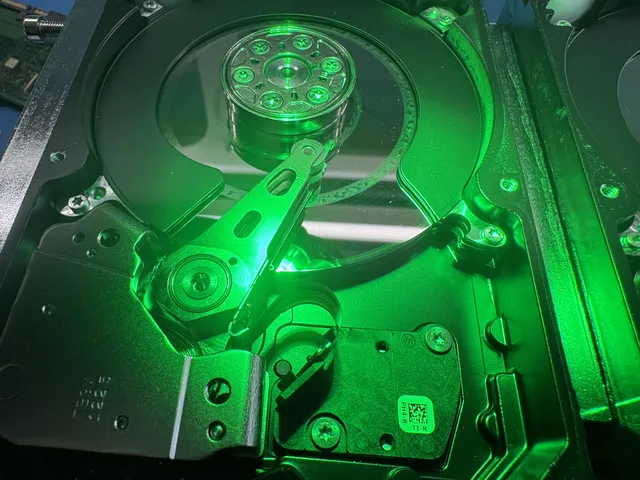
Inside the enclosure is a regular hard drive: spinning platters and an actuator arm with read/write heads. When the drive powers up, the heads sweep out over the platters and look for servo data that tells them where they are. If the heads are damaged, or the preamplifier on the arm has failed, they find nothing, swing back, hit their limiter, and try again. That rhythmic tick... tick... tick is the arm physically striking its stop. The drive isn't "trying to start." It's failing to see, over and over.
Why it matters so much: damaged heads don't fly properly. Instead of gliding above the platter surface, they can drag across it, carving the magnetic coating (and your files) into dust. Recovery pros call the end stage a scratched or scored platter, and past a certain point, nobody on Earth gets that data back.
The one safe check: is it actually a power problem?
External drives add parts that internal drives don't have: a USB bridge board, a cable, and sometimes a power adapter. A drive that isn't getting enough current can make repetitive spin-up attempts that sound click-adjacent. It's the minority case, but it's cheap to rule out. One pass, once:
What you should not do is buy a new enclosure and transplant the drive to "bypass" the USB board. On many portable drives (Western Digital My Passport models are the famous case) the USB bridge is built into the drive's own circuit board and encrypts your data in hardware. The drive and its board are a matched set, and DIY swaps routinely turn a recoverable click into a harder job.
Clicking patterns and what they usually mean
| What you hear | What it usually means |
|---|---|
| Steady click every second or two | Failed heads or preamp; the classic pattern |
| Spin up, few clicks, spin down, repeat | Heads or firmware; drive gives up and retries |
| Beeping or soft buzzing, no spin | Seized spindle or heads stuck on the platters (common after drops) |
| Single click at plug-in, then silence | Often electronics or power; sometimes heads parking |
| Grinding or scraping | Worst case; platter contact in progress. Do not power on again. |
Dropped it while it was running? That's the most common origin story for external clicking we hear, and it usually means the heads got slapped into the platters. The general mechanics are the same as any clicking hard drive, but externals get dropped, kicked off couches, and yanked off desks by their cables, which is why they die this way more often than internals.
What professional recovery looks like for a clicking external
In the lab, the drive comes out of its enclosure and gets evaluated on a hardware imager. If the heads are confirmed bad, they're replaced in a cleanroom with a matched donor set: the drive opened in filtered air, the damaged head stack swapped, and the drive given exactly one careful chance to read. From there we image every sector we can, prioritizing your file areas, onto a healthy drive. If the USB board did hardware encryption, we handle the decryption with the original electronics.
Costs scale with damage: head swaps are the deep end of external drive recovery, and pricing is flat and quoted up front after the diagnostic ($100, credited toward the work). The $100 diagnostic is credited toward a successful recovery. The $100 diagnostic is non-refundable once diagnostics start, and donor drives or replacement parts you approve are non-refundable once ordered, even if recovery fails. You approve the estimate before recovery work starts.
Why recovery software makes clicking worse
Recovery apps assume a healthy drive with lost data. A clicking drive is the opposite: dying hardware with (so far) intact data. Software scans force the damaged heads to sweep the entire surface for hours, exactly the motion that grinds platters. Worse, the drive usually isn't even mounting, so the software sees nothing while the hardware eats itself. The honest rule: software for logical problems, lab for mechanical ones. If it makes any noise it didn't make when new, it's mechanical.
And once your files are back, break the single-copy habit that caused this scare. An external drive is not a backup; it's just data in a different box that can also be dropped. Two copies on different devices plus one offsite or in the cloud is the standard that survives drops, clicks, and coffee. The recovered drive itself should be retired, not reused. A drive that clicked once has told you everything you need to know about its future.
Frequently Asked Questions
Why is my external hard drive clicking and not being recognized?
The read/write heads inside have almost certainly failed and are repeatedly striking their limiter while searching for data they can no longer read. The computer doesn't recognize the drive because the heads never complete their startup read. After one direct-port, known-good-cable check to rule out power, treat it as a physical failure and keep it powered off.
Can I fix a clicking external drive myself?
No, and honest labs say this even though it costs them nothing when you try: there is no cable, software, firmware trick, or YouTube tutorial that repairs failed heads. Opening the drive outside a cleanroom adds dust to a mechanism that operates at nanometer distances. DIY on a clicking drive converts recoverable cases into unrecoverable ones every single day.
How much does it cost to recover a clicking external hard drive?
Clicking usually means cleanroom head work, which sits at the higher end of recovery pricing, commonly several hundred to over a thousand dollars industry-wide depending on the drive and damage. At MDrepairs, you approve the estimate before recovery work starts; the diagnostic and approved parts are subject to the payment terms above.
I dropped my external drive and now it clicks. Is my data gone?
Usually not, if you stop powering it on. A drop slaps the heads into the platters and damages them, but the data underneath typically survives the initial impact. What destroys it is running the drive afterward with damaged heads dragging across the surface. Powered off and brought to a cleanroom, dropped-and-clicking drives recover well.
Does clicking always mean the drive is dead?
It means the drive needs professional hardware recovery, not that the data is lost. The distinction matters: the drive as a product is done, but your files are sitting on platters that a lab can usually still read after replacing the heads. Odds drop with every power-on, which is why the advice is always the same: unplug it now.
Get help with data recovery
Bring your device to our Lincroft lab during opening hours, or mail it in.
How to mail your deviceThe $100 diagnostic is non-refundable once diagnostics start, and donor drives or replacement parts you approve are non-refundable once ordered, even if recovery fails.
More lab videos
Published by MDrepairs
MDrepairs is a data recovery and electronics repair lab in Lincroft, New Jersey. Our founder and lead technician Joseph Montanti films real cases for our YouTube channel, showing tools, repair steps and recovery outcomes.
Keep reading
- BitLocker Recovery Key Not Working? Check the Key ID Before Resetting
- exFAT Drive Corrupted? Cross-Platform Rescue Guide
- External Drive Painfully Slow? It May Be Dying