WD My Passport data recovery
We can help you get your photos and other files back from a WD My Passport, even if it clicks or no longer shows up on your computer. Keep the drive unplugged for now and leave the case closed. For models with spinning disks, our hard drive first aid guide explains what you can safely check at home and when to stop.
You can send us your drive by mail or bring it to our lab in Lincroft, New Jersey. If you mail it from the contiguous US, your shipping label is free.
- Since 2014One lab, in Lincroft, New Jersey
- 20,000+ ticketsacross all services since 2014
- 4.6 from 345Google reviews
- $100 diagnosticcredited toward a successful recovery
The people we help
Our customers include people from
-

-

-
 AT&T
-
 Marriott
-

-

-
 Tennessee Titans
-

-

-

-

-

-

-

Is my WD My Passport encrypted?
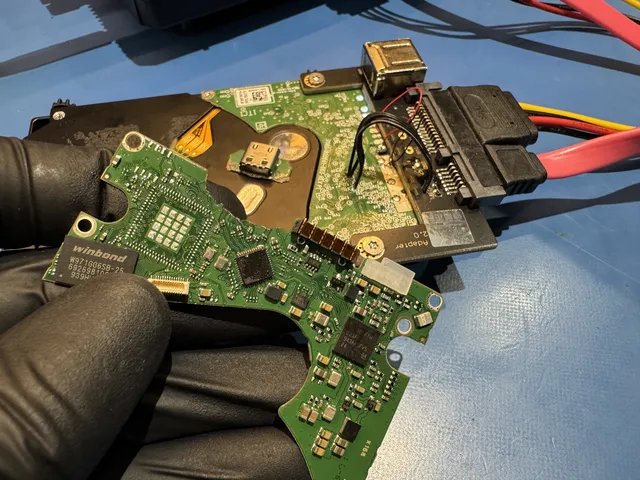
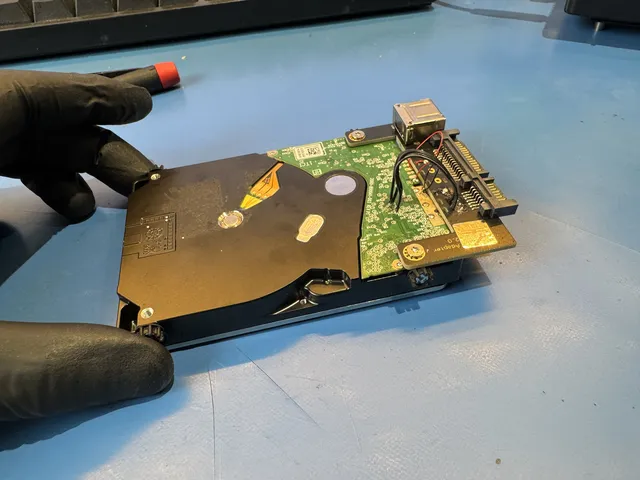
Yes, if yours has spinning disks. A chip on the drive's circuit board scrambles your files as you save them, even if you never set a password. The USB port is built into that same board, so taking the drive out of its case won't give you another place to plug it in.
We can solder a connection called SATA onto the board to connect the drive to our equipment. That's how we connected a 5 TB My Passport after a fall. If the board itself is broken, we can move the encryption chip and the chip that holds the drive's startup instructions (the ROM) to a matching board.
Keep the original board and any loose pieces. If the board is lost or its encryption chip is destroyed, the key to your files may be gone. Our guides cover Western Digital drives, external drives of any brand and how we copy a hard drive and rebuild files from that copy.
Which WD My Passport do I have?
Look at the name on the label. A My Passport SSD or Go stores your files on memory chips. The other models in the table use spinning disks. That difference affects how we recover your files and what the work costs.
| Model | How to recognize it | How we recover files | What to send | Price range |
|---|---|---|---|---|
| My Passport | Fits in a pocket and gets its power through a micro-USB or USB-C port | We use the original board to read the encrypted files on the disks. | The whole drive in its original case | $1,000 - $3,500+ |
| My Passport Ultra | A metal case with “Ultra” on the label | We use the Ultra's original board to unlock the files on its disks. | The whole drive in its metal case | $1,000 - $3,500+ |
| My Passport for Mac WD hard drive not showing up on Mac? Look in Finder and Disk Utility | Set up for a Mac using HFS+ or APFS, the formats a Mac uses to organize files | The Mac format doesn't change how we recover files. Even after reformatting, files can survive until something overwrites them. | The whole drive in its case, even if it was a Windows model you reformatted for your Mac | $1,000 - $3,500+ |
| My Passport SSD, My Passport Go SSD data recoverySanDisk data recovery | “SSD” or “Go” on the label | We work with the flash memory chips that hold your files. | The SSD or Go, switched off | $1,000 - $2,000+ |
| My Passport Wireless and Wireless Pro | Wi-Fi and a built-in SD card reader | We recover files from the hard drive inside the wireless case. | The drive with its original board | $1,000 - $3,500+ |
You can also look for your model number in our My Passport recovery cases.
What to do when your WD My Passport stops working
The light on your My Passport can come on even when the drive can't read your files. On models with spinning disks, our $100 diagnostic checks the heads that read the disks, the chip that unlocks your files and the instructions the drive needs to start.
My Passport started clicking after a fall
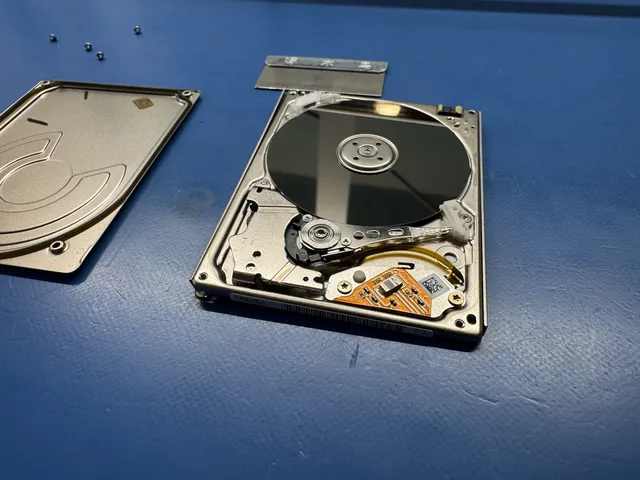
Turn it off and leave it unplugged. A fall while the disks are spinning can damage the heads that read them. At the lab, we can fit matching heads from another drive and start by copying the parts of the disks we can still read.
A family's photos and videos were on a 1 TB WD10JMVW that their cat knocked off a table. Someone had already removed the disks in an earlier recovery attempt. When the replacement heads wouldn't move off the ramp where they rest, we moved the disks into the body of another drive. We found about 900 GB and got back all but about 15 GB of it.
When a disk is scratched, we read up to the scratch from both directions. If a whole surface is too damaged to read, we can remove the head for that surface and change the drive's instructions so we can still recover files from the other surfaces.
My computer doesn't recognize the drive
If the drive is quiet, undamaged and hasn't fallen, try a different cable and USB port once. If that doesn't help, unplug it. “USB device not recognized” can mean a faulty USB chip, a damaged head or startup instructions corrupted by a power loss. If the size looks wrong, even 0 bytes, the drive may have lost track of where your files are.
One customer's game project was on a WD20SDRW that still spun quietly. We wired its board for SATA, fitted new heads and saved a copy of the map the drive uses to find files. When the drive later gave us zeros instead of files, we restored that map and recovered all but 28 MB.
If the light blinks but the drive never appears on your computer, these guides walk you through the checks you can do at home.
My Passport gets really slow or freezes when I copy files
If you can still open your files, copy them to another drive now. If your My Passport freezes partway through, stop and leave it off. On a failing drive, reading the same files over and over can make them harder to save. At the lab, we start by copying what we can still read, working around the weak spots.
My computer asks me to format the drive or shows an error
Cancel the prompt if Windows says “You need to format the disk” or your Mac asks to erase or initialize it. Formatting writes a new, empty file list. If you've already formatted the drive or deleted a folder, don't save anything else to it. Your files may still be there until something overwrites them.
“Access is denied” can mean the drive is locked with a password or that Windows is trying to read a drive formatted for a Mac. If you see “I/O device error” and hear clicking, we suspect the heads. If the drive sounds normal, we check for weak spots on the disks or trouble with the drive's startup instructions.
Skip CHKDSK on Windows or First Aid on a Mac if you see “The parameter is incorrect” or “Location is not available.” Keep the drive unplugged somewhere cool and dry. Even after a format, we need the original board to make the copy we'll use to rebuild your files.
The USB port is loose or broken
If the socket moves when you push the cable in, stop there. A tug can break the solder joints that hold the socket in place while leaving the disks and your files intact. We can repair those joints or solder a SATA connection to the board so our equipment can bypass the broken port.
The drive beeps or buzzes without spinning
Unplug the drive. We'll need to look inside to see whether the motor has jammed or one of the heads is stuck against a disk.
One customer's external drive started beeping after they unplugged it while it was reading files. We recovered about 680 GB, including their photos and documents.
I forgot my WD Security password
We need the password or its key to open files you've locked with WD Security. Look through old printouts and USB sticks, and check any files or online accounts where you might have saved a copy.
Seeing a password prompt can simply mean the lock is working. If the drive has also failed, we can still work on the damage and use your password to open the files we recover.
The drive was opened or the circuit board broke
If the drive is already apart, leave it that way and send every piece. Even a broken board can hold the chips we need to read your files. Leave any spare boards as they are.
One customer told us the board on their WD40NDZM had snapped while the drive was being taken out of its case. We moved the encryption chip and the ROM to a matching board and got all their files back, including their music.
How much does WD My Passport data recovery cost?
$100 diagnostic, credited toward a successful recovery.
The $100 diagnostic is non-refundable once diagnostics start, and donor drives or replacement parts you approve are non-refundable once ordered, even if recovery fails.
Recovery starts at $1,000. Rebuilding a file list takes different work from reading a scratched disk, so we confirm the price for your drive after the $100 diagnostic. You can ask us for a free quote before you send it. Before you pay for recovery, you can click through the folders in your recovery report to see which files we recovered and which may be partly or fully damaged.
- Which price range fits my drive?
If your drive shows 0 bytes or your computer asks to format it, start with the “Firmware / Logical” row. It covers the drive's startup instructions and file list. A clicking drive may need replacement heads. There's a row for scratched disks and another for SSDs, including the Go.
- Can I pay over time?
If you qualify, you can pay over time with Affirm. Our financing guide explains how it works.
| Recovery work | Price range |
|---|---|
| Hard Drive - Firmware / Logical | $1,000 - $1,500 |
| Hard Drive - Head Swap | $1,500 - $3,000+ |
| Scratched / Contaminated Platters | $3,000 - $3,500+ |
| SSD / NVMe Recovery | $1,000 - $2,000+ |
| Service | When we start the diagnostic | Added cost |
|---|---|---|
| Standard diagnostic | Starts in about 4–6 weeks, then recovery time varies by case | No surcharge |
| Priority | Assessment starts within 5–7 days | +$250 |
| Urgent | Assessment starts within 1–2 days | +$500 |
| Emergency | Assessment starts same-day | +$1,000 |
Our data recovery price list covers other drives, and our guide to recovery costs explains what goes into a quote.
WD My Passport recovery cases
These are drives our customers mailed to us or brought to our counter in Lincroft.
- WD My Passport, 500 GB Clicking or other noise · Data recovered Mailed from Virginia 2026
- WD My Passport, 2 TB Clicking or other noise · Data recovered Mailed from South Carolina 2026
- WD My Passport Water or liquid damage · Data recovered Mailed from California 2026
- WD My Passport, 3 TB Data recovered At our lab's counter in Lincroft 2026
- WD My Passport WD50NDZW Stopped working or not detected · Data recovered Mailed from Texas 2026
- WD My Passport WD40NMZW Hard Drive - Head Swap · Data recovered Mailed from California 2025
- WD My Passport WD40NDZM Clicking or other noise · Data recovered Mailed from California 2025
- WD My Passport, 2 TB WD20SDZW Stopped working or not detected · Data recovered Mailed from Florida 2025
These cases come from our ticket system, BenchKey, the shop software we built and run our lab on, with names, contact details and addresses left out. How we publish cases
Help with other drives and computers
Start with the device that held your missing files. You can find help for other drives and computers in our list of data recovery services.
Other Western Digital drives
Our Western Digital guide covers WD Elements, WD drives built into a computer and drives from a NAS, a device that shares files over a network.
WD My Book desktop drives
If the label says My Book, you have a WD desktop drive with its own power adapter. Our My Book guide covers recovery for that drive.
Other brands of external hard drives
Our external hard drive guide covers all brands. If the name on your drive is Seagate, we also have a recovery guide for Seagate drives.
My MacBook stopped working
If you saved the missing files on the MacBook itself, start with MacBook recovery. If you saved them on your My Passport, that's the drive we'll need to see.
Questions about WD My Passport data recovery
Can I use recovery software or a SATA adapter at home?
Only try recovery software if the drive is healthy, quiet and shows up on your computer. A home SATA adapter won't fit the USB board, and you need that board to unlock your files. Keep the case closed. If the drive clicks, beeps, disappears or asks to be formatted, leave it unplugged. A scan makes it work harder.
Can you recover files from a dead WD My Passport?
We may be able to, depending on the condition of the disks and the heads that read them. That's why we don't quote a single success rate for data recovery. After the $100 diagnostic, we can tell you what failed, what we can try and what it would cost.
Is my WD My Passport encrypted if I never set a password?
Yes, if it has spinning disks. A chip on the drive's board encrypts your files as you save them. A password you set in WD Security is a separate lock.
WD My Passport and hard drive guides
These guides explain how to check your drive's health, when it's safe to unplug it after copying files and what can happen inside a hard drive when it stops reading.
My Passport recovery and care
If your drive clicks, disappears or holds photos you can't replace, leave it unplugged and ask for a quote before trying a fix. When you back up your files, keep copies in three places.
Get a quote for your WD My Passport
Tell us what happened to your drive and which files you need back. We return recovered files on a new drive that you can pick up at our Lincroft counter or have us send by mail.