Lost my SSD after a hard reset and i thought the world ended. … I paid the rush fee and within 24 hours and a few extra minutes my business came back to life like tragedy never struck in the first place. They saved everything i thought i lost.
Crucial SSD Data Recovery
We recover files from failed Crucial SSDs at our lab in Lincroft, NJ. If your computer no longer sees your MX500, your T700 stopped working after a power surge, or you accidentally deleted a folder, leave the drive powered off. Tell us what happened and which files you need most.
Our $100 diagnostic tells you what failed and what recovery would cost. You decide whether to go ahead, and we credit the $100 toward recovery if you do. Before you pay the recovery fee, we show you which files we got back.
Recoveries filmed at our bench
The people we help
Our customers include people from
-

-

-
 AT&T
-
 Marriott
-

-

-
 Tennessee Titans
-

-

-

-

-

-

-

Reviews
What Our Customers Say
4.6
Crucial SSD models we work on
Look for the model name and capacity together on the label, such as Crucial MX500 1TB. Those details give us a starting point even if the computer no longer sees the drive.
MX Series
SATAThe MX series includes several generations of SATA drives. The MX500 uses Micron 3D flash memory and supports hardware encryption.
- Crucial MX500 250GB
- Crucial MX500 500GB
- Crucial MX500 1TB
- Crucial MX500 2TB
- Crucial MX500 4TB
- Crucial MX300 275GB
- Crucial MX300 525GB
- Crucial MX300 1TB
- Crucial MX200 250GB
- Crucial MX200 500GB
- Crucial MX100 256GB
- Crucial MX100 512GB
BX Series
SATAThe BX500 keeps the map it uses to find files in flash memory. Some versions use a Silicon Motion SM2259XT controller.
- Crucial BX500 240GB
- Crucial BX500 480GB
- Crucial BX500 1TB
- Crucial BX500 2TB
- Crucial BX500 4TB
- Crucial BX300 120GB
- Crucial BX300 240GB
- Crucial BX200 240GB
- Crucial BX200 480GB
P Series
NVMeThe P3, P3 Plus and P5 Plus plug into an M.2 slot. The controllers inside differ, so the exact model matters for recovery.
- Crucial P3 500GB
- Crucial P3 1TB
- Crucial P3 2TB
- Crucial P3 4TB
- Crucial P3 Plus 500GB
- Crucial P3 Plus 1TB
- Crucial P3 Plus 2TB
- Crucial P3 Plus 4TB
- Crucial P5 Plus 500GB
- Crucial P5 Plus 1TB
- Crucial P5 Plus 2TB
T Series
NVMeThe T500 uses a PCIe Gen4 connection. The T700 uses Gen5 and has a Phison E26 controller.
- Crucial T700 1TB
- Crucial T700 2TB
- Crucial T700 4TB
- Crucial T500 500GB
- Crucial T500 1TB
- Crucial T500 2TB
X Series Portable
USB-CThese portable SSDs connect over USB-C. A damaged socket can cut off access even when the memory inside is still readable.
- Crucial X9 1TB
- Crucial X9 2TB
- Crucial X9 4TB
- Crucial X9 Pro 1TB
- Crucial X9 Pro 2TB
- Crucial X9 Pro 4TB
- Crucial X10 Pro 1TB
- Crucial X10 Pro 2TB
- Crucial X10 Pro 4TB
M Series
SATAThe M500 and M550 are older SATA drives with Marvell controllers. Their flash memory stores data in a single layer of cells.
- Crucial M550 128GB
- Crucial M550 256GB
- Crucial M500 120GB
If your model isn’t listed, call with the part number on the label. We can help you identify it.
Common Crucial SSD failures
An SSD has no moving parts to click or beep when it fails. What tells us more is whether the drive shows up when your computer starts, what size it reports and what happens when you try to open a file.
-
Drive missing from the BIOS or listed as SATAFIRM S11
If your Crucial SSD disappears from the list of drives at startup, its controller may have stopped responding. If you see SATAFIRM S11 instead of a model name, that points to a Phison S11 controller. The MX500 uses Silicon Motion hardware, so we ask for both the name on screen and the one on the label.
Controller and firmware diagnostic -
Wrong capacity or 0 MB
If a 1 TB drive suddenly shows 0 MB or 8 MB, the controller may have lost the map it uses to find your files. This can happen after a power cut. Leave the drive as it is if your computer asks to format it.
Rebuilding the file address map -
Dead after a power surge
A surge from lightning, a faulty power supply or a failed battery backup can damage the circuit board. If your Crucial SSD stopped responding at that moment, tell us. We can test the power circuits before trying to read the memory.
Power circuit testing -
NVMe drive overheats
A fast NVMe drive such as the T700 can slow down as it gets hot. If it also freezes or drops out during a long transfer, stop the transfer. In the lab we cool the controller during sustained reads so we can see whether the drive stays accessible.
Cooling during recovery -
Read-only or worn out
A worn SSD can stop accepting changes while it still lets you open files. If yours reads steadily, copy your most important files to a different drive first. If the copy freezes or files are missing, stop there. Leave the firmware alone.
Save readable files first -
Failed firmware update
If the computer crashed or lost power during a Crucial Storage Executive update, the SSD may have only part of the code it needs to start. Leave it powered off. We look for the damaged part of the firmware and the map that still points to your files.
Service area repair
If your drive keeps freezing or disconnecting, leave it powered off and call 732-933-7717. You can describe the last thing you saw without switching it on again.
How we recover your files
You don’t need to know what broke to get started. A description of what happened is enough for the first call.
-
Tell us what happened
Call 732-933-7717 or use the quote form. Tell us what your computer shows and which files you want back. You can bring the SSD to Lincroft or use our mail-in form to get a UPS label.
-
$100 diagnostic
We examine the drive, explain what failed and give you the recovery price. You can decide then. If you go ahead, the $100 counts toward that price.
-
Make a copy
Once you approve the quote, we work on getting a stable read. That might mean repairing a power circuit or restoring the map the SSD uses to find your files. As the data becomes readable, we copy it to a separate drive.
-
See what came back
We show you the list of recovered files before you pay the recovery fee. You can look for the folders, photos or documents you asked us about.
-
Get your files back
We can return the files on a new external drive or arrange a download. You can have your original Crucial SSD back as well. We keep an offline copy of the recovered data for two weeks after delivery, then delete it.
Call 732-933-7717 Free UPS labels both ways in the contiguous US.
Pricing
What Crucial SSD recovery costs
Crucial SSD and NVMe recovery costs $1,000 to $2,000+. We use the $100 diagnostic to find the fault and give you a price before you decide. If you approve the work, the $100 goes toward recovery.
If recovery fails
If we can't get any files back, there's no recovery fee. The $100 diagnostic is non-refundable once diagnostics start, and donor drives or replacement parts you approve are non-refundable once ordered, even if recovery fails.
See our prices for other devices or read the SSD cost guide for more about how the repair affects the price.
Logical recovery for missing files
When the drive still reads but files or folders are missing, we work from a copy. We can rebuild the folder structure or look for individual files by the patterns they leave on the drive.
- Accidental deletion
- A quick format on a Crucial SSD
- Damaged NTFS, APFS, ext4 or HFS+ file systems
- A partition that shows up as RAW
Firmware and controller recovery
Drive won’t startIf the drive stays busy, reports the wrong size or disappears at startup, we look at the chip that runs it and the instructions that chip relies on. The aim is to get the SSD reading through its own controller again.
- Firmware faults at startup
- Silicon Motion and Phison controller diagnostics
- Rebuilding the address map (FTL)
- Repairing the record of worn memory blocks
- Finding out what remains readable after TRIM
Chip-off NAND recovery
On some drives with a failed controller or damaged board, we can remove the memory chips and read them separately. Turning those readings back into files depends on the memory condition, the way the controller stored the data and any encryption.
- Reading Micron NAND chips
- Correcting read errors with LDPC codes
- Undoing scrambling and putting pieces back in order
- AES decryption when the key is available
- Rebuilding the map after wear leveling
We show you the recovered files before you pay the recovery fee.
If you have a deadline, call us about an earlier diagnostic start.
Affirm financing, if eligibleSSD Data Recovery Turnaround Times
With standard service, we usually start your diagnostic in 4–6 weeks. Recovery takes additional time depending on what we find. Rush surcharges move your device ahead of the standard diagnostic queue so assessment starts within the selected window. Confirm availability. Rush windows do not promise completed diagnosis or recovery. Chip-off cases require additional time for NAND reading and data reconstruction.
-
4–6 weeks
Standard
No surcharge
We usually start the diagnostic in 4–6 weeks. Recovery time after that depends on your case.
-
5 - 7 days
Priority Rush
+$250
Diagnostic assessment starts within 5–7 days, ahead of the standard queue; confirm availability. Completion timing varies.
-
1 - 2 days
Urgent Rush
+$500
Diagnostic assessment starts within 1–2 days, ahead of the standard queue; confirm availability. Completion timing varies.
-
Same Day
Emergency
+$1,000
Diagnostic assessment starts same-day, ahead of the standard queue; confirm availability. Completion timing varies.
Rush windows cover the start of diagnostic assessment; confirm availability. They do not promise completed diagnosis or recovery. We usually start the diagnostic in 4–6 weeks. Recovery time after that depends on your case. Mail-in adds free 2nd-Day-Air UPS each way (USA, excluding islands).
What Affects SSD Recovery Time?
Once work starts, the failure type sets how long the recovery itself takes
-
Logical & Firmware
FastestAccidental deletion, formatting, corrupted partitions, and controller firmware/translator faults. No physical NAND work - typically the quickest turnaround once on the bench.
-
Controller Failure
ModerateA failed SSD controller blocks access to otherwise-healthy NAND. We use PC-3000 SSD and controller-specific firmware tools to restore communication and image the drive - more involved than a logical case, faster than full chip-off.
-
Chip-Off / NAND
LongestWhen the controller cannot be revived, we read the raw NAND directly - desoldering the chips, dumping each one, then reconstructing the data through XOR, ECC, and interleave de-scrambling. Chip-off cases need the most time for NAND reading and data reconstruction.
-
Shipping Time
Free · 2nd-day airMail-in ships free 2nd-Day-Air UPS both ways (USA, excluding islands) - you print the prepaid label right on the mail-in form. Local New Jersey customers who drop off at our Lincroft lab skip transit entirely.
Secure Mail-In SSD Recovery from Anywhere
Free 2nd-Day-Air prepaid labels (contiguous US) to all 50 states - the same in-house lab expertise as our in-person service, with real-time status updates. Your SSD is typically in our Lincroft, New Jersey lab within 2 - 3 business days, and return shipping is free too.
- Free prepaid label (contiguous US), both ways
- UPS 2nd Day Air with tracking
- Real-time status updates
Free UPS labels cover the contiguous US. From Alaska, Hawaii or an island territory, arrange your own shipping; USPS is cheaper.
How Mail-In Works
- 1
Contact Us
Request a free quote. When you are ready, complete the mail-in form and generate a free prepaid UPS label right there (contiguous US).
- 2
Ship Your SSD
Pack your SSD securely in an anti-static bag and drop it at any UPS location. UPS 2nd Day Air shipping is free both ways in the contiguous US.
- 3
We Recover Your Data
Your SSD is diagnosed and recovered using PC-3000 SSD, chip-off equipment, and specialized NAND reading tools in our professional lab.
- 4
Data Returned
Your recovered data is shipped back on a new drive - free 2nd-Day-Air UPS, fast and secure, and verified before it leaves our lab.
Professional SSD Data Recovery Lab in Lincroft, NJ
Located at 644 Newman Springs Road, Suite A in Lincroft, Monmouth County, New Jersey - our lab is equipped with PC-3000 SSD, chip-off NAND extraction hardware, and controller-specific firmware tools. Walk-in drop-off available for local NJ customers.
Data Privacy & Chain of Custody
Your data is handled under strict chain-of-custody procedures from intake to secure destruction.
-
Intake Logging
Every SSD is photographed and logged with a unique case number, serial, model, controller type, and condition on arrival.
-
Restricted Access
Only your assigned technician handles your SSD. No shared workstations, no exceptions.
-
No Browsing Data
We never open or view your files. Integrity is verified through checksums and file structure only.
-
Secure Delivery
Data is transferred to a new drive and shipped back to you. We delete our offline copy after two weeks.
-
SSD Return or Destruction
Your original SSD is returned or securely destroyed per your instructions. Recovered data ships on new media.
Recovery cases filmed in our lab
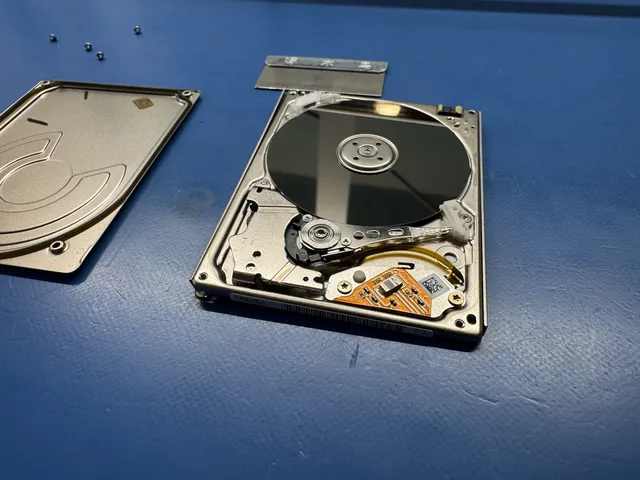
To see how we read flash memory directly, watch the SD card film on this page. The other three films follow hard drives with moving parts. One shows what a partial recovery meant for a family’s photos and videos.
- CASE-001 On film
Reading the flash memory directly SD card
- What happened
- The copper contacts that give a reader access to the flash memory were under the coating on this card.
- What we did
- In the short film, Joe uses a laser to expose the contacts, then solders them to a reader adapter. You can see the reader pick up the raw data from the card.
- CASE-002 On film
A wedding photo transfer froze Helium hard drive
- What happened
- A photographer was copying wedding photos when the computer froze and the drive disconnected. The motor still spun, but the heads that read the photos would not start.
- What we did
- Joe fitted heads from a donor drive, sealed the casing and refilled it with helium. With the heads reading again, he could open the partition and copy the photos.
- CASE-003 On film
Family pictures on a drive that fell WD hard drive
- What happened
- A cat knocked the drive off a table. It held years of pictures and videos of the customer’s children. After the fall, the heads could no longer move into position to read them.
- What we did
- Joe moved the platters into a donor casing and fitted working heads. He recovered most of the files. Some sections of the drive were still unreadable.
- CASE-004 On film
A beeping drive with pictures and documents External hard drive
- What happened
- The owner unplugged the drive during a read. After that it beeped without spinning. The heads were stuck at the edges of the platters, with dust from the damaged edges inside the drive.
- What we did
- Joe cleaned the platters, replaced the heads and worked on the service area until the drive could read files again. He copied about 680 GB of the customer’s data.
How Crucial SSD data recovery works
To get a file back, we need to read the memory and put the pieces in the order your computer expects. The model of SSD, the way it failed and whether the files were deleted or encrypted all affect how we do that.
Micron NAND
Micron memory in Crucial SSDs
Micron sold these drives under its Crucial name and made the flash memory that holds your files. It’s called NAND, and it keeps the data when the power is off. A separate chip called the controller tracks where the pieces of each file are stored. If it loses that map, your computer can stop seeing the SSD while the files are still there.
In older models like the M500 and MX100, the memory cells sit in a single layer and each holds two bits. You may see this described as planar MLC. The MX500, P3 and T700 use 3D NAND, with layers of cells stacked on top of each other.
Each cell stores bits as levels of electrical charge. TLC memory holds three bits per cell, using eight levels. QLC holds four, using sixteen. As the cells wear, neighboring levels get harder to tell apart. Knowing the type of Micron memory on your board helps us choose the read settings and error correction it needs.
Chip-off recovery
Reading NAND flash from a failed Crucial SSD
We try to copy a failed Crucial SSD through its own controller first because that chip already knows how the data fits together. When damage to the board or controller prevents that, some drives allow a chip-off recovery. We remove the flash chips so we can read them separately.
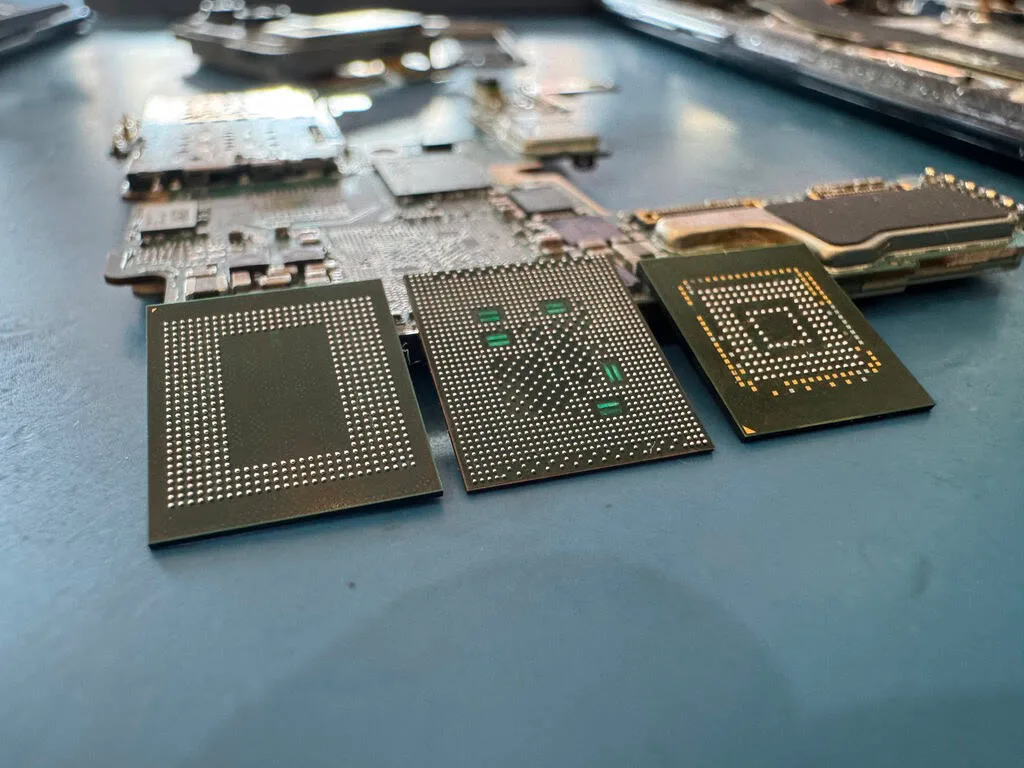
The chips are attached to the board by tiny solder joints underneath each package. We desolder them and use a NAND reader to copy their contents. What comes off the reader is a set of pages. A single photo can be spread across several chips, along with parts of many other files.
Each page carries extra information for correcting read errors, known as ECC. We use that information, account for any scrambling pattern such as XOR, and work out how the controller alternated between chips as it wrote. That last part is called interleaving. If the pieces are out of order, the photo still won’t open.
The flash translation layer, or FTL, maps the addresses your computer asks for to the places the SSD wrote the data. If we can piece that map together, we can make an image of the drive and open its file system. A gap in the middle of one photo can leave that photo unreadable even when the others open.
Controller repair
When a Crucial SSD controller fails
A controller fault can make a Crucial SSD disappear at startup, freeze the computer or report a fraction of its capacity. The controller handles reads and writes, corrects errors and keeps track of worn blocks. If it gets stuck during startup, your computer can keep waiting for a drive that never becomes ready.
A failed power supply can damage the circuit feeding the controller. Excess heat or a voltage spike can damage the chip itself. A firmware bug or a power cut during an update can leave a working chip with instructions it can no longer follow. Knowing what happened just before the drive stopped helps us tell those faults apart.
We identify the controller on the board. An early MX500 uses a Silicon Motion SM2258, for instance, while a BX500 may use an SM2259XT. Each has its own service commands. When the chip responds, those commands help us find out whether it can still reach the flash memory.
If the controller gives no response, we test the power circuits. A board repair may let the original chip read again, which matters when it handles encryption. Where a direct flash read is possible, we still need to reconstruct the layout that controller used.
Drive firmware
Firmware corruption and the service area
Firmware gives your Crucial SSD the instructions it needs to start and read files. The drive keeps internal information in a part of its memory called the service area. It can hold calibration settings, a record of bad blocks and the tables the controller uses to locate data.
A crash during a Storage Executive update can leave the startup code partly written. An unexpected shutdown during everyday use can interrupt a change to the address map. Wear can have a similar effect if the memory holding one of those tables becomes unreadable.
You might see the wrong capacity, a freeze during startup, or an input/output (I/O) error each time you try to open a file. When the controller still responds, we can look at the service area and find out which information from your drive is still usable.
Some Phison NVMe drives keep their startup code and mapping tables in separate modules. Repairing one damaged module can leave the surviving map in place. Installing fresh firmware over everything could destroy that map, so leave the drive off and tell us if an update was interrupted.
Deleted files
TRIM and garbage collection after a deletion
If you’ve just deleted files from a Crucial SSD, shut it down and leave it off. An SSD can continue clearing space while it has power, even if you aren’t saving anything. Recovery depends on which parts of those files can still be read.
Deleting a file frees its space in the file system. On a conventional hard drive, the contents can stay there until something overwrites them. On an SSD, the computer can also send a command called TRIM. It tells the controller which addresses no longer need to hold their old contents.
Flash memory is written in pages and erased in larger blocks. The controller moves pages it still needs out of a partly used block, then erases the block so it can be used again. This is garbage collection. A trimmed address can already read as empty on your computer before the block is physically erased.
Some USB enclosures, RAID setups and older operating systems don’t pass TRIM to the SSD. Tell us how the drive was connected when the files disappeared or the drive was formatted. We can look for data that remains readable. Once the cells holding a file have been erased, its contents cannot be recovered from them.
MX500 SATA
When a Crucial MX500 stops responding
If your MX500 has vanished from the BIOS or hangs whenever you open a folder, the first things we look at are its power circuits, controller and firmware. Crucial changed the memory during the life of this model. Early drives used 64-layer Micron TLC. The label, firmware revision and chips on the board help us identify yours.
The MX500’s power loss protection helps preserve data already written to flash. A surge can still damage the board. A drive that went missing after a storm gives us a different starting point from one that slowed down over months and finally turned read-only.
The MX500 uses part of its flash as a fast writing area called an SLC cache. Data goes there at one bit per cell before the controller moves it into the denser three-bit TLC layout. If power failed during that move, we need to account for both areas when locating the most recent writes.
SMART health warnings, slow writes and intermittent read errors can point to worn cells. On a drive that stalls in certain places, we can make two passes. We copy the readable areas first, then return to difficult spots where adjusting the read voltage may help us distinguish one stored value from the next.
Drive connections
Recovering Crucial SATA and NVMe drives
Crucial SATA and NVMe SSDs both store files in flash memory. What changes on our bench is how we connect to the drive and talk to its controller. An MX500 or BX500 uses SATA. The P1, P3, P3 Plus, P5 Plus, T500 and T700 use NVMe.
Many SATA drives fit in a 2.5-inch bay and use a SATA III connection. The NVMe models listed here are M.2 boards that use PCIe, a connection that can carry several queues of read and write requests. We need equipment that speaks the drive’s protocol even to ask why it stopped responding.
Inside the P3 and P3 Plus is a Phison E21T controller. The P5 Plus uses a Micron controller, the T500 uses a Phison E25 and the T700 uses a Phison E26. Each design has its own startup sequence and its own way of dividing data among the memory chips.
The T700 pairs its Gen5 connection with 232-layer Micron TLC. During a long read its controller can get hot enough to slow down. We use active cooling while copying the drive. If the flash has to be read directly, we also have to match its page layout and error correction before we can piece files together.
Passwords and keys
Recovering files from an encrypted Crucial SSD
We may be able to recover files from an encrypted Crucial SSD if we can read the memory and unlock what we find. Some models, including the MX500, support hardware encryption. On a self-encrypting drive, the controller uses a data encryption key (DEK) to protect the data it writes.
Getting the original controller reading again can preserve access to that key. Reading the flash chips separately gives us the encrypted contents. Even a complete copy of those chips won’t give you readable files if the key is lost and the original controller can no longer decrypt them.
If you set a drive password through TCG Opal, keep it handy. Windows can also protect a drive with BitLocker, in software or using compatible hardware through eDrive and IEEE 1667. You may need the 48-digit BitLocker recovery key to open your files after the drive is readable again.
Keep a copy of any password or recovery key somewhere you can reach without the SSD. If you’re unsure whether encryption was on, tell us what your computer normally asked for at startup. We can identify what the drive needs during the diagnostic.
Drive wear
Wear leveling and over-provisioning on Crucial SSDs
A file can stay in the same folder for years while the SSD moves its contents from one set of memory cells to another. Flash blocks wear a little each time they’re erased and written again. Wear leveling spreads those cycles across the drive so repeated saves to the same file don’t wear out the same cells.
Dynamic wear leveling sends new writes to free blocks that have seen less use. Static wear leveling also moves data that rarely changes, such as operating system files. The controller updates its address map with each move. An old copy of the map can be readable yet point to a place that now holds something else.
The SSD also keeps spare space that never appears in the capacity your computer shows. This is called over-provisioning. It gives the controller room to move data during garbage collection and replace worn blocks. When the active map is damaged, surviving entries in flash can sometimes help us trace where the data went.
The BX500 manages its map without a separate DRAM chip. The MX500 has one for working memory. Both need a record in flash that survives a shutdown. If a worn drive starts refusing writes, its SMART health readings and the map it can still load help us decide how to copy what remains accessible.
Working with us
Choosing a lab for Crucial SSD data recovery
Before you send in a drive, you should know who will handle it, what the diagnostic costs and when you’ll get to decide about recovery. Here’s what that looks like at our Lincroft lab.

Experience with SSDs
Our data recovery engineers work on your SSD here in Lincroft. If you’re looking for a second opinion, tell us what’s already been tried. We can examine the drive and explain whether a board repair, firmware work or a direct read of the flash would help.
Knowing your Crucial model
The same model name can cover several versions of a drive. We identify the controller, the flash memory and the firmware on your board before choosing a repair. Those details matter if we have to rebuild the map of your files.
A price before you decide
The $100 diagnostic tells us what failed. We explain the work and its price before you decide whether to go ahead. If you approve recovery, the $100 goes toward it.
What you owe if recovery fails
If we can't get any files back, there's no recovery fee. The $100 diagnostic is non-refundable once diagnostics start, and donor drives or replacement parts you approve are non-refundable once ordered, even if recovery fails.
Equipment for the job
A controller can sometimes answer service commands even when the SSD won’t appear in Windows. We use tools such as PC-3000 SSD to communicate with it. For work on the board, we use a microscope, soldering equipment and flash readers.
Our work and customer reviews
Our lab has handled over 20,000 cases since 2014. Customers have given us 4.6 out of 5 across 345 Google reviews. You can see the work itself in the films on this page, including one where part of the drive stayed unreadable.
Talking through the results
Tell us if you have a deadline when you first get in touch. We can discuss when the diagnostic would start. After recovery, we show you which files came back so you can look for what matters to you before paying the recovery fee.
Privacy
We log the SSD under its own case number and limit access to the people working on your recovery. We use checksums and the file structure to verify a copy without browsing your files. We delete our offline copy two weeks after delivery.
Sending your drive from another state
Mail-in drives come to the same Lincroft lab as local drop-offs. The mail-in form provides a free UPS label in the contiguous US, and we cover the label for the return trip too.
If you’d like to bring the drive in person, our counter is at 644 Newman Springs Road, Suite A, Lincroft, NJ. We’re open Monday to Friday, 10am to 6pm Eastern.
If you’ve already tried a format or a firmware update, tell us what happened afterward.
Affirm financing, if eligibleCrucial SSD Data Recovery FAQ
Find your model or symptom below, along with answers about the diagnostic, recovery fees and shipping your SSD.
-
Can you recover data from a Crucial MX500 that is not detected?
Yes, an undetected MX500 may still hold your files. We test whether power reaches the controller and whether it can read the map of the flash memory. Restoring that access can let us copy the data even when the drive never appeared in your computer’s BIOS.
-
How much does Crucial SSD data recovery cost?
Crucial SSD and NVMe recovery costs $1,000 to $2,000+. The $100 diagnostic tells us what failed and what the work would cost. You get that price before you decide, and we credit the $100 toward recovery if you go ahead.
-
What causes a Crucial SSD to suddenly stop working?
A faulty component, damaged firmware or worn flash memory can stop the drive from starting. Heat, liquid or a drop can also damage the board. If the SSD disappeared during an update or just after a power surge, tell us. That timing helps narrow down the cause.
-
Should I try data recovery software before sending my Crucial SSD to you?
No. Recovery software needs a drive that can read its own memory. It can’t repair a damaged board, restart a failed controller or restore a damaged firmware map. Saving anything to the SSD can also overwrite data you want back. Leave the drive powered off.
-
Can deleted files be recovered from a Crucial SSD?
Sometimes. A file can disappear from its folder while its contents are still in memory. TRIM tells the SSD it can discard those contents. Power the drive down as soon as you notice the deletion. Once the cells holding the file have been erased, that data is gone.
-
What does the SATAFIRM S11 error mean?
SATAFIRM S11 is a name a Phison S11 controller can display when it can’t start normally. The Crucial MX500 uses a Silicon Motion controller. If the screen shows SATAFIRM S11, give us that name and the model printed on the drive so we can identify what you have.
-
Can you recover data from a Crucial BX500?
Yes. We work on BX500s with power damage, firmware faults and worn flash memory. A BX500 has no separate DRAM chip for its working map. We identify the version you have and look for a way to read the data through its controller.
-
Do you recover data from Crucial NVMe SSDs like the P3 and P5 Plus?
Yes. We work on the Crucial P3, P3 Plus, P5 Plus, T500 and T700. They all use NVMe, but the controllers differ. We match our diagnostic tools to the hardware in your drive.
-
How long does Crucial SSD data recovery take?
The time to get your files back depends on what failed. The standard diagnostic starts in about 4 to 6 weeks. Priority starts the diagnostic within 5 to 7 days (+$250), Urgent within 1 to 2 days (+$500), and Emergency the same day (+$1,000). Call to confirm availability.
-
Can you recover data from an encrypted Crucial SSD?
Sometimes. If the original controller can still decrypt the memory, we may be able to copy the files through it. For a drive locked with TCG Opal or BitLocker, you may also need your password or BitLocker recovery key. A direct read of the chips still leaves the data encrypted.
-
What is chip-off recovery and when is it needed for Crucial SSDs?
Chip-off recovery means removing the NAND flash chips and reading them separately. We consider it when the board or controller is too damaged to read the SSD normally. The layout has to be one we can reconstruct, and for encrypted files we also need a way to decrypt the data.
-
What happens if you cannot recover my data?
If we can't get any files back, there's no recovery fee. The $100 diagnostic is non-refundable once diagnostics start, and donor drives or replacement parts you approve are non-refundable once ordered, even if recovery fails. We’ll explain what kept us from recovering the files.
-
Is shipping free for Crucial SSD recovery?
Yes. We provide a free UPS label both ways in the contiguous US. You can print the label from the mail-in form and use its tracking number to follow your SSD to Lincroft.
-
Can you recover data from a Crucial T700 NVMe SSD?
Yes, we work on failed T700s. The T700 is a Gen5 NVMe drive with a Phison E26 controller and 232-layer Micron flash memory. If yours disappeared during a long transfer or after a power problem, tell us. That detail helps us decide where to look for the fault.
-
Can you recover data from a Crucial portable SSD (X9 or X10 Pro)?
Yes. We work on the X9, X9 Pro and X10 Pro. A damaged USB-C socket can leave a portable drive unreadable even when the flash memory is intact. We test the connector and board, then look at the controller and memory if the fault is further inside.
-
Do you offer emergency same-day Crucial SSD assessment?
Yes. Emergency service starts the diagnostic the same day for an additional $1,000, subject to availability. Call 732-933-7717 to arrange it. We can discuss recovery time once we know what failed.
-
Can you recover data from a Crucial SSD that was formatted?
Sometimes. A quick format can replace folder records and send TRIM. A full format that overwrote the data leaves nothing to recover in those areas. If the SSD was connected through a USB enclosure or RAID controller, tell us which one, since some don’t pass TRIM. Leave the drive powered off.
-
Is my data kept confidential during recovery?
Yes. We restrict access to the people working on your recovery. We use checksums and the file structure to verify the copy without browsing your documents or photos. We keep an offline copy for two weeks after delivery, then delete it.
-
Can you recover data from an old Crucial SSD like the M500 or MX100?
Yes. We work on the M500, M550, MX100, MX200, MX300, BX200 and BX300. These drives span several generations of memory and controllers. If you’re unsure which one you have, the part number on the label helps us identify it.
-
What information should I provide when contacting MDrepairs about my Crucial SSD?
Tell us the model and capacity, what happened just before the SSD failed, which files you need and whether you have a deadline. For example, the label might say MX500 1TB or P5 Plus 2TB. You can also read us the part number.
-
Can a Crucial SSD be repaired and reused after data recovery?
Sometimes, especially after a firmware repair. If the memory is worn or the board is damaged, the SSD may only stay readable long enough to copy it. We recommend keeping the recovered files on a replacement drive.
-
Do you recover data from Crucial SSDs used in RAID arrays?
Yes. We work with Crucial SSDs in RAID 0, 1, 5 and 10 arrays. We use copies of the readable drives to reconstruct how the array divided or mirrored the data. For deleted files, it also matters whether your RAID setup passed TRIM commands to its drives.
-
Why can Crucial SSD recovery cost more than hard drive recovery?
Reading a damaged SSD can take specialized equipment and extra bench time. We may need to repair the controller’s firmware or desolder the flash chips and reconstruct their layout before we can open a single folder. The diagnostic tells us which work your SSD needs.
-
What determines whether you can recover files from my Crucial SSD?
It depends on whether the memory is readable, whether we can put the data back in order and whether any necessary encryption key is available. A dead circuit board can leave the files intact. Erased memory cells, severe wear or a lost key can put some or all of the files beyond recovery.
-
How do I ship my Crucial SSD to MDrepairs?
Use our mail-in form to get a free UPS label in the contiguous US. Put the SSD in an antistatic bag, cushion it inside a sturdy box and send it to 644 Newman Springs Road, Suite A, Lincroft, NJ 07738. Call 732-933-7717 if you need help packing it.
Lincroft, New Jersey
Tell us about your Crucial SSD
Leave the drive powered off and tell us which files you’re trying to get back. You can bring it to our counter Monday to Friday, 10am to 6pm Eastern, or use the mail-in form to send it to us.
$100 diagnostic credited toward recovery Free UPS labels both ways in the contiguous US All 50 states