Seagate Expansion Drive Beeping: What That Sound Means for Your Data
Our founder and lead technician, Joseph Montanti, handles cases personally.
If your Seagate Expansion drive is beeping when you plug it in, its motor or head actuator may be struggling to move. The sound comes from vibrating parts, not a warning speaker. Common causes: stuck spindle bearing, stuck read/write heads from an impact or drop, a failing PCB, or the heads physically resting on the platters instead of in their parked position. The beep itself doesn't damage anything, but every additional power-on attempt with a stuck drive risks scratching the platters and destroying data that's currently still recoverable.
Stop powering it on. Right now. The data is almost certainly still on the platters. The job of a recovery lab is to free the heads or repair the spindle, get the drive to a state where it'll spin once, and image it before anything else goes wrong. The longer you wait and the more times you power it on, the harder that gets.
On this page
What the Beeping Actually Means
Hard drives don't have speakers. The sound can come from vibrations in the spindle motor or head actuator as the drive tries to start. The sound alone can't tell you which part has failed.
The same sound can also come from the spindle motor trying and failing to spin. When the platters refuse to turn, the controller pulses current through the motor coils trying to "kick" them loose. Each pulse vibrates the chassis and produces an audible tick or beep.
A stuck mechanical part or an electrical power problem can cause the sound. Hearing it doesn't prove the drive's electronics are working. We have a more general guide on beeping hard drives that covers all brands, but Seagate Expansion drives have specific patterns worth covering on their own.
Why the Spindle or Heads Get Stuck
Knowing which pattern matches your drive helps the lab estimate cost and difficulty before they even open the case.
1. Stuck Heads from a Drop or Bump
The read/write heads on a hard drive float on a thin cushion of air above the spinning platters. When the drive isn't spinning, the heads should be parked off the platters on a ramp at the edge. If the drive is bumped or dropped while the heads are still over the platters (the "parking" process takes a few seconds after power-off), they can land directly on the magnetic surface and stick there.
When you power the drive on again, the platters try to spin but the heads are physically holding the surface. The spindle motor draws extra current trying to overcome the friction. The struggling motor can make the sound. Dropped drives are their own urgent recovery category.
2. Stuck Bearings from Age
Older Seagate Expansion drives (5+ years old) sometimes develop stiction in the spindle bearings. The lubricant inside the bearing degrades. The platters can no longer overcome the increased friction on startup. The drive tries, fails, beeps, and gives up.
3. Heads Stuck on Each Other
Normal sideways or upside-down storage doesn't make the heads droop together. If heads are stuck or damaged, a lab needs to inspect the drive to find the cause.
4. Spindle Motor Failure
The spindle motor itself can wear out. Electrical faults or bearing damage can stop the brushless motor. The drive tries to spin but the motor doesn't have enough torque. This pattern is more common on the 4TB and 5TB Expansion desktop models with 3.5-inch drives, where the motors are larger and more stressed.
5. PCB Power Issue Masquerading as Beeping
Sometimes a beeping drive isn't mechanically stuck at all. A failing power regulator on the PCB delivers voltage that's too low or too unstable for the motor to start. The motor tries, doesn't get enough power, and can vibrate audibly as it fails to start. The drive can be fully fine inside but won't start because the PCB can't power it.
6. Foreign Object Inside the Drive
Rare, but it happens. A speck of metal from a manufacturing defect, a piece of broken head off another head crash, or contamination from a previous DIY repair attempt can sit on the platters and block rotation. We've opened drives in a laminar-flow work area and found this. The fix is to remove the object and image the drive before anything else moves.
7. Failed Voice Coil Motor
The voice coil that moves the heads has a small but precise coil of wire. If that coil breaks or the magnet behind it cracks, the heads can't move. The spindle might spin fine but the heads can't seek to track zero, so the drive can never finish initialization. The "beep" in this case is the controller pulsing current into a coil that can't move what it's trying to move.
Different Beep Patterns and What They Mean
Not all beeps sound the same. The pattern your drive makes gives clues about what's wrong.
| Beep Pattern | Most Likely Cause | Recovery Approach |
|---|---|---|
| Single beep, then silence | Spindle gave up after one attempt | Work in a filtered area to free spindle or transplant platters |
| Repeated beep every 2-3 seconds | Heads stuck, repeated retry attempts | Head reset or replacement in a filtered area |
| Fast triple-beep then quiet | Protection circuit safety shutdown | Open inspection in a filtered area, often head crash |
| Long continuous tone | Voice coil drive transistor stuck on | PCB-level repair |
| Beep followed by tick-tick-tick | Spindle starts but heads can't initialize | Head stack issue, donor transplant likely |
| Faint beep with no other sound | Severe power issue, no current to motor | PCB diagnostics first, mechanical second |
| Beep that gets quieter over time | Capacitor failure on PCB power rail | PCB component repair |
If you've already recorded the sound, send the clip when you call us. The pattern often tells our techs more than a written description. A short audio clip can help with diagnosis.
Is Your Data Still Recoverable?
In most cases, yes. The beep doesn't mean the platters are damaged. A power problem or stuck mechanical part can cause it. The data on the platters is in the same state it was the last time the drive worked, which is usually fine. The challenge is getting the drive into a state where we can read it.
The recovery odds drop in three specific situations:
- You kept power-cycling the drive. Each attempt with stuck heads grinds them against the platter surface a little more. After dozens of attempts, the heads have scratched the surface badly enough to destroy data in those tracks. Recovery is then partial at best.
- The drive was opened by someone without a clean, filtered work area. Even one fingerprint or dust speck on a platter destroys data on that area. If a friend "took a look inside" with a screwdriver, that area is gone.
- You let it run while beeping for hours. Some people plug it in and walk away, hoping it'll "warm up and start." It won't. The continued mechanical stress can crack heads, break the voice coil, or score the platters.
What NOT to Do
The wrong moves on a beeping Seagate Expansion drive turn a $1,500 recovery into an unrecoverable case. Read this list and follow it strictly.
- Keep plugging it in. Each retry adds wear to already-stressed parts.
- Hit, tap, or shake the drive. The old "tap it on the table to free the heads" trick was a real technique 20 years ago. On modern drives, it almost always causes head crashes that destroy data permanently.
- Put it in the freezer. The freezer myth (chilling the drive to "shrink the parts and free them") doesn't work on modern drives and adds condensation damage on top of the original problem. We have a whole piece on why this doesn't work.
- Open the drive yourself. Opened hard drives need a clean, filtered work area. Particles invisible to your eye scratch the surfaces and destroy data on contact.
- Swap the PCB with one from another Expansion drive. Modern Seagate drives store calibration data on the PCB ROM. Swapping without transferring the ROM data will fail or corrupt the drive on first power-up.
- Run recovery software while it's beeping. Software tools assume the drive can be read. It can't. The repeated read attempts the software makes just add mechanical stress.
- Try DIY tutorials from YouTube that show "fixing" a hard drive. Almost every one of these is destructive. Head and platter work requires a clean, filtered work area and appropriate parts.
Safe Things to Check Before You Call Anyone
Skip these checks after a drop, impact, or other suspected mechanical damage; leave the drive unplugged for a lab. Otherwise, combine the relevant cable or power check with listening and recording in the same brief attempt. If the sound continues, unplug it.
Unplug the drive. If the sound continues at the computer, the drive wasn't its source. If it stops, that alone doesn't identify the fault.
The 3.5-inch Expansion desktop drives use an external 12V power brick. These power bricks fail. If you have a working adapter specified for your exact model, with matching voltage, current rating, connector and polarity, use it for that check. A power-brick fault is one possibility to assess when a desktop Expansion beeps.
For 2.5-inch portable Expansion drives, a damaged or undervolting USB cable can prevent the drive from getting enough power to spin up cleanly. Try a short, high-quality USB cable directly to a back-panel desktop port (not a hub or front-panel port).
Listen with the drive resting on a stable surface during that same attempt. A clicking sound (like a metronome) is different from a beeping sound (more like a faint piezo tone). The sound alone can't tell you whether the problem is mechanical or electrical.
A short voice-memo clip from that same attempt is one of the most useful things you can send a lab. We can usually identify the failure mode from the audio before you even ship the drive. Email or text the clip with your case inquiry.
If the drive still makes the sound after that check, stop. Do not power it on again. The next call should be to a recovery lab.
Seagate Rescue Data Recovery Eligibility
Some Seagate Expansion drives include Seagate Rescue data recovery in the warranty. Rescue is a partnership service where Seagate covers the recovery cost via a third-party lab. If your drive is still within the Rescue warranty period (usually 2 to 3 years from purchase), the recovery is free.
Trade-offs to know:
- Turnaround: Rescue cases run 2 to 6 weeks. For MDrepairs' recovery estimate, see the FAQ below.
- Volume constraints: The Rescue lab partner processes high volume.
- Privacy: Your data goes to Seagate's vendor. For sensitive data (medical, financial, business), some clients prefer a direct relationship with a private lab.
- Re-attempts: If Rescue says no, you can still try a private lab. The drive isn't damaged by the Rescue process. You just lose a few weeks of time.
For non-urgent personal data on an in-warranty drive, try Rescue first. For business data or any out-of-warranty drive, a private lab offers a direct relationship with the team handling your data.
Inside the Lab: How We Recover Beeping Seagate Drives
The exact steps depend on what's stuck and why, but the overall workflow for a beeping Seagate Expansion looks like this.
Step 1: Diagnose Without Powering the Drive
We start by listening to the recording you sent and visually inspecting the drive. The model number tells us which platter design and head stack the drive uses. The serial number tells us roughly when it was made and which firmware family it runs. These details narrow down what's likely stuck inside before we open anything.
Step 2: Controlled Power-On in the Lab
If the diagnosis suggests the failure might be PCB-related, we power the drive through a bench supply with current limiting. This lets us watch exactly how much current the drive draws at each phase of startup. A spindle that's trying to spin but can't will draw a characteristic high-current signature. A stuck head will show a different signature. We never let a beeping drive run for more than a second or two during diagnosis.
Step 3: PCB Diagnosis (if it's a power issue)
If the diagnostic suggests PCB failure rather than mechanical, we check the PCB components. Common Seagate failure points: the TVS diodes on the 12V and 5V rails, the motor controller chip, and the voltage regulators. A failed motor controller takes longer because we sometimes need a donor PCB and have to transfer the ROM.
Step 4: Open-drive inspection (if mechanical failure suspected)
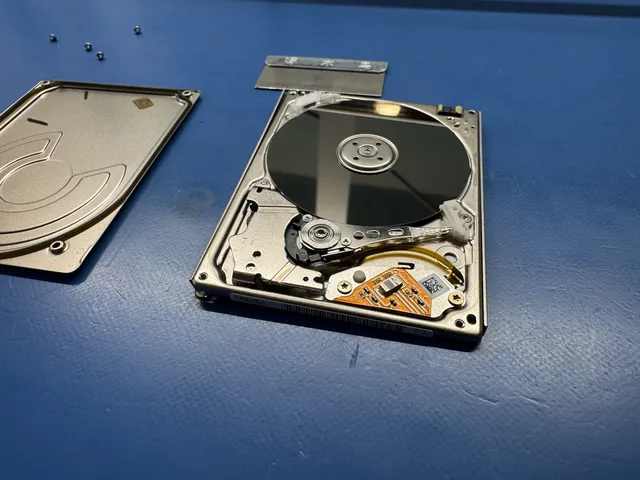
Head and platter work takes place in our laminar-flow work area. We open the lid under HEPA-filtered air and inspect the platters and heads under a microscope. The first thing we look for: are the heads parked on the ramp or are they sitting on the platters?
Step 5: Head Reset or Replacement
If the heads are simply stuck on the platters with no scratches, we can sometimes lift them back to the ramp manually using specialized tools. If the heads are damaged (cracked sliders, broken trailing edges from a head crash), we transplant a head stack from a matched donor drive. Matching is critical: the donor has to be the same family, same number of heads, same firmware generation. Seagate Expansion drives are made in many variants and matching is a research step before we even order parts.
Step 6: Spindle or Motor Repair
If the issue is a stuck spindle (bearing stiction), we may need to perform a platter transplant. The platters move into a donor drive with a known-good spindle motor. The original heads can go with them or be replaced. Platter transplants require extreme care because the platters' angular alignment relative to each other has to be preserved within a fraction of a degree.
Step 7: Imaging
Once the drive will spin and seek, we image it on a hardware data recovery imager. The imager reads the drive sector by sector to a destination drive that's clearly healthy. Bad sectors get logged for retry. Imaging is read-only and doesn't write anything back to the patient drive.
Step 8: Filesystem Rebuild
From the image, we rebuild whatever filesystem was on the drive (NTFS, exFAT, or HFS+ for Mac-formatted Expansion drives) and extract your files. If the partition table or filesystem is also damaged from prior issues, we use raw recovery techniques that scan for file signatures and rebuild structure from the data.
How Much Does Seagate Expansion Beeping Recovery Cost?
Mechanical recoveries are the higher end of hard drive pricing because they require head and platter work and matched donor parts. Pricing varies with the specific failure mode.
| Failure Type | Typical Range | Why |
|---|---|---|
| PCB power issue (no mechanical fault) | By quote | PCB component repair, no clean-room time needed |
| Heads stuck on platters, no scratches | $1,500 to $3,000+ | Head reset in a filtered area, then image |
| Head stack replacement from donor | $1,500 to $3,000+ | Donor drive purchase, matched part transplant |
| Spindle/platter transplant | $1,500 - $3,000+ | Most delicate mechanical work, platter alignment critical |
| Severe head crash with platter damage | $2,250 - $3,500+ | Depends on scratch depth and which tracks affected |
The $100 diagnostic is credited toward a successful recovery and is non-refundable once diagnostics start. Donor drives or replacement parts you approve are non-refundable once ordered, even if recovery fails. You approve the estimate before recovery work starts. Our breakdown of hard drive recovery costs goes into more detail.
Seagate Models That Beep
Other Seagate external drives can beep too. Recovery approach is similar across the family.
| Model | Typical Capacity | Common Beep Causes |
|---|---|---|
| Seagate Expansion Portable | 1TB through 5TB | Stuck heads from drops, aging spindle |
| Seagate Expansion Desktop | 4TB through 14TB | Larger spindle motors, more bearing wear over time |
| Seagate One Touch HDD | 1TB through 5TB | Same internals as Expansion Portable, same patterns |
| Seagate Backup Plus Portable | 1TB through 5TB | Beeping is rare on these but happens; covered in our Backup Plus guide |
| Seagate FreeAgent | 500GB through 2TB | Older line, often spindle stiction from age |
| Seagate IronWolf (NAS use) | 1TB through 18TB | Different failure modes, often runs 24/7 in NAS |
| Seagate BarraCuda (internal) | 500GB through 8TB | Internal drives transplanted into Expansion cases |
If you don't know which exact model you have, the bottom of the drive has an "ST" model number that tells us everything we need.
How to Stop This From Happening Again
Beeping drives are mostly preventable once you know what causes them. Three behaviors do most of the work.
Handle the Drive Like Glass
A 3-foot drop while the drive is spinning is enough to crash the heads. Even a sharp bump on a desk can do it. Pick up the drive only when it's been unplugged for at least 10 seconds (heads need time to park). Carry it in a padded case. Treat it like the small piece of precision mechanical engineering it actually is.
Don't Leave the Drive Powered Forever
Some people plug their Expansion drive into a desktop and leave it running 24/7 as a "backup that's always there." This stresses the spindle bearings beyond what they were designed for. Spin the drive down when you're not using it. Set Windows or macOS to put external drives to sleep after 15 minutes of inactivity.
Replace Drives Every 4 to 5 Years
Hard drives have an average lifespan around 5 years of moderate use. Drives older than 5 years are statistically much more likely to fail. If you have a Backup Plus or Expansion from 2018 that's been your only backup, the math is against you. Replace it. Migrate the data to a new drive while the old one still works.
Follow the 3-2-1 Backup Rule
Three copies of your data, on two different media types, with one copy offsite. Your computer plus an external drive plus cloud backup. If any one component fails, you still have two copies. More on the 3-2-1 rule.
Check S.M.A.R.T. Status Monthly
Hard drives report their health via S.M.A.R.T. attributes. Tools like CrystalDiskInfo on Windows or DriveDx on Mac can read this through the USB bridge on most Seagate Expansion models. Yellow or red warnings mean the drive is heading toward failure. Replace it before it dies, not after. Our CrystalDiskInfo guide walks through how to read the data.
Store Drives Where They Won't Fall
Sideways or upside-down storage doesn't make parked heads droop. If you're shelving a drive long-term, keep it secure from knocks and falls.
FAQ
How long does the beeping continue if I leave it plugged in?
It varies by model. Some drives keep beeping; others stop even though the fault is still there. A mechanically stuck drive can suffer damage while it stays powered, so a quieter drive isn't necessarily a safer one.
Can I make it stop beeping by tapping it on the desk?
Please don't. The "tap it on the desk to free the heads" technique was a real thing in the 1990s when drives had much larger tolerances. Modern drives have head-to-platter spacing measured in nanometers. A tap that frees the heads in one direction often crashes them in another. More on what drops and impacts do to drives.
Does Seagate Rescue cover beeping drives?
Yes, if the drive is within the Rescue warranty period. The lab partner that handles Rescue cases does mechanical recovery. The turnaround is 2 to 6 weeks. For non-urgent personal data, try Rescue first. For business data, a private lab is another option.
My drive beeps once and then sounds like it's spinning. Is that better or worse?
That pattern doesn't identify the fault. Mechanical trouble or an electrical power problem can cause unusual startup sounds. Either way, unplug it. The drive shouldn't be powered on again until a lab can image it.
Can I use a Seagate Rescue voucher I never used on a drive that's now out of warranty?
Sometimes. Seagate's Rescue terms have changed over the years. Some old codes still work, some don't. Check the Seagate website or call their support line to ask about your specific voucher. If they say no, a private lab can still help.
I unplugged the drive 6 months ago and forgot about it. Is the data still there?
Yes. Hard drive platters retain their magnetic state for years. The data hasn't decayed. If you bring the drive in fresh today (without first trying to power it on again), recovery odds are the same as they were 6 months ago.
Why does Seagate's beeping pattern sound different from Western Digital?
Different motor and actuator designs. The audible result varies by manufacturer. Seagate beeps tend to be higher-pitched and more clearly tonal. WD drives often produce more of a ticking sound. The cause can be mechanical or electrical, so the sound alone isn't a diagnosis.
How long does Seagate Expansion recovery take at MDrepairs?
Our standard recovery estimate is 4–6 weeks; timing may vary by case. For mechanical recoveries, timing varies depending on donor availability. Diagnosis is separate from completed recovery. More on typical recovery timelines.
Do you ship to people outside New Jersey?
Yes. We accept external drive cases by mail from across the US. You generate a free prepaid UPS label on the mail-in form (contiguous US), with signed-for delivery. How to ship safely covers the process.
What's the difference between Seagate Expansion and Backup Plus internally?
The exact model matters: don't assume all Backup Plus drives have an integrated USB bridge. A failed enclosure bridge and a fault inside the drive need different approaches. Beeping can come from insufficient power as well as mechanical trouble.
MDrepairs is an independent data recovery lab serving customers nationwide via mail-in service. We're not affiliated with Seagate. Our specialty is getting data off devices that have failed, when that's the only thing you actually care about.
Get help with data recovery
Bring your device to our Lincroft lab during opening hours, or mail it in.
How to mail your deviceThe $100 diagnostic is non-refundable once diagnostics start, and donor drives or replacement parts you approve are non-refundable once ordered, even if recovery fails.
Published by MDrepairs
MDrepairs is a data recovery and electronics repair lab in Lincroft, New Jersey. Our founder and lead technician Joseph Montanti films real cases for our YouTube channel, showing tools, repair steps and recovery outcomes.
Keep reading
- BitLocker Recovery Key Not Working? Check the Key ID Before Resetting
- exFAT Drive Corrupted? Cross-Platform Rescue Guide
- External Drive Painfully Slow? It May Be Dying