Inside the lab follow MDrepairs on YouTube, TikTok & Instagram - visit our YouTube channel ↗

Data recovery services for Dallas, by mail

See the work at our Lincroft bench

We make and post these videos for 2M+ followers across YouTube, TikTok and Instagram combined.

When your device stops working, the files you need can still be there. We recover data from phones, hard drives, solid-state drives (SSDs), memory cards and laptops. We got the files back from a SanDisk Extreme portable SSD that someone mailed us after it stopped showing up on their computer.

Use our free UPS label to mail your device from Dallas to our only lab in Lincroft, New Jersey. Tell us what happened and which files you'd like to get back.

4.6 from 345 Google reviews

Our lab is in Lincroft, New Jersey. Use our free label to mail your device from Dallas.

  • Since 2014One lab, in Lincroft, New Jersey
  • 20,000+ ticketsacross all services since 2014
  • 4.6 from 345Google reviews
  • $100 diagnosticcredited toward a successful recovery

The people we help

Our customers include people from

What people say about getting their files back

Our rating is 4.6 from 345 Google reviews. If you're trying to save family pictures, start with Anar V's review. We got all of a grandmother's photos back from a hard drive that stopped working.

Read our Google reviews

My grandma passed away on August 17th, 2025. … I thought I lost all her photos because my hard drive stopped working one day. But MDRepairs brought all my memories with her back.

Anar V, Google Review 2025

Great service!!! After 3 other companies failed to fix it MDrepairs fixed my water damaged phone with years of photos on it. Worth every penny! Recommend to everyone!

G P, Google Review 2025

Had to bring an old android of mine back to life and I know it was no easy task. MDrepairs was the 3rd company I called and the only ones that were able to get the job done. He had to go above and beyond by sourcing parts from a donor phone.

Donato Guerrera, Google Review 2025
Stereo microscope at the bench with a keyboard to the right
Behind the microscope in our Lincroft lab are a power supply, soldering station and parts drawers.

Who works on your device?

Joseph Montanti opens your box at our Lincroft lab. He's our founder and lead technician, and he's been at that bench since 2014.

He films his recovery work for 2M+ followers across YouTube, TikTok and Instagram. In the videos above, you can see how he handles a drive before you mail yours.

Reviewed by Joseph Montanti, founder and lead technician, November 2026.

Find your device

Choose the device that holds your files to see what to do before you mail it. You can read about all our data recovery services or see the partnership program if you run a repair shop.

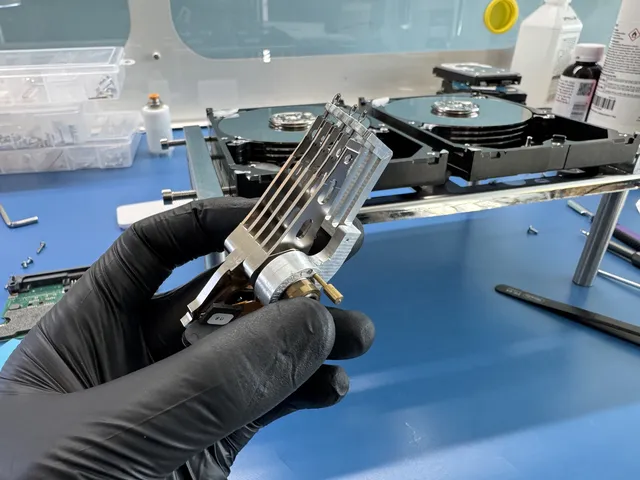
Black-gloved hand holding a hard drive head stack

Hard drive

If your external hard drive fell or no longer shows up, leave it unplugged. When someone mailed us a WD My Passport their computer could no longer see, we got the files back.

How we read a damaged drive

Leave your external hard drive in its case and keep the case closed. A small board inside connects the drive to USB. We'll take the drive out at the lab and test it without that board.

Repeated clicking can mean the arms that read the disks are having trouble. We can fit arms from a matching drive and start by copying the parts we can read. We read up to a scratch from both directions to protect the arms. If one side of a disk is too damaged to read, we can still read the other sides.

Some of your photos can still come back even if a scratch keeps us from reading the whole disk. We keep the original folders when we can. Otherwise, we group files by kind so you can find your pictures together and your documents together.

Recovery prices by device and job
Hard Drive - Firmware / Logical$1,000 - $1,500
Hard Drive - Head Swap$1,500 - $3,000+
Scratched / Contaminated Platters$3,000 - $3,500+
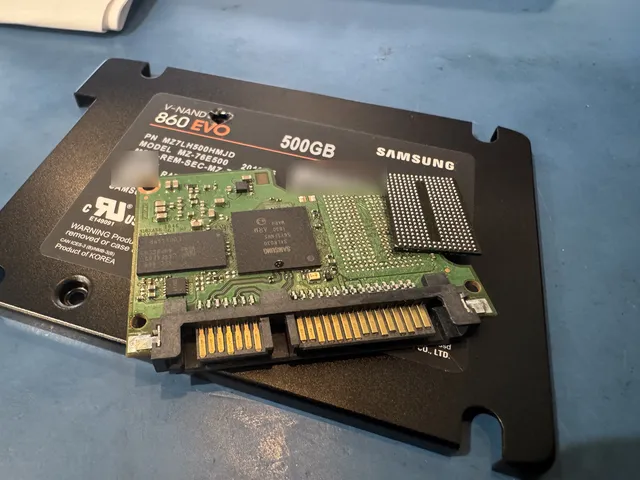
Samsung solid state drive board out of its housing, with a lifted memory chip

SSD

If your SSD disappears from your computer, stop using it even if it shows up again. We got the files back from a Samsung 870 EVO that someone mailed us after it stopped showing up.

How to protect what's on your SSD

Leave your SSD as it is, even if it shows the wrong size. Don't save anything new to it. An SSD can clear deleted files on its own, and saving something new can write over files that are still there. If we can read the files you want, we'll mail them back on a new drive.

Recovery prices by device and job
SSD / NVMe Recovery$1,000 - $2,000+
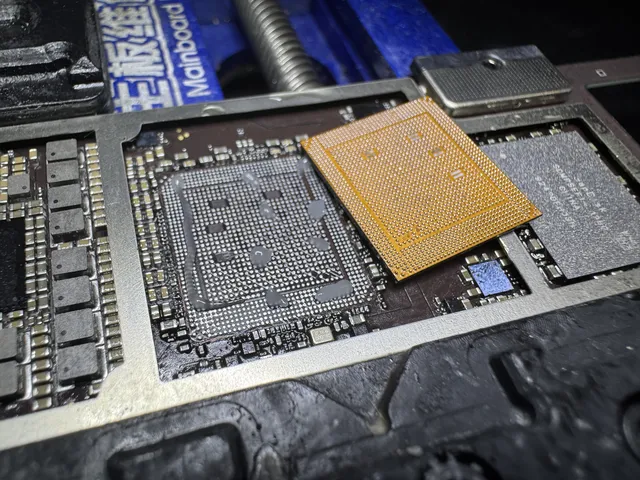
Orange interposer lying over a board's grid of pads

iPhone

If your iPhone went dark and won't start, leave it off and unplugged. We recovered files from an iPhone someone mailed us after a power surge.

How we get your iPhone files back

To read your files, we need your iPhone to start and accept your passcode. A short can cut power to the chip that holds your files. When an iPhone wouldn't start, we moved that chip and the processor to a working board. The owner got their photos and videos back on a USB stick.

Newer iPhones usually have an Apple setting called Stolen Device Protection turned on. When it's on, we can't copy your files to a USB stick. You can send your phone as it is. Once it runs again, we back it up to your own iCloud so you can sign in on another iPhone and get your photos and videos back.

If you want everything from your old iPhone on a new one, you'll need to erase the new iPhone first and set it up from that iCloud backup. With Stolen Device Protection off on your old iPhone, we can make a full backup and put your photos, messages and contacts into folders you can open yourself.

Recovery prices by device and job
iPhone (3GS - 11)$1,000 - $1,500
iPhone (12 - 17 Series)$2,000
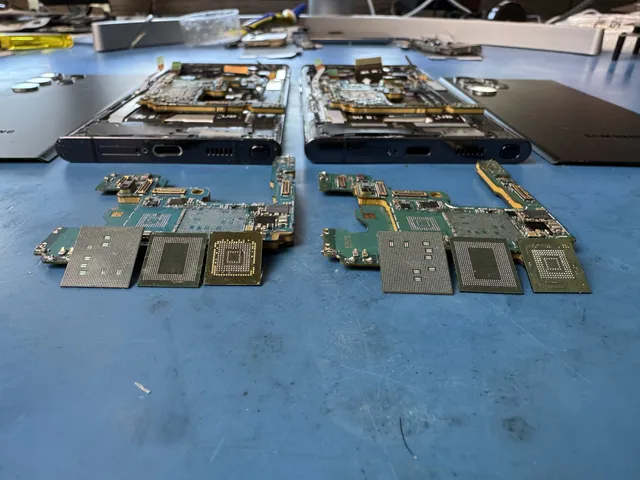
Two phone boards side by side with chips lifted off each

Android phone

If your phone got wet, stop charging it. We recovered pictures and messages from a Galaxy after water got inside.

How we back up your Android files

If your phone got wet and won't start, your files can still be there. Someone mailed us a Galaxy that wouldn't turn on after salt water got inside. We worked on its circuit board until it powered on, then backed up the owner's files before it shut down for good.

On your phone, we'll still need your PIN, pattern or password to make the backup. You can use it to add your old files to a new Android phone without erasing what's there. You also get your pictures and videos as files you can open on their own.

Recovery prices by device and job
Samsung Galaxy / Android$1,500 - $2,000
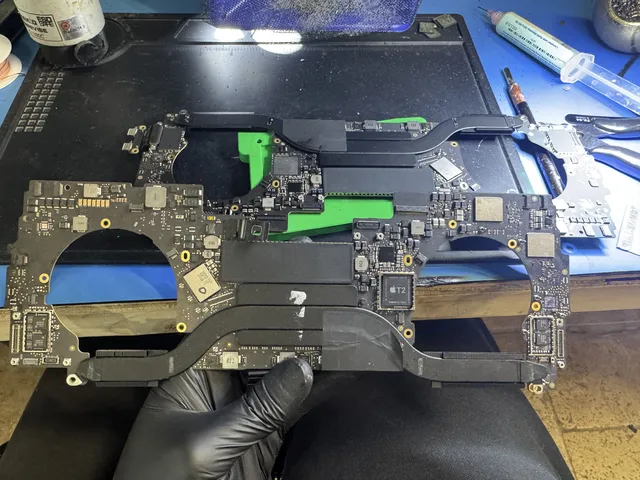
Gloved hand holding a whole MacBook logic board above the bench

Laptop or MacBook

If your laptop won't turn on, leave it off and disconnect the charger if there was a spill. We got the files back from a MacBook Pro that wouldn't turn on or charge.

What to send

You can send just the drive if it comes out of your laptop. We can diagnose the drive even when the laptop won't get past a blue screen. If your Windows laptop asks for a recovery key to unlock the drive, look in your Microsoft account for the key we'll need.

Send the whole computer if it's a newer MacBook. The chips holding your files are fixed to the main board, so getting that board running again is how we reach them.

Recovery prices by device and job
MacBook / Laptop$1,500 - $3,500+
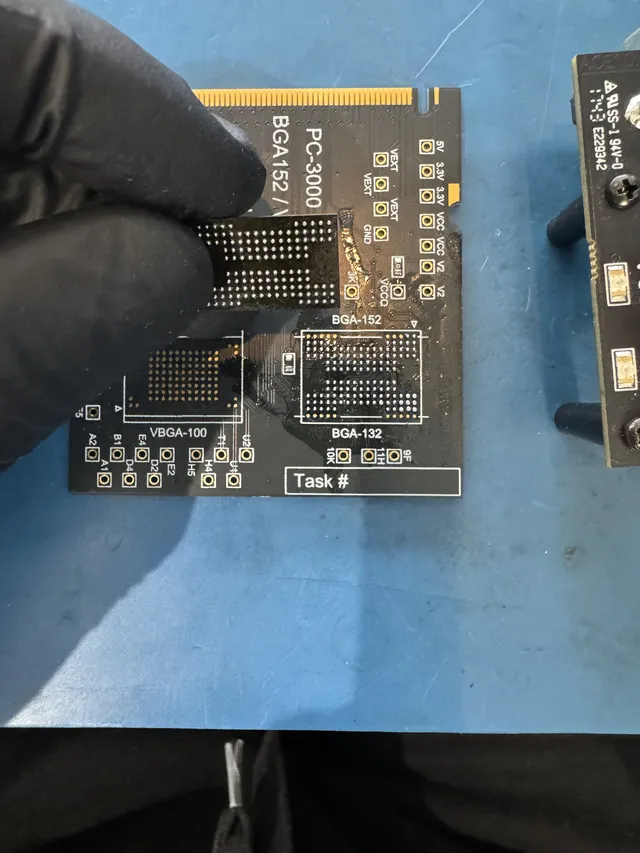
Gloved fingers holding a memory chip on a chip reader board

SD card or USB stick

If your camera asks to format the card, cancel the message and set the card aside. If a USB stick stops showing up, leave it unplugged. We recovered files from a 32 GB Samsung SD card after it stopped working.

How we read cards and USB sticks

A card or USB stick has a chip that runs it and memory that holds your files. We can read that memory directly if the chip running it fails. If a USB plug has snapped, we examine the connection and the chips inside to see what still works.

Hang on to a broken card so we can see where it split. We can't recover pictures from a card cracked in half through its memory chip. Your original card comes home with any photos we can save.

Recovery prices by device and job
Flash Drive / SD Card$299 - $1,750+
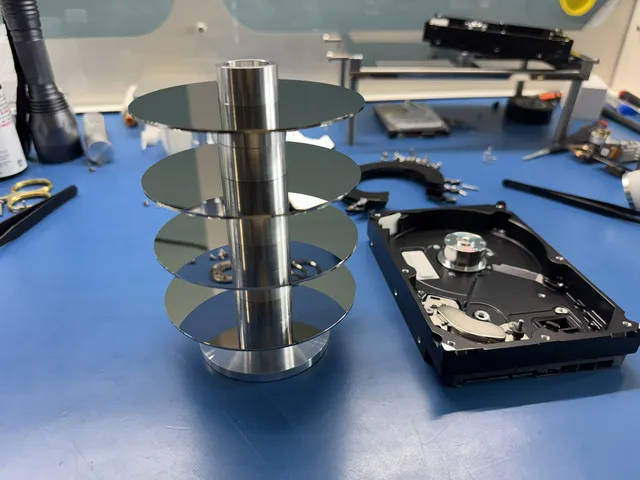
Four platters stacked on a metal alignment tool

RAID and NAS

If your shared folders disappear, power the box down. The files can still be on the drives inside. If you take the drives out, label each with its slot number first so we know where it belongs.

How we put the set back together

Skip the option to rebuild the set. We copy the drives one at a time. Once we work out the order the box used, we can put the set together on those copies without writing to your originals. You get a list of the files to look over. Ask us for a quote for your set.

Recovery prices by device and job
RAID / Multi-Drive ArraysContact for Quote
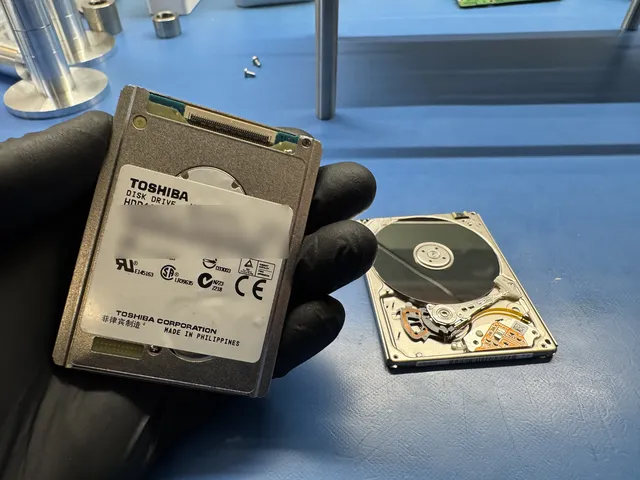
Gloved hand holding a small Toshiba hard drive

iPad or iPod

If your iPad screen is smashed, hang on to it for the pictures you want back. If your computer no longer recognizes your iPod, the songs and playlists can still be on it.

Getting back pictures, music and playlists

We can read an iPad once it starts up and accepts your passcode. If your computer offers to restore it, leave that option alone because it erases the pictures you're trying to save.

An iPod with a broken plug can still hold the music your computer can't see. We can copy the library, including its playlists, and any photos and videos you've kept on it.

Mail your device from anywhere in Dallas

How to pack and ship your device

For mail-in data recovery, send your device to our lab in Lincroft, NJ. We cover the UPS label and the trip home in the lower 48, except islands.

  1. Open a ticket

    Fill out the mail-in form for your device. We'll send your ticket number by text or email.

  2. Get your shipping label

    The form lets you get your prepaid label and print the packing slip right away. The slip goes inside the box with your device.

  3. Cushion the device

    Pack about 2 inches of bubble wrap on every side so the device sits snugly in the box. Tape every seam closed.

  4. Hand it to UPS

    Take the box to any UPS location. We'll let you know by text or email when it reaches our lab.

Shipping time and time at our lab

We use UPS 2nd Day Air both ways. On each trip, you can expect delivery by the end of the second business day after UPS gets your box. Weekends and holidays don't count.

Shipping time and time at our lab
At our labHow long it takes
Standard wait before we start the diagnostic4 to 6 weeks
Recovery work after the diagnosticDepends on what's wrong with your device

Shipping times in the UPS Rate & Service Guide

Address
644 Newman Springs Road, Suite A, Lincroft, NJ 07738
Hours
Mon-Fri 10am to 6pm Eastern

What happens once we have your device

  1. We diagnose your device

    We diagnose your device for $100 to find out what it would take to reach your files. That diagnostic fee goes toward the price of a successful recovery.

  2. You decide

    We give you an estimate based on what we found. You get to think it over, and we start the recovery only if you approve it.

  3. We work on the recovery

    With your go-ahead, we work at the bench to read the files on your original device. Here's how we handle your device and data while they're with us.

  4. Get your recovered files

    We mail your recovered files on a new drive back to you. We keep a copy offline for two weeks, then delete it.

Your files and your device after recovery

Our copy of your files

We keep an offline copy for two weeks in case your drive gets lost or damaged in the mail. We delete it then, or sooner if you ask.

Make your own backup

Make another copy the day your files arrive. After two weeks, our copy is gone.

Your original device

If you mailed us a hard drive, SSD or SD card, your original comes back along with the drive holding your recovered files.

How much does data recovery cost in Dallas?

$100 diagnostic, credited toward a successful recovery.

The $100 diagnostic is non-refundable once diagnostics start, and donor drives or replacement parts you approve are non-refundable once ordered, even if recovery fails.

The price depends on what failed, so we diagnose your device for $100 and give you an estimate before you decide on recovery. We publish the whole price list because you ought to be able to talk it over at home before you put your drive in a box.

If we can't get any files back, there's no recovery fee. Before you pay that fee, you see a report showing which files we recovered.

Where the $100 goes

That $100 pays for figuring out what failed and how we could reach your files. If the recovery succeeds, the money you've already paid goes toward your total data recovery cost.

Why identical drives get different estimates

One drive may need a fix to the software that runs it. Another just like it may need new arms to read the disks, which puts it in a different row on the price list.

How soon we can start

With Priority (+$250), we start diagnosing your device within 5 to 7 days. If you need us sooner, we start within 1 to 2 days with Urgent (+$500).

Recovery prices by device and job
Recovery jobPrice
Flash Drive / SD Card$299 - $1,750+
Hard Drive - Firmware / Logical$1,000 - $1,500
Hard Drive - Head Swap$1,500 - $3,000+
Scratched / Contaminated Platters$3,000 - $3,500+
SSD / NVMe Recovery$1,000 - $2,000+
iPhone (3GS - 11)$1,000 - $1,500
iPhone (12 - 17 Series)$2,000
Samsung Galaxy / Android$1,500 - $2,000
MacBook / Laptop$1,500 - $3,500+
CPU Swap (Severe Cases)$3,500
RAID / Multi-Drive ArraysContact for Quote
When we start diagnosing your device with standard or rush service
OptionTimingAdded cost
Standard diagnosticStarts in about 4–6 weeks, then recovery time varies by caseNo surcharge
PriorityAssessment starts within 5–7 days+$250
UrgentAssessment starts within 1–2 days+$500
EmergencyAssessment starts same-day+$1,000

Rush moves up the day we start diagnosing your device. How long the recovery itself takes still depends on what we find. You can read how we price data recovery and how financing through Affirm works if you qualify.

What we recovered from devices mailed from Texas

We recovered files from a Seagate external drive that fell and an iPhone that got wet. People across Texas mailed us the devices shown here, and we've left out their names. Choose your device to see similar cases, or browse filmed and written cases from around the country.

Recent recoveries from Texas

  • Samsung Galaxy S10e Data recovered 2026
  • Seagate external hard drive, 3 TB ST3000DM001 Hard Drive - Head Swap · Data recovered 2026
  • iPhone Water or liquid damage · Data recovered 2026
  • MacBook Pro Will not turn on or charge · Data recovered 2026
  • iPhone CPU Swap (Severe Cases) · Data recovered 2026
  • WD external hard drive, 2 TB WD2002FAEX Data recovered 2026
  • Samsung Galaxy phone Water or liquid damage · Data recovered 2026
  • iPhone Fire or power surge · Data recovered 2026
  • iPhone Forgotten passcode or locked · Data recovered 2026
  • Seagate external hard drive, 500 GB ST500LM021 Clicking or other noise · Data recovered 2026
  • iPhone Data recovered 2026
  • WD My Passport WD50NDZW Stopped working or not detected · Data recovered 2026
  • WD external hard drive WD10JMVW Dropped or physically damaged · Data recovered 2026
  • Seagate external hard drive ST2000LM003 Dropped or physically damaged · Data recovered 2026
  • Seagate external hard drive ST9320320AS Stopped working or not detected · Data recovered 2026
  • Samsung SD card, 32 GB Stopped working or not detected · Data recovered 2026
  • SanDisk Extreme Stopped working or not detected · Data recovered 2026
  • WD external hard drive Clicking or other noise · Data recovered 2025
  • Cell phone Data recovered 2025
  • WD external hard drive Data recovered 2025
  • WD external hard drive, 4 TB WD40EZRX Stopped working or not detected · Data recovered 2025
  • iPhone 5 Forgotten passcode or locked · Data recovered 2025
  • Hard drive Clicking or other noise · Data recovered 2025
  • Cell phone Water or liquid damage · Data recovered 2025
  • Cell phone Forgotten passcode or locked · Data recovered 2025
  • Samsung 870 EVO Stopped working or not detected · Data recovered 2025
  • External hard drive Clicking or other noise · Data recovered 2025
  • iPhone 6s Water or liquid damage · Data recovered 2025
  • External hard drive Data recovered 2024

These cases come from our ticket system, BenchKey, the shop software we built and run our lab on, with names, contact details and addresses left out. How we publish cases

Dallas weather and your devices

Leave your device off while it cools or dries, and follow the advice below before trying it again.

A phone or laptop left in a hot car

Turn your device off and move it somewhere cooler, out of the sun. Let it cool before you use or charge it. In a Dallas summer, a parked car can get hotter than Apple's 113°F storage limit for an iPhone. If your device still won't start once it's cool, we can diagnose it.

The October 2019 tornado in North Dallas

The tornado damaged homes and cut power, and the storms brought lightning. Once thunderstorms pass and it's safe, unplug dry electronics because returning power can surge. Even a distant strike can send a surge past an ordinary surge protector. If your drive clicks or smells burnt afterward, switch it off and leave it off. Its board can burn while the files survive.

The February 2021 winter storm

The power went off and on across Texas, including Dallas. A power cut while a hard drive is spinning can damage the heads that read its disks. A sudden cut can also make a solid-state drive look empty. If your drive clicks or smells burnt when power returns, switch it off and leave it off.

The August 2022 floods in Dallas

Heavy rain caused flooding in parts of Dallas–Fort Worth. If your phone got wet, stop charging it. Leave a flooded hard drive off, keep it away from heat and call us first. A wet drive left off can still hold the files you need.

How we get the files back

If your drive clicks or your phone won't start, watch how we got to the files on devices that came in with the same problem.

Watch more recoveries on YouTube

Mailing from another city?

You can use the same free UPS label in any city listed here. Choose your city for its own data recovery page.

Dallas–Fort Worth area

For the rest of the state, see the Texas page.

Before you mail your device

Do you have a lab here?

Our only lab is in Lincroft, New Jersey. Get a free UPS label and use it to ship your device from any UPS location.

How do I get my device to you?

Fill out the form in the mail-in steps to get your free UPS label. Once your device is boxed and labeled, you can ship it from any UPS location.

What time can I call?

We're open Monday to Friday, 10am to 6pm Eastern. That's 9am to 5pm Central.

How long will it take, including shipping?

The standard wait is 4 to 6 weeks before we start the diagnostic. Rush gets the diagnostic started sooner. After that, recovery time depends on what we find. We use UPS 2nd Day Air both ways. On each trip, you can expect delivery by the end of the second business day after UPS gets your box.

My external drive is clicking or won't show up. What should I do?

If your drive clicks, leave it unplugged. The same goes for a drive that stops showing up on your computer. Skip the recovery software and mail the drive in its original case. We recovered files from a clicking Seagate external drive.

My SSD disappeared from my computer. Can you get the files back?

We recover files from SSDs that stop showing up, so stop using yours for now. An SSD has no moving parts and can fail without making a sound. We got the files back from a SanDisk Extreme and a Samsung 870 EVO after both stopped showing up.

Can you help if my drive failed and I don't have a backup?

Yes, we work on failed drives that hold the only copy of your files. Follow the mail-in steps to send us the drive. Make a second copy the day your files come back so you can still get to them if one drive fails.

I forgot my phone's passcode. Should I still send it?

Yes, you can still send it, but look for the code first. Once your phone starts, we need the iPhone passcode or the Android PIN, pattern or password to reach your files. We can't get past an iCloud account lock. Tell us on the form whether you know the code. Leave the code itself off the form.

What do I get back, and how?

Your recovered files come home on a new external drive or USB flash drive. If we can read the folder list, your files will be in their original folders. Otherwise, you'll find them grouped by type. When we mail your files back on a new drive, we keep an offline copy for two weeks.

Help with your device and files

Start with the guide for the device in front of you, whether your camera is asking to format its card or your laptop won't start.

Terms, privacy and computer repair

Ask for a recovery quote

On the quote form, tell us what device you have, what happened and what you'd like to get back. If you decide to mail it from Dallas, you can use our free UPS label.

Contact us

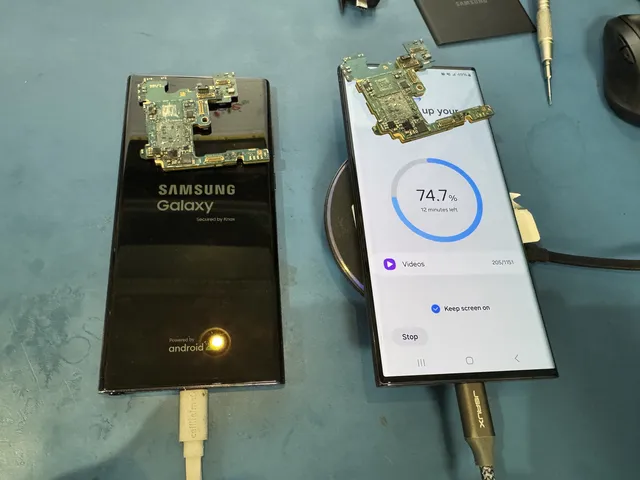
Two Samsung Galaxy phones with removed boards resting on top
On our Lincroft bench, the left screen shows the Samsung Galaxy logo; the right displays copying progress.