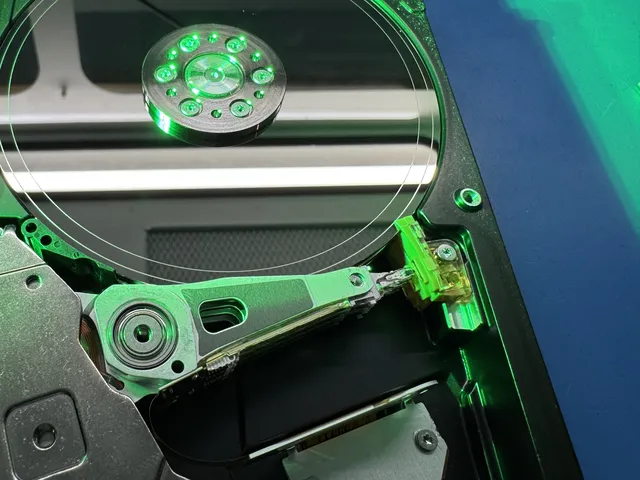
Seagate data recovery
We recover photos, documents and other files from Seagate drives that have stopped working. Even if yours clicks or your computer shows 0 GB, your files may still be on the disks. For now, turn the drive off and leave it unplugged. Our guide to a failing hard drive explains what to do next and which tests to skip.
Whether yours is a portable drive or one from inside a computer, you can mail it to us or bring it to our lab in Lincroft, New Jersey. If you're mailing it from the contiguous US, the shipping label is free.
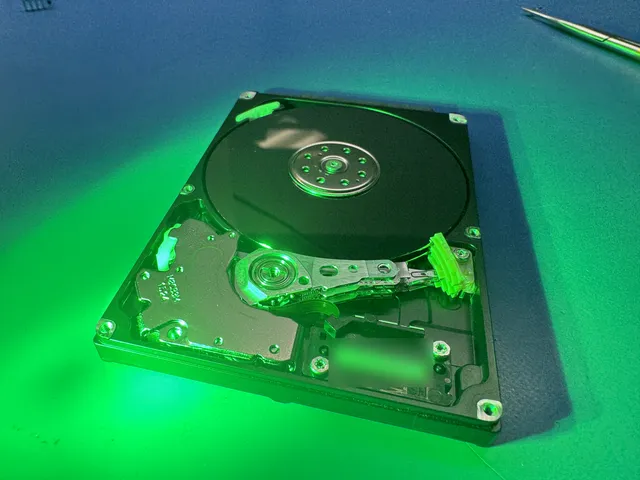
- Since 2014One lab, in Lincroft, New Jersey
- 20,000+ ticketsacross all services since 2014
- 4.6 from 345Google reviews
- $100 diagnosticcredited toward a successful recovery
The people we help
Our customers include people from
-

-

-
 AT&T
-
 Marriott
-

-

-
 Tennessee Titans
-

-

-

-

-

-

-

Which Seagate drive do you have?
Look on the label for the product name or a model number starting with ST. Find your drive below to see what to send with it. For a portable drive, that means keeping it in its case. For a set of drives that store files together, we need the whole set.
| Seagate drive | How to recognize it | What matters for recovery | What to send |
|---|---|---|---|
| Seagate Backup Plus, Expansion, One Touch External Hard Drive Data Recovery | A portable USB drive like the Backup Plus Slim, with a 2.5-inch hard drive such as the ST2000LM007 inside | A knock can damage the slim drives known as Rosewood. The USB board in the case can also fail on its own. | The drive in its case, along with its USB cable |
| Seagate BarraCuda desktop drives | A 3.5-inch drive from a desktop computer or an external case, such as the ST2000DM001 or ST4000DM004 | On newer models, the tracks on the disks overlap like roof shingles. The drive uses a more detailed map to find your files. | The drive from your computer, or the whole external drive with its power adapter |
| Barracuda 7200.11 and 7200.12 | An older 3.5-inch desktop drive with a model number ending in AS, such as ST3500320AS or ST31000528AS | On a 7200.11, a fault in the software that starts the drive can leave it stuck reporting “busy” even when the files are still there. | The drive as it is, without turning it on again |
| Seagate IronWolf and IronWolf Pro RAID Data Recovery | A drive from a network storage box (NAS) that keeps files across several drives | We quote the work for the set. We copy each drive separately, then use those copies to put the set back together. | Every drive in the set. If you know which slot each one came from, mark it on the drive. |
| Seagate Exos and enterprise drives Helium drive whose heads wouldn't start | A drive built for businesses and data centers, such as the 8 TB ST8000NM0045 | These drives have more disks and more heads to read them than a desktop drive. Some have helium sealed inside. | The drive itself |
| Seagate SkyHawk | A drive from a DVR or NVR, the box that records video from your security cameras | We work from a copy to piece the video back together in the recorder's own format. Only footage it hasn't recorded over is still there. | The drive or drives from your recorder |
| Seagate FireCuda and Seagate SSDs Recovery for solid-state drivesNVMe SSD recovery | Either a hybrid drive with spinning disks and a chip for temporary storage, or a solid-state drive (SSD) | An SSD stores files on memory chips. A control chip reads them, so there's no disk to spin. NVMe drives work this way too. | The drive, switched off |
You can also look for your ST model number in our Seagate recovery cases.
What to do when your Seagate drive stops working
When a Seagate disappears from your computer, the trouble could be in the USB case or deeper inside the drive, in its electronics, its startup software or the heads that read the disks. We start with a $100 diagnostic to find out what happened to yours.
Why is my Seagate hard drive clicking?
When the heads can't start reading the disks, they try again, and you hear a click with each attempt. Turn the drive off and leave it off. Running a recovery scan would make those same heads keep trying.
Why is my Seagate beeping?
If your Seagate beeps but doesn't spin, the motor is trying to turn the disks. A head may be stuck to a disk, or the motor itself may be jammed. Turn the drive off and leave it unplugged. Don't try to free it by shaking it, tapping it or putting it in the freezer.
One customer's external drive started beeping after they unplugged it while it was still reading files. We recovered about 680 GB of their pictures, documents and other files.
What should I do if I dropped my Seagate hard drive?
Leave it unplugged and keep it still. Even a short fall can tear one of the heads loose and leave it stuck to a disk.
Why isn't my external Seagate showing up on my computer?
The USB board inside the case may have failed, even if the light still comes on. Leave the drive unplugged for now. At the lab, we can test it outside the case to see whether that USB board is the problem or whether the drive's own circuit board, motor or heads need attention.
Why does my Seagate stay busy or show 0 GB?
A fault in the drive's startup software can cause either problem. The disks may spin without the drive answering your computer, or the drive may report the wrong size even though your files are still there. Leave it off for now. At the lab, we can work directly on that software, called firmware.
My Seagate won't spin or smells burnt
A burnt smell or scorch mark points us toward the circuit board. We'd also check the board first if the drive stopped spinning after a power surge, a static shock or a switch to the wrong power adapter. Keep the original board with the drive, even if it looks ruined, and leave any spare board off.
Can I get files back after deleting them or formatting my Seagate drive?
If the files haven't been overwritten, we can look for them on a copy of the drive. Deleting a file frees up the space it occupied, and a quick format clears the list of files. Stop using the drive for now. Even installing a recovery program on it could write over something you want back.
How we repair Seagate drive firmware
Your Seagate needs its firmware to start up. It reads that software first from a chip on its circuit board, then from a reserved part of the disks called the service area. The firmware includes a map for finding your files (the translator), a list of bad spots to skip and factory settings specific to your drive's heads and disks.
We connect our PC-3000 recovery system to the drive's diagnostic port and back up the files in the service area before we change anything. If the map is damaged, we can rebuild it from copies the drive keeps there. On an older 7200.11, we can also use that connection to clear a damaged activity log that keeps the drive stuck reporting “busy.”
A customer's cat knocked a Backup Plus off a table while the drive was copying photos. Joe found a head torn loose and stuck to a disk. He fitted replacement heads and backed up the drive's startup files. When both copies of its temporary storage file failed, he loaded his backups of that file and the map into the drive's working memory.
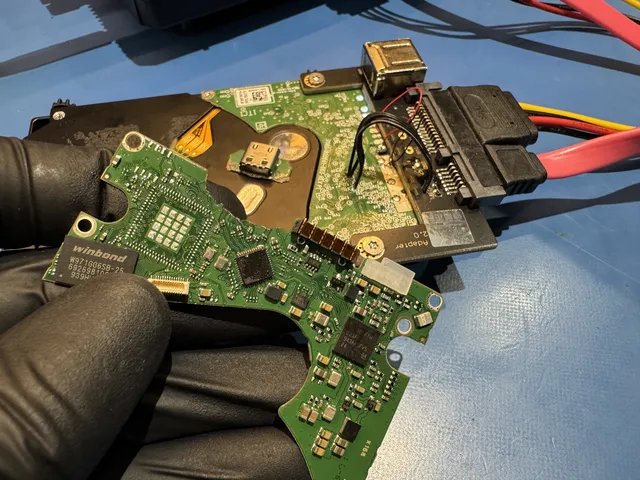
How we recover files from a damaged Seagate hard drive
When a part breaks, our goal is to get your Seagate reading long enough to copy your files onto a new drive. You can follow our hard drive recovery process step by step.
Finding replacement heads that match your Seagate
We keep drives at the lab for parts. When we choose one to supply replacement heads, we match the model number, the drive's generation, its firmware version and the position of each head. Then we fit the replacements at a bench where filtered air keeps dust off the disks.
If one head is struggling to read, we can switch it off in the drive's software while we copy the surfaces the other heads can read. That gives us a copy of those areas before we go back to the weak head. Once we've copied what we can, we look for your files on that copy.
Why keep a burnt Seagate circuit board?
On a modern Seagate, a chip on the original board holds factory settings for the heads and disks in that particular drive. We can transfer those settings from your board to a matching replacement.
Stuck heads or a seized motor in a Seagate drive
We use magnification to see exactly where a stuck head touches the disk so we can lift it free. If the motor has seized, we move the stack of disks into a spare drive with a working motor, keeping the disks lined up and in their original order.
What if a Seagate disk is scratched?
A scratch limits how much we can recover. We read toward it from both directions to copy what we can on either side. If a surface is too badly scratched to read, we remove the head for that surface and adjust the drive's software so the replacement heads read only from the undamaged surfaces.
How much does Seagate data recovery cost?
$100 diagnostic, credited toward a successful recovery.
The $100 diagnostic is non-refundable once diagnostics start, and donor drives or replacement parts you approve are non-refundable once ordered, even if recovery fails.
Seagate hard drive recovery starts at $1,000. We give you a price after the $100 diagnostic and start recovery when you approve it. The price depends on the repair your drive needs. Reaching one folder of photos can take the same head replacement as reading a whole drive of work files.
Before you pay for recovery, you get a report where you can click through your folders to see which files we recovered and which may be partly or fully damaged.
- Which price applies to my drive?
Look under firmware and logical recovery if your drive stays busy or you've formatted it. If it started clicking after a fall, we check whether it needs replacement heads. You'll see that repair listed as a head swap.
- How can I pay?
We accept cards, Apple Pay and PayPal. If you qualify, you can also pay over time with Affirm.
| Work needed | Recovery price |
|---|---|
| Hard Drive - Firmware / Logical | $1,000 - $1,500 |
| Hard Drive - Head Swap | $1,500 - $3,000+ |
| Scratched / Contaminated Platters | $3,000 - $3,500+ |
| SSD / NVMe Recovery | $1,000 - $2,000+ |
| RAID / Multi-Drive Arrays | Contact for Quote |
| Service option | When diagnostics start | Added cost |
|---|---|---|
| Standard diagnostic | Starts in about 4–6 weeks, then recovery time varies by case | No surcharge |
| Priority | Assessment starts within 5–7 days | +$250 |
| Urgent | Assessment starts within 1–2 days | +$500 |
| Emergency | Assessment starts same-day | +$1,000 |
You can compare prices across our recovery services or read more about what goes into a data recovery quote.
Seagate drives we've recovered
Look for your model number or a problem that sounds familiar. These cases include Seagate drives that clicked, disappeared from a computer or wouldn't turn on at all.
- Seagate external hard drive, 500 GB ST3500418AS Fire or power surge · Data recovered Mailed from Ohio 2026
- Seagate external hard drive, 500 GB ST3500320AS Deleted or formatted · Data recovered Mailed from Missouri 2026
- Seagate external hard drive, 3 TB ST3000DM001 Hard Drive - Head Swap · Data recovered Mailed from Texas 2026
- Seagate external hard drive, 5 TB ST5000LM000 Data recovered Mailed from Kentucky 2026
- Seagate external hard drive, 2 TB ST2000LM007 Clicking or other noise · Data recovered Mailed from Alaska 2026
- Seagate hard drive, 1 TB ST1000LM035 Stopped working or not detected · Data recovered Mailed from Colorado 2026
- Seagate external hard drive, 2 TB Data recovered Mailed from Washington 2026
- Seagate external hard drive, 1 TB ST31000528AS Clicking or other noise · Data recovered 2026
- Seagate external hard drive, 2 TB ST2000DL003 Fire or power surge · Data recovered Mailed from Tennessee 2026
- Seagate external hard drive, 1 TB ST1000LM038 Stopped working or not detected · Data recovered At our lab's counter in Lincroft 2026
- Seagate external hard drive ST3500410AS Failed or corrupted · Data recovered Mailed from Michigan 2026
- Seagate external hard drive, 2 TB ST2000DM001 Deleted or formatted · Data recovered Mailed from Indiana 2026
- Seagate external hard drive, 1 TB ST1000DM003 Hard Drive - Firmware / Logical · Data recovered Mailed from Ohio 2026
- Seagate external hard drive ST1000LM024 Clicking or other noise · Data recovered Mailed from California 2026
- Seagate BarraCuda, 3 TB ST3000DM001 Clicking or other noise · Data recovered Mailed from Utah 2026
- Seagate external hard drive ST2000DM001 Data recovered Mailed from Alabama 2026
- Seagate external hard drive, 500 GB ST500LM021 Clicking or other noise · Data recovered Mailed from Texas 2026
- Seagate external hard drive ST1000LM024 Stopped working or not detected · Data recovered Mailed from California 2026
- Seagate external hard drive ST2000DL001 Stopped working or not detected · Data recovered Mailed from Colorado 2026
- Seagate external hard drive ST2000DL001 Data recovered Mailed from Virginia 2026
- Seagate external hard drive ST3300622A Clicking or other noise · Data recovered Mailed from Washington 2026
- Seagate external hard drive ST3500418AS Will not turn on or charge · Data recovered Mailed from South Carolina 2026
- Seagate external hard drive ST3160815AS Stopped working or not detected · Data recovered Mailed from Michigan 2026
- Seagate external hard drive ST2000LM003 Dropped or physically damaged · Data recovered Mailed from Texas 2026
- Seagate external hard drive ST9320320AS Stopped working or not detected · Data recovered Mailed from Texas 2026
- Seagate external hard drive ST31000528AS Stopped working or not detected · Data recovered Mailed from New York 2026
- Seagate hard drive, 1 TB Data recovered At our lab's counter in Lincroft 2026
- Seagate external hard drive, 4 TB ST4000DM004 Clicking or other noise · Data recovered Mailed from Virginia 2026
- Seagate external hard drive ST4000LM024 Stopped working or not detected · Data recovered Mailed from Virginia 2026
- Seagate Backup Plus, 1 TB Data recovered At our lab's counter in Lincroft 2025
- Seagate external hard drive, 2 TB ST3200542AS Stopped working or not detected · Data recovered Mailed from Virginia 2025
- Seagate external hard drive ST2000LM007 Data recovered Mailed from Tennessee 2025
- Seagate external hard drive, 4 TB ST4000LM024 Clicking or other noise · Data recovered Mailed from Pennsylvania 2025
- Seagate external hard drive ST1000LM024 Data recovered At our lab's counter in Lincroft 2025
- Seagate external hard drive ST3750630AS Will not turn on or charge · Data recovered Mailed from Colorado 2025
- Seagate hard drive Failed or corrupted · Data recovered Mailed from Massachusetts 2025
- Seagate hard drive ST3320833AS Fire or power surge · Data recovered Mailed from Ohio 2025
- Seagate external hard drive ST1000DM003 Stopped working or not detected · Data recovered Mailed from Pennsylvania 2025
- Seagate external hard drive ST2000LM007 Clicking or other noise · Data recovered Mailed from Indiana 2025
- Seagate external hard drive ST2000DM001 Stopped working or not detected · Data recovered Mailed from Florida 2025
- Seagate external hard drive ST9500420AS Stopped working or not detected · Data recovered Mailed from Virginia 2025
- Seagate external hard drive Failed or corrupted · Data recovered Mailed from Utah 2025
- Seagate hard drive, 3 TB ST3000DM001 Stopped working or not detected · Data recovered Mailed from Kentucky 2025
- Seagate external hard drive ST2000MD001 Will not turn on or charge · Data recovered Mailed from Missouri 2025
- Seagate external hard drive ST2000LM007 Data recovered At our lab's counter in Lincroft 2025
- Seagate hard drive ST3500820AS Stopped working or not detected · Partly recovered Mailed from Tennessee 2025
- Seagate external hard drive, 8 TB ST8000NM0045 Stopped working or not detected · Data recovered Mailed from Tennessee 2024
- Seagate external hard drive Data recovered At our lab's counter in Lincroft 2024
- Seagate hard drive Data recovered At our lab's counter in Lincroft 2024
- Seagate hard drive ST2000LM007 Dropped or physically damaged · Data recovered Mailed from New York 2024
- Seagate external hard drive ST2000DM001 Fire or power surge · Data recovered 2024
These cases come from our ticket system, BenchKey, the shop software we built and run our lab on, with names, contact details and addresses left out. How we publish cases
Data recovery for LaCie, Maxtor and other brands
Use the name printed on your drive to find its guide below. For a phone or another device, you can also browse our full list of recovery services.
What if my drive says LaCie or Maxtor?
Both are Seagate brands. A modern LaCie has a Seagate drive inside its case. If an older Maxtor DiamondMax needs parts, we look for a matching Maxtor to supply them.
Western Digital, Toshiba, Hitachi and HGST drives
My Passport and My Book are Western Digital drives, and each has its own guide. If your drive says Toshiba, Hitachi or HGST, choose the guide with that name.
My files are on a Samsung Galaxy phone
If the photos you need are saved on the phone itself, start with our Samsung Galaxy phone recovery service.
Questions about Seagate data recovery
Do you publish a success rate for Seagate drives?
We don't publish one. After the diagnostic, we can tell you what's possible for the files on your drive. A disk might read well in most places but have a scratch right where your photos are stored. That's why we assess each recovery individually.
Can recovery software fix a Seagate that stays busy or isn't detected?
No. A recovery program needs the drive to answer your computer before it can look for files, and it can't repair the firmware the drive uses to start up. Only try recovery software on a healthy, quiet drive that your computer recognizes. Scanning a failing drive can make the damage worse.
Guides for Seagate drive owners
If your Seagate is working normally, you can use a health check to see how it's doing. If it's making an unfamiliar sound or your computer no longer sees it, the guides on hard drive failure explain what those symptoms can mean.
Check a working drive
Keep the files you care about in three different places so you still have a copy if one drive fails.
Tell us what happened to your Seagate drive
When you ask for a free quote, tell us in your own words what the drive did the last time you used it. We return the files we recover on a new external drive or USB flash drive.