Inside the lab follow MDrepairs on YouTube, TikTok & Instagram - visit our YouTube channel ↗

Data recovery services for Florida, by mail

Watch us recover files at our bench in Lincroft

We make and post these videos for 2M+ followers across YouTube, TikTok and Instagram combined.

We can help you get your files back if your phone won't turn on or your computer no longer sees your hard drive. Our free UPS label brings your device straight from Florida to our only lab in Lincroft, New Jersey. When a fall left one Florida customer's iPhone XS with a black screen, they mailed it to us and we recovered their photos and messages.

4.6 from 345 Google reviews

Here's how to pack and mail your device from Florida so it reaches our bench in Lincroft, New Jersey.

  • Since 2014One lab, in Lincroft, New Jersey
  • 20,000+ ticketsacross all services since 2014
  • 4.6 from 345Google reviews
  • $100 diagnosticcredited toward a successful recovery

The people we help

Our customers include people from

MDrepairs reviews in our customers' words

One parent wrote about a phone that died with their newborn's pictures still on it. That's one of the 345 Google reviews behind our 4.6 rating. The accounts below appear just as the customers wrote them.

Read our Google reviews

I sent my phone to 2 other reputable phone recovery groups in Toronto Canada, only to get shut down advising it was unfixable due to the serious water damage. I sent my phone to you in an ugly box and made a prayer, you delivered and working like normal again!

Dinesh Bala, Google Review 2025

I was devastated when my phone one day was unresponsive (due to NOTHING - out of the blue!) I went to MDrepairs, they extracted ALL my data within 2 days … never gave me the answer of "I can't help you, this phone is shot" that I constantly got from others.

Andrea Massimo, Google Review 2024

Contacted MDRepairs for data extraction for an iPhone 5C and for an old hard drive. … The hard drive had a hard crash where it was clear something mechanical within the HDD had failed. … Regardless, both techs did an amazing job. The data was quickly recovered in just a few days.

Chris Hillerich, Google Review 2025

Could not be happier with their service. Super professional, kept in constant contact thru the process, and best of all, came thru with what they said they would do. The pics they recovered are literally priceless, from my deploymentd during GWOT. I never thought I'd seen em again. Can not recommend these guys enough. Thanks again.

Nick Langen, Google Review 2026
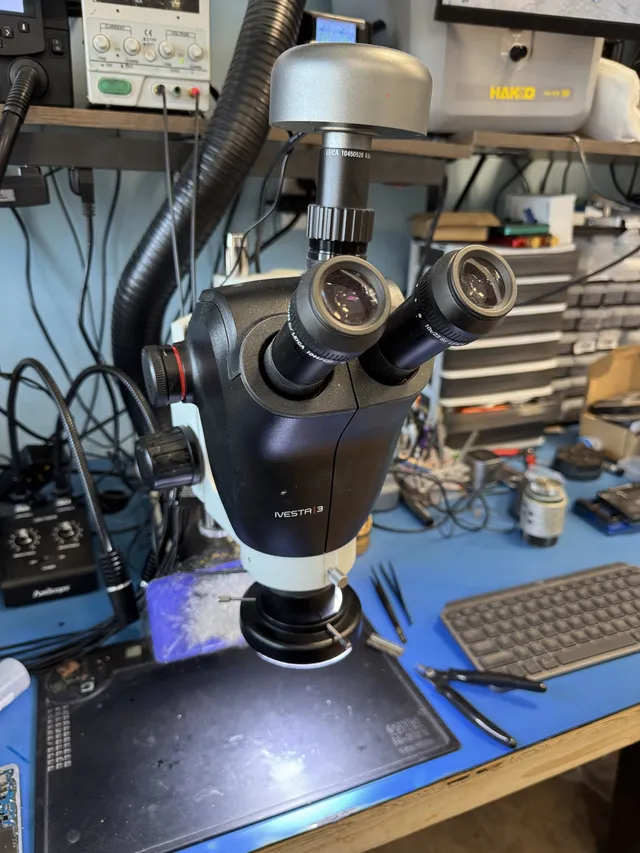
Stereo microscope at the bench with a keyboard to the right
Finding faults and soldering tiny connections on a circuit board can get a dead device running long enough to copy its files.

Who opens the box you mail from Florida?

We open your box here in Lincroft, where our engineers do the recovery work. If you're mailing the only copy of your family photos, you can watch how we handle a device before you decide.

In our films you'll see Joseph Montanti at the bench. He founded MDrepairs in 2014 and works alongside the rest of us as our lead technician.

Reviewed by Joseph Montanti, founder and lead technician, November 2026.

Which devices can you send from Florida for data recovery?

You can mail us a phone, hard drive, SSD, memory card, USB stick, computer or iPod. The diagnostic costs $100 for all our data recovery services, including work we do through our program for businesses and IT staff.

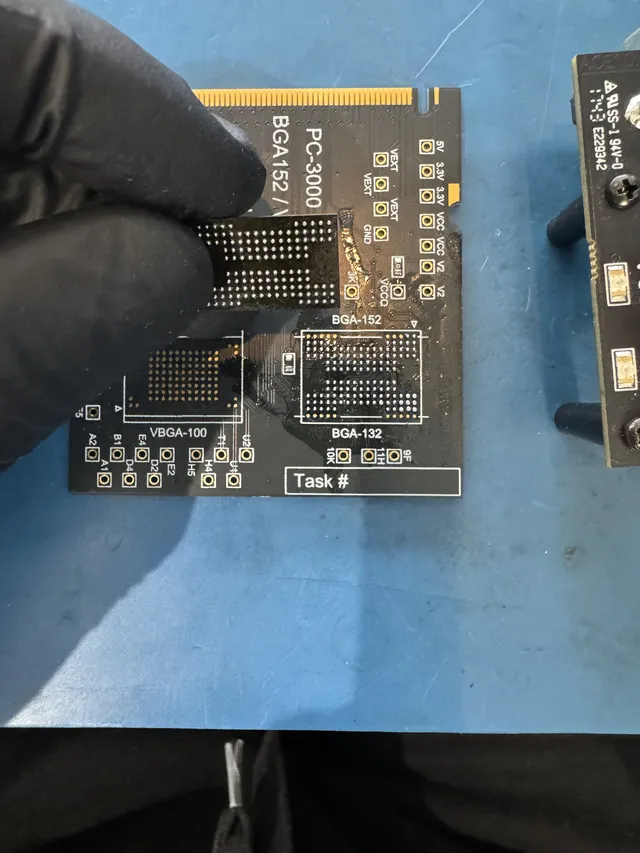
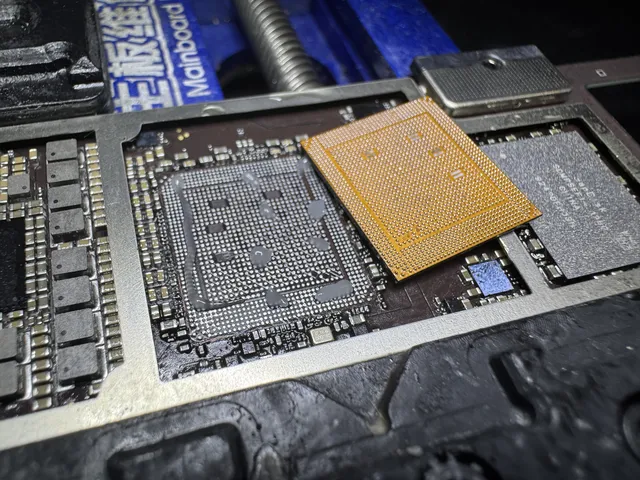
Orange interposer lying over a board's grid of pads

iPhone data recovery in Florida by mail

If your iPhone screen went black after a fall, your pictures may still be there. We recovered photos and messages from an iPhone XS even though the fall had bent its frame. If yours won't turn on, leave it off and unplugged, including from your computer.

Explore iPhone recovery

If Stolen Device Protection is on, we have your old iPhone back up to your own iCloud account once we get it running. You can sign in to iCloud on another iPhone to get your photos and videos. For a complete copy, the replacement iPhone needs to be erased first, then restored from that backup.

Apple has turned this protection on by default since iOS 26.4, and you may have turned it on yourself on an older phone. Your passcode still unlocks the phone. With protection on, approving a copy to a computer or USB stick takes your Face ID or Touch ID.

With protection off, we make a full backup for another iPhone and sort your photos, messages and contacts into folders. In either case, we need more than the storage chip to reach your files. Getting the phone running can mean replacing a failed part on the board or, if the damage is severe, moving its main chips to a working board.

Recovery prices by device and job
iPhone (3GS - 11)$1,000 - $1,500
iPhone (12 - 17 Series)$2,000
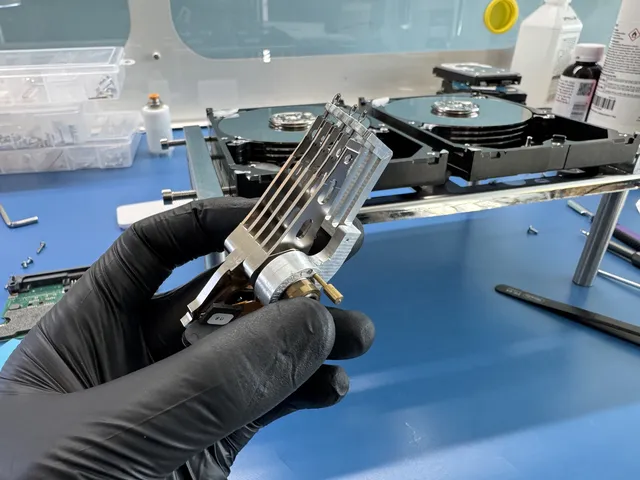
Black-gloved hand holding a hard drive head stack

Mail-in hard drive data recovery in Florida

Leave your hard drive unplugged if it fell, keeps clicking or no longer shows up on your computer. Recovery software would ask it to keep reading. If it's an external drive, send it in its case. One Florida customer mailed us a WD My Passport their computer no longer recognized, and we recovered files from it.

Hard drive help by brand

The original case is worth including because it has its own USB connection. We test the drive separately from the case. A repeated click can mean the small arms that carry the read heads are struggling to read the disks. When those arms fail, we replace them with matching ones from the same model.

We copy the areas that still read well before going back for the harder parts. At a scratch, we read toward it from both sides and stop before the replacement head touches it. If a surface is too scratched to read, we can remove its head and change the drive's instructions so it reads only the undamaged surfaces.

A scratch can leave part of the data out of reach. We keep your folders whenever we can read the part of the disk that lists them. On one dropped drive with a scratched surface, the damage kept us from reading that list, so we grouped the files we recovered by type for the owner.

Recovery prices by device and job
Hard Drive - Firmware / Logical$1,000 - $1,500
Hard Drive - Head Swap$1,500 - $3,000+
Scratched / Contaminated Platters$3,000 - $3,500+
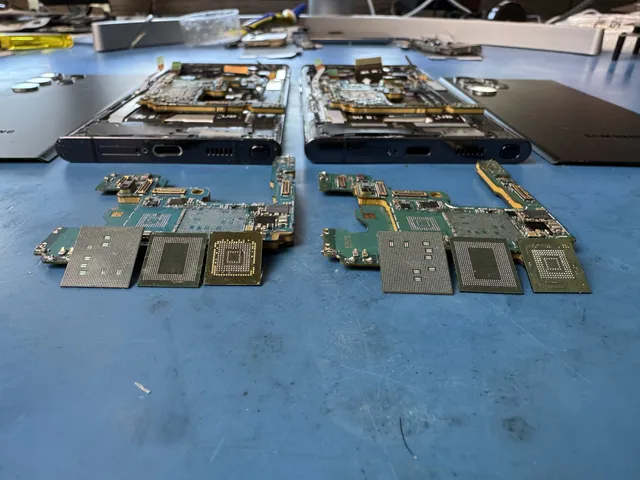
Two phone boards side by side with chips lifted off each

Cell phone data recovery in Florida (Android)

If your Android shut off while you were using it and won't start again, your files may still be there. Leave the original phone as it is and skip the factory reset, even if you've moved to a replacement. A Florida customer's Galaxy S22 Ultra stopped that way, and we mailed them a full backup on a USB stick.

Explore Galaxy phone recovery

A single failed part on a Galaxy's main board can keep the phone from starting while the pictures are still there. We work on that part to get the phone running well enough to unlock with your PIN, pattern or password.

You can keep the pictures you've already taken on your replacement Android. The backup from your old phone adds to what's on the new one, and we also give you your photos and videos as files you can open on their own.

Recovery prices by device and job
Samsung Galaxy / Android$1,500 - $2,000
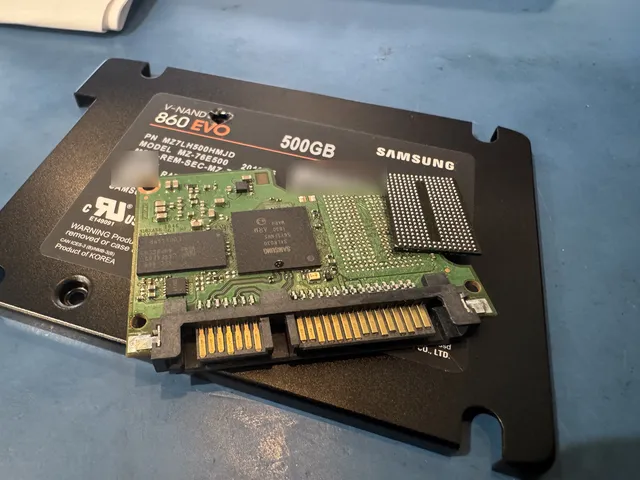
Samsung solid state drive board out of its housing, with a lifted memory chip

SSD and NVMe data recovery by mail from Florida

If part of your SSD disappeared when your computer froze, stop using it and keep your password or recovery key handy. An SSD can fail without making a sound. We found the missing encrypted section on a Florida customer's SSD. With the owner's help, we unlocked it and sent back about 400 GB of files on the drive they supplied.

Explore SSD recovery options

A solid-state drive, or SSD, stores your files on chips. Yours might be marked NVMe. Sometimes the first sign of trouble is that your computer shows the wrong size for the drive. We find out which files we can still read and mail them back on a new drive.

If you deleted a file you want back, turn the SSD off. It can clear deleted files on its own soon afterward, and anything new you save could overwrite them. Leave updates and resets for later.

Recovery prices by device and job
SSD / NVMe Recovery$1,000 - $2,000+
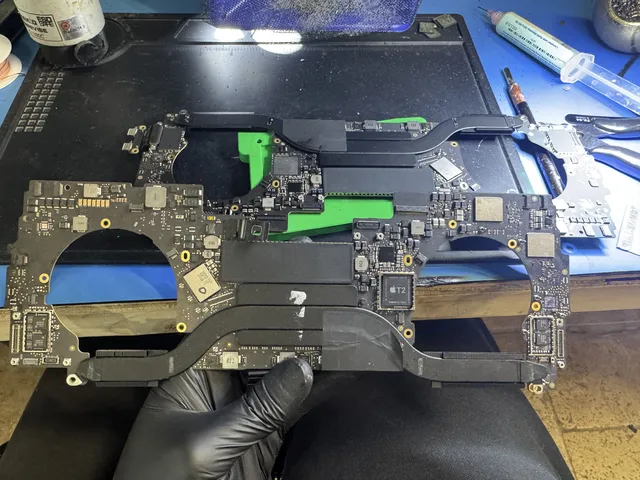
Gloved hand holding a whole MacBook logic board above the bench

Laptop and MacBook data recovery from Florida

If your laptop keeps restarting or your MacBook won't take a charge, it can still hold your files. We recovered data from a Florida customer's MacBook Pro that wouldn't turn on or charge. On newer MacBooks the chips that store your files are fixed to the main board, so send the whole computer.

Laptop and MacBook help

If your laptop has a removable drive, we can take it out and read it even when the computer won't start. If Windows asks for a BitLocker recovery key, it may be in your Microsoft account. You might also have a printed copy, or your IT team may have the key for a work laptop.

When a MacBook stores files on the board, we work on that board. On models with Apple's own processor, both the processor and the chips that hold your files have to work before we can make a copy. If something spilled on the computer, unplug the charger and leave it off.

Recovery prices by device and job
MacBook / Laptop$1,500 - $3,500+
Gloved fingers holding a memory chip on a chip reader board

SD card and USB stick recovery from Florida

If your camera asks to format an SD card, decline and set the card aside. Your pictures may still be on it. Even if you already agreed to format it, the first thing formatting clears is the list of pictures. Each new shot can write over a picture you want back.

Card and flash drive help

A card or USB stick has one chip that keeps track of the files and another that stores them. If the first chip fails, we can read the storage chip directly. On a USB stick with a snapped plug, we examine both the plug and the chips inside.

Keep the original card even if it broke in two. We can look at where it broke, because a break through the chip that holds the pictures puts those files out of reach. We'll mail your card back with any pictures we recover.

Recovery prices by device and job
Flash Drive / SD Card$299 - $1,750+
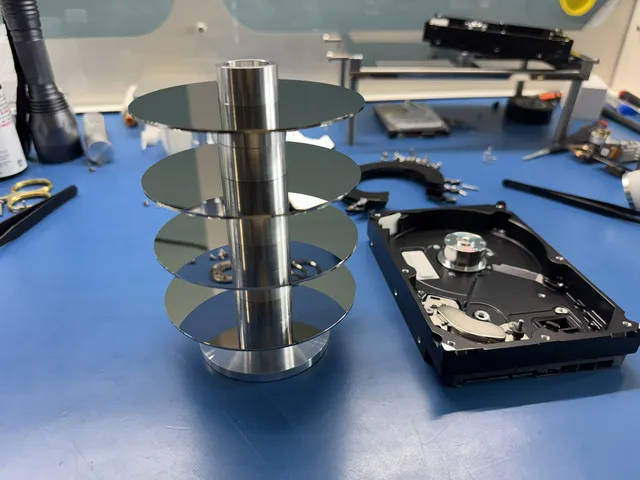
Four platters stacked on a metal alignment tool

RAID and NAS drive sets by mail

If the box that shares your folders stops working, shut it down and leave the rebuild option alone. Your files may still be on the drives. A NAS box shares folders with computers on your network, and it can use RAID to make several drives work together as one.

Explore multi-drive recovery

Before you take out a drive, mark it with its slot number. At the lab we copy each drive separately and work out the order the set used. We put your files back together from those copies, so the original drives stay as you sent them.

Ask us for a quote for your set, since there's no fixed price for a group of drives. Once we've read the drives, you get a list of the files we found so you can look through it.

Recovery prices by device and job
RAID / Multi-Drive ArraysContact for Quote
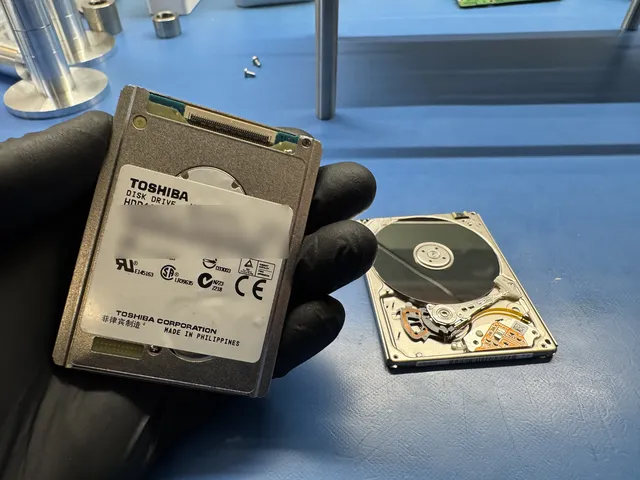
Gloved hand holding a small Toshiba hard drive

Recovering iPad photos and iPod music libraries

A broken iPod plug can leave your music on the player with no way to copy it to your computer. If you have an iPad with a shattered screen, leave the Restore option on your computer alone. It erases the files you're trying to keep.

iPad and iPod guides

For an iPad with a broken screen, the first step is getting it to accept your passcode. Once it unlocks, we can copy the pictures you haven't been able to back up.

With an iPod, we save the playlists along with the songs so your music stays in the order you chose. We also copy any photos and videos on the player.

How to mail your device from anywhere in Florida

Packing your device and getting it to UPS

For mail-in data recovery from Lake Wales or anywhere else in Florida, send your device straight to our lab in Lincroft, NJ. We pay for UPS both ways in the lower 48 states, except on islands.

  1. Fill out the mail-in form

    Tell us which device you're sending. We'll text or email you a ticket number for it.

  2. Print your label and packing slip

    You can print both as soon as you finish the form. The prepaid label goes on the box, and the packing slip goes inside with your device.

  3. Pack the device snugly

    Leave room for about two inches of bubble wrap on every side. Once the device sits snugly in the box, tape every seam closed.

  4. Drop the box off at UPS

    Take your box to any UPS location. We'll text or email you when the box reaches our lab.

How long shipping and recovery take

Whether you're mailing a device for data recovery from Miami or Jacksonville, we use UPS 2nd Day Air both ways. Each trip starts when UPS has the box, and you can expect delivery by the end of the second business day after that. Weekends and holidays don't count.

How long shipping and recovery take
At our labHow long it takes
Standard wait before we start the diagnostic4 to 6 weeks
Recovery work after the diagnosticDepends on what failed in your device

Shipping times in the UPS Rate & Service Guide

Address
644 Newman Springs Road, Suite A, Lincroft, NJ 07738
Hours
Mon-Fri 10am to 6pm Eastern

What happens when your device reaches our lab

  1. We find out what failed

    We diagnose your device for $100 to find out what it would take to reach your files. That fee counts toward the price of a successful recovery.

  2. You decide whether to go ahead

    We give you an estimate based on what we found. Take the time you need to think it over. We start the recovery once you approve it.

  3. Recovery at the bench

    With your go-ahead, we work at the bench to read the files on your original device. You can see how we handle your device and data while they're here.

  4. We mail your files back

    You get your recovered files on a new drive. We keep a copy offline for two weeks, then delete it.

What comes back to you and how long we keep a copy

Our copy of your files

We keep a copy offline for two weeks in case the drive gets lost or damaged in the mail. We delete it at the end of those two weeks, or sooner if you ask.

Your backup at home

Make a second copy the day your files arrive so you have a backup of your own when we delete ours.

Your original device

If you sent a hard drive, SSD or SD card, you'll find your original in the box alongside the drive that holds your recovered files.

The UPS Store addresses by city

Take your sealed, labeled box to any of these stores or any other UPS location.

Miami

153 E Flagler St, 33131

Fort Lauderdale

401 E Las Olas Blvd #130, 33301

West Palm Beach

516 S Dixie Hwy, 33401

Orlando

424 E Central Blvd, 32801

Tampa

503 E Jackson St, 33602

Jacksonville

221 N Hogan St, 32202

Gainesville

2603 NW 13th St, 32609

How much does data recovery cost in Florida?

$100 diagnostic, credited toward a successful recovery.

The $100 diagnostic is non-refundable once diagnostics start, and donor drives or replacement parts you approve are non-refundable once ordered, even if recovery fails.

The price depends on what failed, so we diagnose your device for $100 and give you an estimate before you decide on recovery. Our full price list is here so you can talk it over at home before you pack anything.

If we can't get any files back, there's no recovery fee. Before you pay that fee, you see a report showing which files we recovered.

Where the $100 goes

That $100 pays for figuring out what failed and how we could reach your files. If we recover them, the $100 you've already paid counts toward your total.

Why two drives of the same model can get different estimates

The same model can fail in different ways. One drive may need a repair to the software that runs it. Another may need replacement arms to read the disks. You'll find both jobs on the price list.

How soon we can start the diagnostic

With Priority (+$250), we start diagnosing your device within 5 to 7 days. If you need us sooner, we start within 1 to 2 days with Urgent (+$500).

Recovery prices by device and job
Recovery jobPrice
Flash Drive / SD Card$299 - $1,750+
Hard Drive - Firmware / Logical$1,000 - $1,500
Hard Drive - Head Swap$1,500 - $3,000+
Scratched / Contaminated Platters$3,000 - $3,500+
SSD / NVMe Recovery$1,000 - $2,000+
iPhone (3GS - 11)$1,000 - $1,500
iPhone (12 - 17 Series)$2,000
Samsung Galaxy / Android$1,500 - $2,000
MacBook / Laptop$1,500 - $3,500+
CPU Swap (Severe Cases)$3,500
RAID / Multi-Drive ArraysContact for Quote
When the diagnostic starts with standard or rush service
OptionTimingAdded cost
Standard diagnosticStarts in about 4–6 weeks, then recovery time varies by caseNo surcharge
PriorityAssessment starts within 5–7 days+$250
UrgentAssessment starts within 1–2 days+$500
EmergencyAssessment starts same-day+$1,000

Rush service moves up the day we start the diagnostic. The time we need for the recovery itself depends on what we find. You can read how we price data recovery and, if you qualify, how financing through Affirm works.

What we recovered for customers in Florida

Choose a device to see what happened and what we got back for its owner. One Florida customer sent a Hitachi hard drive that wouldn't turn on after a power surge. We could still read about 4 TB of their files. We've left owners' names out of these stories. You can also browse our full case index.

Dropped WD external hard drive: data partly recovered

2026

A WD external hard drive from Florida came to us in 2026 after it was dropped while running. Some video files no longer played properly, and another repair person had already worked on the drive without success.

We found failed read/write heads and platter areas too damaged to read. We imaged the drive, replacing the heads with donor parts several times as they wore out during reading. We focused the recovery on the files the owner had marked as needed.

We recovered a large part of the data; the data on the most damaged platter areas could not be recovered.

Samsung Galaxy phone: data recovered without replacing the failed display chip

2026 · Mailed from Florida

The screen on a Samsung Galaxy phone from Florida started glitching in 2026, and the phone then stopped turning on. Another repair service had found a board fault; we found a failed display chip on the main board.

We made a full backup without replacing the chip and prepared the recovered data in ordinary folders for a computer. The phone's data included photos, videos, audio files and contacts. We mailed the backup and the computer folders back on a USB stick, and the owner was very pleased with the result.

Samsung Galaxy S22 Ultra stopped working: phone backup recovered

2026 · Mailed from Florida

A Samsung Galaxy S22 Ultra from Florida stopped working suddenly while in use in 2026, and a repair service found a board fault. We found that the processor had come loose from the main board; we moved it and the original storage chip onto a working donor board.

We mailed back a few hundred GB on a USB stick, with a full phone backup plus photos and other files, and the owner thanked us.

Cell phone kept restarting: photos and videos recovered

2023

Each time this cell phone started to load, it crashed and went right back to the beginning.

We saw signs that the memory chip was failing. We took it off the board so we could read the data straight from the chip. That's how we got the owner's photos and videos back even with the phone stuck restarting.

SSD lost its encrypted partition: about 400 GB recovered

2025 · Mailed from Florida

The files on this SSD seemed to disappear when the computer froze.

The encrypted section of the drive had gone missing. We recovered its volume header, the information that describes how that section is set up. With the owner's help, we could read the files again. They gave us a drive, and we mailed it back with about 400 GB of their data on it.

WD external hard drive: almost all data recovered (about 800 GB)

2025 · Mailed from Florida

The owner sent us a WD external hard drive when they couldn't get to the photos on it anymore.

One read head wasn't picking up any data. We read as much as we could with the heads that still worked. To reach the rest of the disk surface, we replaced the whole set of heads.

We got almost all the data back, with only a small part too damaged to save. The new drive we mailed back held about 800 GB, mostly photos.

Power surge hit Hitachi external hard drive: about 4 TB recovered

2025 · Mailed from Florida

A power surge hit this Hitachi external hard drive. It wouldn't turn on, and there'd been a burning smell.

We found some bad spots on the disk, nothing serious. We could still get to the owner's files, and we made a copy of the disk itself. We put about 4 TB of their data on a new external drive and mailed it back.

External hard drive firmware fault: files partly recovered

2023 · Mailed from Florida

A desktop computer quit running, and we got the external hard drive that came out of it.

The drive had a firmware fault and some weak read heads. We fixed the firmware, the software that runs the drive, and copied what the working heads could reach.

The videos and the original folders didn't come back. We sorted the files by type and mailed them to the owner on a new drive. We saved about 50 GB of photos and a fair share of the documents.

Dropped iPhone XS: photos, videos, contacts and messages recovered

2023 · Mailed from Florida

An iPhone XS seemed to keep running after a drop from a height left its screen black. When the phone came to us from Florida in 2023, we found that its bent frame had flexed the logic board and caused a fault with touch input.

We fitted a new screen to test the phone and repaired the back glass. We then worked on the logic board and backed up the data to a USB stick. We mailed the photos and videos back on a new drive. It also held the contacts and messages. The owner thanked us.

Recent recoveries from Florida

  • Seagate external hard drive, 1 TB ST31000528AS Clicking or other noise · Data recovered 2026
  • MacBook Pro Will not turn on or charge · Data recovered 2026
  • Samsung Galaxy phone Data recovered 2026
  • WD Blue, 1 TB WD10JPVX Forgotten passcode or locked · Data recovered 2026
  • WD external hard drive WD10JUCX Clicking or other noise · Data recovered 2026
  • Samsung Galaxy phone Water or liquid damage · Data recovered 2026
  • Cell phone Will not turn on or charge · Data recovered 2026
  • Cell phone Water or liquid damage · Data recovered 2025
  • WD My Passport, 2 TB WD20SDZW Stopped working or not detected · Data recovered 2025
  • Toshiba external hard drive DT01ACA100 Stopped working or not detected · Data recovered 2025
  • WD external hard drive WD50NDZW Stopped working or not detected · Data recovered 2025
  • Cell phone Will not turn on or charge · Data recovered 2025
  • External hard drive Stopped working or not detected · Data recovered 2025
  • External hard drive, 6 TB Clicking or other noise · Data recovered 2025
  • Seagate external hard drive ST2000DM001 Stopped working or not detected · Data recovered 2025
  • Hard drive Will not turn on or charge · Data recovered 2025
  • External hard drive, 8 TB Clicking or other noise · Data recovered 2025
  • External hard drive Will not turn on or charge · Data recovered 2024
  • iPod Stopped working or not detected · Data recovered 2024
  • iPhone 12 Mini Will not turn on or charge · Data recovered 2024
  • iPod Forgotten passcode or locked · Data recovered 2024
  • iPhone 13 Pro Water or liquid damage · Data recovered 2023

These cases come from our ticket system, BenchKey, the shop software we built and run our lab on, with names, contact details and addresses left out. How we publish cases

What to do if a Florida storm damaged your phone or drive

Leave the device off. The pictures on a wet phone or the work files on a hard drive that stopped after a flood or power surge may still be there. Water can damage the parts that read a drive's disks without erasing the files on them.

Salt water from the storm surge during Helene or Milton

Turn a phone off right away if salt water reached it. Leave the buttons alone after that. Rinse only the outside with distilled or bottled water, then wrap it loosely. Salt can ruin the board weeks later. If a hard drive sat in salt water, seal it in a bag of clean fresh water so salt crystals don't form and cause shorts.

What if your drive stopped or went underwater during Milton or Isaias?

Leave it unplugged. If the drive was underwater, keep it off and away from heat and call us first. Once it's safe, photograph the drive before you move it, then keep it damp in a sealed bag. When flooding cuts power to a spinning drive, its read heads can be damaged. A sudden outage can also make a solid-state drive look empty.

Thunderstorms and lightning

Before a thunderstorm, unplug computers and drives at the wall. Switching off a power strip leaves it connected, and even a distant lightning strike can send a surge past an ordinary surge protector. Once the storm starts, leave plugs alone. If your drive clicks or smells burnt afterward, turn it off and leave it off. The board can burn while the files survive.

Watch a recovery at our bench

If you're deciding whether to mail us the phone that holds your pictures, you can watch us work first. We film at our bench in Lincroft and post the recoveries we can share. In one film, a phone had shut off with the owner's photos still on it. We worked on the chip that supplies power and got those photos back.

Watch more recoveries on YouTube

Mail-in data recovery by Florida city

Choose your city to see how to mail your device to our lab in Lincroft, New Jersey. If you're sending a phone from Tampa, follow our mailing instructions. For a hard drive or another device from Tampa, use the mail-in form on this page. Your label is free even if your city isn't listed.

Data recovery services for Miami and South Florida
Data recovery services for Orlando and Central Florida
Tampa Bay and Gulf Coast
North Florida
Treasure Coast
Florida Panhandle
Florida Keys

If you're sending your device from Georgia, Alabama or South Carolina, your state's guide covers mailing to this same lab in Lincroft. We also have mailing guides for California and New York City if that's where your device is.

Questions about mailing a device from Florida

Is there a Florida address where I can send my device?

Our only lab is in New Jersey. Mail your device to MDrepairs, 644 Newman Springs Road, Suite A, Lincroft, NJ 07738. You're welcome to call us from Florida before you send it. For a place to drop off your sealed, labeled box, see The UPS Store addresses for seven Florida cities.

How do I send you my device from Florida?

Fill out the mail-in form to get your free UPS label right away. Cushion your device in the box and put the packing slip inside. Seal the box and attach the label. You can take the box to any UPS location, including the UPS Store on S Dixie Hwy in West Palm Beach.

What does shipping from Florida cost with your label?

Shipping is free both ways with our label. We cover the trip from Florida to Lincroft and the trip back to you.

How long does UPS take from Florida to Lincroft?

Expect delivery by the end of the second business day after UPS gets the box, each way. The count starts when you hand it to UPS. You can print the label earlier. Saturdays, Sundays and holidays don't count.

How long should I allow for recovery and the trip back to Florida?

With standard service, allow 4 to 6 weeks at the lab before we start the diagnostic. Rush service moves up the day we start diagnosing your device. The recovery time after that depends on what we find. For shipping from anywhere in Florida, expect delivery by the end of the second business day each way.

When can I reach the lab by phone from Florida?

You can reach us from anywhere in Florida at (732) 933-7717, Monday through Friday from 10 a.m. to 6 p.m. Eastern.

Can I mail a clicking or failed hard drive all the way to New Jersey?

Yes. Leave it off, pack it snugly with about two inches of bubble wrap on every side and tape every seam. We recovered almost all the data from a Florida customer's WD with one failed read head. A Hitachi mailed from Florida wouldn't start after a power surge, and we got about 4 TB back for its owner.

Is a hard drive I dropped still worth mailing from Florida?

Yes, it can be. Leave it unplugged, even if you only want to look at one file. A Florida customer sent us a WD they'd dropped while it was running. Some areas were too damaged to read, but we recovered much of the data.

How should I pack my drive for the trip from Florida?

Leave an external drive such as a WD My Passport in its original case. For a bare drive, use a bag that protects against static, or a zip-top bag if that's what you have. Wrap the drive in about two inches of bubble wrap on all sides, put it in a snug box with the packing slip and tape every seam.

Will I hear from you when my Florida package arrives?

Yes. We'll text and email you when your box reaches us in Lincroft. The ticket number you get when you fill out the form confirms we've received the form. The separate arrival message means we have your device in hand.

My phone got wet or won't start. What should I do before I mail it?

Leave it off and unplugged. If it's wet, skip the rice and the hair dryer. Send the original phone as it is, and have the code that unlocks it handy. We recovered pictures from a Florida customer's Galaxy that wouldn't turn on.

If I've forgotten my phone's passcode, can you still get my pictures?

No. We need the code that unlocks your phone. On Android it can be a PIN, pattern or password. An iCloud account lock also blocks access to an iPhone's pictures. Before you mail your phone, make sure you remember the code. Tell us on the form that you know it and leave the code itself off.

Should I try turning on my phone or drive after a Florida storm, flood or power surge?

Leave it off. Never touch electrical equipment if it's wet or if you're standing in water. During an outage, unplug dry electronics once it's safe because power can come back with a surge. Keep a wet phone off its charger and leave a drive unplugged if it got wet or took a surge.

What will you mail back, and how long will you keep my files?

For a drive or memory card recovery, you'll get the original device and a new external drive or USB stick holding your files. We keep a copy offline for two weeks in case the shipment gets lost or damaged, then delete it. You can call, email or text us to have it deleted sooner.

What will I pay if I send my device from Florida?

Shipping from Florida is free, and diagnosing your device costs $100. We credit that $100 toward a successful recovery. The price list here gives you a starting point for a phone or drive. Once we know what failed, you get an estimate to approve before we start the recovery.

Why don't you give a success rate?

What we can recover depends on the condition of the disks in your drive or the chips in your phone. We got photos and contacts back from a Florida customer's Galaxy that wouldn't start. From a drive with damaged disks that another Florida customer sent, we could read only some files. We diagnose your device to see what survived.

What to know before you pack

If your computer's drive comes out, you can send just the drive. We recovered photos and documents that way from a Florida customer's failed desktop. If your MacBook stores files on chips fixed to its main board, send the whole MacBook. You can look up the problem in the guides below.

Computer repair and our policies

Talk to us before you mail your device

Tell us what happened and which files you'd most like back. That's how we knew where to focus when a Florida customer sent us a dropped WD drive, and we'll give the files you name the same attention. Your quote and mailing label are free. Diagnosing the device at our bench costs $100.

Contact us

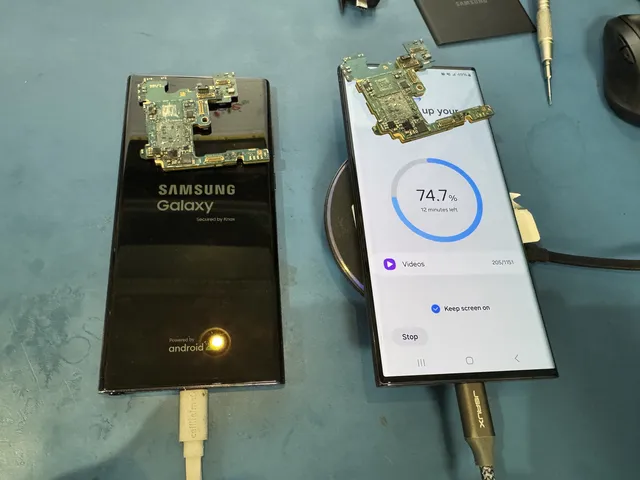
Two Samsung Galaxy phones with removed boards resting on top
Files are being copied from this Samsung Galaxy so the owner can keep them even without the phone.