
Recovery in progress on the bench
the queue moves every day
from 345 Google reviews · 2M+ followers of our recovery videos · Mail-in recovery nationwide
Mail us your phone, laptop or drive from Guaynabo, PR, and we'll work to retrieve your files at our data recovery lab in Lincroft, New Jersey.
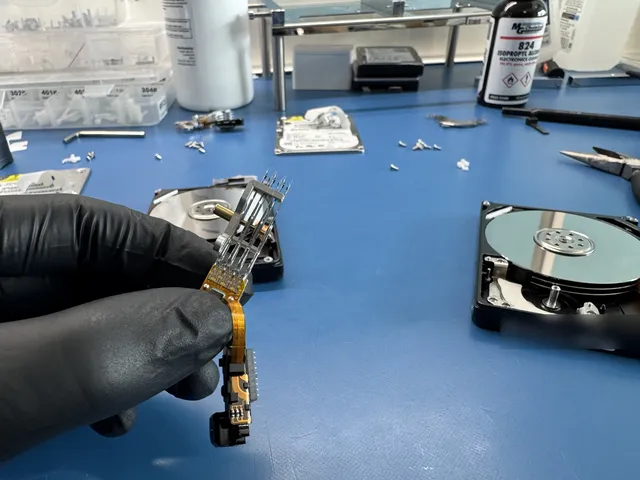
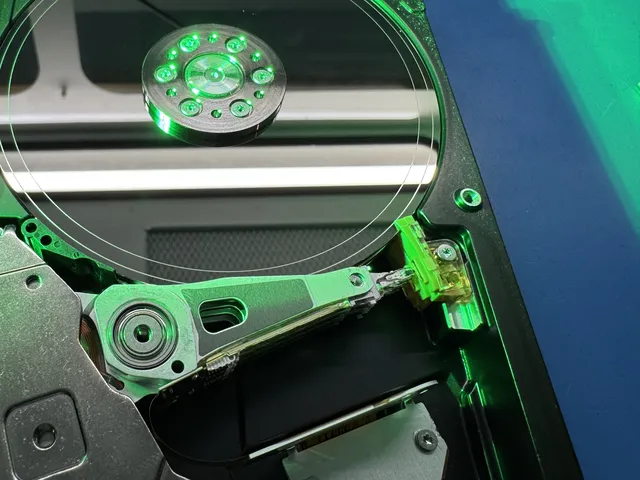
Real devices, real outcomes. Details generalized for customer privacy.
Recovery in progress on the bench
the queue moves every day
Dell tower
Hacked. Needs full wipe. also left 2 hard drives to ,make sure there's
Data recovered
iPad Pro A2014 Water Damage Diagnostic
recovered
Data recovered
iPhone XR Water Damage Diagnostic
on the bench
currently being worked on
WD Elements 2TB
SPECULATING THAT PORT IS DAMAGED.
added to the engineer's queue
External Hard Drive Dropped and Now Making Noise
dropped, not spinning up
data recovered
Seagate ST5000LM007
recovered
Data recovered
iPhone 14
Screen is black/green. dropped. Still charges. gets really hot on bott
added to the engineer's queue
Seagate - ST2000DM001 - 2 TB
recovery requested
added to the engineer's queue
iPhone 8 Home Button Triple Clicking
on the bench
currently being worked on
Toshiba - Toshiba MQ01UBB200 - 2TB
recovered
Data recovered
iPhone 5
Looking for airdrop photo information/date
Data recovered
WD My Passport - 1 TB
recovery requested
added to the engineer's queue
iPhone XR Water Damage Diagnostic
on the bench
currently being worked on
Seagate - SRD0NF1 - 4TB
recovery requested
added to the engineer's queue
Next spot in the queue
yours could be next
MDRepairs is a data recovery company with one lab in Lincroft, New Jersey, where our engineers work alongside Joseph Montanti, our founder and lead technician. He films the team so you can follow a hard drive, phone or SSD from the first diagnostic to the files we send back. We share those videos on YouTube, TikTok, Instagram and Facebook.
The people we help


 AT&T
 Marriott


 Tennessee Titans







Pick the closest match to see what might be wrong, what to avoid and how soon to act.
Keep it powered off
If your hard drive clicks or beeps, turn it off and leave it off. Do the same if it fell or your computer stopped seeing it, even if the drive is quiet. Each time it starts up, a damaged head can scrape the disks that hold your files.
Keep it powered off
The trouble can be in the controller, the part that reads the memory chips, or in the software that runs it. Either fault can make the drive disappear even though the chips still hold your files. Leave the drive off so we can work directly with the controller to read them.
Stop using it for now
Your photos and messages can still be on the storage chip when the rest of the phone stops working. We work on the phone's own board to get it running long enough to copy those files. If it got wet, leave it off and unplugged.
Stop using it for now
A coffee spill or a failed board can keep a laptop from starting even when the drive inside is intact. We can work directly with that drive. On some Macs the storage chips are soldered in place, so we work on the board to reach them. If your laptop got wet, leave it off.
Stop using it for now
If your card or stick is bent, snapped or suddenly looks empty, the connector or the part that reads the memory chip may have failed. The chip can still hold your files. We can remove it and read it directly, a method called chip-off recovery. If your computer asks you to format the card or stick, cancel the prompt.
Keep it powered off
If your system says the array is degraded, leave the disks in their original slots and avoid forcing them to sync. A failed rebuild can overwrite parity, the information the array uses to piece missing data back together. That puts files on the other disks at risk too. We copy each disk first, then reconstruct the array from those copies.
The cost of data recovery depends on your device and what went wrong. A logical problem, like deleted files or a damaged partition, usually costs less to recover from. If a moving part has failed, we may need a matching donor part and time at the laminar flow bench, where filtered air protects the open drive.
We start every recovery with a $100 diagnostic. We examine your device with our lab tools to find out why you can't reach your files. If you go ahead, we credit that fee toward a successful recovery. If we can't get any files back, there's no recovery fee.
Tell us what happened to your device on the quote form so we can give you a more specific estimate.
After the diagnostic, we give you the final price so you can decide whether to go ahead.
Whether you have a clicking hard drive or a water-damaged phone, you can mail it straight to our lab from anywhere in the country. Choose your device to see how we work on it.
If your drive clicks, the heads may have hit the disks they read. We work on this kind of damage as well as failed motors, corrupted firmware (the drive's built-in instructions) and formatted or deleted partitions. We handle all brands, including Seagate, WD, Toshiba and Hitachi.
We work on portable and desktop USB drives that your computer won't recognize, can't open or asks you to format. These include LaCie, WD My Passport and My Book, Seagate Backup Plus, G-Drive and Toshiba Canvio.
If your files were spread across several drives, we can help after a failed rebuild, a controller fault or a deleted volume. We work on RAID 0, 1, 5, 6 and 10, and on NAS units from Synology, QNAP, Drobo and Buffalo.
If your SSD no longer shows up, we look for a fault in its controller (the chip that manages its storage), corrupted firmware or electrical damage. On SATA SSDs and NVMe M.2 drives, we can work directly with the memory chips to reach your files.
If your phone got wet, has a dead motherboard or keeps restarting, we can work on the board to reach its encrypted storage. We use micro-soldering to repair tiny connections on phones of all brands and models.
We work on every model. If your iPhone got wet, keeps restarting or has a screen that won't respond, we can work on its original board to reach your files.
We recover files from Samsung Galaxy phones and tablets with water damage or a cracked screen. When needed, we work on the motherboard to reach your data.
We recover files from water-damaged, corrupted or formatted memory cards used in cameras, drones, dashcams and phones. In severe cases, we may remove the memory chip to read the data directly.
A broken connector, a failed controller or corruption in a memory chip can leave you with a flash drive that no computer recognizes. We work on those faults to reach your files.
If a spill, power surge or failed internal drive keeps your laptop from starting, we can work on the storage to reach your files. We handle Dell, HP, Lenovo, ASUS, Acer and MSI laptops.
On a MacBook Air or MacBook Pro with a T2 or M-series chip, we can work on the logic board to reach files on the soldered SSD. Our Apple computer data recovery guide explains how this works.
We diagnose the board on any iPad model. Whether the screen cracked, the iPad got wet, the storage is corrupted or the motherboard failed, we look for a way to reach your files.
We work on every iPod model, including Classic, Touch, Nano and Shuffle. That includes iPods with water damage, a failed battery or corrupted storage, and ones that stop at the Apple logo.
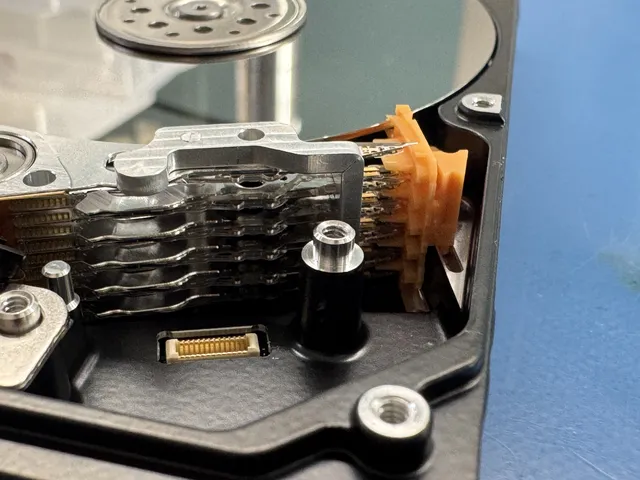
If a drive's heads hit its spinning disks, called platters, they can scratch the surfaces that hold your files. We work directly with those surfaces to read what the damaged drive still holds.
From your first call or message until we send your files back securely, we tell you what's happening with your device.
Call 732-933-7717 or get a free quote online. If you're nearby, you can bring your device to our lab in Lincroft, New Jersey.
For the $100 diagnostic, we examine your device and its circuit board, taking it apart when needed. That tells us what it would take to reach your files. We credit the diagnostic fee toward a successful recovery.
We explain what we found, what the recovery would cost and how long we expect it to take. Take the time you need. We start recovery once you approve the estimate.
What failed determines how we reach your files safely. We might use micro-soldering on a circuit board, work on a drive's platters in filtered air, repair firmware or read a memory chip directly.
We copy your recovered files to a new external drive or flash drive and send it to you by UPS. We keep an offline copy for two weeks, then delete it.
The standard wait is 4 to 6 weeks before we reach your device in line and start the diagnostic. Recovery takes additional time depending on what we find. If you need us sooner, we start the diagnostic within 5 to 7 days with Priority, within 1 to 2 days with Urgent, or the same day with Emergency. Rush service costs extra.
4 to 6 weeks
No rush fee
With standard service, we start the diagnostic in 4 to 6 weeks. How long it takes to recover your files after that depends on what we find.
5 to 7 days
+$250
With Priority, we start the diagnostic within 5 to 7 days. Ask us about availability.
1 to 2 days
+$500
With Urgent, we start the diagnostic within 1 to 2 days. Ask us about availability.
Same day
+$1,000
With Emergency, we start the diagnostic the same day. Ask us about availability.
Rush windows cover the start of diagnostic assessment. With standard service, we usually start the diagnostic in 4–6 weeks. Recovery time after that depends on the case.
The time we need to recover your files depends on the kind of device you have and what failed inside it.
If you lose files to deletion, formatting or a damaged file system and the drive has no physical damage, we can work with the hardware as it is. These logical recoveries on hard drives, flash drives and SD cards usually take less time.
A firmware problem can take less time to resolve than removing NAND, the memory that holds your files. When we need to remove chips, we unsolder each one, read it and put the data back in order. On laptops and MacBooks, timing also depends on whether we can reach the storage directly or need to work on the logic board.
On an iPhone, Samsung Galaxy or another phone, a simple fault in the power circuit can be quick to fix. Severe liquid damage takes longer because we may need to clean the board and replace several parts.
A clicking drive, a seized motor or a scratched platter takes time. We match donor parts, work inside the drive in filtered air and carefully copy the data we can read. We usually have parts for Seagate, WD, Toshiba and Hitachi drives on hand. Our guide to hard drive failure recovery explains the work.
With the $100 diagnostic, we examine your device and give you a written report. It's yours to keep whether or not you go ahead with recovery.
$100, credited toward a successful recovery
We examine the board under high magnification to find chips that have burned, corroded or broken.
We measure voltage and current across the board. That helps us find a short, a failed voltage regulator or another fault that keeps power from reaching a component.
We use this ACE Laboratory system to examine the firmware on hard drives and SSDs. It lets us read the drive's own health records, called SMART data, and map which parts of the drive we can read.
We use this micro-soldering station to examine chips on mobile devices, remove NAND memory and rebuild the tiny solder connections beneath a chip.
We look for damaged firmware in the service area, the part of a hard drive's disks reserved for its own instructions. We also examine the tables that tell the drive where to find your files and the logic its controller uses to read them.
Your report explains what went wrong, how we could recover your files and what each option would cost.
Visit our lab
$100 diagnostic, credited toward a successful recovery. If we can't get any files back, there's no recovery fee.
Affirm financing, if eligibleYou can see our engineers at work before you send your device. Once it's here, we tell you what we found and what recovery would cost so you can decide what to do.
Before you send us your device, you can follow real data recovery cases from start to finish on our YouTube channel.
We use micro-soldering to repair tiny connections on circuit boards and can read data directly from NAND memory chips. For a drive with a scratched platter, we work on the disks inside it in filtered air.
If we can't get any files back, there's no recovery fee. Before you pay that fee, you see a report showing which files we recovered. The $100 diagnostic is non-refundable once diagnostics start, and donor drives or replacement parts you approve are non-refundable once ordered, even if recovery fails. We give you an estimate based on what we found. You get to think it over, and we start the recovery only if you approve it.
We log your device when it arrives, track it through recovery and store it securely until it's time to send it back. We keep an offline copy of your recovered files for two weeks, then delete it.
The standard wait is 4 to 6 weeks before we reach your device in line and start the diagnostic. Recovery takes additional time depending on what we find. Ask which rush options are available. We start the diagnostic within 5 to 7 days with Priority (+$250), within 1 to 2 days with Urgent (+$500) or the same day with Emergency (+$1,000).
You can send your device straight to us at 644 Newman Springs Road in Lincroft, New Jersey, through our nationwide mail-in program. We cover UPS shipping both ways in the lower 48, except islands reached only by ferry or plane. To get started, get a quote or call 732-933-7717.
If your files have gone missing, stop using the device. Knowing what happened just beforehand, whether it was a spill, a fall or a message on your screen, helps us work out where to start.
If your phone falls in a pool, coffee spills on your laptop or floodwater reaches your hard drive, turn the device off right away. Even humidity or condensation can leave enough moisture to short a circuit or corrode it. Keep the device away from heat. Packing it in rice won't stop the corrosion.
Even a fall from a desk can push the heads of a spinning hard drive against its platters. A drop can also crack circuit traces in a laptop or break the solder connections beneath a chip in your phone. SSDs stand up better to drops, though their connectors and circuit boards can still break.
A voltage spike from lightning, a faulty charger or an unstable power supply can burn out controller chips, protective diodes and power circuits. An unprotected power strip can pass a surge to an external Western Digital or Seagate drive. A fault in a motherboard's power circuit can also damage an NVMe SSD.
If your hard drive starts clicking or grinding, the heads or bearings may be worn, or the lubricant may have broken down. These are mechanical failures we handle in hard drive data recovery. SSDs can last longer in everyday use, though writing data also wears down their NAND memory cells over time.
Stop using your device if you deleted a folder, formatted the wrong drive or installed an operating system over files you need. Those files can still be there until new data is written over them. We recover deleted files from flash drives, SD cards, hard drives and SSDs.
If your drive spins but doesn't show up, shows the wrong capacity or freezes as it starts, its firmware may be damaged. An interrupted write, a manufacturing defect or a failed update can corrupt the instructions that track where your data lives. We use the PC-3000 to reach the hard drive's service area and repair those instructions without changing your files.
First, stop using your device. Starting it, saving a file or even leaving an app running can write over files you want back. Leave a hard drive that's clicking unplugged. Each restart can drag damaged heads across the disks and turn a head replacement into a more difficult and costly scratched platter recovery.
If your phone is in water, take it out, turn it off and leave it unplugged. Corrosion can spread on the board even when the outside feels dry. Rice can leave dust inside, and a hair dryer won't stop the corrosion. Our cell phone data recovery team can talk you through what to do next.
If your flash drive or SD card shows an error or asks to be formatted, dismiss the prompt, remove the device and store it safely. Your files may still be on the NAND memory chip. Formatting can overwrite the table that tells us where to find them.
To talk through what happened, request a free quote or call us at 732-933-7717. We cover shipping both ways in the lower 48, except islands reached only by ferry or plane.
When your business loses access to files, work can stop, missed obligations can bring compliance penalties and customers can lose trust. If you run an IT department or manage systems for clients, our partnership program offers priority scheduling and volume pricing.
A drive you can no longer read may still hold the only copies of your family photos, videos of your children, years of personal records or creative work. If we can't get any files back, there's no recovery fee. The $100 diagnostic is non-refundable once diagnostics start, and donor drives or replacement parts you approve are non-refundable once ordered, even if recovery fails.
Our engineers handle your device in our lab throughout recovery. From the day it arrives until we send it back, we record where it is and who handles it.
We photograph your device, record its serial number and note its condition when we receive it.
You get a case number for your device and a status update at every stage.
Only authorized technicians handle your device. We keep it in locked storage between steps and record each time someone accesses it.
We use the PC-3000 to work with the drive and a laminar flow bench when we open it. When we make a copy, we block writes so nothing gets written back to your drive.
We verify your recovered files and return them on a new drive. A secure download is also available. We keep an offline copy for two weeks, then delete it.
At our lab in Lincroft, New Jersey, we use data recovery hardware and software to find out why your device stopped responding and reach the files it still holds.
ACE Laboratory's PC-3000 talks directly to your drive's firmware. We can work around a damaged service area, select which heads read the disks and repair the tables that locate files your computer or recovery software can't see. We use it for Seagate, Western Digital, Toshiba and Hitachi/HGST hard drive recovery and to diagnose SSD firmware.
In every hard drive recovery, we want a stable copy before doing further work on your drive. As soon as the drive can be read, we use the DeepSpar to copy each accessible sector, working around weak heads, damaged areas and reads that stall. Imaging can take hours or days, depending on the damage and the size of the drive.
We do all work inside hard drives at our laminar flow bench, including head swaps, platter transplants and motor replacements. The HEPA-filtered air helps keep dust, hair and skin cells off the disks, where they could damage the surface that holds your files. That protection is especially important for scratched platter recovery.
For cell phone data recovery, our soldering stations let us replace power chips, rebuild solder joints under processors and move NAND memory chips. We also use them for MacBook recovery on T2 and M-series logic boards and to remove SSD memory chips for individual reading. We control the hot air temperature as we lift each chip to protect it from heat damage.
Under a digital microscope we can see scratches on a platter, corrosion or breaks in a circuit, and burnt components. We also use it to inspect solder connections on iPhone and Samsung Galaxy boards. Seeing the damage helps us identify the fault and quote the recovery work before you approve it.
A matching donor saves time when your drive needs a head swap or motor replacement. We stock current and older drives from every major maker, sorted by model, firmware version, head type and platter count. That includes Seagate (see our Seagate recovery guide), Western Digital, Toshiba, Hitachi, Samsung and Maxtor. We also stock boards and controller chips for SSD and flash recovery.
A logical failure means the hardware still works, but you can't reach your files. A physical failure means a part is damaged. Your device can have both. During the data recovery diagnostic, we identify what failed so we can tell you what the work involves, what it will cost and how long it should take.
With a logical failure, a drive in good physical condition can still hold files your computer can't open. That can happen after a deletion, a formatted partition, a virus, an operating system crash or a corrupted file system. A firmware error can even keep the drive from showing up.
Logical recovery usually costs less and takes less time. For hard drives, we locate and piece together files on a sector-by-sector copy, as our guide to recovering a deleted folder explains. On formatted or corrupted flash drives and SD cards, healthy NAND chips may still hold your files. On SSDs, we may need to repair the firmware before making a copy.
You might format a USB drive by mistake or find a camera SD card empty after a write failed. A laptop that won't start after a failed Windows update or an external hard drive asking to be formatted can also have a logical fault. Our guide to recovering data from a formatted SD card explains the steps for cards.
A hard drive with physical damage may click, beep or stop spinning when its heads fail or its motor seizes. A head crash can scratch its platters, and a surge can burn its board. A phone or tablet may have water damage, cracked circuits from a drop or a failed power chip. On SSDs and flash drives, controllers can fail, NAND chips can crack and connectors can break.
To reach files after a physical failure, we use precision tools to work on damaged parts. In a hard drive that might mean a head swap or platter work under the laminar flow bench. In a phone, we use micro-soldering to restore power and data connections. In an SSD, we may need to unsolder individual NAND chips and read them separately.
Working by hand with specialized equipment and donor parts usually takes longer and costs more. Our scratched platter recovery service is for severe physical damage. Where the heads have scraped away the surface that holds data, that data is gone. We work on what's still readable.
Physical and logical faults can occur together. Worn areas on a drive's platters can corrupt the file system. On a wet phone, corroded power circuits can interrupt a firmware update. We look for both kinds of damage during the diagnostic so the recovery plan addresses each one. Our guide to data recovery from a failed hard drive shows how that works.
We diagnose your device for $100 to find out what it would take to reach your files. That diagnostic fee goes toward the price of a successful recovery. If we can't get any files back, there's no recovery fee. Choose your device to see how we work on it.
Get a Free QuoteWe offer hard drive data recovery if your drive clicks, won't show up, is corrupted or has failed completely. The work depends on what went wrong. A logical problem can follow accidental formatting. A mechanical breakdown might call for a head swap or motor replacement in controlled conditions.
When the heads have scored the platters, parts of the disks may still be readable. We do this work at our lab, using specialized equipment and matched donor drives to reach files on those surfaces.
We work on every major hard drive brand. Each has its own firmware and its own way of parking the heads and mapping files to the disks, so we choose tools and techniques specific to your model.
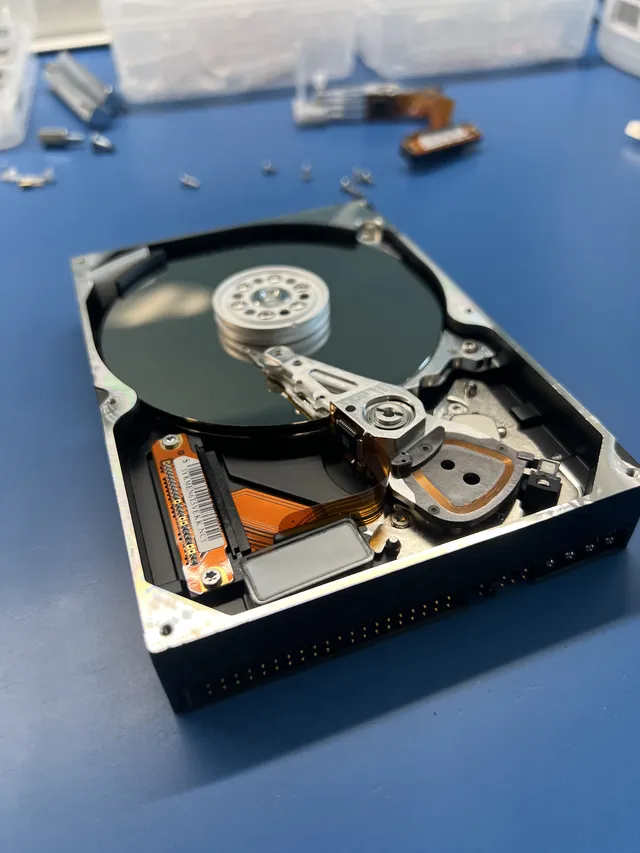
Our SSD recovery services cover power surges, damaged firmware, failed controllers and drives that don't appear in the BIOS, your computer's startup settings. On NVMe M.2 drives with controller or NAND damage, we can work directly with the memory chips. Our guide on how to recover data from an SSD explains the process.
When a controller fails, we can unsolder the NAND chips, read each one and rebuild the file system by putting the data back in the order the controller used. We work on 2.5-inch SATA, M.2 NVMe, mSATA, U.2 and PCIe drives. If yours has stopped responding, see our guide to recovering data from a dead SSD.
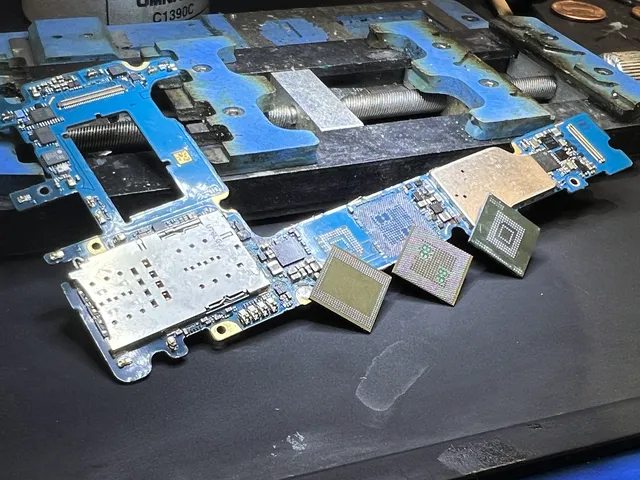
You can send us any brand or model for cell phone data recovery, including iPhones, Samsung Galaxy, Google Pixel, LG, Motorola and OnePlus. If your phone got wet, won't turn on or keeps restarting, we work on it to reach your photos, videos, contacts, messages and documents.
Even if your phone is dead, its files can still be in the encrypted flash chip soldered to the board. If the surrounding circuitry has failed, we use micro-soldering to repair power circuits and processor connections so the phone can start and let us copy your files. Our guide to recovering data from a broken phone explains the work.
We work on every Samsung Galaxy phone and tablet, including the S series from S10 through S25, Note, Z Flip, Z Fold and A series. A spill, a drop that leaves your device without power, overheating or a swollen battery can all keep you from your files.
Samsung's Knox security ties your files to the original processor. To let it decrypt the storage, we get the original board working again. That can mean replacing damaged power circuits, rebuilding the solder connections under the processor or repairing components damaged by corrosion.
For a different phone brand, see our cell phone data recovery services.
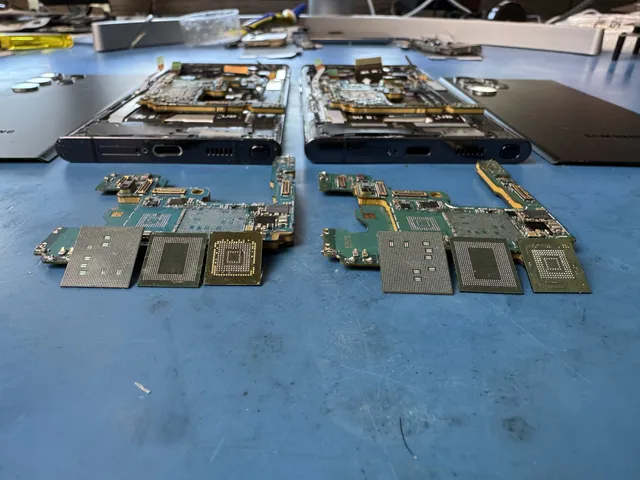
We work on every model. Apple's Secure Enclave ties access to the phone's own hardware. We diagnose the fault and use micro-soldering where needed to repair the connections that supply power and let your phone read its data.
Your iPhone's encryption key is built into its original processor and Secure Enclave. Reading the NAND memory chip on its own gives you encrypted data. We work on the original logic board so its processor can decrypt your files. Our iPhone data recovery guide explains what to expect for each kind of failure.
We also recover data from Samsung Galaxy devices, iPads, iPods and other phones. Once you have your files, our guide explains how to transfer data to your new phone.
For damaged, corrupted or accidentally formatted media, our flash drive data recovery and SD card data recovery start at $299 for basic logical work. If a connector broke or the controller failed, we can work directly with the memory chip.
Bending a USB drive while it's plugged in can break the connector. Its controller can also fail, and repeated writes wear down NAND memory. For SD and microSD cards, causes include water damage, physical cracks and file system damage from removing a card mid-write. If the controller fails, we can unsolder the NAND chip and read it directly.
We recover photos, videos and documents from USB drives, SD, microSD and CF cards, and memory sticks. That includes storage from cameras, drones, dashcams, GoPro cameras, Nintendo Switch consoles and mobile phones.
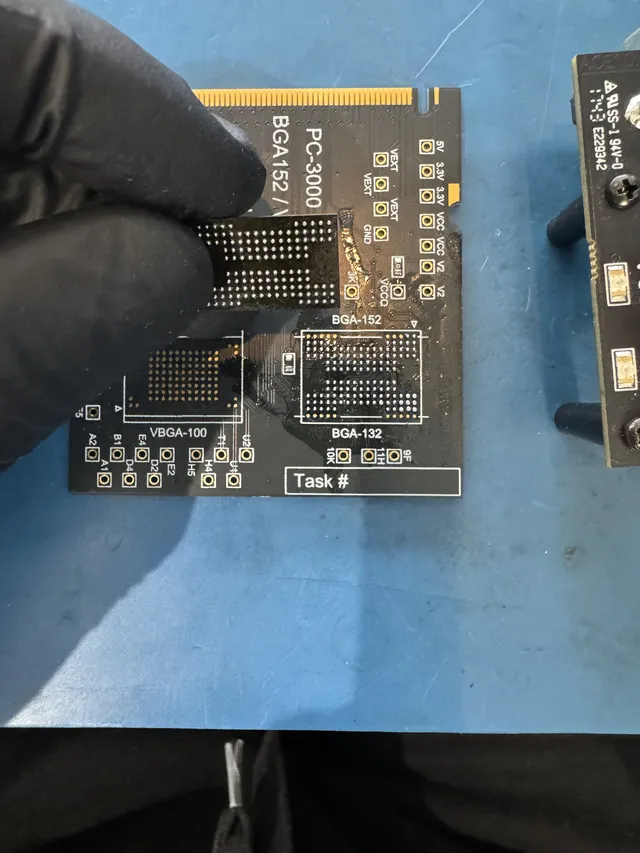
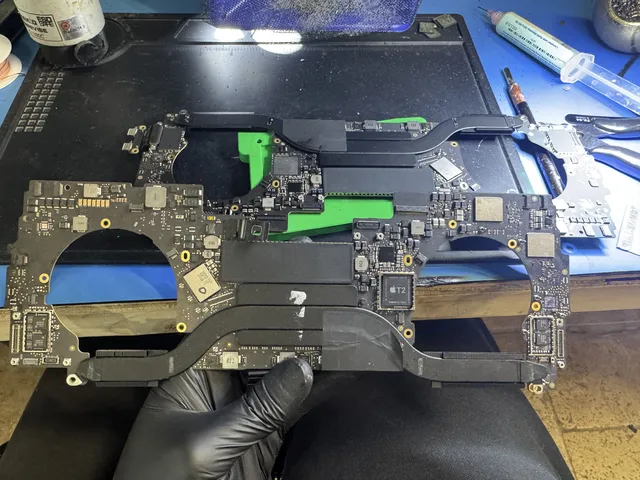
Our laptop data recovery services cover all brands, including Dell, HP, Lenovo and its ThinkPad line, ASUS, Acer, MSI and Razer. If a spill, surge or failed drive stops your laptop from starting, we can work on its internal hard drive, SATA SSD or NVMe M.2 drive to reach your files.
For MacBook data recovery on models from 2018 onward with Apple's T2 or M-series chips, we work on storage soldered to the logic board. A drive dock can't read it separately. At our lab, we restore the original board so the chip can unlock the storage, or use chip-level extraction and decryption where the hardware allows.
If your older MacBook has a removable SSD, we can read the drive directly using Apple-specific adapters and tools.
We offer iPad data recovery and iPod data recovery after a drop, water damage, a motherboard failure, corrupted storage or damage from a swollen battery. Even if yours seems dead, we can diagnose the board to see how to reach your photos, videos, music library, notes and documents.
We work on all iPads, including iPad Mini, Air and Pro, and all iPods, including Classic, Touch, Nano and Shuffle. Like iPhones, these devices can have encrypted NAND storage and chips soldered onto layered logic boards. We use rework stations, controlled hot air and magnification to work on those connections and preserve the hardware that Apple's security relies on.
Turn a wet device off promptly. Corrosion after a spill can damage the circuits that let you reach your files, especially with salt water, pool water or sugary drinks. For phones, including iPhones, we use ultrasonic cleaning and replace damaged parts on the board. On Samsung Galaxy devices, Knox needs the original board working to decrypt your files.
When floodwater reaches a hard drive, we open it in controlled conditions, clean the platters and replace damaged heads before we copy the drive. For laptops and MacBooks, we determine whether we can read the storage directly or need to repair the board to reach encrypted files.
We start by copying each drive separately. Even a RAID or NAS with built-in redundancy can go offline if a controller fails, several drives fail together or the file system is corrupted. Working from the copies, we reconstruct the settings that put the array back together in software, then extract your files. Our guide to recovering data from RAID drives explains the process.
We work on WD My Cloud units and NAS devices from Synology, QNAP, Netgear, Drobo, Buffalo and Asustor, as well as Windows Server, Linux and VMware systems. If you manage IT and need a production server back online, our partnership program offers priority scheduling for server recovery.
If a card fails during a wedding or production shoot, we can work directly with the card that holds your photos, videos and RAW files. We handle SD cards, microSD, CompactFlash (CF), CFexpress and XQD cards from Canon, Nikon, Sony, Fujifilm and GoPro cameras, DJI drones and dashcams. See our guide to recovering photos from a corrupted SD card.
If the card's controller still works, we use logical recovery. Physical damage or a failed controller may mean removing the NAND memory chip and reading it directly. Dashcam cards can wear out from constant recording in a hot vehicle.
If the storage in your console has failed or become corrupted, we can work on it to recover saved games, screenshots, video clips and profile data. We handle PlayStation (PS4 and PS5), Xbox (One and Series X/S) and Nintendo Switch.
Where the hardware allows, we can copy a PS4 or PS5 drive directly. Xbox drives use their own partition layout, which needs specialized tools. Nintendo Switch stores files in internal eMMC memory and on microSD cards. After a spill or surge, we work with the original console to reach storage tied to its hardware by encryption.
Storage can be encrypted by default on iPhones, Samsung Galaxy devices with Knox, MacBooks with T2 or M-series chips and Windows laptops with BitLocker. To reach your files, we need the original hardware or the corresponding encryption key, depending on your device.
On Apple and Samsung devices that tie storage to the original processor, we use micro-soldering to restore the board so the processor can unlock your files. For BitLocker, you'll need your recovery key. During the diagnostic, we explain whether decryption is possible for your device. Our encrypted drive recovery guide covers these situations.
You can speak directly with the technician, request priority scheduling and get documentation for your company's internal and regulatory requirements. Our partnership program gives managed service providers and IT consultants volume pricing, reports they can put their name on and a dedicated account manager. Our 3-2-1 backup guide explains how to protect your files going forward.
For a failed server, crashed RAID or corrupted database, ask if Emergency is available. We start the diagnostic the same day (+$1,000). Recovery time depends on what we find. We work on SAS and SATA enterprise drives, server SSDs, VMware and Hyper-V images, SQL databases and Exchange mailstores. Your packing slip links your box to your ticket. Your recovered files arrive on a drive.
Not sure which service you need? Send us your device for the $100 diagnostic, and we'll explain what went wrong and what recovery would cost.
Affirm financing, if eligibleAnswer a few questions about your drive in our Free HDD Diagnostic Tool. Based on what you're seeing or hearing, it explains when it's safe to try recovering files yourself and when to use professional data recovery services.
Choose the symptom that sounds like your drive. For each one, our technicians explain what they'd recommend next.
If the tool points you toward professional recovery, you can request a quote on the results page or call us at 732-933-7717 to talk it through.
From Guaynabo, PR, you can use our mail-in program to send your device to our lab in Lincroft, New Jersey. You arrange the shipment to the lab and pay for shipping both ways. We credit the $100 diagnostic fee toward the cost of a successful recovery. If we can't get any files back, there's no recovery fee.
See all the cities we serve in Puerto Rico or visit our data recovery services page.
Whether a data recovery tip will help depends on what happened to your device. Something that works for deleted files can do damage if your drive has a broken part.
Putting my hard drive in the freezer will fix it
Leave your drive out of the freezer. As it warms, condensation can corrode the heads and platters and make recovery harder. Freezing was unreliable even on older drives, and modern drives are more sensitive. In professional hard drive recovery, we use matched donor parts and controlled conditions to deal with seized motors and heads stuck to the disks.
Rice will dry out and fix a wet phone
A phone can feel dry while minerals from the water keep corroding its board. Rice leaves those minerals in place and can introduce starch dust. For cell phone data recovery, we clean the board with ultrasound, inspect it under a microscope and repair corroded circuits.
Data recovery software can fix any failed drive
Recuva, R-Studio and DMDE can help with logical failures on healthy hardware, including deleted files, formatted partitions and minor file system damage. If your hard drive clicks, makes unusual sounds or isn't detected, scanning it can do more harm. A head swap, firmware repair or reading damaged NAND requires lab work. Our Free HDD Diagnostic Tool helps you decide what to do.
I need a local service to get my files back
Our mail-in data recovery program serves the whole country, including California and New York. You send your device straight to our lab, where we use PC-3000 systems, laminar flow benches and micro-soldering equipment.
A circuit board from the same drive model will fix mine
When we replace a drive's circuit board, we also transfer the settings stored in its ROM chip. Those settings are matched to your drive's own heads and platters. Even a board from the same model has different settings, and running the heads with the wrong ones can damage the disks.
If my hard drive clicks, my files are gone
Leave a clicking drive unplugged. The sound can come from failed heads, which we can replace with matching donor parts under controlled conditions to keep the disks clean. Restarting the drive can drag those heads across the disks and leave you with a scratched platter.
Stopping early helps protect your files
For a physically damaged drive or a wet phone, leave the power off. If files are missing from a corrupted SD card or were deleted from a flash drive, stop writing to it. To protect what's still there, ask our lab for a recovery quote before trying to repair it yourself.
You can watch our data recovery team at work
We publish our equipment list and film our team using those tools. Before you send your device, you can see who does the work in-house and how we handle a case.
After a recovery, the first thing we recommend is making a backup of the files you got back. These are the same habits we use to protect our own business records. Our guide on how to avoid data loss explains them in more detail.
Keep at least three copies of your important files on two kinds of storage, with one copy offsite or in the cloud. You might keep the originals on your computer, a second copy on an external hard drive at home and a cloud backup in Backblaze, iDrive, Google Drive or iCloud. If one copy fails, you still have the other two.
Open a few files from your backup from time to time, including recent ones you know should be there. A backup drive can fail quietly, cloud syncing can stop and backup software can copy only some of the folders you meant to save. Reading the copies lets you spot those problems while you still have the originals.
If your hard drive slows down or shows a SMART health warning while it's readable, back up your files and replace it. If it starts clicking or grinding, leave it unplugged. A new drive costs less than data recovery. Our guides explain how to check hard drive health and how to safely remove a hard drive from a laptop.
Use a surge protector for hard drives, SSDs and NAS devices. A plain power strip doesn't protect against surges. For a business server or RAID array, use an uninterruptible power supply (UPS) for protection during outages too. Losing power during a write can corrupt the records that tell the array how its drives fit together and put all its files out of reach.
Protect flash drives from physical damage by keeping them straight while plugged in. Use “Safely Remove Hardware” before you disconnect them. With SD cards, wait for the camera's activity light to go out, then store the card in a protective case. Our guide to recovering deleted files from a USB drive explains what to do if files are already missing.
Drops and spills can leave you needing cell phone data recovery. A protective case and screen protector can limit damage from drops, and a waterproof case helps keep water out. Turn on automatic backups for photos and contacts and make sure they're current. On iPhones, check iCloud Backup and storage space. On Samsung Galaxy devices, set up Samsung Cloud or Google Photos.
No question matches that - it's probably faster to just ask us: (732) 933-7717 or .
Start online or call us at 732-933-7717. We credit the $100 diagnostic toward a successful recovery. If we can't get any files back, there's no recovery fee.
These public references explain how our tools work, how devices store and protect your files, and the standards we refer to when handling drives and data.
ACE Lab describes the data recovery hardware and software we use to diagnose drives, work with their firmware and read the data.
DeepSpar explains how its imager copies failing hard drives and SSDs one sector at a time. We use it alongside the PC-3000 and can control how long it waits for a read and when it tries again.
Backblaze publishes annualized failure rates for the hard drives it monitors. Those figures describe its fleet. To find out what happened to your own drive, we diagnose it at the lab.
Apple explains how Secure Enclave encryption ties access to the hardware in your iPhone or iPad. That's why we work on the original board to reach your files.
The U.S. National Institute of Standards and Technology explains how to erase stored data and handle the media that held it. We refer to these guidelines when wiping our copy after recovery.
Under this law, having an independent provider repair your device or perform data recovery does not by itself void a covered consumer product warranty.
Samsung describes its NAND flash memory, including V-NAND, and the controllers that manage it. This helps explain how we read data from the chips in SSDs, phones and flash drives.
You can mail any of these devices to us from Puerto Rico. Choose your device to see how we work on it.
$100 diagnostic, credited toward a successful recovery. If we can't get any files back, there's no recovery fee.
We use cookies for analytics to see how visitors use the site, and to measure our ads. Privacy Policy