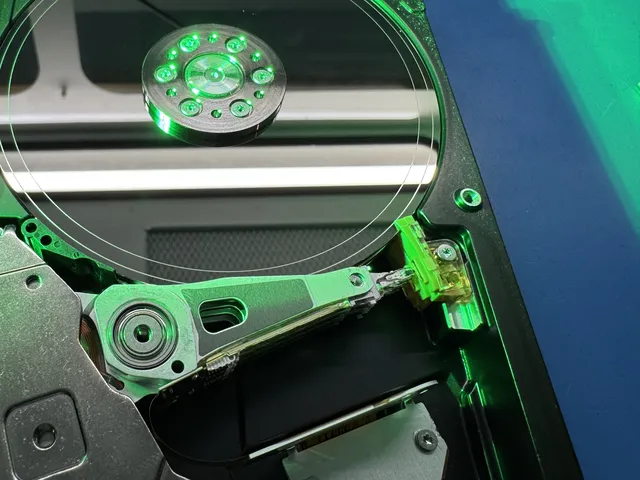
Recovery in progress on the bench
Drives arrive from all 50 states
the queue moves every day
345 Google Reviews · 2M+ Followers · Nationwide Service
Hard drive data recovery in Arlington should not depend on a storefront that ships your drive somewhere else after you leave.
About this recovery service
MDRepairs is a real data recovery lab in New Jersey serving Arlington, TX by mail, with a free prepaid inbound label (contiguous US). We offer a $100 diagnostic applied toward recovery, and no data, no charge. From UTA students near the University of Texas at Arlington to home offices in Viridian, Dalworthington Gardens, and neighborhoods around Lake Arlington, we handle failed hard drives with lab tools, controlled procedures, and clear communication.
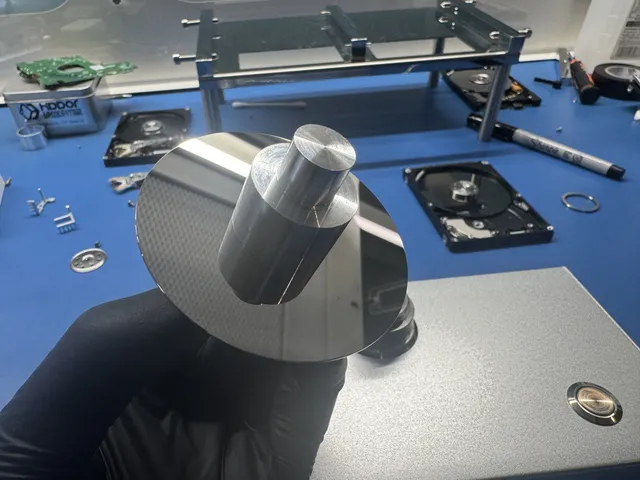
Real devices, real outcomes. Details generalized for customer privacy.
Recovery in progress on the bench
Drives arrive from all 50 states
the queue moves every day
Hard Drive recovery - HDD
failed device
data recovered
2007 imac hard drive clicking
clicking on power-up
data recovered
Dropped Hard drive
dropped, not spinning up
data recovered
Recover data from clicking HDD
clicking on power-up
data recovered
Hard Drive Fell and making clicking sounds.
clicking on power-up
data recovered
hdd - Toshiba - DTB 310 - 1TB
recovery requested
added to the engineer's queue
External Hard Drive Dropped and Now Making Noise
dropped, not spinning up
data recovered
Dropped My Hard Drive
dropped, not spinning up
data recovered
Next spot in the queue
Free UPS 2nd Day Air label (contiguous US), both ways
yours could be next
MDRepairs is an advanced hard drive data recovery lab - and we prove it on camera. Our lead technician Joseph Montanti documents real recovery cases from diagnosis to data delivery. Over 2 million followers across YouTube and social media watch us open failed drives, swap heads, rebuild firmware, and recover data that other labs couldn't.
More Recovery CasesThe people we help


 AT&T
 Marriott


 Tennessee Titans







Pick the symptom - we see every one of these from Arlington, TX weekly. You get the honest answer, not a sales pitch: what's actually wrong, what not to do next, and whether it's urgent.
Mechanical - power it OFF now
That click is the read/write heads failing to find the platters - every extra minute of power risks the heads dragging across the surface that holds your data. Do not retry it, do not "test it one more time," and never open it outside a lab. This is exactly the failure our imaging bench exists for.
Serious - stop using it
A drive that spins but never appears usually has a firmware or electronics fault; one that is silent may have a dead PCB or seized motor. The good news: these are among the most recoverable failures when the platters have not been touched. Stop running detection tools that keep power-cycling it.
Mechanical - power it OFF now
A drop can park the heads on the platter surface or knock them out of alignment. Powering it up to "see if it still works" is how a recoverable drop becomes a scored platter. Leave it off - the evaluation tells you exactly what state it is in.
Logical - act calmly, act soon
Deleted or formatted data is usually still on the platters until something overwrites it. The one rule: stop using the drive right now - every download, update, and even browsing writes over your files. Recovery software CAN work here, but one wrong move on a failing drive makes it worse.
Mechanical - power it OFF now
Wet electronics corrode fast, but platters sealed inside the drive often survive floods and even fires. Do not rice it, bake it, or test it - seal it in a bag and get it to a lab. We handle storm-damaged drives from across the country every season.
Serious - stop using it
Freezes, endless load times, reallocated-sector warnings - that is a drive developing bad sectors faster than it can hide them. Back up what you can RIGHT NOW in one pass (no full scans, no defrag). If the backup stalls, stop and send it in before it degrades further.
Hard drive recovery starts at $1,000. The ranges below depend on the failure, media condition and donor parts; a symptom or capacity alone cannot establish the total.
A $100 standard diagnostic - a hands-on assessment on professional tools, not a quick visual check. You approve a firm quote before any recovery work begins. The $100 is credited toward successful recovery and is non-refundable once diagnostics start. If the agreed target data cannot be recovered, there is no recovery fee; approved parts charges still apply.
Fill out the Get a Quote form for a more accurate estimate based on your specific situation.
Final price confirmed after diagnostic - no surprises.

Data recovery pricing depends on the failure, not the city. A drive from Arlington with deleted files is not priced like a drive with head damage, firmware problems, platter contamination, or severe bad sectors. MDRepairs charges a $100 diagnostic, applied toward the approved recovery, and no data means no charge for the recovery. Published ranges may include $1,000-$1,500, $1,500-$3,000+, $2,250-$3,500+, or higher for complex work, but a real quote requires inspection. For context before you ship, review our data recovery cost page, then send the drive for a case-specific diagnosis.
With standard service, we usually start your diagnostic in 4–6 weeks. Recovery takes additional time depending on what we find. Rush surcharges move your drive ahead of the standard diagnostic queue so assessment starts within the selected rush window. Confirm availability. Rush windows do not promise completed diagnosis or recovery.
4–6 weeks
No surcharge
We usually start the diagnostic in 4–6 weeks. Recovery time after that depends on your case. Standard service has no rush surcharge.
5–7 days
+$250
Diagnostic assessment starts within 5–7 days, ahead of the standard queue. Confirm availability.
1–2 days
+$500
Diagnostic assessment starts within 1–2 days, ahead of the standard queue. Confirm availability.
Same Day
+$1,000
Diagnostic assessment starts same-day, ahead of the standard queue. Confirm availability.
The standard wait to start the diagnostic is 4–6 weeks. Recovery takes additional time depending on the work your device needs. Rush surcharges advance the start of diagnostic assessment only; confirm availability. Shipping time is separate from diagnosis and recovery.
Once work starts, the failure type sets how long the recovery itself takes
Accidental deletion, formatting, corrupted partitions, and Seagate F3 / service-area faults. No mechanical intervention - typically the quickest turnaround once on the bench.
Burned or shorted controller boards from power surges. We repair the PCB and transfer the unique ROM - quicker than a head swap, slower than a clean logical case.
Clicking drives, crashed heads, seized motors, and scratched-platter cases need matched donor parts, controlled-environment work, and careful imaging. Donor availability depends on the exact drive.
Review the supplied shipping and return terms before sending the drive. Transit time is separate from diagnosis and recovery.
Turnaround is based on queue level and technical condition. Standard hard drive recovery is measured in weeks, especially when careful imaging, donor matching, cleanroom work, or repeated read passes are required. Arlington customers who cannot wait can ask about 1-day, 2-day, or 5-7-day rush options, with complex cases quoted individually. Overnight shipping from Arlington can put the drive at the New Jersey lab quickly, and in many cases that is faster than leaving it with a local shop that later outsources the recovery anyway.
Send your drive to our Lincroft, New Jersey lab after reviewing the supplied packing and shipping instructions. Confirm transit, return-shipping and delivery terms for your case.
Tell us about physical damage and previous repair attempts before sending the drive.
Describe the drive, symptoms and data you need. Review intake, diagnostic and shipping terms.
Follow the supplied packing instructions. Keep an external drive together with its original enclosure and parts.
The $100 diagnostic leads to an explanation of recovery options, limitations and a quote for your approval.
Confirm the result against your stated goal and agree delivery. The diagnostic is credited toward successful recovery.
Mail-in recovery is straightforward for Arlington customers. Start the case, generate a free prepaid UPS label on the mail-in form (contiguous US), pack the hard drive securely, and send it to the MDRepairs lab. Do not ship only a loose USB cable or power adapter unless requested; the failed storage device is what matters. If the problem is an external hard drive used at home in North Arlington, a desktop drive from a small business near the Entertainment District, or a laptop drive from a UTA student, the process is the same.
Once the device arrives, the lab performs the $100 diagnostic and explains the recovery path before paid recovery work proceeds. You are not being routed to an Arlington drop-off counter or a franchise desk. You are sending the drive directly to the lab that evaluates it. Customers who want the full step-by-step flow can use our mail-in data recovery process page before opening a case.
Agree the recovery goal, authorized access and delivery requirements before work starts.
Identify the types of data that matter without including private file contents in a quote.
Recovery involves handling data. Discuss access restrictions and any special requirements before service.
Agree how the result will be checked against your target data and how partial results are handled.
Agree the delivery method, format and any delivery media charges.
Ask about working-copy retention and the return of your original drive.
Review what was recovered, what remains unreadable and the available delivery format. Make a second copy of the delivered data.
Confirm the return or other handling of the original device with the lab. A failing drive should be retired from normal storage use.
Ask about opening files, compatible software and transferring supported data before assuming the result is a complete system backup.
Hard drives can contain tax files, medical records, legal documents, client work, school records, photos, and business data. Privacy matters whether the drive came from a home in Southwest Arlington, a professional office near I-20, or a workstation used around the stadium and event corridor. MDRepairs limits handling to the recovery process and focuses on extracting the requested data, not browsing through personal files. Recovered data is returned in a practical format after the job is completed. If your Arlington case involves sensitive business or regulated material, say so when opening the case so handling expectations are clear from the start.
After recovery, the goal is not just getting files back once. Arlington customers should plan a cleaner backup routine before putting the recovered data back into daily use. A recovered hard drive should not be trusted as a healthy working drive, especially after clicking, bad sectors, firmware faults, or repeated disconnects. Use a new storage device, keep at least one separate backup, and consider cloud sync only as part of the plan, not the whole plan. For businesses, test restores matter. A backup that has never been restored is only an assumption until it proves usable.
Two ways to start: a free guided tool for drives that are safe to try at home, or a real $100 lab diagnostic - device-appropriate assessment, credited toward your recovery if you proceed.
A free initial quote explains how to start. The $100 lab diagnostic assesses your drive and supports a recovery quote for approval. It is credited on success; diagnostic and approved parts charges apply on failure. Confirm any special work or delivery terms before approval.
Failed mechanics are assessed and stabilized before any imaging - seized motors, crashed heads, and stiction diagnosed by hand.
Industry-standard ACE Laboratory hardware reads firmware modules, SMART data, and the service area to map exactly how the drive failed.
Open-platter work happens on a clean laminar-flow bench with write-blocked, sector-by-sector imaging to a healthy donor disk.
You receive a clear assessment of the failure, recovery options with firm pricing, and the limitations of the proposed work.
Our free DIY hard drive recovery tool guides you through your drive's symptoms - clicking, beeping, or a drive that won't show up - then gives you tailored, step-by-step recovery instructions for drives that are safe to try at home. No downloads, no sign-up. If your situation calls for the lab instead, the tool will tell you that too.
Watch real hard drive recoveries from start to finish - every diagnosis, repair, and data extraction documented on camera.
Free shipping (contiguous US) from Arlington, TX - $100 diagnostic - no data, no charge.
Affirm financing, if eligibleHard drive data recovery is the process of retrieving inaccessible, lost, or damaged data from a hard disk drive that has failed mechanically, electronically, or logically - including dead hard drives that won't power on or be detected by your computer.
Hard drives store data magnetically on spinning platters using read/write heads that float nanometers above the surface. When components fail - heads crash, motors seize, PCBs burn out, or firmware corrupts - your files become trapped on the platters. Hard disk drive recovery is the process of bypassing or replacing those failed components to extract your data.
Our lab uses ACE Laboratory's PC-3000 for firmware diagnostics, head map editing, and service area repair, and DeepSpar imaging hardware for extracting data from physically damaged media. Combined with a laminar flow bench and a donor drive library spanning all major manufacturers, we image first and recover second - cloning every sector before touching your files.
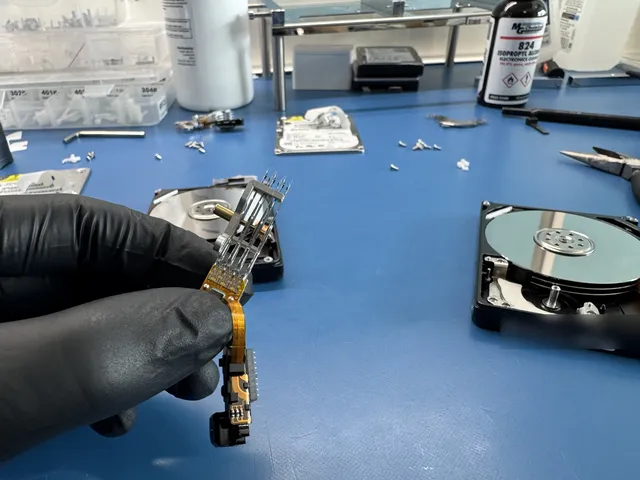
Understanding the internal components of a hard drive helps explain why different failures require different recovery approaches - and why some are more expensive than others.
Magnetic-coated disks where data is physically stored. Scratched platters mean permanently destroyed data, making scratched platter recovery the most difficult type of data recovery.
Fly nanometers above spinning platters to read and write data. Failed heads can crash into the platter surface, destroying data and causing the clicking sound heard from failing drives.
Spins the platters at thousands of RPM. A seized motor causes beeping or buzzing and requires transplanting the platters to a donor motor assembly.
The external board controlling all drive operations. Contains unique calibration data, which is why swapping PCBs between drives doesn't work without a ROM transfer.
Internal software stored on the platters that maps where data is physically located. Corruption can cause the drive to go undetected or hang during startup.
Amplifies signals from the heads to the PCB. Failure mimics head failure (clicking, read errors) and requires a full head stack replacement.
Hard drive failure in Arlington often starts as an inconvenience and quickly becomes a serious problem: a desktop in a Mansfield Road home office stops booting, an external drive used for family photos near Lake Arlington clicks, a small business backup in East Arlington no longer mounts, or a student project drive near the University of Texas at Arlington starts asking to be formatted. The right response depends on what failed. A logical file system problem is different from damaged heads, weak media, firmware corruption, a seized motor, or an external USB enclosure issue.
MDRepairs provides hard drive repair and recovery for Arlington customers through mail-in service to our New Jersey lab. We do not claim to have a physical Arlington location. The point is the opposite: your drive goes directly to a data recovery lab instead of being opened, retried, or outsourced through a local repair counter. For mechanical and media-related cases, we use tools such as PC-3000 and DeepSpar imaging systems, with ISO-grade cleanroom procedures when internal work is required.
For many Arlington customers, the drive has already been through several warning signs: freezing during copy, Windows reporting bad sectors, macOS Disk Utility failing First Aid, a NAS dropping a disk from a RAID set, or a portable drive that powers on but never appears. If the data matters, repeated DIY attempts can turn a recoverable case into a worse one because failing hard drives often degrade while powered. The safest first step is to stop using the drive, avoid file repair utilities, and get a controlled diagnostic.
Our process is built for people who need straight answers without sales theater. You can start with our mail-in data recovery process, generate a free prepaid UPS label on the mail-in form (contiguous US), and send the device from Arlington by UPS. The diagnostic is $100 and is applied toward the recovery if you approve the quote. If no data is recovered, there is no charge for the recovery itself. MDRepairs has a 4.6-star rating with 345+ Google reviews, but we still treat every case as unknown until the drive is inspected. Arlington customers comparing options can also review our Texas hard drive recovery hub and our same-city page for all data recovery services in Arlington.
Every hard drive failure has a cause. Identifying the symptoms correctly is the first step toward successful data recovery - and knowing what NOT to do is just as important.
Repetitive clicking means the read/write heads are failing - they're trying to load onto the platters and falling back. Each click cycle risks scratching the platter surface and destroying data permanently. See our clicking hard drive recovery service.
Power off immediately. Do NOT restart.
Beeping indicates the spindle motor cannot spin the platters - either the motor has seized or the heads are stuck to the platter surface (stiction). The drive needs physical intervention to free the mechanism. Learn more about beeping hard drive recovery.
Power off immediately. Do NOT shake the drive.
If your drive spins but isn't recognized, the issue is likely firmware corruption, a failed PCB (circuit board), or damaged service area on the platters. If the drive doesn't spin at all, the motor or PCB may have failed. We handle drives not detected by the computer, including external hard drives that no longer mount.
Stop reconnecting. Each attempt may worsen firmware damage.
Liquid exposure causes rapid corrosion on the circuit board, heads, and internal components. Fire-damaged drives face heat warping and smoke contamination. Both require urgent professional attention.
Do NOT power on. Do NOT dry with heat. Ship immediately.
If you deleted files, emptied the recycle bin, or accidentally formatted a drive, the data likely still exists on the platters - it's just no longer indexed by the file system. Our guide on how to recover deleted files from a hard drive explains why recovery is very possible if you stop writing to the drive.
Stop using the drive. Do NOT install recovery software on it.
If the drive shows no signs of life - no spinning, no LED, nothing - the PCB (circuit board) has likely failed, often from a power surge, bad power supply, or damaged SATA/USB port. The platters and data are usually fine.
Do NOT swap PCBs from another drive without professional guidance.
Not sure what's wrong? Try our free HDD Diagnostic Tool for a guided assessment, or call 732-933-7717 to speak with a technician.
Run the Diagnostic ToolHard drive failures fall into two main categories. Understanding which type your drive is experiencing determines the recovery approach, timeline, and cost.
Failed read/write heads are replaced using matched donor heads from an identical drive model. Performed in a controlled, particle-filtered environment to protect the platter surface.
Seized spindle motors require platter transplant to a donor chassis. Stiction (heads stuck to platters) requires manual head unsticking using specialized tools under magnification.
When heads contact the spinning platter surface, they create circular scratches that destroy data in those zones. Our scratched platter recovery works around damaged areas to image recoverable sectors.
Dead motor, failed PCB, or damaged preamp. We diagnose the exact point of failure and either replace the component or transplant platters to a functional assembly.
Physical impact displaces the head assembly, damages the preamp, or causes immediate head crash. Severity depends on whether the drive was spinning at impact. Never power on a dropped drive.
Deleted data remains on the platters until overwritten. We image the drive at the sector level and use file carving and file system reconstruction to recover files, folders, and directory structures.
NTFS, HFS+, ext4, and other file systems can become corrupted from improper shutdown, power loss, or bad sectors. We reconstruct the file system metadata to restore access to your data.
Hard drives run internal firmware stored in a service area on the platters. When this firmware becomes corrupted - from bad sectors, power events, or manufacturing defects - the drive may not be detected or may lock up during initialization. PC-3000 tools allow us to read and patch firmware modules.
Degrading magnetic media causes bad sectors that grow over time. SMART warnings indicate the drive is failing. We create a forensic image that works around bad sectors, reading good data first and returning to problematic areas with multiple passes.
Power surges, bad adapters, or component failure can kill the drive's circuit board. PCB recovery requires transferring the original drive's ROM/firmware chip to a compatible donor PCB - swapping boards without this step will not work on modern drives.
Not all hard drives fail the same way. Each manufacturer and drive family has specific failure patterns that require specialized knowledge and tooling. Our technicians maintain current expertise across all major families.
Seagate Rosewood drives (common in Barracuda and Backup Plus models) are known for LED error codes and terminal lock states where the drive becomes completely unresponsive. Recovery requires PC-3000 terminal access to unlock the service area and rebuild corrupted firmware modules before data can be imaged.
Western Digital SMR (Shingled Magnetic Recording) drives use overlapping write tracks to increase density. This makes the translator tables - which map logical to physical sectors - extremely fragile. If the translator corrupts, the drive appears empty or unreadable despite intact data underneath.
High-capacity helium-sealed drives (8TB+) from Seagate, WD, and HGST use helium gas instead of air to reduce turbulence and pack more platters. We cut open the sealed enclosure, replace the failed head stack, then inject lab-grade helium while actively reading the platters - allowing us to image the drive before the gas dissipates.
Older Seagate F3-family drives store firmware across multiple heads. When one head degrades, the drive enters a busy state or fails initialization. PC-3000 allows us to selectively disable damaged heads, patch firmware, and rebuild system files to regain access.
Western Digital drives using Marvell controllers store critical calibration data in the PCB ROM chip. If the PCB fails, the ROM must be carefully desoldered, read, and transferred to a compatible donor board. Without this step, the donor PCB will not initialize the drive correctly.
Higher capacity drives (2TB, 4TB, 8TB+) pack more data onto the same platter area using higher areal density. This means tighter head tolerances, more sensitive alignment, and less margin for error during head swaps. Recovery from high-capacity drives requires extremely precise donor matching and extended imaging times.
We maintain donor drive inventory and brand-specific tooling for every major hard drive manufacturer. Each brand has unique firmware architectures, head designs, and failure patterns that require specialized knowledge.
We assess Seagate hard drives. We service Barracuda, IronWolf, Backup Plus, Expansion, One Touch, FireCuda, Exos, and SkyHawk. Seagate's F3 firmware architecture is prone to busy states, failed initialization, and capacity misreporting when heads degrade. The Rosewood platform frequently presents LED error codes and terminal lock states requiring PC-3000 serial terminal access to unlock.
Seagate Recovery DetailsWe assess Western Digital hard drives. We recover My Passport, My Book, Elements, easystore, WD Blue, Black, Red, Purple, Gold, and Ultrastar drives. Modern WD drives use Marvell controllers with ROM chips containing unique calibration data - PCB swaps without ROM transfer will fail. WD's SMR drives are especially vulnerable to translator corruption from power loss.
WD Recovery DetailsCovers the Canvio Advance, Canvio Slim, Canvio Ready, P300, X300, N300, and MG enterprise series. Common failures include head degradation on Canvio 1TB-2TB models and firmware hang states where the drive spins up but never completes initialization. Toshiba's firmware architecture requires brand-specific PC-3000 modules for service area access.
Toshiba Recovery DetailsDeskstar, Travelstar, Touro, and Ultrastar drives are among the most reliable ever made but still fail from gradual head degradation, preamp failure, and motor bearing wear. HGST firmware requires its own diagnostic approach separate from WD despite the 2012 acquisition. Donor head matching requirements differ from Western Digital drives.
Hitachi Recovery DetailsSamsung exited the HDD market in 2011, but Spinpoint F3 desktop drives and Spinpoint M8/M9T portable drives remain widely in use. Common failures are head degradation, motor seizure, and PCB failure. Samsung firmware requires Samsung-specific PC-3000 modules and Samsung-only donor heads - Seagate parts are not compatible.
Both brands are now Seagate subsidiaries - modern LaCie Rugged, d2, and 2big drives contain Seagate mechanisms and use F3 firmware tools for recovery. Legacy Maxtor drives (DiamondMax, OneTouch) require Maxtor-specific donors. LaCie Rugged drives are popular with photographers and videographers but share the same failure patterns as any Seagate drive.
MDRepairs works with failed hard drives from major manufacturers and brands commonly found in desktops, laptops, external drives, DVRs, workstations, and small office storage. The label may say Seagate, Western Digital, Toshiba, HGST, Samsung, LaCie, G-Technology, or another enclosure brand, but the actual recovery approach depends on the internal drive model and failure behavior. Some Arlington cases involve portable USB drives that need board-level or interface evaluation; others involve bare SATA drives, surveillance drives, or NAS disks. Manufacturer warranty service usually replaces hardware, not your files, so data recovery should be handled before any warranty exchange.
Some hard drive data loss scenarios can be handled at home. Others require professional intervention - and attempting DIY on a mechanically failing drive can make things worse. Here's how to know the difference.
Try our free HDD Diagnostic Tool to check if DIY is appropriate for your situation.
Every power cycle on a failing drive risks permanent damage. Call 732-933-7717 or get a free quote.
Before spending money on professional recovery, there are a few safe checks you can run at home - and a few things you should absolutely never do. Here's the difference.
Many drives arrive at our lab with additional damage caused by well-intentioned DIY attempts that can further corrupt the hard drive. Avoid these mistakes to give your data the best chance of recovery.
Even a few seconds of platter exposure in normal room air introduces dust and fibers that cause head crashes. Opening a drive also risks scratching the platters and disturbing head alignment. If a drive arrives already opened, recovery becomes significantly harder - and sometimes impossible.
This internet myth does not work on modern drives. Freezing introduces condensation inside the drive, accelerating corrosion of the heads and platter surface. Thermal shock can also crack glass platters. A clicking drive will still click after the freezer - now with water damage added.
Repeated attempts can worsen a mechanically failing drive. Stop after new repetitive clicking, grinding or unstable detection and seek an assessment.
Modern PCBs contain a ROM chip with calibration data unique to each drive. Swapping without ROM transfer results in no detection at best - at worst it sends incorrect values to the heads, causing them to contact platters at the wrong position.
Recovery software like Recuva or Disk Drill is designed for healthy drives with logical damage. Running it on a mechanically failing drive forces thousands of read commands, degrading heads further with every retry. If your drive makes unusual sounds, do not run software on it.
Hard drive failures worsen over time. Mild head degradation today becomes catastrophic failure next month. Water-damaged drives corrode more every day. Drives with growing bad sectors lose more data progressively. The best time to send a failing drive for recovery is now.
Hard drives rarely fail without warning. Recognizing these early signs gives you time to back up your data before a catastrophic failure - or to get it to a recovery lab before things get worse.
Sluggish file access, long boot times, and random freezes often mean the drive is developing bad sectors and the heads are struggling to read degraded platter areas.
Your drive's built-in monitoring has flagged critical health metrics - reallocated sectors, pending errors, or seek failures. Back up immediately.
A drive that vanishes and reappears signals a failing PCB, unstable connection, or intermittent head failure - progressive problems that become permanent.
Clicking, grinding, beeping, or buzzing from your drive means mechanical components are failing. A healthy drive is nearly silent - new sounds demand immediate action.
Garbled documents, broken images, and BSODs during disk operations mean the drive is losing the ability to read its platter surface - and it accelerates over time.
Experiencing any of these? Read our in-depth guide to hard drive failure, try our free HDD Diagnostic Tool, or call 732-933-7717 to speak with a technician.
The biggest mistake after a hard drive failure is keeping it powered on because it almost works. Clicking, repeated spin-up, slow copying, disappearing folders, I/O errors, or a format prompt are all reasons to stop. Do not freeze the drive, tap it, swap random circuit boards, run repair utilities against the only copy, or initialize a disk because Windows suggests it. In Arlington, it is tempting to try one more local computer shop or one more software scan, but failing media can worsen with every read attempt. If the files matter, shut the device down, note what happened, and get a diagnostic before more damage accumulates.
Be careful with any provider that promises guaranteed recovery, quotes a single price before seeing the drive, claims a free lab diagnostic, or implies a local cleanroom without being specific. MDRepairs does not guarantee results and does not advertise a $100 diagnostic. The diagnostic is $100 and applied toward recovery. No data means no recovery charge. Also be cautious when a shop says it can repair the hard drive for reuse. In real data recovery, the priority is stabilizing and imaging the failing device so files can be extracted, not making the damaged drive dependable again.
These are not the same service - and confusing them can cost you your data.
Hard drive repair means fixing the drive so it can function as a working storage device again - spinning, reading, and writing data normally. In the vast majority of cases, this is neither possible nor advisable.
A hard drive that has suffered mechanical failure (clicking, beeping, head crash) cannot be reliably returned to service. Even if it appears to work after a temporary fix, the underlying damage means it will fail again - potentially destroying data that was recoverable the first time.
Some shops advertise "hard drive repair" and may attempt fixes that prioritize getting the drive to boot - like running CHKDSK, attempting firmware hacks without proper tools, or even opening the drive without a controlled environment. These approaches can permanently destroy data that a professional lab could have recovered.
Hard drive data recovery means extracting the data from a failed drive and transferring it to healthy media. The original drive is not repaired for continued use.
The real repair work still happens here: PCB replacement with firmware chip transfer, service-area firmware repair, and clean-bench head stack swaps are genuine hard drive repairs, and they are steps inside nearly every mechanical recovery we perform. The difference is the goal: we repair the drive so it can give up your data, not so you keep trusting a drive that already failed once.
Our technicians stabilize the drive just enough to create a complete sector-level image of the platters, extract your files from that image, and deliver them on a new external drive or via secure download. The goal is your data, not a working drive.
The correct approach is always: image first, extract data second, and retire the failed drive permanently.
At MDRepairs, we never return a failed drive to service. We recover your data, deliver it on new media, and the original drive is either returned to you or securely destroyed per your instructions.
Hard drive repair and hard drive data recovery are not the same thing. Repair usually means making hardware usable again. Recovery means getting the data off a device that may never be safe to use again. For Arlington customers, that distinction matters. A retail repair counter may replace a cable, enclosure, or computer part, but internal hard drive failure requires specialized diagnostics, imaging tools, and clean handling when the drive must be opened. MDRepairs serves Arlington by mail-in from a New Jersey lab, the same way we serve larger Texas markets including Dallas recovery, Houston recovery, and San Antonio recovery.
Clicking, beeping, or not detected? Power it off and get a free quote - every power-on risks the platters.
Affirm financing, if eligibleWe've earned our reputation one recovery at a time - with full transparency, honest pricing, and results we document on camera.
The lab assesses the actual drive, explains the recovery options and supplies a quote before you approve recovery work.
We perform head-stack swaps, motor and stiction repair, and controlled-environment platter work - recovering drives that other shops return as "unrecoverable," including complex scratched-platter cases.
If we cannot recover your data, the $100 diagnostic and approved parts charges still apply, but there is no recovery fee. Confirm any special work and delivery terms in the written quote. Your approval is required before any recovery work begins.
We run industry-standard PC-3000 hardware by ACE Laboratory and keep a deep inventory of donor heads, boards, and firmware modules - so we can match parts to your exact drive and image it sector-by-sector.
Recovery work takes place at our Lincroft, New Jersey lab. Agree data access, verification, delivery and retention requirements before service.
Based at 644 Newman Springs Road in Lincroft, NJ, we serve clients in all 50 states through our secure mail-in program with shipping terms supplied for your case. Get a quote or call 732-933-7717.
We recover data from hard drives in any configuration, from any operating system, in any enclosure or computer.
The file system on your drive determines the recovery approach. NTFS and HFS+ are the most common and have well-understood structures. Newer file systems like APFS and ReFS are more complex but fully supported by our tools.
External drives use the same internal mechanisms as desktop/laptop drives inside a USB enclosure. Sometimes the external enclosure fails while the internal drive is fine - we test for this during diagnostics before recommending a full recovery.
An external hard drive spun without unusual noises but would not initialize. The documented work included replacing read heads and preserving firmware information needed to access the data. Most of the data was recovered, with some unreadable data remaining.
This is one individual recovery, not a forecast for another drive. Quiet operation alone does not establish that a drive is healthy, and a partial recovery is different from a complete result.
RAID arrays and NAS devices add complexity to hard drive data recovery - but the core principles are the same. RAID (Redundant Array of Independent Disks) systems use multiple hard drives working together for performance, redundancy, or both. NAS (Network Attached Storage) devices like Synology, QNAP, and WD My Cloud typically use RAID configurations internally.
When a RAID array fails, recovering data from RAID drives requires understanding both the individual drive failures and the RAID configuration that ties them together.
Data is split across two or more drives with no redundancy. If any single drive fails, the entire array is lost. Recovery requires imaging the failed drive (or drives) individually and then reconstructing the stripe order and block size to rebuild the virtual volume.
Two drives contain identical copies of the data. If one drive fails, the other should contain a complete copy. Recovery is typically straightforward - we image the surviving drive. If both drives fail, we recover whichever is in better condition.
Data and parity information are distributed across three or more drives. The array can tolerate one drive failure and rebuild from parity. When two or more drives fail simultaneously - or when a rebuild operation triggers a second failure - recovery requires imaging all available drives and using parity calculations to reconstruct the missing data.
RAID 6, RAID 10, and other configurations have their own redundancy models and failure characteristics. We handle all RAID levels.
RAID recovery pricing depends on the number of drives, the RAID configuration, and the failure mode. Single-drive failures within a RAID are priced as standard hard drive recovery. Multi-drive failures and array reconstruction add complexity and cost. For businesses relying on NAS or server storage, our partnership program provides priority scheduling and dedicated support for RAID recovery cases.
Every recovery begins with a $100 diagnostic evaluation - external inspection, PCB testing, motor current analysis, and controlled spin-up with head monitoring. You receive a detailed quote with recovery likelihood, expected data yield, and timeline.
The $100 diagnostic is credited on success; diagnostic and approved parts charges apply on failure or you decline. Severely scratched or damaged drives requiring advanced inspection have a $500 diagnostic deposit. Describe severe platter damage or previous opening before intake, and confirm how the deposit is applied before authorizing special work.
Not sure where to start? Try our free hard drive diagnostic tool.
ACE Laboratory PC-3000 for firmware diagnostics, head map testing, selective head disabling, and controlled imaging with configurable retry strategies.
Particle-filtered environment for head swaps, platter transplants, and internal inspection. The controlled work area helps limit airborne contamination.
Extensive donor library across all major manufacturers and firmware revisions - Seagate, WD, Toshiba, and Hitachi.
Full chain of custody from intake through data return - the same standard used by forensic recovery operations.
Every recovery starts with a $100 professional diagnostic and our no data, no charge guarantee. Call us directly at 732-933-7717 or get started online - we provide free shipping both ways (contiguous US).
MDRepairs also serves these nearby cities through our secure mail-in program with free prepaid shipping (contiguous US).
Looking for hard drive data recovery elsewhere in Texas? View all hard drive data recovery cities in Texas, or visit our main hard drive data recovery page.
No question matches that - it's probably faster to just ask us: (732) 933-7717 or .
The statistics, specifications, and claims on this page are sourced from publicly available data. We cite our sources so you can verify independently.
Annualized failure rate data from a monitored fleet of 340,000+ drives. Model-level reliability data referenced for general manufacturer failure trends and the ~1.5-1.6% average annualized failure rate cited on this page.
Industry-standard data recovery hardware and software used by professional labs worldwide including DriveSavers, Ontrack, and Rossmann Repair Group. Manufacturer specifications referenced for tool capabilities described in our recovery process.
Professional sector-level imaging tool with controlled retry and timeout features. Used in conjunction with PC-3000 for forensic-grade imaging of failing drives.
International standard for classifying air cleanliness in cleanrooms and clean zones. ISO Class 5 (max 3,520 particles ≥0.5µm per cubic meter) and ISO Class 4 (max 352 particles) referenced in our clean room vs. clean bench comparison.
U.S. National Institute of Standards and Technology guidelines confirming that a single-pass overwrite is sufficient for modern magnetic media. Referenced in our FAQ on overwritten data recovery.
Federal law prohibiting manufacturers from voiding warranties solely because an independent service provider performed repair or recovery. Referenced in our FAQ on whether data recovery voids your warranty.
Quarterly reports breaking down failure rates by manufacturer and model. Referenced for Seagate, WD, Toshiba, and HGST failure trends discussed in our manufacturer sections.
Keep 3 copies of your data, on 2 different types of media, with 1 copy stored offsite or in the cloud. This is the industry standard for data protection and guards against drive failure, theft, fire, and ransomware.
Use free tools like CrystalDiskInfo (Windows) or DriveDx (Mac) to check your hard drive's SMART status regularly. Reallocated sectors and pending errors are early warnings that a drive is failing - back up immediately if you see them. Read our complete guide on how to check hard drive health for step-by-step instructions on Windows, Mac, and Linux.
Hard drives have a typical lifespan of 3-5 years under normal use. If your drive is older than 4 years or shows any SMART warnings, replace it proactively and clone your data to the new drive before the old one fails completely.
Already experiencing symptoms? Try our free HDD Diagnostic Tool or call 732-933-7717 .
Educational resources to help you understand hard drive data recovery, make informed decisions, and protect your data.
If your hard drive is mechanically healthy (spinning normally, no unusual sounds, detected by your computer), you may be able to recover data using software tools. Start by connecting the drive as a secondary device - do not boot from it, as the operating system may overwrite deleted data. Use a read-only recovery tool like R-Studio, Recuva, or PhotoRec to scan the drive and extract files. Never install recovery software onto the failing drive itself. If the drive is not detected, makes unusual sounds, or shows SMART errors, skip software and contact a professional lab to avoid causing further damage. Our free HDD Diagnostic Tool can help you determine which approach is right for your situation.
A "dead" hard drive - one that won't power on, isn't detected, or shows no signs of life - usually has a PCB (circuit board) failure, seized motor, or severe firmware corruption. Do not assume the data is gone. The condition of the platters must be assessed; a dead appearance does not establish either total loss or a complete recovery. Recovery involves diagnosing the specific failure point (burned TVS diode, failed motor controller, corrupted service area) and bypassing or replacing the failed component to access the platters. Read our full guide on how to recover data from a dead hard drive for step-by-step guidance on what to try and when to contact a professional lab.
Deleted-file recovery depends on overwrite, drive behavior and the method used to delete or format the data. When you delete a file, the data stays on the magnetic platters until new data overwrites it. Our complete guide covers how to recover deleted files from a hard drive, why hard drives are the most recoverable storage type for deletion cases, and what steps to take right after accidental deletion.
Software recovery tools like Recuva, R-Studio, and PhotoRec work well for logical failures on mechanically healthy drives - accidentally deleted files, formatted partitions, and corrupted file systems. If your drive spins normally, makes no unusual sounds, and is detected by your computer, software is a reasonable first step. However, if the drive is clicking, beeping, not spinning, or not detected, software cannot help - and running it can make things worse by forcing failing heads to sweep across degrading platters. Repeated attempts on a failing drive can reduce the remaining recovery options. Published logical recovery starts at $1,000; advanced platter work can cost $2,250+. When in doubt, try our free HDD Diagnostic Tool to determine whether DIY software or professional lab recovery is right for your situation.
Choosing a data recovery service is a high-stakes decision - you're trusting someone with data that may be irreplaceable. Here are the key questions to ask:
If you're searching for the best hard drive data recovery near your location, physical proximity matters less than specialized capability. Most local computer repair shops and IT consultants lack the equipment for mechanical hard drive recovery - they'll either attempt software-only recovery (which won't help with mechanical failures) or broker your drive to a specialized lab, adding markup and transit time.
Mailing your drive directly to a specialized lab like MDRepairs eliminates the middleman. Review the supplied shipping terms and current timing estimate and ask about communication with the technicians who actually handle your case. MDRepairs serves customers in all 50 states from our Lincroft, NJ facility. Whether you're in New York City, Texas, Florida, California, Maryland, Pennsylvania, Illinois, Georgia, or any other state, your drive is typically in our lab within 2-3 business days of shipping. Our PC-3000 diagnostics, laminar flow bench, and donor drive inventory are not available at most local electronics stores or IT shops - which is why customers across the country choose to ship to our specialized lab.
Rush surcharges move your drive ahead of the standard diagnostic queue so assessment starts within the selected window: Priority 5–7 days (+$250), Urgent 1–2 days (+$500), or Emergency same-day (+$1,000). Confirm availability. These windows do not promise completed diagnosis or recovery. With standard service, we usually start your diagnostic in 4–6 weeks. Recovery takes additional time depending on what we find. See our contact options.
External hard drives are among our most common recovery cases. Whether your Seagate Backup Plus, WD My Passport, Toshiba Canvio, LaCie Rugged, or other external drive was dropped, stopped being recognized, or is making clicking sounds, we recover the data using the same professional process we apply to internal drives. External enclosure failures are evaluated separately - sometimes the drive inside is fine and only the USB controller board has failed, making recovery straightforward and inexpensive. We recover data from all external drive brands and connection types including USB 3.0, USB-C, Thunderbolt, FireWire, and eSATA.
For business data, define the recovery goal and who can authorize access. Discuss any required documentation or forensic preservation before work begins; a standard recovery does not automatically meet a particular compliance or evidence standard. See our partnership program.
If you manage IT infrastructure or run a technology services business, our partnership program offers priority scheduling, volume pricing, and dedicated account management for hard drive data recovery cases. Many managed service providers and IT consultants refer their hard drive recovery work to MDRepairs because we handle the specialized work they cannot perform in-house - board-level micro-soldering, controlled-environment head swaps, firmware repair, and forensic imaging are capabilities that most IT shops and MSPs do not maintain. We provide white-label reporting and direct-to-client delivery when needed.
MDRepairs is a specialized data recovery lab based in Lincroft, New Jersey, serving customers nationwide through our mail-in program. Our lab is equipped with ACE Laboratory PC-3000, DeepSpar imaging hardware, a HEPA-filtered laminar flow bench, and an extensive donor drive library spanning all major manufacturers. The assessment explains the proposed work and the limits of the available recovery path. No data, no charge. If we recover none of your critical files in usable form, you pay no recovery fee. The $100 diagnostic is non-refundable once diagnostics start, and donor drives or replacement parts you approve are non-refundable once ordered, even if recovery fails. Partial recovery of your critical files counts as success unless we agree otherwise in writing.
Beyond hard drive data recovery, MDRepairs provides professional data recovery services for a wide range of devices. We offer SATA SSD data recovery, NVMe SSD recovery, iPhone data recovery, Samsung Galaxy data recovery, cell phone data recovery for all brands, flash drive and USB recovery, SD card recovery, laptop data recovery, MacBook data recovery, iPad data recovery, and iPod data recovery. After recovery, learn how to transfer data to your new phone or access your recovered data through our secure portal.
Ready to recover your hard drive data?
MDRepairs serves Arlington and surrounding areas from our dedicated data recovery lab in Lincroft, New Jersey. Arlington customers in Downtown Arlington, North Arlington, South Arlington, East Arlington, West Arlington ship their drives via UPS 2nd Day Air and receive their recovered data within 8-14 business days. We also serve neighboring communities including Houston, San Antonio, Dallas - all using the same fast shipping corridor. Our lab handles every type of hard drive failure from every manufacturer. For customers across Texas hard drive data recovery service area and beyond, MDRepairs provides the same professional service available to all 50 states. Visit our main hard drive data recovery page to learn more about our process, or read about our Lincroft, NJ lab where all recovery work is performed.
Ready to recover your hard drive data? Request a free quote, call 732-933-7717, or contact us online.
MDrepairs offers professional data recovery for all device types. We serve Texas through our secure mail-in program with free shipping both ways (contiguous US).
Start with a $100 diagnostic and our no data, no charge guarantee. Free shipping both ways (contiguous US) for Arlington, TX customers.
We use cookies for analytics to see how visitors use the site, and to measure our ads. Privacy Policy