MacBook data recovery
We recover files from MacBooks that won't turn on. If the chips that store and unlock your files still work, we may be able to repair the main board long enough to copy your photos, documents and anything else you've saved. For now, leave your Mac off. On newer models the storage chips are fixed to the board, so there's no drive to plug into another computer.
You can bring your MacBook Pro, MacBook Air or desktop Mac to our counter in Lincroft, New Jersey, or mail it to us. If you're in the contiguous US, the shipping label is free.
My 8Tb MacBook Pro crashed, w no backup. The Apple store wanted to replace the logicboard, which would destroy all my data; unacceptable. … MDRepairs did what the others told me was impossible. They saved every bit of data! This was a minor miracle.
- Since 2014One lab, in Lincroft, New Jersey
- 20,000+ ticketsacross all services since 2014
- 4.6 from 345Google reviews
- $100 diagnosticcredited toward a successful recovery
The people we help
Our customers include people from
-

-

-
 AT&T
-
 Marriott
-

-

-
 Tennessee Titans
-

-

-

-

-

-

-

From customers who got their files back
In their Google reviews, customers describe how we kept in touch and what it meant to get their photos and videos back.
I went to several other locations to try and recover my data. These guys did it, and they were patient with my payment as well.
We had this device for almost 10 years. It contained some of the earliest memories of our kids. … I saw an MD Repairs video and thought I'd give it a shot. Joe was great to work with, very responsive, and was able to restore pictures and videos from our family's early days.
Could not be happier with their service. Super professional, kept in constant contact thru the process, and best of all, came thru with what they said they would do. The pics they recovered are literally priceless, from my deploymentd during GWOT. I never thought I'd seen em again. Can not recommend these guys enough. Thanks again.
What should I do if my MacBook won't start?
If there was a spill, shut your MacBook down and unplug it. Keeping power away from the wet board is the most important thing you can do in the first hour. If the Mac stayed dry and still tries to start, you can check once to see if it recognizes the drive.
What to do now
- Cut the power after a spill
If the Mac is still on, hold the power button until it shuts down. Unplug the charger even if the screen is already dark.
- Turn a wet MacBook upside down
Leave it off and let the liquid drain out. Plugging it back in to see whether it charges can do more damage while the board is wet.
- Check the drive once if the Mac stayed dry
If the Mac tries to start, hold Command+R on an Intel model or hold the power button on an Apple Silicon (M-series) model. In Recovery Mode, open Disk Utility to see if the internal drive is listed, without making any changes.
- Copy your files while the drive is visible
If the drive on your dry Mac keeps disappearing, copy your files to another drive as soon as it shows up. Do that today if you can, since the problem can get worse.
What to avoid
- Skip the rice and the hair dryer
The keyboard can feel dry while liquid is still eating away at the board underneath.
- Leave disk repairs alone
First Aid, Reinstall macOS and Erase can all change the drive that holds your files. Leave those options alone while you're trying to get the files back.
- Don't run a restore
On a Mac with a T2 or M-series chip, a restore erases the keys that unlock your files. That includes a restore using Apple's setup tool, Apple Configurator, or the special restore mode called DFU.
- Keep the case closed
If your MacBook is still in one piece, send it that way. We can take the fragile board out at the bench.
What happened to your MacBook?
Tell us what happened just before you lost access to your files. A screen that went dark after a coffee spill gives us a different place to start than a Mac that keeps restarting after an update.
MacBook won't turn on or charge
A power surge, a faulty USB-C charger or a failed part can cut power to the board. An Apple Silicon Mac can go completely dark that way even when its M-series chip still works.
On an Intel MacBook with a T2 security chip, trouble with that chip can keep the drive from showing up. If your T2 or Apple Silicon MacBook won't turn on, call us before you mail it.
MacBook water damage or a coffee spill
Get a wet MacBook to us as soon as you can. A spill can keep corroding the metal connections for days, and a sugary drink can do more damage than water. If your Mac was in a fire or a flood, tell us when you get in touch.
Dropped MacBook or cracked screen
A cracked screen by itself leaves your files intact. A fall can also break the tiny metal connections under the chips, so it helps to know whether the glass broke, the Mac stopped working, or both.
MacBook shows a flashing folder with a question mark
The flashing folder means your Mac can't find what it needs to start. Your files may still be there. That's also true after a failed update, a cycle of repeated restarts called a boot loop, or a crash called a kernel panic.
If you've already opened Disk Utility in Recovery Mode, tell us whether you saw the internal drive. It can disappear from the list when the part that reads it fails.
How our MacBook data recovery service works
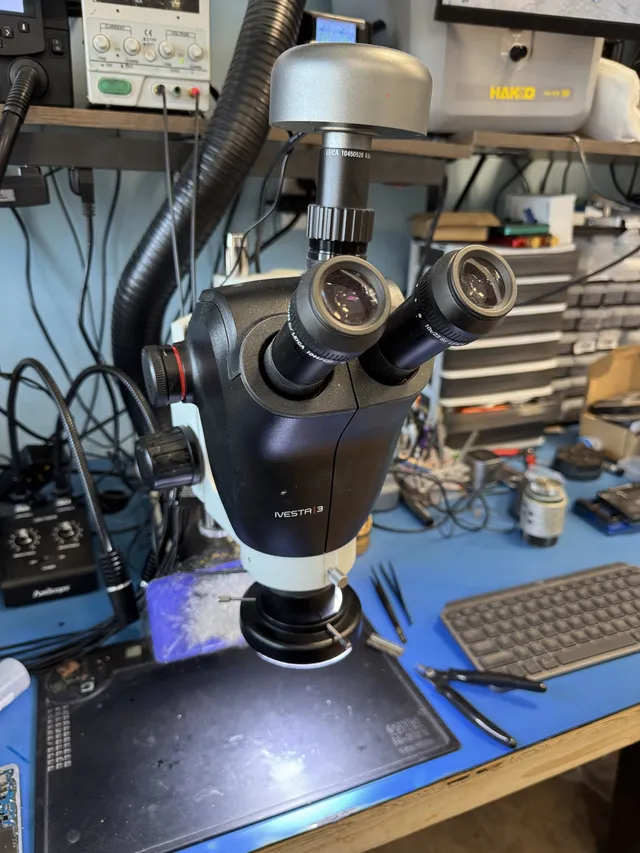
When the storage is built into your MacBook, we start with its original board. We try to get it working just well enough to read your files. If the board is beyond repair, we may be able to move your working chips to a matching board and unlock the files there.
T2 chip data recovery and Apple Silicon
On Intel MacBooks from 2018 to 2020, a security chip called the T2 holds the key to your files. Apple Silicon MacBooks, starting with the M1, keep that key in the processor that runs the Mac. In both, the key stays inside a protected part of the chip called the Secure Enclave.
The files on the storage chips stay encrypted even when FileVault, the Mac's password lock, is turned off. If we read the storage chips on their own, a method called chip-off recovery, all we see is scrambled data. On a Mac that won't start, recovery software has no way to use the key.
From your first quote to getting your files back
-
Bring or mail your Mac
Get in touch for a free quote before you bring your Mac to the counter or put it in the mail.
-
Find out what failed
The $100 diagnostic tells us what failed and whether the processor (CPU) and storage chips still work. We'll give you the price for recovery, and you decide whether we go ahead.
-
Repair the original board
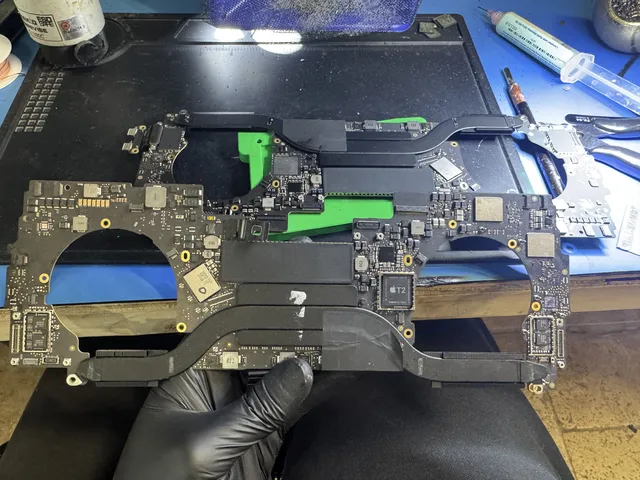
We repair only what the Mac needs to read your files, which saves time and keeps the cost down. Under the microscope, we might replace a tiny power switch or mend a connection a spill has eaten through.
-
Move the chips if the board is beyond repair
We find a working board from the same Mac model and match the board version exactly. With your approval, we move your original processor or T2 chip, the chips that store your files and the small chips that hold your settings together onto that board. Those original chips still need to work for us to unlock the files.
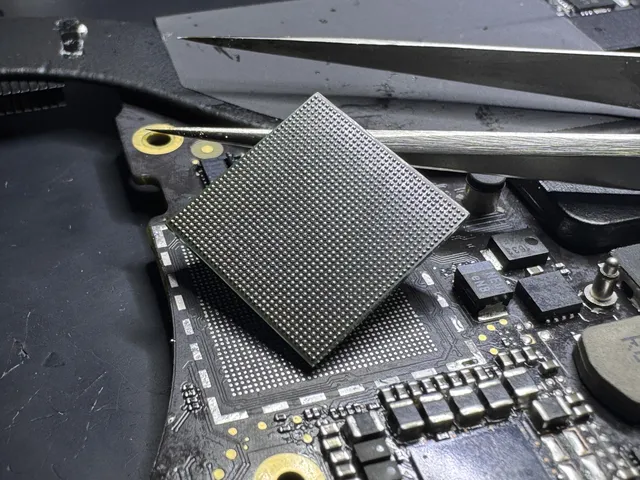
This MacBook's original T2 chip holds the encryption key we need to read the customer's files. That's why it goes with the storage chips. -
Unlock your files
Once your Mac's chip can read the storage again, we use your login password or FileVault recovery key to unlock the files.
-
Return your recovered files
We copy the files we've recovered onto a new drive. You can pick it up at our counter or have us mail it to you.
What should I have ready?
Have your Mac and sign-in information handy, and think about which files you'd like us to look for. You can leave figuring out what broke to us.
- Your password or FileVault recovery key
The password we need is the one you use to sign in to this Mac. If you've forgotten it, look for the recovery key you may have written down when you set up FileVault.
- Your Mac or its original board
You can send the whole MacBook or iMac. If someone has already taken out the original logic board and the storage is on it, you can send just the board.
- What happened and which files matter most
Tell us which pictures or folders you want back and what you've tried so far. It helps to know about a check in Recovery Mode, a restore or a visit to the Apple Store.
What might have failed inside my MacBook?
We find out during the diagnostic. Two MacBooks can look equally dead from the outside, even if one needs a power switch and the other needs its chips moved to a working board. That's why we check yours before we quote the recovery price.
| Problem or model | What you might notice | How we get to the files | Price |
|---|---|---|---|
| Power failure on the board | Won't turn on or charge | Repair the power circuit so the Mac can read its storage | $1,500 - $3,500+ |
| Corrosion from a spill | Stops working during or after a spill | Clean and repair the corroded parts so the Mac's own chip can read the files | $1,500 - $3,500+ |
| Board beyond repair | Won't turn on, and testing shows the board is too badly damaged to repair | Move the original processor or T2 chip, along with the storage and settings chips, to a matching board | $3,500 |
| Disk locked by FileVault | Asks for your FileVault password at startup or shows the disk as locked | Use your login password or recovery key to unlock the disk | $1,500 - $3,500+ |
| MacBook Pro or MacBook Air (2013 to 2015) | Won't start, or the internal drive doesn't appear | Take out the storage card and read it with an adapter | $1,000 - $3,000+ |
| Older MacBook Pro without a Retina screen | Your MacBook won’t start | We take out the standard SATA hard drive or SSD to read your files directly | $1,000 - $3,000+ |
If you have an M-series Mac, these prices apply only if its processor and storage chips still work. Here's how we tell whether your files can be recovered.
How does my MacBook model affect data recovery?
The model and year tell us whether we can take out the storage card or need to work on the original board to reach your files.
MacBook Pro data recovery
Whether your Pro is a 13-inch, 14-inch or 16-inch model, the year helps us identify the storage. Models from 2013 to 2015 have a removable card. In 2016 and 2017, only the 13-inch Pro without a Touch Bar (the touch strip above the keyboard) kept the removable card. The other Pros from those years have storage soldered to the board.
Intel Pros from 2018 to 2020 keep the key to your files in the T2 security chip. On Apple Silicon Pros, which arrived in late 2020, that key is in the M-series processor.
MacBook Air data recovery
If you have a MacBook Air from 2013 to 2015, we can take out the storage card to read it. Intel Airs from 2018 to 2020 use the T2 chip to unlock their built-in storage. Starting with the MacBook Air M1 in late 2020, the main processor holds the key.
iMac, Mac mini, Mac Studio and Mac Pro data recovery
On recent iMac, Mac mini, Mac Studio and Mac Pro models, we work on the original board just as we do on a newer MacBook. It holds both the storage chips and the chip that unlocks the files. If your iMac has that kind of storage, you can send us the whole computer or just its original board.
If your older iMac has a Fusion Drive, we need both parts. The small solid-state drive (SSD) and the hard drive act as one, so we read each to put your files back together.
Can I get the files back from my MacBook?
Your files may still be there even if the MacBook looks completely dead. We test its processor and storage chips to find out whether we can read what you've saved.
When your files may still be there
- The MacBook won't turn on
A failed power switch can leave the screen dark even when the storage is fine. Repairing that part may let us copy the work you saved.
- A spill reached the board
If the chips that store and unlock your files survived the spill, repairing the damaged connections around them may give us access again.
- The Mac keeps restarting
A failed update can leave the Mac restarting over and over. If the storage chips are healthy, the files you saved before the update may still be there.
How much does MacBook data recovery cost?
$100 diagnostic, credited toward a successful recovery.
The $100 diagnostic is non-refundable once diagnostics start, and donor drives or replacement parts you approve are non-refundable once ordered, even if recovery fails.
For an older MacBook with a removable drive, recovery runs $1,000 to $3,000+. For storage that's soldered to the board or locked with FileVault, it's $1,500 to $3,500+. You can read more about how we work out your recovery quote.
- See what we recovered
We'll email you photos showing what we got back from your Mac before the recovery fee is due.
- Payment and financing
You can pay by card, Apple Pay or PayPal. If you qualify, financing through Affirm lets you spread out the cost.
| Recovery work | Price |
|---|---|
| MacBook / Laptop | $1,500 - $3,500+ |
| Removable Drive Laptops | $1,000 - $3,000+ |
| Soldered / Hardware-Encrypted Storage | $1,500 - $3,500+ |
| BitLocker / FileVault Volumes | $1,500 - $3,500+ |
| CPU Swap (Severe Cases) | $3,500 |
| Service option | Time estimate | Added cost |
|---|---|---|
| Standard diagnostic | Starts in about 4–6 weeks, then recovery time varies by case | No surcharge |
| Priority | Assessment starts within 5–7 days | +$250 |
| Urgent | Assessment starts within 1–2 days | +$500 |
| Emergency | Assessment starts same-day | +$1,000 |
Our full data recovery price list includes the terms for donor drives and replacement parts you approve.
What will I get back with my MacBook?
We return your original MacBook along with a new drive that holds the files we recovered.
- Your files on a new drive
We can mail the external drive or USB flash drive to you, or you can pick it up at our Lincroft counter.
- A spare copy for two weeks
We keep a copy offline for two weeks in case your drive gets lost in the mail. We delete it after that, or sooner if you ask.
- Back up the day your drive arrives
Follow the 3-2-1 backup rule and keep your files in three places. If you bring the drive we gave you back for recovery after two weeks, the full recovery price applies.
- Your original MacBook
We repair the board as far as we need to read your files. If you'd like to use the MacBook again for everyday work, MacBook repair is a separate service.
MacBooks we've recovered files from
Customers brought these MacBooks to our Lincroft counter or mailed them in from out of state. Several wouldn't turn on or charge when they arrived.
- MacBook Pro Will not turn on or charge · Data recovered Mailed from Texas 2026
- MacBook Air Will not turn on or charge · Data recovered Mailed from California 2026
- MacBook Pro Will not turn on or charge · Data recovered Mailed from Florida 2026
- MacBook Data recovered Mailed from California 2025
- MacBook Pro Data recovered At our lab's counter in Lincroft 2025
- MacBook Air Data recovered At our lab's counter in Lincroft 2024
These cases come from our ticket system, BenchKey, the shop software we built and run our lab on, with names, contact details and addresses left out. How we publish cases
Need a MacBook repair or data recovery for another device?
If you want to use the MacBook again, we offer MacBook repair. If the files you need are on another device, start with the service for the device that holds them.
I want my MacBook fixed
Choose MacBook repair if you'd like us to get the computer working again for everyday use.
My files are on a PC laptop
If the drive is still inside your Windows or other PC laptop, our laptop data recovery service is the place to start.
My files are on a separate SSD
We can work directly on a solid-state drive (SSD) you've taken out of a PC or used as an external drive.
My backup drive failed too
Hard drive recovery covers external hard drives, including one you've been using for Time Machine backups.
My photos are on a phone or memory card
Choose the device where you saved the photos. You'll find help for iPhones and camera memory cards in our list of recovery services.
Where can I mail or bring my MacBook?
You can bring your MacBook to our counter in Lincroft, New Jersey, or mail it to us at the same address. Either way, our team works on it here.
Fill out the mail-in recovery form and print the packing slip for your box. If you're shipping from the contiguous US, you can get your free UPS 2nd Day Air label as soon as you finish the form.
If you're sending your Mac from Alaska, Hawaii, Puerto Rico or another island, you'll arrange and pay for shipping.
- Address
- 644 Newman Springs Road, Suite A, Lincroft, NJ 07738
- Hours
- Mon-Fri 10am to 6pm Eastern
- Phone
- (732) 933-7717
Northeast
Southeast
Midwest
Questions about Mac data recovery
If Apple replaces my MacBook's logic board, what happens to my files?
On a newer MacBook, your files stay on the board Apple takes out. Have anything you need copied from the original board before you agree to the repair.
Can I get deleted files back on my Mac?
Yes, if your Mac hasn’t cleared the space yet. Stop using it now. The TRIM command tells your Mac to clear that space soon after deletion. If FileVault is on, we’ll need your password or recovery key. Your iCloud account or work IT team may have the key. Our $100 diagnostic tells you what’s possible before you pay for recovery.
Can I recover files from an erased MacBook, even if I used Find My?
Once an Apple silicon or T2 Mac finishes erasing, you’ll need an earlier copy to get your files back. The erase removes the keys that unlock the files on that Mac, even if you used Find My. We’d look for a copy in your Time Machine backup or in iCloud.
Can Time Machine or a Mac snapshot help me get my files back?
Yes. Check your Time Machine backup and iCloud first for a copy of what you need. Your Mac's file system (APFS) also saves earlier views of your files called snapshots. A snapshot can help if the drive that holds it still works.
Why can MacBook data recovery cost more than recovery from a PC laptop?
A newer MacBook keeps the storage chips and the key to your files on its main board, so we may need to repair the board to read the files. On a PC laptop with a removable SSD, we can take the drive out and work on it directly.
Should I revive or restore my Mac if I want to keep my files?
On an Apple silicon Mac, choose Revive to keep your files, since Restore erases everything. A revive refreshes the firmware and can bring your Mac back even if it looks completely dead. You do this in rescue mode (DFU) with a second Mac and a cable. Read the wording on that Mac’s screen before you click.
Mac data recovery guides
If your MacBook Pro won't start, begin with the guide for a broken MacBook Pro. For a closer look at how your Mac keeps its files locked, read the guides on Apple Silicon and FileVault.
A dead or broken Mac
Apple Silicon, T2 and FileVault
Tell us what you need back from your MacBook
When you ask for a quote, tell us what you noticed and which files matter most to you. If all you know is that your Mac won't turn on and it holds the only copy of your family photos, that's enough to get started.