Coffee Spilled on MacBook Keyboard? Save Your Data Before the Repair Shop
Our founder and lead technician, Joseph Montanti, handles cases personally.
If you spilled coffee on your MacBook, shut it down and disconnect the charger and accessories. Coffee inside the case can damage connections and circuitry even while the screen still works. Your files may survive the spill, but on an Apple silicon or T2-equipped Mac, recovering them depends on keeping the original storage and its encryption hardware usable.
On this page
What to do after the coffee spill
- Shut down the Mac. If it will not shut down normally, hold the power button or Touch ID button for up to ten seconds, until it turns off. Apple documents this forced-shutdown action.
- Disconnect MagSafe or USB-C power, the dock, external displays and other attached devices. Move the spilled drink away from the computer.
- Blot visible coffee from the exterior with a soft, lint-free cloth. Avoid pushing liquid into openings; Apple's cleaning guidance calls for unplugged power and keeping moisture out of the case.
- Arrange an inspection for liquid that entered the Mac, while checking existing backups from another device.
Leave the spilled-on Mac off until it is assessed. Reconnecting a charger or trying another startup can energize wet components; a day of drying is not a clearance to test it. Keep rice, hair dryers, compressed air and poured-in cleaners away from the laptop.
A keyboard spill needs more than wiping the keys. Apple recommends prompt service when liquid gets inside a product. Its Mac liquid-alert guidance also explains that charging through a wet USB-C connection can corrode the pins and cause permanent damage.
The internal battery remains inside the computer after you unplug the charger. Removing external power is useful, but it does not physically disconnect that battery. Opening the case and working around the battery and board belong with the inspection.
Why a dry keyboard can still need attention
Coffee can leave residue after its water evaporates. Added sugar or milk makes that residue more noticeable on keys and around openings. A dry-looking keyboard therefore needs a different judgment from a clean internal board: surface drying has not removed whatever reached the electronics.
The immediate electrical problem is liquid where separate contacts should remain isolated. Corrosion can then damage those contacts. Apple describes that mechanism for wet charging ports; liquid inside the case also needs inspection for the affected connections. The location of the spill matters more than a simple rule that one drink is always worse than another.
If the MacBook worked after the spill and failed later, contamination or corrosion may have interrupted a connection that was still working at first. A sticky key may be the most visible problem, while liquid elsewhere is affecting power or communication. Inspection establishes which areas need attention before further use.
The same applies if it still works three days later. Liquid that entered the case merits inspection even when the Mac has not yet stopped running.
Check iCloud and Time Machine on another device
A current copy elsewhere can change the whole decision. If your photos and projects are already available, you can arrange hardware service without needing the damaged Mac to supply them. If a backup stops before the latest work, recovery can focus on the missing period.
iCloud files and photos
- On another computer, sign in to your account at iCloud.com.
- Open iCloud Drive and Photos. Look for the specific documents, dates and albums you need, including the newest work.
- Download copies to that computer or another storage device. Apple's iCloud archive instructions explain how to save files, photos and other synced information.
Having iCloud enabled does not put every folder and application project there. Photos stored only in the local Photos library, documents outside synced folders, Downloads and local project files may all depend on the damaged Mac. Mail and Notes may have copies on their provider's servers. Check the contents rather than assuming an account with plenty of cloud space contains everything. A video project can also refer to media on an external drive. Recovering the project file and locating its source media are separate parts of getting that work usable again.
A Time Machine backup
An existing Time Machine disk can provide the user account, applications and files captured in its backups. On a working replacement Mac, Apple's Migration Assistant instructions let you choose that backup as the source. You can select an available backup date and the categories to transfer.
The useful comparison is between the latest backup and what you need today. A recent backup may have the project but miss edits made just before the coffee spill. An older one may still hold photos that are absent from iCloud. Open the recovered work on the working Mac before deciding the damaged machine has nothing else you need.
Choosing between device service and data recovery
A device repair gets the computer usable again. Data recovery needs access to the files on its original storage. Those goals can overlap when repairing a board restores access, but a replacement board or replacement computer does not bring the old files with it.
Apple's service-preparation page says service may require erasing or replacing the startup disk. If the missing files are the reason you need help, ask for a recovery decision before approving work that discards or erases the original storage. Keep the original hardware available while that decision is made.
Liquid damage is excluded from Apple's limited warranty and AppleCare Protection Plan coverage. AppleCare+ for Mac can cover accidental spills under its terms. Use the plan-purchase-date selector for your agreement; coverage for the device does not include recovery of your stored data.
| Coffee-spill recovery category | Cost |
|---|---|
| Light spill, clean recovery | $1,500 - $3,500+ |
| Medium spill, controller damage | $1,500 - $3,500+ |
| Heavy spill, multiple components | $1,500 - $3,500+ |
| Severe board damage | $1,500 - $3,500+ |
The MacBook / Laptop recovery price applies to each spill condition. MDrepairs' $100 diagnostic is credited toward successful recovery, and you approve the estimate before recovery work starts. The data recovery pricing page explains the published terms.
The standard recovery estimate is 4–6 weeks and can vary with the damage and parts involved. The turnaround explanation distinguishes assessment priority from the time needed to finish recovering files.
Why the original Mac board matters
On Macs with Apple silicon or the T2 Security Chip, internal storage uses encryption tied to the machine's security hardware. Apple's FileVault architecture explains that the internal volume remains encrypted even when FileVault is turned off. Turning FileVault on adds protection involving your credentials.
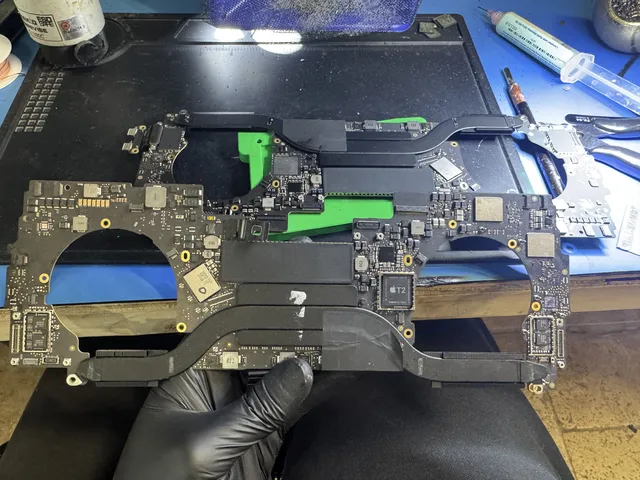
This changes the recovery job. Moving the memory chips to another computer does not supply the original machine's hardware keys. Repairing the original board can preserve the path through that hardware to the files. If the security hardware needed to use the keys is destroyed, intact-looking memory can still hold inaccessible encrypted data.
Older Intel Macs without T2 use a different storage arrangement. FileVault still matters if it was enabled, but those machines do not use the same T2 or Apple silicon hardware binding. The exact model determines which storage and access path is available.
You can identify the model without starting the wet computer. Apple lists the underside markings, original packaging and your account's device list as sources of the model or serial number. That separates, for example, an older Intel MacBook from an Apple silicon model before anyone selects a recovery method.
A working login password or FileVault recovery key should be kept available for the restored machine. An encrypted volume may become readable after hardware repair and still require that credential to open. Repairing power does not remove the encryption.
Copying files after the Mac is stable
Once the liquid damage has been assessed and the Mac is stable enough to use, copying the files comes before software repairs or reinstalling macOS. A Mac that reaches its desktop can provide ordinary file access. An Apple silicon Mac that reaches macOS Recovery may offer another route through Share Disk.
Apple's Share Disk instructions describe transferring files to another Mac over a cable. In Recovery, Utilities > Share Disk makes a selected volume available. On the second Mac, Finder's Network view connects to the shared Mac so its accessible files can be copied.
The broken MacBook recovery guide covers the differences between startup, storage and hardware faults. For a coffee spill, the useful recovery work is whatever restores the original machine's access long enough to retrieve the missing files.
Get help with data recovery
Bring your device to our Lincroft lab during opening hours, or mail it in.
How to mail your deviceThe $100 diagnostic is non-refundable once diagnostics start, and donor drives or replacement parts you approve are non-refundable once ordered, even if recovery fails.
Published by MDrepairs
MDrepairs is a data recovery and electronics repair lab in Lincroft, New Jersey. Our founder and lead technician Joseph Montanti films real cases for our YouTube channel, showing tools, repair steps and recovery outcomes.
Keep reading
- Soldered Laptop SSD? Your Recovery Options Explained
- iMac Fusion Drive Failing? Recovery Is Trickier
- Apple Silicon Data Recovery: What M-Series Changed