MacBook Dead? How to Recover Your Files
Our founder and lead technician, Joseph Montanti, handles cases personally.
Dead MacBooks hurt in a specific way, because Apple's answer at the Genius Bar is usually a logic board replacement, and a board replacement means your files go in the recycling with the old board. If there's no Time Machine backup and iCloud wasn't syncing everything, this guide is your map: what to check first, what's realistically DIY, and what a board-level lab does when nothing else works.
On this page
First: make sure it's actually dead
A surprising share of "dead" MacBooks aren't. Run this list before assuming the worst:
Still nothing? Now it matters how it died. "Just stopped turning on one day" points at board or power faults. Liquid means the corrosion clock is running (more below). And if it died during a macOS update, that's often a recoverable software state rather than hardware at all; our guide to a Mac that won't turn on covers the startup-sequence rabbit holes in more detail.
Why dead-Mac recovery is different from dead-PC recovery
On an old MacBook (through roughly 2015) you could pull the drive, drop it in an enclosure, and copy your files from any other computer. Those days are over, and it's worth understanding what replaced them:
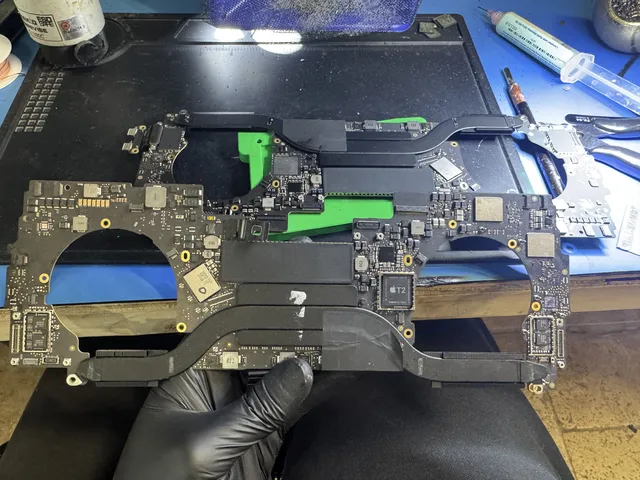
The storage is part of the motherboard. Every Apple Silicon MacBook (M1 through the current M-series) and every T2-era Intel MacBook has NAND storage chips soldered directly to the logic board. There is no drive to pull. If the board won't run, the storage is a locked safe welded into a broken building.
Everything is encrypted, always. Even without FileVault turned on, these Macs encrypt all user data with keys held inside the Secure Enclave on that specific board. Unsoldering the NAND chips and reading them in a lab gets you perfectly preserved ciphertext, which is to say: nothing. The original board has to boot (or at least its security chip has to participate) for the data to come out. This single fact shapes every recovery decision. Our Apple Silicon recovery guide goes deeper on the architecture.
The DIY options, ranked by how alive your Mac is
If it boots sometimes, or partially: use that window now. A MacBook that boots one time in five, or boots and panics after ten minutes, is offering you a rescue window that will not stay open. Boot it, plug in an external drive, and copy documents and photos first, apps never. Don't update, don't "see if it happens again," don't diagnose. Copy.
Share Disk / Target Disk Mode. If the Mac powers on but won't fully boot macOS, connect it to a second Mac with a suitable cable. On Apple Silicon: boot into recovery options (hold power), use Share Disk. On Intel: Target Disk Mode (hold T at startup). The dead-ish Mac's drive appears on the healthy Mac, and you copy everything off. You'll need your password, and FileVault will ask to be unlocked. This is the single most useful trick for a Mac that's sick but not gone.
DFU revive from a second Mac (careful, read this twice). Apple Configurator on another Mac can REVIVE a bricked Apple Silicon/T2 Mac's firmware without touching data. But the neighboring option, RESTORE, wipes the Mac completely. If you attempt this route, revive only. If the words blur together at 1 a.m., step away and let a professional drive.
What the lab does when the Mac is truly dead
Board-level MacBook recovery is the same discipline as our phone work, on a bigger canvas. The logic board comes out, goes under the microscope and thermal camera, and gets diagnosed by its power behavior: which rails come up, what the current draw does, what's shorted, what's silent.
Common findings: a shorted capacitor pinning a power rail to ground, corrosion eating traces under chips (liquid Macs), a failed power-management chip, or physical trauma from a drop. The repair is microsurgery: failed components replaced, traces rebuilt, corrosion cleaned, and on layered boards, deeper rework. The goal is not a MacBook you'll use for years. The goal is one clean boot, because one boot plus your password equals a complete extraction of everything: documents, photo libraries, messages, keychains.
When the board is too far gone around a healthy processor, the endgame mirrors phone recovery: moving the critical silicon to a working donor board so the Secure Enclave can do its part. It's demanding work with real limits (a shattered storage chip or destroyed Enclave is game over), but "dead MacBook" and "unrecoverable data" overlap far less than people fear. This is exactly the service on our MacBook data recovery page.
What to expect on cost and timeline
Dead-MacBook recovery is quoted by failure, not by model year. Simple power faults sit at the low end; liquid boards needing extensive rework and donor-board cases sit higher. You receive an estimate after diagnosis and approve it before recovery work begins; the $100 diagnostic is credited toward successful recovery and is nonrefundable once diagnostics start. Approved donor drives and replacement parts are nonrefundable once ordered, even if recovery fails. Our standard recovery estimate is 4–6 weeks and may vary by case. Mail-in works from anywhere in the country (padded box, no charger needed, note your password separately per our instructions), and it's how most of our Mac cases arrive; details on the mail-in recovery page.
One planning note: once your data is out, THEN decide the machine's fate with clear eyes. Sometimes the extraction repair also leaves the MacBook usable. Treat that as a bonus, not the plan, and put the files on two new homes before celebrating either way.
Frequently Asked Questions
Can files be recovered from a dead MacBook?
Usually, yes. The storage chips almost always survive whatever killed the machine. On modern Macs the storage is soldered and encrypted, so recovery means repairing the logic board enough to boot once, or in extreme cases donor-board work involving the original security chip. The files then come off complete through the normal encrypted path.
Can I remove the SSD from a dead MacBook and read it?
Only on older models (roughly 2015 and earlier) with removable SSDs. Every Apple Silicon MacBook and T2-era Intel MacBook has storage soldered to the board and encrypted by the Secure Enclave, so a removed chip reads as meaningless ciphertext. The board itself has to participate in the recovery.
Does Apple recover data from a dead MacBook?
No. Apple's repair path replaces the logic board, and your data lives on the old board. They'll suggest restoring from Time Machine or iCloud. If you have no backup, data recovery is a service Apple doesn't offer, and it needs to happen before any board-replacement repair.
My MacBook had a drink spilled on it and now it's dead. What are my odds?
Good, if you act fast and badly if you wait. Liquid rarely destroys the storage chips; it corrodes the power circuitry around them, and corrosion spreads for days after the spill. Don't charge it, don't test it, get it to a board-level lab quickly. Spill cases that arrive within days have excellent recovery rates.
How much does dead MacBook data recovery cost?
It depends on the failure: straightforward board faults at the lower end, extensive liquid damage or donor-board work higher. At MDrepairs, phone consultations are free; the diagnostic and any approved donor drives or replacement parts are subject to the payment terms above.
Should I try to fix a dead MacBook myself first?
Limit yourself to the safe list: known-good charger, force restart, external display check, and Share Disk or Target Disk Mode if it partially boots. Skip board-level YouTube surgery and skip "one more charge attempt" on liquid damage. The data's biggest enemy after the initial failure is well-meaning experimentation on a board that needed a microscope.
Get help with data recovery
Bring your device to our Lincroft lab during opening hours, or mail it in.
How to mail your deviceThe $100 diagnostic is non-refundable once diagnostics start, and donor drives or replacement parts you approve are non-refundable once ordered, even if recovery fails.
Published by MDrepairs
MDrepairs is a data recovery and electronics repair lab in Lincroft, New Jersey. Our founder and lead technician Joseph Montanti films real cases for our YouTube channel, showing tools, repair steps and recovery outcomes.
Keep reading
- Soldered Laptop SSD? Your Recovery Options Explained
- iMac Fusion Drive Failing? Recovery Is Trickier
- Apple Silicon Data Recovery: What M-Series Changed