Apple Silicon Data Recovery: What M-Series Changed
Our founder and lead technician, Joseph Montanti, handles cases personally.
For fifteen years, a dead Mac was a minor data problem: pull the drive, done. Apple Silicon ended that era completely, and a lot of advice online hasn't caught up. This is what changed, what a lab can still do, and the two habits that make all of it irrelevant.
On this page
What actually changed, era by era
| Era | Data recovery reality |
|---|---|
| Intel Macs with removable SSDs (through ~2015) | Pull the drive, read it anywhere. Easy. |
| Intel with soldered SSD (2016-2017) | Touch Bar MacBook Pros had a special recovery connector for accessing their soldered storage with a compatible tool. |
| Intel + T2 chip (2018-2020) | Recovery connector removed, encryption always on via T2. Data requires the original board alive. |
| Apple Silicon, M1 to today | Storage controller and encryption keys live inside the main chip. Original board must boot, period. |
The design isn't malice; it's security engineering. Encryption-at-rest with hardware keys means a stolen MacBook is a brick to the thief. The cost is that "the drive" no longer exists as a separate, rescuable thing. Your data and that specific logic board are married for life.
Why "just read the chips" doesn't work anymore
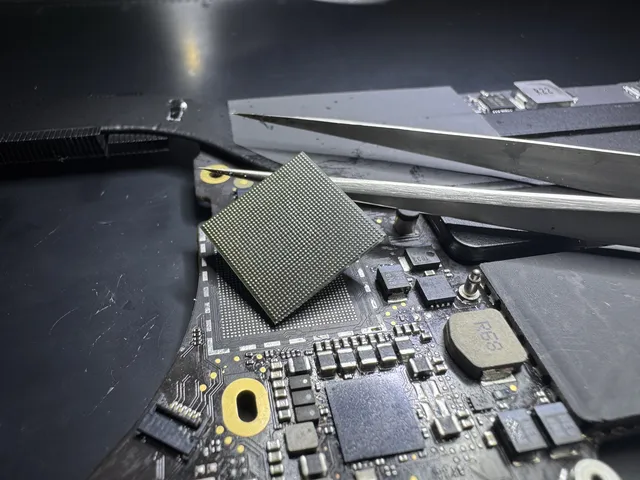
Desolder the NAND chips from a dead M-series board and put them in a reader, and you get perfect, pristine, useless ciphertext. Every byte was encrypted on its way to the chips by the Secure Enclave, using keys generated inside that chip at the factory, keys that never leave it and cannot be extracted. This is true even if you never turned FileVault on: Apple Silicon encrypts the volume by hardware default. FileVault just adds your password as a second lock on the same vault (details in our FileVault recovery guide).
So all recovery on these machines reduces to one goal: make the original board run again, even barely, even once.
What a lab can still do (more than you'd think)
Here's the encouraging part. "The board must live" is a repair problem, and board-level repair is a mature craft.
- Liquid damage. The most common dead-MacBook story, and often very recoverable. Corrosion gets cleaned ultrasonically, damaged power components get replaced, and the board frequently comes back enough to boot. The enemy is time: corrosion spreads daily, so a wet Mac should go to a bench fast, not sit in a drawer for a month.
- Power faults. Dead charging circuits, failed power management, a shorted capacitor pulling a rail down: classic microsoldering fixes that bring the whole machine, and therefore the data, back.
- DFU revive and restore. Apple Silicon Macs have a firmware-level rescue mode via a second Mac and a cable. A "revive" refreshes the firmware without erasing data and rescues machines that look completely dead but are actually firmware-wedged. (A "restore" erases everything; the wording matters, check twice before clicking.)
- Share Disk / Migration. A Mac that boots but has a smashed screen or dead keyboard isn't a recovery case at all: Share Disk (the Apple Silicon replacement for Target Disk Mode) or Migration Assistant moves everything to another Mac.
- External drives are normal recoveries. None of this applies to your external SSDs, Time Machine drives, or SD cards. Those recover the traditional ways.
The same logic explains why buying an identical donor MacBook and swapping boards gets a working laptop but not your files: the data rode on the old board. Any recovery plan that doesn't start with "revive the original board" isn't a data plan at all.
What honestly can't be done
Radical honesty is the house policy, so, plainly:
- If the main chip or Secure Enclave is physically destroyed (crushed, burned through, delaminated), the keys are gone and the data is mathematically unrecoverable. Not hard: impossible, for everyone, including Apple.
- Forgotten password with FileVault and no recovery key on a working machine: the encryption is doing its job against you. No lab bypasses it.
- Apple's repair pipeline doesn't do data. Official repair usually means board replacement, and your old board (with your data) goes into their parts stream. If the data matters, recover before you RMA, or explicitly ask for the old board back where offered.
- Some boards are too far gone. A board that took 90 volts from a knockoff charger across every rail can be beyond economic revival. We tell you that at the diagnostic stage, not after billing you for attempts.
The owner's playbook when an Apple Silicon Mac dies
Frequently Asked Questions
Can data be recovered from a dead M1, M2, M3 or M4 MacBook?
Often, yes, by repairing the original logic board enough to boot or enter a data-transfer mode. Liquid damage and power-circuit failures are the most recoverable categories. What's off the table is recovering from the storage chips independently: they're encrypted with keys sealed inside that board's Secure Enclave, so the board itself is the only door.
Does Apple recover data from dead MacBooks?
No. Apple's repair process replaces hardware; data recovery is explicitly not offered, and a board swap means your data leaves with the old board. If the files matter, get recovery done first at a board-level lab, then let anyone you like do the repair afterward.
Is data recoverable if I never turned on FileVault?
The hardware encrypts everything regardless; FileVault only adds your password to the lock. Practically this changes nothing about dead-Mac recovery (the board must revive either way). On a revived board without FileVault, data comes off directly; with FileVault, you'll need your password or recovery key too.
What is DFU revive and will it erase my Mac?
DFU revive rewrites the Mac's low-level firmware using a second Mac and a USB cable, and it preserves your data. It rescues Apple Silicon Macs bricked by failed updates or firmware corruption. Its sibling option, DFU restore, erases the machine completely. The buttons live next to each other, so read carefully, and when in doubt, ask before clicking.
Can MDrepairs recover a MacBook that another shop called unrecoverable?
Sometimes. "Unrecoverable" from a swap-focused shop often means "we don't do board-level work," not "the board can't live again." Second opinions on Apple Silicon are legitimate as long as the previous shop didn't cook the board trying. Send us the story on a free phone consult and we'll give you honest odds before you ship anything.
Get help with data recovery
Bring your device to our Lincroft lab during opening hours, or mail it in.
How to mail your deviceThe $100 diagnostic is non-refundable once diagnostics start, and donor drives or replacement parts you approve are non-refundable once ordered, even if recovery fails.
Published by MDrepairs
MDrepairs is a data recovery and electronics repair lab in Lincroft, New Jersey. Our founder and lead technician Joseph Montanti films real cases for our YouTube channel, showing tools, repair steps and recovery outcomes.
Keep reading
- Soldered Laptop SSD? Your Recovery Options Explained
- iMac Fusion Drive Failing? Recovery Is Trickier
- MacBook Dead? How to Recover Your Files