
Recovery in progress on the bench
Drives arrive from all 50 states
the queue moves every day
345 Google Reviews · 2M+ Followers · Nationwide Service
About this recovery service
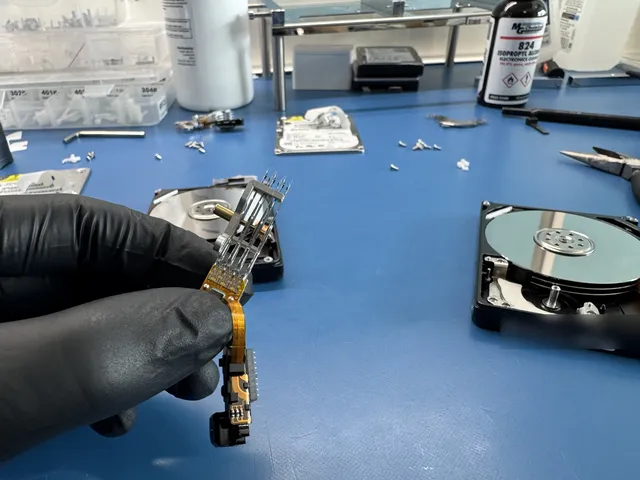
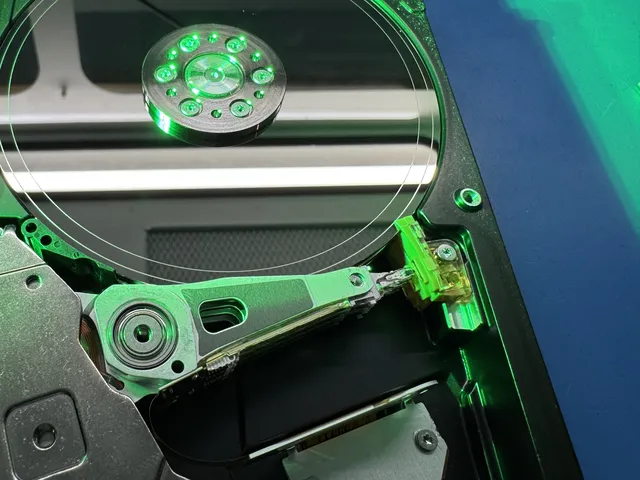
Real devices, real outcomes. Details generalized for customer privacy.
Recovery in progress on the bench
Drives arrive from all 50 states
the queue moves every day
usb - Flip Camera
recovery requested
added to the engineer's queue
iPad Pro A2014 Water Damage Diagnostic
recovered
Data recovered
Phone dropped in sink full of water
dropped, not spinning up
data recovered
Dell tower
Hacked. Needs full wipe. also left 2 hard drives to ,make sure there's
Data recovered
iPhone XR Water Damage Diagnostic
on the bench
currently being worked on
Dell tower
Hacked. Needs full wipe. also left 2 hard drives to ,make sure there's
Data recovered
RAID 1 Recovery
array failure
data recovered
WD My Passport - 1 TB
recovery requested
added to the engineer's queue
Dropped My Hard Drive
dropped, not spinning up
data recovered
Western Digital - WD20EZRZ - 2 TB
recovery requested
added to the engineer's queue
iPhone 8 Home Button Triple Clicking
on the bench
currently being worked on
Samsung A35 5G
screen may have gotten liquid damage
Data recovered
Seagate - Seagate Mobile HDD / ST1000LM035 - 1 TB
recovery requested
added to the engineer's queue
PS5
Dropped. Beeping and turns on but does not display on screen. Module c
Data recovered
Next spot in the queue
Free UPS 2nd Day Air label (contiguous US), both ways
yours could be next
MDrepairs is a professional data recovery lab - and we prove it on camera. Our lead technician Joseph Montanti documents real recovery cases from diagnosis to data delivery. Over 2 million followers across YouTube and social media watch us recover data from hard drives, phones, SSDs, and more that other labs couldn't.
The people we help


 AT&T
 Marriott


 Tennessee Titans







Pick your device. You'll see what might be wrong, what to avoid, and whether it's urgent.
Mechanical - power it OFF now
Mechanical drives fail loudly (clicking, beeping) or silently (not detected). Either way the rule is the same: stop powering it on. Repeatedly powering on the drive can damage the platters and make your files unreadable.
Mechanical - power it OFF now
SSDs go from fine to invisible with no warning - controller and firmware faults, not worn-out chips, cause most of it. The data is usually intact in the NAND and comes out with controller-level tooling.
Serious - stop using it
Photos and messages live in one storage chip that survives most phone deaths. Board-level repair gets it talking long enough to pull everything - even for phones other shops declared dead.
Serious - stop using it
Spilled coffee, dead board, won't boot - the drive or the soldered storage inside typically survives. We pull the data directly, including from Macs with storage soldered to the logic board.
Serious - stop using it
Flash media fails at the connector or the controller; the memory chip itself usually survives. Chip-off recovery reads it directly. Stop reformatting it - "do you want to format this disk" is a trap.
Mechanical - power it OFF now
A degraded RAID with your business on it has one rule: no rebuilds, no forced re-syncs, no swapping disks to "see." A failed rebuild overwrites parity and turns a one-disk problem into a full-array loss. Image first, reconstruct second.
Data recovery pricing depends on the device type and severity of the failure. Simple logical issues like deleted files or corrupted partitions cost less, while mechanical failures that require donor parts and work in a laminar flow cabinet are more involved.
A $100 diagnostic evaluation - a thorough, hands-on assessment using professional tools, not a quick visual check. If you choose to proceed, the diagnostic fee is applied toward your recovery cost. If we can't recover your data, you don't pay for the recovery.
Fill out the Get a Quote form for a more accurate estimate based on your specific situation.
Final price confirmed after diagnostic - no surprises.
We diagnose your device for $100 to find out what it would take to reach your files. That diagnostic fee goes toward the price of a successful recovery. We give you an estimate based on what we found. You get to think it over, and we start the recovery only if you approve it. If we can't get any files back, there's no recovery fee.
Pricing tiers reflect the technical complexity of each recovery, not the amount of data or drive capacity. Simple logical issues like accidental deletion or file system corruption are our most economical tier. For mechanical failures that require head swaps, platter transplants, or motor replacements, the price depends on what we find during the diagnostic. We use those findings to estimate the cost of complex recoveries involving extensive physical damage or multiple failure points. If we can't get any files back, there's no recovery fee.
For Janesville professionals in Wisconsin's manufacturing and healthcare industries, time-sensitive cases can be prioritized through our rush service options. Emergency turnaround maintains the same transparent pricing approach - every cost is disclosed before work begins.
From clicking hard drives to water-damaged phones, our lab handles the toughest data loss cases nationwide. Click any device below for full details.
Clicking drives, head crashes, motor failures, corrupted firmware, formatted or deleted partitions. All brands: Seagate, WD, Toshiba, Hitachi.
Portable and desktop USB drives that won't mount, ask to be formatted, or are no longer recognized. LaCie, WD My Passport/My Book, Seagate Backup Plus, G-Drive, and Toshiba Canvio.
Multi-drive arrays, failed rebuilds, controller faults, and deleted volumes. RAID 0, 1, 5, 6, 10 and NAS units from Synology, QNAP, Drobo, and Buffalo.
Controller failures, firmware corruption, electrical damage, undetected drives. SATA SSD and NVMe M.2 chip-level extraction.
Liquid damage, dead motherboards, boot loops, secure storage. Board-level micro-soldering for all phone brands and models.
Water damage, boot loop, unresponsive screens, motherboard-level extraction. All models iPhone 6 through iPhone 17 Series.
Board-level recovery for Samsung Galaxy phones and tablets. Water damage, cracked screens, and motherboard-level data extraction.
Corrupted, water-damaged, or formatted memory cards from cameras, drones, dashcams, and phones. Chip-off extraction for severe cases.
Broken connectors, controller failures, chip-level corruption, and drives no longer recognized by any computer.
Failed internal drives, liquid spills, power surges, data extraction from non-booting laptops. Dell, HP, Lenovo, ASUS, Acer, MSI.
T2 and M-series chip recovery, soldered SSD extraction, logic board data access for MacBook Air and MacBook Pro. See our Apple computer data recovery guide.
Water damage, storage corruption, motherboard failure, cracked screen recovery. Board-level diagnostics for all iPad models.
Storage corruption, battery failure, water damage. All models: Classic, Touch, Nano, Shuffle. Apple logo stuck recovery.
Our most advanced service. Platter-level extraction from severely damaged drives with head crashes and platter scoring.
As a historic community, Janesville, WI relies on digital storage across every sector. Our data recovery team brings ISO-certified cleanroom expertise to Janesville customers facing drive failures, data corruption, or accidental deletion. We handle all storage device types - from legacy hard drives to modern NVMe SSDs, enterprise RAID configurations, network-attached storage, and portable flash media.
We work on hard drives with firmware zone issues or a buildup of bad blocks. Our engineers maintain parts inventory for Western Digital, Seagate, Toshiba, Samsung, and Hitachi drives. SSD recovery demands specialized knowledge of flash translation layers and controller firmware. We work on drives with Samsung, Crucial, Intel, and Kingston controllers.
Janesville businesses running RAID arrays receive expert-level reconstruction for RAID 0, 1, 5, 6, 10, and complex nested configurations. We also handle virtual machine recovery, surveillance system hard drives, and enterprise SAN/NAS platforms. From manufacturing to healthcare operations across Wisconsin, our recovery capabilities match your storage complexity.
From first contact to secure data return, we keep you informed at every step.
Call 732-933-7717 or get a free quote online. You generate a free prepaid UPS label on the mail-in form (contiguous US) so you can mail in your device safely from anywhere. Local NJ customers can drop off at our Lincroft lab.
The $100 diagnostic includes hands-on inspection, disassembly when needed, and board-level inspection to find out what it would take to reach your files. That diagnostic fee goes toward the price of a successful recovery.
We give you an estimate based on what we found. It includes the expected timeline. You get to think it over, and we start the recovery only if you approve it.
Our technicians use precision micro-soldering, controlled-environment platter work, firmware recovery tools, and chip-level extraction to recover your data safely.
Recovered data is transferred to a new external drive or flash drive and shipped by UPS. We keep an offline copy for two weeks, then delete it.
The standard wait is 4 to 6 weeks before we reach your device in line and start the diagnostic. Recovery takes additional time depending on what we find. If you need us sooner, we start the diagnostic within 5 to 7 days with Priority, within 1 to 2 days with Urgent, or the same day with Emergency. Rush service costs extra.
4–6 weeks
No surcharge
We usually start the diagnostic in 4–6 weeks. Recovery time after that depends on your case. Standard service has no rush surcharge.
5-7 days
+$250
Moves your device ahead of the standard diagnostic queue so assessment starts within 5–7 days. Confirm availability.
1-2 days
+$500
Moves your device ahead of the standard diagnostic queue so assessment starts within 1–2 days. Confirm availability.
Same Day
+$1,000
Moves your device ahead of the standard diagnostic queue so assessment starts same-day. Confirm availability.
We cover the UPS label and the trip home in the lower 48, except islands. We use UPS 2nd Day Air both ways. Shipping time is separate from the lab wait.
Recovery speed depends on device type and failure complexity
Accidental deletion, formatting, or file system corruption on hard drives, flash drives, and SD cards. No physical intervention needed - typically the quickest turnaround.
Firmware-based failures resolve faster. NAND chip-off extraction takes longer - individual chips must be desoldered, read, and reconstructed. Laptop and MacBook times depend on whether storage is accessible or requires logic board work.
iPhones, Samsung Galaxy devices, and other cell phones vary widely. Simple power circuit failures are quick; severe liquid damage requiring multiple component replacements and board cleaning takes longer.
Clicking hard drives, motor failures, and scratched platter cases require donor part sourcing, controlled-environment work, and careful imaging. Brand-specific parts for Seagate, WD, Toshiba, and Hitachi are typically in stock. See our guide on hard drive failure recovery.
Mail-in ships free 2nd-Day-Air UPS both ways (USA, excluding islands) - you print the prepaid label right on the mail-in form. Local New Jersey customers who drop off at our Lincroft lab skip transit entirely.
The standard wait is 4 to 6 weeks before we reach your device in line and start the diagnostic. How long the recovery itself takes still depends on what we find. If you approve the estimate, we do the recovery work and verify the files we get back before sending them to you.
When faster results are essential, our priority service completes most Janesville recoveries in 2 to 4 business days. Emergency cases receive round-the-clock engineering attention, with many recoveries completed in 24 to 48 hours. Janesville businesses in Wisconsin's manufacturing and healthcare sectors frequently choose priority or emergency service to minimize operational disruption.
Every Janesville, WI case includes a free prepaid shipping label (contiguous US) for sending your device to our lab. We ship recovered data back via tracked courier on your preferred media - external drive, USB, or encrypted cloud transfer. Status updates keep you informed throughout the recovery process.
Our $100 diagnostic is hours of hands-on work - and you get a detailed report whether you proceed or not.
$0 - but at what cost?
$100 - applied to your recovery if you proceed
Component-level examination under high magnification to identify burned, corroded, or damaged chips on the PCB.
Voltage and current testing across power circuits to identify shorts, failed regulators, and power delivery issues.
Industry-standard ACE Laboratory hardware for deep HDD/SSD diagnostics - firmware modules, SMART data, and sector mapping.
Professional micro-soldering equipment for mobile device chip-level inspection, NAND removal, and reballing.
Specialized firmware tools to identify corruption in service area modules, translator tables, and controller logic.
You receive a written assessment of the failure and recovery options with pricing.
Visit our lab
We cover the UPS label and the trip home in the lower 48, except islands. $100 diagnostic, credited toward a successful recovery. If we can't get any files back, there's no recovery fee.
Affirm financing, if eligibleWe've earned our reputation one recovery at a time - with full transparency, honest pricing, and results that speak for themselves.
Our YouTube channel documents real data recovery cases from start to finish - including failures. You can watch us work before you send your device. That transparency is why millions of people trust MDRepairs.
Our technicians perform precision micro-soldering, chip-level NAND extraction, and controlled-environment platter work. We recover data from devices that other shops return as "unrecoverable" - including complex scratched platter cases.
If we can't get any files back, there's no recovery fee. Before you pay that fee, you see a report showing which files we recovered. The $100 diagnostic is non-refundable once diagnostics start, and donor drives or replacement parts you approve are non-refundable once ordered, even if recovery fails. We give you an estimate based on what we found. You get to think it over, and we start the recovery only if you approve it.
Every device is tracked, cataloged, and stored securely from arrival to return. UPS 2nd Day Air is free both ways in the contiguous US. We delete our offline copy of your recovered files after two weeks.
The standard wait is 4 to 6 weeks before we reach your device in line and start the diagnostic. Recovery takes additional time depending on what we find. Rush surcharges advance diagnostic assessment start: Priority within 5–7 days (+$250), Urgent within 1–2 days (+$500), or Emergency same-day (+$1,000). Confirm availability. These windows do not promise completed diagnosis or recovery.
Based at 644 Newman Springs Road in Lincroft, NJ, we serve clients in all 50 states through our secure mail-in program. Free prepaid shipping (contiguous US). Get a quote or call 732-933-7717.
We use a laminar flow cabinet for open-drive work.
We diagnose your device for $100 to find out what it would take to reach your files. That diagnostic fee goes toward the price of a successful recovery. We give you an estimate based on what we found. You get to think it over, and we start the recovery only if you approve it. If you're mailing your device from Wisconsin, it goes straight to our lab in Lincroft, New Jersey.
Our 96% success rate on accepted cases reflects the quality of our engineering team and equipment. Janesville's pharmacies, optometry offices, and fitness centers trust us with sensitive data because our chain-of-custody documentation and privacy controls meet regulatory standards across Wisconsin's manufacturing and healthcare sectors.
We diagnose your device for $100 to find out what it would take to reach your files. That diagnostic fee goes toward the price of a successful recovery. If we can't get any files back, there's no recovery fee. We cover the UPS label and the trip home in the lower 48, except islands.
Data loss strikes without warning - and understanding the root cause is the first step toward successful recovery.
Spills, submersion, humidity, and condensation corrode circuits and short out components. Phones dropped in pools, laptops hit with coffee, and hard drives exposed to floods all suffer liquid intrusion. The key is to power off immediately and avoid drying with heat - rice doesn't help, and every hour of corrosion reduces recovery chances.
A dropped laptop or phone can knock read/write heads into the platter surface of a hard drive, crack internal circuit traces, or dislodge BGA solder connections on a phone motherboard. Even drops from desk height can be catastrophic for spinning hard drives. SSDs are more drop-resistant but still vulnerable to connector damage and cracked PCBs.
Lightning strikes, unstable power supplies, and faulty chargers send voltage spikes through circuits that burn out controller chips, TVS diodes, and power management ICs. We see this regularly in external Western Digital and Seagate drives plugged into unprotected power strips, as well as NVMe SSDs damaged by motherboard power delivery failures.
Hard drives have moving parts that wear out over time. After 3-5 years of regular use, head assemblies degrade, bearings develop play, and lubricant breaks down. This leads to the clicking, grinding, and eventual failure that makes hard drive data recovery our most common service. SSDs also degrade as NAND flash cells wear from write cycles, though they typically last longer under normal consumer use.
Accidentally deleting files, formatting the wrong drive, or running a clean install over important data is more common than most people think. In many cases, the data still exists on the storage media until it's overwritten - making quick action critical. We recover deleted files from flash drives, SD cards, hard drives, and SSDs. Stop using the device to avoid overwriting the files.
Drives rely on internal firmware to manage where data is stored. When firmware corrupts - from interrupted writes, manufacturing defects, or failed updates - the drive may spin up but refuse to be detected, show the wrong capacity, or hang during initialization. Firmware recovery requires specialized tools like the PC-3000 to access and repair the drive's internal service area without touching your data.
What you do immediately after discovering data loss has a major impact on whether your files can be recovered. The single most important rule is this: stop using the device. Every operation - every boot attempt, every file save, every app running in the background - risks overwriting the data you're trying to save. For a hard drive that's clicking, each power cycle can cause the failed heads to scrape additional data off the platter surface, turning a recoverable case into a scratched platter recovery that's far more difficult and expensive.
The single most important rule is this: stop using the device.
For phones, remove the device from water immediately if applicable, power it off (don't charge it), and resist the urge to try the "rice trick" or blow-dry the device. These methods do nothing to stop active corrosion on the circuit board and can introduce additional contaminants. Our cell phone data recovery technicians see worse outcomes from delayed action than from the initial damage in many cases.
For flash drives and SD cards that show corruption or formatting errors, do not accept any prompts to format the drive. Remove the device and store it safely. The data is likely still intact on the NAND chips - formatting would overwrite the file allocation table and make recovery significantly harder.
When you're ready to start the recovery process, request a free quote or call us at 732-933-7717. We can discuss your situation over the phone. Generate your free prepaid UPS label (contiguous US) after completing the form in our mail-in program.
Data loss can start with a mechanical or electronic failure in your device. Accidental deletion, formatting, mishandling, software corruption, malware, and natural disasters can also lead to data loss.
For businesses, the costs go beyond the data itself. Downtime, lost productivity, compliance penalties, and customer trust damage can multiply the true cost of data loss many times over. Our partnership program offers priority scheduling and volume pricing for IT departments and managed service providers.
For individuals, the data is often irreplaceable: family photos, videos of children growing up, decades of personal documents, and creative work that exists nowhere else. When that data lives on a single device with no backup, losing it feels catastrophic. If we can't get any files back, there's no recovery fee. The $100 diagnostic is non-refundable once diagnostics start, and donor drives or replacement parts you approve are non-refundable once ordered, even if recovery fails.
Janesville, WI experiences the full spectrum of data loss scenarios that affect modern storage devices. Our most frequent cases from Janesville involve firmware zone issues, bad block accumulation, and virtual disk corruption. Wisconsin's climate and power infrastructure create conditions that accelerate these failures.
Business-critical data loss hits Janesville's economy across all sectors. Drop-damaged portables and boot sector damage regularly impact organizations in Wisconsin's manufacturing and healthcare industries. We see increased case volume during severe weather seasons, power grid stress periods, and after regional infrastructure events.
Proactive monitoring reduces emergency recovery needs for Janesville businesses. SMART monitoring, regular backup verification, and scheduled drive replacement programs minimize risk. When prevention fails, our engineering team handles the full range of failure scenarios with documented procedures for each type.
Every device is documented, tracked, and handled under structured internal controls from intake through return. MDRepairs maintains a complete chain of custody throughout the entire data recovery process - the same standard used by forensic labs and law enforcement agencies.
Device photographed, serial numbers recorded, condition logged
Unique case number with status updates at every stage
Authorized technician only, locked storage, full access log
PC-3000, laminar flow bench, write-blocked imaging
Files on a new drive or by secure download. We delete our offline copy.
Privacy protection for Janesville, WI recovery cases begins before your device arrives. Our secure intake process assigns tracking identifiers and establishes chain-of-custody documentation that follows your media through every stage. Physical security controls restrict access to authorized engineering personnel only.
Janesville businesses in Wisconsin's manufacturing and healthcare sectors often handle data subject to regulatory requirements. Our recovery procedures accommodate HIPAA, SOX, and other compliance frameworks through documented handling protocols, access controls, and confidentiality agreements. We adapt our security measures to meet your organization's specific requirements.
All temporary working copies are securely wiped from our systems following documented procedures. We keep an offline copy for two weeks in case your drive gets lost or damaged in the mail. We delete it then, or sooner if you ask.
Professional data recovery requires professional tools. Our Lincroft, NJ lab is equipped with the same hardware and software platforms used by the world's leading data recovery operations and forensic labs.
The PC-3000 from ACE Laboratory is the industry standard for hard drive diagnostics, firmware repair, and data extraction. It communicates directly with drive firmware at the manufacturer level, allowing our technicians to bypass damaged service areas, edit head maps, repair translator tables, and access data that's invisible to standard operating systems and consumer recovery tools. We use the PC-3000 for Seagate, Western Digital, Toshiba, and Hitachi/HGST hard drive recovery, as well as SSD firmware diagnostics.
The DeepSpar hardware imager creates sector-by-sector clones of damaged drives while managing unstable heads, bad sectors, and read timeouts far more effectively than software tools. Every hard drive recovery we perform begins with creating a DeepSpar image - this ensures we have a stable copy of all accessible data before performing any invasive work on the original drive. The imaging process can take hours or days depending on the damage level and drive capacity.
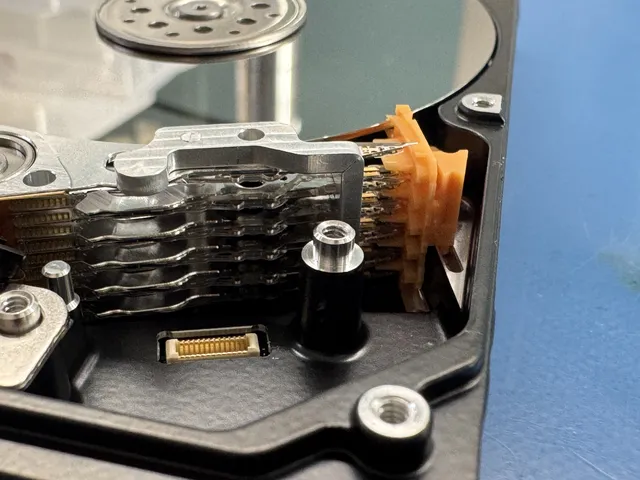
All internal hard drive work - head swaps, platter transplants, motor replacements - is performed under our laminar flow bench with HEPA-filtered air. The HEPA-filtered air helps keep dust, hair, and skin cells off the drive surface, where they could cause additional platter damage. Our scratched platter recovery work is especially dependent on this controlled environment.
Our precision soldering stations handle component-level work on circuit boards with features as small as 0.3mm. This equipment is essential for cell phone data recovery (replacing PMICs, reballing CPUs, transplanting NAND chips), MacBook recovery (logic board repair and T2/M-series work), and SSD chip-off extraction where individual NAND chips must be desoldered and read independently. Our hot-air rework systems provide precise temperature profiling to prevent thermal damage during desoldering.
High-magnification digital microscopes allow our technicians to visually inspect platter surfaces for scratches, examine circuit board traces for corrosion or breaks, identify blown components, and verify solder connections during iPhone and Samsung Galaxy board-level recovery work. Microscope-assisted diagnosis is the foundation of accurate quoting - it helps us identify the root cause of failure and estimate recovery probability before any work begins.
We maintain a large inventory of donor drives from every major manufacturer, organized by model, firmware revision, head family, and platter count. When a hard drive needs a head swap or motor transplant, having the right donor in stock eliminates sourcing delays that can add weeks to recovery time. Our library includes current and legacy models from Seagate (see our Seagate recovery guide), Western Digital, Toshiba, Hitachi, Samsung, and Maxtor, as well as spare boards and controller chips for SSD and flash recovery.
Every data recovery case falls into one of two broad categories - and understanding the difference helps you know what to expect in terms of cost, timeline, and recovery approach. Many devices involve elements of both, and our diagnostic process identifies exactly what type of failure you're dealing with.
Logical failures occur when the storage hardware is physically intact but the data has become inaccessible due to software-level problems. This includes accidentally deleted files, formatted partitions, corrupted file systems, virus damage, operating system crashes, and firmware errors that prevent the drive from being detected properly. In these cases, the data is still magnetically or electrically present on the storage media - it just can't be reached through normal means.
Logical recovery is generally the faster and less expensive type of recovery. For hard drives, it involves creating a sector-level image of the drive and using specialized file carving and reconstruction tools to locate and extract the data - our blog on recovering a deleted folder explains how this process works for common accidental deletion cases. For flash drives and SD cards, logical recovery can often retrieve files from formatted or corrupted media if the underlying NAND chips are healthy. For SSDs, logical recovery may involve firmware repair to make the drive accessible again before imaging.
Common logical failure scenarios include accidentally formatting a USB drive with important files, a camera SD card showing as empty after a corrupted write, a laptop that won't boot after a Windows update failure, or an external hard drive showing "drive needs to be formatted" when plugged in. For step-by-step guidance on SD card issues, see our guide on recovering data from a formatted SD card.
Physical failures involve actual hardware damage to the storage device. For hard drives, this means clicking or beeping from damaged heads and seized motors, platters with scratches from head crashes, burned PCB components from power surges, and drives that won't spin at all. For phones and tablets, physical failures include water-damaged motherboards, cracked circuit traces from drops, and failed power management chips. For SSDs and flash storage, physical issues include dead controller chips, cracked NAND dies, and damaged connectors.
Physical recovery requires hands-on intervention: replacing damaged components, and using precision tools to access the raw storage media. For hard drives, this means head swaps and platter work under our laminar flow bench. For phones, it means board-level micro-soldering to restore power and data paths. For SSDs, it may mean desoldering individual NAND chips and reading them independently.
Physical recovery is generally more time-consuming and expensive because of the manual labor, specialized equipment, and donor parts involved. Our scratched platter recovery service represents the extreme end of physical recovery - cases where the drive's read/write heads have physically contacted and scored the platter surface, destroying data in the damaged areas.
Many real-world recovery cases involve both logical and physical issues. A hard drive might develop bad sectors (physical degradation of the platter surface) that cause file system corruption (logical failure). A phone dropped in water might have corroded power circuits (physical) that caused an incomplete firmware update (logical). Our diagnostic process examines both dimensions of the problem so the recovery plan addresses everything - not just the most obvious symptom. For a deeper look at how we approach these complex scenarios, see our guide on data recovery from a failed hard drive.
We diagnose your device for $100 to find out what it would take to reach your files. That diagnostic fee goes toward the price of a successful recovery. If we can't get any files back, there's no recovery fee. Here's a deeper look at how we approach each device type.
Get a Free QuoteMDRepairs provides professional hard drive data recovery for clicking, non-detecting, corrupted, or completely failed drives. Our lab handles every type of HDD failure - from simple logical corruption and accidental formatting to catastrophic mechanical breakdowns requiring head swaps and motor replacements in a controlled environment.
For the most severe cases involving scratched or scored platters, our technicians perform advanced platter-level extraction using specialized equipment and donor drives. This is the most complex and delicate recovery work available, and MDRepairs is one of the few labs nationwide that handles these cases in-house.
We work with every major hard drive manufacturer. Each brand uses unique firmware, head parking systems, and translator module architectures that require specialized knowledge and proprietary tools:
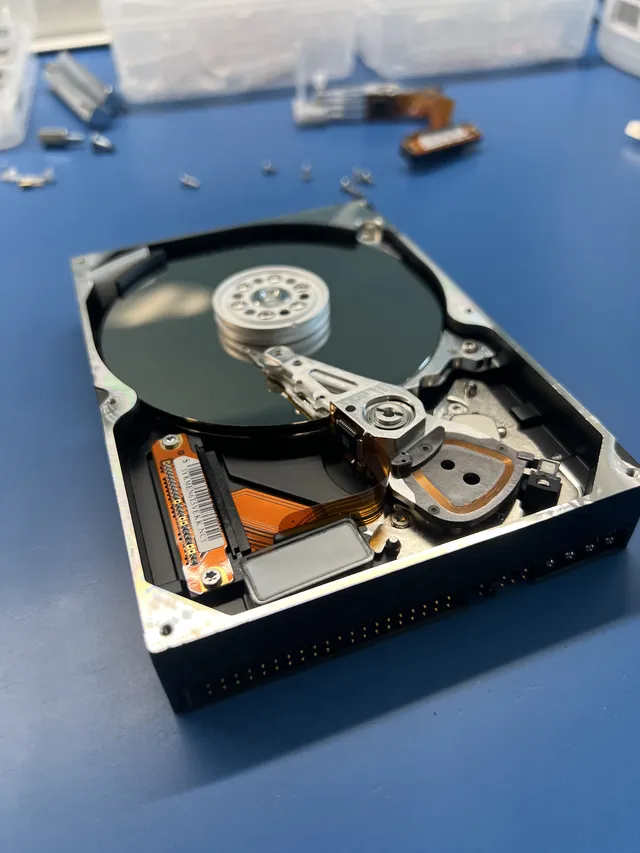
Our SSD recovery services handle controller failures, firmware corruption, power surge damage, and drives no longer detected by BIOS. For NVMe M.2 drives, we use chip-level extraction to recover data from failed controllers and damaged NAND flash. Our guide on how to recover data from an SSD explains the full process.
When an SSD controller fails, our technicians desolder individual NAND chips, read the raw data, and reconstruct the file system by reversing the controller's internal mapping. This works across all form factors - 2.5" SATA, M.2 NVMe, mSATA, U.2, and PCIe. For drives that have stopped responding entirely, see our guide on recovering data from a dead SSD.
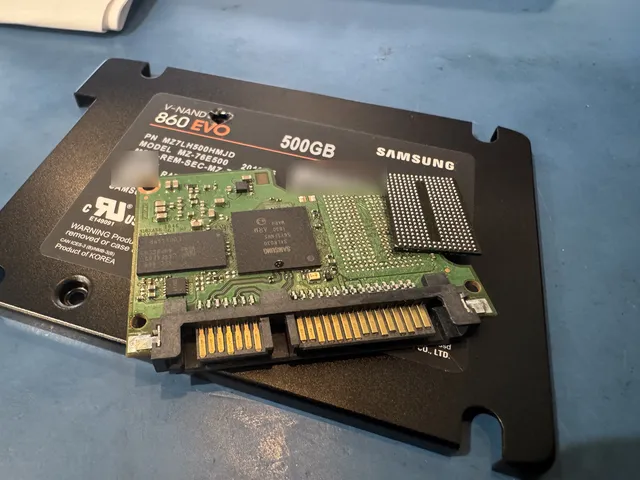
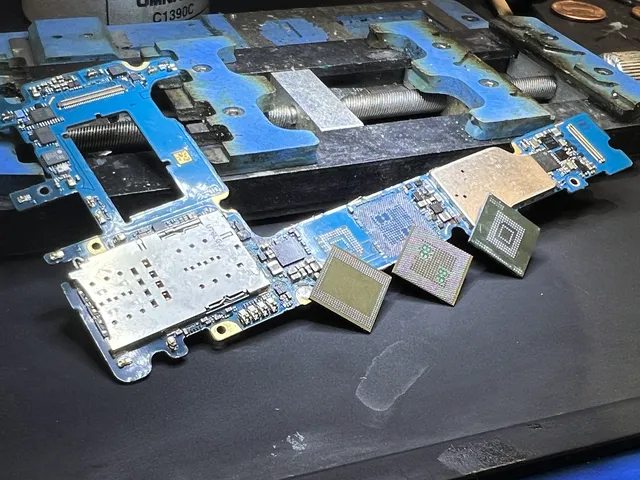
We specialize in cell phone data recovery for all brands and models - recovering photos, videos, contacts, messages, and documents from completely dead devices, water-damaged phones, and devices stuck in boot loops. We handle iPhones (all models), Samsung Galaxy, Google Pixel, LG, Motorola, OnePlus, and all other manufacturers.
Modern smartphones store data in encrypted flash chips soldered to the logic board. When a phone dies, the storage chip is usually intact - the problem is the surrounding circuitry. Our micro-soldering work restores damaged power management circuits and CPU connections to revive the phone for data extraction. Learn more in our guide to recovering data from a broken phone.
We recover data from all Samsung Galaxy smartphones and tablets - Galaxy S series (S10 through S25), Note, Z Flip, Z Fold, A series, and all tablet models. Common scenarios include liquid damage, devices that won't power on after a drop, and overheating or battery swelling.
Samsung's Knox security ties encrypted storage to the original processor, so recovery requires reviving the original board. Our technicians replace damaged power management circuits, reball CPU connections, and restore corroded components to bring the device to a functional state where Knox can decrypt the data.
For other phone brands, see our cell phone data recovery services.
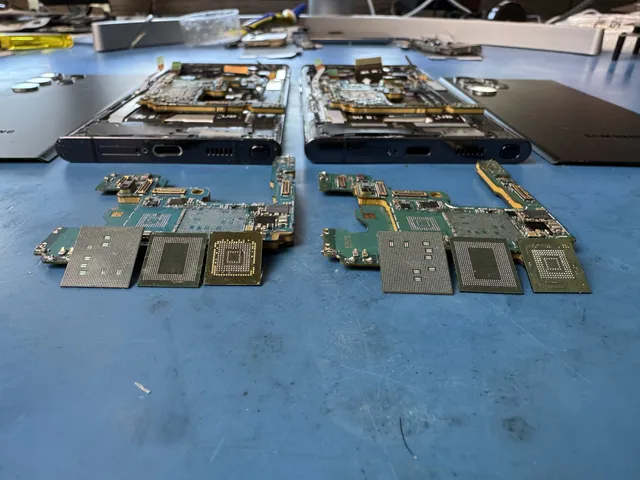
We recover data from every iPhone model - iPhone 6 through iPhone 17 Series. Apple's Secure Enclave encryption and tightly integrated hardware make iPhone recovery one of the most technically demanding specialties in the industry. Our technicians diagnose the exact point of failure and perform targeted component-level micro-soldering to restore power paths and data access.
Every iPhone encrypts its storage with a key fused to the original processor and Secure Enclave, so reading the NAND directly is a dead end - the flash only decrypts on its own device. That makes board-level repair essential on every model: we revive the original logic board so the processor itself can decrypt and release your data. Our iPhone data recovery guide covers all failure scenarios and what to expect.
We also recover data from Samsung Galaxy devices, iPads, iPods, and all other cell phones. After recovery, learn how to transfer data to your new phone.
MDRepairs provides professional flash drive data recovery and SD card data recovery for damaged, corrupted, or accidentally formatted portable storage devices. These are often our most affordable recoveries, starting at $299 for basic logical cases and ranging up to $2,000 for complex breakout board reconstructions - but even severely damaged drives with broken connectors or dead controllers can be recovered through chip-level extraction.
Flash drives fail most commonly from broken USB connectors (especially when bent while plugged in), controller chip failures, and NAND degradation from excessive write cycles. SD cards and micro SD cards typically fail from water damage, improper ejection, file system corruption, or physical cracks. In both cases, our chip-off recovery process involves desoldering the NAND flash chip and reading the raw data directly - bypassing the failed controller entirely.
We recover photos, videos, and documents from USB drives, SD cards, micro SD cards, CF cards, and memory sticks used in cameras, drones, dashcams, GoPro cameras, Nintendo Switch consoles, and mobile phones.
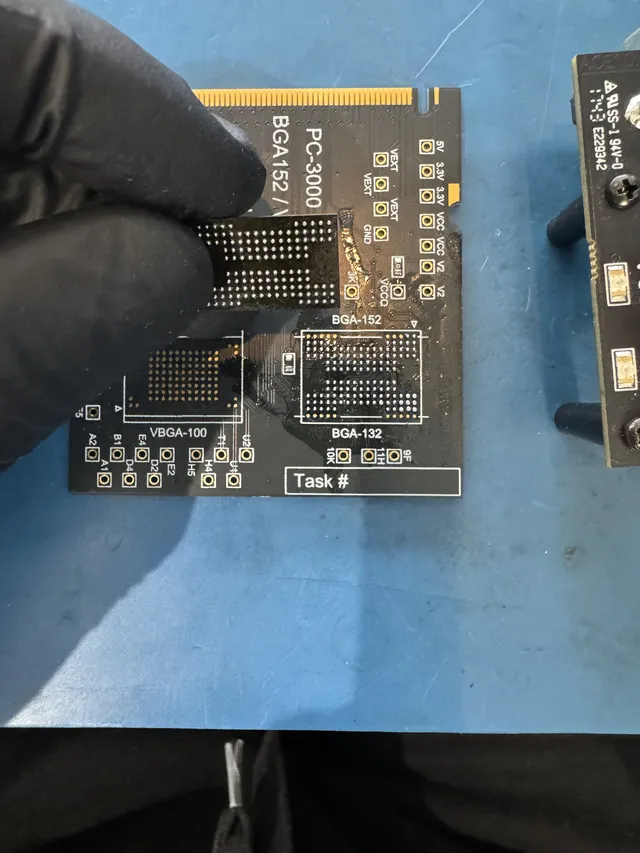
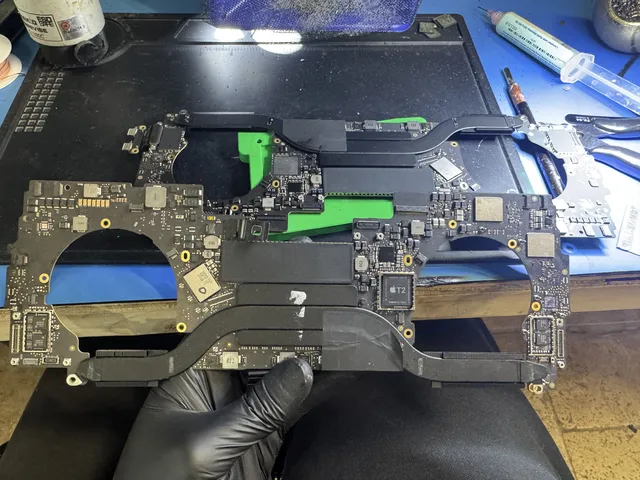
Our laptop data recovery services handle failed internal drives, liquid spills, power surge damage, and data extraction from systems that won't boot. We recover data from all laptop brands including Dell, HP, Lenovo, ThinkPad, ASUS, Acer, MSI, Razer, and more - regardless of whether the internal drive is HDD, SATA SSD, or NVMe M.2.
For Apple computers, our MacBook data recovery requires specialized techniques because modern MacBooks (2018+) use Apple's T2 security chip or M-series chips with storage soldered directly to the logic board. This means the SSD cannot be removed and read in a standard dock - recovery requires either reviving the logic board to access the drive through the T2/M-series encryption layer, or performing advanced chip-level extraction and decryption. MDRepairs is one of the few labs that handles this in-house.
For older MacBooks with removable SSDs, we also offer direct drive recovery using Apple-specific adapters and tools.
We provide professional iPad data recovery and iPod data recovery for devices with water damage, storage corruption, motherboard failure, accidental drops, or age-related battery expansion. Our board-level diagnostics recover photos, videos, music libraries, notes, and documents from Apple devices that appear completely dead.
iPads and iPods share many of the same recovery challenges as iPhones - encrypted NAND storage, BGA soldering, layered logic board architecture, and Apple's security chain. Our technicians have the specialized rework stations, hot air equipment, and microscopy tools needed for these delicate recoveries. We handle all iPad models (iPad Mini, iPad Air, iPad Pro) and all iPod models (Classic, Touch, Nano, Shuffle).
Water damage is one of the most time-sensitive emergencies we handle. Water itself doesn't destroy data - the corrosion that follows does, and salt water, pool water, and sugary liquids accelerate damage dramatically. For phones and iPhones, we perform ultrasonic cleaning and board-level component replacement to restore the device. For Samsung Galaxy devices, Knox encryption means the original board must be revived - making rapid treatment critical.
For hard drives exposed to floods, we disassemble under controlled conditions, clean the platters, and perform head replacements before imaging. For laptops and MacBooks, we assess whether storage can be extracted directly or the motherboard needs repair to access encrypted data.
RAID arrays and NAS devices aren't immune to data loss - controller failures, multiple simultaneous drive failures, and filesystem corruption can take down even redundant configurations. Our recovery process images each drive independently, then reconstructs the array parameters to virtually reassemble and extract the data. See our guide to recovering data from RAID drives for technical details.
We handle NAS devices from Synology, QNAP, WD My Cloud, Netgear, Drobo, Buffalo, and Asustor, plus Windows Server, Linux, and VMware environments. Server recovery is available with priority scheduling through our partnership program for IT professionals who need production systems restored quickly.
When an SD card or CompactFlash card fails during a shoot, the data loss can mean losing an entire wedding or production. We recover photos, videos, and RAW files from all card types - SD, microSD, CF, CFexpress, XQD - used in cameras by Canon, Nikon, Sony, Fujifilm, GoPro, DJI drones, and dashcams. See our guide on recovering photos from a corrupted SD card.
For cards with functional controllers, we perform logical recovery. For dead controllers or physical damage, we use chip-off NAND extraction to bypass the failed controller entirely. Dashcam cards are especially failure-prone due to continuous write cycles in hot vehicles - we handle these regularly.
We recover save files, screenshots, video captures, and profile data from PlayStation (PS4, PS5), Xbox (One, Series X/S), and Nintendo Switch consoles with failed or corrupted internal storage.
PS4/PS5 drives can often be imaged directly, while Xbox consoles require specialized tools for proprietary partitioning. Nintendo Switch uses internal eMMC flash plus microSD. For consoles damaged by power surges or liquid spills, we extract data from encrypted storage tied to the original hardware.
Most modern devices encrypt storage by default - iPhones, Samsung Galaxy (Knox), MacBooks (T2/M-series), and Windows laptops (BitLocker). Recovery must work within these encryption frameworks, which means the original hardware or encryption keys must be involved.
For Apple and Samsung devices, the storage is cryptographically tied to the original CPU - our board-level micro-soldering revives the original board so the secure processor can decrypt the data. For BitLocker, recovery requires the recovery key. We clearly communicate during diagnostics whether decryption is achievable for your specific case. See our guide on encrypted drive recovery for common scenarios.
We provide business-focused recovery with priority scheduling, direct technician communication, and documentation meeting corporate and regulatory requirements. Our partnership program offers volume pricing, white-label reporting, and dedicated account management for MSPs and IT consultants. See our backup strategy guide to prevent future incidents.
For failed servers, crashed RAID arrays, or corrupted databases, we offer Emergency same-day diagnostic assessment start (+$1,000); confirm availability. This does not promise completed diagnosis or recovery that day. We recover from enterprise drives (SAS, SATA), server SSDs, VMware/Hyper-V images, SQL databases, and Exchange mailstores. Recovered data is delivered through our secure portal with full chain-of-custody documentation.
Not sure which service fits? Send it in - the $100 diagnostic tells you exactly what happened and what recovery costs.
Affirm financing, if eligibleOur free HDD Diagnostic Tool guides you through a series of questions about your hard drive's symptoms and provides personalized guidance on whether it's safe to attempt a DIY recovery or if your situation requires professional data recovery services.
The tool covers the most common hard drive failure scenarios: clicking or grinding sounds, drive not detected by BIOS, slow performance and freezing, corrupted or inaccessible files, accidental deletion or formatting, and drives that spin up but don't mount. Each path gives you clear, actionable advice based on what our technicians would recommend.
If the tool determines that professional recovery is needed, you can request a quote directly from the results page or call us at 732-933-7717 for immediate assistance.
We serve Janesville, WI through our secure mail-in program. We cover the UPS label and the trip home in the lower 48, except islands. We do the recovery work at our New Jersey lab. $100 diagnostic, credited toward a successful recovery. If we can't get any files back, there's no recovery fee.
We serve these cities through our secure mail-in program. We cover the UPS label and the trip home in the lower 48, except islands.
Looking for data recovery services elsewhere in Wisconsin? View all data recovery services cities in Wisconsin, or visit our main data recovery services page.
If you're mailing a device from Janesville, WI, it goes directly to our lab in Lincroft, New Jersey. You can generate a free prepaid UPS label on the mail-in form for shipments from the lower 48, except islands. Our packaging guide walks you through safe preparation of your device with proper cushioning and anti-static protection for transit.
The standard wait is 4 to 6 weeks before we reach your device in line and start the diagnostic. The diagnostic report explains what went wrong and how we'd try to recover your files. We give you an estimate based on what we found. You get to think it over, and we start the recovery only if you approve it.
After successful recovery, your data returns to Janesville, WI via tracked, shipment on your chosen format. External drives, USB media, and encrypted cloud download are all available. Direct communication with our engineering team keeps you informed throughout the process - Janesville customers always know their case status.
Janesville, WI customers face important decisions when choosing a data recovery partner. The provider you select directly impacts whether your data can be recovered. These criteria help Janesville residents and businesses make informed comparisons.
Ask how the lab protects open hard drives from dust. Opening a hard drive exposes the platters to dust and other particles. We use a laminar flow cabinet for open-drive work.
Technical expertise varies significantly across the industry. Our engineers maintain active manufacturer certifications and undergo continuous training as storage technology evolves. This matters because a 2024 SSD requires different recovery techniques than a 2015 hard drive. Ask Janesville, WI providers about their team's specific training and certification status.
Ask what you'll pay at each step. We diagnose your device for $100 to find out what it would take to reach your files. That diagnostic fee goes toward the price of a successful recovery. We give you an estimate based on what we found. You get to think it over, and we start the recovery only if you approve it. If we can't get any files back, there's no recovery fee.
Read reviews before you decide where to send your device. Our rating is 4.6 from 345 Google reviews. If you're in Wisconsin, you can mail your device to our lab in Lincroft, New Jersey.
Data recovery is surrounded by misinformation. Here are the most common myths we encounter - and the truth behind each one.
"Put your hard drive in the freezer to fix it"
The freezer trick was unreliable even decades ago, and modern drives are far more sensitive. Condensation from temperature changes can cause immediate corrosion on the platters and heads, turning a potentially recoverable drive into a much harder case. Professional hard drive recovery handles the same failures the freezer supposedly fixes - seized motors and stiction - using proper donor parts and controlled tools.
"Rice will dry out and fix a wet phone"
Rice does not stop corrosion, does not remove minerals from water, and can introduce starch dust into the device’s internals. When a phone gets wet, the threat is electrochemical corrosion on the logic board - and that corrosion continues whether the exterior feels dry or not. Professional cell phone data recovery involves ultrasonic cleaning, board-level inspection under a microscope, and component-level repair of corroded circuits.
"Data recovery software can fix any failed drive"
Software tools like Recuva, R-Studio, and DMDE are useful for logical failures on healthy hardware - deleted files, formatted partitions, minor file system corruption. But if your hard drive is clicking, making unusual noises, or not being detected at all, running software recovery attempts can cause further damage. These tools cannot perform head swaps, repair firmware, or read data from damaged NAND chips. Try our free HDD Diagnostic Tool to assess whether your situation requires professional intervention.
"You need a local service for best results"
You can mail your device directly to the lab that will do the work. Our lab uses PC-3000 platforms, laminar flow benches, and micro-soldering equipment. Our mail-in data recovery program serves all 50 states, including California and New York. We cover the UPS label and the trip home in the lower 48, except islands.
"Swapping the circuit board from an identical drive will fix it"
Modern hard drives store unique calibration data (adaptive parameters) in a ROM chip on the PCB. These parameters are specific to the individual drive’s heads and platters - they’re not interchangeable between drives, even drives of the exact same model. Swapping a PCB without transferring the ROM data will at best not work and at worst can cause heads to operate with incorrect parameters, damaging the platters. Professional recovery includes ROM transfer when PCB replacement is necessary.
"If a drive is clicking, the data is gone"
Clicking can mean the read/write heads have failed. If the heads have failed, we can replace them with matched donor parts under controlled conditions to prevent contamination. If your drive clicks, leave it unplugged. Repeated attempts to start it can turn a head failure into a scratched platter case.
"The sooner you act, the better the recovery outcome"
This one is true. For every type of data loss - physical hard drive failures, water-damaged phones, corrupted SD cards, deleted files on flash drives - acting quickly and correctly improves outcomes. Stop using the device, avoid DIY repair attempts, and contact a professional lab as soon as possible.
"All data recovery companies are not the same"
The gap between a well-equipped lab with experienced technicians and a broker operation that ships your device to someone else is enormous. Equipment matters, experience matters, and in-house capability matters. That’s why we show our actual work, publish our equipment list, and maintain full transparency about our process. You deserve to know exactly who is handling your data and how.
While we're here to recover your data when things go wrong, the best recovery is the one you never need. Here are the strategies we recommend to every client after completing their recovery - the same strategies we use internally to protect our own business data. For a comprehensive overview, read our guide on how to avoid data loss.
Keep at least three copies of important data, on two different types of media, with one copy stored offsite or in the cloud. For example: your original files on your computer's internal drive, a backup on an external hard drive at home, and a cloud backup through a service like Backblaze, iDrive, Google Drive, or iCloud. If any one copy fails, you have two others. This simple rule prevents the vast majority of permanent data loss situations we see in our lab.
A backup that hasn't been tested is a backup you can't trust. Periodically verify that your backup files can actually be opened and read. We've seen cases where customers assumed their data was backed up for years, only to discover during an emergency that the backup drive had silently failed, the cloud sync had stopped working months ago, or the backup software was only capturing a subset of the intended files.
Hard drives have a practical lifespan of 3-5 years under regular use. After that, failure rates increase significantly. If your hard drive is making new sounds, running slower than usual, or showing SMART warnings, treat those as urgent signals to back up your data immediately and replace the drive. Use our guide on how to check hard drive health to monitor your drive's condition. If you need to swap out a failing drive, our guide on how to safely remove a hard drive from a laptop walks through the process. Don't wait for a catastrophic failure - the cost of a new drive is a fraction of the cost of data recovery.
Power surges are a leading cause of electronic failure in hard drives, SSDs, and NAS devices. A quality surge protector (not just a power strip) provides a baseline of protection, and an uninterruptible power supply (UPS) protects against both surges and outages. For business servers and RAID arrays, a UPS is essentially mandatory - an unexpected power loss during a write operation can corrupt the RAID metadata and cause array-wide data loss.
Flash drives and SD cards are physically fragile. Always use "Safely Remove Hardware" before disconnecting USB drives. Don't remove SD cards from cameras while the card activity light is on. Avoid bending flash drives while plugged into laptops, and store memory cards in protective cases rather than loose in bags. These simple habits prevent a significant percentage of the portable storage failures we see. If you've already lost files from a USB drive, our guide on recovering deleted files from USB explains the recovery process.
Waterproof cases, screen protectors, and quality protective cases prevent the drops and water exposure that lead to the majority of cell phone data recovery cases. Enable automatic cloud backup for photos and contacts, and verify periodically that the backup is current. For iPhones, ensure iCloud backup is enabled and has sufficient storage. For Samsung Galaxy devices, set up Samsung Cloud or Google Photos backup for your irreplaceable memories.
Data recovery pricing for Janesville, WI is based on failure complexity, not data amount or drive size. The $100 we charge when your device arrives covers finding out what went wrong and putting together an estimate to get your files back. Logical recoveries such as deleted files or formatted drives are the most affordable tier. Mechanical failures that require work in a laminar flow cabinet fall in the mid-range. Complex multi-component failures are quoted individually. If we can't get any files back, there's no recovery fee.
The standard wait is 4 to 6 weeks before we reach your device in line and start the diagnostic. If you need us sooner, we start the diagnostic within 5 to 7 days with Priority, within 1 to 2 days with Urgent, or the same day with Emergency. How long the recovery itself takes still depends on what we find. We cover the UPS label and the trip home in the lower 48, except islands. You can track your shipment.
During the diagnostic, we look at what failed and what condition your drive is in. We look for contamination and any damage from earlier recovery attempts. We give you an estimate based on what we found.
Generate a free prepaid UPS label on the mail-in form (contiguous US). Package your device in a sturdy box with generous cushioning material - bubble wrap, foam, or packing peanuts. Include anti-static protection for bare drives. The label covers full shipping costs from Janesville to our lab via tracked FedEx service. We provide detailed packaging instructions to ensure your device arrives safely.
We recover data from all hard drive types used in Janesville, WI - internal 3.5-inch desktop drives, 2.5-inch laptop drives, portable USB drives, enterprise SAS and SCSI drives, and legacy IDE models. All major manufacturers are covered including Western Digital, Seagate, Toshiba, Samsung, and Hitachi. Our parts inventory enables rapid component matching for physical recovery procedures.
Yes, our engineers recover data from all SSD types used in Janesville, WI - SATA, NVMe, M.2, and mSATA form factors. SSD recovery requires specialized techniques including chip-off recovery, firmware-level access, and NAND flash reading. We handle controller failures, firmware corruption, wear-leveling exhaustion, and electronic damage across Samsung, Crucial, Intel, Kingston, and all other SSD manufacturers.
We provide complete RAID recovery for Janesville businesses running any RAID configuration - RAID 0, 1, 5, 6, 10, 50, 60, and custom arrays. Our engineers reconstruct degraded and failed arrays from all controller brands including Dell PERC, HP Smart Array, LSI, and Adaptec. Wisconsin's manufacturing and agriculture businesses rely on our RAID expertise for mission-critical recovery.
Our recovery process restores all file types from Janesville, WI devices - documents, photos, videos, databases, email archives, accounting files, medical records, CAD drawings, and proprietary application data. We support all major file systems including NTFS, HFS+, APFS, ext4, XFS, and ZFS. Recovery results include complete directory structures preserving your original file organization.
Our diagnostic includes physical inspection of the device exterior, electronic testing of drive components, firmware analysis, and assessment of media surface condition where applicable. You receive a detailed report explaining what failed and the recommended recovery procedures. We give you an estimate based on what we found.
We diagnose your device for $100 to find out what it would take to reach your files. That diagnostic fee goes toward the price of a successful recovery. If we can't get any files back, there's no recovery fee. After diagnostics, we confirm which data you need most. Before you pay for recovery, you can look through your report to see which files we got back.
We serve Janesville, WI through our mail-in recovery program. Your device goes to our lab in Lincroft, New Jersey, where we do the work. Physical drive problems need hands-on work. We cover the UPS label and the trip home in the lower 48, except islands. You can track your shipment, and we keep you informed throughout the process.
Yes. We work on drives that have already been through a recovery attempt. We do open-drive work in a laminar flow cabinet. Prior recovery attempts can cause additional damage. We diagnose your device for $100 to find out what it would take to reach your files.
External hard drive recovery is one of our most common services for Janesville, WI customers. We handle all brands including Western Digital My Passport and Elements, Seagate Backup Plus and Expansion, LaCie, G-Technology, and Toshiba Canvio. Failures include dropped drives, USB port damage, encryption controller problems, and standard mechanical or logical failures. The drives inside external enclosures are standard hard drives or SSDs, and our recovery procedures apply equally to them.
We recover data from Macs, including those with HFS+, APFS, and Fusion Drive configurations. Our engineers handle MacBook SSDs with T2 and Apple Silicon chips, iMac internal drives, Mac Pro storage arrays, and Time Machine backup drives. Mac-specific challenges like APFS encryption and proprietary SSD interfaces are within our standard capabilities. We start with a paid diagnostic. If we can't get any files back, there's no recovery fee.
First, contact us by phone or through our website to describe what happened. We cover the UPS label and the trip home in the lower 48, except islands. Get your label on the mail-in form. Second, package your device securely following our guidelines and ship it to us. Use the prepaid label if you're eligible. Third, after the paid diagnostic, you'll get a report with findings and pricing. You get to think it over, and we start the recovery only if you approve it.
We recover data from encrypted drives when Janesville, WI customers can provide the encryption credentials (password, recovery key, or BitLocker key). Our process recovers the raw encrypted data from the failed device, then applies your credentials to access the files. We work with BitLocker, FileVault, VeraCrypt, and hardware-encrypted drives. Without valid credentials, encrypted data cannot be decrypted - this is by design and protects Janesville customers' data security.
Our primary expertise serves Janesville, WI customers with traditional storage devices - hard drives, SSDs, RAID arrays, NAS systems, and flash media. For smartphone and tablet recovery involving internal flash storage, we evaluate cases individually. SD cards and removable media from mobile devices are handled through our standard flash recovery process. Contact us to discuss your specific Janesville mobile device situation.
Yes. We work on drives that got wet. Leave a wet drive unplugged. Powering it on can cause a short circuit and further damage. We dry the drive, clean components, and treat corrosion as needed.
The core recovery technology is identical for all Janesville, WI cases. Business recoveries often involve additional considerations - RAID arrays, server environments, compliance requirements, and urgency levels that affect service tier selection. Janesville businesses frequently need expedited turnaround and may require documented chain of custody for regulatory compliance. Our team accommodates these requirements while applying the same rigorous recovery procedures to both business and personal cases.
Data loss prevention for Janesville, WI residents starts with the 3-2-1 backup rule: maintain three copies of important data on two different media types with one copy off-site. Use surge protectors to guard against power fluctuations common in Wisconsin. Monitor drive health through SMART utility software. Replace drives proactively after three to five years of use. Keep laptops and portable drives in protective cases. These practices significantly reduce the chance Janesville residents will need emergency data recovery.
No question matches that - it's probably faster to just ask us: (732) 933-7717 or .
$100 diagnostic, credited toward a successful recovery. If we can't get any files back, there's no recovery fee. Call us directly at 732-933-7717 or get started online. We cover the UPS label and the trip home in the lower 48, except islands.
The tools, standards, and claims referenced on this page are sourced from publicly available data. We cite our sources so you can verify independently.
Industry-standard data recovery hardware and software used by professional labs worldwide including DriveSavers, Ontrack, and Rossmann Repair Group. Referenced for diagnostic tool capabilities described in our recovery process and diagnostics section.
Professional sector-level imaging tool with controlled retry and timeout features. Used in conjunction with PC-3000 for forensic-grade imaging of failing hard drives and SSDs.
Annualized failure rate data from a monitored fleet of 340,000+ drives. Referenced for general device failure trends and the importance of professional diagnostics over visual inspection alone.
Apple's documentation on Secure Enclave hardware encryption and data protection architecture. Referenced for our explanation of why modern phone and tablet recovery requires board-level repair of the original device.
U.S. National Institute of Standards and Technology guidelines on data sanitization and media handling. Referenced for secure data wiping procedures after recovery completion.
International standard for classifying air cleanliness in controlled environments. We use a laminar flow bench during hard drive platter work.
Federal law prohibiting manufacturers from voiding warranties solely because an independent service provider performed repair or data recovery. Relevant to all device types we service.
Samsung's documentation on NAND flash memory architecture including V-NAND and controller technology. Referenced for SSD, phone, and flash drive recovery processes that involve chip-level data extraction.
MDrepairs offers professional data recovery for all device types. We serve Wisconsin through our secure mail-in program with free shipping both ways (contiguous US).
$100 diagnostic, credited toward a successful recovery. If we can't get any files back, there's no recovery fee. We cover the UPS label and the trip home in the lower 48, except islands.
We use cookies for analytics to see how visitors use the site, and to measure our ads. Privacy Policy