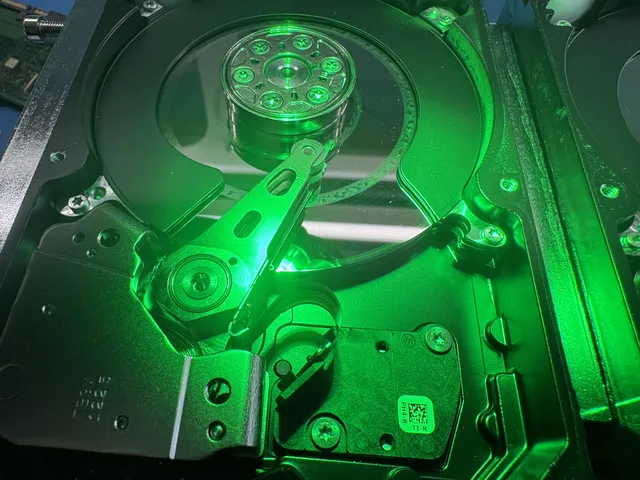
Toshiba hard drive data recovery
We can help you get your files back from a Toshiba hard drive that's stopped working. Your photos and documents may still be on the disks even if your computer no longer sees the drive. Sometimes repairing the circuit board or fitting a matching set of read heads lets us copy those files. If your drive clicks, beeps or has been dropped, unplug it and leave it off. Our hard drive first aid guide explains which checks are safe to try at home.
We provide a free shipping label if you'd like to mail us your drive from anywhere in the contiguous US. You're also welcome to bring it to our lab in Lincroft, New Jersey.
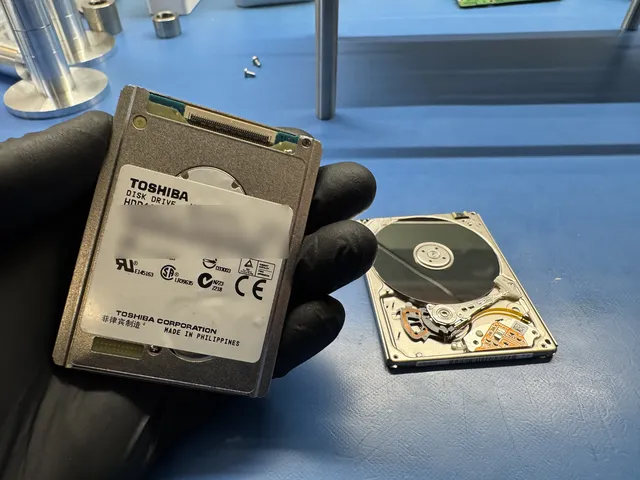
- Since 2014One lab, in Lincroft, New Jersey
- 20,000+ ticketsacross all services since 2014
- 4.6 from 345Google reviews
- $100 diagnosticcredited toward a successful recovery
The people we help
Our customers include people from
-

-

-
 AT&T
-
 Marriott
-

-

-
 Tennessee Titans
-

-

-

-

-

-

-

Which Toshiba drive do you have?
Look for the family name on the case or the model number on the drive label. You can use either to find what to send us. If you're sending a bare drive, keep its original circuit board with it.
| Toshiba family | How to recognize it | What matters for recovery | What to send |
|---|---|---|---|
| Toshiba Canvio portables External Hard Drive Data Recovery | A 2.5-inch drive in a USB case labeled Canvio Advance, Basics, Flex, Slim, Gaming or Ready | On some models, the USB socket is attached directly to the drive's circuit board. | Your Canvio with the case closed, plus its USB cable |
| Toshiba laptop hard drive (L200, MQ) | A 2.5-inch laptop drive such as the MQ01ABD100M or MQ01ABF050. Yours may be in a USB case. | The original board holds the instructions the drive needs to start and the settings for the heads that read the disks. | The laptop drive, still in its USB case if it has one |
| P300, X300 and DT01ACA desktop drives | A 3.5-inch desktop drive. We've recovered files from DT01ACA300 and DT01ACA100 drives in large external cases. | Some startup instructions are on the circuit board, and the rest are in a reserved area on the disks. | Just the drive if it came from a desktop computer. For an external drive, send it in its case with its power adapter. |
| Toshiba N300 in a NAS RAID Data Recovery | A drive built to run around the clock alongside other drives in a network storage box called a NAS | Files can span several drives. We copy each drive separately and rebuild the set from those copies. We quote this work individually. | All the drives, with each one marked by slot if you know the order |
| Toshiba MG enterprise drives Helium drive whose heads wouldn't start | A business drive such as the MG08, MG09 or MG10, with a SATA or SAS connector | The heads read a stack of disks. Larger models contain helium, and some models have built-in encryption. | The MG drive and, if your files are encrypted, the key that unlocks them |
| Toshiba S300 recorder drives | A drive that stores security camera footage in a DVR or NVR | We work from a copy to rebuild the footage in the recorder's own format. Anything the recorder has overwritten is gone. | The S300 and any other drives from the same recorder |
| Toshiba SSD or Kioxia SSD Kioxia solid-state drives | A solid-state drive that stores files on memory chips instead of spinning disks | A chip called the controller manages access to the files in memory. Our SSD guide covers recovery for these drives. | Your SSD, with the power off |
You can also look for the model number on your label in our Toshiba recovery cases.
What to do when your Toshiba hard drive stops working
A broken USB socket and a problem with the drive's own software can look the same from your side. In either case, your Toshiba may simply disappear from your computer. We check the drive itself during the diagnostic to find out what failed.
Why is my Toshiba hard drive clicking?
Repeated clicking can be the sound of the heads trying to start. Unplug the drive when you hear it, especially if your Canvio started clicking after a fall. Running recovery software keeps those heads moving, and a damaged head can scratch the disks where your files are stored.
Can you recover files from a dropped Toshiba portable hard drive?
We've recovered files from Toshiba drives after a fall. If yours fell while the disks were spinning, a head may have hit the surface of a disk. Whether the drive clicked afterward or went completely quiet, leave it unplugged.
My Toshiba hard drive has no light and isn't showing up
Your files may still be on the disks. A failed circuit board, a motor that won't turn or damaged heads can all keep your computer from recognizing the drive. On a Canvio, the trouble may be a broken USB port.
If the drive sounds normal and hasn't clicked, beeped or fallen, our Toshiba guide below covers the checks you can try at home.
Why is my Toshiba hard drive beeping?
A Toshiba can beep or buzz when the motor tries to spin the disks and something holds them still. A head may be stuck to a disk, or the motor itself may be jammed. Leave the drive unplugged and avoid tapping it, shaking it or putting it in the freezer.
Why does my Toshiba hard drive slow down or freeze when I open folders?
A weak spot on a disk or a head that's wearing out can make one folder hard to read even when another opens normally. If folders start to freeze or give you errors, stop copying and switch the drive off.
One older Western Digital external drive came to us with a single weak head. After replacing the heads, we finished the copy and recovered over 800 GB, including the owner's photos.
Can I get files back after deleting them or formatting my Toshiba drive?
Deleted files may still be on the disks after their names disappear. The same is true after a quick format, which changes the file list. Stop using the drive so nothing writes over what you want back. A full format that fills the disks with zeros has already overwritten the files.
Toshiba Canvio data recovery with a broken USB port
If a tug on the cable left your Canvio unresponsive, the USB socket may be all that's damaged. Some external drives have a separate board for the USB connection. On some Canvios, the micro-USB 3.0 socket is soldered directly to the drive's main circuit board. A crack at that joint can make a healthy drive look dead.
Send your Canvio with the case closed so we have its original board to work with. We can repair the socket or connect an adapter to small metal contacts on the board. We've recovered files from a Toshiba with this type of port after it stopped responding.
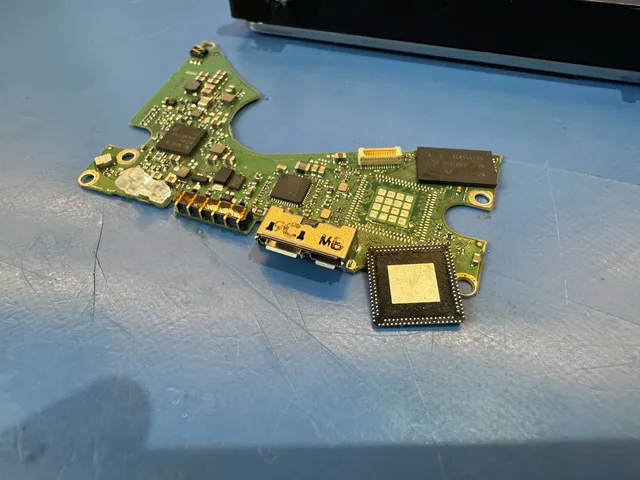
How we recover files from a damaged Toshiba hard drive
We try to get your drive reading long enough to make a copy of the disks. Once we have that copy, we can retire the damaged drive and put your files back together from the copy.
Toshiba firmware repair when the drive shows the wrong size
If your Toshiba shows the wrong size, even zero, the map it uses to find your files may be damaged. That map, called the translator, is part of the drive's startup software, or firmware. The drive keeps some of its firmware in a chip on the circuit board and the rest in a reserved part of the disks called the Service Area.
The drive also keeps lists of damaged spots so it knows which ones to skip. If a list fills up, the drive can get stuck when you turn it on. Losing power while it's updating the Service Area can also leave it with incomplete instructions.
We connect our PC-3000 system to the drive's diagnostic port and back up the entire Service Area before making changes. We repair only the damaged firmware and keep the factory settings for your drive's heads and disks. Before we start copying, we check that the drive reads and reports the right size.
Why we need your Toshiba's original circuit board
Even a scorched board can hold the factory settings your drive needs to start. Those settings are in a chip called the ROM. We can move the chip to a matching board or copy its contents across. If the chip won't read, we can try to rebuild its contents from the reserved area on the disks.
A power surge can burn out a protective part on the board called a diode. If that's the only damage, we can remove it and copy the drive. A surge can also damage the preamp, the part on the arm that boosts the signal from the heads. That calls for more than a board repair.
How we match replacement heads to your Toshiba
We take working heads from another drive in the same Toshiba family whose firmware closely matches yours. When your drive is off, its heads rest on a small ramp at the edge of the disks.
We work in filtered air to keep dust off the disks while we remove the ramp, fit the replacement heads and put the ramp back. On a drive with stacked disks, like an N300, X300 or MG, we hold the heads apart and line them all up at once.
Can you recover files if a head has scratched a disk?
We may be able to recover some of your files by reading up to the scratch from either side. If a surface is too badly damaged to read, we remove the head that runs over it and adjust the drive's software so the replacement heads read only the undamaged surfaces.
What does Toshiba data recovery cost?
$100 diagnostic, credited toward a successful recovery.
The $100 diagnostic is non-refundable once diagnostics start, and donor drives or replacement parts you approve are non-refundable once ordered, even if recovery fails.
Firmware recovery starts at $1,000. If we need to replace the heads to recover your files, the price starts at $1,500. We confirm the price for your drive after the $100 diagnostic, once we know what failed and how much damage there is.
Before you pay for recovery, we give you a report so you can browse your folders and see which files we recovered and which may be partly or fully damaged.
- Which price range should I look at?
For deleted files or a drive showing the wrong size, look at the row for firmware and logical recovery. Clicking can mean the heads need replacing. If the only damage is a broken USB port, we quote that repair after the diagnostic.
- How can I pay?
We accept Apple Pay, PayPal and cards. Our financing guide explains how to pay in installments through Affirm if you qualify.
| Recovery work | Price |
|---|---|
| Hard Drive - Firmware / Logical | $1,000 - $1,500 |
| Hard Drive - Head Swap | $1,500 - $3,000+ |
| Scratched / Contaminated Platters | $3,000 - $3,500+ |
| SSD / NVMe Recovery | $1,000 - $2,000+ |
| RAID / Multi-Drive Arrays | Contact for Quote |
| Service option | When diagnostics start | Added cost |
|---|---|---|
| Standard diagnostic | Starts in about 4–6 weeks, then recovery time varies by case | No surcharge |
| Priority | Assessment starts within 5–7 days | +$250 |
| Urgent | Assessment starts within 1–2 days | +$500 |
| Emergency | Assessment starts same-day | +$1,000 |
You can also compare recovery prices for other devices or read about what goes into a data recovery estimate.
Toshiba hard drive recovery cases
Customers from Alaska to Maine have mailed us their Toshiba hard drives. These are some of the drives we've recovered files from, including ones that clicked, stopped showing up or took a fall.
- Toshiba external hard drive, 3 TB DT01ACA300 Clicking or other noise · Data recovered Mailed from Tennessee 2026
- Toshiba hard drive, 500 GB MQ01ABF050 Data recovered Mailed from Louisiana 2026
- Toshiba external hard drive Hard Drive - Firmware / Logical · Data recovered Mailed from Maine 2026
- Toshiba external hard drive MQ01UBD100 Stopped working or not detected · Data recovered Mailed from Iowa 2026
- Toshiba external hard drive, 2 TB MQ04UBD200 Hard Drive - Firmware / Logical · Data recovered Mailed from Tennessee 2026
- Toshiba external hard drive, 1 TB MQ01ABD100M Stopped working or not detected · Data recovered Mailed from Alaska 2026
- Toshiba hard drive Dropped or physically damaged · Data recovered Mailed from Virginia 2025
- Toshiba external hard drive Dropped or physically damaged · Data recovered Mailed from North Carolina 2025
- Toshiba external hard drive DT01ACA100 Stopped working or not detected · Data recovered Mailed from Florida 2025
- Toshiba external hard drive MQ01UBB150 Dropped or physically damaged · Data recovered Mailed from Wisconsin 2025
- Toshiba external hard drive Stopped working or not detected · Data recovered Mailed from Oklahoma 2025
- Toshiba external hard drive, 5 TB Data recovered Mailed from California 2025
- Toshiba hard drive Stopped working or not detected · Data recovered Mailed from New York 2023
- Toshiba external hard drive Stopped working or not detected · Data recovered 2022
These cases come from our ticket system, BenchKey, the shop software we built and run our lab on, with names, contact details and addresses left out. How we publish cases
Hard drive recovery guides for other brands
Look for the name on your drive's case or label to find the right guide. If your files are on another kind of device, see our full list of recovery services.
Hitachi or HGST
Seagate, Western Digital, LaCie or Maxtor
Questions about Toshiba hard drive recovery
Does Toshiba offer data recovery, and what does its warranty cover?
We run MDrepairs independently of Toshiba here in Lincroft, New Jersey. The warranty replaces a failed drive, and the replacement comes empty. Decide about the files you want back before you turn in the original.
Can I move my Toshiba Canvio into another USB case?
Leave your Canvio in its case and send it with its cable. If the USB socket is part of the drive's circuit board, the broken socket would move with the drive. We need that original board, and opening the drive itself can let dust onto the disks.
Can a disk check or repair tool make my Toshiba hard drive worse?
Yes, if a head is failing. A disk check or a program that copies the whole drive keeps using that head and can make the damage worse. Stop copying and unplug the drive. In the lab, we replace failing heads before making a full copy.
Guides for Toshiba hard drive owners
If your drive sounds normal and hasn't been damaged, start with the checks you can do at home before mailing it. If it's stopped reading files, the guides on drive failure explain the sounds or errors you may have noticed.
Checking a quiet drive
If your Toshiba clicked, beeped or fell, leave it off. When you get in touch, just tell us what you remember hearing. There's no need to plug it back in to check.
Get a quote for Toshiba hard drive recovery
Tell us what happened and whether anyone has tried a repair or used recovery software. Let us know if the drive had a password. If your files are encrypted, you'll need the password or recovery key to open the copy. After recovery, we return your original Toshiba along with your recovered files on a new drive.