Galaxy Stuck in a Boot Loop? Save Your Data First
Our founder and lead technician, Joseph Montanti, handles cases personally.
A Samsung Galaxy stuck in a boot loop is failing to complete startup. An app, interrupted update, battery problem or board/storage fault can send it back to the Samsung logo. The first job is to recover access without erasing the phone: a factory reset removes local data, while a successful restart or Safe Mode session may let you copy it.
The point where it restarts helps choose the next step. A phone that reaches Android and then crashes after a new app was installed has a different starting point from one that began looping after liquid damage. Samsung's boot-loop guidance covers software, battery and hardware causes rather than treating every loop as failed memory.
On this page
Checks that leave the files in place
For a dry, undamaged phone, remove a case that may be holding a button down and check that the buttons release normally. If the battery may be discharged, Samsung's logo-screen guidance recommends at least 15 minutes on an appropriate charger before startup. This charging check is for a phone with no liquid exposure, impact damage, swelling or unusual heat.
If the loop began after an app installation, Safe Mode is useful because it starts Android without downloaded apps running. Samsung describes the button method in its startup troubleshooting instructions: hold Volume Down during startup until Safe Mode appears. If you can reach the power menu, Samsung also documents holding the on-screen Power off control and selecting Safe mode.
If the phone unlocks and stays responsive, use that session to save the photos, messages and documents missing from your backups. Connect it to a computer, approve the connection on the phone, then choose the needed categories in Samsung Smart Switch Backup. Wait until the backup finishes and you have checked the files before testing a restart or changing apps or settings.
End the attempt if the phone heats unusually or resumes restarting during the copy. A wet or damaged Galaxy needs hardware assessment rather than charging and repeated restarts. Arrange that promptly after liquid exposure because corrosion can continue while the phone sits. Keep a persistently looping phone out of use; factory reset, Odin flashing and other initialization tools can remove the data you are trying to retrieve.
Smart Switch needs sufficient access to the working phone and the permissions it requests. Seeing the phone connected over USB is not equivalent to having its photos backed up. Check any existing Google Photos, Samsung/Google backups and app-specific backups from another device while the original phone is being assessed.
For a dry, undamaged Galaxy with no unusual heat, clearing temporary system cache is another non-erasing option if your model and software expose Wipe cache partition. Use Samsung's model-dependent cache instructions; the option is not present on every Galaxy. Back up first if Safe Mode already lets you unlock the phone.
- Switch the phone off, then use the button combination Samsung lists for your model to enter Recovery.
- If Wipe cache partition is available, select it with the volume buttons and confirm with Power, then confirm Yes. Do not select Wipe data/factory reset, which erases local data; if the cache-only choice is absent, stop.
- Select the reboot option when cache clearing finishes. If the phone now unlocks, make the backup described above; stop if it heats up or starts looping again.
Stuck on the “Downloading…” screen
Download mode is a service mode used to communicate with the phone's software-loading system. It can appear after an accidental button combination. It is separate from a phone repeatedly showing the Samsung logo, and entering the mode does not itself erase your files.
For accidental entry with no update or firmware transfer running, Samsung's documented exit is to hold Volume Down and the Power or Side key for about seven seconds, until the device restarts. This restart does not erase user data. Release the buttons when it restarts; if it boots normally, use the working session for the backup described above.
An active or interrupted firmware flash is a different situation. Do not interrupt a transfer still writing software, or start another flashing tool to clear the screen. Follow the instructions for the exact operation already underway. A phone that returns to Download mode after accidental-entry restart needs its buttons, software and hardware checked before further storage changes.
Why reset and boot-loop repair tools can lose data
A tool advertised as a Samsung boot-loop repair tool may restore Android by reinstalling software or erasing user storage. Making the phone start and preserving its current contents are separate results. A factory reset is suitable only after you have accepted the loss of local data or verified the copies you need.
Modern Galaxy storage is encrypted. Android's file-based encryption documentation explains that credential-encrypted storage becomes available after the user unlocks the device. Recovery can depend on the original hardware and the known PIN, password or pattern; replacing the board can leave those files on the old board. Removing a memory chip does not turn that protected content into ordinary readable files.
A reset clears the phone's user data and its associated access state. Cloud content or an existing backup can still be restored afterward, but that is a separate copy. Google's reset guidance says to back up first.
Storage faults and board repairs in the lab
In a Galaxy S2 that repeatedly reached the logo and shut off, the removed memory chip also kept disconnecting in a reader. Joe connected it through a USB board to PC-3000 Portable and adjusted the read settings. Pictures were visible in the portion recovered so far; the record ends before the full read was complete.
That older S2 case explains how failing storage can interrupt startup. A read failure can prevent Android from loading a required part of the system, even while the display and power circuitry still work.
Board faults can also prevent startup. In a dead Galaxy A03S, Joe found corrosion under a chip connecting points that should have been separate. Cleaning, reballing and reinstalling that original chip let the phone power on and its text messages be recovered.
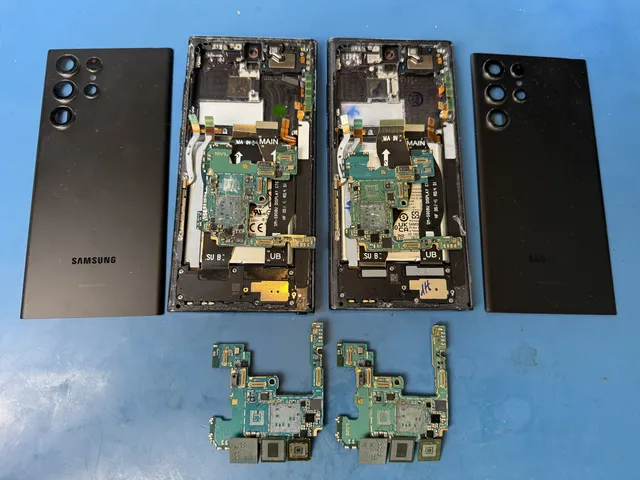
A pool-damaged Galaxy S22 needed a different repair: its storage tested healthy, but the motherboard was badly corroded. Joe moved the original CPU, RAM, storage and the small encryption-related chip to a donor board, then powered up the phone and recovered the customer's pictures.
The phone must remain stable long enough to unlock and complete the extraction; one brief appearance of the home screen may not be enough. The fault and the exact Galaxy model determine whether original-board repair, a supported chip transfer or another reading method is available through Samsung Galaxy data recovery.
Get help with data recovery
Bring your device to our Lincroft lab during opening hours, or mail it in.
How to mail your deviceThe $100 diagnostic is non-refundable once diagnostics start, and donor drives or replacement parts you approve are non-refundable once ordered, even if recovery fails.
Published by MDrepairs
MDrepairs is a data recovery and electronics repair lab in Lincroft, New Jersey. Our founder and lead technician Joseph Montanti films real cases for our YouTube channel, showing tools, repair steps and recovery outcomes.
Keep reading
- Samsung Stuck in Download Mode: Exit Safely Without Wiping Your Data
- Samsung Galaxy Z Fold/Flip Hinge Damaged? Save Your Data Inside
- Samsung Galaxy S25 / S25 Ultra Data Recovery