
Samsung SSD data recovery
We can help you get your files back from a Samsung SSD that your computer no longer recognizes. A broken power connection can make the drive disappear while your photos and documents are still there. If that's what happened to yours, repairing the connection may be enough for us to copy them. For now, turn the drive off and unplug it. Don't run Samsung Magician's drive tools or update the drive's software. If your computer asks to format it, cancel that prompt. Our SSD first aid guide explains what to do next.
If the SSD comes out of your laptop, you can send just the drive. For a portable SSD, leave it in its case and include its cable. Our mail-in form gives you a free shipping label if you're sending it from the contiguous US. You're also welcome to bring it to our counter in Lincroft, New Jersey.
- Since 2014One lab, in Lincroft, New Jersey
- 20,000+ ticketsacross all services since 2014
- 4.6 from 345Google reviews
- $100 diagnosticcredited toward a successful recovery
The people we help
Our customers include people from
-

-

-
 AT&T
-
 Marriott
-

-

-
 Tennessee Titans
-

-

-

-

-

-

-

Which Samsung SSD do you have?
Look for the full model name on the label. Find yours below to see how the drive is built and which parts to send us.
| Samsung model | Where it's used | What affects recovery | What to send |
|---|---|---|---|
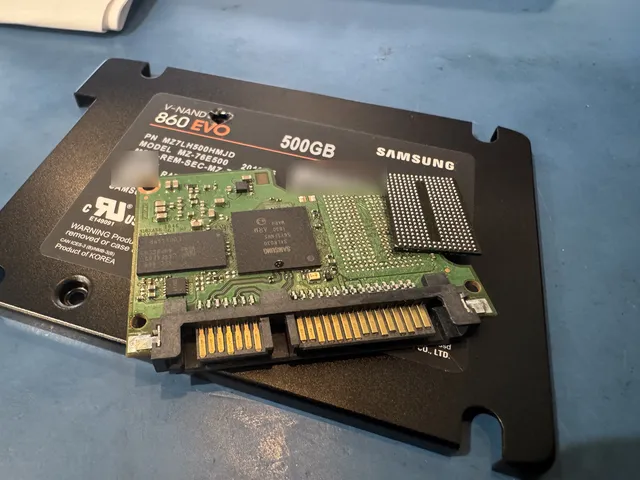
| 850, 860, 870 (EVO, Pro, QVO) Samsung 860 EVO Data Recovery: Not Detected, Read-Only, or Unreadable | Laptops and desktops that take a 2.5-inch SATA drive. The 860 EVO also comes in other shapes. | Samsung's controller scrambles data as it saves it. In the 860 EVO, that chip is called MJX. | Just the SSD |
| Samsung NVMe 960, 970, 980, 990 NVMe SSD data recovery | Small M.2 sticks inside laptops and desktops. The label may also say EVO, EVO Plus or Pro. | A software bug could leave the 980 Pro read-only. Early 990 Pro software could show a sharp drop in the drive's health reading. | Just the M.2 stick |
| T7, T7 Touch, T7 Shield, T9 | Portable drives that connect by USB-C | The socket and memory share one circuit board. There's no separate drive to take out. | The closed drive and its own USB-C cable |
| T1, T3, T5, T5 EVO | Portable drives that connect by USB | These are built differently from the T7. Repairing the socket or a connection on the board can make the files readable again. | The whole drive and the cable it came with |
| Enterprise PM883, PM893, PM9A1, PM9A3, PM9C1a RAID data recovery | Servers, either as a single drive or as part of a set | If the drives worked together in a RAID array, we quote recovery for the whole set. | The PM drive if it worked alone, or every drive in the set |
If your model name starts with T, see how we check Samsung portable SSDs. You can also see 870 EVO drives we've recovered files from.
What's happening with your Samsung SSD?
A broken socket and a chip that won't start can look the same from your side of the screen. We check the circuit board, the power reaching it and the drive's built-in software to find out what's wrong.
My Samsung SSD isn't showing up
If the drive is dry, undamaged and hasn't been through a power surge, check once for its name in the computer's startup settings (BIOS or UEFI). A drive that shows up there but is missing from Windows is still responding. The problem may be with the way its files are organized.
If the SSD is missing in both places, we look for a fault in its electronics or built-in software. The chip that manages the data can fail after a surge, from overheating or without warning. Once you've checked, leave the drive off until we can look at it.
My SSD shows 0 MB or an unfamiliar name
Your files may still be there even if the drive shows 0 MB or a size that doesn't match its label. Leave it as it is so we can check it.
If you see "SATAFIRM S11" in the startup settings, check which drive that name belongs to. It's a substitute name used by drives with another maker's controller. Don't install an S11 update on your Samsung SSD.
The health reading dropped or my SSD went read-only
A read-only drive has stopped accepting changes, but it may still let you open your files. If it does, copy the ones that matter most to a different drive now. Avoid writing anything to the Samsung.
On the 980 Pro, a bug in the drive's software, called firmware, could make its health reading drop and leave it read-only or missing. Early 990 Pro firmware also showed sharp drops in reported health. Samsung issued fixes for both. If your drive is healthy, back it up before installing the update for your model. An update won't bring a failed drive back.
I deleted files or formatted my SSD
Shut the computer down and leave the SSD unplugged. As long as it has power, the drive can clear the space where your deleted files were stored, even if you never save anything else.
My SSD is asking for a password
For a Samsung portable, you need the password you set on the drive. If you've forgotten it, check your saved passwords and any notes where you might have written it down. Leave the drive locked while you look, because resetting it erases your files.
A BitLocker prompt comes from Windows, and a FileVault prompt comes from a Mac. For either one, we need your password or your recovery key, the spare code that unlocks the files.
My SSD was exposed to fire, water or a power surge
Keep the drive unplugged so we can inspect the damage before it gets power again.
How we recover files from a Samsung SSD
We work with your SSD's original controller, the chip that tracks where each part of a file goes. Samsung makes that chip and the memory it writes to. The controller uses built-in encryption to scramble each file as it saves it, even if you've never set a password. It holds the key we need to read the pieces and put your files back together.
We test the power and memory first. When a socket or power connection needs repair, we do that work under a microscope on your original board. If our PC-3000 recovery system supports your exact model and firmware, we try to reach the controller through Samsung's service mode. Once we can read the drive, we copy it in full and recover your files from the copy.
You can read about each step of SSD recovery, from quote to return.
Our team of engineers does the recovery work at our lab in Lincroft. Joseph Montanti founded MDrepairs and is our lead technician.

Samsung T7 data recovery after a fall
If your T7 stopped showing up after a fall, the USB-C socket may have come loose. We test that connection and check the rest of the board for damage. There's no separate drive to take out of a T7 or T9. Opening the case to look for one can damage the board that holds your files.
The full name on the label helps us work out which parts fit. The T7 Touch has a fingerprint lock, the T7 Shield has a rugged case and the T9 uses a different USB connection. The older T3 and T5 are built differently too.
If your drive is dry, undamaged and stays connected, you can try one other cable you know can transfer files. If it keeps disconnecting, leave it unplugged. When you send it to us, keep the case closed and pack the drive's own cable with it.
What can we recover from your Samsung SSD?
If the memory still holds your files and the original controller can unscramble them, we can copy them. We check both during the diagnostic so we can tell you what's possible for your drive. That's why we don't quote a general success rate.
When we can still get to your files
- The controller has lost power
A broken connection can cut power to an otherwise healthy chip. Repairing that connection can let the drive's own controller read your files again.
- The controller responds even though the drive won't start
The controller may still respond through a service mode built into the drive. We can try that if our equipment supports your model and the version of its software.
- A worn SSD still lets you read files
Wear can make an SSD go read-only. Even though it has stopped accepting new files, we may still be able to copy the ones you've already saved.
What does Samsung SSD data recovery cost?
$100 diagnostic, credited toward a successful recovery.
The $100 diagnostic is non-refundable once diagnostics start, and donor drives or replacement parts you approve are non-refundable once ordered, even if recovery fails.
Recovery for a single Samsung SSD, such as an 870 EVO or a T7, runs from $1,000 to $2,000 or more. If several drives worked together in your server, we quote the whole set. Once we've checked what failed, you'll get an estimate and you can decide whether to go ahead.
When we're done, you can click through folders in your recovery report to see which files we recovered and which may be partly or fully damaged, all before you pay.
- Ways to pay
We take cards, Apple Pay and PayPal. If you qualify for Affirm financing, you can split the cost into payments.
| Recovery service | Price range |
|---|---|
| SSD / NVMe Recovery | $1,000 - $2,000+ |
| Service option | When we start | Added cost |
|---|---|---|
| Standard diagnostic | Starts in about 4–6 weeks, then recovery time varies by case | No surcharge |
| Priority | Assessment starts within 5–7 days | +$250 |
| Urgent | Assessment starts within 1–2 days | +$500 |
| Emergency | Assessment starts same-day | +$1,000 |
You can review our full data recovery price list and terms for recovery work before you decide.
Samsung 870 EVO data recovery cases
Here's what happened with 870 EVOs that customers mailed to our Lincroft lab.
- Samsung 870 EVO Fire or power surge · Data recovered Mailed from Utah 2025
- Samsung 870 EVO Stopped working or not detected · Data recovered Mailed from Texas 2025
- Samsung 870 EVO, 500 GB Failed or corrupted · Data recovered Mailed from California 2025
These cases come from our ticket system, BenchKey, the shop software we built and run our lab on, with names, contact details and addresses left out. How we publish cases
Is this the right recovery service for your drive?
If your files were on a Samsung SSD, you're in the right place. If you're unsure what you have, check the full name on the device that held your files. Samsung made hard drives as well as SSDs.
My SSD is from another brand
Our SSD recovery guide covers drives from any maker. If your brand is listed below, you can go straight to its recovery page.
Samsung hard drive data recovery
If the drive itself clicks or beeps, it's a hard drive. An SSD is silent because it has no moving parts. We work on Samsung's internal and external hard drives, and the cases below show recoveries from hard drives made by other brands.
Samsung Galaxy phone, SD card or flash drive
Choose Galaxy recovery if the files were saved on the phone itself. If you kept them on an SD card or a flash drive, choose the recovery service for that device.
My Samsung SSD came from a Mac
If the Samsung SSD comes out of your Mac, you can send just the drive. For storage built into a MacBook's board, choose MacBook data recovery.
Questions about Samsung SSD data recovery
Can you recover files online if my Samsung T5 isn't showing up?
No. If your T5 has stopped responding, we need the drive itself here in the lab. Recovery software can only reach your files while the drive is readable.
Should I arrange recovery before a Samsung SSD warranty exchange?
Yes. Arrange recovery while you still have the original SSD. Samsung's warranty gives you a replacement drive, so any files still on yours go back to Samsung when you send it in.
Can you get my files off the memory chips if my Samsung SSD’s controller died?
If the controller isn’t getting power, we may be able to fix that and get your files back. The memory chips hold scrambled data that only your drive’s own controller can unlock. If it can’t, your files may be lost. Keep every part and don’t swap the board.
Will Samsung SSD repair let me use my drive again?
We'd retire the failing SSD. We repair it so we can read the files and copy them. Anything we recover goes onto a new drive you can keep using.
Will Samsung Magician or a firmware update fix my failing SSD?
No. Leave Samsung Magician closed on a failing SSD. It can only reach files the drive can still read, and installing a firmware update writes to the drive. Those changes can make recovery harder.
Guides for Samsung SSD owners
If there's an error message on your screen, start with the Samsung SSD error codes guide. The other guides explain how we approach a drive that won't start and what goes into the cost of recovery.
Samsung errors and SSD recovery
Planning for recovery costs
Ask for a Samsung SSD recovery quote
Tell us what happened the last time you used the drive. Your description is enough to ask for a quote, so you can leave it unplugged. We return any files we recover on a new drive, and our privacy policy explains how we handle them.