iPhone data recovery when your phone won't start
We can help you get your photos, videos and messages back from a phone that won't turn on. You don't need a backup to use our iPhone data recovery service. Water can damage the board inside your iPhone and still leave your files intact. We repair the board so the phone can start, then use your passcode to unlock it and make a copy. You can bring your iPhone to our lab in Lincroft, New Jersey, or mail it to us from anywhere in the contiguous US.
- Since 2014One lab, in Lincroft, New Jersey
- 20,000+ ticketsacross all services since 2014
- 4.6 from 345Google reviews
- $100 diagnosticcredited toward a successful recovery
The people we help
Our customers include people from
-

-

-
 AT&T
-
 Marriott
-

-

-
 Tennessee Titans
-

-

-

-

-

-

-

iPhone data recovery reviews from our customers
Our lab's rating is 4.6 from 345 Google reviews. Here's how it went for people who trusted us with their phones, exactly as they wrote it.
I had an IPhone with water damage that sat in a drawer for approximately 10 years with little hope of recovering the images and videos on our children when they were babies … Less than three weeks after mailing off our phone we received confirmation of ALL of the data being recovered!
I walked into a lake with my iPhone 7 years ago. Destroyed it! I went to a number of local shops who said it was beyond repairable. … He was prompt, extremely responsive and was able to recover priceless photos and videos.
I had an iPhone that I sent out to multiple businesses because I could not get into it. Got back responses like “device corrupted” and “unrepairable”. Gave it one last try with MDrepairs.., and success!
These guys are legit- they saved the day when … other local places told me my iPhone was unfixable after a drop with internal damage. … MDrepairs in a store front where you can talk to the employees and they understand and appreciate your emergency.
Contacted MDRepairs for data extraction for an iPhone 5C and for an old hard drive. … The hard drive had a hard crash where it was clear something mechanical within the HDD had failed. … Regardless, both techs did an amazing job. The data was quickly recovered in just a few days.
What to do first with a wet or broken iPhone
Leave your iPhone off for now, even if you just want to see whether your photos are there. Trying to turn it on sends power through parts that may already be damaged.
How to protect your phone
- Unplug your iPhone
Disconnect it from any charger or computer and avoid pressing the buttons to see if it will start.
- Keep it dry and at room temperature
A dry shelf indoors is fine until you can get the phone to us. Keep it out of direct sunlight, hot cars and the freezer.
- Write down what happened
If your phone got wet, note when it happened and what it fell into. If you dropped it, tell us what the phone did right afterward. Those details help us decide where to look first.
- Get in touch soon after a spill
Liquid can keep corroding the metal inside while the phone sits. The sooner you can get it to the lab, the less time that liquid has to do damage.
What to avoid
- Skip the rice
Moisture stays inside the phone while it sits in rice, giving it more time to do damage. Rice can also leave starch dust in the charging port.
- Avoid hair dryers and heat guns
Heat can leave your iPhone dry to the touch while liquid is still corroding the parts inside.
- Don't keep charging or restarting it
Each attempt sends power through the board again. If a damaged part is already getting hot, that can make things worse.
- Don't select Restore
If your computer says your iPhone is in recovery mode, leave the Restore option alone. It erases everything on the phone, including your photos.
- Leave the phone closed and skip the rinse
If your iPhone fell in salt water, bring it in as it is. Avoid adding fresh water or opening the phone to dry it out. It's easy to tear a cable inside.
Broken iPhone data recovery by symptom
You don't have to know which part failed. Start with what happened to your phone or what you saw on the screen, even if it just went black.
My iPhone bent or cracked after a drop
A fall can break connections on the board inside your phone even when the glass looks fine. We look for those breaks to work out what kind of board repair your iPhone needs.
One iPhone came in with its board snapped in half. We repaired a broken connection and moved the original chips to a working board. The owner got back files they'd never backed up.
Dead iPhone data recovery when yours won't turn on
A single failed part can keep an iPhone from starting while the chip that holds your files is still fine. A worn or swollen battery can also damage the chip that controls charging, which is why a new battery alone may not get the phone running.
One customer wanted the old photos of their dog. Their iPhone still wouldn't start after we replaced two charging chips. Once we found and removed a tiny damaged part on the board, we could turn the phone on and copy those photos.
Water damaged iPhone data recovery
Your files may still be on a phone that got wet. A fall or a screen repair can weaken the seals and let liquid reach the metal under the chips. Pool water and sugary drinks can do more damage there than clean fresh water.
One customer was pushed into a pool with their iPhone 12 Pro Max. To get their photos back, we removed a damaged part from each of the board's two layers.
My iPhone fell in salt water
Leave the phone off and bring it in without rinsing it. Salt water is especially hard on the metal under the chips.
An iPhone that fell in the ocean had a hole burned through its board. We cleared the burned area and repaired the parts that light up the screen, which let us save the owner's photos.
My iPhone screen is cracked or stays black
Your iPhone stores its photos on a chip inside the phone, so we can copy them even if the screen is broken.
One customer had old photos of a parent on an iPhone with two broken connections behind the screen. We bridged those connections with fine wires and got the photos back.
My iPhone is stuck on the Apple logo after an update
If the Apple logo keeps coming back as the phone restarts, it's stuck in what's called a boot loop. We check for a failing storage chip or a connection that broke during the update.
If your computer showed error 14, 4013 or 4014, tell us which one you saw. Avoid choosing Restore, which erases the phone.
My iPhone keeps shutting off
We check the board for a damaged part that draws too much power. That can cause an iPhone to shut down on its own, sometimes overnight.
In one case, the iPhone started after our first repair, then shut down again. Replacing the chip that handles sound kept it running long enough for us to copy the owner's pictures.
Can you help if another shop has already opened my iPhone?
Yes. Tell us what the shop tried. Knowing where someone has already worked helps us check for a torn cable or a broken connection.
An iPhone X came to us after two other shops had tried to get it running. During testing, we found a tiny part that was getting hot. Replacing it let us save the owner's wedding and graduation photos.
I deleted photos or erased my iPhone
For a missing photo, check Recently Deleted and iCloud first. Once a file is permanently deleted, the iPhone discards the key it needs to open it. If you erased the whole phone, look for a backup you made before the reset.
I'm locked out or see "iPhone Unavailable"
We need your passcode to unlock the files. If you know it and a broken screen is keeping you from entering it, we can still help. If you've forgotten the code, the files stay locked.
My iPhone was damaged in a fire
Whether we can recover your files depends on how much damage the heat did inside the phone. We look for a warped board and check the chips that run the phone and store your files.
After a house fire, we got one customer's iPhone running long enough to back up their photos and videos of the time they'd spent in that home.
How our iPhone data recovery service works
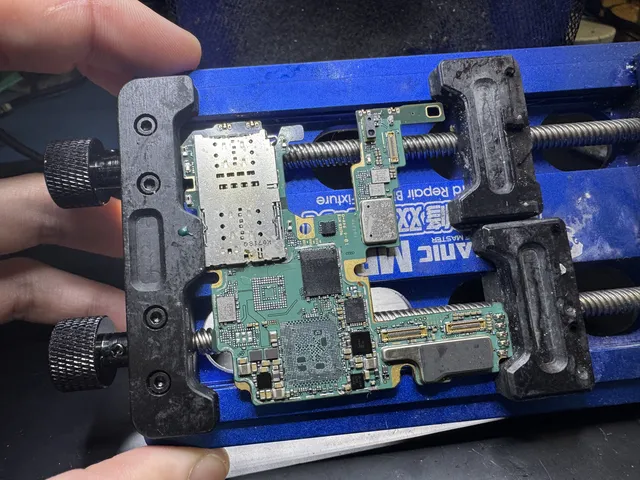
We work under a microscope to repair the logic board, the main board inside your iPhone. The phone needs to stay on long enough for us to enter your passcode and copy your files.
Why can't you read the iPhone's storage chip like a memory card?
Your files are on the storage chip, and the key that opens them is in the processor, the chip that runs your iPhone. Those two chips are paired, and the processor needs a small memory chip on the board to use the key. Reading the storage chip by itself or putting it in another iPhone would leave your files locked.
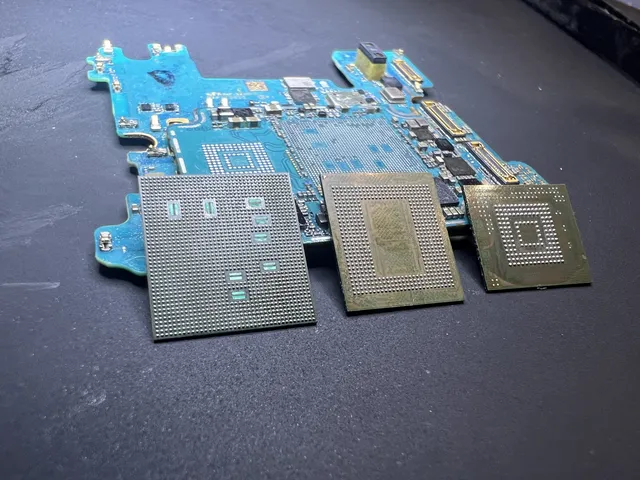
Your iPhone recovery in six steps
-
Bring or mail us your iPhone
After you ask for a quote, you can bring your iPhone to our Lincroft counter or mail it to our lab. If you're shipping from the contiguous US, the form gives you a prepaid UPS label for the box and a packing slip to go inside.
-
We find out what failed
For the $100 diagnostic, we open your iPhone and trace where the power stops. We use a camera to find parts that are getting hot and a microscope to spot breaks in the fine copper lines on the board.
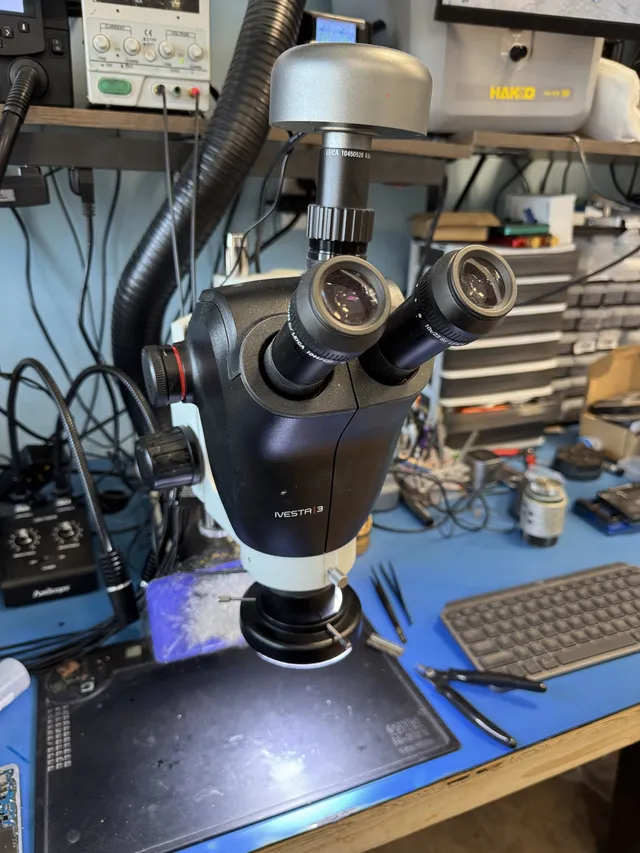
Finding faults and soldering tiny connections on a circuit board can get a dead device running long enough to copy its files. -
You review the estimate
We explain what failed, what it would take to fix it and how much it would cost. You decide whether you'd like us to go ahead with the repair.
-
We repair the board
On the iPhone X and later models with a stacked board, we separate the two layers to reach the damage. We solder replacement parts into place under a microscope, a technique called microsoldering. We can also mend connections under the processor with wires as fine as a hair. Then we put the board back together and test whether the phone starts.
If the board is too badly damaged to repair, we may still be able to move your original processor and storage chip together to a working board. You'll see that repair listed as "iPhone Board-to-Board Transplant" in our prices.
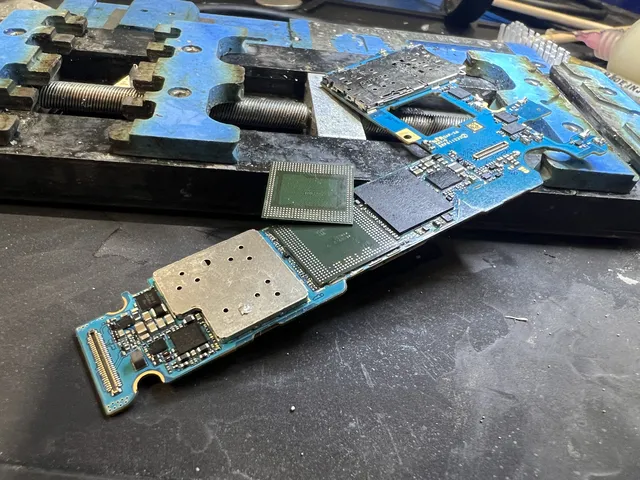
We lift the phone's processor and memory chips to move them to a donor board. They need to work together so we can unlock the phone and copy its files. -
We copy your unlocked phone
Once the phone stays on, we unlock it with your passcode. Your Stolen Device Protection setting determines whether you get your files back through iCloud or on a drive. The repair only needs to last long enough to make the copy, so you may still need another phone for everyday use.
-
You get your files back
Before you pay the recovery fee, we email you a photo so you can see what we've saved for you.
What we'll ask you about your iPhone
We'll ask for four details to help us find the damage and unlock the phone once it's running. If you're unsure of the model or what failed, tell us what you remember.
- Your iPhone passcode
We need the code you type on your iPhone's lock screen. Even after the phone starts, the files stay locked without it.
- What happened and when
If the phone got wet, knowing what it fell into and how long ago helps us judge how far the damage may have spread.
- Any earlier repairs
Let us know if anyone opened the phone and what they tried. That helps us check for damage such as a torn cable.
- Which iPhone you have
A description is fine if you don't know the model. We can read the exact model number on the board once we open the phone.
What data can you recover from my iPhone?
If we can get your iPhone running and unlock it, we can copy what's stored on it, from family photos and messages to notes and voice recordings. During the $100 diagnostic, we check whether the chips that hold and unlock your files survived the damage.
Files we can copy
- Photos and videos
The copy includes still photos, Live Photos, videos and screenshots saved on your phone.
- Texts, group chats and WhatsApp
We can copy texts and iMessages with their attachments, including photos someone sent you. We can also copy conversations that WhatsApp and other apps saved on the phone.
- Contacts, notes and voice memos
We can save your phone numbers, written notes and voice recordings, along with your call history, reminders and calendar entries.
- Files on a badly damaged iPhone
Shattered glass, water damage and even a broken board can leave your files intact. We check the chips inside to see whether we can get to those files.
How will I get my iPhone files back?
We return your files through your own iCloud account or on a drive. Which one we use depends on Stolen Device Protection, a setting available since iOS 17.3. It's usually on if your iPhone runs iOS 26.4 or later.
- When protection is on, we use iCloud
Copying files to a computer or flash drive would require your face or fingerprint through Face ID or Touch ID, even with your passcode. Without you here, we back up the phone to your iCloud account so your photos and videos return when you sign in on another iPhone.
- When protection is off, you can get a drive
We can put a full backup on a drive for you to restore to another iPhone. You'll also have folders of photos, messages and contacts you can open before you set up that phone.
- Restoring the backup to another iPhone
First, back up anything you want to keep on the iPhone you're moving to. Once you've saved those files, erase that iPhone and restore it from the backup of your old one.
- Getting your drive by mail or at the lab
We can mail you a new external drive or USB flash drive, or you can pick it up here. We keep a copy offline for two weeks in case the drive gets lost or damaged in the mail. Then we delete our copy.
- Make two more copies when your drive arrives
Copy your files to two other places the day you get your drive so you have them in three places. After the two weeks are up, we charge full price if you bring that same drive back for recovery.
How much does iPhone data recovery cost?
$100 diagnostic, credited toward a successful recovery.
The $100 diagnostic is non-refundable once diagnostics start, and donor drives or replacement parts you approve are non-refundable once ordered, even if recovery fails.
Your price depends on your model and what failed. If we can't repair your board, we may need to move its chips to a working one. That move costs more than fixing the original board, as our iPhone data recovery cost guide explains.
You approve the estimate before we start recovery. If the files are beyond recovery, we return your iPhone and charge for the diagnostic and any parts you approved. You can also see our price list for all recovery services.
- See what we recovered
We email you a photo of the files we saved so you can see the result before you pay the recovery fee.
- Ways to pay
You can pay by card, PayPal or Apple Pay. Once the work is complete, you can also pay over time with Affirm if you qualify.
- What rush service changes
A rush option gets your phone on the bench sooner. How long the repair and backup take still depends on the damage we find.
| Model or repair | Price |
|---|---|
| iPhone (3GS - 11) | $1,000 - $1,500 |
| iPhone (12 / 13 / 14 / 15) | $2,000 |
| iPhone (16 / 17) | $2,000 |
| iPhone Board-to-Board Transplant | $3,500 |
| Service option | When work starts | Added cost |
|---|---|---|
| Standard diagnostic | Starts in about 4–6 weeks, then recovery time varies by case | No surcharge |
| Priority | Assessment starts within 5–7 days | +$250 |
| Urgent | Assessment starts within 1–2 days | +$500 |
| Emergency | Assessment starts same-day | +$1,000 |
With standard service, we take phones in the order they arrive, so it's about 4 to 6 weeks before we start diagnosing yours. Recovery takes more time after that, depending on what your phone needs.
How iPhone data recovery varies by model
We work on every iPhone from the 3GS through the 17 series. The earliest models have larger parts on a single layer. On newer models, reaching a damaged part can mean separating two layers of the board.
| iPhone model | Board layout | What the work involves | Recovery price |
|---|---|---|---|
| iPhone 3GS, 4 and 5 series | One layer with larger parts | If we need a replacement board, a matching one can be hard to find. | $1,000 - $1,500 |
| iPhone 6, 6s, 7, 8 and SE (2020) iPhone 7 data recoveryiPhone SE data recovery | One layer with more paths for power | On the 7 and 8, we check for board damage from a screw that was too long. | $1,000 - $1,500 |
| iPhone X, XS, XR and 11 series | This group includes boards with two layers stacked together | We separate the layers on a stacked board to reach the damage, then join them again. | $1,000 - $1,500 |
| iPhone 12, 13, 14 and 15 series, 12 mini, 13 mini, SE (2022) iPhone 13 data recovery | Closely spaced parts on boards with two layers | After a spill, we check the surrounding parts because liquid can reach several at once. | $2,000 |
| iPhone 16 and 17 series | Two layers with the least space between parts | If the repair needs another board, we look for a match among the newest models. | $2,000 |
If you're unsure which iPhone you have, tell us its size, color and roughly how old it is. We can identify it from the board. For pricing, the 2020 SE goes with the iPhone 8, the 2022 SE goes with the iPhone 13, and each mini is in the same group as its full size model.
iPhone data recovery cases from our lab
Look for your iPhone model or a case that sounds like what happened to your phone.
- iPhone 8 Water or liquid damage · Data recovered Mailed from Illinois 2026
- iPhone 15 Pro Dropped or physically damaged · Data recovered Mailed from Kentucky 2026
- iPhone 14 Pro Water or liquid damage · Data recovered Mailed from Tennessee 2026
- iPhone 12 Mini Water or liquid damage · Data recovered Mailed from Ohio 2026
- iPhone 4 Data recovered Mailed from Connecticut 2026
- iPhone 12 Water or liquid damage · Data recovered Mailed from New York 2026
- iPhone 11 Pro Max Dropped or physically damaged · Data recovered Mailed from New York 2025
- iPhone 6s Data recovered At our lab's counter in Lincroft 2025
- iPhone 14 Pro Data recovered At our lab's counter in Lincroft 2025
- iPhone 15 Pro Water or liquid damage · Data recovered Mailed from New York 2025
- iPhone 6s Water or liquid damage · Data recovered Mailed from Alaska 2025
- iPhone 6 Water or liquid damage · Data recovered Mailed from Georgia 2025
- iPhone 7 Plus Data recovered At our lab's counter in Lincroft 2025
- iPhone 13 Pro Max Dropped or physically damaged · Data recovered Mailed from Illinois 2025
- iPhone SE Dropped or physically damaged · Data recovered Mailed from California 2025
- iPhone 11 Data recovered At our lab's counter in Lincroft 2025
- iPhone 13 Will not turn on or charge · Data recovered Mailed from New York 2025
- iPhone 11 Pro Max Data recovered At our lab's counter in Lincroft 2025
- iPhone 13 Water or liquid damage · Data recovered Mailed from North Carolina 2025
- iPhone 13 Data recovered At our lab's counter in Lincroft 2025
- iPhone 16 Data recovered 2025
- iPhone 5c Data recovered Mailed from California 2025
- iPhone X Water or liquid damage · Data recovered Mailed from Oregon 2025
- iPhone 4 Data recovered Mailed from Kentucky 2025
- iPhone 11 Pro Max Will not turn on or charge · Data recovered Mailed from South Carolina 2025
- iPhone 4s Water or liquid damage · Data recovered Mailed from California 2025
- iPhone 12 Dropped or physically damaged · Data recovered Mailed from New York 2025
- iPhone XR Water or liquid damage · Data recovered Mailed from California 2025
- iPhone XR Will not turn on or charge · Data recovered Mailed from Pennsylvania 2025
- iPhone 6s Water or liquid damage · Data recovered Mailed from Texas 2025
- iPhone 15 Pro Max Data recovered At our lab's counter in Lincroft 2025
- iPhone 4s Dropped or physically damaged · Data recovered Mailed from Georgia 2024
- iPhone X Data recovered At our lab's counter in Lincroft 2024
- iPhone 13 Pro Max Data recovered At our lab's counter in Lincroft 2024
- iPhone 8 Plus Data recovered 2024
- iPhone 13 Pro Water or liquid damage · Data recovered Mailed from Illinois 2024
- iPhone 12 Pro Max Data recovered At our lab's counter in Lincroft 2024
- iPhone 4 Will not turn on or charge · Data recovered Mailed from Texas 2024
- iPhone 6 Data recovered Mailed from Texas 2024
- iPhone 12 Pro Data recovered At our lab's counter in Lincroft 2024
- iPhone 5 Will not turn on or charge · Data recovered Mailed from Texas 2024
- iPhone 12 Mini Will not turn on or charge · Data recovered Mailed from Florida 2024
- iPhone 4s Data recovered At our lab's counter in Lincroft 2024
- iPhone 6s Plus Data recovered At our lab's counter in Lincroft 2024
- iPhone XS Max Data recovered At our lab's counter in Lincroft 2023
- iPhone 8 Plus Water or liquid damage · Data recovered 2023
- iPhone 12 Pro Max Data recovered At our lab's counter in Lincroft 2023
- iPhone 6s Stopped working or not detected · Data recovered 2023
- iPhone XS Water or liquid damage · Data recovered Mailed from Maine 2023
- iPhone 13 Pro Water or liquid damage · Data recovered 2023
- iPhone XS Dropped or physically damaged · Data recovered Mailed from Florida 2023
- iPhone 6s Data recovered 2023
- iPhone 6 Water or liquid damage · Data recovered Mailed from Michigan 2023
- iPhone 6s Water or liquid damage · Data recovered 2023
- iPhone XS Data recovered At our lab's counter in Lincroft 2023
- iPhone 12 Pro Data recovered At our lab's counter in Lincroft 2023
- iPhone X Data recovered At our lab's counter in Lincroft 2023
- iPhone X Will not turn on or charge · Data recovered Mailed from California 2022
- iPhone 7 Plus Water or liquid damage · Data recovered 2022
These cases come from our ticket system, BenchKey, the shop software we built and run our lab on, with names, contact details and addresses left out. How we publish cases
Which service do I need?
Choose data recovery if what you need most is the files on your phone. Hang on to your original iPhone even if you're ready to replace it, especially if it holds your only copy.
What if my iPhone just needs a new screen?
Our iPhone repair service is the right fit if you want the screen replaced so you can keep using the phone.
Can I recover iPhone data with software on my computer?
Software can help if your iPhone starts, you can unlock it and your computer can see it. The phone also needs to be running to make a new iCloud backup.
What if Apple offers to replace my dead iPhone?
If your iPhone holds the only copy of your files, keep it for recovery before replacing it. If you already have a backup, you can restore it on the replacement iPhone.
Do you recover data from Android phones?
Yes. We work on Android phones too. The way an Android phone locks its files depends on who made it, but we use the same skills to find and repair a damaged part on the board.
Can you recover photos from an iPad?
Yes. An iPad protects its files the same way an iPhone does. We get it running long enough to unlock it with your passcode and make a backup.
Can my business send an iPhone for data recovery?
Yes, you can send us a company phone. If your business or repair shop sends phones regularly, ask us about our partnership program.
Can I get iPhone data recovery near me?
You can bring your phone to our counter at 644 Newman Springs Road, Suite A, Lincroft, New Jersey 07738. We're here Monday through Friday from 10am to 6pm Eastern. If you mail us your iPhone, it comes to this same lab.
Shipping is free both ways in the contiguous US. The mail-in form gives you a prepaid UPS 2nd Day Air label to print and a packing slip to put in the box. Choose your location for the guide to sending us your iPhone.
- Address
- 644 Newman Springs Road, Suite A, Lincroft, NJ 07738
- Hours
- Mon-Fri 10am to 6pm Eastern
- Phone
- (732) 933-7717
Northeast
Southeast
Midwest
Common questions about iPhone data recovery
Can you recover iPhone data without a backup?
Yes. If we can get your iPhone running and unlock it with your passcode, we can copy files straight from the phone, even if you never backed it up to iCloud or a computer.
Can I get my data back if my iPhone has a cracked board or chip?
Repairing the cracked board can get your data back. If it’s beyond repair, we can try moving your original processor and storage chip together to a working board. We can’t recover your data if either chip is cracked or eaten through, or if the small memory chip the processor needs is damaged. We’ll check all three during the diagnostic.
Where can I find iPhone data recovery near me?
Our only counter is in Lincroft, New Jersey. If that's too far to drive, you can mail your iPhone to us from anywhere in the contiguous US.
Who handles iPhone data recovery at your lab?
Our engineers do the recovery work here in Lincroft. In the videos on this page, you can watch our founder and lead technician, Joseph Montanti, repair iPhones at the bench.
How long does iPhone data recovery take?
With standard service, the wait is about 4 to 6 weeks before we start diagnosing your iPhone. The repair and backup take additional time depending on what failed. A rush option moves up the day we start.
How should I pack and ship my iPhone?
Use our mail-in instructions to print your UPS label and packing slip. Put the iPhone and slip in a small box with padding around the phone, attach the label to the outside and drop the box off at any UPS location.
How do you keep my recovered files private?
When we return your files on a drive, we keep our copy offline. We email you a photo showing what we saved and delete our copy after two weeks. If you'd like it deleted sooner, email, call or text us. You can read more about how we handle your phone and files.
Guides to iPhone data recovery
Choose a guide by what happened to your iPhone or the message on your screen. If you're weighing the cost of recovery, the pricing guide explains what goes into an estimate.
Damaged iPhones and recovery costs
Locked phones, restarts and erased files
Tell us what happened to your iPhone
If all you know is that the screen went dark overnight, start there. Include the iPhone model if you know it. Asking for a quote is free. If you bring or mail us the phone, we'll explain what we find during the $100 diagnostic so you can decide whether to go ahead with recovery.