
iPhone Stuck in Recovery Mode: Save Your Data Before You Restore
Our founder and lead technician, Joseph Montanti, handles cases personally.
An iPhone stuck in Recovery Mode has reached the cable-and-computer screen instead of starting iOS. A force restart can get it back to the lock screen without erasing it. If the cable icon returns, the startup fault is still there; the next decision depends on whether you have a copy of the files you need. Clicking Restore erases the phone.
Recovery Mode itself does not erase your photos or messages. It also gives you no assurance that the storage is healthy: a failed software installation and a hardware problem can both leave you here. Start with the restart below, then check the backup before choosing a software repair.
Check the phone before powering it again. If it is wet, unusually hot or has a swollen battery, disconnect it and arrange inspection. If it keeps returning to Recovery Mode and holds your only copy of important files, leave Update, Restore and third-party repair tools alone until a data recovery assessment.
On this page
How to exit Recovery Mode without restoring
A force restart asks the phone to start again. It is different from holding the buttons to enter Recovery Mode, even though the sequences begin the same way. For the restart, release at the Apple logo.
- Disconnect the iPhone from the computer. This lets you try the restart without a software prompt waiting on the computer; unplugging the cable does not itself exit Recovery Mode.
- Use the button combination for your model below. Watch for the Apple logo and release the buttons when it appears.
- If the lock screen appears, enter your passcode and save your files immediately. If the cable screen returns, move to the backup and repair choices below.
| iPhone model | Force restart |
|---|---|
| iPhone 8 and later, including X, 11, 12, 13, 14, 15, 16 and SE 2nd/3rd generation | Quickly press and release Volume Up, then Volume Down. Hold the Side button until the Apple logo appears, then release. |
| iPhone 7 and 7 Plus | Hold Side and Volume Down together until the Apple logo appears. |
| iPhone 6s, first-generation SE and earlier | Hold Home and Side or Top together until the Apple logo appears. |
These are Apple's force-restart instructions. The logo can take longer than ten seconds to appear. Continuing to hold through it is how you can end up back at the recovery screen.
If the phone died before this happened and now shows a low-charge battery, check the cable and adapter for damage and use a working wall charger. Apple recommends charging for 30 minutes or until it starts when the low-battery image is visible; for a phone that will not turn on, its guidance is one hour before trying again. A phone that already stays on at the cable screen has moved beyond a simple empty-battery symptom.
Once you can enter the passcode and open your photos, save them to the computer before trying more startup fixes. Then make a backup using Finder on a Mac or Apple Devices on Windows, unlocking the phone and approving Trust if asked. An encrypted computer backup includes categories such as Health data that an unencrypted one leaves out; keep its password. Apple's computer-backup steps show where to confirm the completed backup's date. A reboot, unusual heat or a frozen or interrupted transfer is a reason to disconnect the iPhone and have its startup fault assessed.
Why did my iPhone go into Recovery Mode?
The phone checks the software it is about to load during startup. Its bootloader, called iBoot, has to load and verify the next stage before iOS can run. A failure at that stage can send it to Recovery Mode, where a computer can communicate with it over USB. That is why the cable screen can still work when your apps and lock screen will not load. Apple describes this startup chain in its security documentation.
An interrupted or failed iOS installation is one route to this screen. If it appeared during an update or a restore, that operation is the first thing to investigate. An update error can also come from the computer, cable or connection to Apple's servers. Repeating the same installation without addressing the error can bring you back to the same point.
Hardware belongs in the picture too. NAND is the storage that holds the operating system and your files; trouble reading that storage can prevent startup. A damaged connection or unstable power can also interrupt the process. Liquid exposure or a drop before the failure makes physical inspection relevant. The exact fault needs an examination of the phone.
A phone running beta iOS has another complication: returning to the current public release involves erasing and restoring it. Turning off future beta updates is a separate setting. Apple's beta-removal instructions also explain that a backup made on a newer beta may not restore onto an older iOS version. Keep the existing backup rather than assuming any available installer will accept it.
Check the backup before choosing Update
Sign in to iCloud.com from another device and look for the photos, contacts, notes and files you need. Open a few recent items. Seeing older pictures there does not establish that yesterday's pictures finished uploading.
iCloud Photos and iCloud Backup do different jobs. Synced photos are available through Photos; a device backup contains settings and eligible app data for restoring a device. You cannot browse a whole iPhone backup as a folder at iCloud.com. Apple explains what iCloud Backup includes, including why data already syncing to iCloud is handled separately.
With the needed data safely copied or covered by a checked backup, Update is the software option to try before Restore. Apple says it reinstalls iOS while keeping personal data.
- Use an up-to-date Mac with Finder, or a Windows PC with the current Apple Devices app. Connect the iPhone directly with a cable that supports data.
- Select the phone when it appears, then choose Update in the Update-or-Restore dialog. Leave it connected while the installation runs.
- If the download takes over 15 minutes and the phone exits the recovery screen, let the download finish. Re-enter Recovery Mode using Apple's model-specific instructions, then continue the update.
Apple's Restore-screen instructions explain the Update option. Its recovery-mode instructions cover the longer download and the buttons used to bring back the connect-to-computer screen. For that procedure, you keep holding until the cable screen appears; for an ordinary force restart, you release at the logo.
If Update succeeds, unlock the phone and check the files against your backup. If it fails, the error is the next clue. Error 9, 4005, 4013 or 4014 can appear when the device disconnects or the computer cannot complete the restore communication. Apple recommends checking the computer and USB connection, including a different cable or computer. Those codes are not a finding that the NAND chip has failed. See Apple's guidance for these errors.
If the computer never sees the phone, try a data-capable cable, a different USB port and another computer. On a Mac, approve an accessory-connection prompt if one appears. A phone absent from Finder may have a connection problem before you get as far as an iOS repair; Apple's detection checks cover that path.
When the phone needs data recovery
If force restart cycles right back to Recovery Mode, the phone is consistently failing to complete boot. If there is no usable backup, this is the point to choose iPhone data recovery before accepting a restore. A failed Update after the connection checks, visible liquid damage or a phone that shuts off as it starts also calls for inspection.
Modern iPhone files are encrypted with keys tied to the original hardware and, for protected data, the passcode. Getting the original phone working far enough to unlock it is therefore central to recovery. Moving its storage chip onto an unrelated working board does not turn that board into your unlocked phone. Apple's Data Protection documentation explains the hardware and passcode relationship.
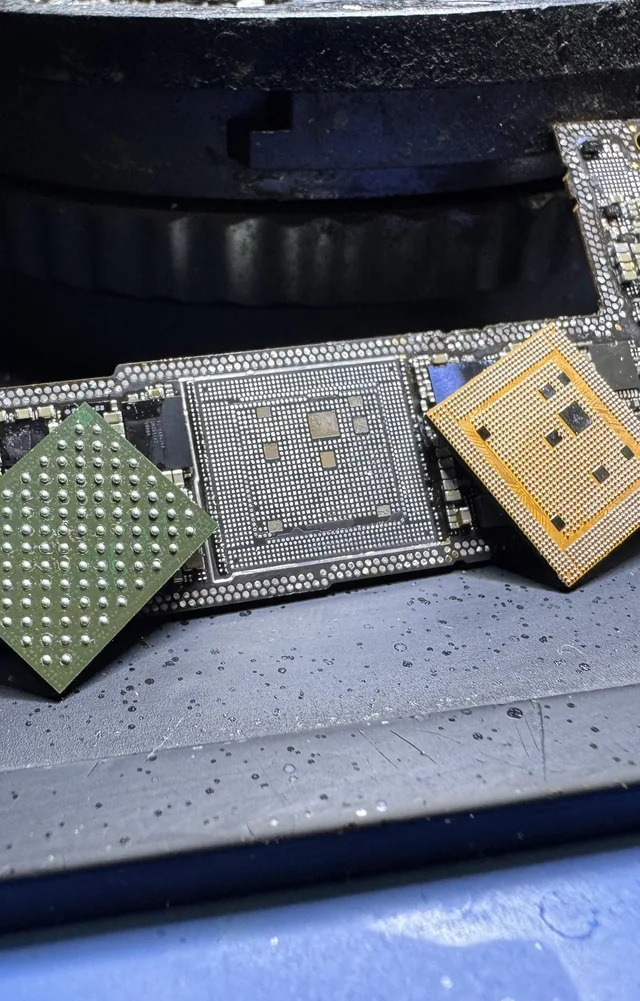
At MDrepairs, the fault is assessed before recovery work is agreed. Recovery prices depend on the iPhone model and whether it needs a board-to-board transplant.
| Work required | Price |
|---|---|
| Software-only recovery, where supported | $1,000 - $1,500 for iPhone (3GS - 11) or $2,000 for iPhone (12 - 17 Series) |
| Charging port repair and data extraction | $1,000 - $1,500 for iPhone (3GS - 11) or $2,000 for iPhone (12 - 17 Series) |
| Power-management chip repair | $1,000 - $1,500 for iPhone (3GS - 11) or $2,000 for iPhone (12 - 17 Series) |
| Storage-circuit or logic-board connection repair | $1,000 - $1,500 for iPhone (3GS - 11) or $2,000 for iPhone (12 - 17 Series) |
| iPhone Board-to-Board Transplant | $3,500 |
The diagnostic is $100, credited toward a successful recovery; you approve the estimate before any recovery work starts. The iPhone recovery cost breakdown covers the wider pricing choices.
Recovery Mode, DFU and a normal startup
DFU stands for Device Firmware Upgrade. It operates earlier in startup than Recovery Mode. The computer can call both states “recovery,” which is why the phone's screen matters when comparing instructions.
| State | Phone display | What is running |
|---|---|---|
| Recovery Mode | Cable and computer, or the older iTunes graphic | The bootloader's recovery environment |
| DFU | Black screen while the computer detects a recovery device | Boot ROM waiting for recovery over USB |
| Normal startup | Apple logo followed by the lock screen | iOS has started and can accept your passcode |
Apple's DFU definition describes the black display and the computer's restore prompt. DFU is a firmware-recovery state, not a way to browse the photos. Entering a deeper startup mode does not make a Restore preserve them.
If Restore has already finished
A completed restore erases the phone, including the keys needed to read its former contents. Recovery then means finding another copy: iCloud-synced files, an iCloud or computer backup, or copies held in the apps you used. An unfinished restore that ended in an error needs individual assessment because the point it reached matters.
Once a phone is accessible, photos and Files documents can be copied directly, while messages and app content may depend on a backup or that app's transfer feature. A replacement iPhone can restore a compatible device backup during setup. Keep the backup password and the relevant app accounts available; a folder of exported pictures will not recreate every conversation and setting.
Get help with data recovery
Bring your device to our Lincroft lab during opening hours, or mail it in.
How to mail your deviceThe $100 diagnostic is non-refundable once diagnostics start, and donor drives or replacement parts you approve are non-refundable once ordered, even if recovery fails.
Published by MDrepairs
MDrepairs is a data recovery and electronics repair lab in Lincroft, New Jersey. Our founder and lead technician Joseph Montanti films real cases for our YouTube channel, showing tools, repair steps and recovery outcomes.
Keep reading
- iPhone Stuck on “Attempting Data Recovery”: What to Check Before Restore
- Photos Missing After an iOS Update? Don't Panic Yet
- Deleted Photos on iPhone: Recovery Past 30 Days