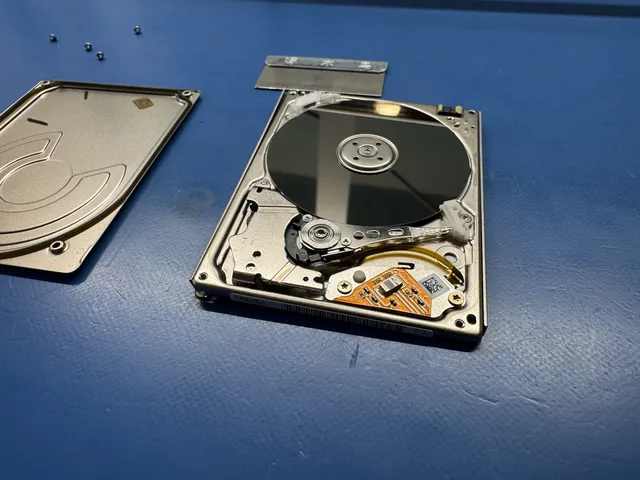
Hard Drive Clicking? What It Means and What to Do
In this article
The hard drive clicking noise people call the "click of death" is loud and rhythmic. It can mean the read/write heads can't find the data tracks on the platters. A soft click as you open a file can be normal. If the clicking is loud and repeated, or the drive clicks and stops reading files, power it off immediately and stop turning it on and off.
- Power it down now: shut down the computer if the drive is inside it, or disconnect the external drive from USB and its power supply
- Don't run recovery software: it can't repair mechanical damage
- Need the files? Leave the drive off and ask us about professional hard drive data recovery.
A hard drive that keeps clicking may be struggling to find the data tracks on the platters. The heads swing back and forth trying to locate their position, and each failed attempt can produce a click. This repetitive clicking is called the "click of death," and it can point to physical damage inside the drive. If your hard drive is clicking like that right now, power it off immediately. Do not keep turning it on and off. Every time the drive spins up with damaged heads, those heads can scrape the platter surfaces and destroy your data permanently.
We recover data from clicking hard drives in our lab. Some need head swaps. Others come in with deep platter scratches. Restarting the drive won't fix a damaged head, and it can turn a small scratch into a much bigger one.
If you're hearing clicking right now and your data matters, request a quote from our lab. We'll be straight with you about what's going on and whether recovery is realistic.
What Hard Drive Clicking Actually Means
To understand why your hard drive is clicking, you need to know what's happening inside the enclosure. A hard drive is a precision mechanical device. Think of it like a tiny record player spinning at insane speeds.
The Key Components
Platters. These are circular glass or aluminum discs coated with a thin magnetic layer. Your data lives on these surfaces as microscopic magnetic patterns. A drive can have one platter or several stacked on a spindle, and many spin at 5,400 or 7,200 RPM. Some enterprise drives hit 10,000 or even 15,000 RPM.
Read/write heads. These are tiny electromagnetic sensors mounted on the tips of thin metal arms. Each platter surface used for storage gets its own head. So a drive that uses both sides of three platters has six heads. These heads float just nanometers above the platter surface as it spins. For perspective, a human hair is about 75,000 nanometers thick. The gap between the head and the platter is absurdly small.
Actuator arm. This is the mechanical arm that swings the heads across the platter surfaces, kind of like the tonearm on a record player but moving much faster. It uses a voice coil motor, which is basically an electromagnet, to position the heads with extreme precision over the correct data tracks.
Firmware zone. A small reserved area on the platters where the drive stores some of its operating instructions. The firmware tells the drive how to position the heads, where to find data, and how to manage bad sectors. The drive reads this area as it starts up.
What Happens During Normal Operation
When you turn on a healthy hard drive, here's the sequence:
- The spindle motor spins the platters up to full speed.
- The heads "fly" out from their parked position over the platter surfaces.
- The heads read the firmware zone to load the drive's operating parameters.
- The drive reports itself as ready to the computer.
As the drive starts up, you may hear a brief whir and maybe a soft click or two. That's normal. Some healthy drives also make a quiet click every few seconds, even when you're not opening a file. If that's a familiar sound and your files open normally, you can keep using the drive and back it up as usual.
What Happens During Clicking
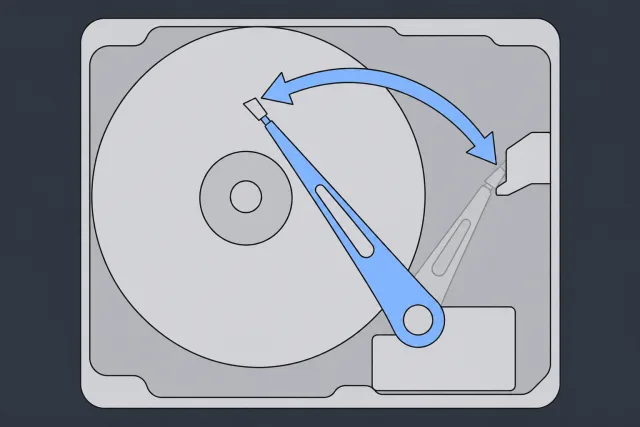
When the heads can't read the firmware zone or locate data tracks, the drive's controller chip can tell the actuator arm to try again. And again. And again. Each attempt can produce a click as the arm resets to its starting position and sweeps back across the platter. That's the clicking you hear.
 Illustration
Some clicking drives follow this pattern: spin up, click-click-click for a few seconds, spin down, then repeat the whole cycle. The drive can get stuck in this loop when the heads keep failing to read the data they need.
Common Causes of a Clicking Hard Drive
Clicking doesn't come from just one thing. Several different failures produce that same sound, and each one requires a different approach in the lab.
Head Crash
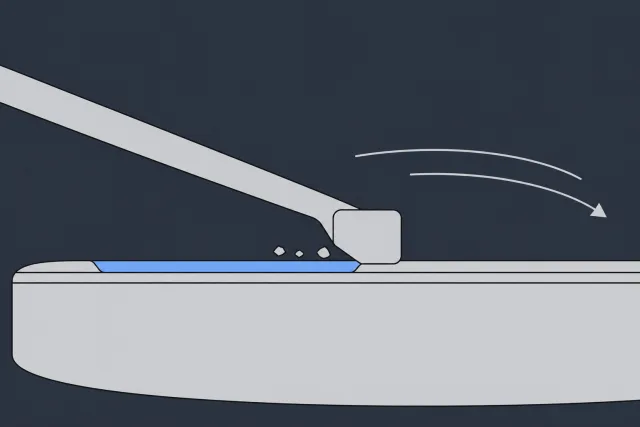
A head crash happens when the read/write head makes physical contact with the spinning platter surface. Remember that tiny gap? It doesn't take much to close it. A bump or a drop while the hard drive is spinning can cause the heads to touch down.
 Illustration
When a head crashes, it can damage the magnetic coating on the platter. It can also damage the head itself. The head can get deformed or contaminated with debris, leaving it unable to read data. Where the coating is scraped away, the data stored in that spot is gone.
Stuck or Seized Heads
Sometimes the heads get stuck to the platter surface. This is called stiction. It can happen if the heads come to rest on the platter instead of their parking ramp. When you power on the drive, the motor tries to spin the platters but the heads are physically stuck to the surface. You may hear a buzz as the motor struggles to start.
A technician needs a clean, filtered work area to open the drive and free stuck heads.
Spindle Motor Failure
The spindle motor spins the platters. If this motor starts failing, the platters may not reach full speed. The heads need the platters spinning fast enough to fly above them. If the platters spin too slowly, the drive can struggle to start.
Motor failures sometimes produce a buzzing or humming sound along with the clicking. Or the drive just makes a brief whirring noise and stops. Recovery from motor failure can require transplanting the platters to a donor drive with a working motor.
PCB (Circuit Board) Damage
The green circuit board on the bottom of your hard drive controls everything. It sends power to the motor, controls the head movements, and handles data transfer. If this board gets fried from a power surge, gets wet, or has a failed component, the drive can behave erratically. That includes clicking.
PCB issues are tricky because you can't just swap in a board from an identical drive. Many modern hard drives store unique calibration data (called "adaptive data") on the PCB that's specific to that exact drive. Without that data, a replacement board may spin the drive up but still be unable to read your files.
Firmware Corruption
The firmware stored on the platter surfaces can become corrupted. Bad sectors in the firmware zone can also leave the drive unable to read its own instructions. When the drive can't read its own firmware, it doesn't know how to operate. The heads may search for the firmware data, fail to find it, and start clicking.
Firmware corruption is sometimes fixable with specialized tools that can rewrite or patch the firmware modules. But this requires professional equipment and experience. It's not a DIY job.
What to Do Immediately When Your Hard Drive Clicks
The first thing you do after hearing a clicking hard drive matters. Seriously. Restarting it can give damaged heads another chance to scrape the platters.
Do NOT Keep Restarting It
People hear the click, unplug the drive, wait a minute, then plug it back in "to see if it works this time." If you heard repeated hard clicks or grinding, leave it unplugged. Each restart can put damaged heads back over the platters, creating more scratches and destroying more data.
Repeated hard clicking is one of the most obvious signs your hard drive is failing, especially if the computer freezes when you open a folder.
Do NOT Open the Drive
Hard drives are assembled in filtered air for a reason. The gap between heads and platters is so small that a single dust particle is like a boulder on a highway. Opening a drive requires a clean, filtered work area to keep airborne contaminants off the platters. Your kitchen table is not a filtered work area.
Do NOT Put It in the Freezer
This old internet myth needs to die. The idea is that cooling the drive causes the metal components to contract, which might "unstick" seized heads or a seized motor. In practice, moisture can condense on precision surfaces that need to stay perfectly clean and dry.
Condensation can damage the platters and electronics as the drive warms back up. If you've already tried the freezer, leave the drive off and tell us.
Do NOT Hit It or Shake It
Another myth. Banging the drive "to knock the heads loose" is like trying to fix a watch by hitting it with a hammer. You could dislodge debris, misalign the platters, or crack a platter entirely. Just don't.
What You SHOULD Do
- Power off immediately. Unplug the drive or shut down the computer. If you have a backup, leave the clicking drive off and open the photos and files you need on another device.
- Note what happened. Was there a drop? A power surge? Did it happen gradually or suddenly? This info helps the recovery technician.
- Don't attempt software recovery tools. They require the drive to spin, which can cause more damage. If Windows asks to initialize or format the drive, click Cancel.
- Contact our data recovery lab. If the drive needs head work, we open it in a clean, filtered work area.
Can Software Fix a Clicking Hard Drive?
No.
That's the whole answer, but we'll explain why so you don't waste time and money on tools that can't help.
A hard drive that keeps clicking can have a physical, mechanical problem. The heads may be damaged, stuck, or misaligned. The motor may be failing. The platters may be scratched. No piece of software running on your computer can reach inside the drive and physically repair those components.
Software data recovery tools are designed for logical failures. Deleted files. Corrupted partitions. Formatted drives. Situations where the hardware is working fine but the file system is messed up. Those tools are great at what they do. But they're completely useless against mechanical failure.
When you run recovery software on a drive with failing heads, here's what can happen:
- The software tells the drive to read data from specific sectors.
- The drive tries to read those sectors with its damaged heads.
- The heads can't read, so they click and retry.
- If a damaged head touches the platter, each retry can scratch more of the surface.
- The software may stall or report a read error.
- Any new scratches can make more of your files unreadable.
If your drive sounds normal and responds when you open files, check out our guide on how to check hard drive health. If the drive keeps clicking loudly, leave it off. Don't power it up for a health test.
Can a Clicking Hard Drive Be Fixed?
Honest answer: not in the way most people mean. Repeated clicking can be a symptom of failed read/write heads, a damaged preamp, or corrupted firmware, and none of those are repairable at home. There is no clicking hard drive fix you can download. The mechanical work a lab performs is done to make the drive run just long enough to copy your data off.
If the drive fell, grinds, clicks hard over and over, or stops reading files, leave it off. If the drive only clicks softly and you know your backup has the files, you can look at the power connection and the enclosure.
- Power and cables. For a USB drive, try one cable you know works, plugged directly into the computer. For a desktop external, use the power adapter that came with that model. An underpowered drive can click while failing to spin up. If an internal drive's power connector is loose, shut down and unplug the computer before reseating it.
- The enclosure. When an external drive clicks, the fault can be in the electronics in the case. With the drive unplugged, look at the USB port from the outside and tell us if it's bent or pushed in. Leave the drive in its original enclosure. On some models those electronics are needed to read your files, even if you never set a password.
If the clicking gets louder or the drive still can't read your files, power it off. The sound alone can't tell you which part failed. Head work requires a clean, filtered work area, matched donor parts, and imaging of the platters. That is a data recovery operation, not a repair, and the drive is retired afterward.
What does not fix a clicking drive: the freezer trick, tapping it, repeated power cycling, swapping the circuit board (many modern PCBs carry calibration data unique to that drive), or running recovery software for hours against failing heads. Those attempts can make professional recovery harder. If the data matters, power the drive down. Here's how our hard drive data recovery service works.
Different Clicking Patterns and What They Mean
Not all clicking sounds the same. The specific pattern gives a technician clues, but a sound alone can't tell us which part failed. Here's what we listen for when a drive comes into the lab.
Repetitive, Rhythmic Clicking (Click-Click-Click-Click)
This is the classic "click of death." A steady, repetitive click every second or so, sometimes faster. It can mean the heads are trying to read the firmware zone and failing. The drive spins up, the heads sweep across the platters repeatedly, then the drive spins back down. Then the whole cycle starts again.
Possible causes: Head failure or firmware zone damage.
Recovery outlook: It depends on whether the platters were scratched. If only the heads failed, replacement heads may let us copy your files.
Single Click Then Spin Down
The drive powers on, you hear one click, and then the motor stops. Sometimes it tries again, sometimes it just sits there.
Possible causes: Head damage, a power problem, or a fault on the circuit board. If the drive can't finish starting up, it can shut the motor down again.
Recovery outlook: A power problem or a failed motor can stop a drive without erasing your files. If a head scratched a platter, we may still be able to copy photos and documents from the undamaged areas.
Clicking Plus Beeping
If you hear clicking followed by (or mixed with) a high-pitched beeping or squealing noise, the motor may be struggling to spin the platters. Stuck heads can hold them in place. An external drive that's short on power can beep, too.
Possible causes: Head stiction, a stalled motor, or too little power.
Recovery outlook: The condition of the platters matters. A technician separates stuck heads from the platter surface in a clean, filtered work area.
Intermittent Clicking (Works Sometimes, Clicks Others)
The drive works fine for a while, then starts clicking. It might show up again after a restart, then start clicking again. That's what tricks people into thinking the drive is "mostly okay."
Possible causes: A head may be beginning to fail. Or the firmware zone has degrading sectors that sometimes read and sometimes don't.
Recovery outlook: It depends on which parts of the platters still read. If you keep using the drive, a damaged head can scratch areas that are still readable.
Fast, Frantic Clicking
Rapid-fire clicking, much faster than the normal rhythmic pattern. Almost sounds like a buzzing or chattering noise.
Possible cause: If the drive also stalls when you open a file, the heads may be trying repeatedly to read it.
Recovery outlook: If the clicking is new and the drive stops reading, power off the drive now. What we can copy depends on the condition of the platter surfaces.
| Clicking Pattern | Possible Cause |
|---|---|
| Steady rhythmic clicking | Head failure or firmware zone damage |
| Single click, then spin down | Head damage, power or circuit board problem |
| Clicking + beeping | Stuck heads, stalled motor or too little power |
| Intermittent clicking | Failing head, partial firmware issue |
| Fast/frantic clicking | Repeated read attempts if the drive also stalls |
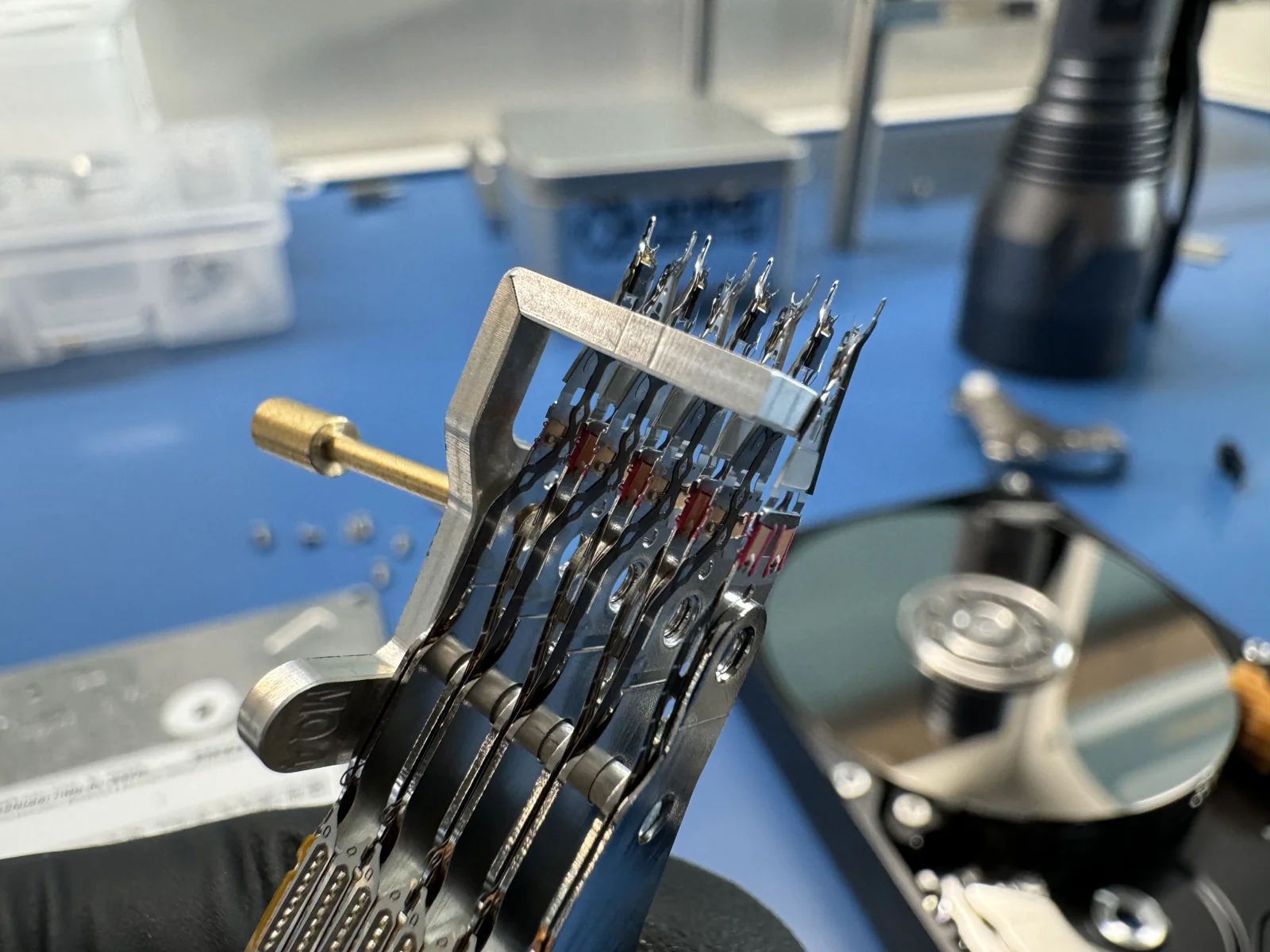 Hard-drive head assembly photographed at the MDrepairs lab.
What Professional Data Recovery Actually Looks Like
A lot of people have no idea what happens when they send a clicking drive to a data recovery lab. Some picture a guy in a basement with a screwdriver. The reality is very different.
Evaluation and Diagnosis
First, the drive gets a thorough external inspection. We look at the PCB for burn marks or failed components. If it's safe to power the drive, we listen as it starts. We read the SMART data if the drive is responsive enough to report it.
Based on the diagnostic, we determine the recovery approach and give you an estimate to approve before recovery work starts.
The standard wait is 4 to 6 weeks before we reach your device in line and start the diagnostic. You can choose a paid rush option for your family photos. If you need us sooner, we start the diagnostic within 5 to 7 days with Priority, within 1 to 2 days with Urgent, or the same day with Emergency. Recovery takes additional time depending on what we find.
Laminar-flow work area
When we open your drive, a steady stream of filtered air helps keep dust off the platters. Even a speck caught under a head can scratch the surface that holds your files.
Head Swap
If the read/write heads have failed, we may need to do a head swap. We source a compatible donor drive with matching model number, firmware revision, and head map. Not just any drive of the same model will work.
The technician removes the damaged heads from your drive and installs the donor heads. This is microsurgery-level work. The heads are incredibly fragile, and even a slight touch to the wrong surface can destroy them.
Platter Transplant
If the spindle motor has failed, we sometimes need to transplant your platters into a donor drive's chassis with a working motor. This is even more delicate than a head swap because the platters have to stay in the right order and line up on the new spindle.
In the video, our lead technician Joe Montanti moves the platters from a dropped, clicking hard drive into a matching drive, replaces the heads, and gets almost all the files back.
Imaging the Drive
Once the drive has working heads (whether original or donor), we use specialized hardware imaging tools to create a sector-by-sector copy of the drive. These tools are nothing like consumer cloning software. They can handle bad sectors, retry reads with different parameters, read data from individual heads independently, and work around areas of platter damage.
How long imaging takes depends on the drive size and the extent of the damage. If a platter is scratched, we can read toward the scratch from each side and stop before the new head touches it.
Data Extraction
Once we have a complete (or as complete as possible) image, we mount it and extract your files. We verify file integrity, rebuild damaged file system structures where we can, and organize the recovered data onto a new external drive or USB flash drive. You can click through the folders in your recovery report to see which files came back and which may be damaged before you decide whether to pay for the recovery.
How Much Does Clicking Hard Drive Recovery Cost?
We'll be straight with you. Head and platter work uses a laminar-flow work area and may require donor parts. Data recovery costs vary a lot depending on the specific failure and the size of the drive.
| Failure Type | Recovery Price | Why |
|---|---|---|
| Firmware corruption (500GB / 1TB, no physical damage) | $1,000 | No head or platter work |
| Head stiction (stuck heads, no platter damage) | Estimate after the diagnostic | The heads need to be freed and inspected for damage |
| Crashed heads (500GB / 1TB) | $1,500 | Donor drive + laminar-flow head work + imaging |
| Crashed heads (2TB, including USB drives) | $2,000 ($2,500 for WD My Passport 2TB, Charger family) | Matching replacement heads to read the platters |
| Crashed heads (HGST / WD Ultrastar helium drive, 8TB to 10TB) | $4,000 to $5,000+ | Head replacement and a helium refill |
| Motor failure (platter transplant) | Estimate after the diagnostic | Work in a laminar-flow work area with a compatible donor drive |
| Platters that must come out for inspection or cleaning | $500 + $2500 - $3000+ | Inspection and cleaning, then recovery from the readable surfaces |
A few things that affect the price:
- Drive capacity. At the same read speed, a larger drive takes longer to image.
- Number of platters. More platters can mean more heads, which can make a head swap more complex.
- Donor availability. A matching donor for an uncommon or old drive can be harder to find. Sometimes we need to order a specific donor before we can install new heads.
- Extent of platter damage. A drive that ran for hours while clicking can have surface damage. If the heads have scratched a platter, we can only copy from the areas that still read. A partial recovery costs the same as a full one.
We charge $100 for the diagnostic when your drive arrives and credit it toward a successful recovery. You approve the estimate before recovery work starts. If we can't get any files back, there's no recovery fee.
For detailed pricing across all drive types, check out our data recovery pricing page.
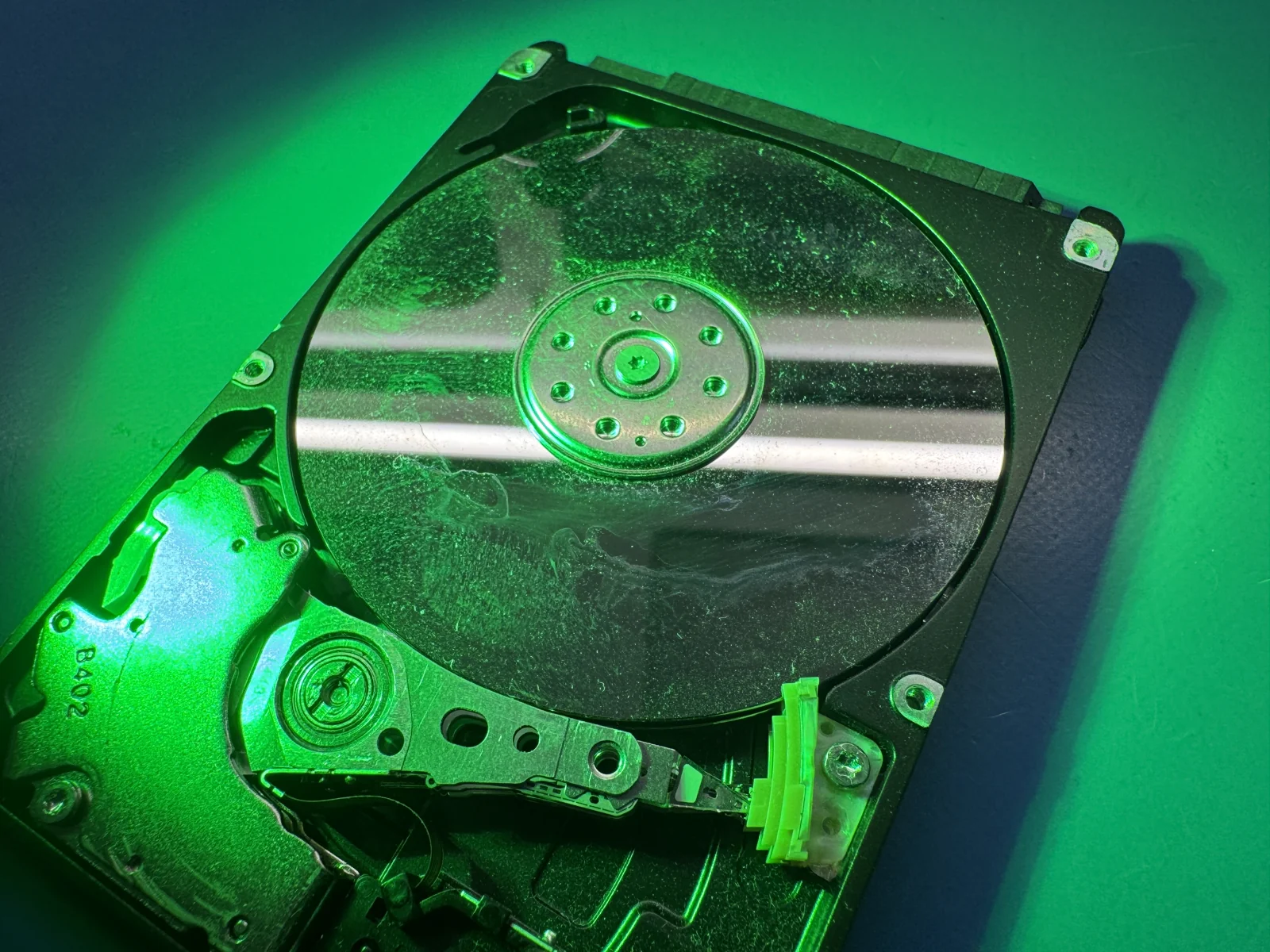 Hard-drive platter surface under inspection lighting at MDrepairs.
Mistakes People Make That Destroy Their Data
We've touched on some of these already, but they're worth emphasizing. A drive can reach the lab in worse condition because its owner tried something they read online.
Mistake #1: Repeatedly Powering the Drive On and Off
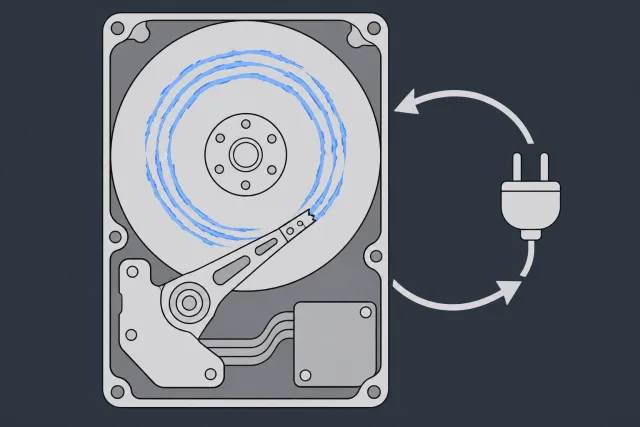
"Maybe it'll work this time." Each restart can put a damaged head back over the platters. A chipped head can leave deep circular grooves as the platter spins. Any data in the coating it scrapes away is lost.
 Illustration
Mistake #2: Running CHKDSK or Disk Repair Tools
When Windows detects a problem with a drive, it sometimes offers to run CHKDSK. Do not let it. CHKDSK is designed to fix file system errors on a healthy drive. A scan for bad sectors can make it read the whole drive, and a repair can write changes to it. The same advice applies to macOS Disk Utility's "First Aid" feature. Leave it alone while the drive is clicking.
Mistake #3: The Freezer Trick
Putting your hard drive in a freezer, a refrigerator, or a bag of ice risks moisture damage. Even if you seal it in a ziplock bag, condensation can form on the internal components when the drive warms back up. Don't do it.
Mistake #4: Opening the Drive at Home
YouTube makes everything look easy. But opening a hard drive on your desk exposes the platters to dust, hair, skin particles, and everything else floating in normal air. A single particle landing on the platter can cause a head crash. You need a clean, filtered work area. Your home doesn't have that.
Mistake #5: Swapping the Circuit Board
This used to work on some older drives. On many modern drives, the PCB stores calibration data unique to that drive's heads and platters. Putting a different PCB on your drive can leave it clicking or unable to read your files. Even if you find the exact same model number, the adaptive data won't match.
Mistake #6: Going to a Computer Repair Shop Instead of a Data Recovery Lab
Head and platter work takes a clean, filtered work area, compatible donor parts and specialized equipment. If someone suggests running recovery software first, leave the drive off. Running it for longer can give a damaged head time to do more harm.
You can bring the drive directly to our lab in Lincroft, New Jersey. If you're farther away, we offer mail-in data recovery.
Leave an external drive in its original case. Put it in an anti-static bag, wrap it in at least two inches of bubble wrap on every side, and set it in a sturdy box. Pack the USB cable and any power adapter in a separate bag and fill the gaps so nothing shifts.
Fill out the mail-in form, print the packing slip, and put it in the box. If you're on the mainland in the lower 48 states, the form gives you a free UPS 2nd Day Air label (contiguous US) for the outside. Return shipping is free there too.
If this helped, these guides cover related scenarios we see in the lab:
Frequently Asked Questions
Is a clicking hard drive fixable?
The drive itself isn't worth trusting with your files again after a head failure. Hard drives are consumable components. They wear out, and repeated hard clicking can mean internal mechanical damage. What we do is recover the data from the damaged drive and transfer it to a new, healthy drive. If your data doesn't matter, just replace the failing drive. If you need those files, leave the drive off and call us about recovering them.
Can I recover data from a clicking hard drive myself?
Not if the clicking is caused by a physical problem. DIY recovery tools require the drive to spin and read, which can cause more damage to a mechanically failing drive. Opening the drive outside a clean, filtered work area can contaminate the platters. If these are the only copies of your files, leave the drive off and contact our lab.
Why does my hard drive click then stop?
The drive can click when the heads are trying to read data and failing. It can stop when the drive's controller gives up and powers down the motor. Some drives will then automatically restart the cycle, creating a loop of spinning up, clicking, and spinning down. This is the drive repeatedly trying (and failing) to initialize. Power it off and don't let it keep cycling.
How long can a clicking hard drive last?
There's no safe amount of time to run a drive that's clicking loudly and struggling to read. Every time it spins with damaged heads, more of the platter can get scratched. If you need the files, power it off now.
Does a clicking hard drive mean all data is lost?
No. The files can still be on the platters even if the heads can't read them. With replacement heads, we may be able to copy them. How much comes back depends on which parts of your platters are still readable. Running the drive with damaged heads can scratch the platters.
Is it worth recovering data from a clicking hard drive?
That depends entirely on what's on it. Family photos you can't replace? Business records you legally need to keep? A decade of creative work? Those might be worth recovering. A drive full of movies you can re-download? Probably not. We give you an estimate after the diagnostic so you know the cost before committing to recovery.
What does the "click of death" sound like?
It sounds like a repetitive, rhythmic tapping or ticking coming from inside the drive. Think of someone tapping a pen on a desk at a steady pace. Some drives click faster than others. Some failing drives click once as they try to start, then the motor winds down. A single click when you shut the computer down can simply be the heads parking. If you've already heard the drive clicking and struggling to start, leave it off. There's no need to start it again to compare sounds.
Can a power surge cause a hard drive to click?
Yes. A power surge can fry components on the PCB that supply power to the motor and heads. The drive can click even though the heads and platters might be physically fine. Power surges can also damage the pre-amplifier chip inside the drive, which handles the signals going to and from the heads. PCB-related clicking is sometimes repairable without opening the drive, but it still requires professional tools and expertise.
Is the Clicking Coming From Your Computer's Hard Drive?
If your computer clicks and freezes when you open a file, the hard drive may be failing. A laptop hard drive can make the same clicking noise as a desktop drive. You might also notice folders disappearing or the computer struggling to start.
Not every click is the same. A single soft click during startup can be normal on some drives. Loud rhythmic clicking with read errors, clicking followed by spin-down during startup, grinding, or clicking that begins after a drop is not normal. The trouble could be inside the drive, or it may be getting too little power. Your computer can freeze while the drive keeps trying to read the same spot. If you think you hear an external hard drive clicking, unplug the external drive from USB and its power supply. If the clicking continues, it's coming from somewhere else.
If the hard drive inside your computer keeps clicking loudly, shut the computer down. Do not run long diagnostics, defragment the drive, rebuild indexes, reinstall the operating system, or run repair utilities against a clicking drive. Those actions increase head movement and can expand platter damage. If your drives work together in a RAID array, leave them in place and hold off on a rebuild. We need to know which drive is clicking and whether the others can still read your data. A rebuild can put more strain on a failing drive.
In the lab, we find out what's making your drive click. After any head or platter work, we copy the areas we can read and leave the trouble spots for later. Once we have that copy, your old drive can stay off while we put the recovered files on a new one. For next steps, see our hard drive recovery process.
Why does my computer get slow when the hard drive clicks?
A failing hard drive may retry weak or unreadable areas many times before giving up. During those retries, the operating system waits, which causes freezing, long boot times, delayed file access, and application hangs. The clicking is often the drive resetting its heads after failed reads, so slowness and clicking together are a serious warning.
Sources
- Identifying Hard Drive Sounds and Determining What They Mean
- Reasons for Hard Drive Noise
- When Data Loss Occurs
- Internal Hard Drive Troubleshooter
- WD External Drive Hardware Encryption Compatibility Matrix
- Initialize new disks
- chkdsk
- How to repair a Mac storage device with Disk Utility
- Seagate Mobile HDD 5400 RPM - SATA Product Manual
- Experimental study of stationary head-disk contact in magnetic disk drives
- CFS635A/CFS850A/CFS1275A Intelligent Disk Drive Product Manual
- Clicking Hard Drive Data Recovery
- Hard Drive PCB Swap: Why the Donor Board Trick Fails
- How to Ship a Hard Drive Safely for Mail-In Recovery